Free Microsoft AZ-400 Practice Test Questions MCQs
Stop wondering if you're ready. Our Microsoft AZ-400 practice test is designed to identify your exact knowledge gaps. Validate your skills with Microsoft Azure DevOps Solutions (beta) questions that mirror the real exam's format and difficulty. Build a personalized study plan based on your free AZ-400 exam questions mcqs performance, focusing your effort where it matters most.
Targeted practice like this helps candidates feel significantly more prepared for Microsoft Azure DevOps Solutions (beta) exam day.
24880+ already prepared
Updated On : 12-Oct-2026488 Questions
Microsoft Azure DevOps Solutions (beta)
4.9/5.0
Topic 4: Mix Questions Set
You have a .NET app named App1.
You need to upload App1 to GitHub Packages.
How should you complete the command? To answer, select the appropriate options in the
answer area.
NOTE: Each correct selection is worth one point.


Explanation:
To upload a .NET application to GitHub Packages, you need to first create a NuGet package file (.nupkg) from your project. Once the package is created, you push it to the GitHub Packages repository using the appropriate NuGet command with authentication credentials and the target source location.
Correct Option:
First dropdown (Action): pack
The dotnet pack command builds the .NET project and creates a NuGet package. This is an essential first step because GitHub Packages stores .NET applications as NuGet packages. Without generating the .nupkg file first, there is no package to upload to the registry.
Second dropdown (Command): nuget push
The nuget push command uploads the NuGet package to a specified package source. In this case, it pushes the .nupkg file to GitHub Packages using the provided API key (PAT_TOKEN) and the source pointing to the GitHub repository where the package will be stored.
Incorrect Option:
First dropdown alternatives:
make: This is a build automation tool not specifically designed for creating .NET NuGet packages.
dotnet: This is just the base .NET CLI command and must be combined with an action like pack or push.
git: This is a version control system used for source code management, not package creation.
npm: This is the package manager for JavaScript/Node.js and is not used for .NET applications.
Second dropdown alternatives:
nuget add source: This command configures a new package source in NuGet configuration files but does not perform the actual upload.
publish: The dotnet publish command prepares the application for deployment to a hosting environment, not for uploading to a package registry.
Reference:
Microsoft Learn: dotnet pack command documentation
Microsoft Learn: nuget push command documentation
GitHub Docs: Configuring NuGet for GitHub Packages
You need to deploy Azure Kubernetes Service (AKS) to host an application. The solution
must meet the following requirements:
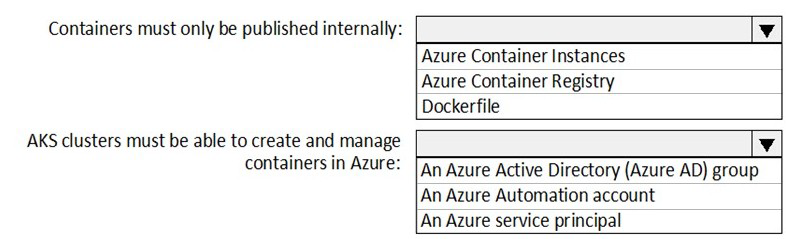
Containers must only be published internally.
AKS clusters must be able to create and manage containers in Azure.
What should you use for each requirement? To answer, select the appropriate options in
the answer area.
NOTE: Each correct selection is worth one point.
Explanation:
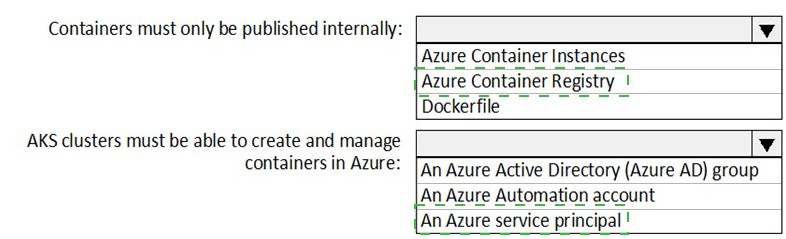
To meet the requirement of publishing containers internally, you need a private container registry that stores container images within your organization's boundary. For AKS clusters to create and manage containers in Azure, they require an identity with appropriate permissions to interact with Azure resources, which is provided through a service principal.
Correct Option:
First requirement (Containers must only be published internally): Azure Container Registry
Azure Container Registry (ACR) allows you to store and manage private container images. When configured as private, ACR ensures that container images are only accessible internally within your organization or Azure environment, meeting the requirement that containers must only be published internally.
Second requirement (AKS clusters must be able to create and manage containers): An Azure service principal
An Azure service principal is an identity that AKS uses to create and manage Azure resources like load balancers and storage. This service principal provides the necessary authentication and authorization for the AKS cluster to interact with other Azure services and manage containers effectively.
Incorrect Option:
First requirement alternatives:
Azure Container Instances: This is a compute service for running containers directly, not a registry for storing and publishing container images.
Dockerfile: This is a script file containing instructions to build a container image, not a storage location for published containers.
Second requirement alternatives:
An Azure Active Directory (Azure AD) group: While Azure AD groups can be used for role-based access control, AKS clusters specifically need a service principal identity to interact with Azure APIs and manage resources.
An Azure Automation account: This is used for automating processes and runbooks in Azure, not for providing identity and permissions to an AKS cluster.
Reference:
Microsoft Learn: Introduction to Azure Container Registry
Microsoft Learn: Service principals with Azure Kubernetes Service (AKS)
You plan to use Desired State Configuration (DSC) to maintain the configuration state of
virtual machines that run Windows Server.
You need to perform the following:
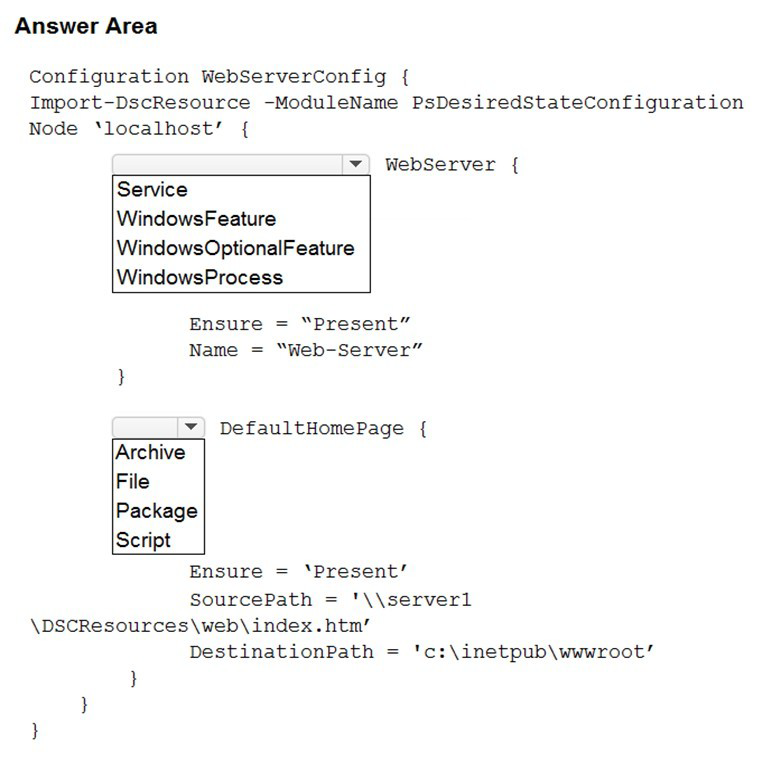
Install Internet Information Services (IIS) on the virtual machines.
Update the default home page of the IIS web server.
How should you configure the DSC configuration file? To answer, select the appropriate
options in the answer area.
NOTE: Each correct selection is worth one point.
Explanation:
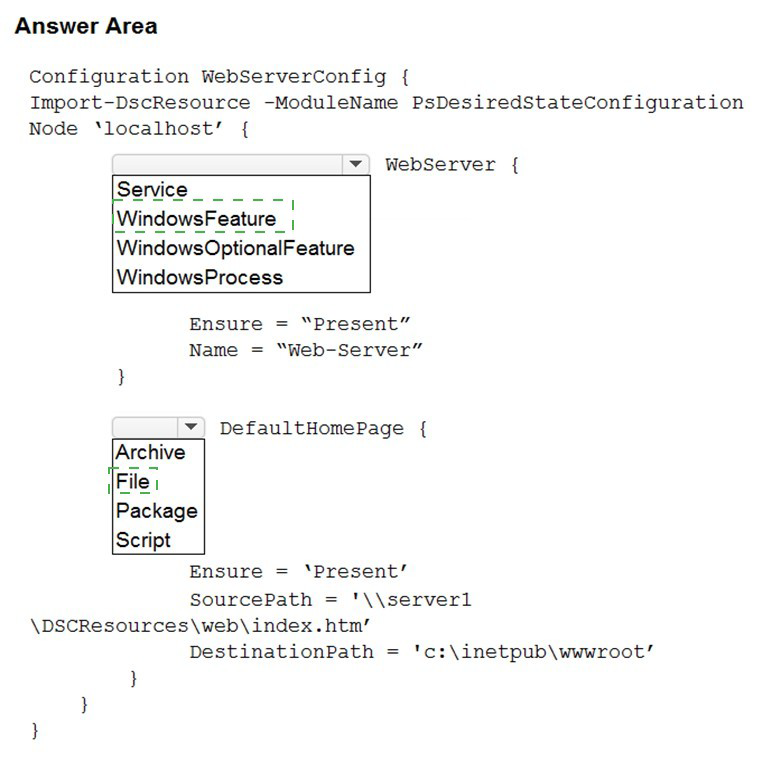
To configure IIS installation using DSC, you need the WindowsFeature resource to install the Web-Server role. For updating the default home page, the File resource is used to copy the new index.htm file from a source location to the IIS web root directory (c:\inetpub\wwwroot), ensuring the web server displays the updated content.
Correct Option:
First dropdown (Resource for IIS installation): WindowsFeature
The WindowsFeature resource in DSC is specifically designed to install, configure, and ensure the state of Windows Server roles and features. Setting the Name property to "Web-Server" and Ensure to "Present" guarantees that the IIS web server role is installed on the target virtual machine.
Second dropdown (Resource for updating home page): File
The File resource manages files and directories on a target node. By specifying Ensure as 'Present', SourcePath pointing to the new index.htm file, and DestinationPath as c:\inetpub\wwwroot, this resource copies the updated default home page to the IIS web server's root directory.
Incorrect Option:
First dropdown alternatives:
Service: This resource manages Windows services but cannot install Windows roles or features like IIS.
WindowsOptionalFeature: This resource is for enabling/disabling optional Windows features in Windows client OS, not for server roles in Windows Server.
WindowsProcess: This resource manages Windows processes but does not handle role or feature installation.
Second dropdown alternatives:
Archive: This resource unpacks archive files (.zip) but does not handle simple file copying operations.
Package: This resource installs software packages like MSI or EXE files, not for copying individual files.
Script: While this could technically copy files using PowerShell, it is more complex and less reliable than the dedicated File resource for this specific task.
Reference:
Microsoft Learn: WindowsFeature DSC resource
Microsoft Learn: File DSC resource
Microsoft Learn: Get started with Desired State Configuration (DSC) for Windows
You have an Azure subscription that contains a project in Azure DevOps named Project1.
In Microsoft Azure Active Directory (Azure AD), part of Microsoft Entra. you have three
users that require access to Project! as shown in the following table.
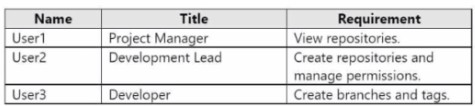
You need to ensure that the users have the appropriate permissions. The solution must
use the principle of least privilege.
To which permission group in Azure DevOps should you add each user? To answer, drag
the appropriate permission groups to the correct users. Each permission group may be
used once, more than once, or not at all. You may need to drag the split bar between
panes or scroll to view content.
NOTE: Each correct selection is worth one point.


Explanation:
Azure DevOps uses built-in security groups that grant specific permission levels to users. The principle of least privilege requires assigning users only the permissions necessary to perform their job functions. Readers can only view content, Contributors can add and modify code, and Project Administrators have full control over project settings and permissions.
Correct Option:
User1 (Project Manager - View repositories): Readers
The Readers group in Azure DevOps provides read-only access to repositories and other project artifacts. This meets User1's requirement to view repositories while adhering to the principle of least privilege by not granting unnecessary write or administrative permissions.
User2 (Development Lead - Create repositories and manage permissions): Project Administrators
The Project Administrators group has full permissions to manage project settings, including creating repositories and managing permissions for other users. This level of access is required for User2 to fulfill both listed responsibilities.
User3 (Developer - Create branches and tags): Contributors
The Contributors group allows users to contribute to the codebase by creating branches and tags, as well as pushing code and creating pull requests. This provides the necessary permissions for a developer without granting administrative privileges.
Incorrect Option:
Build Administrators: This group focuses specifically on managing build pipelines and agents. It does not provide permissions for creating repositories or managing general project permissions, nor does it grant code contribution rights.
Other assignments:
Assigning Readers to User2 or User3 would not meet their requirements for creating repositories or branches.
Assigning Project Administrators to User1 or User3 would grant excessive permissions beyond their needs, violating the principle of least privilege.
Assigning Contributors to User1 would allow code modifications not required for viewing only.
Reference:
Microsoft Learn: About security groups in Azure DevOps
Microsoft Learn: Permissions and groups in Azure DevOps
Microsoft Learn: Default permissions and access levels
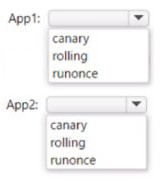
You are designing YAML-based Azure pipelines for the apps shown in the following table
You need to configure the YAML strategy value for each app. The solution must minimize
app downtime. Which value should you configure for each app? To answer, select the
appropriate options in the answer area.
Explanation:
Azure Pipelines supports multiple deployment strategies to minimize downtime during releases. The canary strategy gradually rolls out changes to a subset of users before full deployment, while rolling replaces instances incrementally. The runOnce strategy performs a single deployment which typically causes downtime during the update process.
Correct Option:
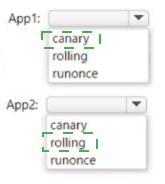
App1 (Minimize downtime with progressive exposure): canary
The canary deployment strategy releases the new version to a small subset of users or servers first. If successful, it gradually increases the rollout to more users. This approach minimizes potential downtime by catching issues early before affecting all users, making it ideal for applications where high availability is critical.
App2 (Minimize downtime with incremental replacement): rolling
The rolling deployment strategy updates instances one by one or in small batches. While one instance is being updated, others continue serving traffic. This ensures the application remains available throughout the deployment process, effectively minimizing downtime compared to a full cutover approach.
Incorrect Option:
runonce: This strategy performs a single deployment operation without any progressive exposure or incremental updates. During the deployment, the application typically experiences downtime as the old version is stopped and the new version is started. This does not align with the requirement to minimize downtime.
Alternative assignments:
Assigning rolling to App1 would work but canary provides even more controlled exposure with automatic pause based on health monitoring, making it superior for minimizing risk.
Assigning canary to App2 would also minimize downtime but may be more complex than necessary if the application doesn't require phased user exposure.
Reference:
Microsoft Learn: Deployment strategies in Azure Pipelines
Microsoft Learn: Canary deployment strategy
Microsoft Learn: Rolling deployment strategy
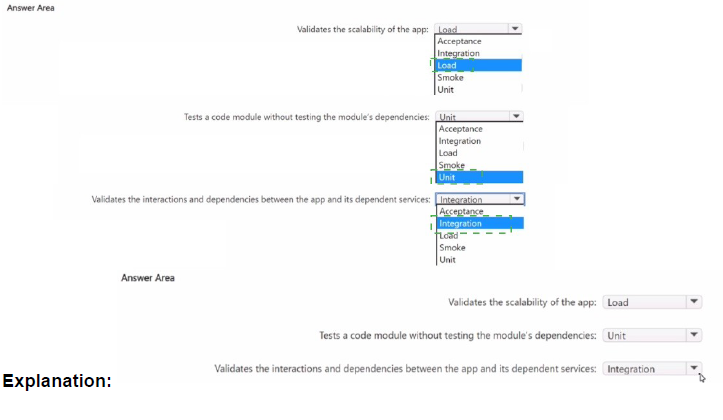
You are using an Azure Pipelines pipeline to build and deploy a web app.
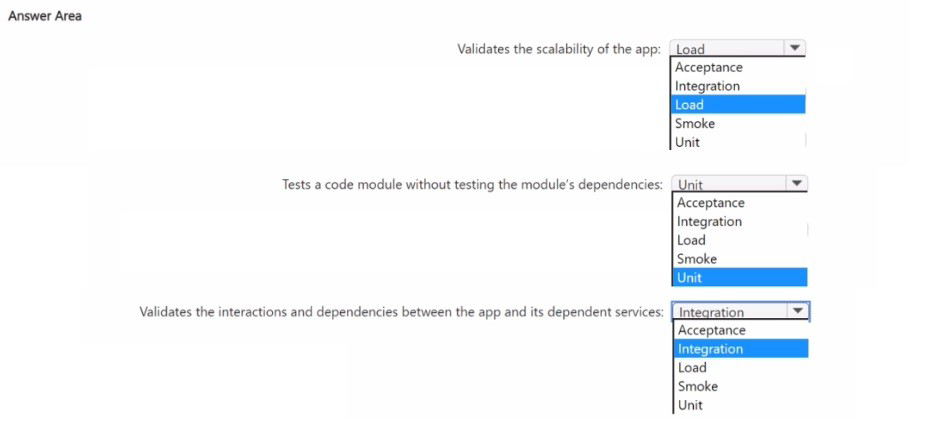
You need to implement a testing strategy that meets the following requirements:
• Validates the scalability of the app
• Tests a code module without testing the module's dependencies
• Validates the interactions and dependencies between the app and its dependent services
Which type of test should you implement for each requirement? To answer, select the
appropriate options in the answer area.
Explanation:
Different types of tests serve specific purposes in a comprehensive testing strategy. Load testing validates application performance under expected user loads to ensure scalability. Unit testing isolates individual code components by mocking dependencies. Integration testing verifies that different modules and services work together correctly.
Correct Option:
First requirement (Validates scalability): Load
Load testing simulates real-world usage by applying expected or peak user traffic to the application. This helps determine how the application behaves under stress, identifies performance bottlenecks, and validates that the app can scale appropriately to meet demand.
Second requirement (Tests code module without dependencies): Unit
Unit testing focuses on testing individual components or modules in isolation. By mocking or stubbing external dependencies, unit tests verify that each code unit functions correctly on its own, ensuring that bugs are caught early at the component level.
Third requirement (Validates interactions and dependencies): Integration
Integration testing verifies that different modules, services, or components work together as expected. This type of testing identifies issues in the interactions between the application and its dependent services, such as APIs, databases, or external systems.
Incorrect Option:
Acceptance: This testing validates that the application meets business requirements from an end-user perspective. It does not specifically test scalability, isolated code modules, or service interactions.
Smoke: This is a quick sanity test to verify basic functionality after a build or deployment. It does not provide deep validation of scalability, unit isolation, or integration points.
Unit (for other requirements): While essential, unit testing specifically targets isolated code modules and cannot validate scalability or service interactions.
Integration (for other requirements): Integration testing focuses on component interactions but does not test isolated code units or application scalability under load.
Load (for other requirements): Load testing addresses performance and scalability but does not validate isolated code modules or service interactions.
Reference:
Microsoft Learn: Run tests in your pipeline
Microsoft Learn: Unit testing fundamentals
Microsoft Learn: Integration testing in Azure Pipelines
Microsoft Learn: Load testing with Azure Test Plans
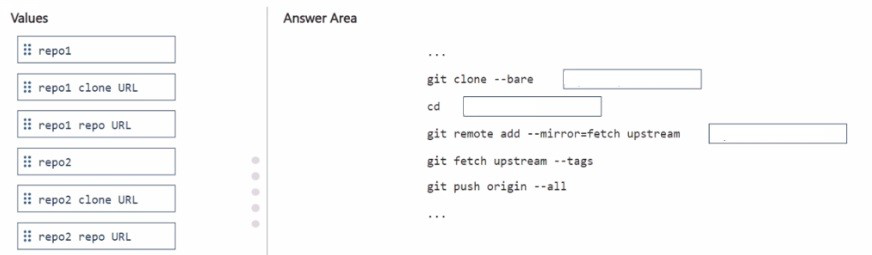
You have a GitHub repository named repo1.
You migrate repo1 to an Azure Repos repository named repo2.
After the migration, changes are made to repo1.
You need to sync the changes to repo2.
How should you complete the script? To answer, drag the appropriate values to the correct
targets. Each value may be used once, more than once, or not at all. You may need to drag
the split bar between panes or scroll to view content.
NOTE: Each correct selection is worth one point.
Explanation:
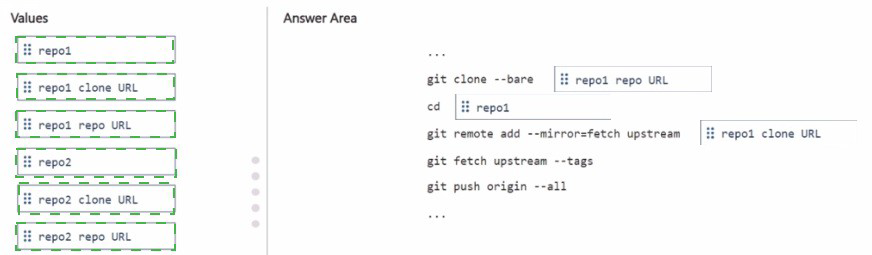
To sync changes from an original GitHub repository to a migrated Azure Repos repository, you need to set up a mirroring relationship. This involves cloning the original repository as a bare repository, then adding the new repository as a remote with mirror fetch configuration to pull changes from the original and push them to the new location.
Correct Option:
First blank (git clone --bare): repo1 clone URL
The git clone --bare command requires the clone URL of the source repository (repo1). A bare clone creates a repository without a working directory, which is ideal for mirroring scenarios as it contains only the Git version control data.
Second blank (cd): repo1
After cloning repo1, you need to change directory into the cloned repository folder. The cloned folder will be named after the repository itself, so cd repo1 navigates into the correct directory to perform subsequent Git operations.
Third blank (git remote add --mirror=fetch upstream): repo2 repo URL
The git remote add command adds a new remote repository. Using --mirror=fetch configures this remote to fetch all refs (branches and tags) without mapping. The URL needed here is the repository URL of the destination (repo2), where changes will be pushed.
Fourth blank (git fetch upstream --tags): Not applicable (no value needed)
This command fetches all tags from the upstream remote (which was added as repo2). No additional value needs to be inserted here as the command is complete with "upstream" referring to the previously added remote.
Fifth blank (git push origin --all): Not applicable (no value needed)
This command pushes all branches to the origin remote. In a bare clone context, this pushes the fetched changes from repo1 to repo2. No additional value is required.
Incorrect Option:
repo1 repo URL: While similar to the clone URL, the repository URL may use a different format (SSH vs HTTPS) and the clone URL is specifically required for the initial clone operation.
repo2: This is the repository name, not its URL, and cannot be used for remote URL configuration.
repo2 clone URL: The clone URL could work but the repository URL is more appropriate for remote configuration in mirroring scenarios.
Using any value for the last two blanks: The commands git fetch upstream --tags and git push origin --all are complete statements that don't require additional values in this context.
Reference:
Microsoft Learn: Git CLI documentation for clone, remote, fetch, and push
GitHub Docs: Duplicating a repository
Microsoft Learn: Import Git repositories into Azure Repos
You have the following Azure policy.

A. ensures that at) data for new Azure Storage accounts is encrypted at rest
B. prevents HTTPS traffic to new Azure Storage accounts when the accounts are accessed over the internet
C. prevents all HTTP traffic to wasting Azure Storage accounts
D. ensures that all traffic to new Azure Storage accounts is encrypted
Explanation:
This Azure policy definition uses an if condition with allof requiring both conditions to be true. It checks if the resource type is a storage account AND if the property supportsHttpTrafficOnly is NOT equal to "true". When both conditions match, the policy applies its effect (typically deny or audit). The property supportsHttpTrafficOnly being set to false means the storage account allows HTTP traffic in addition to HTTPS, which is less secure.
Correct Option:
D. ensures that all traffic to new Azure Storage accounts is encrypted
This policy is designed to enforce secure transfer by requiring that supportsHttpTrafficOnly is set to true. When this property is true, the storage account only accepts encrypted HTTPS traffic and rejects HTTP. The policy identifies storage accounts where this property is NOT true (meaning they allow HTTP), and would typically deny their creation or mark them as non-compliant, thereby ensuring all new storage accounts only accept encrypted HTTPS traffic.
Incorrect Option:
A. ensures that all data for new Azure Storage accounts is encrypted at rest
Encryption at rest is managed by different properties like encryption.services.blob.enabled or encryption.services.file.enabled. The supportsHttpTrafficOnly property specifically controls encryption in transit (HTTPS vs HTTP), not encryption at rest. This policy addresses transport encryption, not data encryption when stored on disk.
B. prevents HTTPS traffic to new Azure Storage accounts when the accounts are accessed over the internet
This policy actually does the opposite. It ensures HTTPS traffic is REQUIRED by enforcing supportsHttpTrafficOnly = true. It prevents HTTP traffic, not HTTPS traffic. The property name "supportsHttpTrafficOnly" is misleading, but when set to "true", it means the account ONLY supports HTTPS (rejects HTTP).
C. prevents all HTTP traffic to existing Azure Storage accounts
This policy applies to new storage accounts being evaluated during creation or compliance checks. The condition checks the resource type and property value at the time of evaluation. It does not automatically apply to existing accounts unless specifically assigned with appropriate effects, and it certainly doesn't modify existing configurations without remediation tasks.
Reference:
Microsoft Learn: Azure Policy definition structure
Microsoft Learn: Secure transfer required in Azure Storage
Microsoft Learn: Azure Policy built-in definitions for Storage
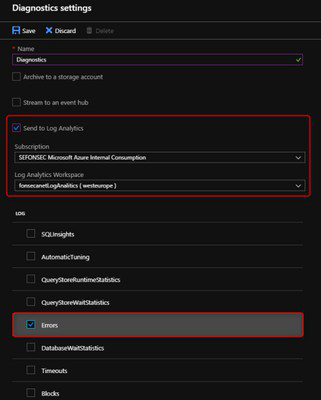
You have a web app hosted on Azure App Service. The web app stores data in an Azure
SQL database.
You need to generate an alert when there are 10,000 simultaneous connections to the
database. The solution must minimize development effort.
Which option should you select in the Diagnostics settings of the database?
A. Send to Log Analytics
B. Stream to an event hub
C. Archive to a storage account
Explanation:
To generate alerts based on database metrics like simultaneous connections, you need to route diagnostic data to a destination that supports alerting rules. Azure Monitor Alerts can query data from Log Analytics workspaces to trigger notifications when specific conditions are met, such as when the number of connections reaches 10,000.
Correct Option:
A. Send to Log Analytics
Sending diagnostics data to Log Analytics enables you to use Azure Monitor to create alert rules based on the collected metrics and logs. Log Analytics provides a powerful query engine that can analyze the connection data and trigger alerts when the threshold of 10,000 simultaneous connections is reached. This approach requires minimal development effort as alerts are configured through the Azure portal without writing custom code.
Incorrect Option:
B. Stream to an event hub
Streaming to an event hub is useful for real-time data processing with external tools or custom applications. However, to generate alerts, you would need to build a separate consumer application that reads from the event hub, checks for the connection threshold, and sends notifications. This requires significant development effort and does not meet the requirement to minimize development effort.
C. Archive to a storage account
Archiving to a storage account is primarily for long-term retention, compliance, and auditing purposes. Data stored in blobs or tables cannot directly trigger alerts. You would need to build custom solutions to periodically read the archived data, analyze it for connection counts, and send alerts, which involves considerable development work and does not provide real-time alerting.
Reference:
Microsoft Learn: Diagnostic settings in Azure Monitor
Microsoft Learn: Create, view, and manage metric alerts using Azure Monitor
Microsoft Learn: Log Analytics workspace overview
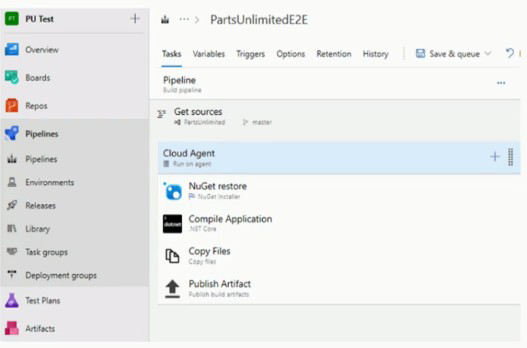
You have the Azure DevOps pipeline shown in the following exhibit.
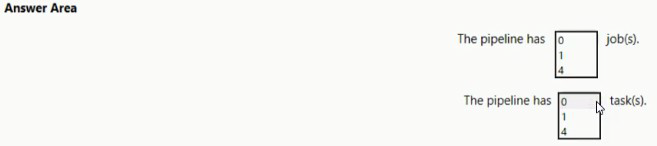
Use the drop-down menus to select the answer choice that completes each statement based on the information presented in the graphic.
Explanation:
Based on the pipeline exhibit shown, we need to count the number of jobs and tasks displayed in the pipeline structure. Jobs represent execution phases that can run on agents, while tasks are individual steps within a job that perform specific actions like restoring NuGet packages or compiling code.
Correct Option:
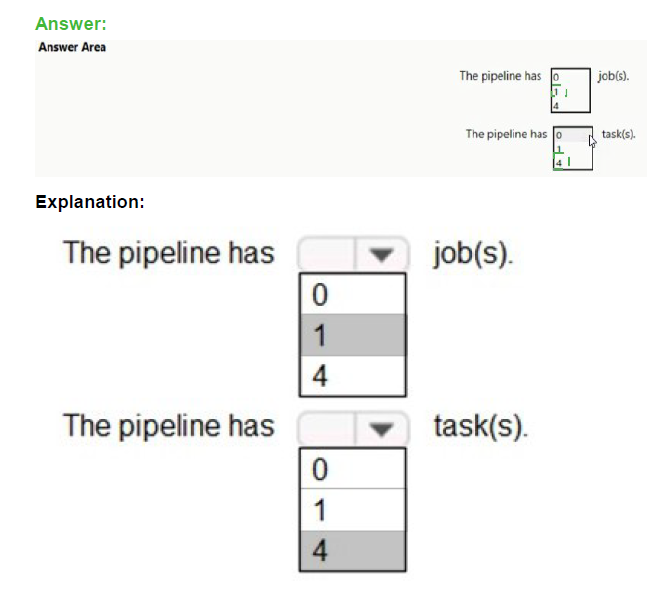
First statement (The pipeline has ______ job(s)): 1
The exhibit shows a single pipeline with "Run on agent" under the Cloud Agent section. This indicates there is one agent job configured for this pipeline. The tasks are all organized under this single job, not distributed across multiple jobs.
Second statement (The pipeline has ______ task(s)): 4
The exhibit lists four distinct tasks under the pipeline:
NuGet restore (NuGet Installer)
Compile Application (.NET Core)
Copy Files
Publish Artifact (Publish build artifacts)
These are all the tasks visible in the pipeline configuration shown.
Incorrect Option:
0 jobs: This would mean no execution environment is configured, but the exhibit clearly shows "Run on agent" which defines a job.
4 jobs: The pipeline only shows one agent job. Multiple jobs would be represented separately in the pipeline structure.
0 tasks: Tasks are clearly listed in the exhibit under the pipeline.
1 task: There are multiple tasks visible beyond just one.
Reference:
Microsoft Learn: Jobs in Azure Pipelines
Microsoft Learn: Tasks in Azure Pipelines
Microsoft Learn: Classic pipelines in Azure DevOps
| Page 1 out of 49 Pages |
Microsoft Azure DevOps Solutions (beta) Practice Exam Questions
These AZ-400 practice questions with explanations help candidates understand DevOps practices using Microsoft tools. Topics include CI/CD pipelines, source control, infrastructure as code, monitoring, and security. Each explanation clearly describes why an answer is correct, helping learners understand DevOps concepts and workflows. This approach promotes deeper learning and real-world application. By practicing these questions, candidates can improve their ability to design and manage DevOps solutions and confidently prepare for the certification exam.AZ-400 - Designing and Implementing Microsoft DevOps Solutions Official Exam Blueprint and Weight:
1. Configure Processes and Communications
Official Exam Weight: 10-15%
Subtopics: Design and configure source control strategies, configure Azure Boards and work item tracking, manage team collaboration and communication processes, integrate GitHub and Azure Repos, configure branch policies and pull request workflows, implement Agile and Scrum processes, manage notifications and dashboards, configure access and permissions, integrate collaboration tools including Microsoft Teams and GitHub, manage project documentation and Wikis, monitor team productivity and workflow metrics.
2. Design and Implement Source Control
Official Exam Weight: 10-15%
Subtopics: Design repository structures, manage Git repositories and branching strategies, implement branching and merging workflows, configure repository security, manage large repositories and artifacts, implement Git hooks and policies, integrate GitHub Actions and Azure Repos, manage package repositories using Azure Artifacts, optimize source control performance, automate repository management tasks, troubleshoot source control issues.
3. Design and Implement Build and Release Pipelines
Official Exam Weight: 50-55%
Subtopics: Design continuous integration (CI) pipelines, design continuous delivery (CD) pipelines, implement Azure Pipelines, configure YAML pipelines, integrate testing into pipelines, manage build agents and deployment targets, implement infrastructure as code using ARM Bicep and Terraform, configure deployment strategies including blue-green and canary deployments, manage secrets and secure variables, integrate containerization using Docker and Kubernetes, implement package management and artifact storage, automate deployments to Azure and hybrid environments, monitor pipeline executions and troubleshoot failures, configure approvals gates and checks, implement deployment slots and rollback strategies.
4. Develop a Security and Compliance Plan
Official Exam Weight: 10-15%
Subtopics: Implement secure DevOps practices, manage secrets using Azure Key Vault, configure security scanning and code analysis, implement compliance policies and governance, configure access controls and role-based access control (RBAC), monitor security vulnerabilities, integrate Microsoft Defender for Cloud and GitHub Advanced Security, manage dependency scanning and software supply chain security, implement auditing and logging, secure CI/CD pipelines, manage compliance reporting and policies.
5. Implement an Instrumentation Strategy
Official Exam Weight: 5-10%
Subtopics: Configure monitoring and logging solutions, implement Azure Monitor and Application Insights, create dashboards and alerts, monitor application performance and availability, implement telemetry collection, configure distributed tracing, analyze logs and metrics, automate incident response workflows, integrate monitoring with DevOps pipelines, optimize observability and diagnostics, troubleshoot performance issues using monitoring tools.
| Domain | Title | Exam Weight |
|---|---|---|
| 1 | Configure Processes and Communications | 10-15% |
| 2 | Design and Implement Source Control | 10-15% |
| 3 | Design and Implement Build and Release Pipelines | 50-55% |
| 4 | Develop a Security and Compliance Plan | 10-15% |
| 5 | Implement an Instrumentation Strategy | 5-10% |
What Our Clients Say
DevOps is about culture, processes, and tools. The AZ-400 exam tests all three. MSmcqs.com provided comprehensive practice questions covering CI/CD pipelines, infrastructure as code, and security integration. I felt overprepared going into the exam and passed easily. Highly recommended!
Daniel Foster, DevOps Lead | Seattle, WA