Topic 1: Litware inc. Case Study: 1
Overview
Existing Environment
Litware, Inc. an independent software vendor (ISV) Litware has a main office and five
branch offices.
Application Architecture
The company’ s primary application is a single monolithic retirement fund management
system based on ASP.NE T web forms that use logic written in V8.NET. Some new
sections of the application are written in C#.
Variations of the application are created for individual customers. Currently, there are more
than 80 have code branches in the application’s code base.
The application was developed by using Microsoft Visual Studio. Source code is stored in
Team Foundation Server (TFS) in the main office. The branch offices access of the source
code by using TFS proxy servers.
Architectural Issues
Litware focuses on writing new code for customers. No resources are provided to refactor
or remove existing code. Changes to the code base take a long time, AS dependencies are
not obvious to individual developers.
Merge operations of the code often take months and involve many developers. Code
merging frequently introduces bugs that are difficult to locate and resolve.
Customers report that ownership costs of the retirement fund management system
increase continually. The need to merge unrelated code makes even minor code changes
expensive.
Requirements
Planned Changes
Litware plans to develop a new suite of applications for investment planning. The
investment planning Applications will require only minor integration with the easting
retirement fund management system.
The investment planning applications suite will include one multi-tier web application and
two iOS mobile applications. One mobile application will be used by employees; the other
will be used by customers.
Litware plans to move to a more agile development methodology. Shared code will be
extracted into a series of package.
Litware has started an internal cloud transformation process and plans to use cloud based
services whenever suitable.
Litware wants to become proactive m detecting failures, rather than always waning for
customer bug reports.
Technical Requirements
The company's investment planning applications suite must meet the following technical
requirements:
• New incoming connections through the firewall must be minimized.
• Members of a group named Developers must be able to install packages.
• The principle of least privilege must be used for all permission assignments
• A branching strategy that supports developing new functionality in isolation must be used.
• Members of a group named Team leaders must be able to create new packages and edit the permissions of package feeds
• Visual Studio App Center must be used to centralize the reporting of mobile application
crashes and device types in use.
• By default, all App Center must be used to centralize the reporting of mobile application
crashes and device types in use.
• Code quality and release quality are critical. During release, deployments must not
proceed between stages if any active bugs are logged against the release.
• The mobile applications must be able to call the share pricing service of the existing
retirement fund management system. Until the system is upgraded, the service will only
support basic authentication over HUPS.
• The required operating system configuration tor the test servers changes weekly. Azure
Automation State Configuration must be used to ensure that the operating system on each
test servers configured the same way when the servers are created and checked
periodically.
Current Technical
The test servers are configured correctly when first deployed, but they experience
configuration drift over time. Azure Automation State Configuration fails to correct the
configurations.
Azure Automation State Configuration nodes are registered by using the following
command.

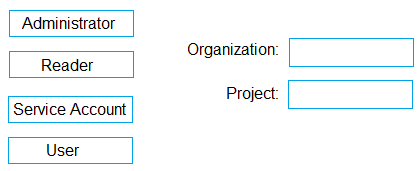
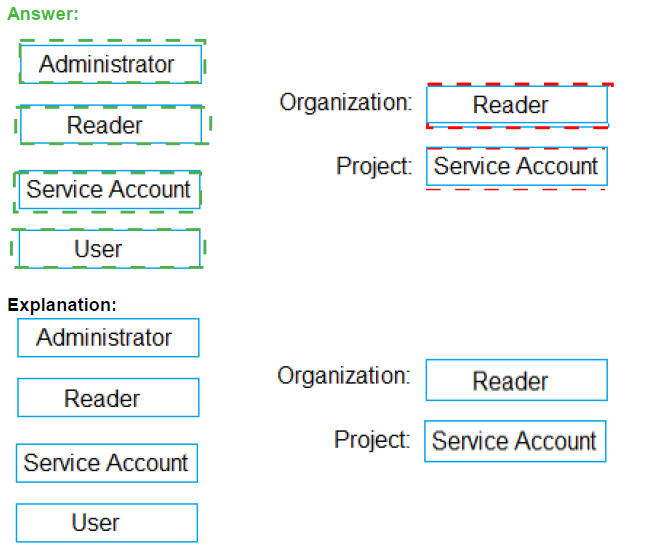
You need to configure access to Azure DevOps agent pools to meet the following
requirements:
Use a project agent pool when authoring build or release pipelines.
View the agent pool and agents of the organization.
Use the principle of least privilege.
Which role memberships are required for the Azure DevOps organization and the project?
To answer, drag the appropriate role memberships to the correct targets. Each role
membership may be used once, more than once, or not at all. You may need to drag the
split bar between panes or scroll to view content.
NOTE: Each correct selection is worth one point.
You plan to use Azure Kubernetes Service (AKS) to host containers deployed from images
hosted in a Docker Trusted Registry.
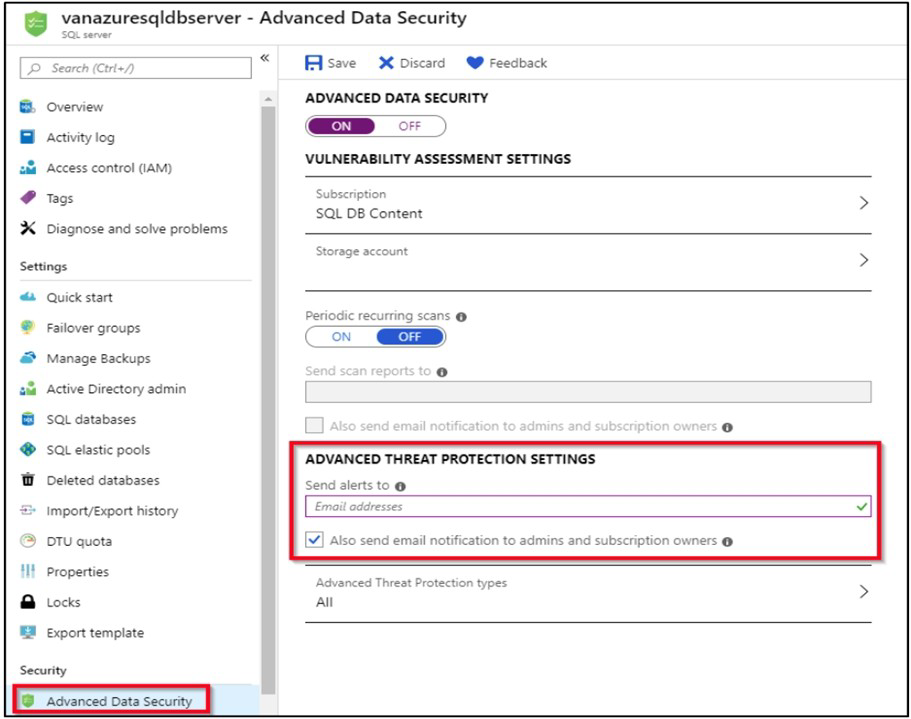
You need to recommend a solution for provisioning and connecting to AKS. The solution
must ensure that AKS is RBAC-enaWed and uses a custom service principal.
Which three commands should you recommend be run in sequence? To answer, move the
appropriate commands from the list of commands to the answer area and arrange them in
the coned order.
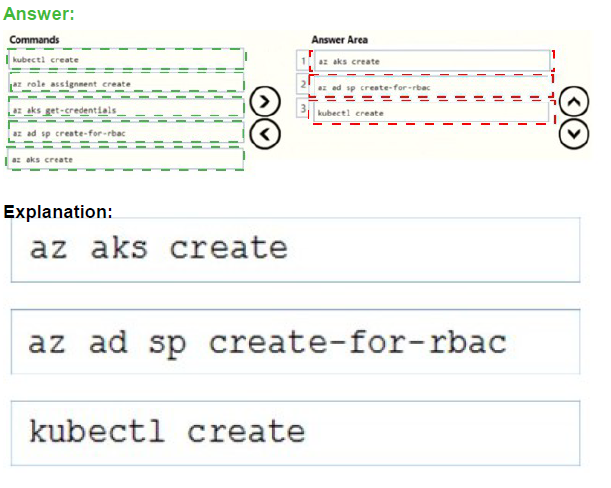
Step 1 : az acr create
An Azure Container Registry (ACR) can also be created using the new Azure CLI.
az acr create
--name
--resource-group
--sku Basic
Step 2: az ad sp create-for-rbac
Once the ACR has been provisioned, you can either enable administrative access (which is
okay for testing) or you create a Service Principal (sp) which will provide a client_id and a
client_secret.
az ad sp create-for-rbac
--scopes
/subscriptions/
--role Contributor
--name
Step 3: kubectl create
Create a new Kubernetes Secret.
kubectl create secret docker-registry
--docker-server
--docker-email
--docker-username=
--docker-password
You need to create an instance of Azure Application Insights named az400-9940427-main
and configure the instance to receive telemetry data from an Azure web app named az400-
9940427-main.
To complete this task, sign in to the Microsoft Azure portal.
Answer: See solution below.
Explanation:
Step 1: Create an instance of Azure Application Insights
1. Open Microsoft Azure Portal
2. Log into your Azure account, Select Create a resource > Developer tools > Application
Insights.
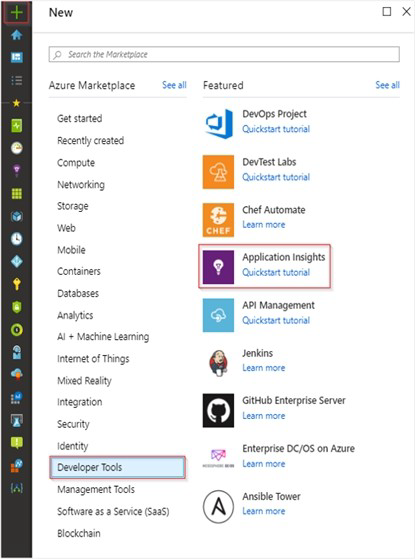
3. Enter the following settings, and then select Review + create.
Name: az400-9940427-main
Step 2: Configure App Insights SDK
4. Open your ASP.NET Core Web App project in Visual Studio > Right-click on the
AppName in the Solution Explorer > Select Add > Application Insights Telemetry.
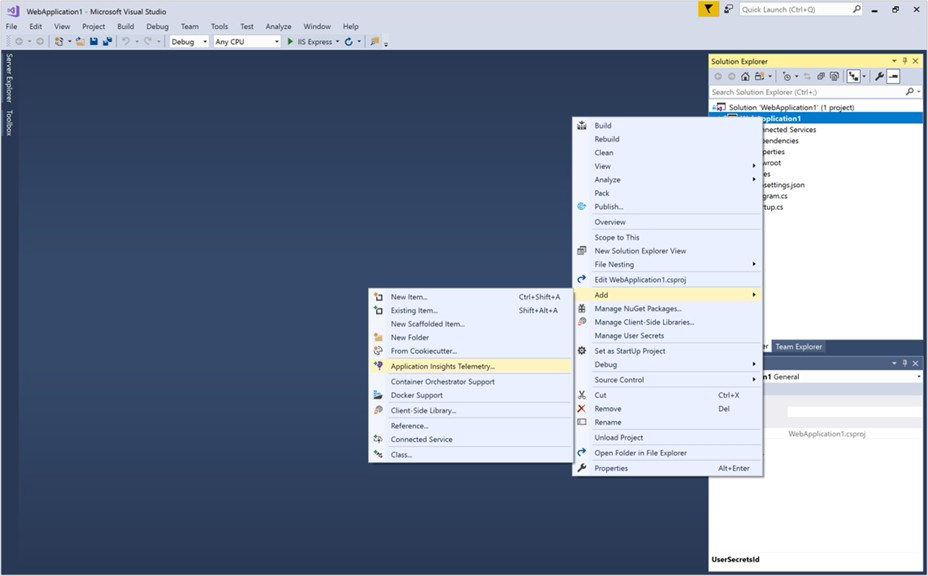
5. Click the Get Started button
6. Select your account and subscription > Select the Existing resource you created in the
Azure portal > Click Register.
You plan to publish build artifacts by using an Azure pipeline.
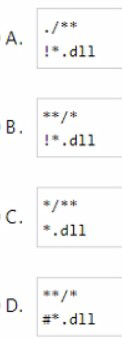
You need to create an. artifactignore file that meets the following requirements:
• Includes all files in the build output folder and all subfolders
• Excludes files that have the .dll extension
What should you include in the file?
A. Option A
B. Option B
C. Option C
D. Option D
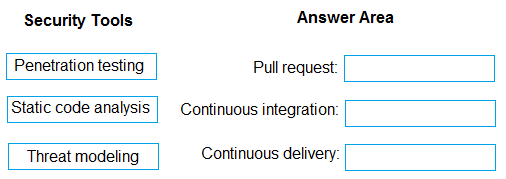
You need to increase the security of your team's development process.
Which type of security tool should you recommend for each stage of the development
process? To answer, drag the appropriate security toots to the correct stages. Each
security tool may be used once, more than once, or not at all. You may need to drag the
split bar between panes or scroll to view content
NOTE: Each correct selection is worth one point.
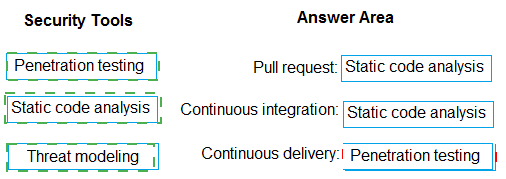
You have several apps that use an Azure SQL Database named db1.
You need to ensure that queries to db1 are tuned by Azure over time. The solution must
only apply to db1.
To complete this task, sign in to the Microsoft Azure portal.
Answer: See solution below.
Explanation:
1. To enable automatic tuning on a single database, navigate to the database in the Azure portal and select Automatic tuning.
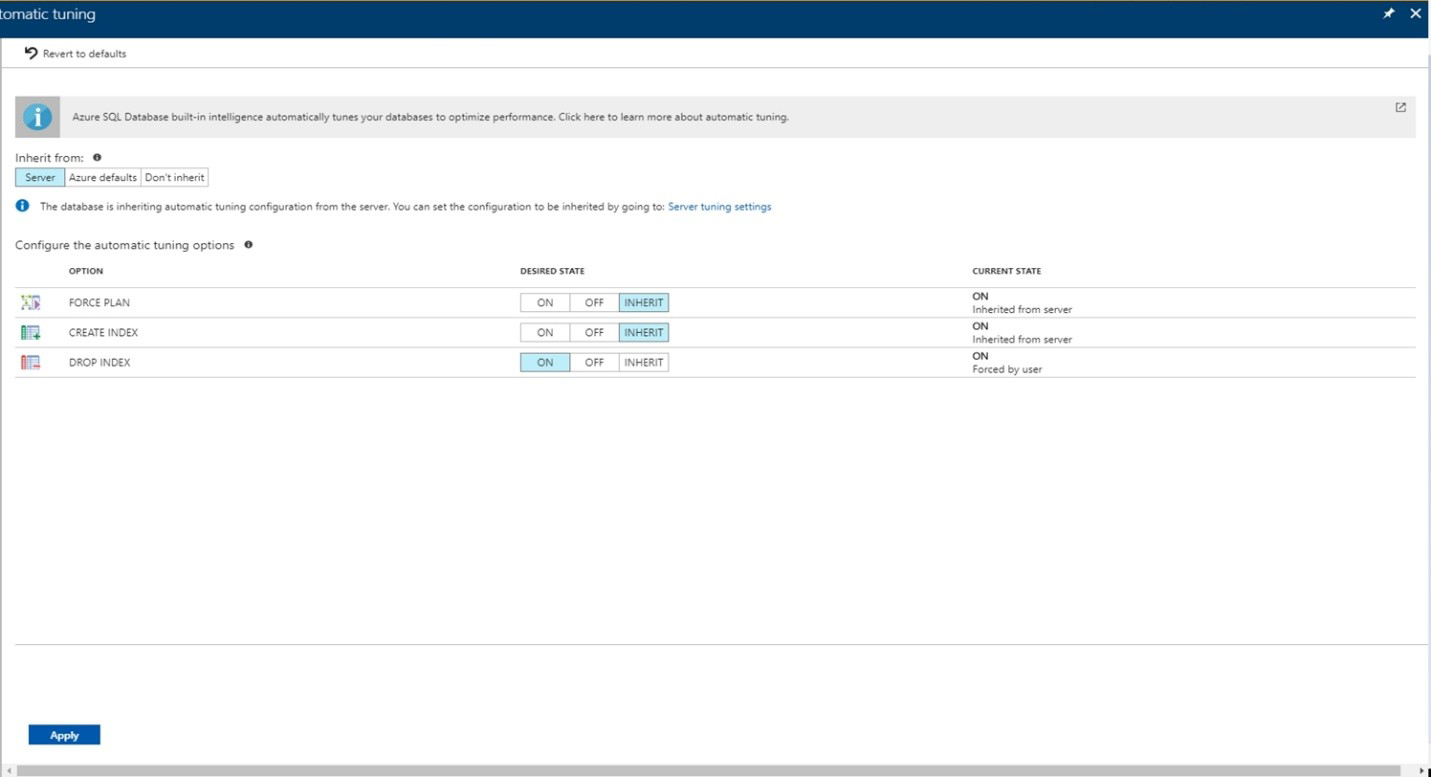
2. Select the automatic tuning options you want to enable and select Apply.
Note: Individual automatic tuning settings can be separately configured for each database.
You can manually configure an individual automatic tuning option, or specify that an option
inherits its settings from the server.
You plan to deploy a template named D:\Deploy.json to a resource group named Deploylod9940427.
You need to modify the template to meet the following requirements, and then to deploy the
template:
The address space must be reduced to support only 256 total IP addresses.
The subnet address space must be reduced to support only 64 total IP addresses.
To complete this task, sign in to the Microsoft Azure portal.
Answer: See solution below.
Explanation:
1. Sign in to the portal,
2. Choose template Deploy-lod9940427
3. Select Edit template, and then paste your JSON template code into the code window.
4. Change the ASddressPrefixes to 10.0.0.0/24 in order to support only 256 total IP
addresses.
addressSpace":{"addressPrefixes": ["10.0.0.0/24"]},
5. Change the firstSubnet addressprefix to 10.0.0.0/26 to support only 64 total IP
addresses.
"subnets":[
{
"name":"firstSubnet",
"properties":{
"addressPrefix":"10.0.0.0/24"
}
6. Select Save.
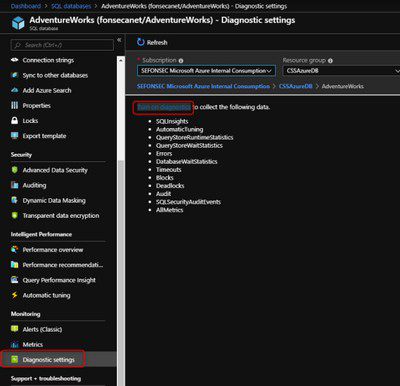
7. Select Edit parameters, provide values for the parameters that are shown, and then
select OK.
8 Select Subscription. Choose the subscription you want to use, and then select OK.
9. Select Resource group. Choose an existing resource group or create a new one, and
then select OK.
10. Select Create. A new tile on the dashboard tracks the progress of your template
deployment.
You have a web app hosted on Azure App Service. The web app stores data in an Azure
SQL database.
You need to generate an alert when there are 10,000 simultaneous connections to the
database. The solution must minimize deve4opment effort.
Which option should you select in the Diagnostics settings of the database?
A. Send to Log Analytics
B. Archive to m storage account
C. Stream to an event hub
Explanation:
ENABLE DIAGNOSTICS TO LOG ANALYTICS
This configuration is done PER DATABASE
1. Click on Diagnostics Settings and then Turn On Diagnostics
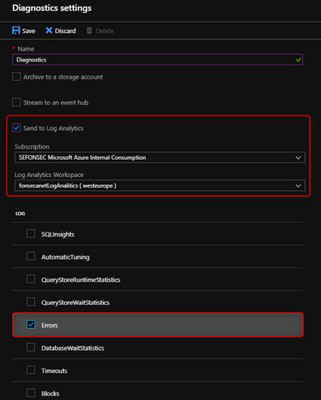
2. Select to Send to Log Analytics and select the Log Analytics workspace. For this sample
I will selected only Errors
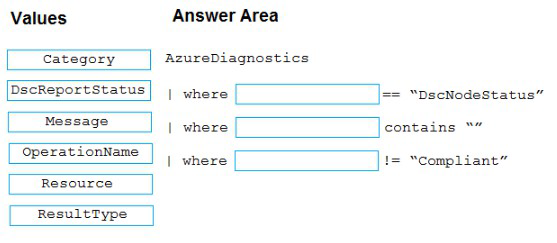
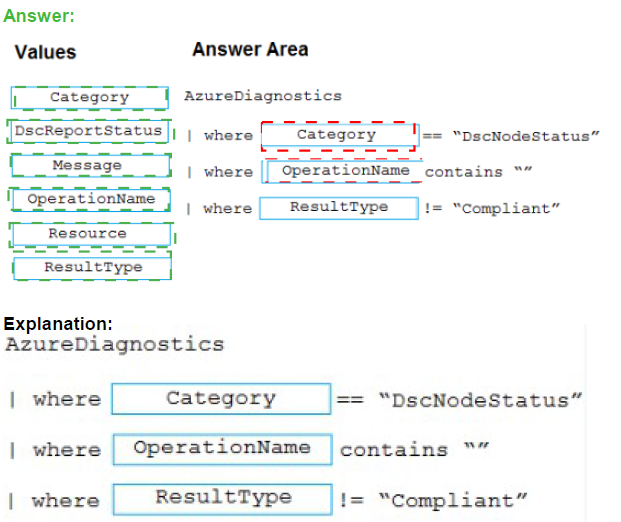
You have an Azure subscription that uses Azure Automation State Configuration to
manage the configuration of virtual machines.
You need to identify which nodes are noncompliant.
How should you complete the query? To answer, drag the appropriate values to the correct
targets. Each value may be used once, more than once, or not at all. You may need to drag
the split bar between panes or scroll to view content.
NOTE: Each correct selection is worth one point.
Your company has two virtual machines that run Linux in a third-party public cloud.
You plan to use the company's Azure Automation State Configuration implementation to
manage the two virtual machines and detect configuration drift.
You need to onboard the Linux virtual machines.
You install PowerShell Desired State Configuration (DSC) on the virtual machines, and
then run register.py.
Which three actions should you perform next in sequence? To answer, move the actions
from the list of actions to the answer area and arrange them in the correct order.


Explanation:
Step 1: Create a DSC metaconfiguration
Load up the DSC Configuration into Azure Automation.
Step 2: Copy the metaconfiguration to the virtual machines.
Linking the Node Configuration to the Linux Host
Step 3: Add the virtual machines as DSC nodes in Azure Automation.
go to DSC Nodes, select your node, and then click Assign node configuration. This step
assigns the DSC configuration to the Linux machine.
Next up will be to link the node configuration to the host. Go to the host and press the
“Assign node…”-button. Next up you can select your node configuration.
| Page 4 out of 49 Pages |