Topic 4: Mix Questions Set
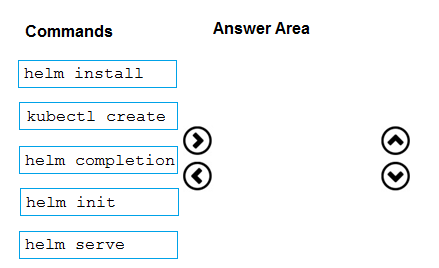
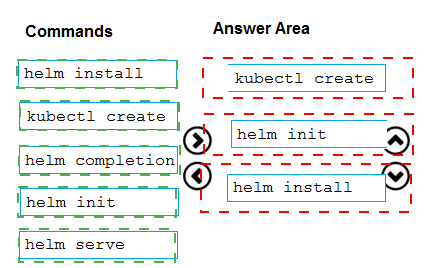
You need to recommend a solution for deploying charts by using Helm and Title to Azure
Kubemets Service (AKS) in an RBAC-enabled cluster.
Which three commands should you recommend be run m sequence? To answer, move the
appropriate commands from the list of commands to the answer area and arrange them in
the correct order.
You use Get for source control.
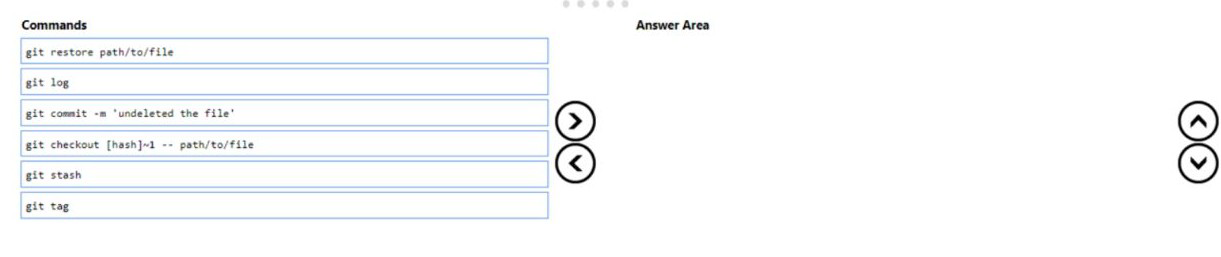
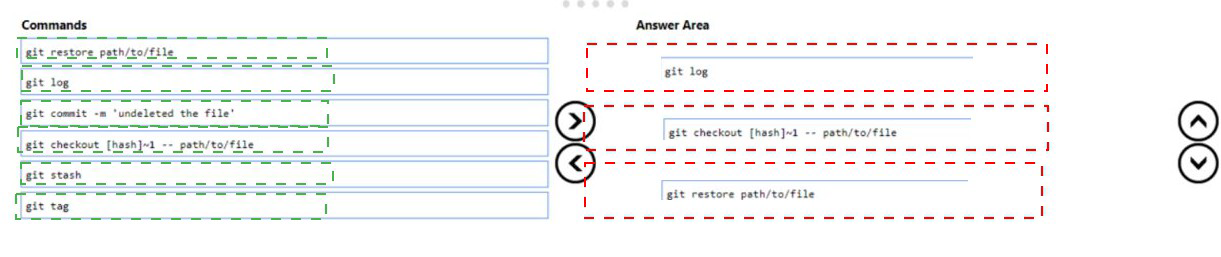
You delete a file, commit the changes, and continue to work.
You need to recover the deleted file.
Which three commands should you run in sequence? To answer, move the appropriate
commands from the list of commands to the answer area and arrange them in the correct
order.
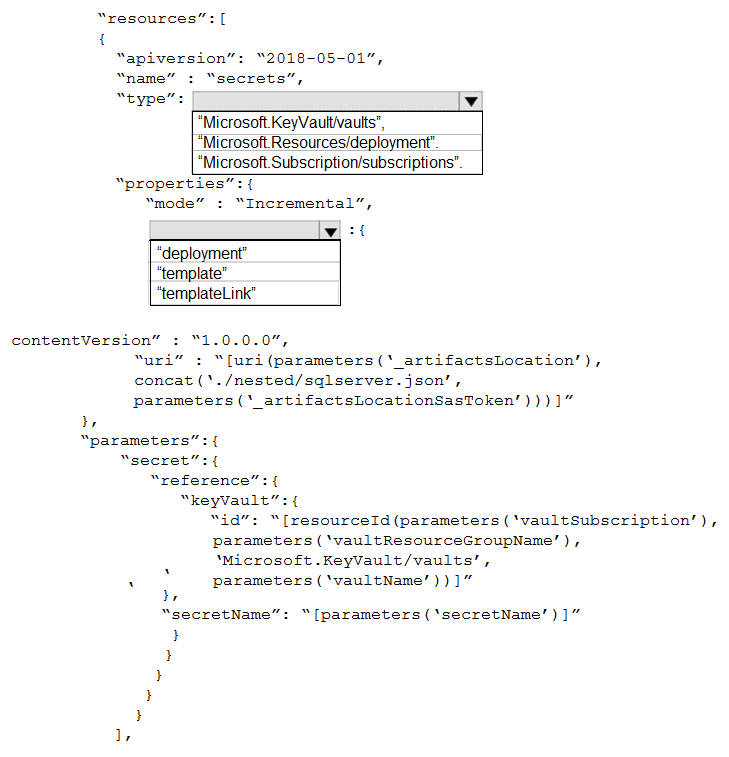
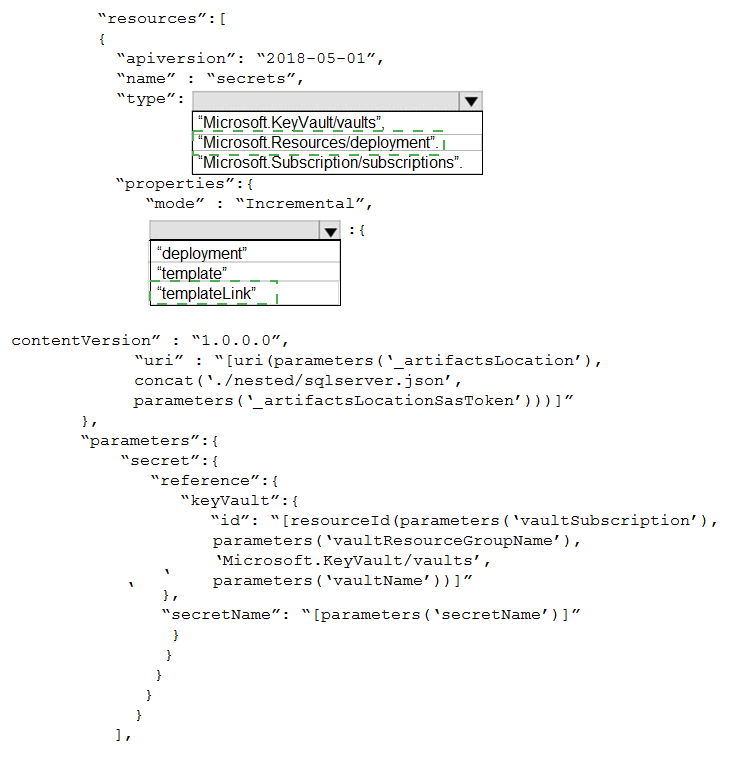
You have a project Azure DevOps.
You plan to create a build pipeline that will deploy resources by using Azure Resource
Manager templates. The templates will reference secretes stored in Azure Key Vault.
You need to ensure that you can dynamically generate the resource ID of the key vault
during template deployment.
What should you include in the template? To answer, select eh appropriate options in the
answer area.
NOTE: Each correct selection is worth one point.
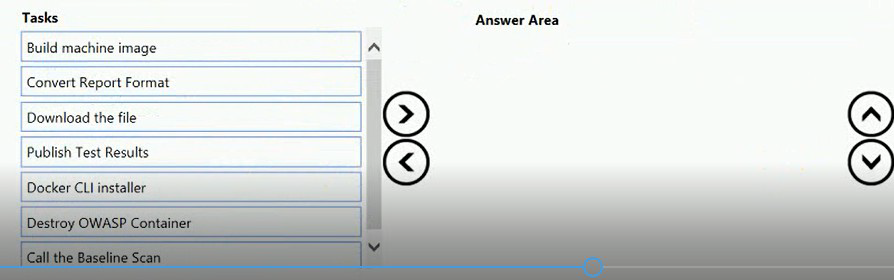
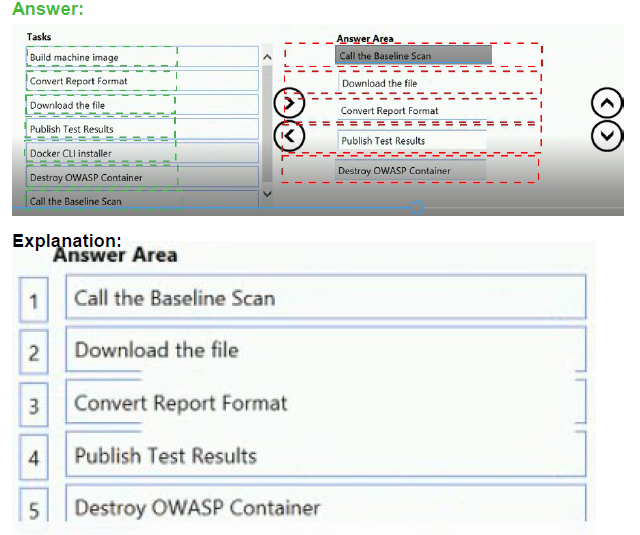
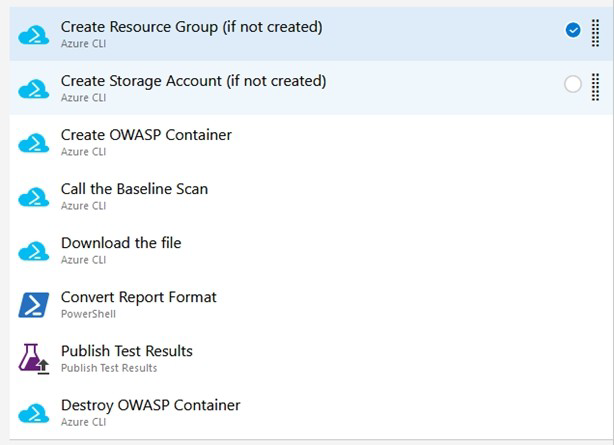
You have an Azure DevOps release pipeline as shown in the following exhibit. You need to complete the pipeline to configure OWASP ZAP for security testing.
Which five Azure CLI tasks should you add in sequence? To answer, move the tasks from
the list of tasks to the answer area and arrange them in the correct order.
Defining the Release Pipeline
Once the application portion of the Release pipeline has been configured, the security scan portion can be defined. In our example, this consists of 8 tasks, primarily using the Azure
CLI task to create and use the ACI instance (and supporting structures).
Otherwise specified, all the Azure CLI tasks are Inline tasks, using the default configuration
options.
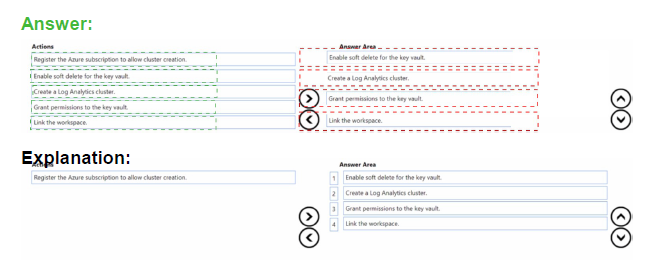
You have an Azure Key Vault that contains an encryption key named key1.
You plan to create a Log Analytics workspace that will store logging data.
You need to encrypt the workspace by using key1.
Which four actions should you perform in sequence? To answer, move the appropriate
actions from the list of actions to the answer area and arrange them in the correct order.

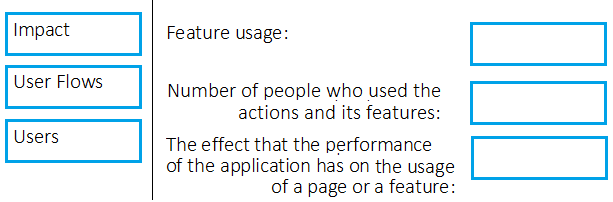
Your company wants to use Azure Application Insights to understand how user behaviors
affect an application.
Which Application Insights tool should you use to analyze each behavior? To answer, drag
the appropriate tools to the correct behaviors. Each tool may be used once, more than
once, or not at all. You may need to drag the split bar between panes or scroll to view
content.
NOTE: Each correct selection is worth one point.
Explanation:
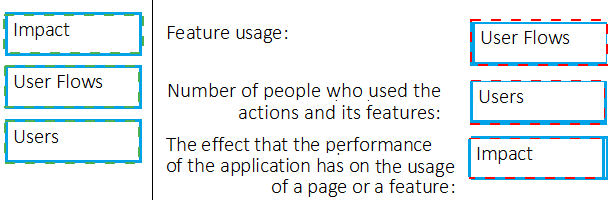
Box 1: User Flows
The User Flows tool visualizes how users navigate between the pages and features of your
site. It's great for answering questions like:
How do users navigate away from a page on your site?
What do users click on a page on your site?
Where are the places that users churn most from your site?
Are there places where users repeat the same action over and over?
Box 2: Users
Counting Users: The user behavior analytics tools don't currently support counting users or
sessions based on properties other than anonymous user ID, authenticated user ID, or
session ID.
Box 3: Impact
Impact analyzes how load times and other properties influence conversion rates for various
parts of your app. To put it more precisely, it discovers how any dimension of a page view,
custom event, or request affects the usage of a different page view or custom event.
You plan to deploy a runbook that will create Azure AD user accounts.
You need to ensure that runbooks can run the Azure PowerShell cmdlets for Azure Active
Directory.
To complete this task, sign in to the Microsoft Azure portal.
Answer: See solution below.
Explanation:
Azure Automation now ships with the Azure PowerShell module of version 0.8.6, which
introduced the ability to non-interactively authenticate to Azure using OrgId (Azure Active
Directory user) credential-based authentication. Using the steps below, you can set up
Azure Automation to talk to Azure using this authentication type.
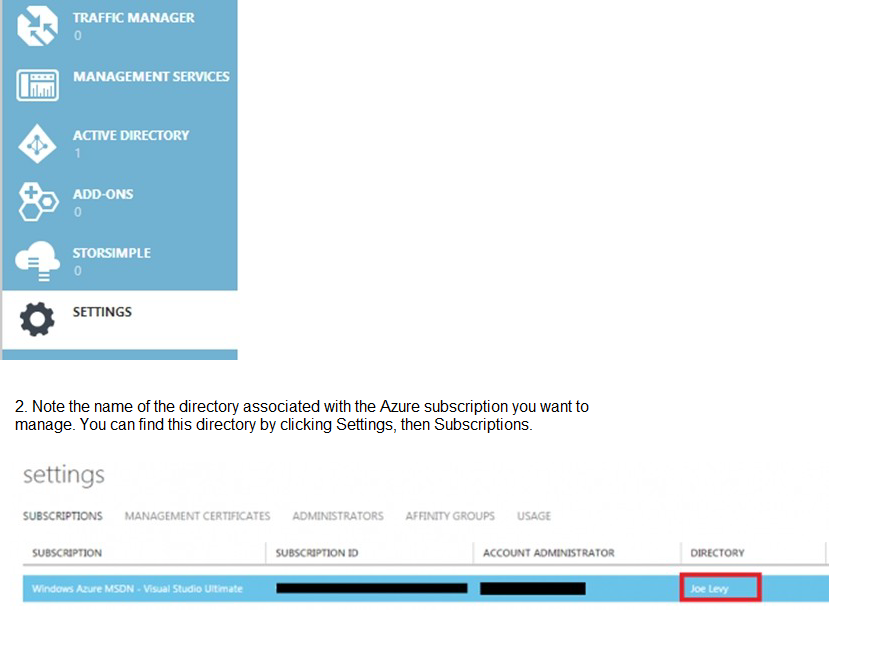
Step 1: Find the Azure Active Directory associated with the Azure subscription to manage:
1. Log in to the Azure portal as the service administrator for the Azure subscription you
want to manage using Azure Automation. You can find this user by logging in to the Azure
portal as any user with access to this Azure subscription, then clicking Settings, then
Administrators.
Step 2: Create an Azure Active Directory user in the directory associated with the Azure
subscription to manage:
You can skip this step if you already have an Azure Active Directory user in this directory.
and plan to use this OrgId to manage Azure.
1. In the Azure portal click on Active Directory service.
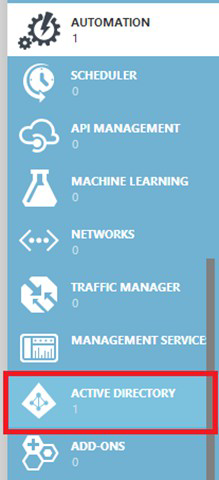
2. Click the directory name that is associated with this Azure subscription.
3. Click on the Users tab and then click the Add User button.
4. For type of user, select “New user in your organization.” Enter a username for the user to
create.
5. Fill out the user’s profile. For role, pick “User.” Don’t enable multi-factor authentication.
Multi-factor accounts cannot be used with Azure Automation.
6. Click Create.
7. Jot down the full username (including part after @ symbol) and temporary password.
Step 3: Allow this Azure Active Directory user to manage this Azure subscription.
1. Click on Settings (bottom Azure tab under StorSimple)
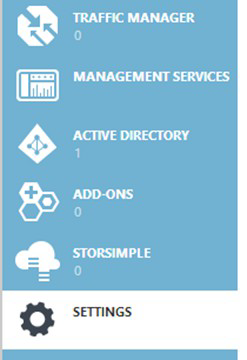
2. Click Administrators
3. Click the Add button. Type the full user name (including part after @ symbol) of the
Azure Active Directory user you want to set up to manage Azure. For subscriptions, choose
the Azure subscriptions you want this user to be able to manage. Click the check mark.
Step 4: Configure Azure Automation to use this Azure Active Directory user to manage this
Azure subscription
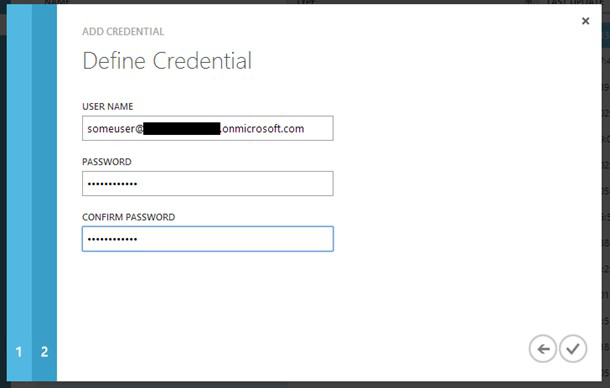
Create an Azure Automation credential asset containing the username and password of the
Azure Active Directory user that you have just created. You can create a credential asset in
Azure Automation by clicking into an Automation Account and then clicking the Assets tab,
then the Add Setting button.
Note: Once you have set up the Azure Active Directory credential in Azure and Azure
Automation, you can now manage Azure from Azure Automation runbooks using this
credential.
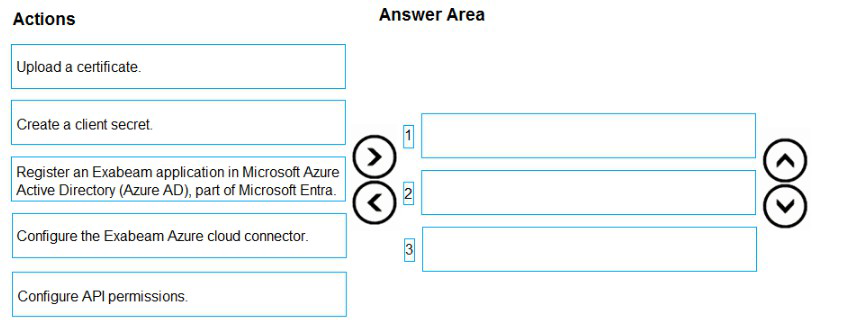
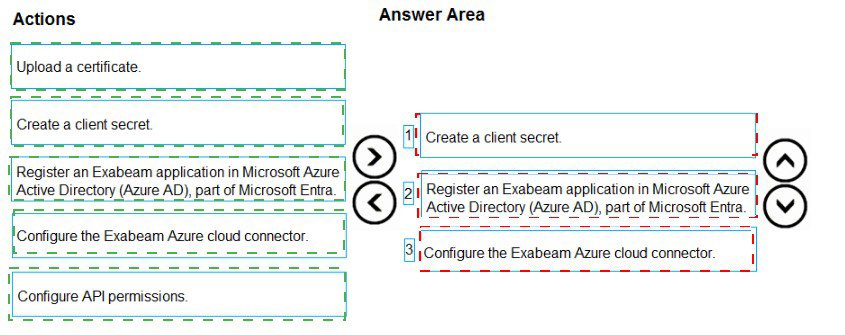
You use Extra beam Fusion SIEM and the Azure cloud platform.
You need to integrate Extra beam and Azure. The solution must use OAuth authentication.
Which three actions should you perform in sequence? To answer, move the appropriate
actions from the list of actions to the answer area and arrange them in the correct order.
You use Azure DevOps to manage the build and deployment of an app named App1.
You have a release pipeline that deploys a virtual machine named VM1.
You plan to monitor the release pipeline by using Azure Monitor
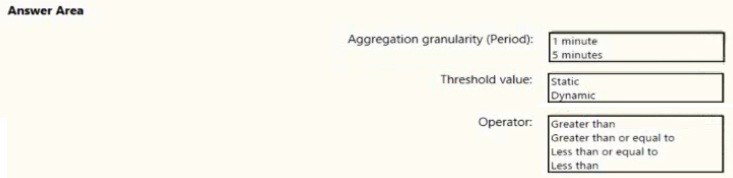
You need to create an alert to monitor the performance of VM1. The alert must be triggered
when the average CPU usage exceeds 70 percent for five minutes. The alert must
calculate the average once every minute.
How should you configure the alert rule? To answer, select the appropriate options in the
answer area.
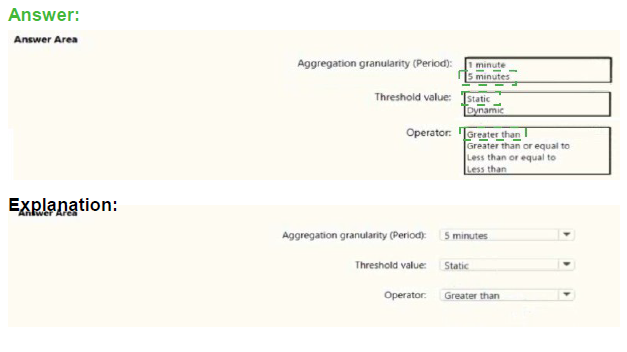
Box 1: 5 minutes
The alert must calculate the average once every minute.
Note: We [Microsoft] recommend choosing an Aggregation granularity (Period) that is
larger than the Frequency of evaluation, to reduce the likelihood of missing the first
evaluation of added time series
Box 2: Static
Box 3: Greater than
Example, say you have an App Service plan for your website. You want to monitor CPU
usage on multiple instances running your web site/app. You can do that using a metric alert
rule as follows:
Target resource: myAppServicePlan
Metric: Percentage CPU
Condition Type: Static
Dimensions
Instance = InstanceName1, InstanceName2
Time Aggregation: Average
Period: Over the last 5 mins
Frequency: 1 min
Operator: GreaterThan
Threshold: 70
Like before, this rule monitors if the average CPU usage for the last 5 minutes
exceeds 70%.
Aggregation granularity
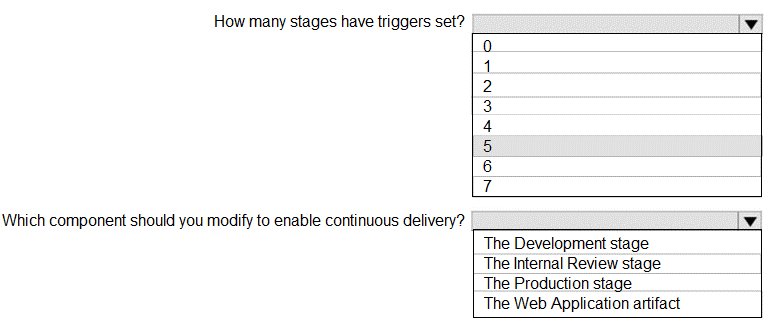
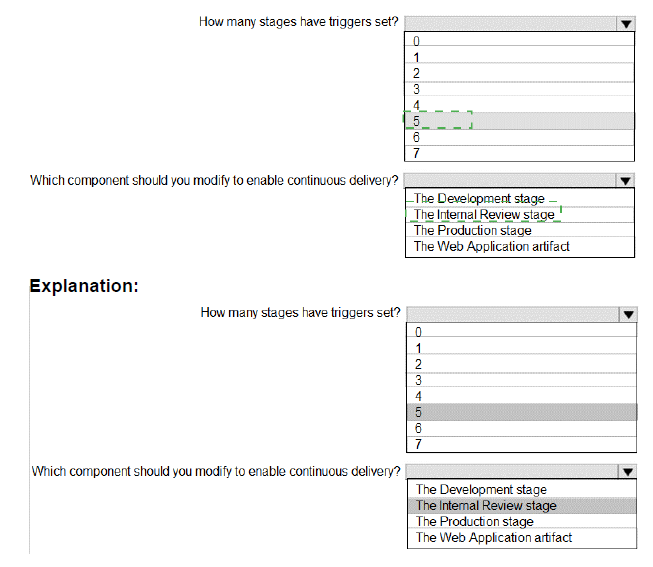
You are configuring a release pipeline in Azure DevOps as shown in the exhibit.
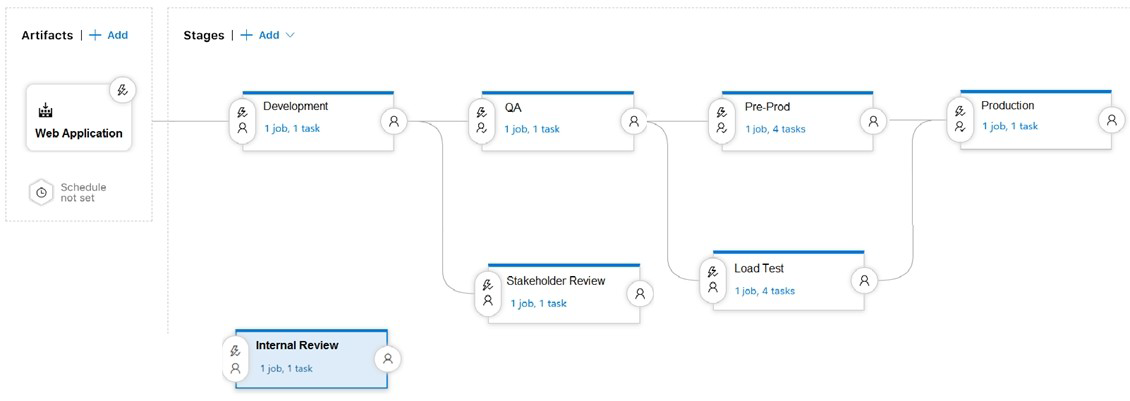
Use the drop-down menus to select the answer choice that answers each question based
on the information presented in the graphic.
NOTE: Each correct selection is worth one point.
| Page 6 out of 49 Pages |