Topic 4: Mix Questions Set
Note: This question is part of a series of questions that present the same scenario. Each
question in the series contains a unit solution that might meet the stated goals. Some
question sets might have more than one correct solution, while others might not have a
correct solution.
After you answer a question in this section, you will NOT be able to return to it. As a result,
these questions will not appear if the review screen.
You use an Azure Pipelines pipeline to build and release web apps.
You need to configure the pipeline to meet the following requirements:
• Only run when there is a change in the /webapp folder.
• Only run when a pr is created.
Solution: You configure the pipeline definition by using the following elements.
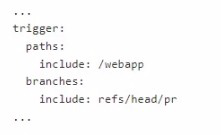
Does this meet the goal?
A. Yes
B. No
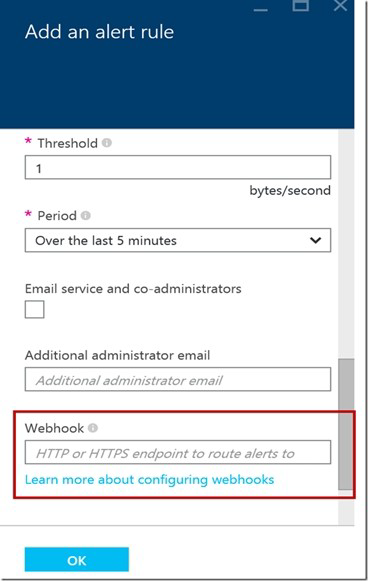
You need to create a notification if the peak average response time of an Azure web app
named az400-9940427-main is more than five seconds when evaluated during a fiveminute
period. The notification must trigger the “https://contoso.com/notify” webhook.
To complete this task, sign in to the Microsoft Azure portal.
Answer: See solution below.
Explanation:
1. Open Microsoft Azure Portal
2. Log into your Azure account and go to App Service and look under Monitoring then you
will see Alert.
3. Select Add an alert rule
4. Configure the alert rule as per below and click Ok.
Source: Alert on Metrics
Resource Group: az400-9940427-main
Resource: az400-9940427-main
Threshold: 5
Period: Over the last 5 minutes
Webhook: https://contoso.com/notify
You use Get for source control.
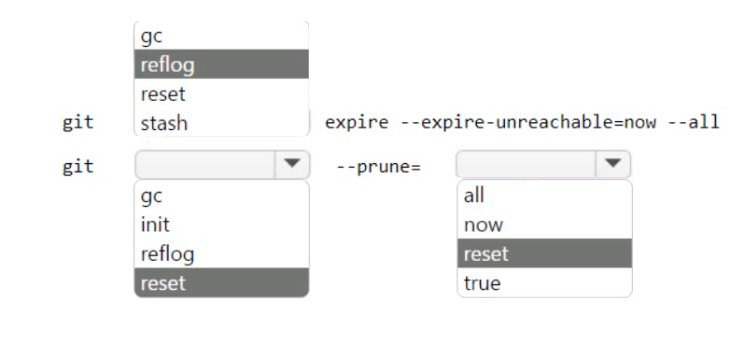
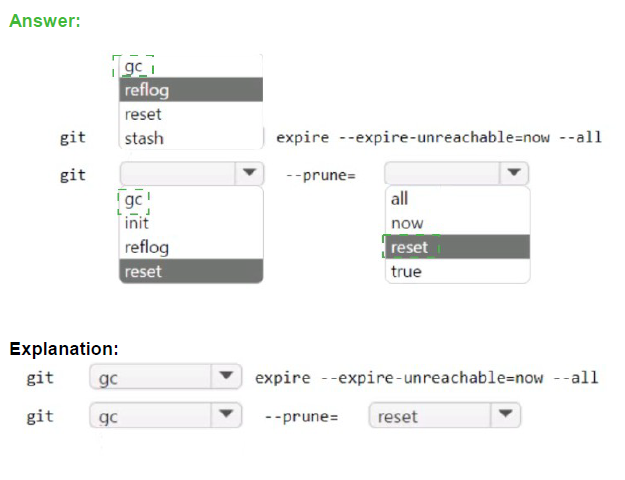
You need to optimize the performance of a repository. The solution must meet the following
requirements:
Permanently remove all items referenced only in the ref log.
Remove history that is NOT in any current branch.
How should you complete the command? To answer, select the appropriate options in the
answer area.
You have an Azure subscription that contains a resources group named RG1. RG1
contains the following resources:
• Four Azure virtual machines that run Windows Server and have Internet Information
Services (IIS) installed
• SQL Server on an Azure virtual machine
• An Azure Load Balancer
You need to deploy an application to the virtual machines in RG1 by using Azure Pipelines.
Which four actions should you perform in sequence? To answer, move the appropriate
actions from the List of actions to the answer area and arrange them in the correct order.


Step 1: Create an agent pool
Azure Pipelines provides a pre-defined agent pool named Azure Pipelines with Microsofthosted
agents.
Step 2: Create a deployment group
Deployment groups make it easy to define logical groups of target machines for
deployment, and install the required agent on each machine.
Step 3: Execute the Azure Pipelines Agent extension to the virtual machines
Install the Azure Pipelines Agent Azure VM extension
Step 4: Add and configure a deployment group job for the pipeline
Tasks that you define in a deployment group job run on some or all of the target servers,
depending on the arguments you specify for the tasks and the job itself.
You mc configuring Azure DevOps build pipelines.
You plan to use hosted build agents.
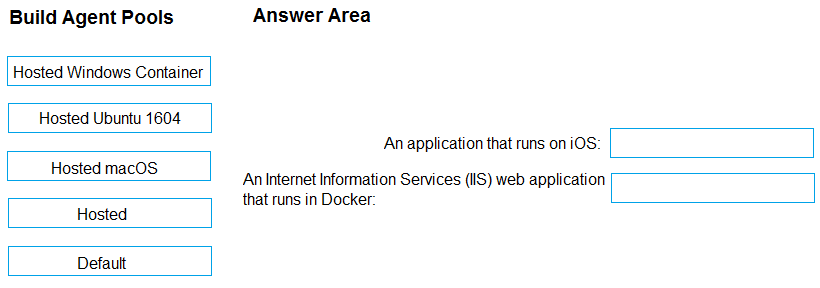
Which build agent pool should you use to compile each application type? To answer, drag the appropriate built agent pools to the correct application types. Each butt agent pool may be used once, more than once, or not at all. You may need to drag the split bar between panes or scroll to view content.
NOTE: Each correct selection is worth one point.
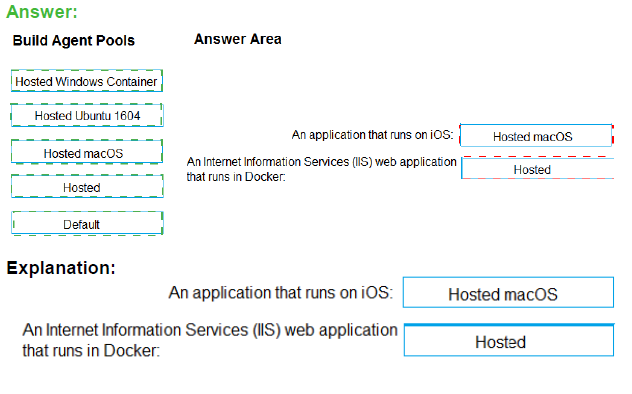
Box 1: Hosted macOS
Hosted macOS pool (Azure Pipelines only): Enables you to build and release on macOS
without having to configure a self-hosted macOS agent. This option affects where your data
is stored.
Box 2: Hosted
Hosted pool (Azure Pipelines only): The Hosted pool is the built-in pool that is a collection
of Microsoft-hosted agents.
Note: This question is part of a series of questions that present the same scenario. Each question in the series contains a unique solution that might meet the stated goals. Some question sets might have more than one correct solution, while others might not have a correct solution.
After you answer a question in this section, you will NOT be able to return to it. As a result,
these questions will not appear in the review screen.
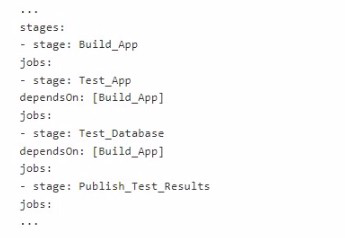
You need to use an Azure Pipelines pipeline to build and test an app and test the database
of the app. The solution must meet the following requirements.
• The test stages must be run in parallel.
• The Publish_Test_Results stage must always be run.
• The test stages must be run after successful completion of the build stage.
• The PubHsh_Test_ftesuHs stage must be run after completion of all the test stages.
Solution: You include the following elements in the YAML definition of the pipeline.
Does this meet the goal?
A. Yes
B. No
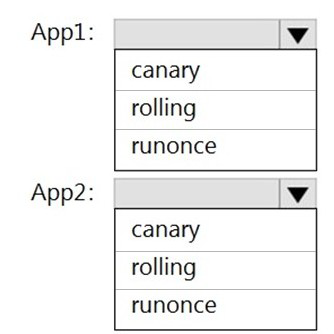
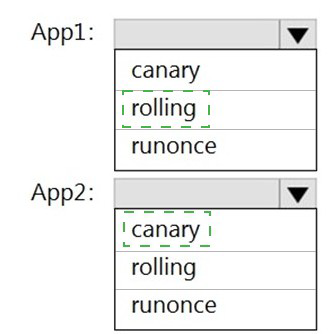
You are designing YAML-based Azure pipelines for the apps shown in the following table.
You need to configure the YAML strategy value for each app. The solution must minimize
app downtime.
Which value should you configure for each app? To answer, select the appropriate options
in the answer area.
NOTE: Each correct selection is worth one point.
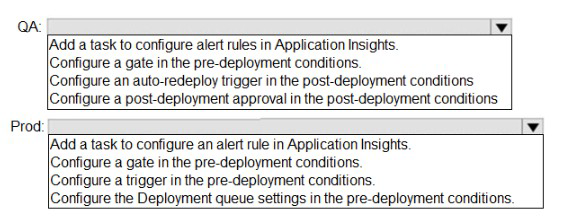
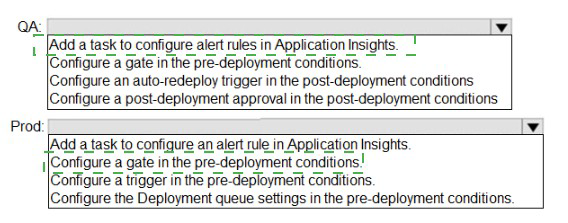
You have a project in Azure DevOps that contains a release pipeline. The pipeline contains two stages named QA and Prod. QA deploys code to an Azure web app named webapp1.
Prod deploys code to an Azure web app named webapp2.
You need to ensure that code deployments to webapp2 are blocked if Azure Application
Insights generates Failed requests alerts following the deployment of new code to
webapp1.
What should you do for each stage? To answer, select the appropriate options in the
answer area.
NOTE: Each correct selection is worth one point.
You plan to deploy a website that will be hosted in two Azure regions.
You need to create an Azure Traffic Manager profile named az40011566895n1-tm in a resource group named RG1lod11566895. The solution must ensure that users will always connect to a copy of the website that is in the same country.
To complete this task, sign in to the Microsoft Azure portal.
Answer: See solution below.
Explanation:
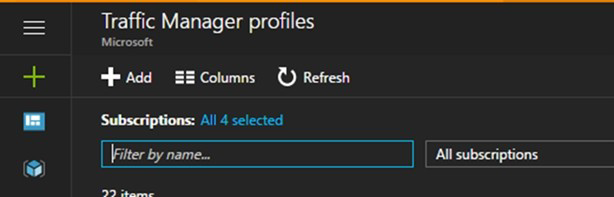
1. Go to the Azure portal, navigate to Traffic Manager profiles and click on the Add button
to create a routing profile.
2. In the Create Traffic Manager profile, enter, or select these settings:Name:
az40011566895n1-tmRouting method: GeographicResource group: RG1lod11566895 Note: Traffic Manager profiles can be configured to use the Geographic routing method so that users are directed to specific endpoints (Azure, External or Nested) based on which geographic location their DNS query originates from. This empowers Traffic Manager customers to enable scenarios where knowing a user’s geographic region and routing them based on that is important.
You have a protect in Azure DevOps.
You need to associate an automated test to a test case.
Which three actions should you perform in sequence? To answer, move the appropriate actions from the list of actions to the answer area and arrange them in the correct order.

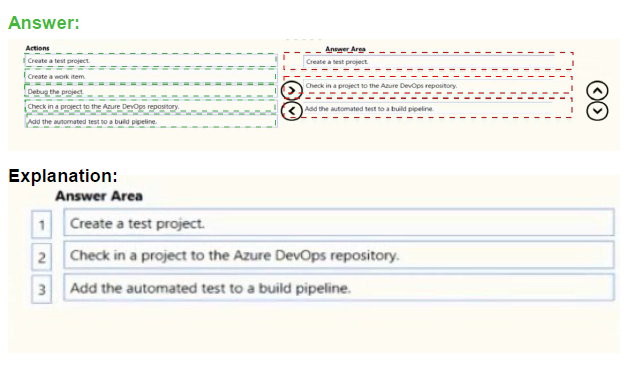
The process to associate an automated test with a test case is:
Create a test project containing your automated test. What types of tests are supported?
Check your test project into an Azure DevOps or Team Foundation Server (TFS) repository.
Create a build pipeline for your project, ensuring that it contains the automated test. What are the differences if I am still using a XAML build?
Use Visual Studio Enterprise or Professional 2017 or a later version to associate the automated test with a test case as shown below. The test case must have been added to a test plan that uses the build you just defined.
| Page 8 out of 49 Pages |