Topic 4: Mix Questions Set
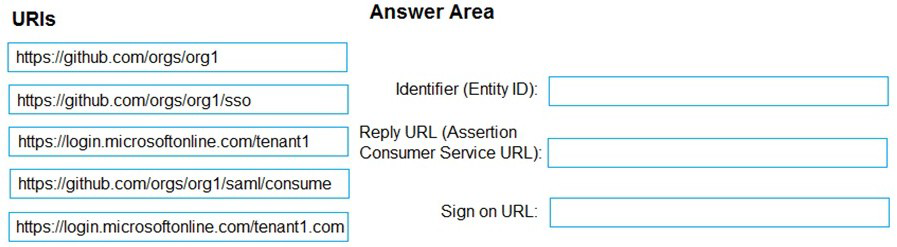
You have a GitHub organization named org1 and an Azure tenant named Tenant1.
You need to enable single sign-on (SSO) in Azure Active Directory (Azure AD) for the
users in org1.
Which URIs should you use for the SAML configuration in Azure AD? To answer, drag the
appropriate URIs to the correct settings. Each URI may be used once, more than once, or
not at all. You may need to drag the split bar between panes or scroll to view content.
NOTE: Each correct selection is worth one point.
Explanation:
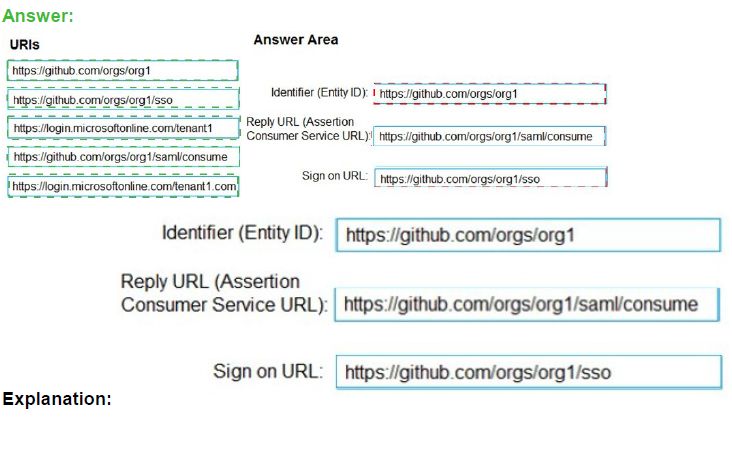
When configuring SAML-based SSO between Azure AD (as the identity provider) and GitHub (as the service provider), specific URIs must be configured correctly. The Identifier (Entity ID) uniquely identifies the application in Azure AD, the Reply URL is where Azure AD sends SAML responses after authentication, and the Sign-on URL is where users initiate the login process.
Correct Option:
Identifier (Entity ID): https://github.com/orgs/org1
The Entity ID uniquely identifies the GitHub organization as the service provider in the SAML federation. GitHub expects this specific format using the organization name to establish trust between Azure AD and the GitHub organization for SSO.
Reply URL (Assertion Consumer Service URL): https://github.com/orgs/org1/sso
The Assertion Consumer Service URL is where GitHub receives and processes SAML assertions from Azure AD after successful authentication. This endpoint handles the SAML response containing the user's identity and claims.
Sign on URL: https://github.com/orgs/org1/sso
The Sign-on URL is the initial endpoint users access to begin the SSO process. For GitHub organizations, this URL directs users to the organization-specific SSO initiation page that triggers authentication through Azure AD.
Incorrect Option:
Using https://github.com/orgs/org1/sso for Identifier: The Identifier must be the base organization URL, not the SSO endpoint, as it serves as the unique identifier for the service provider entity.
Using https://github.com/orgs/org1 for Reply URL: The Reply URL must be the specific endpoint that accepts SAML responses, which is the /sso path, not the base organization URL.
Using any other URI combinations: GitHub specifically requires these exact URL patterns for SAML configuration to function correctly.
Reference:
Microsoft Learn: Configure SAML-based single sign-on for applications
GitHub Docs: Enabling and testing SAML single sign-on for your organization
Microsoft Learn: SAML 2.0 authentication with Azure Active Directory
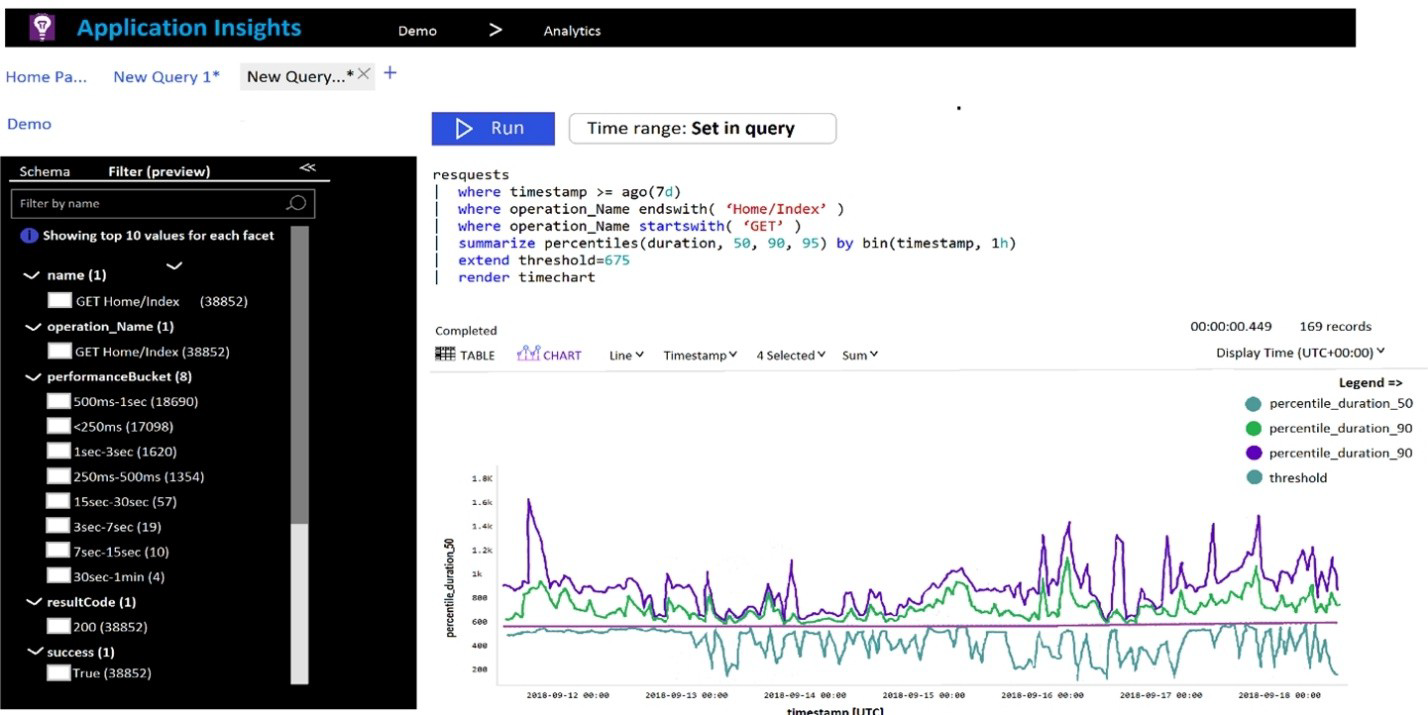
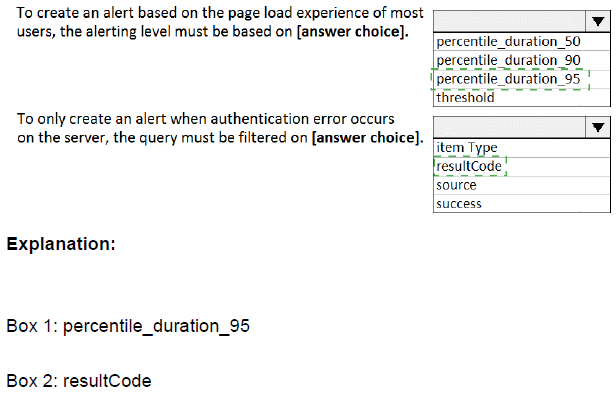
You plan to create alerts that will be triggered based on the page load performance of a
home page.
You have the Application Insights log query shown in the following exhibit.
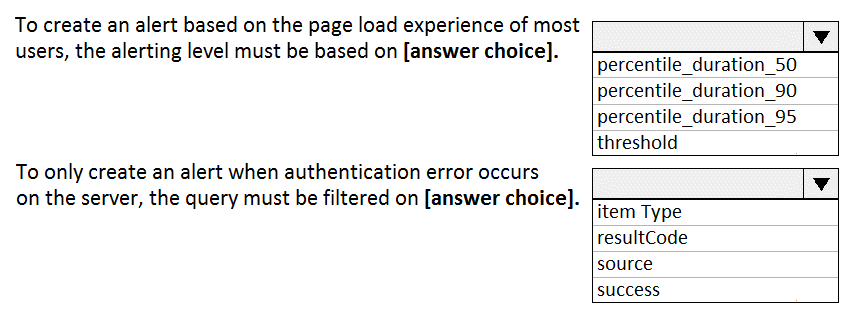
Use the drop-down menus to select the answer choice that completes each statement
based on the information presented in the graphic.
NOTE: Each correct selection is worth one point.
Explanation:
The Application Insights query analyzes request performance for the "GET Home/Index" operation over the past 7 days. It calculates the 50th, 90th, and 95th percentile durations hourly and compares them against a threshold of 675ms. The schema panel shows that 38,852 requests were analyzed, with most completing between <250ms and 1 second.
Correct Option:
Based on the exhibit, the query is analyzing the requests table, filtering for the operation name ending with 'Home/Index' and starting with 'GET'. The query summarizes the duration percentiles and sets a threshold of 675ms for alerting purposes.
Incorrect Option:
The query is not analyzing:
exceptions - There are no exception tables or error data being queried
traces - No trace logs are being analyzed
availabilityResults - This is not testing availability, but rather performance of actual user requests
pageViews - While related to page performance, this query specifically targets the requests table
Reference:
Microsoft Learn: Application Insights log queries
Microsoft Learn: Create alerts from Application Insights
Microsoft Learn: Kusto Query Language (KQL) overview
Your company plans to implement a new compliance strategy that will require all Azure web apps to be backed up every five hours.
You need to back up an Azure web app named az400-11566895-main every five hours to
an Azure Storage account in your resource group.
To complete this task, sign in to the Microsoft Azure portal.
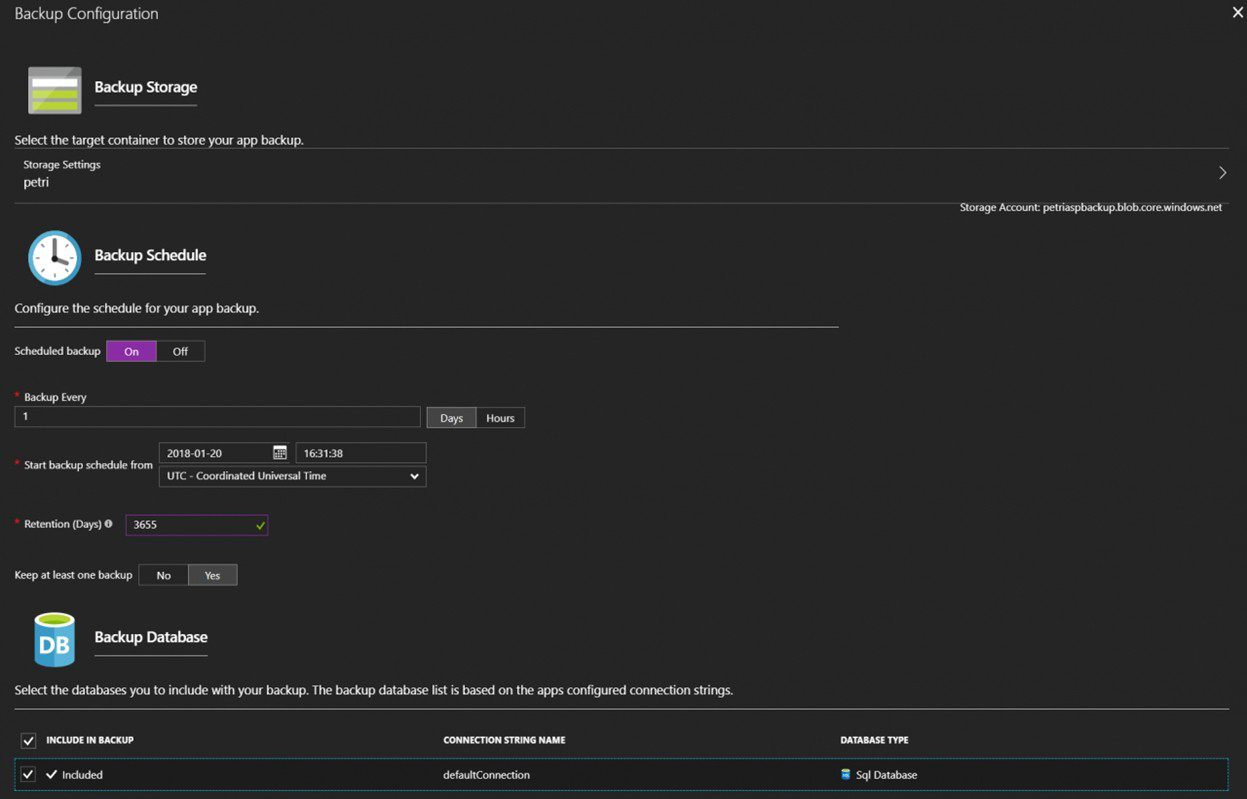
Steps to configure backup for Azure Web App every five hours:
Sign in to the Azure portal at https://portal.azure.com
Navigate to your Web App:
In the search bar, type "az400-11566895-main"
Select your App Service from the search results
Configure Backup:
In the left menu, under Settings, select Backups
Click Configure (if not already configured)
Set Backup to On
Under Storage account, select the appropriate storage account in your resource group
Under Backup schedule, set the interval to Every 5 hours
Configure retention settings as needed (e.g., retain backups for 7 days)
Click Save
Verify the configuration:
After saving, you should see the backup schedule listed as "Every 5 hours"
The first backup will run according to the schedule
Important Notes:
Backups include your web app content, configuration, and any connected databases (if configured)
The storage account must be in the same region as your web app
You may incur storage costs for the backup files
The "Every 5 hours" option means backups will run at 5-hour intervals (e.g., at 12:00 AM, 5:00 AM, 10:00 AM, etc.)
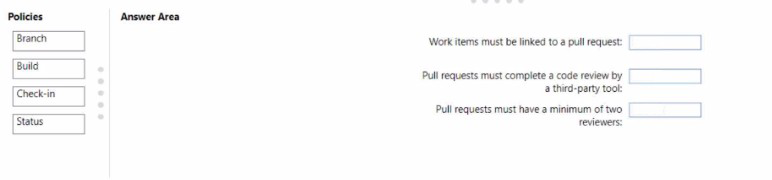
You create a Git repository named Repo1 in Azure Repos.
You need to configure Repo1 to meet the following requirements:
• Work items must be linked to a pull request.
• Pull requests must have a minimum of two reviewers.
* Pull requests must complete a code review by using a thirty-party tool.
The solution must minimize administrative effort.
Which type of policy should you use for each requirement? To answer, drag the
appropriate policy types to the correct requirements. Each policy type may be used once,
more than once, or not at all.
You may need to drag the split bar between panes or scroll to view content.
Explanation:
Azure Repos provides branch policies to enforce code quality and collaboration standards. Different policy types address specific requirements: work item linking, reviewer count, and integration with external tools. Selecting the appropriate policy type for each requirement ensures compliance while minimizing manual administrative overhead.
Correct Option:
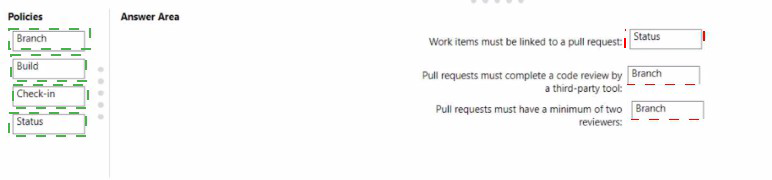
Work items must be linked to a pull request: Status
The Status policy allows integration with external services and tools to validate pull requests. For work item linking, you can use a status policy that checks whether work items are linked before allowing completion. This can be enforced through built-in Azure DevOps requirements or custom status checks.
Pull requests must complete a code review by a third-party tool: Status
Third-party code review tools (like SonarQube or GitHub Advanced Security) integrate with Azure Repos using status policies. The status policy waits for the external tool to report a successful review before allowing the pull request to be completed, ensuring external validation is performed.
Pull requests must have a minimum of two reviewers: Branch
Branch policies include settings for requiring a minimum number of reviewers. This is configured directly in the branch policy settings under "Require a minimum number of reviewers," where you can specify that at least two reviewers must approve the pull request before it can be merged.
Incorrect Option:
Build: This policy type requires a build pipeline to succeed before merging. While useful for validating code compilation and tests, it does not enforce work item linking or external code reviews.
Check-in: This is not a standard Azure Repos policy type. The term "check-in" is associated with older TFVC version control, not Git branch policies in Azure Repos.
Reference:
Microsoft Learn: Branch policies and settings in Azure Repos
Microsoft Learn: Require a minimum number of reviewers
Microsoft Learn: Configure status policies
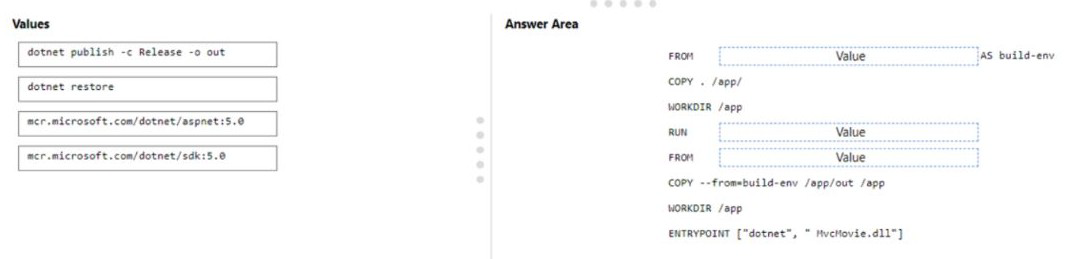
You are creating a container for an ASP.NET Core app.
You need to create a Docker file to build the image. The solution must ensure that the size
of the image is minimized
How should you configure the file? To answer, drag the appropriate values to the correct
targets. Each value may be used once, more than once, or not at all. You may need to drag
the split bar between panes or scroll to view content.
NOTE: Each correct selection is worth one point.
Explanation:
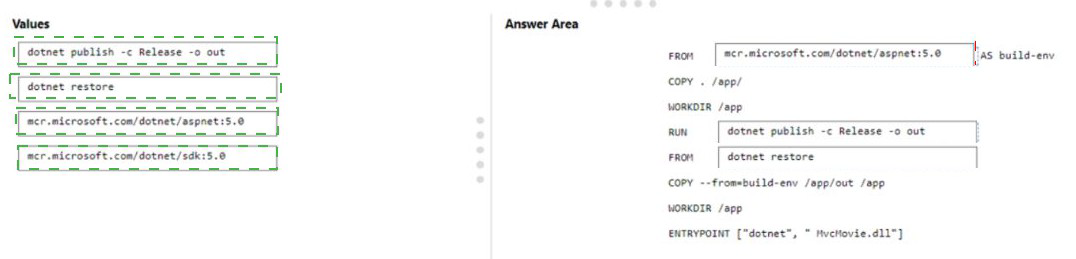
Multi-stage Docker builds optimize image size by using separate stages for building and running the application. The build stage uses the full SDK image to compile the app, while the final runtime stage uses the smaller ASP.NET runtime image. Only the compiled output is copied to the final image, excluding build tools and source code.
Correct Option:
First blank (FROM Value AS build-env): mcr.microsoft.com/dotnet/sdk:5.0
The SDK image contains the .NET SDK and build tools necessary to compile and publish the application. This is used in the build stage to restore dependencies and build the application.
Second blank (RUN Value): dotnet publish -c Release -o out
The dotnet publish command compiles the application and outputs the publish artifacts to the specified folder. This creates the deployable files that will be copied to the final runtime image.
Third blank (FROM Value): mcr.microsoft.com/dotnet/aspnet:5.0
The ASP.NET runtime image is significantly smaller than the SDK image as it contains only the runtime components needed to run the application. Using this for the final stage minimizes the overall image size.
Incorrect Option:
dotnet restore:
While this command restores NuGet packages, it is typically included in the build process. However, dotnet publish automatically restores packages, so using restore separately is unnecessary and would add an extra layer.
mcr.microsoft.com/dotnet/aspnet:5.0 for build stage:
The runtime image lacks SDK tools and cannot compile the application.
mcr.microsoft.com/dotnet/sdk:5.0 for final stage:
Using the SDK image for the final stage would significantly increase image size (several hundred MB larger) by including unnecessary build tools.
Reference:
Microsoft Learn: Multi-stage builds for ASP.NET Core
Microsoft Learn: Docker images for ASP.NET Core
Docker Docs: Multi-stage builds
Your company has a project in Azure DevOps.
You plan to create a release pipeline that will deploy resources by using Azure Resource
Manager templates. The templates will reference secrets stored in Azure Key Vault.
You need to recommend a solution for accessing the secrets stored in the key vault during
deployments. The solution must use the principle of least privilege.
What should you include in the recommendation? To answer, drag the appropriate
configurations to the correct targets. Each configuration may be used once, more than
once, or not at all. You may need to drag the split bar between panes or scroll to view
content.
NOTE: Each correct selection is worth one point.
Explanation:
When deploying Azure resources using ARM templates that reference Key Vault secrets, secure access must be established. Azure DevOps requires an Azure service connection with appropriate permissions to access the key vault. Following least privilege principles means granting only the specific permissions needed for deployment (GET and LIST) to a dedicated service principal rather than broader permissions.
Correct Option:
First target (Authentication method): Azure service connection with service principal
An Azure service connection in Azure DevOps uses a service principal to authenticate with Azure. This provides a secure, managed identity that can be granted specific permissions to access resources like Key Vault during deployments.
Second target (Key Vault access): Grant GET and LIST permissions to the service principal
The service principal used by the Azure service connection needs only GET and LIST permissions on the Key Vault to retrieve secrets during deployment. This follows least privilege by not granting permissions to create, update, or delete secrets.
Incorrect Option:
Personal Access Token (PAT):
PATs are user-specific tokens for Azure DevOps API access, not for authenticating to Azure resources during deployments.
Azure AD user account:
Using a user account would require interactive authentication and violates least privilege by granting human-level access to an automated process.
Grant all Key Vault permissions:
Giving full permissions (CREATE, UPDATE, DELETE) would exceed what's needed for deployment and violate least privilege principles.
Use inline script with embedded credentials: This is insecure and doesn't use proper Azure DevOps integration for secret management.
Reference:
Microsoft Learn: Use Azure Key Vault secrets in Azure Pipelines
Microsoft Learn: Azure Resource Manager service connection
Microsoft Learn: Best practices for using Azure Key Vault
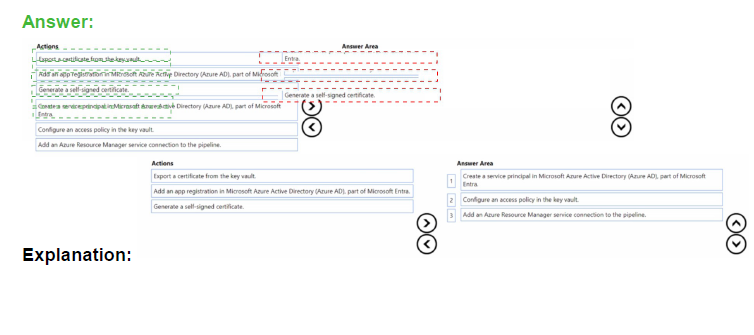
You are configuring an Azure DevOps deployment pipeline. The deployed application will
authenticate to a web service by using a secret stored in an Azure key vault.
You need to use the secret in the deployment pipeline.
Which three actions should you perform in sequence? To answer, move the appropriate
actions from the list of actions to the answer area and arrange them in the correct order.

Explanation:
To use a secret from Azure Key Vault in a deployment pipeline, you need to establish proper authentication and authorization. This involves creating an identity that Azure DevOps can use, granting that identity access to the key vault, and then configuring the pipeline connection to use that identity for secret retrieval during deployments.
Correct Option:
First action: Add an app registration in Microsoft Azure Active Directory (Azure AD)
The first step is to register an application in Azure AD. This creates an identity that will be used by Azure DevOps to authenticate and access Azure resources. The app registration provides the foundation for creating a service principal.
Second action: Create a service principal in Microsoft Azure Active Directory (Azure AD)
From the app registration, you create a service principal. This service principal acts as the identity for the Azure DevOps pipeline when it needs to authenticate to Azure and access resources like Key Vault during deployments.
Third action: Configure an access policy in the key vault
With the service principal created, you then configure an access policy in the key vault that grants the service principal the necessary permissions (typically GET and LIST) to retrieve secrets. This ensures the pipeline can access only the specific secrets it needs.
Incorrect Option:
Export a certificate from the key vault: This is a retrieval action that would happen after access is configured, not a setup step for pipeline configuration.
Generate a self-signed certificate: While certificates can be used for authentication, this is not the primary sequence for pipeline secret access using service principal authentication.
Add an Azure Resource Manager service connection to the pipeline: This would be the final step after creating the service principal and configuring access, making it the fourth action not included in the three required steps.
Reference:
Microsoft Learn: Use Azure Key Vault secrets in Azure Pipelines
Microsoft Learn: Service principals and Azure DevOps
Microsoft Learn: Key Vault access policies
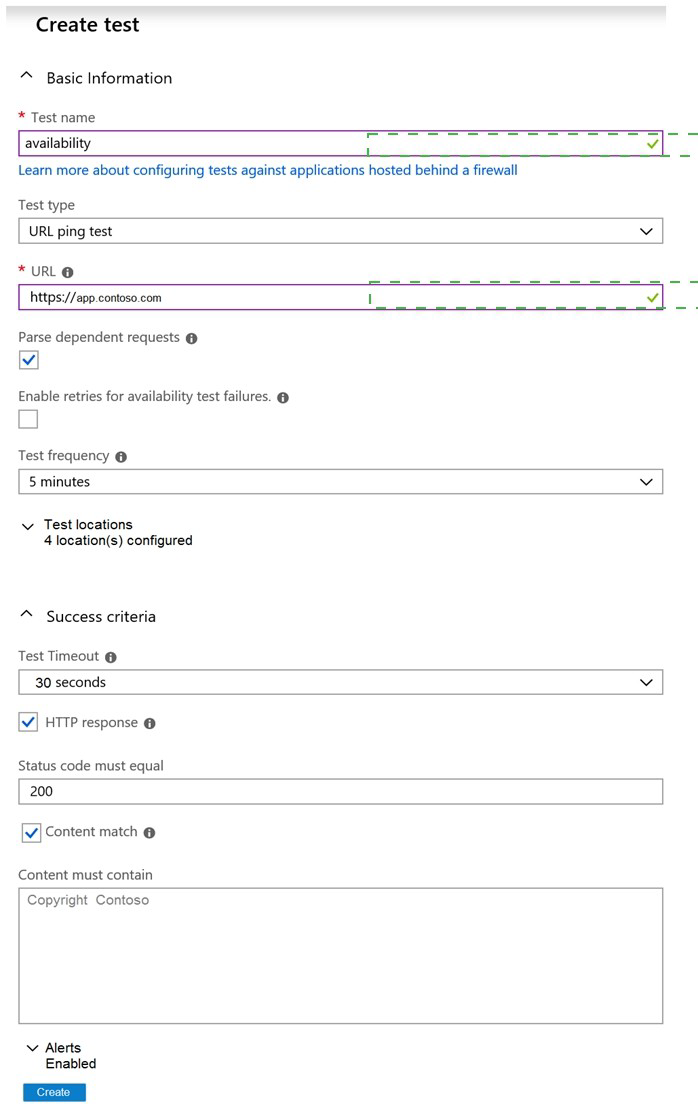
You have an application named App1 that has a custom domain of app.contoso.com.
You create a test in Azure Application Insights as shown in the following exhibit.
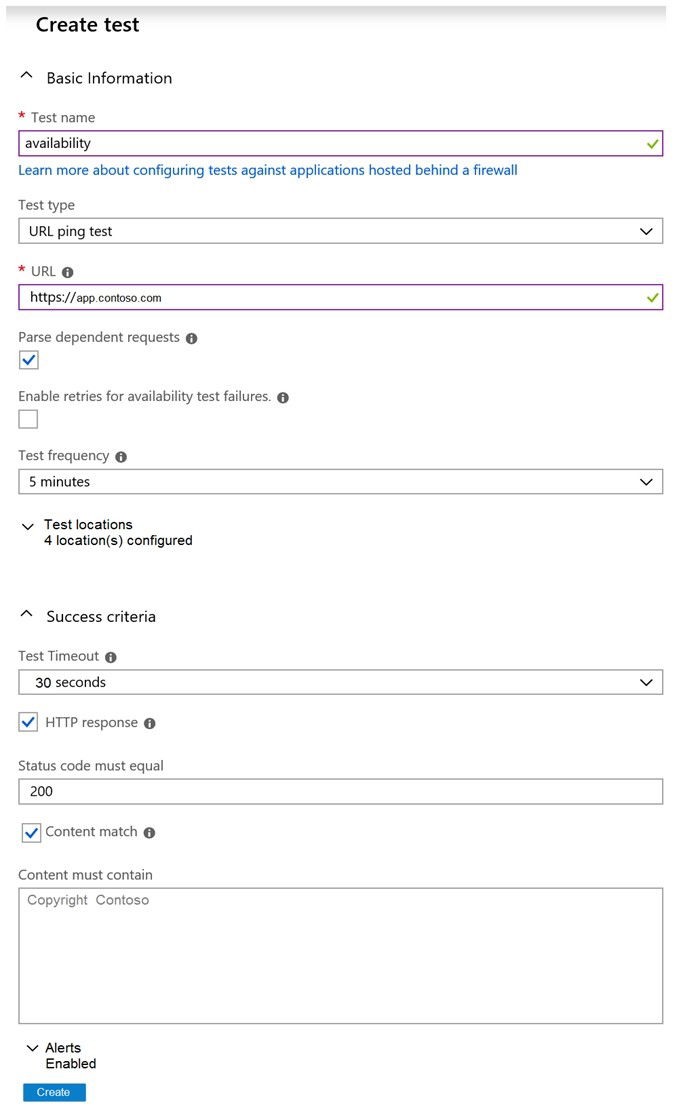
Use the drop-down menus to select the answer choice that completes each statement
based on the information presented in the graphic.
NOTE: Each correct selection is worth one point.
Explanation:
The exhibit shows an Application Insights availability test configuration. This is a URL ping test that checks the availability of https://app.contoso.com every 5 minutes from 4 test locations. The test expects an HTTP 200 response and verifies that the page content contains "Copyright Contoso" within 30 seconds.
Correct Option:
Based on the exhibit, this is an availability test configured as a URL ping test. The test runs every 5 minutes from 4 test locations. It validates both HTTP response (status code 200) and content match (presence of "Copyright Contoso"). The test will fail if the page does not load within 30 seconds.
Incorrect Option:
This is not a performance test - performance tests measure load times and scalability
This is not a unit test - unit tests validate code functionality, not availability
This is not a load test - load tests simulate multiple users to test scalability
This is not testing API endpoints exclusively - it's testing a web page with content validation
Reference:
Microsoft Learn: Availability tests in Application Insights
Microsoft Learn: URL ping test configuration
Microsoft Learn: Monitor availability with Application Insights
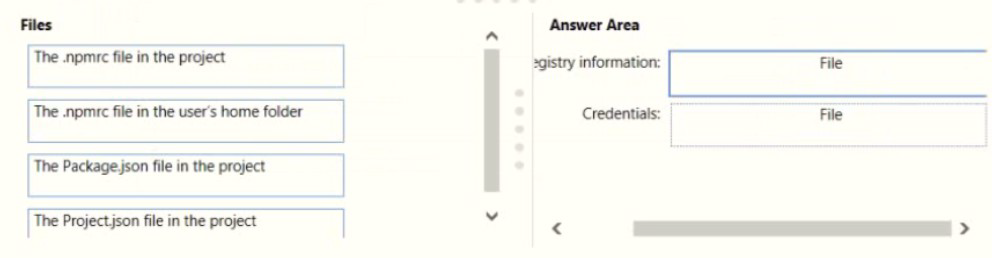
You are implementing a package management solution for a Node.js application by using
Azure Artifacts.
You need to configure the development environment to connect to the package repository.
The solution must minimize the likelihood that credentials will be leaked.
Which file should you use to configure each connection? To answer, drag the appropriate
files to the correct connections. Each file may be used once, more than once, or not at all.
You may need to drag the split bar between panes or scroll to view content
NOTE: Each correct selection is worth one point.
Explanation:
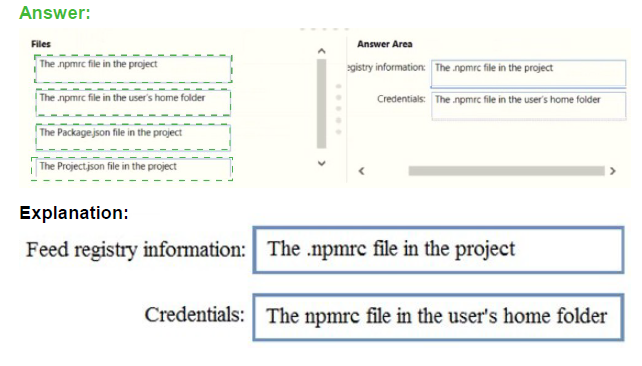
In Node.js package management with Azure Artifacts, registry configuration and credential storage should be separated to minimize security risks. The project-level .npmrc file can safely store registry information since it's typically committed to source control, while credentials should be stored in the user-specific .npmrc file which remains outside the repository.
Correct Option:
Registry information: The .npmrc file in the project
The project-level .npmrc file (committed to the repository) should contain the registry URL and scope mappings. This information is not sensitive and can be shared across the team. Storing it in the project file ensures all developers use the correct registry configuration.
Credentials: The .npmrc file in the user's home folder
The user-specific .npmrc file (located in the user's home directory) should store authentication credentials like base64-encoded PAT tokens. This file is never committed to source control, significantly reducing the risk of credential leakage through repository exposure.
Incorrect Option:
Package.json: This file defines project dependencies and metadata but does not contain registry or credential configuration for npm.
Project.json: This is not a standard Node.js/npm file; it's associated with .NET Core projects, not Node.js applications.
Reference:
Microsoft Learn: npm registry authentication with Azure Artifacts
Microsoft Learn: Set up your npm client with Azure Artifacts
npm Docs: .npmrc configuration files
You have an Azure subscription that contains a user named User1.
You have an Azure Resource Manager (ARM) template named Template 1.
You plan to perform the following actions:
• Deploy an Azure key vault named KV1.
• Deploy Azure resources by using Template1 to retrieve secrets from KV1
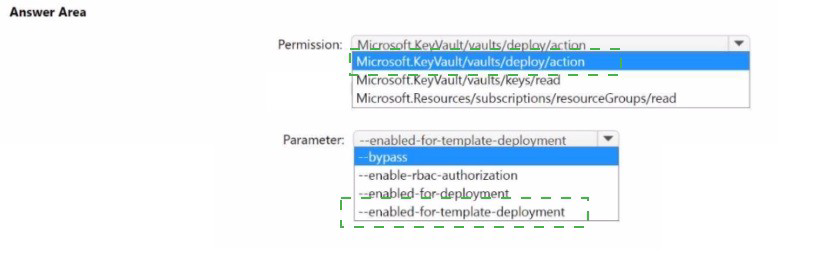
You need to ensure that User1 can deploy Template1 The solution must follow the principle
of least privilege.
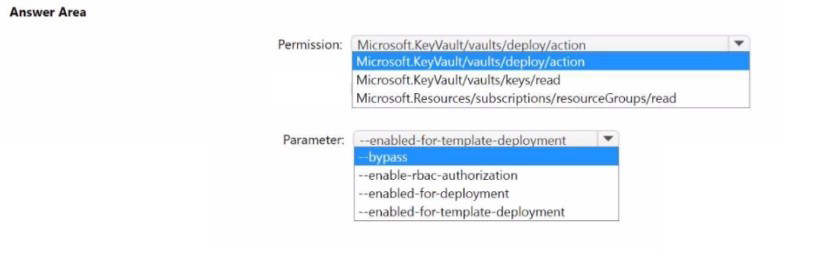
Which permission should you grant to User1, and which parameter should be specified
when you create KV1? To answer, select the appropriate options in the answer area.
NOTE: Each correct selection is worth one point.
Explanation:
To deploy an ARM template that references Key Vault secrets, two requirements must be met. First, the user deploying the template needs specific permissions to access the key vault during deployment. Second, the key vault must be configured with a parameter that allows it to be accessed by Azure Resource Manager for template deployments.
Correct Option:
Permission: Microsoft.KeyVault/vaults/deploy/action
This specific permission allows a user to deploy an ARM template that references secrets from a key vault. It grants just enough access to enable template deployment without giving broader permissions to manage the key vault itself, following the principle of least privilege.
Parameter: --enabled-for-template-deployment
This parameter must be set to true when creating or updating the key vault. It allows Azure Resource Manager to access secrets in the key vault during template deployments. Without this setting, even with proper permissions, the template deployment would fail when trying to retrieve secrets.
Incorrect Option:
Microsoft.KeyVault/vaults/keys/read: This permission allows reading key material but is not sufficient for template deployment scenarios where ARM needs special access to retrieve secrets during deployment.
Microsoft.Resources/subscriptions/resourceGroups/read: This is a read permission at the resource group level and does not grant access to key vault secrets for template deployment.
--enabled-for-deployment: This parameter enables access for Azure Virtual Machines to use the key vault for certificate deployment, not for ARM template deployments.
--enable-rbac-authorization: This enables role-based access control for the key vault but does not specifically enable template deployment access.
--bypass: This parameter is used with network rules to bypass restrictions and is not related to template deployment access.
Reference:
Microsoft Learn: Use Azure Key Vault to pass secure parameter value during deployment
Microsoft Learn: Microsoft.KeyVault/vaults/deploy/action permission
Microsoft Learn: Enable template deployment on Key Vault
| Page 2 out of 49 Pages |