Topic 2: Contoso Case Study: 2
Overview
Existing Environment
Contoso, Ltd. is a manufacturing company that has a main office in Chicago.
Requirements
Contoso plans to improve its IT development and operations processes implementing Azue
DevOps principles. Contoso has an Azure subscription and creates an Azure DevOPs
organization.
The Azure DevOps organization includes:
The Docker extension
A deployment pool named Pool7 that contains 10 Azure virtual machines that run
Windows Server 2016.
The Azure subscription contains an Azure Automation account.
Planned Changes
Contoso plans to create projects in Azure DevOps as shown in the following table.

Technical Requirements
Contoso identities the following technical requirements:
• Implement build agents rot Project 1.
• Whenever possible, use Azure resources
•Avoid using deprecated technologies
• Implement a code flow strategy for Project2 that will:
•Enable Team 2 to submit pull requests for Project2.
• Enable Team 2 to work independently on changes to a copy of Project?
• Ensure that any intermediary changes performed by Tram2 on a copy of Project2 will be
subject to the same restrictions as the ones defied in the build policy of Project2.
• Whenever possible. Implement automation and minimize administrative effort.
• Implement Protect3, Project5, Project6, and Project7 based on the planned changes.
• Implement Project4 and configure the project to push Docker images to Azure Container
Reentry.
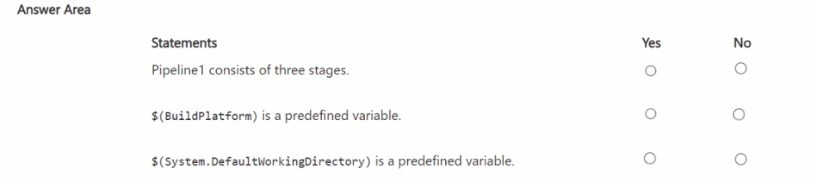
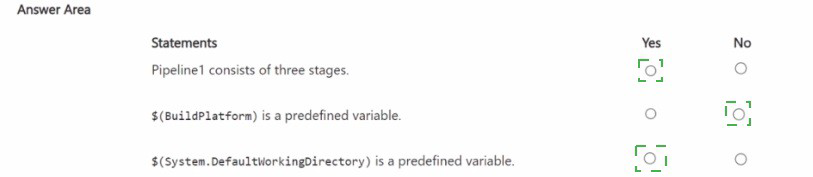
You have an Azure Pipelines pipeline named Pipeline1 that has the following YAML definition.
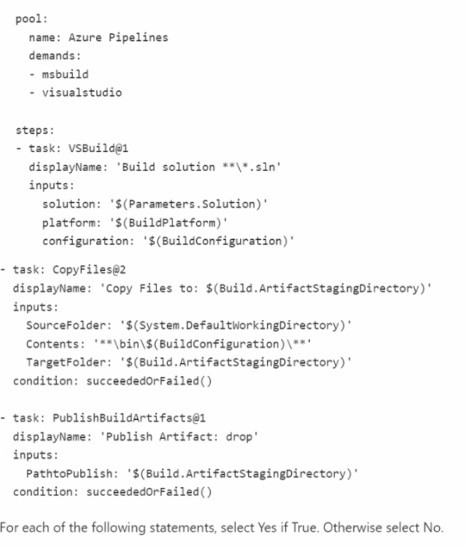
NOTE: Each correct selection is worth one point.
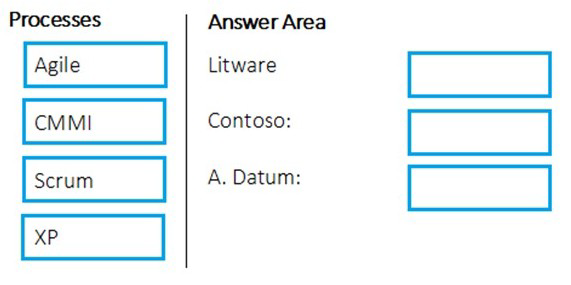
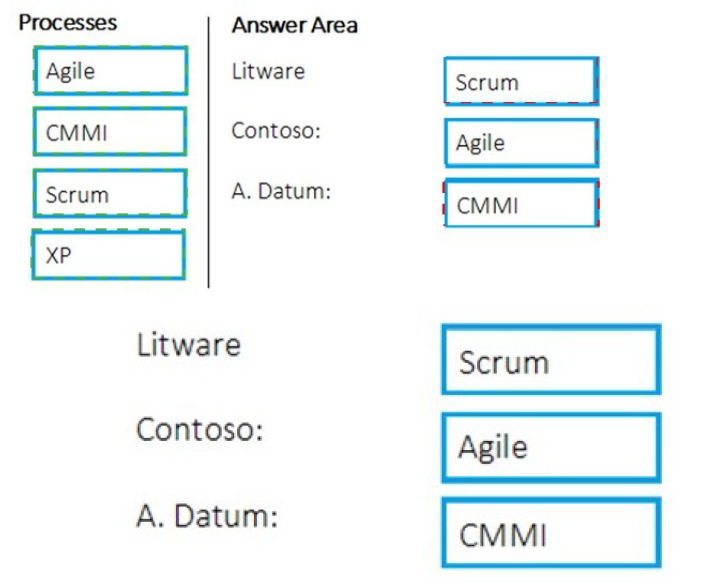
You are planning projects for three customers. Each customer’s preferred process for work items is shown in the following table.
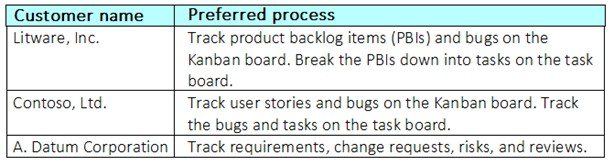
The customers all plan to use Azure DevOps for work item management.
Which work item process should you use for each customer? To answer, drag the appropriate work item process to the correct customers. Each work item process may be used once, more than once, or not at all. You may need to drag the split bar between panes or scroll to view content.
NOTE: Each correct selection is worth one point.
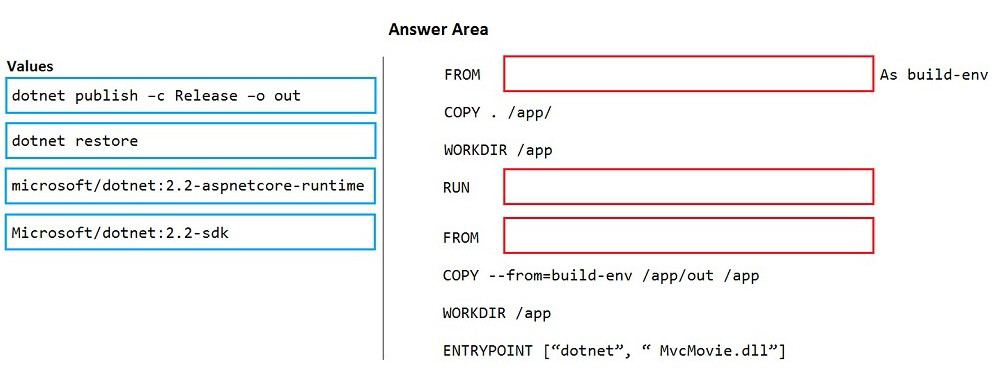
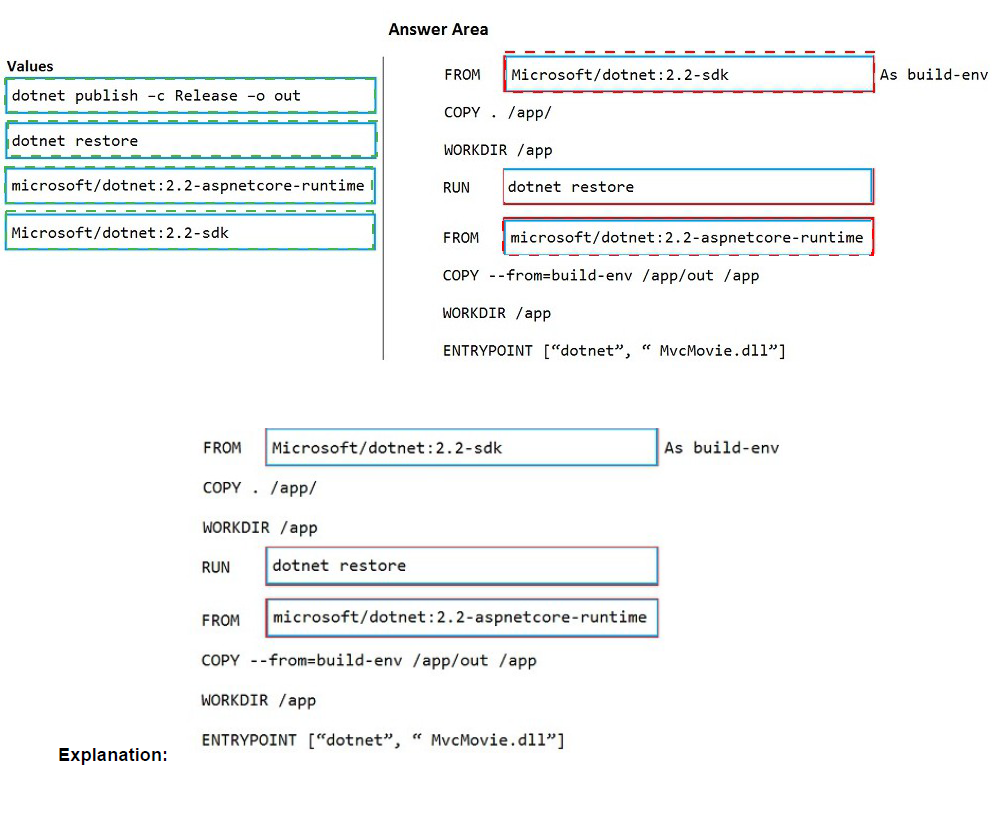
You are creating a container for an ASP.NET Core app.
You need to create a Dockerfile file to build the image. The solution must ensure that the size of the image is minimized.
How should you configure the file? To answer, drag the appropriate values to the correct targets. Each value must be used once, more than once, or not at all. You may need to drag the split bar between panes or scroll to view content.
NOTE: Each correct selection is worth one point.
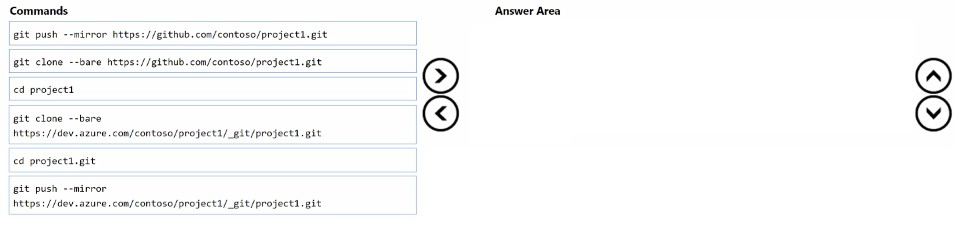
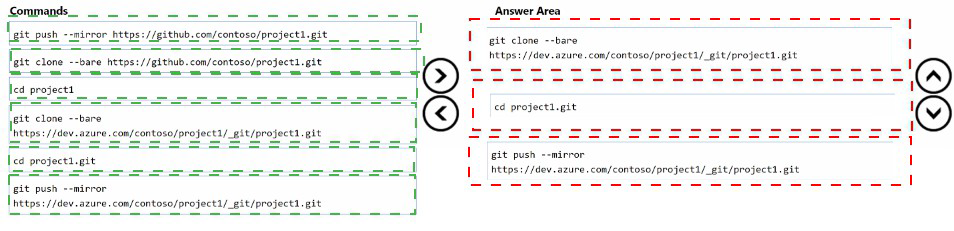
You have the repositories shown in the following table.

You need to migrate the contents of the GitHub repository to the Azure Repos repository.
The solution must ensure that the Azure Repos repository only contains branches and history from the GitHub repository.
Which three commands should you run in sequence? To answer, move the appropriate commands from the list of commands to the answer area and arrange them in the correct order.
You have a project in Azure DevOps that uses packages from multiple public feeds. Some of the feeds are unreliable.
You need to consolidate the packages into a single feed.
Which three actions should you perform in sequence? To answer, move the appropriate actions from the list of actions to the answer area and arrange them in the correct order.


Explanation:
Step 1: Create a NuGet package.
NuGet and Maven are public package managers that support multiple feeds.
Step 2: Create an Azure Artifacts feed that uses upstream sources
If you want to use packages from multiple feeds, use upstream sources to bring packages from multiple feeds together into a single feed.
Step 3: Create a Micrtosoft Visual Studio project that includes all the packages Consume NuGet packages from upstream sources: Now you can open Visual Studio and install packages from the upstream sources you just configured.
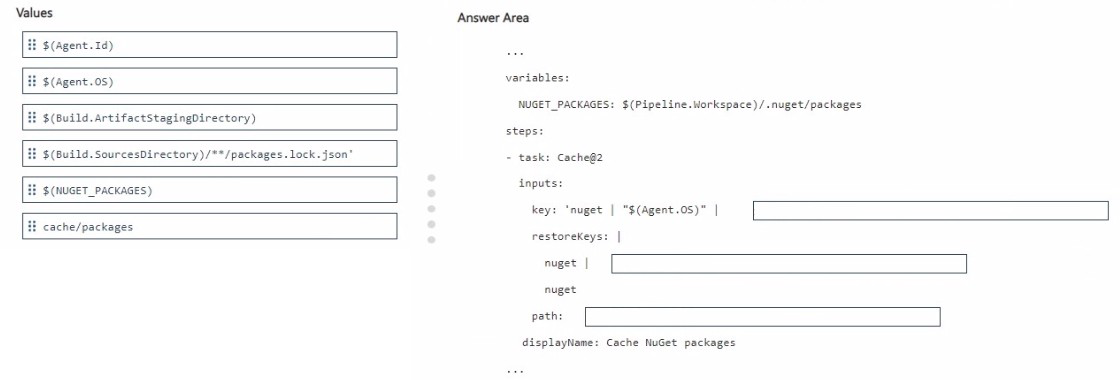
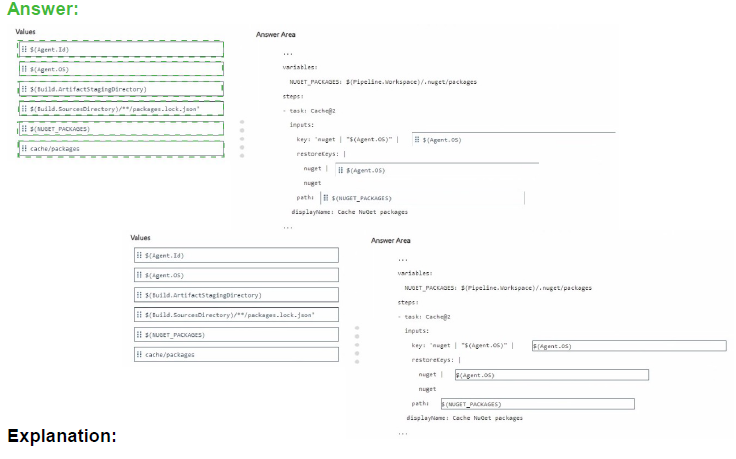
You use an Azure pipeline to build a .NET app that has NuGet dependencies.
You need to ensure that the pipeline caches required NuGet packages.
How should you configure the pipeline? To answer, drag the appropriate values to the correct targets. Each value may be used once, more than once, or not at all. You may need to drag the split bar between panes or scroll to view content.
NOTE: Each correct selection is worth one point.
You have a project in Azure DevOps that has three teams as shown in the Teams exhibit.
(Click the Teams tab.)
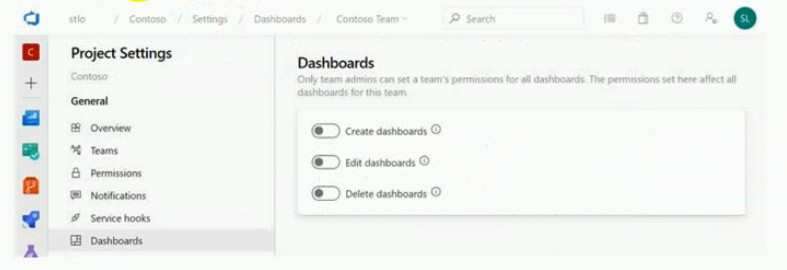
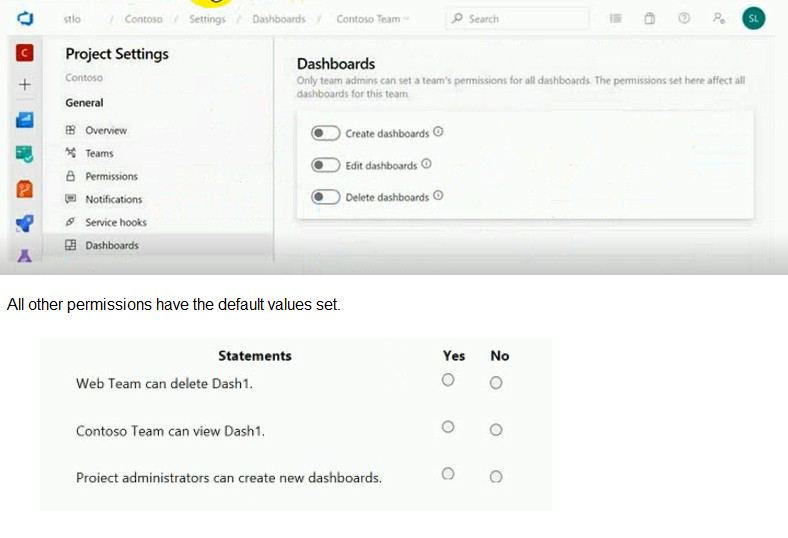
You create a new dashboard named Dash1.
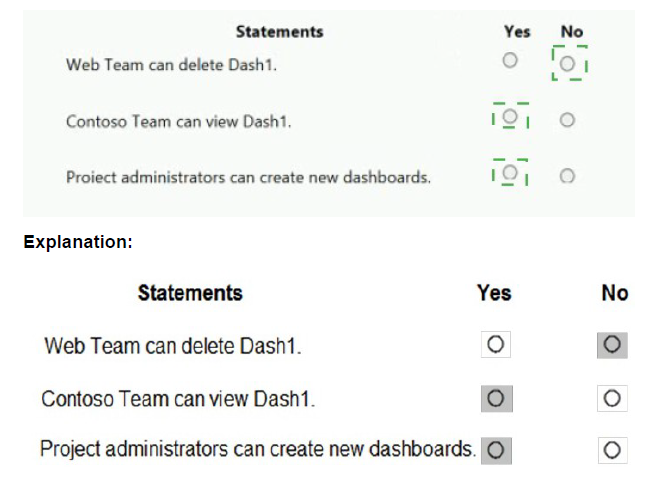
You configure the dashboard permissions for the Contoso project as shown in the
Permissions exhibit (Click the Permissions tab.)
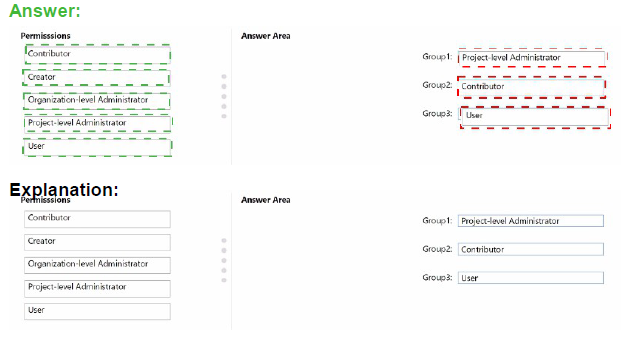
You have a tendril in Microsoft Azure Active Directory (Azure AD), part of Microsoft Entra.
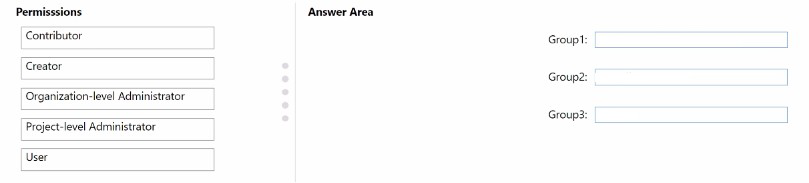
The tenant contains three groups named Group1. Group2, and Group3.
You create a new project in Azure DevOps named Project1.
You need to secure the service connections for Project1. The solution must meet the following requirements:
• The members of Group1 must be able to share and unshare a service connection with other projects.
• The members of Group2 must be able to rename a service connection and update the description.
• The members of Group3 must be able to use the service connection within build or release pipelines.
• The principle of least privilege must be followed.
Which permission should you grant to each group? To answer, drag the appropriate permissions to the correct groups. Each permission may be used once, more than once, or not at all. You may need to drag the split bar between panes or scroll to view content. NOTE: Each correct selection is worth one point.
You have an Azure DevOps organization named Contoso.
You have 10 Azure virtual machines that run Windows Server 2019. The virtual machines host an application that you build and deploy by using Azure Pipelines. Each virtual machine has the Web Server (IIS) role installed and configured.
You need to ensure that the web server configurations pin the virtual machines is maintained automatically. The solution must provide centralized management of the configuration settings and minimize management overhead.
Which four actions should you perform in sequence? To answer, move the appropriate actions from the list of actions to the answer area and arrange them in the correct order.


Step1: Create an Azure Automation account.
An Azure Automation account is required.
Step 2: Install the custom Desired State Configuration (DSC) extension on the virtual machines Under the hood, and without an administrator having to remote into a VM, the Azure VM Desired State Configuration extension registers the VM with Azure Automation State Configuration.
Step 3: Onboard the virtual machines to the Azure Automation account.
Step 4: Complete the Desired State Configuration (DSC) configuration.
Create a DSC configuration.
You use GitHub Enterprise Server as a source code repository.
You create an Azure DevOps organization named Contoso.
In the Contoso organization, you create a project named Project 1.
You need to link GitHub commits, pull requests, and issues to the work items of Project 1.
The solution must use OAuth-based authentication
Which three actions should you perform in sequence? To answer, move the appropriate actions from the list of actions to the answer area and arrange them in the correct order.


Explanation:
Step 1: From Developer settings in GitHub Enterprise Server, register a new OAuth app.
If you plan to use OAuth to connect Azure DevOps Services or Azure DevOps Server with your GitHub Enterprise Server, you first need to register the application as an OAuth App Step 2: Organization settings in Azure DevOps, add an OAuth configuration
Register your OAuth configuration in Azure DevOps Services.
Note:
Sign into the web portal for Azure DevOps Services.
Add the GitHub Enterprise Oauth configuration to your organization.
Open Organization settings>Oauth configurations, and choose Add Oauth configuration.
Fill in the form that appears, and then choose Create.
Step 3: From Project Settings in Azure DevOps, add a GitHub connection.
Connect Azure DevOps Services to GitHub Enterprise Server Choose the Azure DevOps logo to open Projects, and then choose the Azure Boards project you want to configure to connect to your GitHub Enterprise repositories.
Choose (1) Project Settings, choose (2) GitHub connections and then (3) Click here to connect to your GitHub Enterprise organization.
| Page 9 out of 49 Pages |