Free Microsoft AZ-801 Practice Test Questions MCQs
Stop wondering if you're ready. Our Microsoft AZ-801 practice test is designed to identify your exact knowledge gaps. Validate your skills with Configuring Windows Server Hybrid Advanced Services questions that mirror the real exam's format and difficulty. Build a personalized study plan based on your free AZ-801 exam questions mcqs performance, focusing your effort where it matters most.
Targeted practice like this helps candidates feel significantly more prepared for Configuring Windows Server Hybrid Advanced Services exam day.
22810+ already prepared
Updated On : 12-Oct-2026281 Questions
Configuring Windows Server Hybrid Advanced Services
4.9/5.0
Topic 3: Misc. Questions
You have a server named Server1 that runs Windows Server and contains two volumes
named C and D.
You connect a disk to Server 1 that is encrypted by using BitLocker and contains a volume
named E.
You need to ensure that after a restart, the data on volume E can be accessed without
providing a password or a recovery key.
Which three actions should you perform on Server1 in sequence? To answer, move the
appropriate actions from the list of actions to the answer area and arrange them in the
correct order.
.png)
.png) Explanation:
Explanation:
This question tests your knowledge of configuring BitLocker Auto-Unlock on fixed or removable data volumes in Windows Server. BitLocker Auto-Unlock allows data volumes to unlock automatically upon system boot without user intervention, provided specific prerequisites are satisfied.
✅ Correct Option:
Step 1: Install the BitLocker Drive Encryption feature.
Windows Server does not enable the BitLocker Drive Encryption feature by default. Installing the core BitLocker feature provides the necessary system drivers, background services, and PowerShell cmdlets needed to manage BitLocker encryption keys and configure automatic unlocking capabilities across all system volumes.
Step 2: Encrypt volume C.
A strict prerequisite for enabling BitLocker Auto-Unlock on any secondary data volume is that the primary operating system volume (Volume C) must be encrypted with BitLocker. Auto-unlock stores the encrypted volume's unlocking keys inside the local system registry, which must be protected by OS-level encryption to remain secure.
Step 3: Turn on auto-unlock.
With the BitLocker feature active and the operating system drive protected by BitLocker, auto-unlock can now be enabled specifically for Volume E. After enabling auto-unlock, Windows automatically decrypts Volume E during system boot whenever the encrypted operating system drive successfully unlocks.
❌ Incorrect options:
Installing the BitLocker Drive Encryption Administration Utilities feature
The BitLocker Drive Encryption Administration Utilities feature provides Remote Server Administration Tools (RSAT) for managing remote machines, which is not required since local administration tools are included when installing the main BitLocker feature on Server1.
Installing the BitLocker Network Unlock feature
BitLocker Network Unlock is designed specifically to automatically unlock operating system drives over a wired network during PXE boot using WDS and DHCP servers. It plays no role in automatically unlocking secondary data drives like Volume E.
Encrypting volume D
Encrypting Volume D is unnecessary because auto-unlock dependencies rely exclusively on the primary operating system volume (Volume C) being encrypted. Additional data volumes do not need to be encrypted to enable auto-unlock on Volume E.
🔧 Reference:
⇒ Microsoft Learn - BitLocker operations guide confirms that the operating system drive must be encrypted with BitLocker before auto-unlock can be configured for secondary data drives.
Your network contains an Active Directory Domain Services (AD DS) domain. The domain
contains the servers shown in the following table.
.png)
The Failover Clustering tools are NOT installed on the servers.
You plan to enable Cluster-Aware Updating (CAU).
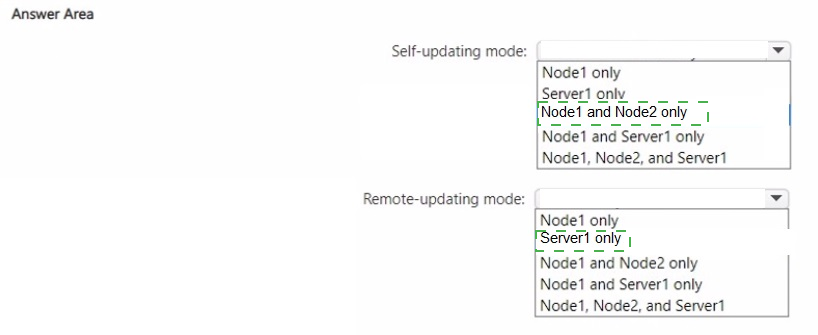
On which servers should you install the Failover Clustering tools to implement CAU in selfupdating
mode, and on which servers should you install the Failover Clustering tools to
implement remote-updating mode? To answer, select the appropriate options in the answer
area.
NOTE: Each correct selection is worth one point..png)
 Explanation:
This question tests your understanding of the Failover Clustering Tools installation requirements for Cluster-Aware Updating (CAU) in self-updating and remote-updating modes. The key is determining which servers act as the Update Coordinator in each mode.
✅ Correct Options:
Self-updating mode: Node1 and Node2 only
In self-updating mode, the CAU clustered role is configured as a workload on the cluster itself, meaning all cluster nodes must have Failover Clustering Tools installed to participate in the updating process. The CAU Update Coordinator process runs on whichever cluster node owns the CAU clustered role, then fails over between nodes during the update run.
Remote-updating mode: Server1 only
In remote-updating mode, Server1 acts as the Update Coordinator computer. It must have Failover Clustering Tools installed to trigger and manage updating runs. The cluster nodes (Node1 and Node2) only need the Failover Clustering feature installed, not the tools, unless you need to run certain cmdlets like Save-CauDebugTrace.
❌ Incorrect Options:
Self-updating: Node1 only or Node2 only
CAU self-updating requires all cluster nodes to have Failover Clustering Tools installed because the CAU clustered role can fail over to any node. Restricting to a single node would break the automatic failover of the updating process.
Self-updating: Server1 only or Server1 combinations
Server1 is a member server outside the cluster. In self-updating mode, Server1 does not participate in the update orchestration. It has no CAU clustered role and cannot assume the Update Coordinator role within the cluster.
Remote-updating: Node1, Node2, or combinations
Cluster nodes do not function as Update Coordinator in remote-updating mode. The orchestration is performed externally from a computer that has network connectivity to the cluster, making Server1 the required installation target.
Remote-updating: Node1 and Node2 only
This option incorrectly assigns the Update Coordinator role to cluster nodes. In remote-updating mode, the coordinator runs outside the cluster, so only the remote computer needs Failover Clustering Tools.
🔧 Reference:
→ Microsoft Learn – Cluster-Aware Updating requirements and best practices – Provides the installation requirements table showing Failover Clustering Tools are required on all cluster nodes for self-updating mode and on the remote update computer for remote-updating mode.
→ Microsoft Learn – Cluster-Aware Updating overview – Explains that in self-updating mode, the CAU clustered role runs on cluster nodes, while remote-updating mode uses an external Update Coordinator computer.
Your on-premises network contains an Active Directory Domain Services (AD DS) domain.
The domain contains four servers named Server1, Server2. Server3. and Server4 that run
Windows Server.
You configure the connection security rules shown in the following table.
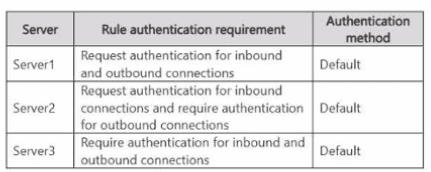
Server4 does NOT have any connection security rules applied.
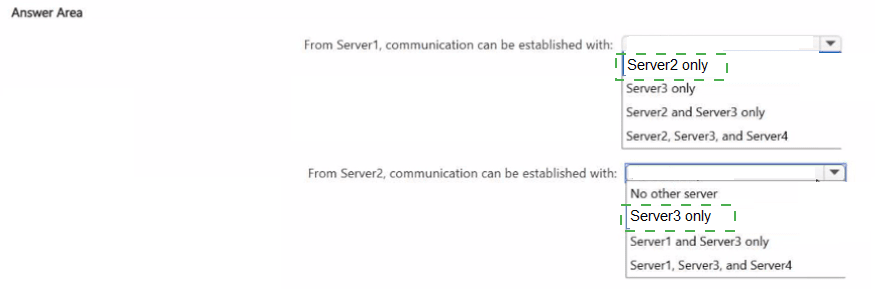
With which servers can Server1 and Server2 establish communication after the connection
security rules are applied? To answer, select the appropriate options in the answer area.
NOTE: Each correct selection is worth one point..png)
 Explanation:
This question tests the behavior of Windows Defender Firewall connection security (IPsec) rules when the authentication requirement is set to “Request” versus “Require.”
Request authentication = Prefer an authenticated connection, but fall back to clear-text if authentication fails or the peer has no matching rule.
Require authentication = Accept only authenticated connections; block the connection if authentication cannot be negotiated.
All three servers use the Default authentication method (Kerberos), so domain-joined machines can successfully authenticate with one another. Server4 has no connection security rules and therefore only supports clear-text traffic.
✅ From Server1 (Request inbound + outbound)
Server1 is flexible. It will attempt authentication but will accept clear-text when necessary.
Server2 accepts the connection (its inbound setting is Request).
Server3 accepts the connection because Server1 successfully authenticates with Kerberos (Server3’s inbound setting is Require).
Server4 accepts the connection in clear-text (Server1 falls back because Server4 has no IPsec rule).
Therefore Server1 can communicate with Server2, Server3, and Server4.
✅ From Server2 (Request inbound / Require outbound)
Server2 will only initiate connections that can be authenticated.
Server1 accepts the authenticated connection (its inbound setting is Request).
Server3 accepts the authenticated connection (its inbound setting is Require).
Server4 cannot authenticate, so the outbound connection from Server2 is blocked.
Therefore Server2 can communicate only with Server1 and Server3.
❌ Why other combinations are incorrect
Selecting only Server2 for Server1 ignores the fact that Server1 can still talk to Server3 (authenticated) and Server4 (clear-text fallback).
Selecting only Server3 for Server2 ignores the successful authenticated connection that Server2 can establish with Server1.
🔧 Reference:
→ Microsoft Learn: Explore authentication options
Explains the difference between “Request authentication” (allows fallback) and “Require authentication” (blocks unauthenticated traffic).
Your network contains an Active Directory Domain Services (AD DS) forest that has a
Windows Server 2008 R2 forest functional level. The forest contains the domains shown in
the following table.
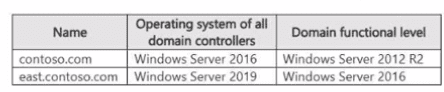
You need to perform an in-place upgrade of the domain controllers in east.contoso.com to
Windows Server 2025. The solution must minimize administrative effort.
What should you do first?
A. Raise the domain functional level of east.contoso.com to Windows Server 2025.
B. Extend the schema.
C. Raise the domain functional level of contoso.com to Windows Server 2016.
D. Raise the forest functional level to Windows Server 2025.
Explanation:
The forest functional level is currently Windows Server 2008 R2, while the domain controllers already run Windows Server 2016 or newer. Before the forest functional level can be raised to Windows Server 2016, contoso.com must first have its domain functional level raised to Windows Server 2016. This is the required first step.
🟢 Correct Option: C. Raise the domain functional level of contoso.com to Windows Server 2016.
The contoso.com domain currently has a Windows Server 2012 R2 domain functional level, while its domain controllers run Windows Server 2016. Because the forest functional level cannot be raised above the domain functional level of any domain, contoso.com must first be raised to Windows Server 2016. After that, the forest functional level can be raised appropriately for the Windows Server 2025 upgrade.
🔴 Incorrect Option: A. Raise the domain functional level of east.contoso.com to Windows Server 2025.
The east.contoso.com domain already has a Windows Server 2016 domain functional level, but Windows Server 2025 requires the domain controllers to be running Windows Server 2025 before its functional level can be raised. Therefore, this cannot be the first step.
🔴 Incorrect Option: B. Extend the schema.
Schema preparation is required when introducing a newer Windows Server domain controller, but the forest currently has a Windows Server 2008 R2 functional level. Windows Server 2025 requires a supported functional level, so the functional-level prerequisites must be addressed before proceeding with the upgrade.
🔴 Incorrect Option: D. Raise the forest functional level to Windows Server 2025.
The forest cannot immediately be raised to Windows Server 2025. Its domains must first meet the required functional-level prerequisites, and Windows Server 2025 requires an existing domain to be at least Windows Server 2016 functional level. Also, Windows Server 2025 cannot be used as a forest functional level until the DCs run 2025.
🔧 Reference:
→ Microsoft Learn — Active Directory Domain Services functional levels — Confirms the supported Windows Server 2025 functional-level requirements and interoperability.
→ Microsoft Learn — Raise Domain and Forest Functional Levels in AD DS — Confirms that the domain functional level must be raised before the forest functional level.
Your network contains an Active Directory Domain Services (AD DS) domain that contains
the servers shown in the following table.

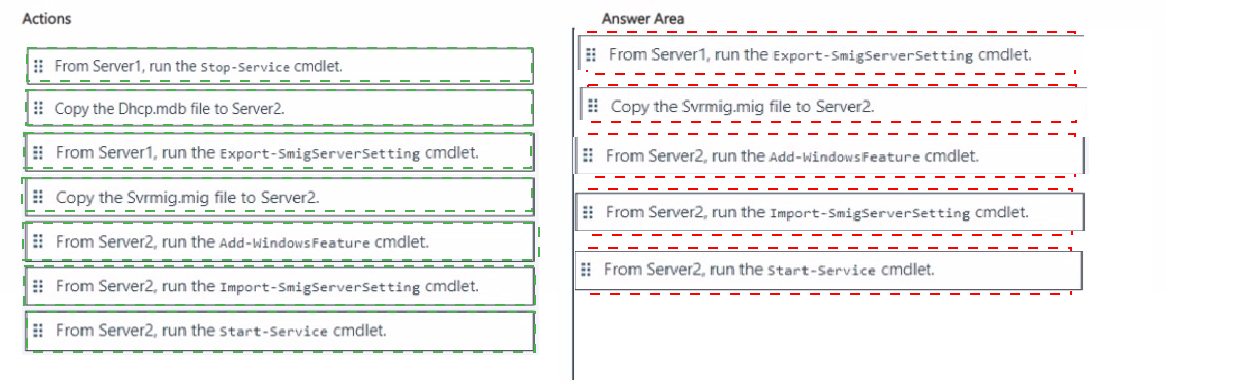
Server1 and Server2 are authorized as DHCP servers in the domain. You need to migrate
the DHCP Server role from Server1 to Server2. Which five actions should you perform in
sequence? To answer, move the appropriate actions from the list of actions to the answer
area and arrange them in the correct order.
.png)
 Explanation:
This question tests the proper sequence for migrating the DHCP Server role from a Windows Server 2019 source server (Server1) to a Windows Server 2025 destination server (Server2) by using the built-in Windows Server Migration Tools. Both servers are already authorized as DHCP servers in the AD DS domain and have the Migration Tools installed. The process must capture the complete DHCP configuration, transfer it securely, prepare the target server, import the settings, and bring the service online with minimal disruption.
✅ Correct sequence:
From Server1, run the Export-SmigServerSetting cmdlet.
This cmdlet is executed on the source server to collect all DHCP-related data—including scopes, reservations, leases, server options, and related settings—into a single encrypted migration store file named Svrmig.mig.
Copy the Svrmig.mig file to Server2.
The migration store must be copied to a location accessible by the destination server so that the configuration can be imported in the next steps.
From Server2, run the Add-WindowsFeature cmdlet.
The DHCP Server role (and its management tools) must be installed on Server2 before any configuration can be imported. Without the role present, the import operation will fail.
From Server2, run the Import-SmigServerSetting cmdlet.
This cmdlet reads the Svrmig.mig file and applies the exported DHCP configuration to Server2, recreating the scopes, options, and other settings exactly as they existed on Server1.
From Server2, run the Start-Service cmdlet.
After a successful import, the DHCP Server service is started on Server2 so it can begin responding to client requests and serving IP addresses.
❌ Incorrect actions (not part of the required sequence):
From Server1, run the Stop-Service cmdlet – Stopping the DHCP service on the source is sometimes performed after the export to prevent address conflicts, but it is not one of the mandatory steps when using the Migration Tools for this migration.
Copy the Dhcp.mdb file to Server2 – Copying the raw DHCP database file is the older manual method. The Windows Server Migration Tools replace this approach with the standardized Svrmig.mig migration store.
🔧 Reference:
→ Microsoft Learn: Migrate a DHCP server installation to another Windows Server
Provides the official step-by-step process using Export-SmigServerSetting on the source, transferring the migration store, installing the role on the destination, running Import-SmigServerSetting, and starting the DHCP service.
Your on-premises network contains an Active Directory Domain Services (AD DS) domain.
The domain contains a server named Server1 that runs Windows Server and is in an
organizational unit (OU) named OU1.
You have a Group Policy Object (GPO) that is linked to OUT and has the Windows
Defender SmartScreen settings shown in the following table.

You have the apps shown in the following table.
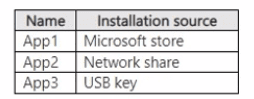
Which apps can you install on Served?
A. App1 only
B. App1 and App2 only
C. App1 and App3 only
D. App1, App2, and App3
Explanation:
This question tests your understanding of applying Windows Defender SmartScreen and App Install Control Group Policy settings. App Install Control enforces restrictions on application installation sources to ensure only approved applications can be installed on target Windows Server machines.
✅ Correct Option:
A. App1 only
The Group Policy Object applied to OU1 configures "Configure App Install Control" with the value "Allow apps from Store only." This policy restricts software installation exclusively to applications sourced directly from the Microsoft Store. Because App1 is the only application sourced from the Microsoft Store, it is the only app permitted to be installed on Server1.
❌ Incorrect options:
B. App1 and App2 only
App2 is located on a network share. The "Allow apps from Store only" policy blocks all non-Store installation sources, preventing App2 from installing regardless of Windows Defender SmartScreen warnings.
C. App1 and App3 only
App3 is located on a removable USB key. Non-Store media sources are blocked by App Install Control when set to store-only enforcement, making App3 impossible to install.
D. App1, App2, and App3
Including App2 and App3 is incorrect because the App Install Control setting blocks any installation sourced outside of the official Microsoft Store, regardless of whether SmartScreen bypass is disabled.
🔧 Reference:
⇒ Microsoft Learn - Configure App Install Control in Windows confirms that setting App Install Control to "Allow apps from Store only" blocks all application installations that do not originate from the Microsoft Store.
You have a server named Server1 that runs Windows Server.
You need to capture the SYN packets exchanged between Server1 and an IP address of
192.168.0.100. How should you complete the command? To answer, select the appropriate
options in the answer area.
NOTE: Each correct selection is worth one point.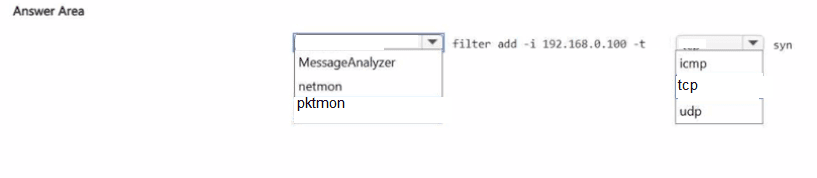
 Explanation:
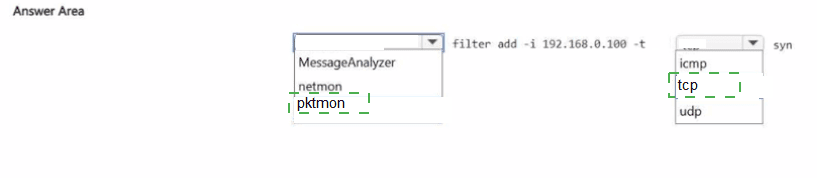
This question tests your knowledge of Windows Server built-in packet capture tools and how to filter traffic for specific protocols. It focuses on identifying the correct utility and protocol filter to capture SYN packets.
✅ Correct Options:
First dropdown: pktmon
Pktmon (Packet Monitor) is the built-in Windows Server tool for capturing and filtering network packets. The syntax pktmon filter add is specific to this utility, allowing administrators to define filters that isolate traffic matching specified criteria such as IP address and protocol.
Second dropdown: tcp
SYN packets are part of the TCP three-way handshake used to establish connections. Filtering by tcp ensures only TCP traffic is captured, which includes SYN, SYN-ACK, and ACK packets. Selecting ICMP or UDP would not capture SYN packets since those protocols do not use TCP flags.
❌ Incorrect Options:
MessageAnalyzer
MessageAnalyzer is a deprecated Microsoft tool for capturing and analyzing network traffic. It is not included in modern Windows Server versions and does not use the filter add syntax shown in the command.
netmon
Network Monitor (netmon) is a legacy packet capture tool that has been replaced by MessageAnalyzer and later by pktmon. It is not available by default on current Windows Server installations and does not support the command syntax shown.
icmp
ICMP is used for diagnostic and error-reporting messages such as ping. It does not use TCP flags or SYN packets, so filtering by ICMP would not capture the required traffic.
udp
UDP is a connectionless protocol that does not establish sessions using SYN packets. Filtering by UDP would capture unrelated traffic and miss the TCP SYN packets needed for this scenario.
🔧 Reference:
→ Microsoft Learn – Packet Monitor (Pktmon) – Confirms pktmon is the built-in Windows Server tool for packet capture and filtering.
→ Microsoft Learn – pktmon filter – Documents the pktmon filter add syntax and protocol filtering options including TCP.
| Page 1 out of 29 Pages |
Configuring Windows Server Hybrid Advanced Services Practice Exam Questions
These AZ-801 practice questions with explanations help candidates learn advanced hybrid Windows Server solutions. Topics include identity services, virtualization, storage, networking, and security. Each question includes a detailed explanation that helps learners understand complex configurations and hybrid scenarios. This approach enhances both theoretical knowledge and practical skills. By practicing consistently, candidates can strengthen their understanding of hybrid infrastructure, identify weak areas, and confidently prepare for the certification exam.AZ-801: What You are Signing Up For
AZ-801 (Configuring Windows Server Hybrid Advanced Services) is aimed at admins who already know Windows Server basics and now need to operate it in a modern, hybrid world. The exam leans into “keep it running” scenarios: resilience, security hardening, migrations, and hybrid connectivity with Azure services.
What to Focus On
Hybrid identity & access: integrating on-prem AD with Azure identity, secure authentication flows
High availability & disaster recovery: clustering concepts, storage options, backup/restore planning
Server security: hardening, patching strategy, just-enough access, and auditing
Monitoring & troubleshooting: logs, performance issues, service failures, incident response
Migration & modernization: moving workloads, minimizing downtime, validating after cutover
Hybrid management: tools and approaches to manage servers consistently across environments
Study Approach That Matches the Exam
Build a small lab (even virtual) and practice “advanced admin days”: recover from a failed update, restore from backup, simulate a service outage, and document the steps you took. AZ-801 rewards calm, repeatable operations.
Common Mistakes
Treating hybrid as an afterthought (identity + connectivity assumptions break answers)
Confusing HA vs DR requirements in scenario wording
Skipping security details (least privilege, auditing, and remediation steps matter)
Practice That Sharpens Your Timing
Timed, Microsoft Configuring Windows Server Hybrid Advanced Services practice exam is ideal for AZ-801 because questions are often long and layered. AZ-801 practice questions on msmcqs.com can help you get comfortable with scenario phrasing, improve speed, and identify the topics that consistently trip you up.