Topic 3: Misc. Questions
Your network contains an Active Directory Domain Services (AD DS) domain. The domain
contains servers that run Windows Server 2022.
You have a Storage Spaces Direct cluster named SSCIuster1 that contains two physical
nodes named Node! and Node2. Node! and Node2 host highly available virtual machines.
You plan to perform an in-place upgrade to Windows Server 2025 on Node1
You need to ensure that the virtual machines remain running during the upgrade.
Which four actions should you perform in sequence on Node1? To answer, move the
appropriate actions from the list of actions to the answer area and arrange them in the
correct order.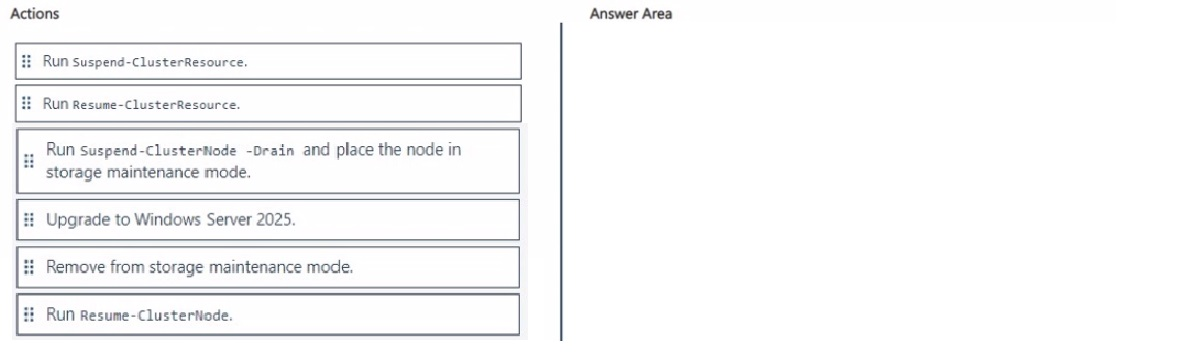
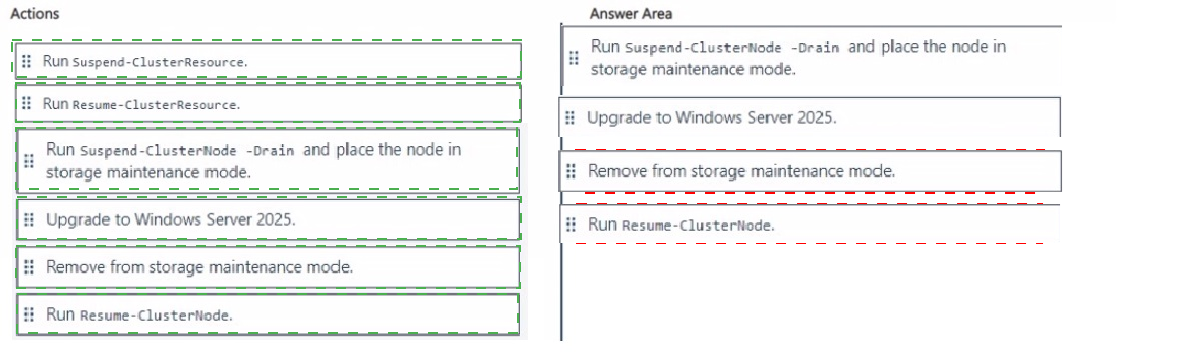 Explanation:
This question tests the correct rolling in-place upgrade procedure for a two-node Storage Spaces Direct (S2D) cluster. The goal is to upgrade Node1 to Windows Server 2025 while the highly available Hyper-V virtual machines continue running without interruption on Node2. The process must safely drain workloads, protect the shared storage, perform the upgrade, and then cleanly return the node to the cluster.
✅ Correct sequence:
Run Suspend-ClusterNode -Drain and place the node in storage maintenance mode.
Suspend-ClusterNode -Drain live-migrates every virtual machine and cluster role from Node1 to Node2. Simultaneously placing the node into storage maintenance mode instructs Storage Spaces Direct to stop all I/O against the local disks, ensuring data consistency and preventing storage corruption during the upgrade.
Upgrade to Windows Server 2025.
With no roles running and the disks safely offline to the pool, the in-place operating-system upgrade can be performed on Node1 without affecting the rest of the cluster.
Remove from storage maintenance mode.
After the upgrade completes and the node reboots, storage maintenance mode is disabled. This allows the local disks to rejoin the Storage Spaces Direct pool and begin the necessary resynchronization jobs.
Run Resume-ClusterNode.
The upgraded node is brought back online as a full cluster member. Once storage jobs finish and the node is healthy, virtual machines can optionally fail back to it.
❌ Incorrect actions (not used in the sequence):
Run Suspend-ClusterResource / Resume-ClusterResource – These cmdlets target individual cluster resources. Because Suspend-ClusterNode -Drain already moves all resources in one operation, suspending and resuming resources individually is unnecessary and increases administrative effort.
The four-step sequence above is the official Microsoft recommended process that guarantees zero virtual-machine downtime during the upgrade of an S2D node.
🔧 Reference:
→ Microsoft Learn: Upgrade a Storage Spaces Direct cluster
Documents the exact order required for an in-place upgrade while virtual machines remain running: Suspend-ClusterNode -Drain, enable storage maintenance mode, perform the upgrade, disable storage maintenance mode, and Resume-ClusterNode.
You have a management group named MG1 that contains an Azure subscription named
Sub1. Sub1 contains the resources shown in the following table.
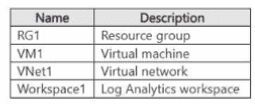
You need to enable Microsoft Defender for Servers.
From the Azure portal, on which two resources can you enable Defender for Servers? Each
correct answer presents a complete solution.
NOTE: Each correct selection is worth one point.
A. VM1
B. Workspace1
C. RG1
D. VNet1
E. Sub1
F. MG1
E. Sub1
Explanation:
This question tests your understanding of where Microsoft Defender for Servers can be directly enabled within Azure scope hierarchies. Microsoft Defender for Cloud plans can be enabled at either the subscription level or directly on a Log Analytics workspace.
✅ Correct Option:
B. Workspace1
Microsoft Defender for Servers can be configured at the Log Analytics workspace level. Enabling Defender for Servers on a specific workspace protects all virtual machines and servers that report data and logs to that designated Log Analytics workspace, regardless of their subscription association.
E. Sub1
Microsoft Defender for Servers is primarily enabled at the Azure subscription level. Enabling Defender for Servers on Sub1 automatically protects all supported virtual machines and server resources hosted across all resource groups within that subscription.
❌ Incorrect options:
A. VM1
Microsoft Defender for Servers cannot be enabled individually on a single virtual machine resource. Coverage is inherited from the plan being enabled at the subscription level or the workspace to which the VM reports.
C. RG1
While some Microsoft Defender for Cloud features support resource group scoping, the Microsoft Defender for Servers plan is not configured directly on individual resource groups in the Azure portal.
D. VNet1
Virtual networks (VNets) represent networking infrastructure and are not a supported scope or target resource for enabling Microsoft Defender for Servers security plans.
F. MG1
Management groups allow administrators to assign governance policies or Azure policies at scale, but enabling Microsoft Defender for Cloud plans directly via environment settings is configured at the subscription or workspace level rather than directly on management group objects.
🔧 Reference:
⇒ Microsoft Learn - Connect your Azure Subscriptions to Microsoft Defender for Cloud confirms that Microsoft Defender for Servers can be enabled at either the Azure Subscription level or individual Log Analytics Workspace level.
You have an on-premises server named Server1 that runs Windows Server.
You have an Azure subscription that uses Microsoft Defender for Cloud.
You need to onboard Server1 to Defender for Cloud.
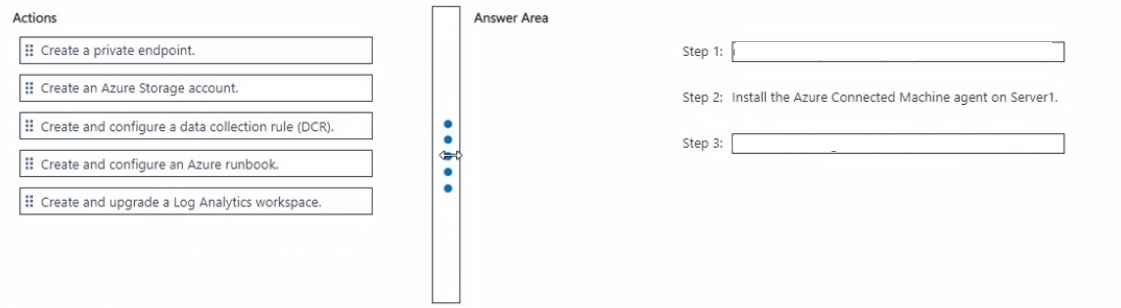
Which actions should you perform in sequence? To answer, drag the appropriate actions to
the correct order. Each action may be used once, more than once, or not at all. You may
need to drag the split bar between panes or scroll to view content.
NOTE: Each correct selection is worth one point.
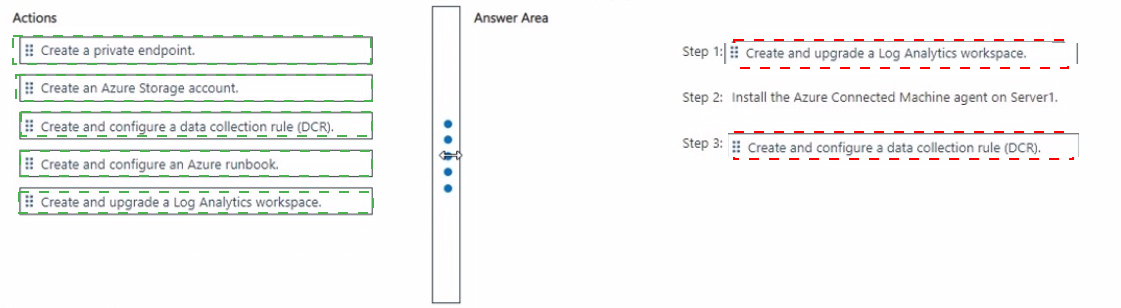 Explanation:
This question tests the sequence of actions required to onboard an on-premises Windows Server to Microsoft Defender for Cloud. It focuses on the dependency order between workspace creation, agent installation, and data collection configuration.
✅ Correct Options:
Step 1: Create and upgrade a Log Analytics workspace
Defender for Cloud requires a Log Analytics workspace to store security data and telemetry from onboarded servers. The workspace must be created and upgraded to the required pricing tier before agent deployment, as it serves as the data destination for the connected machine.
Step 2: Install the Azure Connected Machine agent on Server1
The Azure Connected Machine agent (Azure Arc agent) enables Azure management capabilities on non-Azure servers. Installing it on Server1 establishes the connection between the on-premises server and Azure, allowing Defender for Cloud to discover and monitor the machine.
Step 3: Create and configure a data collection rule (DCR)
After the agent is installed and the server is connected, a data collection rule defines what security events and performance data are collected and sent to the Log Analytics workspace. The DCR must be configured after agent installation to specify collection settings.
❌ Incorrect Options:
Create a private endpoint
A private endpoint provides private connectivity to Azure services but is not a required step for onboarding an on-premises server to Defender for Cloud. It is optional for environments requiring private network access.
Create an Azure Storage account
An Azure Storage account is not required for Defender for Cloud onboarding. Log Analytics workspace serves as the data repository, and storage accounts are used for other purposes such as boot diagnostics or backup.
Create and configure an Azure runbook
Azure runbooks are part of Azure Automation for task automation and are not involved in the Defender for Cloud onboarding process for on-premises servers.
🔧 Reference:
→ Microsoft Learn – Connect your non-Azure machines to Microsoft Defender for Cloud – Confirms the sequence of creating a Log Analytics workspace, installing the Azure Connected Machine agent, and configuring data collection.
→ Microsoft Learn – Plan Defender for Servers deployment – Documents the Log Analytics workspace requirement and agent installation process for onboarding servers.
You have a Hyper-V failover cluster named Ousted. Cluster1 contains a virtual machine
named VM1 that runs Windows Server. VM1 contains a Windows service named Service1.
You need to ensure that Cluster1 performs a recovery action if Service1 fails.
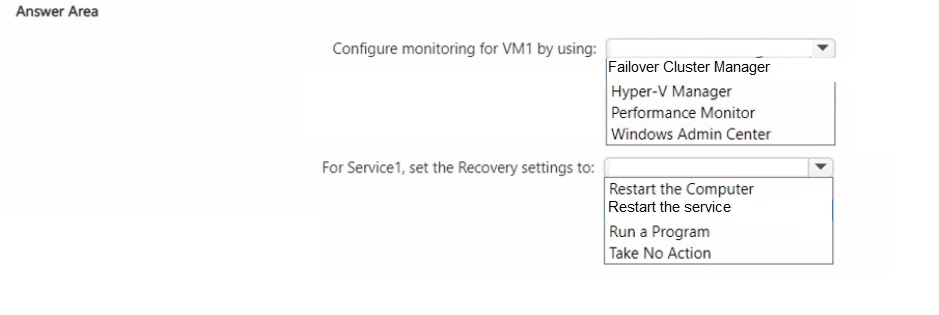
What should you do? To answer, select the appropriate options in the answer area.
NOTE: Each correct selection is worth one point.
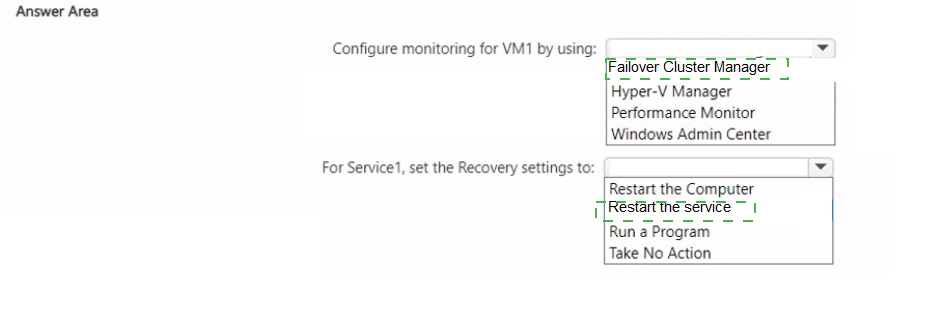 Explanation:
This question tests the Hyper-V VM Monitoring feature, which lets a failover cluster detect when a specific Windows service inside a guest VM fails and respond with cluster-level recovery actions. It checks whether you know the correct console for configuring this monitoring and how the in-guest service recovery settings interact with the cluster's response.
✅ Configure monitoring for VM1 by using: Failover Cluster Manager
Failover Cluster Manager includes a "Configure Monitoring" option on the VM's role (under More Actions) that lets you select a Windows service running inside VM1 to monitor. Once enabled, the Cluster Service tracks that service's health and can take actions such as restarting the VM or failing it over to another node if the service keeps failing.
✅ For Service1, set the Recovery settings to: Restart the Service
The in-guest Recovery tab (Services console) for Service1 governs the first response to a failure. Setting it to Restart the Service lets the guest operating system attempt to fix the problem locally first; if the service keeps failing after repeated attempts, the cluster's monitoring escalates the issue and triggers a VM-level recovery action on Cluster1.
❌ Options not selected:
Hyper-V Manager, Performance Monitor, and Windows Admin Center — None of these tools expose the cluster-aware VM Monitoring feature; Hyper-V Manager only manages VM settings locally, Performance Monitor tracks performance counters, and Windows Admin Center doesn't provide this specific cluster service-monitoring configuration.
Restart the Computer, Run a Program, and Take No Action — Restarting the whole computer or running a custom program are unrelated to letting the guest OS retry the service first, and setting Take No Action on the first response would skip the in-guest recovery attempt that's expected before cluster-level action takes over.
🔧 Reference:
→ How to configure VM Monitoring in Windows Server 2012 – Microsoft Learn (Tech Community) — Confirms Failover Cluster Manager's Configure Monitoring feature and how the service's in-guest Recovery settings determine the sequence of restart attempts before cluster-level recovery.
You have an Azure virtual machine named VM1 that runs Windows Server. You need to
perform the following tasks on VM1:
• Configure Windows Defender Firewall to allow Remote Desktop connections.
• Configure where to store the logs of the virtual machine console.
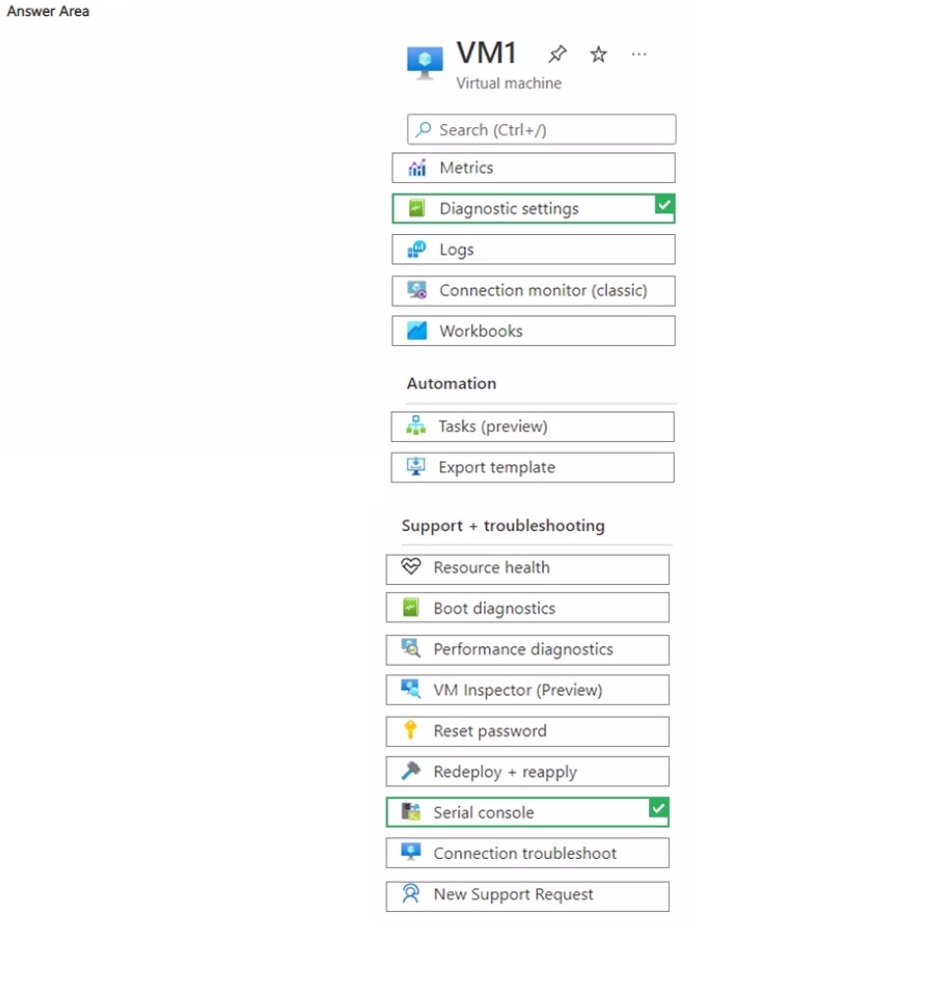
Which two settings should you use? To answer, select the settings in the answer area.
NOTE: Each correct selection is worth one point.
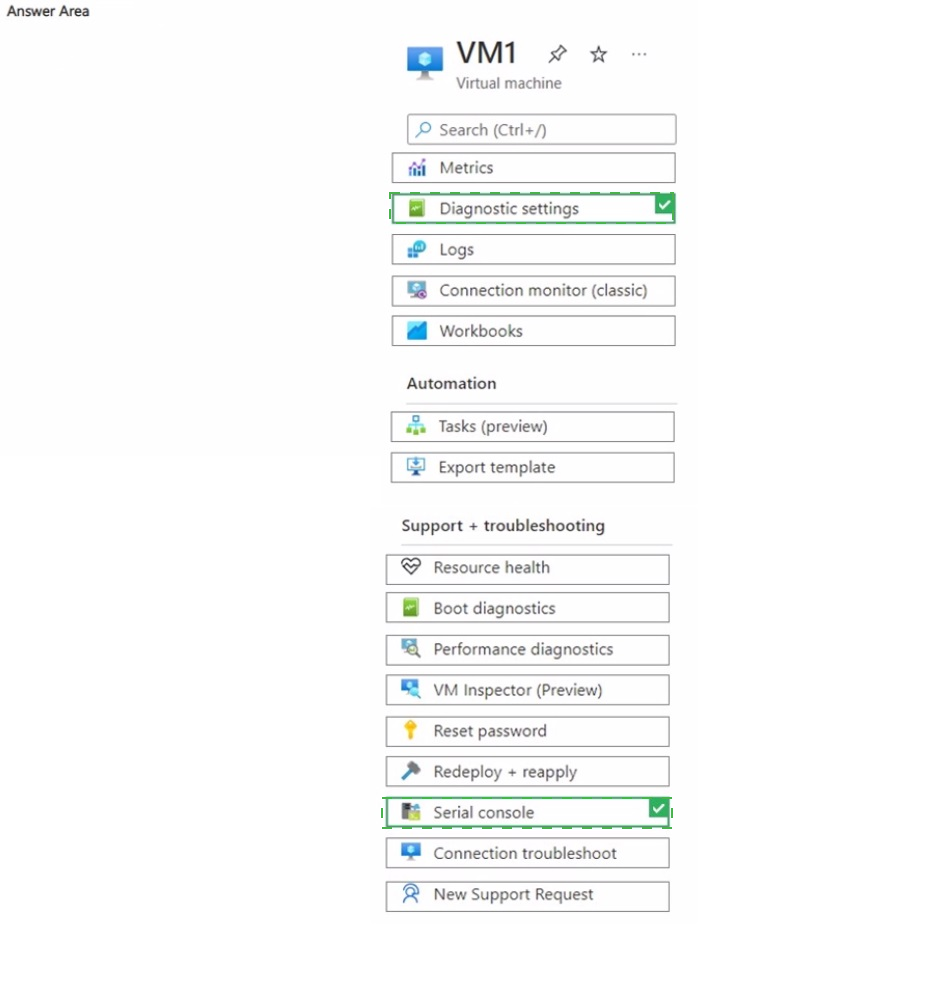 Explanation:
This question tests your knowledge of managing and troubleshooting Azure virtual machines using the Azure portal tools. It requires identifying the specific blades under Support + troubleshooting to interactively configure guest OS firewall rules and configure storage destinations for virtual machine console logs.
✅ Correct Option:
Serial console
The Serial console blade provides direct command-line access (CMD/PowerShell) to the Windows Server guest operating system regardless of network state. If Remote Desktop is blocked by the OS-level Windows Defender Firewall, accessing the VM via Serial console allows an administrator to run netsh advfirewall commands to enable the necessary RDP firewall rules.
Boot diagnostics
Boot diagnostics captures serial output and console log data (along with boot screen images) from the virtual machine. Navigating to the Boot diagnostics settings blade allows administrators to configure the target Azure Storage Account where these virtual machine console logs and diagnostic captures are stored.
❌ Incorrect options:
Diagnostic settings
Diagnostic settings under the Monitoring section are used to collect guest OS performance metrics, Windows Event Logs, and crash dumps for Azure Monitor or Log Analytics, rather than configuring storage for VM boot and serial console output logs.
Reset password
The Reset password blade allows administrators to reset local account credentials or reset the Remote Desktop configuration itself, but it does not provide interactive access to configure custom Windows Defender Firewall rules or configure console log storage paths.
Connection troubleshoot
Connection troubleshoot is a diagnostic tool used to test network connectivity and identify network security group (NSG) or routing issues between endpoints, but it cannot modify guest firewall settings or configure diagnostic log storage.
🔧 Reference:
⇒ Microsoft Learn - Azure Serial Console for Windows confirms that the Serial console provides direct command-line access to configure OS settings like Windows Defender Firewall rules.
⇒ Microsoft Learn - Azure boot diagnostics confirms that Boot diagnostics is used to view and configure storage settings for VM console logs and boot screenshots.
You have an Azure subscription. The subscription contains a virtual machine named VM1
that runs Windows Server.
The network interface for VM1 is disabled in the operating system.
You need to enable the network interface by using the Azure Serial Console.
How should you complete the command? To answer, select the appropriate options in the
answer area.
NOTE: Each correct selection is worth one point.
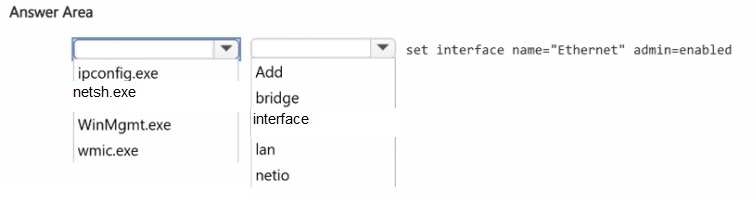
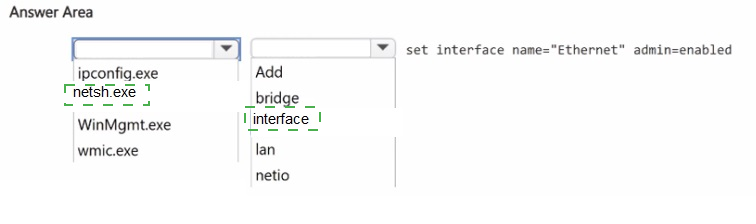 Explanation:
This question tests your ability to use the Azure Serial Console to recover a VM whose network interface is disabled in the guest OS. It requires identifying the correct command-line tool and syntax to re-enable the NIC without network connectivity.
✅ Correct Options:
First dropdown: netsh.exe
The netsh (Network Shell) utility is the built-in Windows command-line tool for configuring and managing network interfaces. The syntax set interface name="Ethernet" admin=enabled is a netsh interface command, so netsh.exe must precede the remaining parameters to form a valid command.
Second dropdown: interface
The complete command netsh interface set interface name="Ethernet" admin=enabled uses the interface context to target network adapter settings. This context is required before the set interface subcommand can enable the disabled NIC. Omitting it produces an invalid command that Windows cannot parse.
❌ Incorrect Options:
ipconfig.exe
The ipconfig utility displays and renews IP configuration but cannot enable or disable network adapters. It lacks any set interface capability, making it unsuitable for re-enabling a disabled NIC from the Serial Console.
WinMgmt.exe
This is the Windows Management Instrumentation service executable, not a command-line configuration tool. It cannot modify network adapter states and is unrelated to NIC enablement tasks.
wmic.exe
While WMIC can query and modify some system settings, it requires network stack functionality that may be unavailable on a disabled NIC. The netsh interface command is the documented method for this scenario.
Add
"Add" is not a valid netsh context for enabling interfaces. The correct subcommand is set interface, and the required context is interface, not add.
bridge
"Bridge" relates to network bridging configurations, not adapter enablement. It does not provide the functionality needed to re-enable a disabled network interface.
lan
"Lan" is not a recognized netsh context. The valid context for managing network adapters is interface, which provides the set interface subcommand used in this scenario.
netio
"Netio" refers to network I/O statistics and performance monitoring. It does not offer commands to enable or disable network adapters.
🔧 Reference:
→ Microsoft Learn – Cannot remote desktop to a VM because the network interface is disabled – Confirms the exact command netsh interface set interface name="interface Name" admin=enabled for enabling a disabled NIC via Serial Console.
→ Microsoft Learn – How to use CMD and PowerShell Windows commands – Documents netsh interface set interface name="
| Page 2 out of 29 Pages |