Topic 3: Misc. Questions
You have an Azure subscription. The subscription contains a virtual machine named VM1
that runs Windows Server and is in the East US Azure region. The subscription contains
the storage accounts shown in the following table.
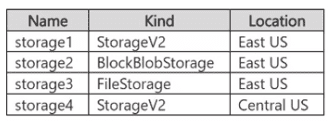
You plan to configure the Diagnostic settings for VM1. Which storage accounts should you
specify for the settings?
A. storage1 only
B. storage1 and storage2 only
C. storage1 and storage4 only
D. storage1, storage2, and storage3 only
E. storage1, storage2, storage3, and storage4
Explanation:
This question tests the requirements for selecting a destination storage account when configuring Azure Monitor Diagnostic settings for a regional resource such as a virtual machine. The storage account must be in the same Azure region as the VM and must be a supported Standard account type (Premium accounts are excluded).
β
Correct Option:
A. storage1 only
storage1 is a StorageV2 (general-purpose v2) account located in East US, matching the region of VM1. Azure Monitor Diagnostic settings support Standard storage accounts in the same region as the monitored resource, so only this account meets both the location and account-type requirements.
β Incorrect options:
B. storage1 and storage2 only
storage2 is a BlockBlobStorage account (Premium). Premium storage accounts are not supported as destinations for diagnostic settings.
C. storage1 and storage4 only
storage4 is in Central US. For regional resources such as VMs, the storage account destination must be in the same region (East US).
D. storage1, storage2, and storage3 only
Both storage2 (BlockBlobStorage) and storage3 (FileStorage) are Premium account kinds, which are unsupported destinations for diagnostic settings.
E. storage1, storage2, storage3, and storage4
This includes unsupported Premium accounts (storage2, storage3) and an account in a different region (storage4).
π§ Reference:
β Microsoft Learn β Diagnostic settings in Azure Monitor
Confirms that the destination storage account must be in the same region as the regional resource and that Premium storage accounts are not supported (only Standard accounts are).
You have an on premises Hyper-V host named Server 1. Server! contains a virtual machine named VM1. You have a non-domain joined Hyper-V server named Server2 that is hosted in a remote location. You plan to replicate VM1 to Server2 by using Hyper-V Replica. You need to configure replication on Server1. Which authentication method can you use?
A. NTLM
B. Kerberos
C. preshared secret
D. certificate
Explanation:
The question tests authentication requirements for Hyper-V Replica when the replica server is not domain joined. Kerberos requires the Hyper-V hosts to be in the same or trusted Active Directory domains. For workgroup or untrusted-domain hosts, certificate-based HTTPS authentication is required.
π’ Correct Option:
D. Certificate
Certificate-based authentication is supported when Hyper-V Replica hosts are not domain joined or are in untrusted domains. Server2 is explicitly non-domain joined, so Kerberos cannot be used. A valid certificate installed on both Server1 and Server2 enables HTTPS-based Hyper-V Replica authentication without an Active Directory dependency. Therefore, certificate authentication is the appropriate choice for replicating VM1 to Server2.
π΄ Incorrect options:
A. NTLM
NTLM is not an authentication method available for Hyper-V Replica configuration. Hyper-V Replica supports Kerberos or certificate-based authentication. Therefore, NTLM cannot be selected for replication between Server1 and Server2.
B. Kerberos
Kerberos requires the Hyper-V hosts to be joined to the same or trusted Active Directory domains. Because Server2 is non-domain joined, Kerberos authentication cannot be used for this replication scenario.
C. Preshared secret
A preshared secret is not an authentication method supported by Hyper-V Replica. For hosts without a domain relationship, Hyper-V Replica uses certificate-based authentication over HTTPS instead.
π§ Reference:
β Enable Hyper-V Replica on a single host β Confirms that non-domain-joined or untrusted hosts must use certificate-based HTTPS authentication.
β Replicate a virtual machine with Hyper-V Replica β Confirms the available authentication choices are Kerberos or certificate-based authentication.
You have a server named Server1 that runs Windows Server. You install System Insights
on Server 1.
You need to modify the schedule for storage consumption forecasting. What should you
use?
A. Server Manager
B. Windows Admin Center
C. Performance Monitor
D. Resource Monitor
Explanation
This question tests your knowledge of where to manage and configure System Insights after it has been installed. The schedule for storage consumption forecasting is a configuration setting that can only be modified through the dedicated management tools for this feature.
β
Correct Option: B. Windows Admin Center
Windows Admin Center is the primary graphical interface for managing System Insights capabilities, including modifying their schedules . When you navigate to the System Insights extension in Windows Admin Center, you can access a specific capability's settings, where you can adjust the schedule from the default daily 3 a.m. run time to a custom frequency that suits your environment .
Note: Modifying the schedule can also be done via PowerShell using the Set-InsightsCapabilitySchedule cmdlet, but Windows Admin Center is the correct answer for the tool that should be used .
β Incorrect option: A. Server Manager
While Server Manager is used to install the System Insights feature, it does not provide any interface to manage the capabilities or their schedules after installation . Management tasks are performed through Windows Admin Center or PowerShell.
β Incorrect option: C. Performance Monitor
Performance Monitor is a tool for viewing real-time performance counters and logs . It does not have any capabilities to configure or manage System Insights features or their scheduling.
β Incorrect option: D. Resource Monitor
Resource Monitor provides detailed real-time information about CPU, memory, disk, and network usage . It is not a configuration tool for System Insights and offers no scheduling functionality.
π§ Reference
β Manage System Insights capabilities in Windows Admin Center | Microsoft Learn
This documentation confirms that Windows Admin Center is used to configure schedule settings for each capability.
Your network contains an Active Directory Domain Services (AD DS) domain. The
functional level of the domain is Windows Server 2012 R2.
You need to create and link an authentication policy silo.
What should you do first?
A. Raise the domain functional level to Windows Server 2016.
B. Raise the domain functional level to Windows Server 2025.
C. Create an authentication policy.
D. Create an authentication policy silo.
Explanation:
The question tests the prerequisite order for configuring authentication policy silos in Active Directory. Authentication policy silos require an existing authentication policy to define TGT lifetimes and access-control conditions. The domain is already at the Windows Server 2012 R2 functional level, which is the minimum required, so no functional-level raise is needed first.
β
Correct Option: C. Create an authentication policy.
An authentication policy must exist before it can be linked to (or referenced by) an authentication policy silo. You create the policy in Active Directory Administrative Center or with PowerShell (New-ADAuthenticationPolicy), configure its settings, and only then create the silo that applies that policy to a set of accounts. This is the required first action among the given choices.
β Incorrect options:
β A. Raise the domain functional level to Windows Server 2016.
Windows Server 2012 R2 is the minimum domain functional level required for authentication policies and silos. Raising the level is unnecessary for this task.
β B. Raise the domain functional level to Windows Server 2025.
The current 2012 R2 functional level already supports the feature. No higher level is required.
β D. Create an authentication policy silo.
You cannot usefully create and link a silo until an authentication policy exists to assign to it. Creating the silo is the subsequent step.
π§ Reference:
β Microsoft Learn (TechNet Wiki archive): Authentication Policies and Authentication Silos
Confirms the Windows Server 2012 R2 domain functional level requirement and the sequence of creating an authentication policy before creating and linking a silo.
You have an Azure subscription that contains the virtual machines shown in the following
table.
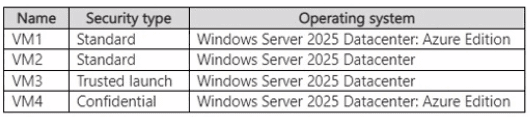
You plan to use Azure Site Recovery to replicate supported virtual machines to a
secondary Azure region. Which virtual machines can be replicated by using Azure Site
Recovery?
A. VM1 only
B. VM1 and VM2 only
C. VM1 and VM4 only
D. VM1.VM2, and VM4 only
E. VM1, VM2, VM3, and VM4
Your network contains an Active Directory Domain Services (AD DS) forest. The forest
contains a user named User1. You deploy a read-only domain controller (RODC) named
RODC1.
You need to ensure that User1 is a local administrator on RODC1. The solution must use
the principle of least privilege. What should you use?
A. Local Users and Groups
B. System Configuration
C. Active Directory Sites and Services
D. ntdsutil.exe
Explanation:
This question tests Administrator Role Separation for a read-only domain controller (RODC). The requirement is to grant User1 local administrative permissions on only RODC1 without assigning broader domain-level administrative privileges, which follows the principle of least privilege.
βοΈ Correct Option:
D. ntdsutil.exe
Use ntdsutil.exe to configure the RODCβs local administrator role through Administrator Role Separation. In the tool, use the local roles context to add User1 to the Administrators role for RODC1. This permits User1 to sign in locally and perform maintenance on that specific RODC, without making the user a member of Domain Admins or granting administrative access to other domain controllers.
β Incorrect options:
A. Local Users and Groups
Domain controllers, including RODCs, do not use ordinary local user and group accounts in the same way as member servers. The local Administrators role on an RODC is managed through Administrator Role Separation, not by using the Local Users and Groups console.
B. System Configuration
System Configuration (msconfig.exe) controls startup behavior, boot options, services, and diagnostic startup settings. It cannot assign a domain user local administrative permissions on an RODC and does not manage Active Directory delegation or RODC administrator roles.
C. Active Directory Sites and Services
Active Directory Sites and Services manages site topology, subnets, replication connections, and domain controller placement. It does not configure the RODC local administrator role for a specific user and cannot grant User1 local administrative permissions on RODC1.
π§ Reference:
β Microsoft Learn β Administrator Role Separation Configuration: Confirms that ntdsutil.exe and its local roles context can add a domain user to the Administrators role on an RODC.
β Microsoft Learn β AD DS Configuration Wizard Page Descriptions: Confirms that delegated RODC administrators receive local administrative permissions without membership in Domain Admins or the built-in domain Administrators group.
You have a server named Served that runs Windows Server. You install a custom app
named App1 that is accessed by using TCP port 52310. Users report that they cannot
access App1. You confirm that App1 is running on Server1.
You need to ensure that the users can access App1. The solution must only provide
access to App1 on Server1. What should you do in Windows Defender Firewall with
Advanced Security?
A. Create an inbound rule.
B. For the current profile, allow all inbound connections.
C. Create an outbound rule.
D. Create an isolation connection security rule.
Explanation:
This question tests your knowledge of host-based traffic filtering using Windows Defender Firewall with Advanced Security. By default, Windows Defender Firewall blocks unsolicited incoming connections to the server while allowing outbound network traffic initiated by local processes.
β
Correct Option:
Creating a custom inbound firewall rule allowing traffic on TCP port 52310 grants external users incoming access to App1. Specifying the exact protocol (TCP) and local port (52310) ensures that only traffic intended for App1 is allowed into Server1, adhering to the principle of least privilege.
β Incorrect Options:
β B. For the current profile, allow all inbound connections.
Allowing all inbound connections across the network profile permits unfiltered incoming traffic to all services on Server1. This severely compromises system security and violates the requirement to only provide access to App1.
β C. Create an outbound rule.
Outbound rules control traffic originating from Server1 that is heading out to external destinations. Because clients are initiating the connection to App1 on Server1, an inbound ruleβnot an outbound ruleβis required.
β D. Create an isolation connection security rule.
Connection security rules configure IPsec authentication and encryption between endpoints to isolate systems. They do not open or permit blocked inbound TCP ports for an application on the local firewall.
π§ Reference:
β Microsoft Learn: Create an Inbound Port Rule in Windows Defender Firewall - Confirms that creating an inbound port rule is required to allow external incoming connections to a specific application port.
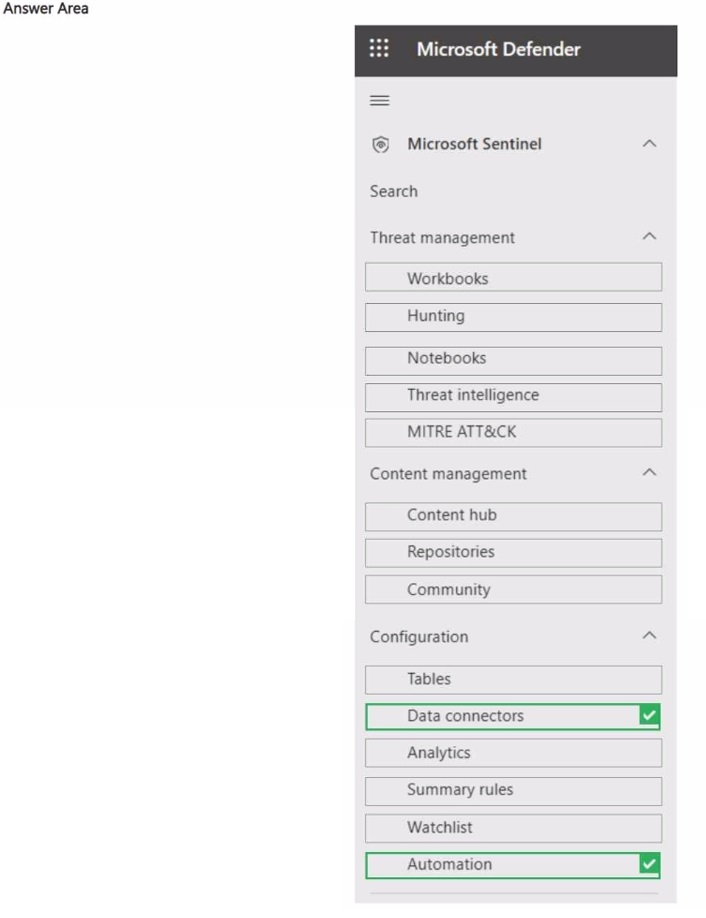
You have 50 on-premises servers that run Windows Server.
You have an Azure subscription that contains a Microsoft Sentinel workspace.
You plan to monitor the servers by using Microsoft Sentinel.
You need to perform the following actions in Microsoft Sentinel;
β’ Add the Windows Forwarded Events data connector.
β’ Create a playbook that has an incident trigger.
Which two settings should you use? To answer, select the appropriate settings in the
answer area.
NOTE: Each correct selection is worth one point.
Explanation:
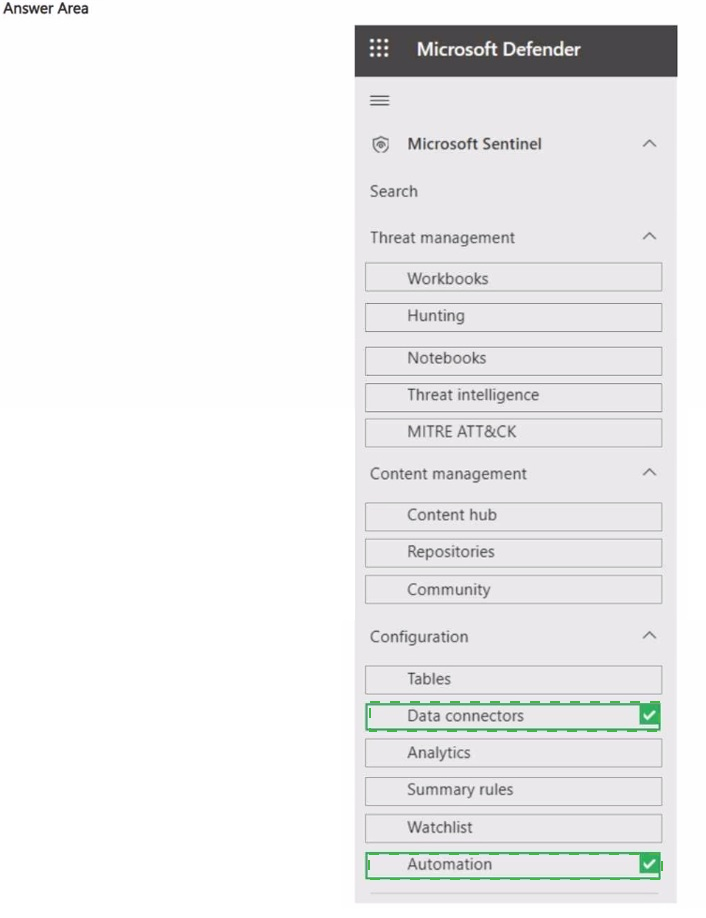
The question tests two separate Microsoft Sentinel configuration tasks: connecting Windows Forwarded Events for log collection and creating a playbook with an incident trigger. Data ingestion is configured through Data connectors, while playbooks and incident-triggered automation are managed through Automation.
π’ Correct Option 1: Data connectors
Data connectors is the page used to configure data sources that send events to Microsoft Sentinel. The Windows Forwarded Events connector uses Windows Event Collection (WEC) with Azure Monitor Agent to collect forwarded Windows events. Therefore, Data connectors is the appropriate setting for adding the Windows Forwarded Events data connector to the Sentinel workspace.
π’ Correct Option 2: Automation
Automation is used to configure automated responses and work with playbooks. A playbook can use the Microsoft Sentinel incident trigger, which runs when an incident is created or updated. Microsoft recommends incident-triggered playbooks for most incident automation scenarios, making Automation the appropriate page for this requirement.
π΄ Incorrect options:
Tables
Tables are used to view and manage data tables in the Log Analytics workspace. They are not used to configure external data connectors or create Sentinel playbooks, so this setting does not satisfy either requirement.
Analytics
Analytics is primarily used to create and manage detection rules that identify threats from collected data. It is not the page for adding the Windows Forwarded Events connector or creating an incident-triggered playbook.
Summary rules
Summary rules aggregate and summarize log data for specific querying and performance scenarios. They do not configure Windows event ingestion or provide the interface for creating Sentinel playbooks.
Watchlist
Watchlists contain reference data that can be used with queries and analytics rules. They are unrelated to configuring Windows Forwarded Events ingestion or creating a playbook with an incident trigger.
π§ Reference:
β Connect Microsoft Sentinel to other Microsoft services with a Windows agent-based data connector β Confirms that Windows Forwarded Events are configured through the Sentinel data connector and use WEC with Azure Monitor Agent.
β Microsoft Sentinel playbook triggers β Confirms that the Microsoft Sentinel incident trigger is used for incident-based playbooks.
Your network contains an Active Directory Domain Services (AD DS) domain.
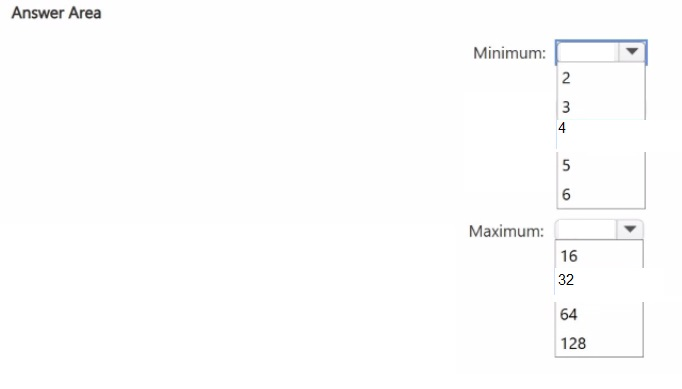
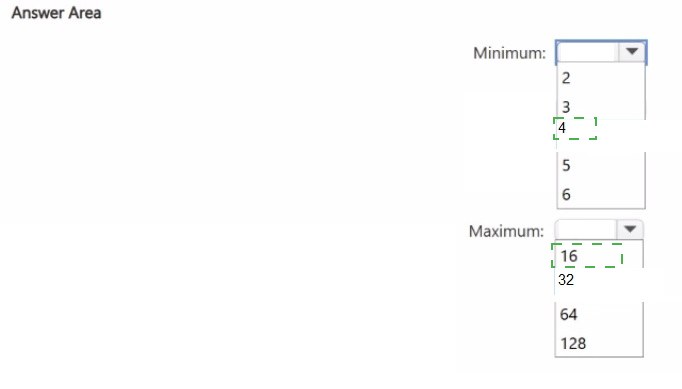
You need to deploy a Storage Spaces Direct cluster. The solution must support dual parity.
What is the minimum and maximum number of nodes you can deploy to the cluster? To
answer, select the appropriate options in the answer area.
NOTE: Each correct selection is worth one point.
Explanation
This question tests your knowledge of the scale requirements for different resiliency types in a Storage Spaces Direct (S2D) cluster. To support dual parity, the cluster must meet the minimum node count required for this specific fault tolerance option.
β
Correct Option: Minimum β 4
Dual parity requires a minimum of four hardware fault domains, which in a Storage Spaces Direct cluster corresponds to four servers . This is because the underlying Reed-Solomon erasure coding (with an RS 2+2 layout) needs at least four nodes to implement the required distribution of data and parity symbols.
β
Correct Option: Maximum β 16
The maximum number of nodes for a Storage Spaces Direct cluster is 16 . While dual parity can be used at any scale from 4 to 16 nodes, Microsoft's official efficiency tables and cluster size limits confirm 16 as the upper boundary .
β Incorrect options:
Minimum values (2, 3, 5, 6):
Values below 4 are insufficient for dual parity. A 2 or 3-node cluster can only use mirroring (two-way or nested) for fault tolerance, not dual parity .
Maximum values (16, 32, 64, 128):
The maximum supported cluster size for Storage Spaces Direct is 16 nodes . While dual parity becomes more efficient with more nodes, the cluster itself cannot exceed 16 .
π§ Reference
β Fault tolerance and storage efficiency on Azure Local and Windows Server clusters | Microsoft Learn
This documentation confirms the minimum required fault domains for dual parity is 4 and lists efficiency tables for deployments from 4 to 16 nodes.
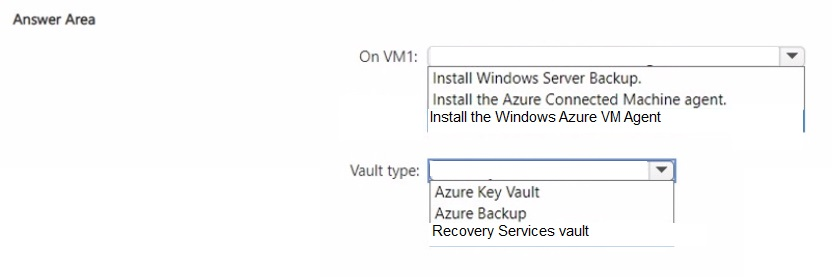
You have an on-premises server named Server 1 that runs Windows Server.
You have an Azure subscription.
You migrate Server1 to an Azure virtual machine named VM1.
You need to configure a backup solution for VM1. The solution must provide recovery
points.
What should you do on VM1, and in which type of vault should you store the backups? To
answer, select the appropriate options in the answer area.
NOTE: Each correct selection is worth one point.
Explanation:
The question requires configuring Azure Backup for an Azure VM that was migrated from an on-premises Windows Server. Azure Backup for IaaS VMs relies on a Recovery Services vault to store recovery points and uses an extension that depends on the Windows Azure VM Agent being present on the VM.
β
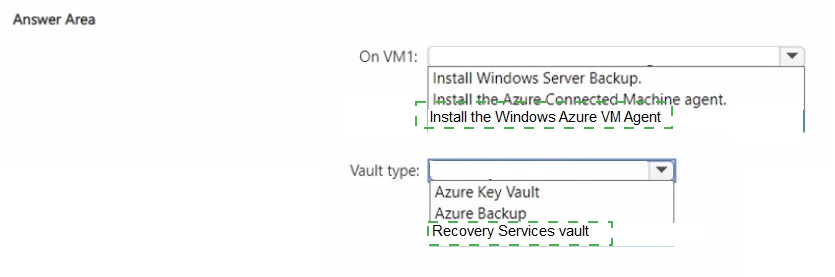
Correct Option: On VM1 β Install the Windows Azure VM Agent
Azure Backup installs a backup extension on top of the Windows Azure VM Agent. Marketplace VMs already include the agent, but VMs migrated from on-premises often do not. Installing the agent on VM1 is therefore required so the backup extension can run and create application-consistent recovery points.
β
Correct Option: Vault type β Recovery Services vault
Azure Backup stores VM recovery points (including Instant Restore snapshots and long-term retention points) exclusively in a Recovery Services vault. This is the vault type used for all Azure VM backup operations.
β Incorrect options:
β On VM1 β Install Windows Server Backup.
Windows Server Backup is the native on-premises backup feature. It is not used for Azure VM backups and does not integrate with Azure Backup or create recovery points in an Azure vault.
β On VM1 β Install the Azure Connected Machine agent.
The Azure Connected Machine agent is used to onboard servers to Azure Arc. It is unrelated to Azure Backup for Azure VMs.
β Vault type β Azure Key Vault
Azure Key Vault stores secrets, keys, and certificates. It is not used to store backup recovery points.
β Vault type β Azure Backup
βAzure Backupβ is the service name, not a vault type. Recovery points are stored in a Recovery Services vault managed by the Azure Backup service.
π§ Reference:
β Microsoft Learn: Back up Azure VMs in a Recovery Services vault β Install the VM agent
Confirms that migrated VMs may require manual installation of the Windows Azure VM Agent and that recovery points are stored in a Recovery Services vault.
| Page 8 out of 29 Pages |