Free Microsoft DP-300 Practice Test Questions MCQs
Stop wondering if you're ready. Our Microsoft DP-300 practice test is designed to identify your exact knowledge gaps. Validate your skills with Administering Relational Databases on Microsoft Azure questions that mirror the real exam's format and difficulty. Build a personalized study plan based on your free DP-300 exam questions mcqs performance, focusing your effort where it matters most.
Targeted practice like this helps candidates feel significantly more prepared for Administering Relational Databases on Microsoft Azure exam day.
23340+ already prepared
Updated On : 12-Oct-2026334 Questions
Administering Relational Databases on Microsoft Azure
4.9/5.0
Topic 1: Litware
Existing Environment Network Environment The manufacturing and research datacenters connect to the primary datacenter by using a VPN. The primary datacenter has an ExpressRoute connection that uses both Microsoft peering and private peering. The private peering connects to an Azure virtual network named HubVNet. Identity Environment Litware has a hybrid Azure Active Directory (Azure AD) deployment that uses a domain named litwareinc.com. All Azure subscriptions are associated to the litwareinc.com Azure AD tenant. Database Environment The sales department has the following database workload: An on-premises named SERVER1 hosts an instance of Microsoft SQL Server 2012 and two 1-TB databases. A logical server named SalesSrv01A contains a geo-replicated Azure SQL database named SalesSQLDb1. SalesSQLDb1 is in an elastic pool named SalesSQLDb1Pool. SalesSQLDb1 uses database firewall rules and contained database users. An application named SalesSQLDb1App1 uses SalesSQLDb1. The manufacturing office contains two on-premises SQL Server 2016 servers named SERVER2 and SERVER3. The servers are nodes in the same Always On availability group. The availability group contains a database named ManufacturingSQLDb1 Database administrators have two Azure virtual machines in HubVnet named VM1 and VM2 that run Windows Server 2019 and are used to manage all the Azure databases. Licensing Agreement Litware is a Microsoft Volume Licensing customer that has License Mobility through Software Assurance. Current Problems SalesSQLDb1 experiences performance issues that are likely due to out-of-date statistics and frequent blocking queries. Requirements Planned Changes Litware plans to implement the following changes: Implement 30 new databases in Azure, which will be used by time-sensitive manufacturing apps that have varying usage patterns. Each database will be approximately 20 GB. Create a new Azure SQL database named ResearchDB1 on a logical server named ResearchSrv01. ResearchDB1 will contain Personally Identifiable Information (PII) data. Develop an app named ResearchApp1 that will be used by the research department to populate and access ResearchDB1. Migrate ManufacturingSQLDb1 to the Azure virtual machine platform. Migrate the SERVER1 databases to the Azure SQL Database platform. Technical Requirements Litware identifies the following technical requirements: Maintenance tasks must be automated. The 30 new databases must scale automatically. The use of an on-premises infrastructure must be minimized. Azure Hybrid Use Benefits must be leveraged for Azure SQL Database deployments. All SQL Server and Azure SQL Database metrics related to CPU and storage usage and limits must be analyzed by using Azure built-in functionality. Security and Compliance Requirements Litware identifies the following security and compliance requirements: Store encryption keys in Azure Key Vault. Retain backups of the PII data for two months. Encrypt the PII data at rest, in transit, and in use. Use the principle of least privilege whenever possible. Authenticate database users by using Active Directory credentials. Protect Azure SQL Database instances by using database-level firewall rules. Ensure that all databases hosted in Azure are accessible from VM1 and VM2 without relying on public endpoints. Business Requirements Litware identifies the following business requirements: Meet an SLA of 99.99% availability for all Azure deployments. Minimize downtime during the migration of the SERVER1 databases. Use the Azure Hybrid Use Benefits when migrating workloads to Azure. Once all requirements are met, minimize costs whenever possible.
You have an Azure subscription.
You plan to migrate 10 on-premises Microsoft SQL Server instances to Azure.
You need to ensure that the migrated environment can be managed by using multiserver
administration and supports master/target (MSX/TSX) jobs. The solution must minimize
administrative effort.
Which SQL deployment options should you select as the master server (MSX) and the
target server (TSX)? To answer, select the appropriate options in the answer area.
NOTE: Each correct selection is worth one point.
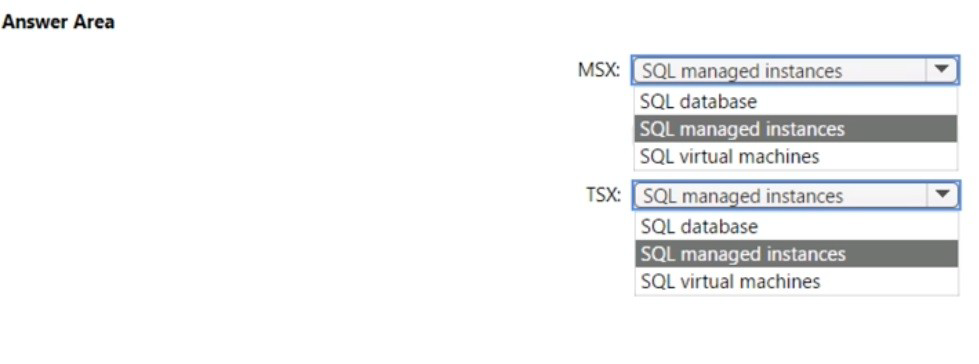
Explanation:
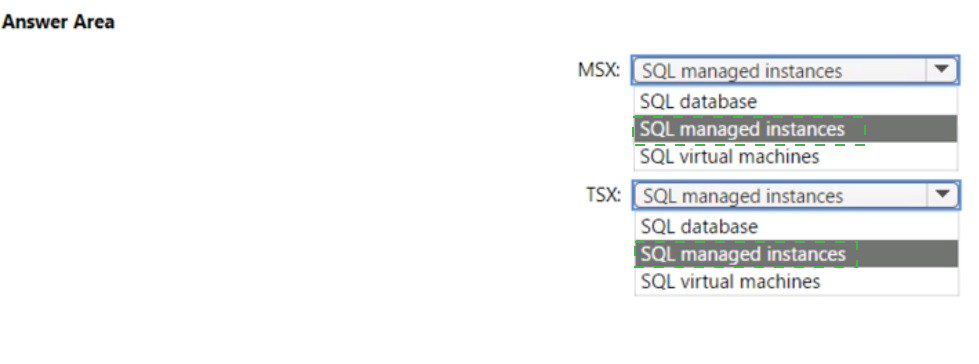
Multiserver administration in SQL Server uses a master server (MSX) to distribute and manage jobs across multiple target servers (TSX). This feature is available in SQL Server Agent. For Azure SQL deployments, SQL Managed Instances support this functionality natively, while SQL Database and SQL VMs have limitations in the MSX/TSX hierarchy.
Correct Option:
MSX: SQL managed instances
SQL Managed Instance can function as the master server (MSX) in a multiserver administration topology. It provides full SQL Server Agent capabilities, including the ability to create multiserver jobs, enlist target servers, and centrally manage job schedules. This supports the migration requirement while minimizing administrative effort.
TSX: SQL managed instances
SQL Managed Instances can also serve as target servers (TSX) in the multiserver job architecture. They can receive jobs from the MSX, execute them locally, and report back the status. This creates a homogeneous environment that's easier to manage and fully supports the master/target job functionality required for the migration.
Incorrect Options:
MSX: SQL database:
SQL Database cannot be an MSX because it lacks full SQL Server Agent capabilities for multiserver administration. It has limited agent functionality and cannot distribute jobs to other servers.
MSX: SQL virtual machines:
While SQL on VMs can be an MSX, this option increases administrative effort compared to managed instances. You would need to manage the underlying VM, operating system, and SQL Server patches.
TSX: SQL database:
SQL Database cannot be a TSX because it cannot receive and execute multiserver jobs from an MSX. Its SQL Server Agent is limited and doesn't support the target server role in a multiserver topology.
TSX: SQL virtual machines:
Although SQL VMs can be TSX, using them increases management overhead. The requirement specifically asks to minimize administrative effort, making managed instances the better choice.
Reference:
Microsoft Learn: Automate management tasks using SQL Server Agent jobs in Azure SQL Managed Instance
Microsoft Documentation: Create a multiserver environment
You have an Azure SQL database named db1 that contains an Azure Active Directory
(Azure AD) user named user1.
You need to test impersonation of user1 in db1 by running a SELECT statement and
returning to the original execution context.
How should you complete the Transact-SQL statement? To answer, select the appropriate
options in the answer area.
NOTE: Each correct selection is worth one point.
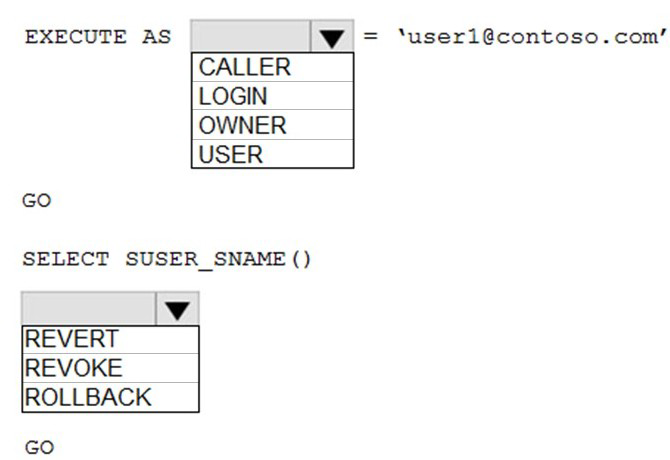
Explanation:
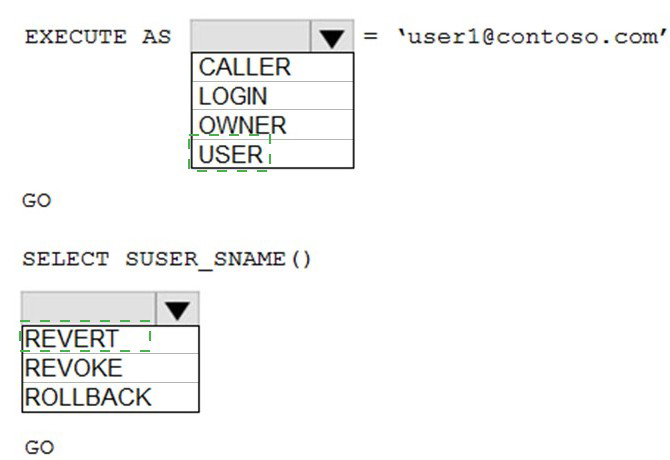
In Azure SQL Database, the EXECUTE AS clause allows you to set the execution context of a session. To impersonate another user and then return to the original context, you need to specify the impersonation type and use the appropriate command to revert. USER_SNAME() returns the name of the current user context.
Correct Option:
First dropdown: USER
To impersonate a specific database user, you use EXECUTE AS USER = 'user1@contoso.com'. This explicitly sets the execution context to the named database user, which in this case is an Azure AD user. The USER clause is used when you have a specific database principal to impersonate.
Second dropdown: REVERT
After impersonating a user and running the SELECT statement, you need to use the REVERT command to return to the original execution context. REVERT switches the execution context back to the caller of the last EXECUTE AS statement, effectively ending the impersonation session.
Incorrect Options:
First dropdown options:
CALLER: This is used within a module (like stored procedure) to specify that statements execute in the context of the caller, not for direct session impersonation.
LOGIN: This option exists in SQL Server but not in Azure SQL Database for EXECUTE AS at the session level. Azure SQL Database uses contained database users.
OWNER: This is used within modules to execute as the module owner, not for direct user impersonation in a session.
Second dropdown options:
REVOKE: This command removes permissions previously granted, not related to execution context switching.
ROLLBACK: This transaction command undoes data changes, not used for context switching.
GO: This batch separator signals the end of a batch to SQL tools, not an execution context command.
Reference:
Microsoft Documentation: EXECUTE AS (Transact-SQL)
Microsoft Documentation: REVERT (Transact-SQL)
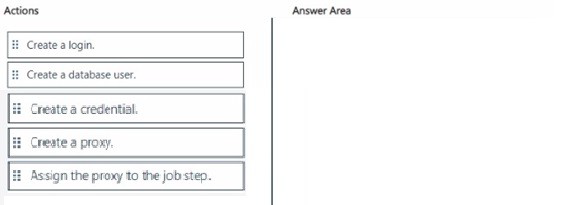
You have an Azure subscription that contains an instance of SQL Server on Azure Virtual
Machines named SQLVM1 and a virtual machine named Server! that runs Windows
Server. SQLVM1 and Serverl are joined to an Active Directory Domain Services (AD DS)
domain. Serverl hosts a file share named Sharel.
You need to ensure that a SQL Server Agent job step on SQLVM1 can access the files in
Share1. The solution must use the principle of least privilege.
Which three actions should you perform in sequence? To answer, move the appropriate
actions from the list of actions to the answer area and arrange them in the correct order.
Explanation:
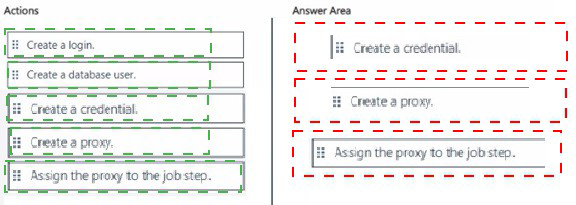
When a SQL Server Agent job step needs to access external resources like a file share, it requires appropriate permissions. In a domain-joined environment, the recommended approach is to create a credential (which stores a domain account), create a proxy that uses that credential, and assign the proxy to the job step. This follows the principle of least privilege.
Correct Order:
First: Create a credential.
Create a credential in SQL Server that stores the domain account credentials (username and password) which has the necessary permissions to access the file share. The credential securely stores the authentication information needed to access external resources.
Second: Create a proxy.
Create a proxy account in SQL Server Agent that uses the credential created in the previous step. The proxy defines which subsystem (like operating system or PowerShell) it can use and provides a layer of abstraction between the credential and the job steps.
Third: Assign the proxy to the job step.
Configure the SQL Server Agent job step to run under the newly created proxy account. When the job step executes, it uses the proxy's credentials to access Share1, ensuring the job has the minimum required permissions.
Incorrect Actions:
Create a login: Creating a login is for authenticating to SQL Server, not for accessing external resources like file shares.
Create a database user: Database users control access within databases, not for operating system-level resource access.
Reference:
Microsoft Documentation: Create a SQL Server Agent Proxy
Microsoft Documentation: Credentials in SQL Server
Microsoft Documentation: SQL Server Agent Security
You have an Azure subscription that contains an Azure SQL managed instance named
SQL1.
You use the Microsoft Power B1 service.
You need to configure connectivity from the Power B1 service to SQL1. The solution must
ensure that only the Power B1 service can initiate connections to SQL1.
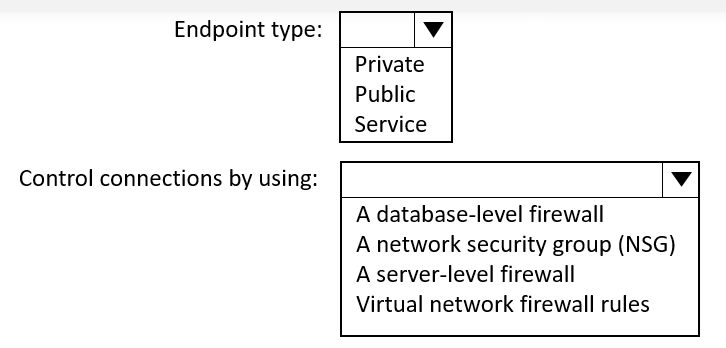
Which type of endpoint should you use for SQL1, and what should you use to control the
connections to SQL1? To answer, select the appropriate options in the answer area.
NOTE: Each correct selection is worth one point.
Explanation:
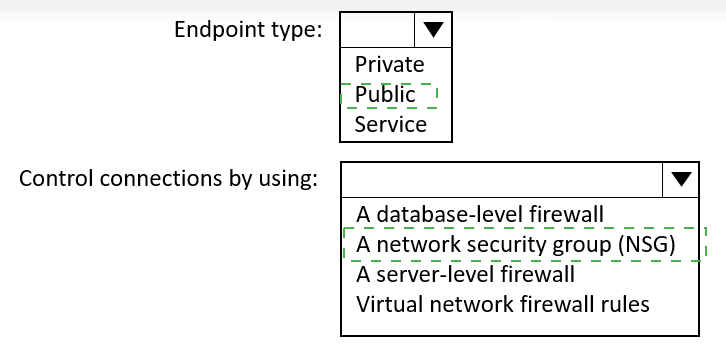
Power BI service requires connectivity to Azure SQL Managed Instance for data refresh and live connection scenarios. To ensure only Power BI service can initiate connections, you need a public endpoint with proper access controls, as private endpoints are for Azure VNet traffic only and Power BI service runs outside your VNet.
Correct Options:
Endpoint type: Public
Azure SQL Managed Instance provides both public and private endpoints. The public endpoint allows connections from outside the VNet, including the Power BI service which runs in Microsoft's public cloud infrastructure. This enables Power BI to connect directly to SQL1 without requiring VNet integration or gateway installation.
Control connections by using: Virtual network firewall rules
When using the public endpoint for SQL Managed Instance, you must configure the built-in firewall to allow specific source IP addresses. For Power BI service, you need to allow the IP ranges used by Power BI in your region. This is managed through virtual network firewall rules that restrict access to only authorized sources like Power BI service IPs.
Incorrect Options:
Endpoint type options:
Private:
Private endpoint restricts traffic to within your virtual network. Power BI service runs outside your VNet and cannot directly use private endpoints without additional infrastructure like VPN or ExpressRoute.
Service:
This is not a valid endpoint type for Azure SQL Managed Instance. Valid endpoint types are public and private only.
Control connections options:
A database-level firewall:
SQL Managed Instance does not support database-level firewall rules. Firewall configuration is managed at the instance level.
A network security group (NSG):
NSGs control traffic within VNets and apply to private endpoint traffic. They cannot control access to the public endpoint.
A server-level firewall:
While Azure SQL Database uses server-level firewalls, SQL Managed Instance uses virtual network firewall rules for public endpoint access control.
Reference:
Microsoft Documentation: Configure public endpoint in Azure SQL Managed Instance
Microsoft Documentation: Power BI IP addresses
Microsoft Documentation: Connect to Azure SQL Managed Instance with Power BI
You have An Azure SQL managed instance.
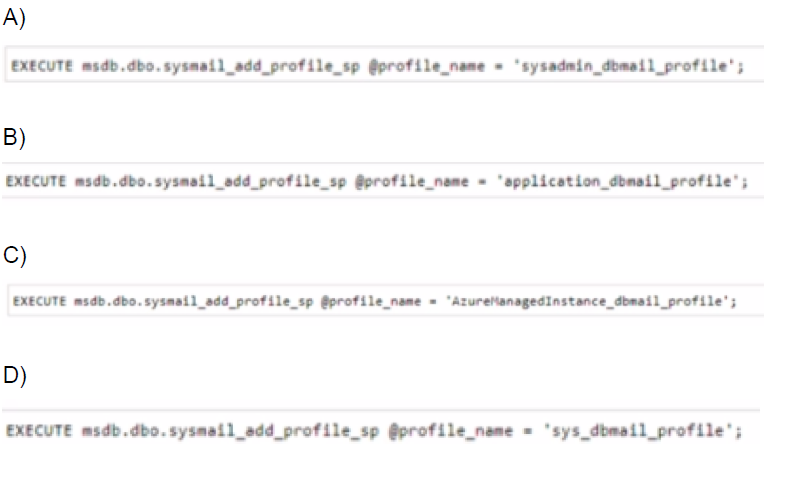
You need to configure the SQL Server Agent service to email job notifications.
Which statement should you execute?
A. Option A
B. Option B
C. Option C
D. Option D
Explanation:
In Azure SQL Managed Instance, Database Mail is preconfigured with a specific profile name that must be used for SQL Server Agent notifications. The service requires a specific profile name to successfully send email notifications for job status, alerts, and other agent-related events.
Correct Option:
B. EXECUTE msdb.dbo.sysmail_add_profile_sp @profile_name = 'application_dbmail_profile';
Azure SQL Managed Instance comes with a preconfigured Database Mail profile named 'application_dbmail_profile'. This profile is specifically designed for application and SQL Server Agent usage. When you need to enable email notifications from SQL Server Agent, you must use this exact profile name as it's already set up with the necessary settings and permissions.
Incorrect Options:
A. EXECUTE msdb.dbo.sysmail_add_profile_sp @profile_name = 'sysadmin_dbmail_profile';
This profile name is not the default preconfigured profile in Azure SQL Managed Instance. While you could create a custom profile with this name, it would require additional configuration steps and would not automatically work with SQL Server Agent without manual setup.
C. EXECUTE msdb.dbo.sysmail_add_profile_sp @profile_name = 'AzureManagedInstance_dbmail_profile';
Although this name suggests Azure SQL Managed Instance, it is not the actual preconfigured profile name. The managed instance comes with a specific default profile that must be used for agent notifications to work without additional configuration.
D. EXECUTE msdb.dbo.sysmail_add_profile_sp @profile_name = 'sys_dbmail_profile';
This is not the default profile name in Azure SQL Managed Instance. Using any name other than 'application_dbmail_profile' would require creating a new profile, configuring accounts, and setting up permissions manually, which contradicts the purpose of using the preconfigured setup.
Reference:
Microsoft Documentation: Configure Database Mail in Azure SQL Managed Instance
Microsoft Documentation: SQL Server Agent with Azure SQL Managed Instance
You have an Azure subscription.
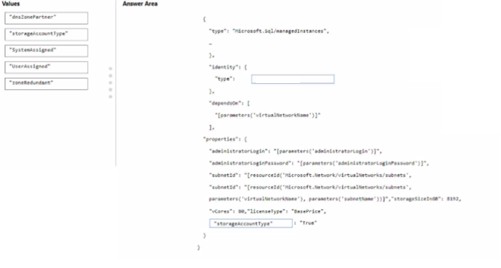
You need to deploy an Azure SQL managed instance by using an Azure Resource
Manager (ARM) template. The solution must meet the following requirements:
The SQL managed instance must be assigned a unique identity.
The SQL managed instance must be available in the event of an Azure datacenter outage.
How should you complete the template? To answer, drag the appropriate values to the
correct targets. Each value may be used once, more than once, or not at all. You may need
to drag the split bar between panes or scroll to view content.
NOTE: Each correct selection is worth one point.
Explanation:
When deploying an Azure SQL Managed Instance using an ARM template, you need to configure identity and availability settings. The requirements specify a unique identity (which requires system-assigned managed identity) and availability during datacenter outages (which requires zone-redundant configuration or specific zone selection).
Correct Targets:
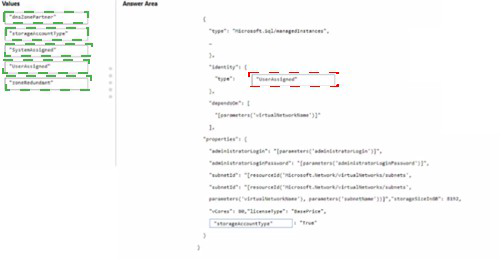
First target (under "Identity": {"type": [ ]): SystemAssigned
The SystemAssigned value creates a managed identity for the SQL Managed Instance that is tied to the resource lifecycle. This provides a unique identity in Azure Active Directory that can be used for authentication to other Azure services without storing credentials in code.
Second target (for storageAccountType): ZRS
Zone-redundant storage (ZRS) replicates data across multiple availability zones within the same region. This ensures data availability even if one datacenter experiences an outage, meeting the requirement for availability during datacenter failures.
Incorrect Values:
"dataSharePartner": This appears to be a parameter name in the template, not a value for identity type or storage redundancy.
"ownershipId": This is not a valid value for identity type or storage configuration in SQL Managed Instance templates.
"sharedSubscriber": This value doesn't correspond to any required property for identity or availability requirements.
Reference:
Microsoft Documentation: ARM template for Azure SQL Managed Instance
Microsoft Documentation: Managed identities in Azure SQL Managed Instance
Microsoft Documentation: Availability zones in Azure SQL Managed Instance
| Page 1 out of 34 Pages |
Administering Relational Databases on Microsoft Azure Practice Exam Questions
These DP-300 practice questions with explanations help candidates learn how to manage and administer databases on Azure. Topics include database deployment, performance tuning, backup and recovery, and security. Each question includes a detailed explanation that helps learners understand database concepts and administrative tasks more clearly. This approach promotes deeper learning and practical understanding. By practicing consistently, candidates can improve their database management skills, identify weak areas, and confidently prepare for the certification exam.DP-300 - Administering Relational Databases on Microsoft Azure Official Exam Blueprint and Weight:
1. Plan and Implement Data Platform Resources
Official Exam Weight: 15-20%
Subtopics: Configure Azure SQL Database resources, configure Azure SQL Managed Instance resources, configure SQL Server on Azure Virtual Machines, recommend appropriate database service tiers, configure compute and storage resources, configure networking settings and firewall rules, implement authentication and authorization, configure high availability and disaster recovery options, configure database scalability, deploy database resources using Azure portal PowerShell and Azure CLI, monitor resource utilization and costs, configure elastic pools and serverless compute.
2. Implement a Secure Environment
Official Exam Weight: 15-20%
Subtopics: Manage database authentication and authorization, configure Azure Active Directory authentication, implement role-based access control, configure row-level security, configure dynamic data masking, implement Transparent Data Encryption (TDE), configure Always Encrypted, manage auditing and threat detection, configure Microsoft Defender for SQL, implement data classification and sensitivity labels, manage database permissions, secure network access to database resources, configure firewall rules and virtual networks.
3. Monitor Optimize and Troubleshoot Performance
Official Exam Weight: 40-45%
Subtopics: Monitor database performance using Azure Monitor Query Store and Dynamic Management Views (DMVs), identify and resolve blocking and deadlocks, analyze query execution plans, optimize indexes and statistics, configure intelligent performance recommendations, troubleshoot connectivity issues, monitor resource utilization, identify long-running queries, implement performance tuning strategies, optimize workloads for Azure SQL services, configure automatic tuning, troubleshoot high CPU memory and storage usage, monitor availability and latency metrics, implement maintenance tasks for performance optimization.
4. Optimize Operational Resources
Official Exam Weight: 15-20%
Subtopics: Automate administrative tasks, configure alerts and notifications, implement backup and restore strategies, configure geo-replication and failover groups, manage database imports and exports, perform database migrations using Azure Database Migration Service, automate deployments using ARM templates and Azure DevOps, manage maintenance windows, configure retention policies, monitor and optimize operational costs, implement automation using PowerShell Azure CLI and T-SQL scripts, configure patching and updates, manage resource governance.
5. Plan and Implement a High Availability and Disaster Recovery (HADR) Environment
Official Exam Weight: 10-15%
Subtopics: Configure backup strategies, restore databases to a point in time, implement active geo-replication, configure auto-failover groups, configure Always On availability groups, test disaster recovery procedures, monitor replication health, implement business continuity solutions, configure long-term backup retention, validate recovery objectives including RPO and RTO, troubleshoot HADR issues, automate backup validation and recovery testing.
| Domain | Title | Exam Weight |
|---|---|---|
| 1 | Plan and Implement Data Platform Resources | 15-20% |
| 2 | Implement a Secure Environment | 15-20% |
| 3 | Monitor Optimize and Troubleshoot Performance | 40-45% |
| 4 | Optimize Operational Resources | 15-20% |
| 5 | Plan and Implement a High Availability and Disaster Recovery (HADR) Environment | 10-15% |
Customer Love
Database administration preparation improved significantly with MSmcqs practice test for Microsoft Certified: Azure Database Administrator Associate (DP-300). The mock exams covered performance tuning and database security thoroughly.
Chen Hao | China