Topic 6: Misc. Questions
You are building a database in an Azure Synapse Analytics serverless SQL pool.
You have data stored in Parquet files in an Azure Data Lake Storage Gen2 container.
Records are structured as shown in the following sample.
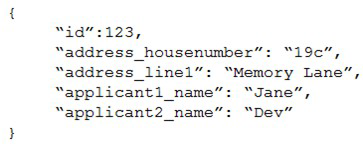
The records contain two applicants at most.
You need to build a table that includes only the address fields.
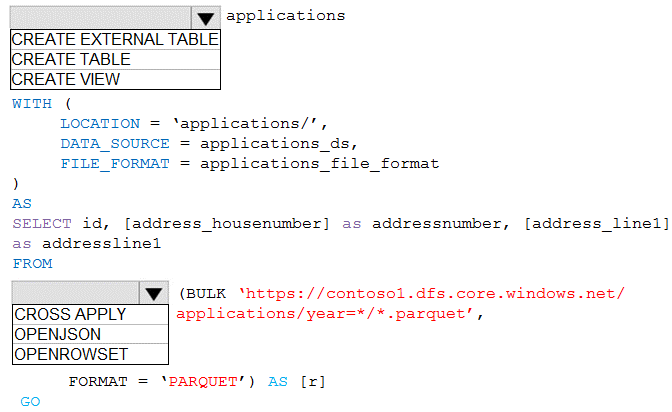
How should you complete the Transact-SQL statement? To answer, select the appropriate
options in the answer area.
NOTE: Each correct selection is worth one point.
Explanation:
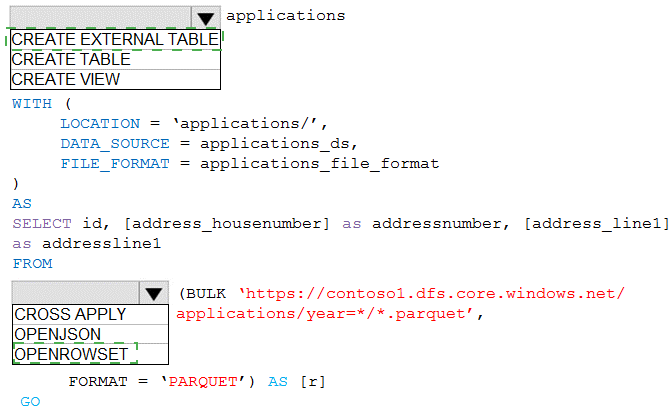
Azure Synapse serverless SQL pool allows querying data files directly using OPENROWSET with BULK option. To select only address fields from nested JSON-like structures in Parquet files, you need to specify the file format and use a WHERE clause to filter the relevant columns. The path to the container must be properly formatted.
Correct Options:
First dropdown: OPENROWSET
OPENROWSET with BULK is the function used to read data from files in serverless SQL pool. It allows you to query Parquet files directly from Data Lake Storage without loading data into a database. This provides the most efficient way to access the address fields.
Second dropdown: BULK
The BULK keyword is required with OPENROWSET to specify the data source location. It tells the function to read from files rather than from a table. The complete syntax would be OPENROWSET(BULK 'path/to/files', FORMAT = 'PARQUET').
Third dropdown: FORMAT
FORMAT = 'PARQUET' specifies that the source files use the Parquet format. This is essential for proper parsing of the structured data. Parquet is a columnar storage format that works efficiently with serverless SQL pool.
Fourth dropdown: 'https://storagename.dfs.core.windows.net/containername/*.parquet'
The correct path format for Azure Data Lake Storage Gen2 uses the DFS endpoint (dfs.core.windows.net) which supports hierarchical namespace. The wildcard (*.parquet) includes all Parquet files in the container, and the path points to the specific container location.
Fifth dropdown: WHERE
A WHERE clause is needed to filter only the address fields from the records. Since the requirement is to build a table with only address fields, you need to select specific columns and potentially use JSON_VALUE if the address fields are nested within a JSON structure in the Parquet file.
Reference:
Microsoft Documentation: Query Parquet files using serverless SQL pool
Microsoft Documentation: OPENROWSET in serverless SQL pool
Microsoft Documentation: Accessing Data Lake Storage with serverless SQL pool
You are creating a managed data warehouse solution on Microsoft Azure.
You must use PolyBase to retrieve data from Azure Blob storage that resides in parquet
format and load the data into a large table called FactSalesOrderDetails.
You need to configure Azure Synapse Analytics to receive the data.
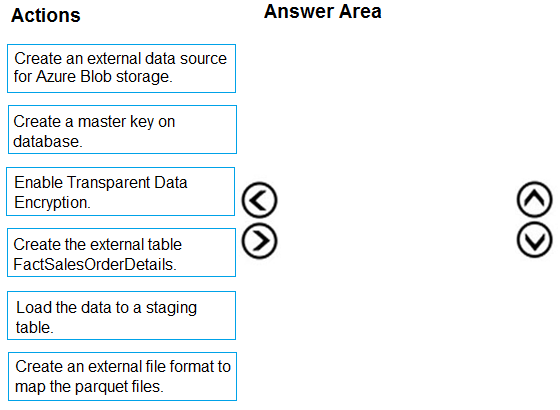
Which four actions should you perform in sequence? To answer, move the appropriate
actions from the list of actions to the answer area and arrange them in the correct order.
Explanation:
PolyBase in Azure Synapse Analytics allows querying external data sources like Azure Blob storage. To load Parquet files into a table, you need to follow a specific sequence: establish security, define file format, create external data source, and finally create the external table that maps to the Parquet files.
Correct Order:
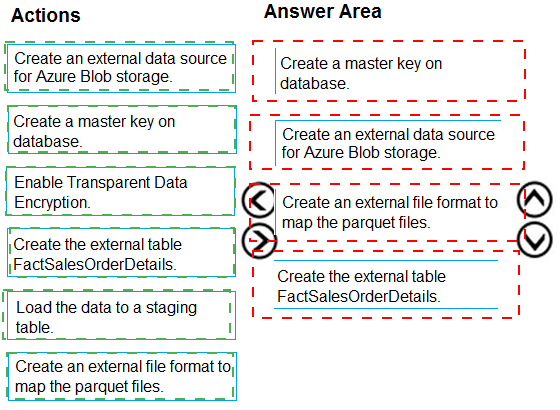
First: Create a master key on database.
A database master key is required to encrypt the credential secrets that will be used to access external data sources. This is the foundational security step before creating any credentials or data sources that require encryption.
Second: Create an external file format to map the parquet files.
The external file format defines how the Parquet files should be interpreted by PolyBase. It specifies the format type (PARQUET) and any format-specific options. This must be created before referencing the files in external tables.
Third: Create an external data source for Azure Blob storage.
The external data source defines the location of the Blob storage container and the authentication method. It references the storage account and container where the Parquet files are stored, using the previously created master key for credential encryption if needed.
Fourth: Create the external table FactSalesOrderDetails.
Finally, create the external table that maps to the Parquet files. This table definition specifies the schema (columns and data types) and references both the external data source and external file format created earlier.
Note:
Enable Transparent Data Encryption is not required for this process as it's about encrypting the database itself, not accessing external data.
Load the data to a staging table is a subsequent step after creating the external table, not part of the initial configuration sequence.
Reference:
Microsoft Documentation: PolyBase in Synapse SQL
Microsoft Documentation: Create external data source for PolyBase
Microsoft Documentation: Query Parquet files with PolyBase
You have SQL Server on an Azure virtual machine.
You need to use Policy-Based Management in Microsoft SQL Server to identify stored procedures that do not comply with your naming conventions.
Which three actions should you perform in sequence? To answer, move the appropriate
actions from the list of actions to the answer area and arrange them in the correct order.
Explanation:
Policy-Based Management in SQL Server allows you to define and enforce policies for managing SQL Server objects. To identify stored procedures that violate naming conventions, you need to create a condition that defines the naming rule, create a policy based on that condition, and then evaluate the policy against the target objects.
Correct Order:
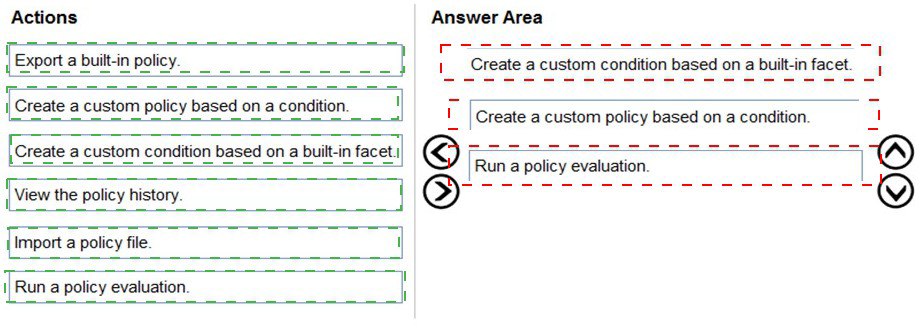
First: Create a custom condition based on a built-in facet.
The first step is to create a condition that defines your naming convention rule. Using the Stored Procedure facet, you create a condition that checks the @Name property against your naming pattern (like 'usp_%' for stored procedures). The condition specifies what compliance means for stored procedures.
Second: Create a custom policy based on a condition.
With the condition created, you now create a policy that uses this condition. The policy defines which condition to evaluate and what target objects to check (all stored procedures). You can set the evaluation mode and whether the policy should be enforced or just evaluated.
Third: Run a policy evaluation.
Finally, you evaluate the policy against the target stored procedures. This can be done manually on demand, and the results will show which stored procedures comply with your naming convention and which ones violate the rule.
Incorrect Actions:
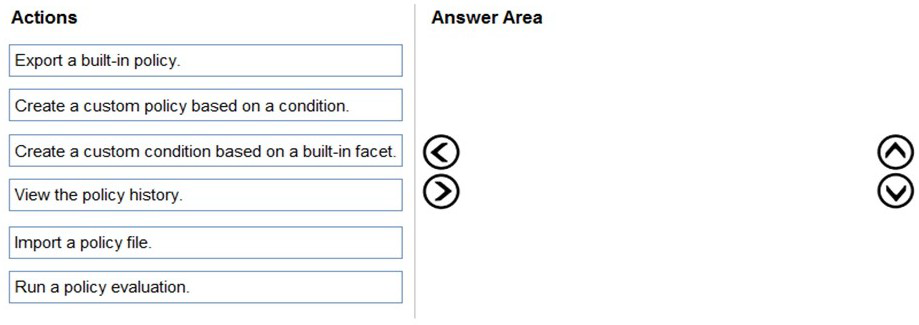
Export a built-in policy: Not needed as you're creating a custom policy, not exporting an existing one.
Import a policy file: This would be for bringing in pre-defined policies from files, not for creating custom naming convention policies.
View the policy history: This is for reviewing past evaluations, not for initially identifying non-compliant objects.
Run a policy evaluation: This is the final step, not the first step. You need the policy and condition created first.
Reference:
Microsoft Documentation: Administer Servers with Policy-Based Management
Microsoft Documentation: Create a New Policy-Based Management Condition
Microsoft Documentation: Evaluate a Policy-Based Management Policy
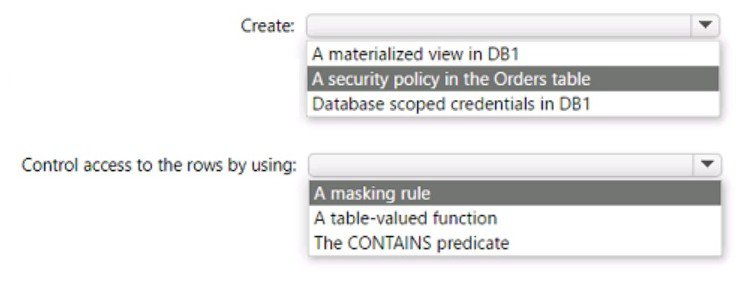
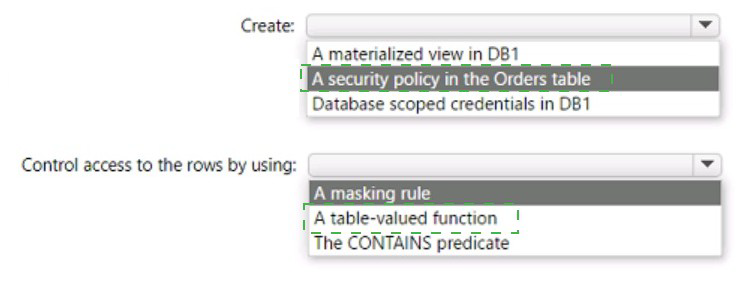
You have an Azure SQL database named DB1 that contains a table named Orders. The
Orders table contains a row for each sales order. Each sales order includes the name of
the
user who placed the order.
You need to implement row-level security (RLS). The solution must ensure that the users
can view only their respective sales orders.
What should you include in the solution? To answer, select the appropriate options in the
answer area.
NOTE: Each correct selection is worth one point.
You have an Azure subscription that contains an Azure SQL managed instance, a
database named db1, and an Azure web app named Appl. Appl uses db1.
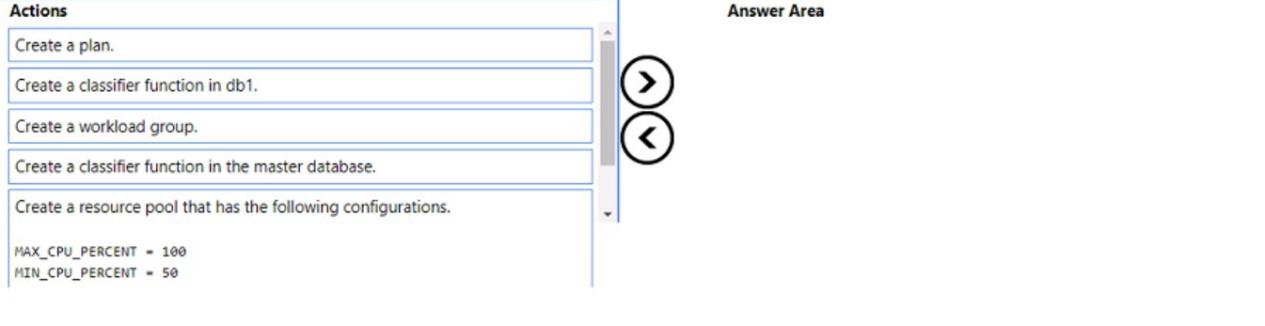
You need to enable Resource Governor for a App1. The solution must meet the following
requirements:
App1 must be able to consume all available CPU resources.
App1 must have at least half of the available CPU resources always available.
Which three actions should you perform in sequence? To answer. move the appropriate
actions from the list of actions to the answer area and arrange them in the correct order
NOTE: More than one order of answer choices is correct. You will receive credit for any of
the correct orders you select.
Explanation:
Resource Governor in Azure SQL Managed Instance allows you to manage SQL Server workload and system resource consumption. To guarantee minimum resources while allowing maximum consumption when available, you need to create resource pools with MIN and MAX CPU settings, create a workload group, and create a classifier function to route App1 connections.
Correct Order:
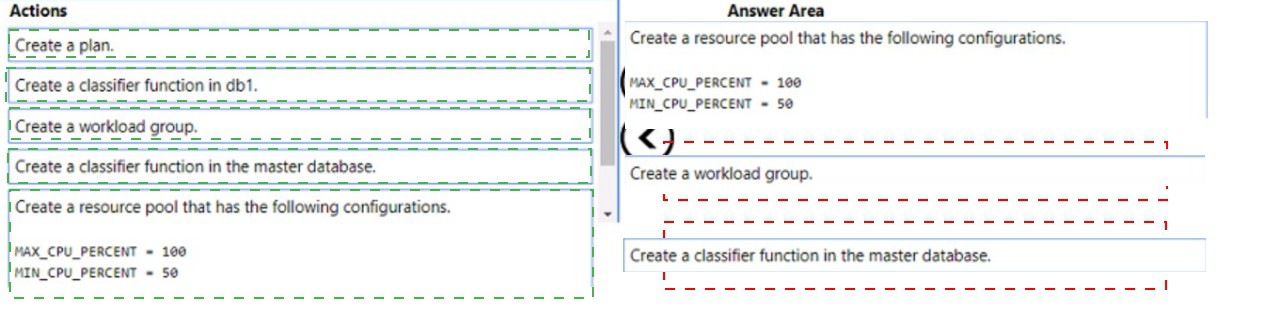
First: Create a resource pool that has the following configurations: MAX_CPU_PERCENT = 100, MIN_CPU_PERCENT = 50
The resource pool defines the resource limits for a specific workload. Setting MIN_CPU_PERCENT = 50 guarantees at least half of CPU resources are always available for App1, while MAX_CPU_PERCENT = 100 allows it to consume all available CPU when needed.
Second: Create a workload group
A workload group sits within a resource pool and serves as a container for sessions that have similar classification criteria. It inherits the resource pool's configuration and allows you to apply additional settings like request limits and importance.
Third: Create a classifier function in the master database
The classifier function must be created in the master database (not user databases). This user-defined function examines incoming connections and assigns them to the appropriate workload group based on criteria like application name or login. The function then routes App1 connections to the workload group you created.
Incorrect Actions:
Create a plan: Not a valid Resource Governor object.
Create a classifier function in db1: Classifier functions must be created in the master database only, not in user databases.
Create a plan: Duplicate of first incorrect action.
Note: The order of creating the resource pool and workload group can be swapped - you can create the workload group first and then associate it with the resource pool, or create the resource pool first. Both sequences are acceptable.
Reference:
Microsoft Documentation: Resource Governor in Azure SQL Managed Instance
Microsoft Documentation: CREATE WORKLOAD GROUP
Microsoft Documentation: CREATE RESOURCE POOL
You have an Azure subscription that contains a group named Group1 and an Azure SQL
managed instance that hosts a database named 081. You need to ensure that Group 1 has
read access to new tables created m 06I The solution must use the principle of least
privilege How should you complete the Transact-SQL statement' To answer, select the
appropriate options in the answer area. NOTE: Each correct selection is worth one point.


Explanation:
In Azure SQL Managed Instance, to automatically grant permissions to all future tables in a database, you need to grant permissions at the schema level. The SELECT permission on a schema automatically provides read access to all existing and future tables within that schema, following the principle of least privilege by not granting unnecessary write permissions.
Correct Options:
First dropdown: SELECT
SELECT permission grants read access to the specified objects. This meets the requirement for read access without providing unnecessary write permissions like INSERT, UPDATE, or DELETE, adhering to the principle of least privilege.
Second dropdown: Schema
Granting permissions at the schema level ensures that Group1 automatically has access to any new tables created in the future. This is more efficient than granting permissions on individual tables and ensures the requirement for future tables is met without additional administrative effort.
Complete statement:
GRANT SELECT ON SCHEMA :: [schema_name] TO [Contoso\group1]
Incorrect Options:
First dropdown options:
DELETE, INSERT, UPDATE: These permissions allow modifying data, which violates the principle of least privilege as the requirement only specifies read access.
GRANT: This is the action keyword, not a permission type.
Second dropdown options:
Database: Granting at database level would give access to all objects across all schemas, potentially granting more access than needed.
Table: Granting at table level would require manually granting permissions to each new table created in the future, failing the requirement for automatic access to new tables.
Reference:
Microsoft Documentation: GRANT Schema Permissions
Microsoft Documentation: Principle of Least Privilege in SQL Server
Microsoft Documentation: SQL Server Permissions
Vou have an Azure SQL database named DB1.
You have 10 Azure virtual machines that connect to a virtual network subnet named
Subnet 1.
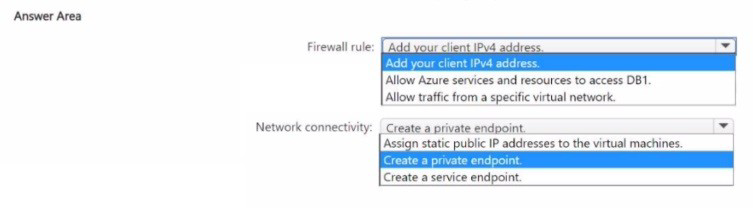
You need to implement a database-level firewall that meets the following requirements:
• Ensures that only the 10 virtual machines can access DB1
• Follows the principle of least privilege
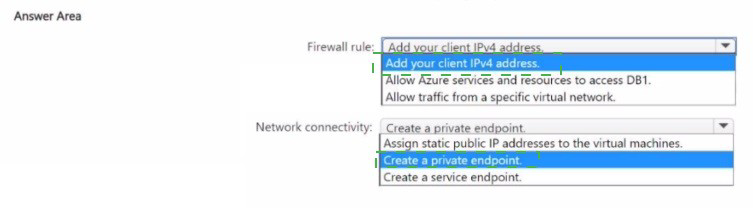
How should you configure the firewall rule, and how should you establish network connectivity from the virtual machines to DB1? To answer, select the appropriate options in
the answer area.
NOTE: Each correct selection is worth one point.
Explanation:
To ensure only specific virtual machines can access an Azure SQL Database while following least privilege, you need to combine virtual network firewall rules with private connectivity. This approach avoids opening access to all Azure services or using public IP-based firewall rules.
Correct Options:
Firewall rule: Allow traffic from a specific virtual network
Instead of allowing all Azure services or individual IP addresses, you should configure a virtual network firewall rule that allows traffic specifically from Subnet1. This ensures only resources within that subnet can access DB1, following the principle of least privilege by not granting access to any other sources.
Network connectivity: Create a private endpoint
A private endpoint gives the virtual machines a private IP address from their VNet to connect to DB1. This keeps all traffic within the Microsoft backbone network, avoids exposing the database to the public internet, and works with the virtual network firewall rule to ensure only traffic from Subnet1 can access DB1.
Incorrect Options:
Firewall rule options:
Add your client IPv4 address: This would allow only a single client IP, not all 10 VMs. Also, VMs typically use dynamic private IPs, making IP-based rules impractical.
Allow Azure services and resources to access DB1: This would allow access from any Azure service, violating least privilege by granting far more access than needed.
Network connectivity options:
Assign static public IP addresses to the virtual machines: This would expose VMs to the internet and require managing individual IP firewall rules, increasing security risk and administrative overhead.
Create a service endpoint: While service endpoints provide connectivity from a VNet to Azure SQL, they don't provide a private IP address and are less secure than private endpoints for this scenario.
Reference:
Microsoft Documentation: Virtual Network service endpoints for Azure SQL Database
Microsoft Documentation: Private Link and private endpoints for Azure SQL Database
Microsoft Documentation: Azure SQL Database firewall rules
You have an on-premises Microsoft SQL Server 2016 instance that hosts a database
named db1. You have an Azure subscription that contains an Azure SQL managed
instance named Mil.
You plan to perform an online migration of db1 to MM by using Azure Database Migration
Service.
You need to create the backups for the migration. The solution must minimize the number
of backup files created.
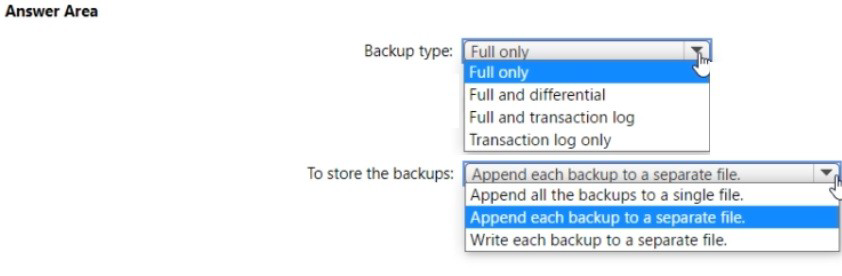
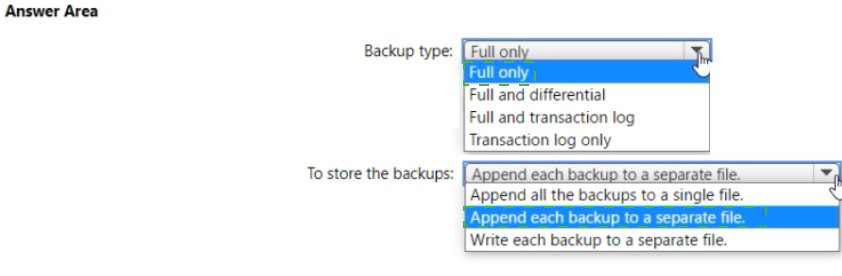
Which type of backups should you create, and how should you store the backups? To
answer, select the appropriate options in the answer area.
NOTE: Each correct selection is worth one point.
Explanation:
Azure Database Migration Service (DMS) supports online migrations from SQL Server to Azure SQL Managed Instance. For online migration with minimal backup files, you need to create full and transaction log backups, and write each backup to a separate file. This allows DMS to continuously apply log backups during the migration process.
Correct Options:
Backup type: Full and transaction log
For online migration, you need a full backup to establish the baseline and transaction log backups to capture ongoing changes. This allows the target database to stay synchronized with the source during migration. The full backup provides the initial data, while transaction logs keep the target updated until cutover.
To store the backups: Write each backup to a separate file
Each backup must be written to its own separate file. For online migration, DMS requires individual backup files to process them sequentially. The full backup goes to one file, and each transaction log backup goes to its own unique file. This enables DMS to track and apply each backup independently during the migration process.
Incorrect Options:
Backup type options:
Full only: This would only provide a point-in-time snapshot with no ability to sync ongoing changes, making online migration impossible.
Full and differential: Differential backups don't provide the continuous change capture needed for online migration.
Transaction log only: You cannot restore transaction logs without a full backup baseline.
Storage options:
Append each backup to a separate file: While similar to "write to separate file," this implies appending multiple backup sets to the same file, which DMS cannot process correctly.
Append all the backups to a single file: This would create one file with multiple backup sets, which DMS cannot read for online migration.
Reference:
Microsoft Documentation: Online migration to Azure SQL Managed Instance
Microsoft Documentation: Backup requirements for DMS online migration
Microsoft Documentation: Prepare SQL Server for online migration
You have a database on a SQL Server on Azure Virtual Machines instance.
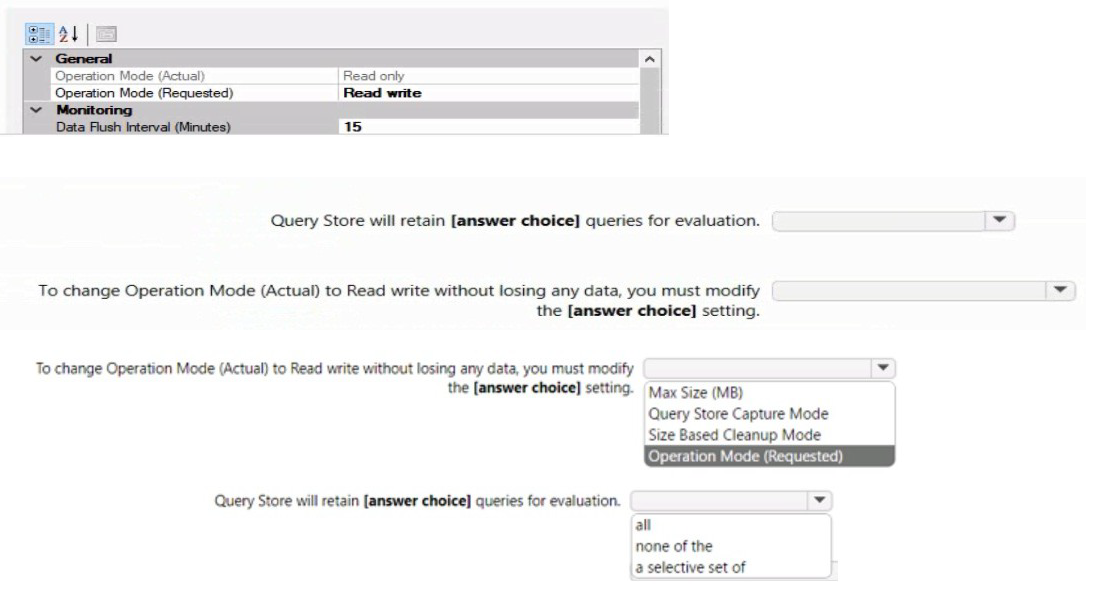
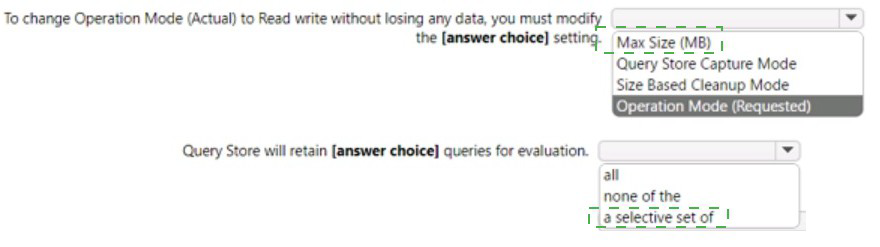
The current state of Query Store for the database is shown in the following exhibit.
Explanation:
Query Store in SQL Server captures query performance data for analysis and troubleshooting. The exhibit shows Operation Mode (Actual) is "Read only" while Operation Mode (Requested) is "Read write". This indicates Query Store has reached its maximum size and automatically switched to read-only mode to prevent data loss.
Correct Options:
First dropdown: Max Size (MB)
When Query Store reaches the Max Size (MB) limit, it automatically switches to read-only mode to protect existing data. To return to read-write mode without losing data, you must increase the Max Size (MB) setting, providing additional space for new query data while preserving existing historical information.
Second dropdown: Size Based Cleanup Mode
Size Based Cleanup Mode controls whether Query Store automatically removes older or less relevant data when space is needed. To change from read-only to read-write without losing data, you can enable Size Based Cleanup Mode to auto-cleanup data, rather than increasing the max size. This allows Query Store to free up space by removing old data according to its cleanup policy.
Incorrect Options:
Query Store Capture Mode:
This setting controls which queries are captured (All, Auto, None) but doesn't affect the read-only state caused by space exhaustion.
Operation Mode (Requested):
This is already set to "Read write" in the exhibit. The issue is that the actual mode is read-only due to space constraints.
Reference:
Microsoft Documentation: Query Store best practices
Microsoft Documentation: Query Store catalog views
Microsoft Documentation: Manage Query Store in SQL Server
| Page 3 out of 34 Pages |