Topic 2: Contoso Ltd
Case study This is a case study. Case studies are not timed separately. You can use as much exam time as you would like to complete each case. However, there may be additional case studies and sections on this exam. You must manage your time to ensure that you are able to complete all questions included on this exam in the time provided. To answer the questions included in a case study, you will need to reference information that is provided in the case study. Case studies might contain exhibits and other resources that provide more information about the scenario that is described in the case study. Each question is independent of the other questions in this case study. At the end of this case study, a review screen will appear. This screen allows you to review your answers and to make changes before you move to the next section of the exam. After you begin a new section, you cannot return to this section. To start the case study To display the first question in this case study, click the Next button. Use the buttons in the left pane to explore the content of the case study before you answer the questions. Clicking these buttons displays information such as business requirements, existing environment, and problem statements. If the case study has an All Information tab, note that the information displayed is identical to the information displayed on the subsequent tabs. When you are ready to answer a question, click the Question button to return to the question. Overview Existing Environment Contoso, Ltd. is a financial data company that has 100 employees. The company delivers financial data to customers. Active Directory Contoso has a hybrid Azure Active Directory (Azure AD) deployment that syncs to onpremises Active Directory. Database Environment Contoso has SQL Server 2017 on Azure virtual machines shown in the following table. SQL1 and SQL2 are in an Always On availability group and are actively queried. SQL3 runs jobs, provides historical data, and handles the delivery of data to customers. The on-premises datacenter contains a PostgreSQL server that has a 50-TB database. Current Business Model Contoso uses Microsoft SQL Server Integration Services (SSIS) to create flat files for customers. The customers receive the files by using FTP. Requirements Planned Changes Contoso plans to move to a model in which they deliver data to customer databases that run as platform as a service (PaaS) offerings. When a customer establishes a service agreement with Contoso, a separate resource group that contains an Azure SQL database will be provisioned for the customer. The database will have a complete copy of the financial data. The data to which each customer will have access will depend on the service agreement tier. The customers can change tiers by changing their service agreement. The estimated size of each PaaS database is 1 TB. Contoso plans to implement the following changes: Move the PostgreSQL database to Azure Database for PostgreSQL during the next six months. Upgrade SQL1, SQL2, and SQL3 to SQL Server 2019 during the next few months. Start onboarding customers to the new PaaS solution within six months. Business Goals Contoso identifies the following business requirements: Use built-in Azure features whenever possible. Minimize development effort whenever possible. Minimize the compute costs of the PaaS solutions. Provide all the customers with their own copy of the database by using the PaaS solution. Provide the customers with different table and row access based on the customer’s service agreement. In the event of an Azure regional outage, ensure that the customers can access the PaaS solution with minimal downtime. The solution must provide automatic failover. Ensure that users of the PaaS solution can create their own database objects but he prevented from modifying any of the existing database objects supplied by Contoso. Technical Requirements Contoso identifies the following technical requirements: Users of the PaaS solution must be able to sign in by using their own corporate Azure AD credentials or have Azure AD credentials supplied to them by Contoso. The solution must avoid using the internal Azure AD of Contoso to minimize guest users. All customers must have their own resource group, Azure SQL server, and Azure SQL database. The deployment of resources for each customer must be done in a consistent fashion. Users must be able to review the queries issued against the PaaS databases and identify any new objects created. Downtime during the PostgreSQL database migration must be minimized. Monitoring Requirements Contoso identifies the following monitoring requirements: Notify administrators when a PaaS database has a higher than average CPU usage. Use a single dashboard to review security and audit data for all the PaaS databases. Use a single dashboard to monitor query performance and bottlenecks across all the PaaS databases. Monitor the PaaS databases to identify poorly performing queries and resolve query performance issues automatically whenever possible. PaaS Prototype During prototyping of the PaaS solution in Azure, you record the compute utilization of a customer’s Azure SQL database as shown in the following exhibit. Role Assignments For each customer’s Azure SQL Database server, you plan to assign the roles shown in the following exhibit.
You have an Azure Data Lake Storage Gen2 container.
Data is ingested into the container, and then transformed by a data integration application.
The data is NOT modified after that. Users can read files in the container but cannot modify
the files.
You need to design a data archiving solution that meets the following requirements:
New data is accessed frequently and must be available as quickly as possible.
Data that is older than five years is accessed infrequently but must be available
within one second when requested.
Data that us older than seven years is NOT accessed. After seven years, the data
must be persisted at the lowest cost possible.
Costs must be minimized while maintaining the required availability.
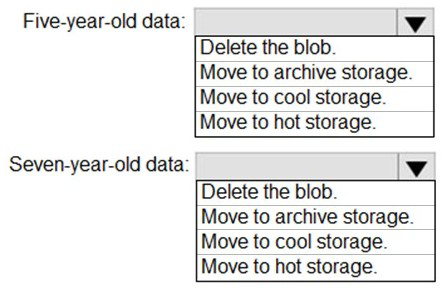
How should you manage the data? To answer, select the appropriate options in the answer
area.
NOTE: Each correct selection is worth one point.
Explanation:
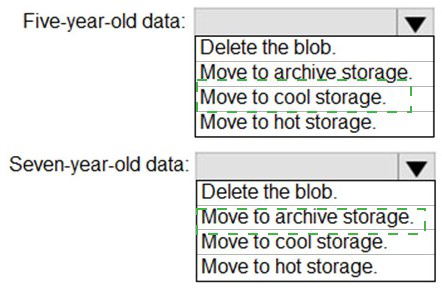
Azure Data Lake Storage Gen2 supports tiered storage with hot, cool, and archive tiers. Each tier offers different access characteristics and costs. The requirements specify different access patterns based on data age: immediate availability for new data, one-second availability for 5-7 year old data, and lowest cost retention beyond 7 years.
Correct Options:
Five-year-old data: Move to cool storage
Data older than five years is accessed infrequently but must be available within one second. Cool storage tier is designed for infrequently accessed data that needs to be available immediately. It offers lower storage costs than hot tier while maintaining low latency access, meeting both the cost minimization and one-second availability requirements.
Seven-year-old data: Move to archive storage
Data older than seven years is never accessed but must be persisted at the lowest possible cost. Archive storage tier provides the lowest storage cost but has higher access latency (hours). Since the requirement states this data is not accessed, archive tier is ideal as it minimizes costs while still preserving the data.
Incorrect Options:
Five-year-old data options:
Delete the blob: This would lose the data permanently, which doesn't meet the requirement to retain infrequently accessed data.
Move to archive storage: Archive storage has access latency of hours, not meeting the one-second availability requirement.
Move to hot storage: Hot storage has higher costs and is optimized for frequently accessed data, which doesn't match the infrequent access pattern.
Seven-year-old data options:
Delete the blob: The requirement specifies data must be persisted, so deletion is not acceptable.
Move to cool storage: Cool storage has higher costs than archive, which doesn't minimize costs as required.
Move to hot storage: Hot storage is the most expensive tier and not appropriate for never-accessed data.
Reference:
Microsoft Documentation: Azure Blob Storage access tiers
Microsoft Documentation: Archive access tier in Azure Blob Storage
Microsoft Documentation: Cool access tier in Azure Blob Storage
You have an Azure subscription that contains an Azure SQL database. The database
contains a table named tablet.
You execute the following Transact-SQL statements.

You need to reduce the time it takes to perform analytic queries on the database.
Which configuration should you enable?
A. ROW_ MODE_MEMORY GRANT_FEEDBACK
B. BATCH MODE_MEMORY GRAIJT_FEEDBACK
C. BATCH_MODE_ADAPTIVE_TOIMS
D. BATC H_MODE_ON_ROWSTOR E
Explanation:
The table has a clustered index and a nonclustered index, indicating rowstore storage. Analytic queries typically benefit from batch mode processing, which processes data in batches rather than row-by-row. To improve performance for analytic queries on rowstore tables, you need to enable batch mode processing capabilities.
Correct Option:
D. BATCH_MODE_ON_ROWSTORE
Batch mode on rowstore enables batch mode execution for analytic queries even when the data is stored in traditional rowstore tables. This feature allows the query processor to use batch mode processing (which is typically only available for columnstore indexes) on rowstore data, significantly improving performance for analytic workloads without requiring changes to the table structure.
Incorrect Options:
A. ROW_MODE_MEMORY_GRANT_FEEDBACK:
This feature helps correct insufficient or excessive memory grants for row mode queries but doesn't change the execution mode itself. It addresses memory issues rather than enabling batch processing, so it won't provide the analytic query performance improvement needed.
B. BATCH_MODE_MEMORY_GRANT_FEEDBACK:
This feature adjusts memory grants for batch mode queries to prevent spills or excessive memory usage. While useful for optimizing existing batch mode queries, it doesn't enable batch processing for rowstore tables, so it won't help if queries aren't already using batch mode.
C. BATCH_MODE_ADAPTIVE_JOINS:
This feature allows the query optimizer to dynamically choose a join strategy during execution for batch mode queries. While it improves join performance, it only works when queries already run in batch mode and doesn't enable batch processing for rowstore tables.
Reference:
Microsoft Documentation: Batch mode on rowstore
Microsoft Documentation: Intelligent query processing in SQL databases
Microsoft Documentation: Adaptive query processing
You have a burstable Azure virtual machine named VMI that hosts an instance of Microsoft
SQL Server.
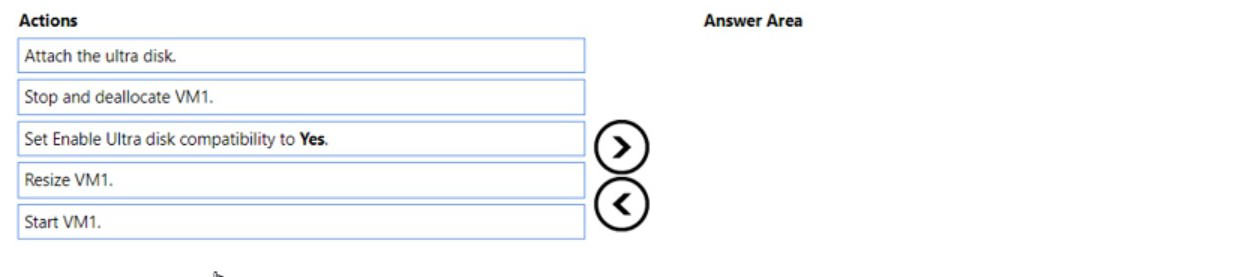
You need to attach an Azure ultra disk to VMI. The solution must minimize downtime on
VMI.
In which order should you perform the actions? To answer, move all actions from the list of
actions to the answer area and arrange them in the correct order.
Explanation:
Azure ultra disks have specific requirements for VM compatibility. Not all VM series and sizes support ultra disks, and the feature must be explicitly enabled. For an existing VM, enabling ultra disk compatibility requires the VM to be deallocated. Following the correct sequence ensures successful attachment while minimizing downtime.
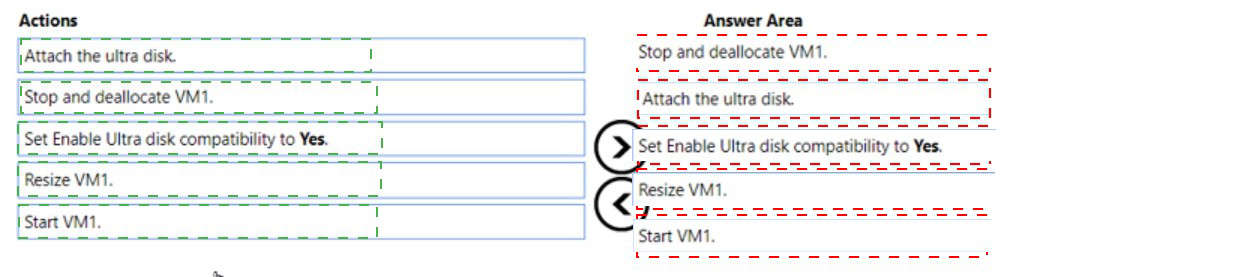
Correct Order:
First: Stop and deallocate VM1.
Before enabling ultra disk compatibility, the VM must be in a stopped (deallocated) state. This frees up the hardware resources and allows configuration changes to the VM settings that cannot be modified while the VM is running.
Second: Set Enable Ultra disk compatibility to Yes.
With the VM deallocated, you can now enable the ultra disk compatibility setting on the VM. This configuration change prepares the VM to support ultra disks and is only possible when the VM is not running.
Third: Start VM1.
After enabling ultra disk compatibility, start the VM to bring it back online. The VM now has the capability to work with ultra disks, though no disk is attached yet.
Fourth: Attach the ultra disk.
With the VM running and ultra disk compatibility enabled, you can now attach the ultra disk to VM1. This can be done while the VM is running, minimizing additional downtime.
Note: Resize VM1. is not required
Resizing the VM is only necessary if the current VM size doesn't support ultra disks. Since the question doesn't indicate a compatibility issue with the current size, this step isn't needed in the sequence.
Reference:
Microsoft Documentation: Using Azure ultra disks
Microsoft Documentation: Ultra disk compatibility with VM sizes
You have an Azure Synapse Analytics dedicated SQL pool.
You run PDW_SHOWSPACEUSED('dbo.FactInternetSales'); and get the results shown in
the following table.
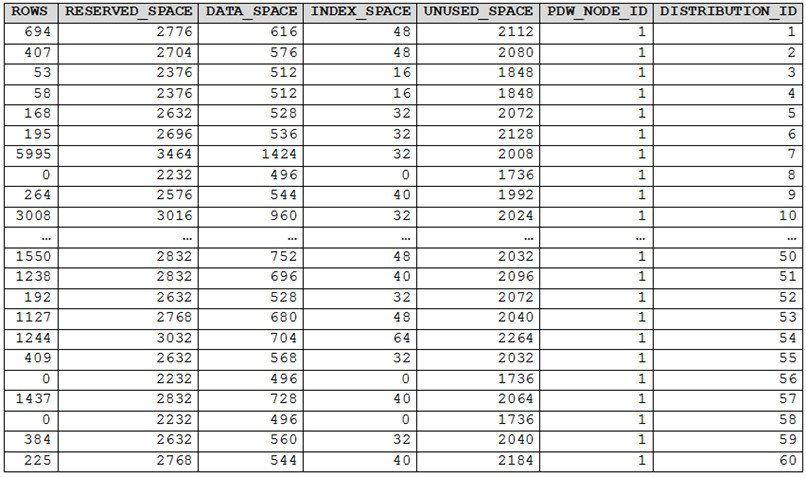
Which statement accurately describes the dbo.FactInternetSales table?
A. The table contains less than 10,000 rows.
B. All distributions contain data.
C. The table uses round-robin distribution
D. The table is skewed.
Explanation:
PDW_SHOWSPACEUSED is a system function in Azure Synapse Analytics dedicated SQL pool that displays space usage information for a table across distributions. The output shows row counts and space usage for each distribution (DISTRIBUTION_ID). Analyzing this data helps identify distribution issues like data skew, which impacts query performance.
Correct Option:
D. The table is skewed.
The table shows significant data skew, meaning rows are unevenly distributed across distributions. Distribution 7 contains 5,995 rows while distributions 8, 56, and 58 contain 0 rows. Distribution 3 has only 53 rows. This uneven distribution indicates a poor distribution key choice, causing some distributions to handle much more data than others, which negatively impacts query performance.
Incorrect Options:
A. The table contains less than 10,000 rows:
The table actually contains over 10,000 rows. Even from the partial data shown, distributions 7 (5,995) and 10 (3,008) alone total over 9,000 rows, with many other distributions contributing additional rows.
B. All distributions contain data:
Multiple distributions show 0 rows (distributions 8, 56, 58). In a dedicated SQL pool with 60 distributions, having empty distributions indicates the distribution strategy isn't spreading data to all distributions.
C. The table uses round-robin distribution:
Round-robin distribution would distribute rows evenly across distributions. The highly variable row counts (from 0 to 5,995) prove this isn't round-robin but rather hash distribution with a poor distribution key choice.
Reference:
Microsoft Documentation: PDW_SHOWSPACEUSED in Synapse SQL
Microsoft Documentation: Table distribution guidance
Microsoft Documentation: Managing data skew in dedicated SQL pool
You have two on-premises Microsoft SQL Server instances named SQL1 and SQL2.
You have an Azure subscription
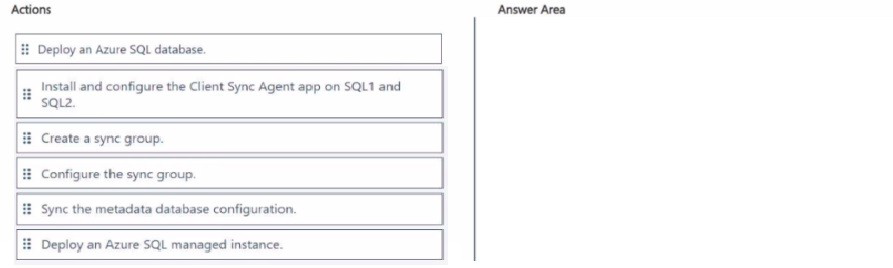
You need to sync a subset of tables between the databases hosted on SQL1 and SQL2 by
using SQL Data Sync.
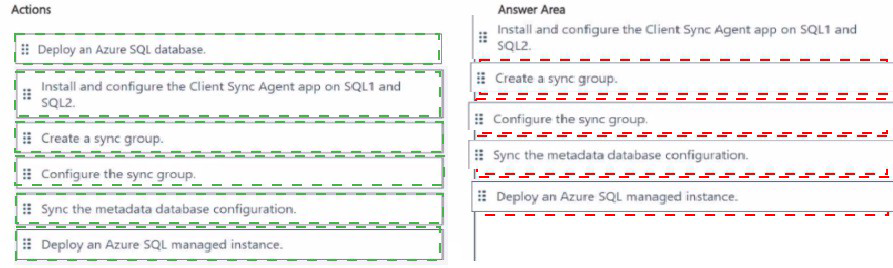
Which five actions should you perform in sequence' To answer, move the appropriate
actions from the list of actions to the answer area and arrange them in the correct order.
Explanation:
SQL Data Sync is a service that allows bi-directional data synchronization between Azure SQL Database and on-premises SQL Server. To sync on-premises databases, you need to deploy an Azure SQL database as the hub, install the sync agent on-premises, and configure sync groups. The correct sequence ensures proper setup and connectivity.
Correct Order:
First: Deploy an Azure SQL database.
The Azure SQL database serves as the hub database in the sync topology. It stores metadata and coordinates synchronization between all member databases. This must be created first as it's the central component of the sync group.
Second: Install and configure the Client Sync Agent app on SQL1 and SQL2.
The Data Sync Agent must be installed on each on-premises server to enable communication between Azure and the local SQL Server instances. The agent handles authentication and data transfer between on-premises and cloud.
Third: Sync the metadata database configuration.
After installing the agents, you need to sync the metadata database configuration to register the on-premises databases with the sync service. This establishes the connection between the Azure sync service and the local agents.
Fourth: Create a sync group.
With agents configured and registered, create a sync group in the Azure portal. The sync group defines the synchronization topology, including the hub database (Azure SQL) and member databases (on-premises).
Fifth: Configure the sync group.
Finally, configure the sync group settings including sync frequency, conflict resolution policy, and select the specific tables and columns to synchronize between the on-premises databases.
Note: Deploy an Azure SQL managed instance is not used
SQL Data Sync works with Azure SQL Database, not SQL Managed Instance. The hub database must be Azure SQL Database.
Reference:
Microsoft Documentation: Set up SQL Data Sync for Azure SQL Database
Microsoft Documentation: SQL Data Sync agent for on-premises SQL Server
Microsoft Documentation: Tutorial: Set up SQL Data Sync
| Page 2 out of 34 Pages |