Free Microsoft SC-100 Practice Test Questions MCQs

Stop wondering if you're ready. Our Microsoft SC-100 practice test is designed to identify your exact knowledge gaps. Validate your skills with Microsoft Cybersecurity Architect questions that mirror the real exam's format and difficulty. Build a personalized study plan based on your free SC-100 exam questions mcqs performance, focusing your effort where it matters most.

Targeted practice like this helps candidates feel significantly more prepared for Microsoft Cybersecurity Architect exam day.

21710+ already prepared
Updated On : 3-Mar-2026
171 Questions
Microsoft Cybersecurity Architect
4.9/5.0

Page 1 out of 18 Pages

Topic 1: Fabrikam, Inc Case Study 1


OverView
Fabrikam, Inc. is an insurance company that has a main office in New York and a branch office in Paris.

On-premises Environment
The on-premises network contains a single Active Directory Domain Services (AD DS) domain named corp.fabrikam.com.

Azure Environment
Fabrikam has the following Azure resources:
• An Azure Active Directory (Azure AD) tenant named fabrikam.onmicrosoft.com that syncs with corp.fabnkam.com
• A single Azure subscription named Sub1
• A virtual network named Vnet1 in the East US Azure region
• A virtual network named Vnet2 in the West Europe Azure region
• An instance of Azure Front Door named FD1 that has Azure Web Application Firewall (WAR enabled)
• A Microsoft Sentinel workspace
• An Azure SQL database named ClaimsDB that contains a table named ClaimDetails
• 20 virtual machines that are configured as application servers and are NOT onboarded to Microsoft Defender for Cloud
• A resource group named TestRG that is used for testing purposes only
• An Azure Virtual Desktop host pool that contains personal assigned session hosts All the resources in Sub1 are in either the East US or the West Europe region.

Partners
Fabrikam has contracted a company named Contoso, Ltd. to develop applications. Contoso has the following infrastructure-.
• An Azure AD tenant named contoso.onmicrosoft.com
• An Amazon Web Services (AWS) implementation named ContosoAWS1 that contains
AWS EC2 instances used to host test workloads for the applications of Fabrikam Developers at Contoso will connect to the resources of Fabrikam to test or update applications. The developers will be added to a security Group named Contoso Developers in fabrikam.onmicrosoft.com that will be assigned to roles in Sub1.
The ContosoDevelopers group is assigned the db.owner role for the ClaimsDB database.

Compliance Event
Fabrikam deploys the following compliance environment: • Defender for Cloud is configured to assess all the resources in Sub1 for compliance to the HIPAA HITRUST standard.
• Currently, resources that are noncompliant with the HIPAA HITRUST standard are remediated manually.
• Qualys is used as the standard vulnerability assessment tool for servers.

Problem Statements
The secure score in Defender for Cloud shows that all the virtual machines generate the following recommendation-. Machines should have a vulnerability assessment solution.
All the virtual machines must be compliant in Defender for Cloud.

ClaimApp Deployment
Fabrikam plans to implement an internet-accessible application named ClaimsApp that will have the following specification
• ClaimsApp will be deployed to Azure App Service instances that connect to Vnetl and Vnet2.
• Users will connect to ClaimsApp by using a URL of https://claims.fabrikam.com.
• ClaimsApp will access data in ClaimsDB.
• ClaimsDB must be accessible only from Azure virtual networks.
• The app services permission for ClaimsApp must be assigned to ClaimsDB.

Application Development Requirements
Fabrikam identifies the following requirements for application development:
• Azure DevTest labs will be used by developers for testing.
• All the application code must be stored in GitHub Enterprise.
• Azure Pipelines will be used to manage application deployments.
• All application code changes must be scanned for security vulnerabilities, including application code or configuration files that contain secrets in clear text. Scanning must be done at the time the code is pushed to a repository.

Security Requirement
Fabrikam identifies the following security requirements:
• Internet-accessible applications must prevent connections that originate in North Korea.
• Only members of a group named InfraSec must be allowed to configure network security groups (NSGs} and instances of Azure Firewall, VJM. And Front Door in Sub1.
• Administrators must connect to a secure host to perform any remote administration of the virtual machines. The secure host must be provisioned from a custom operating system image.

AWS Requirements
Fabrikam identifies the following security requirements for the data hosted in ContosoAWSV.
• Notify security administrators at Fabrikam if any AWS EC2 instances are noncompliant with secure score recommendations.
• Ensure that the security administrators can query AWS service logs directly from the Azure environment.

Contoso Developer Requirements
Fabrikam identifies the following requirements for the Contoso developers;
• Every month, the membership of the ContosoDevelopers group must be verified.
• The Contoso developers must use their existing contoso.onmicrosoft.com credentials to access the resources in Sub1.
• The Comoro developers must be prevented from viewing the data in a column named MedicalHistory in the ClaimDetails table.

Compliance Requirement
Fabrikam wants to automatically remediate the virtual machines in Sub1 to be compliant with the HIPPA HITRUST standard. The virtual machines in TestRG must be excluded from the compliance assessment.

Your company has a Microsoft 365 subscription and uses Microsoft Defender for Identity.
You are informed about incidents that relate to compromised identities.
You need to recommend a solution to expose several accounts for attackers to exploit. When the attackers attempt to exploit the accounts, an alert must be triggered. Which Defender for Identity feature should you include in the recommendation?

A. standalone sensors

B. honeytoken entity tags

C. sensitivity labels

D. custom user tags

B.   honeytoken entity tags

Explanation:
The requirement is to proactively set a trap for attackers by creating attractive targets (user accounts) that, when interacted with, will generate a high-fidelity alert. This is the exact purpose of a honeytoken.

Here's a detailed breakdown:
Honeytoken Entity Tags: In Microsoft Defender for Identity, a honeytoken is a dedicated user account that you tag as such. This account has no legitimate business purpose and should never be used for normal logins or activities. Any authentication attempt, lateral movement, or other activity involving this account is, by definition, malicious. Defender for Identity monitors these tagged accounts and triggers immediate, high-severity alerts the moment they are accessed. This directly fulfills the requirement to "expose several accounts for attackers to exploit" and have "an alert... triggered."

Let's examine why the other options are incorrect:
A. Standalone Sensors:
These are physical or virtual appliances you deploy on your domain controllers' network segments to monitor traffic. They are a core component of the Defender for Identity architecture for data collection, but they are not a feature used to create deceptive accounts. They are the "ears" that listen for attacks, not the "bait" itself.
C. Sensitivity Labels:
These are part of Microsoft Purview Information Protection and are used to classify and protect documents and emails. They govern encryption, access permissions, and watermarks. They have no functionality for creating deceptive identities or triggering alerts based on account compromise in the context of Defender for Identity.
D. Custom User Tags:
Defender for Identity allows you to create custom tags to categorize users (e.g., "VIP," "Service Account," "Contractor"). While you could create a custom tag named "Honeytoken," the system would not inherently treat it as a deceptive asset. The built-in honeytoken tag is a specific, pre-configured feature that the Defender for Identity security engine is explicitly programmed to monitor for high-priority attacks. Using a custom tag would not guarantee the same automated, high-severity alerting behavior.

Reference:
Microsoft Learn - Create a honeytoken user account:
This document explains the concept and the steps to create and tag a honeytoken account in Defender for Identity.

Your company plans to provision blob storage by using an Azure Storage account The blob storage will be accessible from 20 application sewers on the internet. You need to recommend a solution to ensure that only the application servers can access the storage account. What should you recommend using to secure the blob storage?

A. service tags in network security groups (NSGs)

B. managed rule sets in Azure Web Application Firewall (WAF) policies

C. inbound rules in network security groups (NSGs)

D. firewall rules for the storage account

E. inbound rules in Azure Firewall

D.   firewall rules for the storage account

Explanation:
Azure Storage Accounts include a built-in firewall and virtual network feature that allows you to restrict access to specific public IP addresses, subnets, or virtual networks.
Since your 20 application servers are on the internet (not in Azure), the most secure and appropriate approach is to:
Allow only the public IP addresses of those 20 servers through storage account firewall rules.
Block all other network access by setting the storage account’s default network access rule to “Deny”.
This ensures that only the specified IP addresses can access the blob storage, even though it’s exposed over the internet.

Why the Other Options Are Incorrect:
A. Service tags in NSGs
NSGs (Network Security Groups) are used to control traffic to/from Azure virtual networks, not public internet-based access. They can’t directly secure access to a storage account from the internet.
B. Managed rule sets in Azure WAF
Azure WAF is used to protect web applications from attacks (e.g., SQL injection, XSS), not for controlling access to storage accounts.
C. Inbound rules in NSGs
Similar to (A), NSGs apply to subnets and network interfaces in Azure VNets — not directly to storage accounts accessible via public endpoints.
E. Inbound rules in Azure Firewall
Azure Firewall controls traffic within or from Azure networks, not directly for public internet IP whitelisting to a storage account. The storage account firewall provides a simpler and purpose-built solution.

Reference:
🔗 Microsoft Learn: Configure Azure Storage firewalls and virtual networks

You have Windows 11 devices and Microsoft 365 E5 licenses. You need to recommend a solution to prevent users from accessing websites that contain adult content such as gambling sites. What should you include in the recommendation?

A. Microsoft Endpoint Manager

B. Compliance Manager

C. Microsoft Defender for Cloud Apps

D. Microsoft Defender for Endpoint

D.   Microsoft Defender for Endpoint

Explanation:
To block access to adult content (e.g., gambling, pornography) on Windows 11 devices, Microsoft Defender for Endpoint provides Web Content Filtering as part of its threat protection capabilities. This feature allows security teams to:
Categorize and block access to specific types of websites (e.g., adult content, gambling, etc.)
Enforce policies across devices enrolled in Defender for Endpoint
Monitor and report on web activity via the Microsoft 365 Defender portal
This capability is included in Microsoft 365 E5, which Ammad already has.

❌ Why the other options are incorrect:
A. Microsoft Endpoint Manager:
While it can manage device configurations and compliance policies, it does not natively block web content based on categories like adult or gambling. You’d need Defender for Endpoint integrated for that.
B. Compliance Manager:
This tool helps assess and manage compliance risks, but it does not enforce web filtering or block access to specific websites.
C. Microsoft Defender for Cloud Apps:
It provides visibility and control over cloud app usage, including session controls and app governance, but does not block general web content like gambling sites unless accessed via sanctioned cloud apps.

📚 Reference:
Microsoft Defender for Endpoint: Web Content Filtering
Microsoft 365 E5 Security Capabilities

You are designing the security standards for containerized applications onboarded to Azure. You are evaluating the use of Microsoft Defender for Containers. In which two environments can you use Defender for Containers to scan for known vulnerabilities? Each correct answer presents a complete solution. NOTE: Each correct selection is worth one point.

A. Linux containers deployed to Azure Container Registry

B. Linux containers deployed to Azure Kubernetes Service (AKS)

C. Windows containers deployed to Azure Container Registry

D. Windows containers deployed to Azure Kubernetes Service (AKS)

E. Linux containers deployed to Azure Container Instances

A.   Linux containers deployed to Azure Container Registry
B.   Linux containers deployed to Azure Kubernetes Service (AKS)

Explanation:
Microsoft Defender for Containers provides comprehensive security for containerized workloads, and its vulnerability scanning capability is a key feature. However, its scanning support is specific to certain platforms and operating systems.

Here's a detailed breakdown:
Vulnerability Scanning in Azure Container Registry (ACR):
Defender for Containers can scan container images stored in Azure Container Registries for known vulnerabilities. When you push a Linux container image to ACR, Defender can automatically scan it and provide a detailed report of discovered vulnerabilities. This is a critical "shift-left" security practice, finding issues before deployment.
Vulnerability Scanning in Azure Kubernetes Service (AKS):
For running workloads, Defender for Containers can scan the images of Linux containers deployed within an AKS cluster. It assesses the container's file system and its dependencies in the package cache for known vulnerabilities (CVEs). This provides runtime visibility.

Let's examine why the other options are incorrect:
C. Windows containers deployed to Azure Container Registry:
This is not supported. As of the current capabilities, the vulnerability assessment feature of Defender for Containers does not support Windows container images in Azure Container Registry.
D. Windows containers deployed to Azure Kubernetes Service (AKS):
This is not supported. The runtime vulnerability scanning for containers in AKS clusters is only available for Linux containers, not Windows containers.
E. Linux containers deployed to Azure Container Instances (ACI):
This is not supported. Azure Container Instances is a serverless container platform, and Defender for Containers does not provide vulnerability scanning for containers running within ACI. Its primary focus for runtime protection and scanning is on AKS and Arc-enabled Kubernetes clusters.
Architect's Perspective: When designing security for containerized applications, it's crucial to understand the scope and limitations of your chosen tools. For a mixed environment of Linux and Windows containers, you must plan for a layered defense. While Defender for Containers can protect the Linux workloads and the underlying Kubernetes API server for both, you would need a third-party solution or a different process to scan your Windows container images and runtime for vulnerabilities.

Reference:
Microsoft Learn - Microsoft Defender for Containers - Feature support:
This official documentation provides a detailed matrix of what is supported across different environments and features.

You design cloud-based software as a service (SaaS) solutions. You need to recommend ransomware attacks. The solution must follow Microsoft Security Best Practices. What should you recommend doing first?

A. Implement data protection.

B. Develop a privileged access strategy.

C. Prepare a recovery plan.

D. Develop a privileged identity strategy.

C.   Prepare a recovery plan.

Explanation:
When designing cloud-based Software as a Service (SaaS) solutions with a focus on mitigating ransomware attacks, the first step according to Microsoft Security Best Practices is to prepare a recovery plan. Ransomware attacks aim to encrypt critical data and disrupt operations, often demanding payment to restore access. A well-defined recovery plan ensures that the organization can quickly restore systems and data, minimizing downtime and damage, which is a cornerstone of ransomware defense.

Here’s why preparing a recovery plan comes first:
Ransomware Mitigation Priority:
Microsoft’s best practices for ransomware protection emphasize preparedness to recover from an attack. A recovery plan includes strategies for backup, restoration, and incident response, ensuring business continuity even if an attack succeeds. This aligns with the Assume Breach mindset in Microsoft’s Zero Trust framework, which is critical for the SC-100 exam.

Key Components of a Recovery Plan:
Strategy
Implement regular, secure, and immutable backups (e.g., using Azure Backup with immutability features) to ensure data can be restored without paying the ransom.
Disaster Recovery:
Define recovery time objectives (RTO) and recovery point objectives (RPO) using tools like Azure Site Recovery for SaaS applications.
Incident Response:
Establish procedures for isolating affected systems, identifying the attack scope, and restoring from clean backups.
Testing:
Regularly test backups and recovery processes to ensure reliability.
Proactive Defense:
A recovery plan reduces reliance on reactive measures by ensuring systems can be restored quickly, mitigating the impact of ransomware before other controls (like data protection or privileged access) are fully optimized.

Why Not the Other Options?
A. Implement data protection:
While data protection (e.g., encryption, access controls, or Microsoft Defender for Cloud Apps) is critical to prevent data compromise, it is a secondary step. Without a recovery plan, even protected data may not be recoverable after a ransomware attack, as encryption by attackers can bypass standard protections. Recovery planning takes precedence to ensure resilience.
B. Develop a privileged access strategy:
Privileged access management (e.g., securing admin accounts with Azure AD Privileged Identity Management) is vital to prevent attackers from gaining elevated access to deploy ransomware. However, this is a preventive control and comes after ensuring recovery capabilities, as recovery is the last line of defense in a ransomware attack.
D. Develop a privileged identity strategy:
This is similar to option B and refers to managing privileged identities (e.g., using Azure AD PIM, just-in-time access). While important, it is not the first step, as it focuses on preventing initial compromise rather than ensuring recovery post-attack. Note: Options B and D are closely related and may reflect a terminology overlap in the question, but both are secondary to recovery planning.

Microsoft Security Best Practices Alignment
Microsoft’s ransomware protection guidance, as outlined in resources like the Microsoft 365 Defender documentation and Azure security baselines, prioritizes a layered approach:
Prepare for Recovery:
Ensure backups and recovery processes are in place to neutralize the leverage of ransomware attackers.
Prevent Initial Access:
Implement privileged access controls, identity security, and network segmentation.
Protect Data:
Use encryption, access controls, and monitoring to reduce attack surfaces.
The SC-100 exam emphasizes designing solutions that align with these principles, particularly under the Design a strategy for data protection and recovery domain. Implementation Steps for a Recovery Plan
Enable Azure Backup:
Use Azure Backup for SaaS application data with immutability to prevent tampering.
Configure Azure Site Recovery:
Set up disaster recovery for critical SaaS components hosted in Azure.
Define Incident Response:
Use Microsoft Defender for Cloud to monitor and respond to threats, integrating with a recovery workflow.
Test Regularly:
Simulate ransomware scenarios to validate backup integrity and recovery speed.

References:
Microsoft Docs:
Ransomware protection in Microsoft 365 – Emphasizes recovery planning as the first step to limit ransomware impact.
Microsoft Docs:
Azure Backup immutability – Details immutable backups for ransomware resilience.
Microsoft Learn:
SC-100 Study Guide – Design data protection and recovery – Covers ransomware mitigation strategies, prioritizing recovery. Microsoft Security Best Practices: Human-operated ransomware mitigation – Recommends recovery planning as a foundational step.

You are designing a ransomware response plan that follows Microsoft Security Best Practices. You need to recommend a solution to minimize the risk of a ransomware attack encrypting local user files. What should you include in the recommendation?

A. Microsoft Defender for Endpoint

B. Windows Defender Device Guard

C. protected folders

D. Azure Files

E. BitLocker Drive Encryption (BitLocker)

C.   protected folders

Explanation:
The requirement is very specific: to protect local user files from being encrypted by ransomware. The most direct and effective control for this specific scenario is the use of protected folders, a key feature of Microsoft Defender Antivirus known as Controlled Folder Access.

Here’s a detailed breakdown:
Protected Folders (Controlled Folder Access):
This is a feature designed explicitly to block ransomware. It works by restricting which applications are allowed to make changes to files in protected folders (such as Documents, Pictures, Desktop, etc.). When an unauthorized or untrusted application (like ransomware) tries to modify or encrypt files in these folders, the action is blocked, and an alert is generated. This directly and effectively "minimizes the risk of a ransomware attack encrypting local user files."

Let's examine why the other options are incorrect for this specific requirement:
A. Microsoft Defender for Endpoint:
This is an Endpoint Detection and Response (EDR) platform. It is excellent at detecting, investigating, and responding to ransomware attacks and other advanced threats. However, its primary strength is in post-breach visibility and automated response. While it can trigger remediation actions, Controlled Folder Access (protected folders) is often the specific component that provides the primary prevention against file encryption on the local endpoint.
B. Windows Defender Device Guard (now part of "Windows Security features" like Application Guard):
This suite of features is focused on application control and isolation. For example, it can restrict which executables can run. While this can help prevent ransomware from executing in the first place, it is a broader application control mechanism and is not the most direct solution specifically for protecting local files from encryption once malware is running.
D. Azure Files:
This is a cloud-based file storage service. While storing files in Azure Files (especially with features like snapshots) can be a fantastic part of a backup and recovery strategy, it does not prevent the encryption of local user files. If a user's local machine is infected, the ransomware will encrypt the locally synced or mapped files. The cloud version might be safe, but the local copy is still destroyed, requiring a restore process.
E. BitLocker Drive Encryption (BitLocker):
BitLocker is a full-disk encryption technology. Its purpose is to protect data at rest in case of physical theft of a device. It encrypts the entire drive. It provides zero protection against ransomware, because ransomware operates after the drive is unlocked and the user is logged in. The ransomware, running with the user's permissions, can read and encrypt the files just as the user can, as the disk is fully decrypted at that point.
Architect's Perspective: A defense-in-depth strategy is key. For ransomware, this includes:
Prevention: Protected Folders (Controlled Folder Access) to block file encryption.
Detection: Microsoft Defender for Endpoint to identify the malicious process and its chain of activity.
Data Resilience: Backups (which could use Azure Files) to enable recovery. The question specifically targets the prevention of local file encryption, making "protected folders" the most precise and effective recommendation.

Reference:
Microsoft Learn - Protect important folders with Controlled Folder Access:
This document explains how the feature works to prevent ransomware from encrypting files.
Link: Protect important folders with Controlled Folder Access

You have an Azure subscription that has Microsoft Defender for Cloud enabled. You are evaluating the Azure Security Benchmark V3 report.
In the Secure management ports controls, you discover that you have 0 out of a potential 8 points. You need to recommend configurations to increase the score of the Secure management ports controls. Solution: You recommend enabling adaptive network hardening.
Does this meet the goal?

A. Yes

B. No

B.   No

Explanation:
While both features are related to network security in Microsoft Defender for Cloud, they serve different purposes and are not interchangeable for achieving the specific "Secure management ports" control.

Here’s a detailed breakdown:
The Goal - Secure Management Ports (NS-4):
This specific control in the Azure Security Benchmark is about proactively restricting access to management ports (like SSH on port 22 and RDP on port 3389) on your virtual machines. The primary, recommended way to achieve this is by using Just-in-Time (JIT) VM access. JIT reduces the attack surface by keeping these ports closed by default and only opening them for a limited time to a specific IP address when an authorized user requests access.
The Proposed Solution - Adaptive Network Hardening:
This feature provides recommendations to further harden your Network Security Group (NSG) rules after they are already in place. It analyzes actual network traffic patterns and compares them to your configured NSG rules. If it finds that certain allowed rules are not being used, it will recommend that you narrow them down. It is a reactive and refining control, not a primary enforcement mechanism for management ports.

Why the Solution Does Not Meet the Goal:
1.Different Functions:
Recommending Adaptive Network Hardening does not directly implement the primary security control required by the benchmark, which is to lock down management ports. JIT is the direct solution for NS-4.
2.Prerequisite Dependency:
Adaptive Network Hardening often works best after you have already implemented basic security measures like JIT. If your management ports are still wide open (hence the score of 0), Adaptive Network Hardening might not even be able to provide effective recommendations because the traffic patterns would show constant, open access.
3.Scoring Mechanism:
The points for the "Secure management ports" control are awarded specifically for enabling and using Just-in-Time VM access. Enabling a different feature (Adaptive Network Hardening) will not change the score for this specific control.
4.Architect's Perspective:
To fix a failing security control, you must implement the specific mitigation that the benchmark is measuring. In this case, the direct and correct recommendation to increase the score from 0 is to enable Just-in-Time (JIT) VM access on the vulnerable VMs.

Reference:
Microsoft Learn - Azure Security Benchmark v3 - Network Security (NS-4):
This document explicitly lists the requirements for the "Secure management ports" control.

You have an on-premises network and a Microsoft 365 subscription.
You are designing a Zero Trust security strategy.
Which two security controls should you include as part of the Zero Trust solution? Each correct answer part of the solution.
NOTE: Each correct answer is worth one point.

A. Block sign-attempts from unknown location.

B. Always allow connections from the on-premises network.

C. Disable passwordless sign-in for sensitive account.

D. Block sign-in attempts from noncompliant devices.

A.   Block sign-attempts from unknown location.
D.   Block sign-in attempts from noncompliant devices.

Explanation:
A Zero Trust strategy is built on the principle of "never trust, always verify." This means that no request for access should be trusted by default, regardless of its source (inside or outside the corporate network). Access decisions are based on explicit verification of the user's identity, the device's health, and other contextual signals.

Here’s a detailed breakdown of each option:
A. Block sign-attempts from unknown location:
This is a core Zero Trust control. It uses the signal of location as a key risk factor. A login attempt from an unfamiliar or high-risk country that the user has never been to before is treated as suspicious and should be blocked or challenged with additional authentication. This directly implements the principle of verifying access based on context.
D. Block sign-in attempts from noncompliant devices:
This is another fundamental Zero Trust control. It verifies the device's health and compliance before granting access. A device that is not managed (e.g., not enrolled in Intune), is missing security updates, or doesn't have a firewall enabled can be considered a risk. Blocking access from such devices ensures that only secure, compliant endpoints can access corporate resources.

Let's examine why the other options are incorrect and violate Zero Trust principles:
B. Always allow connections from the on-premises network:
This is the antithesis of Zero Trust. The classic "castle-and-moat" security model trusted everything inside the corporate network. Zero Trust explicitly eliminates this concept. An attacker who compromises a machine on the internal network should not be granted any inherent trust. All access must be verified, regardless of the source IP address.
C. Disable passwordless sign-in for sensitive account:
This goes against modern security best practices and Zero Trust guidance. Passwordless authentication (using Windows Hello for Business, FIDO2 security keys, or the Microsoft Authenticator app) is more secure than traditional passwords. It is highly resistant to phishing, password spray, and replay attacks. For sensitive accounts, you should be enforcing strong, phishing-resistant passwordless authentication, not disabling it.

Architect's Perspective:
The correct answers (A and D) align perfectly with key pillars of the Zero Trust model:
A aligns with the "Signals" pillar, using risk detection and location intelligence.
D aligns with the "Device" pillar, ensuring access is granted only from secure and compliant devices.

Reference:
Microsoft Learn - Zero Trust Guidance Center: This resource outlines the core Link: Microsoft Zero Trust Guidance Center
Microsoft Learn - Conditional Access: Block access by location: This details how to implement control A.
Link: Block access with Conditional Access
Microsoft Learn - Require managed devices for access: This details how to implement control D.
Link: Require managed device with Conditional Access

Your company has a third-party security information and event management (SIEM) solution that uses Splunk and Microsoft Sentinel. You plan to integrate Microsoft Sentinel with Splunk. You need to recommend a solution to send security events from Microsoft Sentinel to Splunk. What should you include in the recommendation?

A. Azure Event Hubs

B. Azure Data Factor

C. a Microsoft Sentinel workbook

D. a Microsoft Sentinel data connector

A.   Azure Event Hubs

Explanation:
Microsoft Sentinel is a cloud-native SIEM that can ingest and export security events. To integrate Sentinel with a third-party SIEM like Splunk, you need a mechanism to stream events in near real-time.

The recommended solution is:
Azure Event Hubs:
Acts as a streaming platform to export logs from Microsoft Sentinel.
Splunk can ingest data from Event Hubs using the Splunk Add-on for Microsoft Cloud Services or HTTP Event Collector (HEC).
This approach is scalable and reliable for sending security events continuously.
The workflow is typically:
Microsoft Sentinel → Diagnostic settings → Event Hubs → Splunk ingestion

Why the Other Options Are Incorrect:
B. Azure Data Factory
Azure Data Factory is designed for ETL and data movement, not real-time streaming of security events.
C. Microsoft Sentinel workbook
Workbooks are visualization tools, not for exporting events to external SIEMs.
D. Microsoft Sentinel data connector
Data connectors are used to ingest data into Sentinel, not to export data out to third-party SIEMs.

Reference:
🔗 Microsoft Learn: Stream Microsoft Sentinel logs to Event Hubs

You have a Microsoft 365 E5 subscription that uses Microsoft Exchange Online.
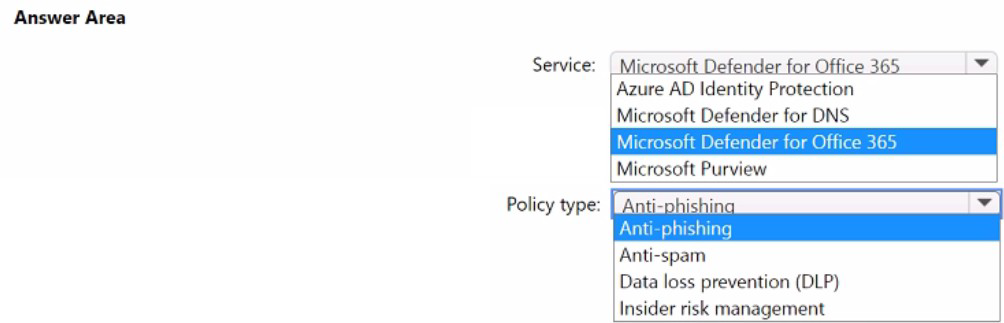
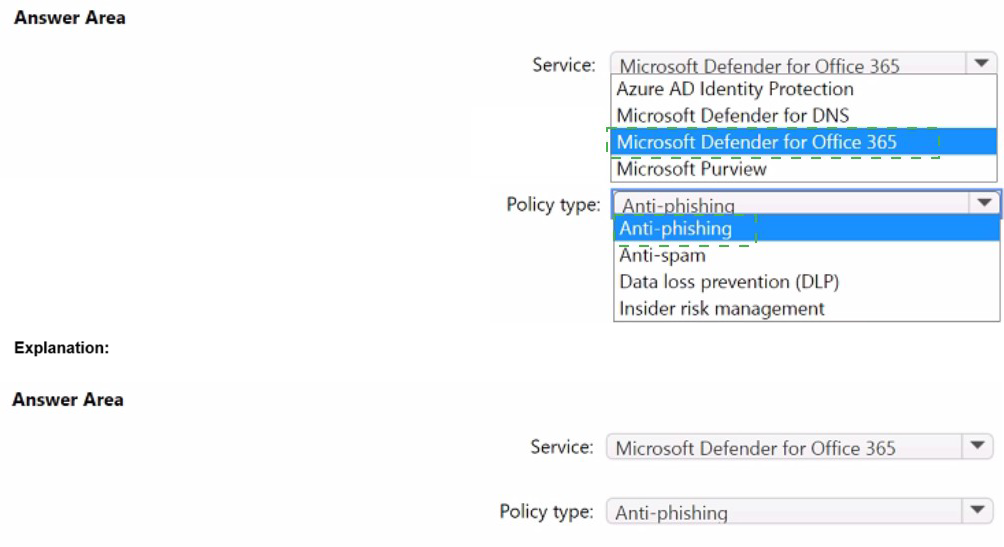
You need to recommend a solution to prevent malicious actors from impersonating the email addresses of internal senders.
What should you include in the recommendation? To answer, select the appropriate options in the answer area.
NOTE: Each correct selection is worth one point.


Explanation:
The requirement is to prevent malicious actors from impersonating the email addresses of internal senders. This is a specific type of phishing attack where an external attacker spoofs the display name or email address of someone inside your organization to trick employees.

Here's why this combination is correct:
Service: Microsoft Defender for Office 365:
This is the premium security service that adds advanced protection layers on top of the baseline security in Exchange Online. The specific policy needed to combat internal impersonation is a feature of Defender for Office 365, not the standard protection in Exchange Online.
Policy type: Anti-phishing:
Within the anti-phishing policies of Microsoft Defender for Office 365, you can create impersonation protection rules. You can explicitly add your most important internal users (like the CEO, CFO, and IT administrators) and your company's domains to a list. When Defender for Office 365 detects an incoming email that is trying to impersonate these protected entities, it will take the action you configure, such as quarantining the message or redirecting it to a security admin.

Let's examine why the other options in the list are incorrect for this specific goal:
Azure AD Identity Protection:
This service focuses on detecting risks and vulnerabilities related to user identities and sign-ins, such as impossible travel, anonymous IP addresses, and leaked credentials. It does not scan or protect against malicious emails.
Microsoft Defender for DNS:
This service protects against DNS-related threats, such as malware communicating with command-and-control servers or DNS tunneling attacks on your network. It is unrelated to email security.
Microsoft Purview:
This is the compliance and data governance suite. Its policy types are focused on data, not sender identity:
Anti-spam:
This policy type is for blocking bulk, unsolicited email (spam), not targeted impersonation.
Data Loss Prevention (DLP):
This policy type prevents the accidental or intentional sharing of sensitive information; it does not verify sender authenticity.
Insider Risk Management:
This policy type helps identify malicious or negligent activity by users inside your organization; it does not protect against external actors impersonating internal senders.

Reference:
Microsoft Learn - Impersonation insight in anti-phishing policies:
This document explains how to configure impersonation protection for users and domains within the anti-phishing policies in Defender for Office 365.

Page 1 out of 18 Pages

Microsoft Cybersecurity Architect Practice Exam Questions