Topic 3: Mix Questions
You are creating an application lifecycle management process based on the Microsoft Security Development Lifecycle (SDL). You need to recommend a security standard for onboarding applications to Azure. The standard will include recommendations for application design, development, and deployment What should you include during the application design phase?
A. static application security testing (SAST) by using SonarQube
B. dynamic application security testing (DAST) by using Veracode
C. threat modeling by using the Microsoft Threat Modeling Tool
D. software decomposition by using Microsoft Visual Studio Enterprise
Explanation:
This question tests your knowledge of the Microsoft Security Development Lifecycle (SDL) phases. The SDL consists of seven phases: Training, Requirements, Design, Implementation, Verification, Release, and Response. The question specifically asks about the application design phase. Threat modeling is the core security activity performed during the design phase to identify potential threats, attack vectors, and mitigations before coding begins .
Correct Option:
C. Threat modeling by using the Microsoft Threat Modeling Tool -
Threat modeling is explicitly a design phase activity in Microsoft SDL. It helps architects and developers identify security issues early using STRIDE methodology, create data flow diagrams, and document trust boundaries. This proactive approach reduces costly late-stage fixes .
Incorrect Option:
A. Static application security testing (SAST) by using SonarQube -
SAST analyzes source code for vulnerabilities and is performed during the implementation phase, not design. It requires written code to scan and cannot be executed during design when no code exists .
B. Dynamic application security testing (DAST) by using Veracode -
DAST tests running applications for vulnerabilities and is performed during verification or release phases. It requires a deployed or testable application instance, making it unsuitable for the design phase .
D. Software decomposition by using Microsoft Visual Studio Enterprise -
Software decomposition is a technique to understand application components but is not a formal Microsoft SDL design phase requirement. Threat modeling is the prescribed SDL design activity .
Reference:
Microsoft Learn: Microsoft Security Development Lifecycle (SDL) - Design Phase
Microsoft Learn: Microsoft Threat Modeling Tool overview
Microsoft Learn: SDL Phase 3: Design
Microsoft Learn: Threat modeling in the SDL
You have an Azure subscription that has Microsoft Defender for Cloud enabled. Suspicious authentication activity alerts have been appearing in the Workload protections dashboard. You need to recommend a solution to evaluate and remediate the alerts by using workflow automation. The solution must minimize development effort. What should you include in the recommendation?
A. Azure Monitor webhooks
B. Azure Logics Apps
C. Azure Event Hubs
D. Azure Functions apps
Explanation:
This question tests your knowledge of Microsoft Defender for Cloud workflow automation capabilities. Defender for Cloud can trigger automated responses to security alerts using built-in integration with Azure Logic Apps. Logic Apps provide low-code/no-code workflow automation with prebuilt connectors specifically for Defender for Cloud, minimizing development effort compared to custom code solutions .
Correct Option:
B. Azure Logic Apps -
Logic Apps is the recommended workflow automation solution for Defender for Cloud alerts. It offers prebuilt Defender for Cloud connectors, templates for common incident response scenarios, and visual designer for rapid deployment. This minimizes custom development while enabling evaluation, enrichment, and remediation workflows .
Incorrect Option:
A. Azure Monitor webhooks -
Webhooks can deliver alert payloads to external systems but provide no built-in logic, evaluation capabilities, or remediation actions. Custom development is required to process alerts and take actions, increasing development effort significantly .
C. Azure Event Hubs -
Event Hubs is a big data streaming platform and event ingestion service. It does not provide workflow automation, conditional logic, or remediation capabilities. Custom consumers must be built to process alerts and take actions .
D. Azure Functions apps -
Azure Functions allows custom code execution in response to events. While it can process Defender for Cloud alerts, it requires custom development, testing, and maintenance. This represents higher development effort compared to Logic Apps' low-code approach .
Reference:
Microsoft Learn: Automate Defender for Cloud responses
Microsoft Learn: Workflow automation with Logic Apps
Microsoft Learn: Trigger Logic Apps with Defender for Cloud alerts
Microsoft Learn: Security alert response automation
Your company wants to optimize using Microsoft Defender for Endpoint to protect its
resources against ransomware based on Microsoft Security Best Practices.
You need to prepare a post-breach response plan for compromised computers based on
the Microsoft Detection and Response Team (DART) approach in Microsoft Security Best
Practices.
What should you include in the response plan?
A. controlled folder access
B. application isolation
C. memory scanning
D. machine isolation
E. user isolation
Explanation:
This question tests your knowledge of Microsoft Defender for Endpoint incident response procedures aligned with the Microsoft Detection and Response Team (DART) methodology. DART's post-breach response for compromised computers prioritizes machine isolation to contain the threat, prevent lateral movement, and enable forensic investigation without risking further spread across the network .
Correct Option:
D. Machine isolation -
Machine isolation is a Defender for Endpoint response action that disconnects a compromised device from the network while maintaining connectivity to Defender services. This contains ransomware, prevents lateral movement, and allows safe investigation. This is the primary containment step in DART's post-breach response playbook .
Incorrect Option:
A. Controlled folder access -
Controlled folder access is a preventive attack surface reduction rule that protects files in specified folders from unauthorized changes. It is a pre-breach hardening control, not a post-breach response action for already compromised computers .
B. Application isolation -
Application isolation (Windows Defender Application Guard) runs untrusted applications in isolated containers. This is a proactive security control, not an incident response action for compromised machines. It does not contain an already infected device .
C. Memory scanning -
Memory scanning is a detection capability within Defender for Endpoint that identifies in-memory attacks. It is part of continuous monitoring and alerting, not a response action to contain an actively compromised computer .
E. User isolation -
User isolation is not a Defender for Endpoint response action. Defender can isolate machines, not specific user accounts. User-level containment would require revoking credentials or conditional access policies .
Reference:
Microsoft Learn: Take response actions in Microsoft Defender for Endpoint
Microsoft Learn: Isolate devices from the network
Microsoft Learn: Microsoft DART: Ransomware approach and best practices
Microsoft Learn: Incident response with Microsoft Defender for Endpoint
Your company has devices that run either Windows 10, Windows 11, or Windows Server.
You are in the process of improving the security posture of the devices.
You plan to use security baselines from the Microsoft Security Compliance Toolkit.
What should you recommend using to compare the baselines to the current device
configurations?
A. Microsoft Intune
B. Policy Analyzer
C. Local Group Policy Object (LGPO)
D. Windows Autopilot
Explanation:
This question tests your knowledge of tools included in the Microsoft Security Compliance Toolkit. The toolkit provides security baselines and tools to manage, analyze, and deploy them. To compare baselines to current device configurations, the Policy Analyzer tool is specifically designed to view differences between multiple Group Policy Objects (GPOs) or compare them against local policies and registry settings .
Correct Option:
B. Policy Analyzer -
Policy Analyzer is a tool within the Security Compliance Toolkit that enables administrators to compare baseline GPOs against current GPOs, local policies, or registry configurations. It highlights differences in policy settings, shows setting precedence, and helps identify gaps between desired and actual configurations .
Incorrect Option:
A. Microsoft Intune -
Intune deploys and manages security baselines to devices but does not have built-in capabilities to compare baselines against current configurations. It applies baselines and reports compliance, but the question specifically asks for the tool to perform the comparison .
C. Local Group Policy Object (LGPO) -
LGPO is a command-line tool to import, export, and apply local Group Policy settings. It applies baselines but does not provide comparison or analysis functionality between baselines and existing configurations .
D. Windows Autopilot -
Windows Autopilot is a device provisioning and deployment solution. It configures new devices during initial setup and does not include any policy comparison or analysis tools for existing device configurations .
Reference:
Microsoft Learn: Microsoft Security Compliance Toolkit 1.0
Microsoft Learn: Policy Analyzer tool overview
Microsoft Learn: Download Microsoft Security Compliance Toolkit
Microsoft Learn: How to use Policy Analyzer
Your company plans to follow DevSecOps best practices of the Microsoft Cloud Adoption Framework for Azure. You need to perform threat modeling by using a top-down approach based on the Microsoft Cloud Adoption Framework for Azure. What should you use to start the threat modeling process?
A. the STRIDE model
B. the DREAD model
C. OWASP threat modeling
Explanation:
This question tests your knowledge of threat modeling approaches aligned with the Microsoft Cloud Adoption Framework (CAF). The CAF emphasizes a top-down, risk-based approach starting with business impact analysis and security objectives. OWASP threat modeling provides a structured methodology that begins with defining scope, identifying assets, and understanding application architecture before applying threat frameworks like STRIDE. This aligns with CAF's strategy-first DevSecOps principle.
Correct Option:
C. OWASP threat modeling -
OWASP threat modeling follows a top-down approach beginning with scope definition, asset identification, and architecture decomposition. This aligns with Microsoft CAF's DevSecOps strategy, where security is integrated from the initial planning phase. OWASP provides a systematic process to identify, document, and mitigate threats based on business context and application design.
Incorrect Option:
A. The STRIDE model -
STRIDE (Spoofing, Tampering, Repudiation, Information Disclosure, Denial of Service, Elevation of Privilege) is a threat classification framework, not a top-down methodology. It is typically applied after scoping and decomposition within a broader threat modeling process. Starting with STRIDE skips the foundational business and architecture analysis required by CAF.
B. The DREAD model -
DREAD (Damage, Reproducibility, Exploitability, Affected Users, Discoverability) is a risk scoring and prioritization system. It is used to rank identified threats, not to initiate the threat modeling process. DREAD assumes threats are already discovered and documented, making it unsuitable as a starting point.
Reference:
Microsoft Learn: DevSecOps in the Microsoft Cloud Adoption Framework
Microsoft Learn: Threat modeling in the Microsoft Security Development Lifecycle
Microsoft Learn: OWASP Threat Modeling
Microsoft Learn: STRIDE model overview
You have an Azure subscription.
Your company has a governance requirement that resources must be created in the West
Europe or North Europe Azure regions.
What should you recommend using to enforce the governance requirement?
A. regulatory compliance standards in Microsoft Defender for Cloud
B. custom Azure roles
C. Azure Policy assignments
D. Azure management groups
Explanation:
This question tests your knowledge of Azure governance and resource restrictions. The requirement is to enforce that resources are created only in West Europe or North Europe regions. Azure Policy provides deny and audit effects to enforce allowed locations at subscription, management group, or resource group scope. This prevents non-compliant resource creation at deployment time .
Correct Option:
C. Azure Policy assignments -
Azure Policy includes the built-in "Allowed Locations" policy definition that restricts resource deployment to specified regions. When assigned with Deny effect, any attempt to create a resource outside West Europe or North Europe is automatically blocked, ensuring full compliance with the governance requirement .
Incorrect Option:
A. Regulatory compliance standards in Microsoft Defender for Cloud -
Defender for Cloud compliance standards assess and report on existing resources against regulatory frameworks. They provide visibility and recommendations but do not proactively enforce or block non-compliant resource creation during deployment .
B. Custom Azure roles -
Azure RBAC roles control who can perform actions, not where resources can be deployed. Custom roles can restrict permissions to certain resource types or actions but cannot restrict resources to specific Azure regions .
D. Azure management groups -
Management groups provide organizational hierarchy for subscriptions and enable policy inheritance. However, they do not themselves enforce location restrictions. They are the scope for assigning Azure Policy, not the enforcement mechanism itself .
Reference:
Microsoft Learn: Azure Policy built-in policy definitions - Allowed locations
Microsoft Learn: Enforce governance with Azure Policy
Microsoft Learn: What is Azure Policy?
Microsoft Learn: Organize and manage subscriptions with management groups
Your company has a Microsoft 365 E5 subscription. Users use Microsoft Teams, Exchange Online, SharePoint Online, and OneDrive for sharing and collaborating. The company identifies protected health information (PHI) within stored documents and communications. What should you recommend using to prevent the PHI from being shared outside the company?
A. insider risk management policies
B. data loss prevention (DLP) policies
C. sensitivity label policies
D. retention policies
Explanation:
This question tests your knowledge of Microsoft Purview information protection controls. The requirement is to prevent PHI from being shared outside the company. Sensitivity labels with encryption and permissions restrict access and sharing directly on the content itself. DLP policies detect and block sharing, but sensitivity labels proactively prevent unauthorized sharing by enforcing protection at the point of creation or classification .
Correct Option:
C. Sensitivity label policies -
Sensitivity labels can be configured with encryption that restricts access to specific users/groups and blocks external sharing. When applied to PHI documents, encryption travels with the content, ensuring unauthorized external users cannot open or share the file regardless of where it is stored or transmitted .
Incorrect Option:
A. Insider risk management policies -
Insider risk policies detect, investigate, and respond to risky user activities. They identify potential data leaks after they occur but do not proactively prevent PHI from being shared externally at the point of action .
B. Data loss prevention (DLP) policies -
DLP policies monitor and block sharing of sensitive content at endpoints, email, and cloud apps. However, they rely on real-time inspection and blocking rather than persistent protection. Sensitivity labels provide stronger preventive controls .
D. Retention policies -
Retention policies preserve or delete content for compliance and legal requirements. They do not restrict access, prevent sharing, or protect PHI from unauthorized external distribution .
Reference:
Microsoft Learn: Learn about sensitivity labels
Microsoft Learn: Restrict access to content by using encryption in sensitivity labels
Microsoft Learn: Compare data loss prevention and sensitivity labels
Microsoft Learn: Microsoft Purview information protection
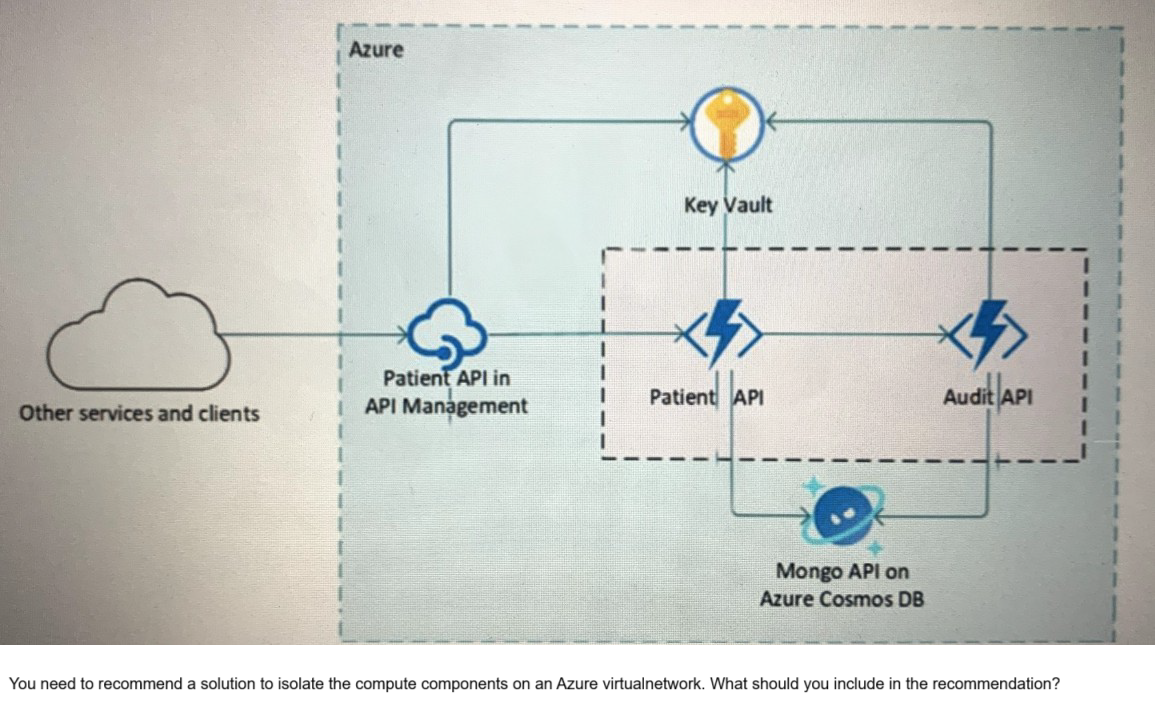
Your company is developing a serverless application in Azure that will have the architecture shown in the following exhibit.
A. Azure Active Directory (Azure AD) enterprise applications
B. an Azure App Service Environment (ASE)
C. Azure service endpoints
D. an Azure Active Directory (Azure AD) application proxy
Explanation:
This question tests your knowledge of network isolation options for Azure serverless and PaaS components. The exhibit shows API Management, Patient API (likely Azure Functions or App Service), Cosmos DB, and Key Vault. The requirement is to isolate the compute components on an Azure virtual network. Azure App Service Environment (ASE) provides fully isolated and dedicated App Service deployments inside a virtual network, enabling complete network isolation for compute components .
Correct Option:
B. An Azure App Service Environment (ASE) -
ASE is a dedicated, single-tenant App Service deployment injected directly into an Azure virtual network. It provides complete network isolation for web apps, API apps, and functions, allowing inbound/outbound traffic control via NSGs, UDRs, and integration with internal load balancers. This meets the compute isolation requirement .
Incorrect Option:
A. Azure Active Directory (Azure AD) enterprise applications -
Azure AD enterprise applications are identity configurations for SSO and application registration. They provide authentication and authorization, not network isolation. They cannot place compute resources inside a virtual network .
C. Azure service endpoints -
Service endpoints secure Azure service access from virtual networks by providing optimal routing and restricting public endpoints. However, they do not place compute resources inside the virtual network; they only secure connectivity from the VNet to PaaS services .
D. Azure Active Directory (Azure AD) application proxy -
Azure AD Application Proxy provides secure remote access to on-premises web applications. It is a reverse proxy service, not a compute isolation solution for Azure-hosted serverless components .
Reference:
Microsoft Learn: App Service Environment overview
Microsoft Learn: Network isolation in Azure App Service
Microsoft Learn: Securing PaaS deployments with service endpoints
Microsoft Learn: Integrate App Service with virtual network
For of an Azure deployment you are designing a security architecture based on the Microsoft Cloud Security Benchmark. You need to recommend a best practice for implementing service accounts for Azure API management. What should you include in the recommendation?
A. device registrations in Azure AD
B. application registrations m Azure AD
C. Azure service principals with certificate credentials
D. Azure service principals with usernames and passwords
E. managed identities in Azure
Explanation:
This question tests your knowledge of secure authentication methods for Azure API Management aligned with the Microsoft Cloud Security Benchmark (MCSB). MCSB prioritizes managed identities as the recommended best practice for service accounts because they eliminate credential management, provide automatic rotation, and integrate natively with Azure AD without storing secrets in code or configuration files .
Correct Option:
E. Managed identities in Azure -
Managed identities provide an automatically managed service principal in Azure AD, eliminating the need for developers to manage credentials. API Management can use managed identities to securely access Azure Key Vault, backend services, and other Azure resources without storing or rotating secrets. This aligns with MCSB identity security best practices .
Incorrect Option:
A. Device registrations in Azure AD -
Device registrations represent physical or virtual devices in Azure AD for conditional access and device-based policies. They are not service accounts and cannot be used by API Management to authenticate against Azure resources .
B. Application registrations in Azure AD -
While application registrations can be used as service principals, they require manual secret or certificate management, rotation, and secure storage. Managed identities are preferred over application registrations for Azure-hosted workloads per MCSB .
C. Azure service principals with certificate credentials -
Certificate-based service principals are more secure than username/password but still require certificate provisioning, renewal, and secure storage. Managed identities eliminate this operational overhead .
D. Azure service principals with usernames and passwords -
Username/password (client secrets) are the least secure option, prone to leakage, hardcoding, and require manual rotation. This violates MCSB identity security principles .
Reference:
Microsoft Learn: Use managed identities with API Management
Microsoft Learn: Microsoft Cloud Security Benchmark - Identity Management
Microsoft Learn: Best practices for service accounts
Microsoft Learn: Authenticate Azure resources with managed identities
You are designing the security standards for a new Azure environment.
You need to design a privileged identity strategy based on the Zero Trust model.
Which framework should you follow to create the design?
A. Enhanced Security Admin Environment (ESAE)
B. Microsoft Security Development Lifecycle (SDL)
C. Rapid Modernization Plan (RaMP)
D. Microsoft Operational Security Assurance (OSA)
Explanation:
This question tests your knowledge of Zero Trust identity frameworks within Microsoft's guidance. The Rapid Modernization Plan (RaMP) is specifically designed to help organizations quickly implement Zero Trust security using Microsoft 365 and Azure capabilities, including privileged identity strategy. RaMP provides prescriptive guidance for identity, endpoints, applications, data, infrastructure, and networking aligned with Zero Trust principles .
Correct Option:
C. Rapid Modernization Plan (RaMP) -
RaMP delivers actionable steps to implement Zero Trust, including privileged identity recommendations such as just-in-time access, privileged identity management (PIM), conditional access policies, and identity governance. It is the current Microsoft framework for Zero Trust identity strategy design .
Incorrect Option:
A. Enhanced Security Admin Environment (ESAE) -
ESAE (also known as Red Forest) is a legacy privileged access security model focused on dedicated administrative forests. Microsoft now recommends the Enterprise Access Model within RaMP/Zero Trust, making ESAE outdated for new designs .
B. Microsoft Security Development Lifecycle (SDL) -
SDL is a software development security framework focusing on integrating security into application design, development, and testing. It does not address privileged identity strategy for Azure environments .
D. Microsoft Operational Security Assurance (OSA) -
OSA was a previous operational security framework focused on Azure workloads. It has been superseded by the Microsoft Cloud Security Benchmark (MCSB) and Zero Trust guidance within RaMP .
Reference:
Microsoft Learn: Rapid Modernization Plan (RaMP) for Zero Trust
Microsoft Learn: Zero Trust identity and access management
Microsoft Learn: ESAE to Zero Trust migration
Microsoft Learn: Microsoft security frameworks and modernization
| Page 3 out of 18 Pages |