Topic 2: Litware, inc. Case Study 2
Overview
Litware, inc. is a financial services company that has main offices in New York and San
Francisco. litware has 30 branch offices and remote employees across the United States.
The remote employees connect to the main offices by using a VPN.
Litware has grown significantly during the last two years due to mergers and acquisitions.
The acquisitions include several companies based in France.
Existing Environment
Litware has an Azure Active Directory (Azure AD) tenant that syncs with an Active
Directory Domain Services (AD D%) forest named Utvvare.com and is linked to 20 Azure
subscriptions. Azure AD Connect is used to implement pass-through authentication.
Password hash synchronization is disabled, and password writeback is enabled. All Litware
users have Microsoft 365 E5 licenses.
The environment also includes several AD DS forests, Azure AD tenants, and hundreds of
Azure subscriptions that belong to the subsidiaries of Litware.
Planned Changes
Litware plans to implement the following changes:
• Create a management group hierarchy for each Azure AD tenant.
• Design a landing zone strategy to refactor the existing Azure environment of Litware and
deploy all future Azure workloads.
• Implement Azure AD Application Proxy to provide secure access to internal applications
that are currently accessed by using the VPN.
Business Requirements
Litware identifies the following business requirements:
• Minimize any additional on-premises infrastructure.
• Minimize the operational costs associated with administrative overhead.
Hybrid Requirements
Litware identifies the following hybrid cloud requirements:
• Enable the management of on-premises resources from Azure, including the following:
• Use Azure Policy for enforcement and compliance evaluation.
• Provide change tracking and asset inventory.
• Implement patch management.
• Provide centralized, cross-tenant subscription management without the overhead of
maintaining guest accounts.
Microsoft Sentinel Requirements
Litware plans to leverage the security information and event management (SIEM) and
security orchestration automated response (SOAK) capabilities of Microsoft Sentinel. The
company wants to centralize Security Operations Center (SOQ by using Microsoft Sentinel.
Identity Requirements
Litware identifies the following identity requirements:
• Detect brute force attacks that directly target AD DS user accounts.
• Implement leaked credential detection in the Azure AD tenant of Litware.
• Prevent AD DS user accounts from being locked out by brute force attacks that target
Azure AD user accounts.
• Implement delegated management of users and groups in the Azure AD tenant of
Litware, including support for.
• The management of group properties, membership, and licensing « The management of
user properties, passwords, and licensing
• The delegation of user management based on business units.
Regulatory Compliance Requirements
Litware identifies the following regulatory compliance requirements:
• insure data residency compliance when collecting logs, telemetry, and data owned by
each United States- and France-based subsidiary.
• Leverage built-in Azure Policy definitions to evaluate regulatory compliance across the
entire managed environment.
• Use the principle of least privilege.
Azure Landing Zone Requirements
Litware identifies the following landing zone requirements:
• Route all internet-bound traffic from landing zones through Azure Firewall in a dedicated
Azure subscription.
• Provide a secure score scoped to the landing zone.
• Ensure that the Azure virtual machines in each landing zone communicate with Azure
App Service web apps in the same zone over the Microsoft backbone network, rather than
over public endpoints.
• Minimize the possibility of data exfiltration.
• Maximize network bandwidth.
The landing zone architecture will include the dedicated subscription, which will serve as
the hub for internet and hybrid connectivity. Each landing zone will have the following
characteristics:
• Be created in a dedicated subscription.
• Use a DNS namespace of litware.com.
Application Security Requirements
Litware identifies the following application security requirements:
• Identify internal applications that will support single sign-on (SSO) by using Azure AD
Application Proxy.
• Monitor and control access to Microsoft SharePoint Online and Exchange Online data in
real time.
You have an Azure subscription that contains a Microsoft Sentinel workspace named
MSW1. MSW1 includes 50 scheduled analytics rules.
You need to design a security orchestration automated response (SOAR) solution by using
Microsoft Sentinel playbooks. The solution must meet the following requirements:
• Ensure that expiration dates can be configured when a playbook runs.
• Minimize the administrative effort required to configure individual analytics rules.
What should you use to invoke the playbooks, and which type of Microsoft Sentinel trigger
should you use? To answer, select the appropriate options in the answer area.
NOTE: Each correct selection is worth one point.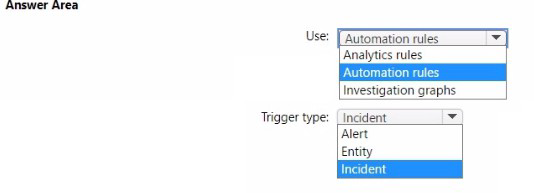
Explanation:
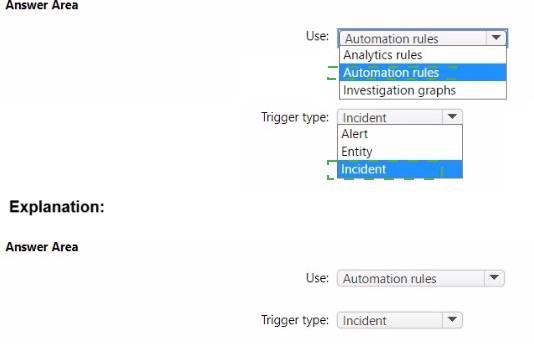
This question tests your knowledge of Microsoft Sentinel automation efficiency. You need to invoke playbooks while minimizing administrative effort on 50 analytics rules. Configuring expiration dates requires an incident trigger because incidents have properties like created/updated timestamps. To avoid configuring each analytics rule individually, automation rules centrally manage playbook invocation across multiple rules.
Correct Option:
Use: Automation rules -
Automation rules allow centralized, scalable playbook invocation without modifying each analytics rule. They apply to all matching analytics rules based on conditions, dramatically reducing administrative overhead when managing 50+ rules.
Trigger type:Incident -
Incident triggers support expiration date configuration because incidents have timestamp properties (created/updated). Playbooks can check incident age and implement expiration logic. Incident triggers also support automation rules, unlike alert/entity triggers which require individual rule configuration.
Incorrect Option:
Use: Analytics rules -
While analytics rules can invoke playbooks directly, this requires configuring each of the 50 rules individually, violating the "minimize administrative effort" requirement. This approach doesn't scale efficiently.
Use: Investigation graphs -
Investigation graphs are visualization tools for security investigations, not mechanisms for invoking playbooks. They cannot trigger automated SOAR responses.
Trigger type: Alert -
Alert triggers create significant administrative overhead as each analytics rule requires individual playbook attachment. They also lack incident context needed for reliable expiration date configuration.
Trigger type: Entity -
Entity triggers are designed for entity-specific automation (accounts, hosts) and must be configured per rule. They don't support automation rules and lack incident-level properties for expiration logic.
Reference:
Microsoft Learn: Automate incident handling with automation rules
Microsoft Learn: Playbook triggers and actions in Microsoft Sentinel
Microsoft Learn: Incident expiration in Microsoft Sentinel
Microsoft Learn: Automation in Microsoft Sentinel
Your company has an Azure App Service plan that is used to deploy containerized web
apps. You are designing a secure DevOps strategy for deploying the web apps to the App
Service plan. You need to recommend a strategy to integrate code scanning tools into a
secure software development lifecycle. The code must be scanned during the following two
phases:
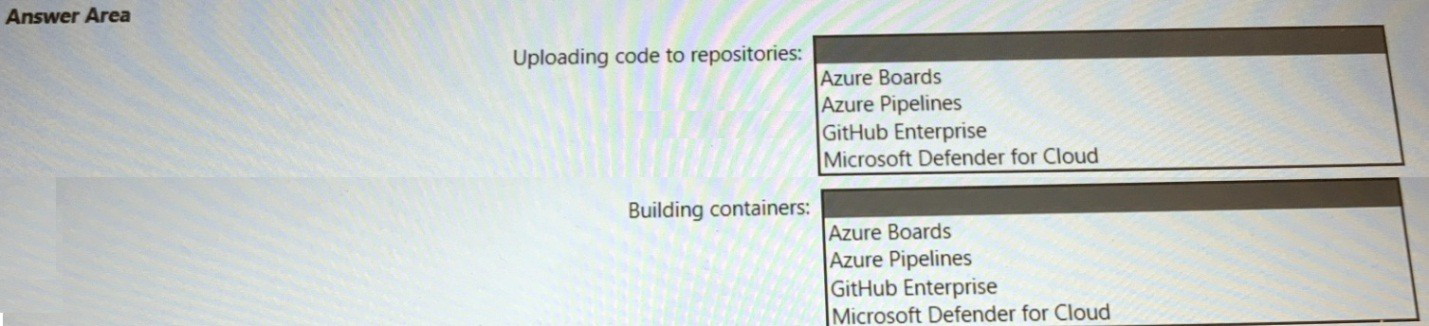
Uploading the code to repositories Building containers
Where should you integrate code scanning for each phase? To answer, select the
appropriate options in the answer area.
Explanation:
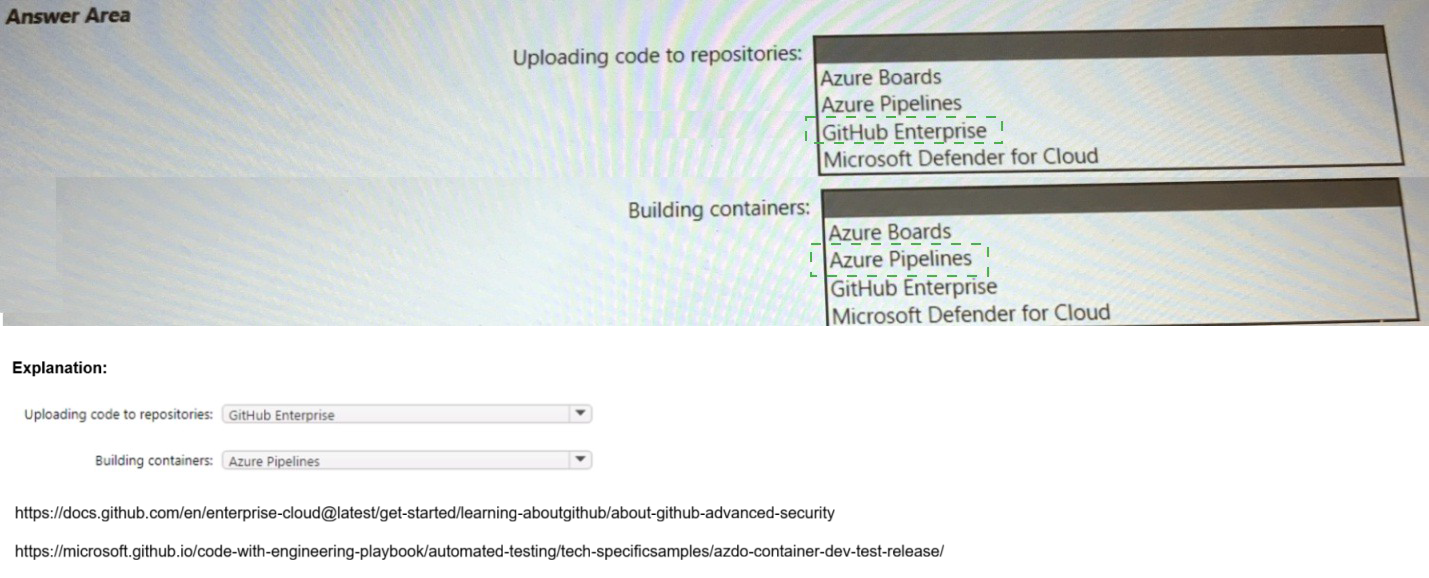
This question tests your knowledge of DevSecOps integration points in Microsoft's secure development lifecycle. Code scanning must occur at specific phases: during code upload to repositories and during container builds. Different tools integrate at different stages. For repository code scanning, GitHub Advanced Security integrates directly with GitHub Enterprise. For container scanning, Defender for Cloud can scan container images during build pipelines.
Correct Option:
Uploading code to repositories:
GitHub Enterprise - GitHub Enterprise includes GitHub Advanced Security features like CodeQL and secret scanning that automatically scan code as it is pushed to repositories. This provides native integration for scanning code at the point of repository upload, identifying vulnerabilities before build processes begin.
Building containers:
Microsoft Defender for Cloud - Defender for Cloud provides container image scanning capabilities that can integrate directly into Azure Pipelines. It scans container images for vulnerabilities during the build phase, identifying OS and language-specific package vulnerabilities before deployment to Azure Container Registry or App Service.
Incorrect Option:
Uploading code to repositories:
Azure Boards - Azure Boards is an Agile project management tool for tracking work items, not a code repository. It does not store code and therefore cannot perform code scanning on repository uploads.
Uploading code to repositories:
Azure Pipelines - Azure Pipelines is a CI/CD execution engine, not a repository. While code scanning can occur during pipeline execution, the question specifically asks for scanning during the "uploading code to repositories" phase, which occurs before pipelines run.
Uploading code to repositories:
Microsoft Defender for Cloud - Defender for Cloud focuses on runtime security and workload protection, not repository-level code scanning. It cannot scan code during repository upload events.
Building containers:
Azure Boards - Azure Boards has no integration with container build processes. It cannot scan container images during build phases.
Building containers:
Azure Pipelines - While container builds often execute in Azure Pipelines, the scanning tool itself must be specified. Azure Pipelines is the execution platform, not the scanning solution. The question asks for the tool to integrate, not the platform.
Building containers:
GitHub Enterprise - GitHub Enterprise can scan code in repositories but does not natively scan built container images. Container scanning requires specialized tools designed for image layer analysis.
Reference:
Microsoft Learn: Secure DevOps for Azure
You have a Microsoft 365 subscription that is protected by using Microsoft 365 Defender.
You are designing a security operations strategy that will use Microsoft Sentinel to monitor
events from Microsoft 365 and Microsoft 365 Defender.
You need to recommend a solution to meet the following requirements:
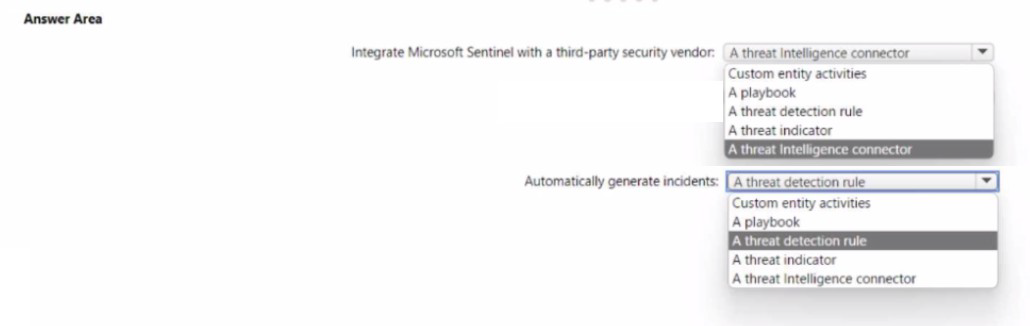
• Integrate Microsoft Sentinel with a third-party security vendor to access information about
known malware
• Automatically generate incidents when the IP address of a command-and control server is
detected in the events
What should you configure in Microsoft Sentinel to meet each requirement? To answer,
select the appropriate options in the answer area.
NOTE: Each correct selection is worth one point.
Explanation:
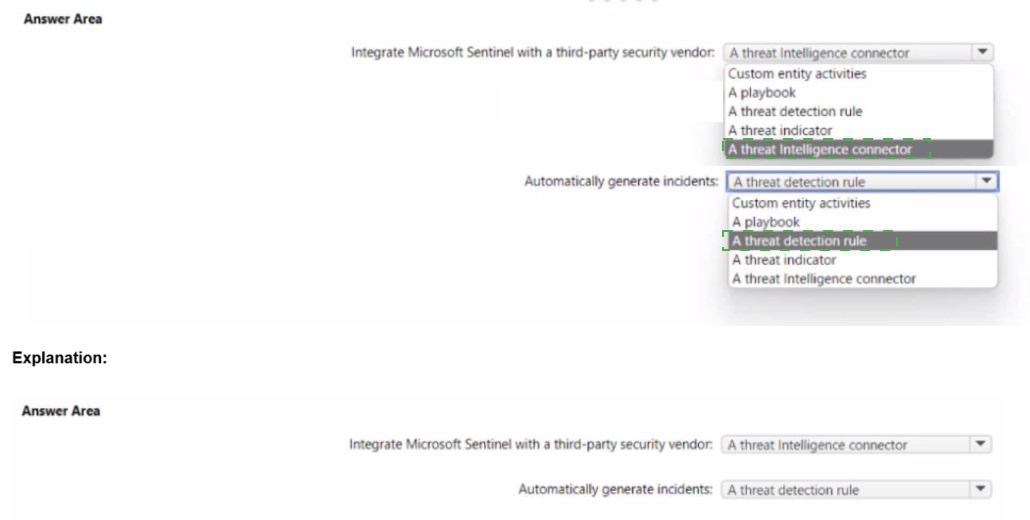
This question tests your knowledge of threat intelligence integration and incident generation in Microsoft Sentinel. Accessing external threat intelligence about known malware requires a threat intelligence connector. Automatically generating incidents when a specific indicator (C2 server IP) is detected requires a threat detection rule that matches events against threat indicators.
Correct Option:
Integrate Microsoft Sentinel with a third-party security vendor:
A threat intelligence connector - Threat intelligence connectors ingest threat indicators (IOCs) from third-party vendors into Sentinel's Threat Intelligence workspace. These connectors pull STIX-formatted threat data including known malware hashes, C2 server IPs, and domains, making them available for detection and investigation.
Automatically generate incidents:
A threat detection rule - Scheduled or NRT threat detection rules can be configured to match incoming events against ingested threat indicators. When an event contains an IP address matching a known C2 server threat indicator, the rule automatically generates an incident for SOC investigation.
Incorrect Option:
Integrate: Custom entity activities -
Entity activities track behavior of specific entities (users, hosts) within Sentinel, not external threat intelligence ingestion. This cannot bring third-party threat data into Sentinel.
Integrate: A playbook -
Playbooks are automation workflows triggered after incident creation. They cannot ingest external threat intelligence; they consume data already in Sentinel.
Integrate: A threat detection rule -
Detection rules consume existing data to identify threats. They do not import or integrate external threat intelligence feeds.
Integrate: A threat indicator -
Threat indicators are the ingested data objects themselves, not the integration mechanism. You need a connector to import indicators.
Generate incidents:
Custom entity activities - Entity activities provide behavior analytics and hunting context but do not automatically generate incidents based on threat indicator matches.
Generate incidents:
A playbook - Playbooks respond to existing incidents; they cannot be the primary mechanism to generate incidents from threat indicator matches.
Generate incidents:
A threat indicator - Threat indicators are static data objects. They do not perform detection or generate incidents independently; they must be referenced by detection rules.
Generate incidents:
A threat intelligence connector - Connectors only import threat data. They do not perform detection or incident creation; detection rules consume the imported data.
Reference:
Microsoft Learn: Threat intelligence in Microsoft Sentinel
You plan to deploy a dynamically scaling, Linux-based Azure Virtual Machine Scale Set
that will host jump servers. The jump servers will be used by support staff who connect f
personal and kiosk devices via the internet. The subnet of the jump servers will be
associated to a network security group (NSG).
You need to design an access solution for the Azure Virtual Machine Scale Set. The
solution must meet the following requirements:
• Ensure that each time the support staff connects to a jump server; they must request
access to the server.
• Ensure that only authorized support staff can initiate SSH connections to the jump
servers.
• Maximize protection against brute-force attacks from internal networks and the internet.
• Ensure that users can only connect to the jump servers from the internet.
• Minimize administrative effort
What should you include in the solution? To answer, select the appropriate options in the
answer area.
NOTE: Each correct selection is worth one point.

Explanation:
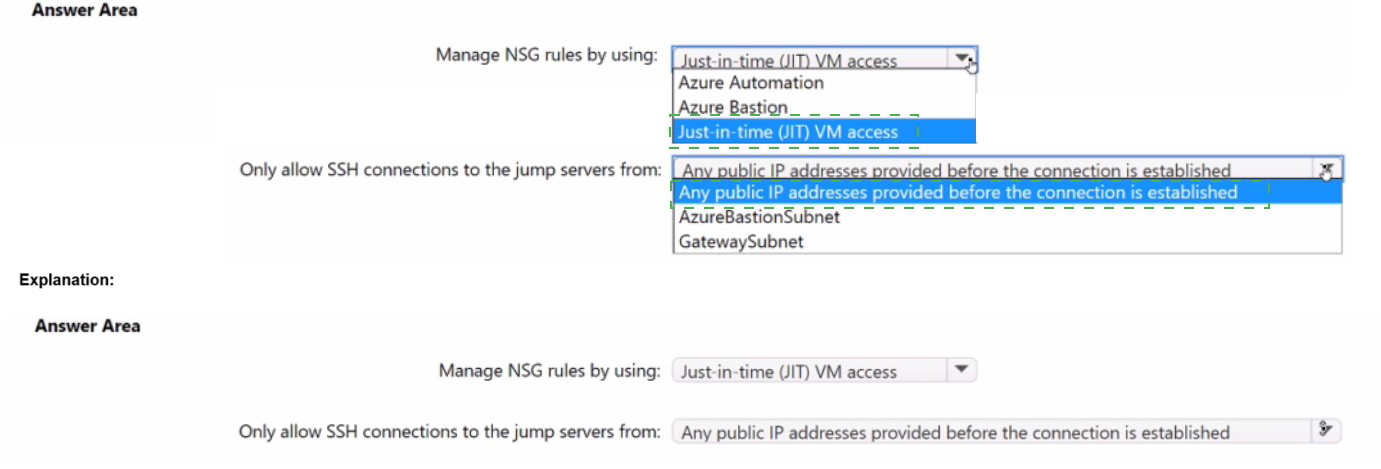
This question tests your knowledge of securing jump servers accessed via the internet. The requirements demand that support staff must request access each time, only authorized users can initiate SSH connections, protection against brute-force attacks, and internet-only connectivity with minimal administrative effort. Just-in-time (JIT) VM access handles access requests and authorization, while Azure Bastion provides secure internet-based SSH without exposing public IPs .
Correct Option:
Manage NSG rules by using:
Just-in-time (JIT) VM access - JIT requires users to request access each time, verifies Azure RBAC permissions before approving, and automatically opens SSH port 22 only from the requesting IP for a limited time window. This minimizes brute-force exposure by keeping ports closed normally and reduces administrative overhead compared to manual NSG management .
Only allow SSH connections to the jump servers from:
AzureBastionSubnet - Azure Bastion provides secure SSH connectivity over TLS from any internet-connected device without exposing public IPs on jump servers. By restricting NSG inbound rules to only allow SSH from AzureBastionSubnet, you ensure all connections originate from Bastion, meeting internet-only access while maximizing protection .
Incorrect Option:
Manage NSG rules by using:
Azure Automation - Azure Automation is an automation and configuration management service, not a mechanism for managing NSG access rules with on-demand approval workflows. It cannot enforce per-request access approval or integrate RBAC checks for connection requests .
Manage NSG rules by using:
Azure Bastion - Azure Bastion is a secure RDP/SSH connectivity service, not a tool for managing NSG rules. Bastion itself requires NSG rules to allow traffic from Bastion subnet to target VMs; it does not configure or manage NSG policies .
Only allow SSH connections from:
Any public IP addresses provided before the connection is established - This describes JIT's behavior but is not the NSG source restriction. The requirement "ensure users can only connect from the internet" is satisfied by Bastion's public IP, not by allowing direct SSH from random internet IPs. JIT still opens port 22 directly to the internet temporarily, increasing attack surface compared to Bastion .
Only allow SSH connections from:
GatewaySubnet - GatewaySubnet is used for VPN and ExpressRoute gateways, not Azure Bastion. Bastion requires a dedicated subnet named AzureBastionSubnet with a /26 mask or larger. GatewaySubnet cannot provide Bastion's HTML5-based SSH connectivity .
Reference:
Microsoft Learn: Configure just-in-time administration
Microsoft Learn: Understand just-in-time VM access
Microsoft Learn: How Azure Bastion works
Microsoft Learn: NSG access and Azure Bastion
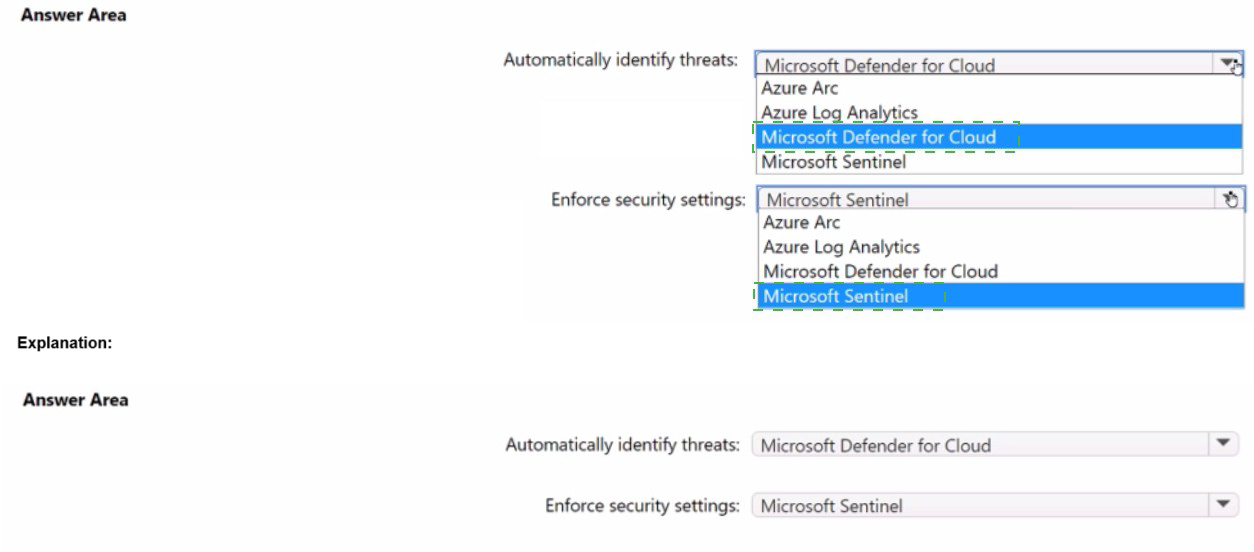
You have a multi-cloud environment that contains an Azure subscription and an Amazon
Web Services (AWS) account.
You need to implement security services in Azure to manage the resources in both
subscriptions. The solution must meet the following requirements:
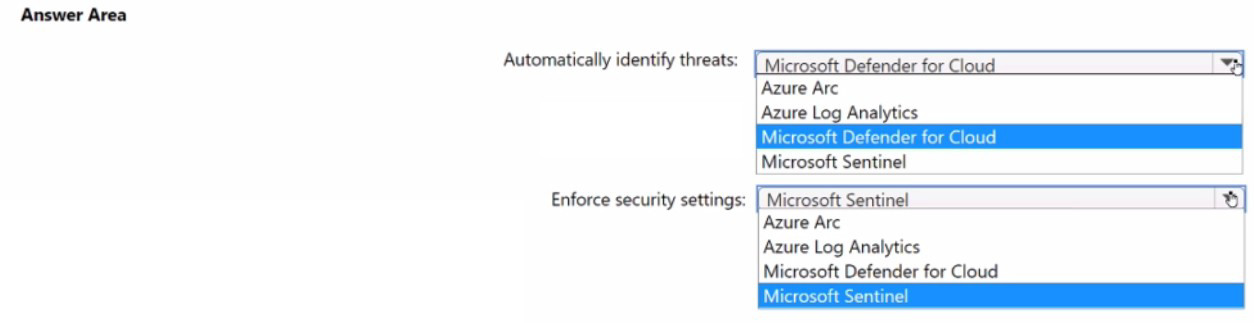
• Automatically identify threats found in AWS CloudTrail events.
• Enforce security settings on AWS virtual machines by using Azure policies.
What should you include in the solution for each requirement? To answer, select the
appropriate options in the answer area.
NOTE: Each correct selection is worth one point.
Explanation:
This question tests your knowledge of Microsoft Defender for Cloud's multicloud capabilities. For identifying threats in AWS CloudTrail events, Microsoft Defender for Cloud directly ingests CloudTrail management logs to enhance CIEM and threat detection . For enforcing Azure Policies on AWS VMs, Azure Arc enables non-Azure servers to receive Azure Policy assignments, making them manageable like Azure resources .
Correct Option:
Automatically identify threats:
Microsoft Defender for Cloud - Defender for Cloud provides native AWS CloudTrail integration that ingests management events for threat detection, identity risk analysis, and CIEM capabilities. This works with both single accounts and AWS Organizations, adding activity-based signals to identify unused permissions, dormant identities, and privilege escalation paths .
Enforce security settings:
Azure Arc - Azure Arc-enabled servers allow AWS EC2 instances to be projected into Azure as non-Azure machines, enabling Azure Policy assignment and guest configuration assessments. This brings AWS VMs under consistent Azure security governance with Defender for Cloud recommendations and compliance monitoring .
Incorrect Option:
Automatically identify threats:
Azure Arc - Azure Arc is an onboarding and management plane, not a threat detection service. It enables management of non-Azure resources but does not analyze CloudTrail events or generate threat detections .
Automatically identify threats:
Azure Log Analytics - Log Analytics is a data collection and query platform, not a threat detection service. While it can store logs, it lacks built-in threat intelligence and automated threat detection capabilities for AWS CloudTrail .
Automatically identify threats:
Microsoft Sentinel - Although Sentinel can ingest CloudTrail logs, the question specifies "security services in Azure to manage the resources in both subscriptions." Defender for Cloud is the native multicloud security posture and threat detection service, while Sentinel is SIEM/SOAR .
Enforce security settings:
Microsoft Sentinel - Sentinel provides incident detection and response, not configuration enforcement. It cannot apply Azure Policy or enforce security settings on AWS virtual machines .
Enforce security settings:
Azure Log Analytics - Log Analytics collects and analyzes telemetry but cannot enforce security configurations. It lacks policy definition and remediation capabilities required to enforce settings on VMs .
Enforce security settings:
Microsoft Defender for Cloud - Defender for Cloud detects misconfigurations and provides recommendations but does not directly enforce settings. Enforcement requires Azure Policy, which requires Azure Arc to target non-Azure machines
Reference:
Microsoft Learn: Integrate AWS CloudTrail logs with Microsoft Defender for Cloud
Microsoft Learn: Connect your AWS account to Microsoft Defender for Cloud
Microsoft Learn: Azure Arc-enabled servers
Microsoft Learn: Security policies in Defender for Cloud
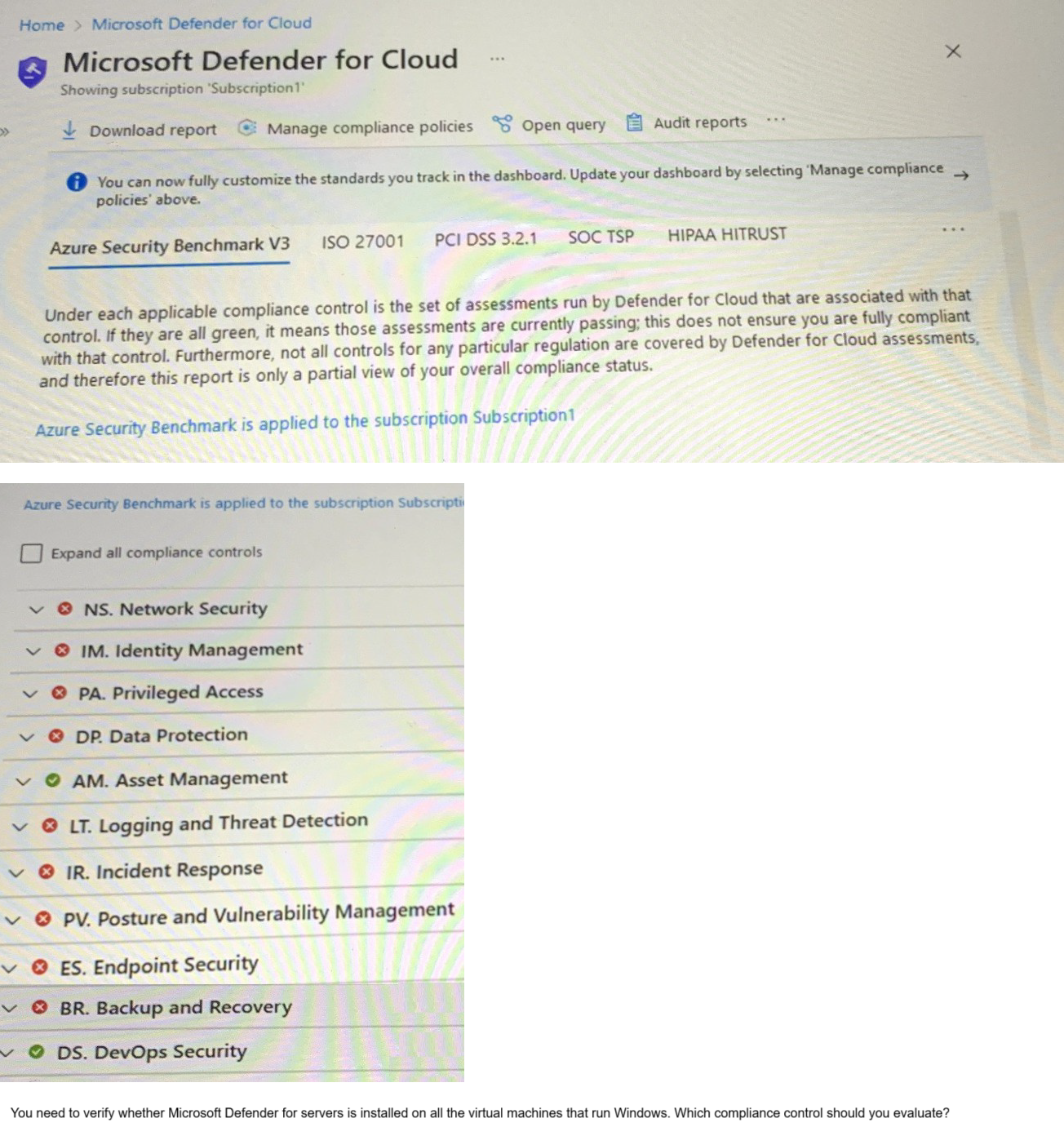
You have an Azure subscription that has Microsoft Defender for Cloud enabled.
You are evaluating the Azure Security Benchmark V3 report as shown in the following exhibit.
A. Data Protection
B. Incident Response
C. Posture and Vulnerability Management
D. Asset Management
E. Endpoint Security
Explanation:
This question tests your knowledge of Microsoft Defender for Cloud regulatory compliance controls and their specific assessments. You need to verify whether Microsoft Defender for servers (formerly Microsoft Defender for Endpoint) is installed on Windows VMs. This is a threat detection and endpoint protection configuration check. Within Azure Security Benchmark V3, the specific control that monitors endpoint protection installation and health is Endpoint Security (ES) , not Incident Response (IR) .
Correct Option:
E. Endpoint Security -
The Endpoint Security (ES) control in Azure Security Benchmark V3 includes assessments specifically for Microsoft Defender for Endpoint deployment status, endpoint protection health, and real-time protection configuration. This directly maps to verifying Defender for servers installation on Windows VMs
Incorrect Option:
A. Data Protection -
Data Protection (DP) controls focus on encryption at rest, encryption in transit, key management, and data classification. It does not assess endpoint protection software installation or health status .
B. Incident Response -
Incident Response (IR) controls address detection, triage, investigation, and remediation processes. While endpoint detection feeds incidents, verifying Defender for servers installation is a posture/compliance check, not an incident response process assessment .
C. Posture and Vulnerability Management -
Posture and Vulnerability Management (PV) controls focus on vulnerability scanning, secure configuration baselines, and software inventory. Although Defender for servers includes vulnerability assessment, the specific "is Defender installed" check resides under Endpoint Security .
D. Asset Management -
Asset Management (AM) controls govern inventory tracking, resource tagging, and access approvals. It does not monitor security agent installation or endpoint protection health .
Reference:
Microsoft Learn: Endpoint security in Azure Security Benchmark
Microsoft Learn: Microsoft Defender for Endpoint deployment
Microsoft Learn: Regulatory compliance controls in Microsoft Defender for Cloud
Microsoft Learn: Azure Security Benchmark V3 - Endpoint Security (ES)
Your company has a hybrid cloud infrastructure.
Data and applications are moved regularly between cloud environments.
The company's on-premises network is managed as shown in the following exhibit.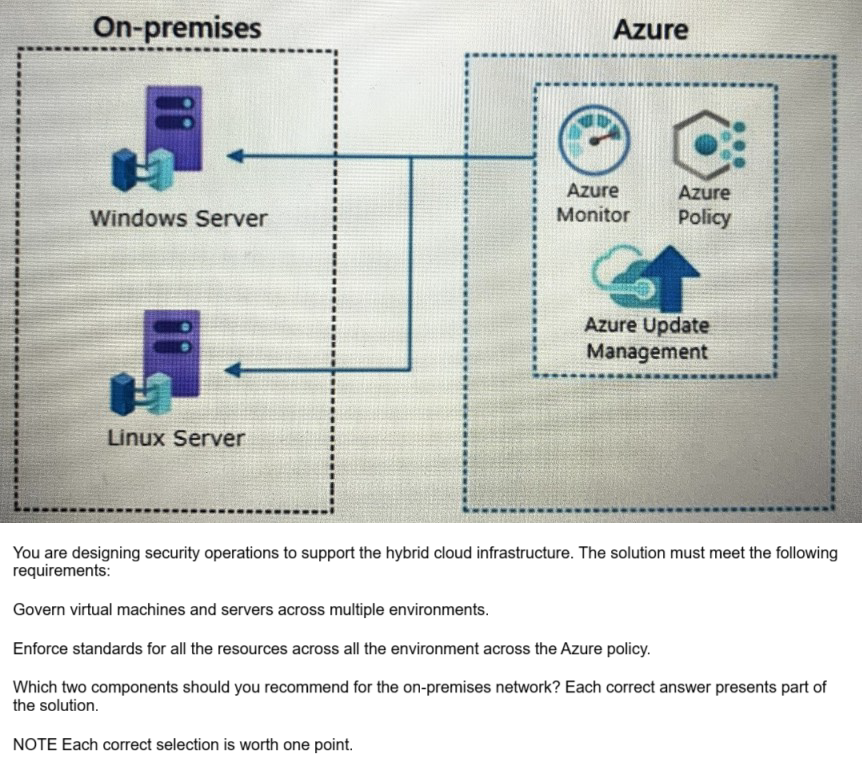
A. Azure VPN Gateway
B. guest configuration in Azure Policy
C. on-premises data gateway
D. Azure Bastion
E. Azure Arc
E. Azure Arc
Explanation:
This question tests your knowledge of extending Azure governance and policy enforcement to on-premises servers in a hybrid environment. The requirements specify governing VMs across multiple environments and enforcing Azure Policy standards on all resources. Azure Arc enables non-Azure machines to be projected into Azure as resource types, while guest configuration inside Azure Policy allows auditing and configuring settings inside VM operating systems .
Correct Option:
B. Guest configuration in Azure Policy -
Guest configuration extends Azure Policy to audit and configure settings inside the operating system of both Azure and Arc-enabled servers. This ensures compliance with security baselines, application settings, and system configurations on Windows and Linux servers across hybrid environments .
E. Azure Arc -
Azure Arc-enabled servers allow on-premises Windows and Linux servers to be represented in Azure as non-Azure machines. This enables consistent management using Azure Policy, tagging, extensions, and Defender for Cloud across on-premises and cloud environments .
Incorrect Option:
A. Azure VPN Gateway -
Azure VPN Gateway provides site-to-site or point-to-site VPN connectivity between on-premises networks and Azure. It enables network connectivity but does not provide governance, policy enforcement, or configuration management capabilities for servers .
C. On-premises data gateway -
On-premises data gateway is designed for hybrid data integrations, specifically allowing Power BI, Logic Apps, and Power Apps to access on-premises data sources. It has no role in Azure Policy enforcement or server governance .
D. Azure Bastion -
Azure Bastion provides secure RDP/SSH connectivity to Azure VMs without exposing public IPs. It operates entirely within Azure and cannot be deployed on-premises or manage on-premises server configurations or policies .
Reference:
Microsoft Learn: What is Azure Arc-enabled servers?
Microsoft Learn: Azure Policy guest configuration
Microsoft Learn: Azure Arc hybrid management overview
Microsoft Learn: Guest configuration requirements
| Page 2 out of 18 Pages |