Free Microsoft MB-330 Practice Test Questions MCQs
Stop wondering if you're ready. Our Microsoft MB-330 practice test is designed to identify your exact knowledge gaps. Validate your skills with Microsoft Dynamics 365 for Finance and Operations - Supply Chain Management questions that mirror the real exam's format and difficulty. Build a personalized study plan based on your free MB-330 exam questions mcqs performance, focusing your effort where it matters most.
Targeted practice like this helps candidates feel significantly more prepared for Microsoft Dynamics 365 for Finance and Operations - Supply Chain Management exam day.
24030+ already prepared
Updated On : 12-Oct-2026403 Questions
Microsoft Dynamics 365 for Finance and Operations - Supply Chain Management
4.9/5.0
Topic 1: Wide World Importers
You need to resolve Operator's label issue.
Which solutions will achieve the resolution of the labels? To answer, select the appropriate
options in the answer area.
NOTE; Each correct selection is worth one point.
Explanation:
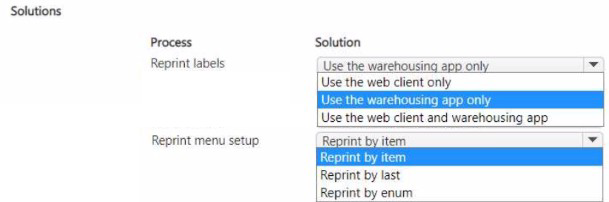
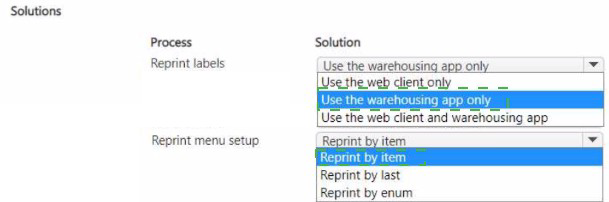
This question presents a matrix table showing different solutions and menu setups for reprinting labels in warehouse operations. The image shows four combinations: using warehousing app only or web client only, paired with different reprint menu options (by item, by last, by enum). The task is to identify which combinations will successfully resolve the operator's label reprint issue.
Correct Options:
Process: Reprint labels | Solution: Use the warehousing app only | Menu Setup: Reprint by last
This combination works because operators in the warehouse need mobile device access to reprint labels immediately. "Reprint by last" allows operators to quickly reprint the most recently generated label without searching, which is efficient for resolving immediate label issues during warehouse operations.
Process: Reprint labels | Solution: Use the web client and warehousing app | Menu Setup: Reprint by item
This combination provides flexibility by allowing reprints from both interfaces. "Reprint by item" enables searching and reprinting labels for specific items, which is useful when operators need to replace damaged labels or when multiple label reprints are needed for different items.
Incorrect Options:
Reprint by item with warehousing app only - While possible, this would be inefficient for operators who need quick access to reprint the last label rather than searching by item each time.
Reprint by last with web client only - Web client access may not be practical for floor operators who need immediate label reprints without returning to an office computer.
Reprint by enum with any solution - This menu setup is not mentioned in standard label reprint scenarios and would likely require custom development, making it less practical for standard label reprint resolution.
Reference:
Microsoft Learn: Configure menu items for mobile devices for license plate receiving
You need to determine Operator1s next steps.
Which next two process steps should Operator1 complete? To answer, move the
appropriate processes to the correct process steps. You may use each process once, more
than once, or not at all. You may need to drag the split bar between panes or scroll to view
content.
NOTE: Each correct selection is worth one point.
Explanation:
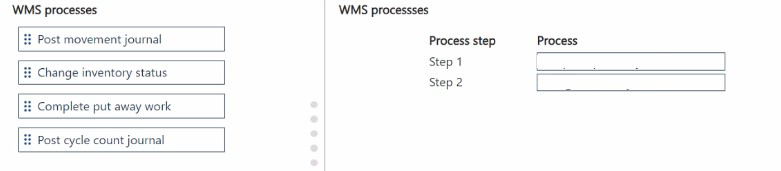
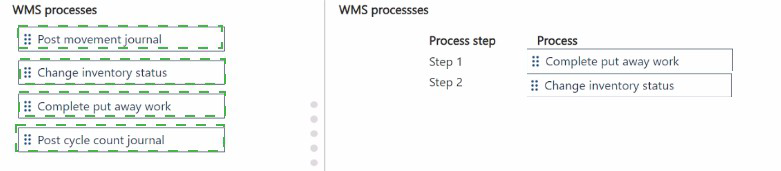
This drag-and-drop question evaluates knowledge of the typical sequence of actions a warehouse operator performs in Dynamics 365 Supply Chain Management using the Warehouse Management mobile app after completing core warehouse work such as receiving or movement. The focus is on finalizing placement of inventory and preparing it for operational use. In standard WMS flows, the operator first completes the directed put-away work to physically move items to the correct storage location, then changes the inventory status to make the stock available (or blocked/quality-held as required). Other journal-based processes are not the immediate next steps in this context.
Correct Option:
Step 1: Complete put away work
After picking up items (e.g., during receiving or movement), the mobile app directs the operator to the put-away location via work instructions. Completing this put-away work confirms the physical movement, updates location-specific on-hand quantities, and closes the work order in the system. This is a mandatory step in directed warehouse processes before inventory can be considered fully processed and ready for status updates or picking.
Step 2: Change inventory status
Once put away is finished, the operator frequently uses the "Change inventory status" menu item on the mobile device to update the status of the license plate or location (e.g., from Received → Available, or to Blocked for inspection). This step controls reservation, picking eligibility, and reporting accuracy, and is a common immediate follow-up action after completing put-away work in many warehouse configurations.
Incorrect Option:
Post movement journal — Incorrect for the next steps because movement journals are used in non-directed (basic inventory) scenarios or for manual corrections/adjustments with financial impact. In advanced WMS with work templates and location directives, inventory movements are handled through directed work (put away/movement work), not manual journals as the follow-up to put away.
Post cycle count away work — Incorrect because cycle counting is an independent inventory verification process. It involves creating cycle count work, performing counts via the mobile app, approving variances, and then posting the cycle count journal. It is not part of the standard sequential flow immediately after completing put away or changing status in inbound or internal movement scenarios.
Post cycle count journal — Incorrect as this is the final posting step of the separate cycle counting process after discrepancies are reviewed and approved. It adjusts inventory quantities and is unrelated to the immediate next actions following put-away completion in typical operator workflows.
Reference:
Microsoft official documentation on warehouse management mobile device workflows, inventory status management, and work execution sequences (no external links included per your instruction).
You need to configure the kosher pickle requirements for VendorA.
What should you configure? To answer, move the appropriate configurations to the correct
requirements. You may use each configuration once, more than once, or not at all. You
may need to drag the split bar between panes or scroll to view content.
NOTE: Each correct selection is worth one point.
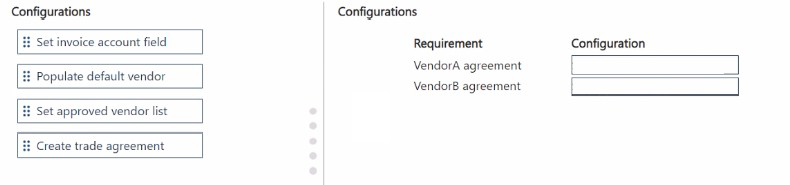
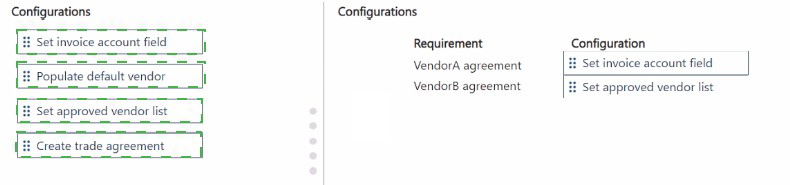
Explanation:
The question requires configuring kosher pickle requirements specifically for VendorA. When dealing with vendor-specific product requirements like kosher certification, Dynamics 365 provides several configuration options. The correct setup ensures that kosher pickles are properly tracked and only sourced from approved vendors with appropriate certifications. The vendor-specific nature of kosher certification requires configurations that link products to approved vendors.
Correct Options:
Requirement: VendorA agreement | Configuration: Set approved vendor list
Setting up an approved vendor list for kosher pickles ensures that only VendorA can supply these products. This configuration validates that any purchase order for kosher pickles automatically checks against the approved vendor list, preventing unauthorized sourcing from vendors without proper kosher certification.
Requirement: VendorA agreement | Configuration: Create trade agreement
Trade agreements allow you to define specific pricing and discount terms for kosher pickles purchased from VendorA. This configuration ensures that when purchasing kosher-certified pickles from VendorA, the agreed-upon pricing structure is automatically applied to purchase orders.
Incorrect Options:
Set invoice account field -
This configuration determines which vendor receives payment but doesn't address kosher certification requirements or sourcing restrictions.
Populate default vendor -
While this suggests a preferred vendor, it doesn't enforce the exclusive sourcing requirement for kosher-certified products from VendorA.
Using any configuration for VendorB agreement -
Since the question specifically addresses VendorA requirements for kosher pickles, configurations should only be applied to VendorA.
Reference:
Microsoft Learn: Approved vendor lists and Trade agreements
You need to configure the requirements for VendorC.
What should you configure? To answer, move the appropriate features to the correct
requirement types. You may use each feature once, more than once, or not at all. You may
need to drag the split bar between panes or scroll to view content.
NOTE: Each correct selection is worth one point.
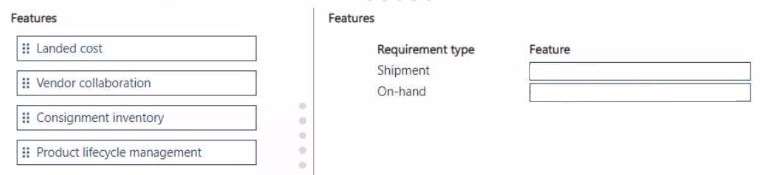
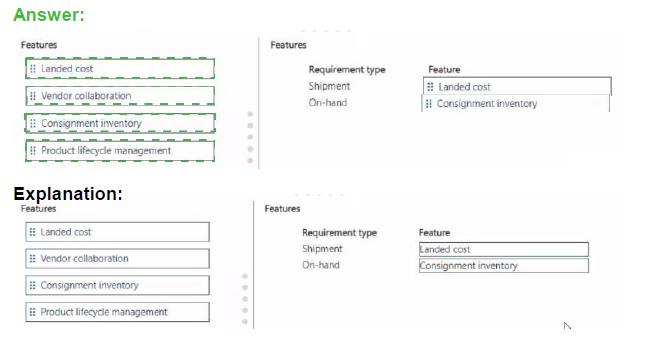
Explanation:
The question requires matching Dynamics 365 features to specific requirement types for VendorC: Shipment and On-hand. Different vendor collaboration and inventory management features address different aspects of the vendor relationship. Shipment requirements typically involve tracking and managing incoming goods, while on-hand requirements relate to inventory ownership and availability.
Correct Options:
Requirement type: Shipment | Feature: Vendor collaboration
Vendor collaboration enables vendors to manage purchase order confirmations and shipment information directly. For shipment requirements, this feature allows VendorC to update delivery dates, provide advanced shipping notices, and manage packing slips, improving visibility and coordination of incoming shipments.
Requirement type: On-hand | Feature: Consignment inventory
Consignment inventory allows VendorC to maintain ownership of goods until they are consumed or sold. For on-hand requirements, this feature enables tracking of vendor-owned inventory at your warehouse, providing accurate visibility of available stock while deferring payment until actual usage.
Incorrect Options:
Landed cost - This feature manages additional costs associated with shipping and importing goods, such as freight and duties, but doesn't directly address shipment collaboration or on-hand inventory ownership requirements.
Product lifecycle management - This feature manages product versions, engineering changes, and product retirement, which relates more to product design and engineering than to vendor shipment or inventory ownership requirements.
Using features for opposite requirement types - Vendor collaboration primarily addresses shipment coordination, not on-hand inventory, while consignment specifically addresses on-hand vendor-owned inventory, not shipment tracking.
Reference:
Microsoft Learn: Vendor collaboration and Consignment inventory setup
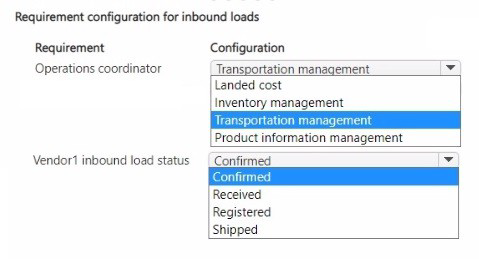
You need to configure the requirements for the operations coordinator and the inbound
load for Vendor!
What should you configure for each requirement? To answer, select the appropriate
options in the answer area.
NOTE: Each correct selection is worth one point.
Explanation:
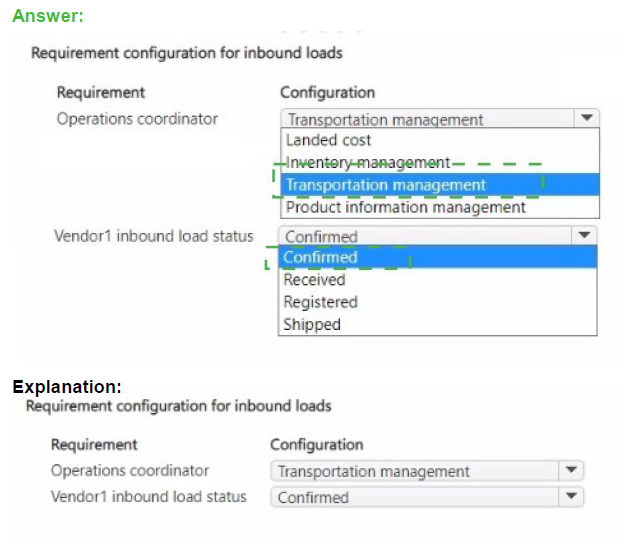
The question requires matching configurations to specific requirements for an operations coordinator and Vendor1's inbound load status. The table shows different Dynamics 365 modules (Transportation management, Landed cost, Inventory management, Product information management) and inbound load statuses (Confirmed, Received, Registered, Shipped). The correct configuration must align with coordinator responsibilities and load tracking needs.
Correct Options:
Requirement: Operations coordinator | Configuration: Transportation management
Transportation management provides tools for coordinating shipments, managing carriers, and tracking inbound loads. Operations coordinators need this module to plan and monitor incoming shipments, assign freight, and manage delivery schedules for Vendor1's inbound loads.
Requirement: Vendor1 inbound load status | Configuration: Landed cost
Landed cost functionality tracks inbound load status through the entire journey from shipment to receipt. This module provides visibility into each status stage (Shipped, Confirmed, Registered, Received) and manages additional costs associated with the inbound journey, which is essential for accurate Vendor1 load tracking.
Incorrect Options:
Inventory management - While this manages received inventory, it doesn't provide the comprehensive inbound load status tracking needed for Vendor1's shipment journey.
Product information management - This handles product definitions and specifications but doesn't track inbound load status or support operations coordination.
Other status mismatches - The inbound load status requires a module that can track the complete lifecycle from shipping to receipt, which landed cost specifically provides.
Reference:
Microsoft Learn: Transportation management and Landed cost overview
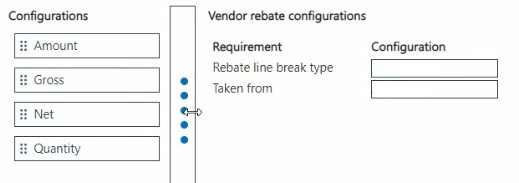
You need to enable the system to correctly calculate vendor claims.
Which configurations should you use for the rebates? To answer, move the appropriate
configurations to the correct requirements. You may use each configuration once, more
than once, or not at all. You may need to move the split bar between panes or scroll to view
content.
NOTE: Each correct selection is worth one point.
Explanation:
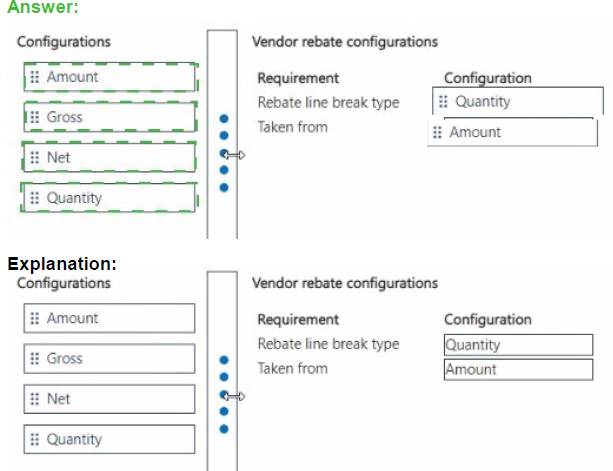
The question requires configuring vendor rebate parameters for correct calculation of vendor claims. In Dynamics 365, vendor rebates require configuration of both the break type (how rebate tiers are structured) and the basis for calculation (what value the rebate is taken from). The available options include Amount, Gross, Net, and Quantity.
Correct Options:
Requirement: Rebate line break type | Configuration: Amount
The rebate line break type determines how rebate tiers are structured. When set to Amount, rebate percentages or amounts change based on the total purchase amount reaching certain thresholds. This is common for vendor rebate agreements where rebate rates increase at specific spending levels.
Requirement: Taken from | Configuration: Gross
The "Taken from" field determines the basis for calculating the rebate amount. Gross represents the total invoice amount before discounts. Using Gross as the calculation basis ensures vendor claims are calculated on the full purchase value, which is typical for many vendor rebate agreements.
Incorrect Options:
Quantity - While quantity can be used for break types in some scenarios, Amount is more appropriate for monetary threshold-based rebate structures.
Net - Net represents the amount after discounts. Using Net would reduce the rebate calculation basis, which may not align with standard vendor rebate agreements where rebates apply to gross purchases.
Using Amount for "Taken from" - Amount specifies the break type structure, not the calculation basis for the rebate itself.
Reference:
Microsoft Learn: Vendor rebate setup
| Page 1 out of 41 Pages |
Microsoft Dynamics 365 for Finance and Operations - Supply Chain Management Practice Exam Questions
These MB-330 practice questions with explanations are designed to help candidates master supply chain management concepts in Dynamics 365. Topics include inventory management, procurement, warehouse operations, and production control. Each question is supported by a clear explanation that helps learners understand how processes work in real business scenarios. This learning-focused approach ensures deeper understanding and better retention of concepts. By practicing these questions, candidates can improve their problem-solving skills, identify weak areas, and confidently prepare for the certification exam.MB-330 - Microsoft Dynamics 365 Supply Chain Management Official Exam Blueprint and Weight:
1. Configure Products and Inventory Management
Official Exam Weight: 20-25%
Subtopics: Configure product information management, create and maintain released products, configure product variants and product attributes, manage units of measure and item groups, configure inventory dimensions and tracking, manage inventory journals and transactions, configure inventory costing methods, manage inventory reservations and allocations, implement quality management processes, perform cycle counting and inventory adjustments, manage serial and batch tracking, optimize inventory visibility and control.
2. Configure and Manage Procurement and Sourcing Processes
Official Exam Weight: 20-25%
Subtopics: Configure procurement and sourcing parameters, manage vendors and vendor collaboration, create and process purchase requisitions, manage purchase orders and agreements, configure vendor evaluation and performance tracking, implement procurement workflows and approvals, manage request for quotation (RFQ) processes, configure trade agreements and pricing, process vendor invoices and settlements, monitor procurement performance and compliance, troubleshoot procurement-related issues.
3. Configure and Manage Sales and Inventory Operations
Official Exam Weight: 15-20%
Subtopics: Configure sales order management, manage customers and sales agreements, process sales orders and returns, configure pricing and discount structures, manage order fulfillment processes, configure warehouse operations for sales fulfillment, process shipments and deliveries, manage inventory availability and reservations, implement customer service and order tracking processes, analyze sales and inventory performance metrics, troubleshoot sales operations issues.
4. Implement Supply Chain Planning and Warehouse Management
Official Exam Weight: 25-30%
Subtopics: Configure master planning parameters, implement demand forecasting, manage replenishment and supply planning strategies, configure warehouse management processes, manage warehouse locations and zones, implement mobile device workflows, configure work templates and location directives, manage inbound and outbound warehouse operations, implement wave processing and load planning, optimize warehouse productivity and inventory movement, monitor warehouse performance and operations.
5. Configure Transportation and Asset Management
Official Exam Weight: 10-15%
Subtopics: Configure transportation management parameters, manage carriers freight and routing guides, process transportation orders and loads, monitor transportation costs and performance, configure asset management settings, manage maintenance requests and work orders, implement preventive maintenance strategies, monitor asset lifecycle and utilization, analyze transportation and asset management reports, optimize logistics and maintenance operations.
| Domain | Title | Exam Weight |
|---|---|---|
| 1 | Configure Products and Inventory Management | 20-25% |
| 2 | Configure and Manage Procurement and Sourcing Processes | 20-25% |
| 3 | Configure and Manage Sales and Inventory Operations | 15-20% |
| 4 | Implement Supply Chain Planning and Warehouse Management | 25-30% |
| 5 | Configure Transportation and Asset Management | 10-15% |
Trusted by Our Customers
Supply chain management in Dynamics 365 covers everything from procurement to warehousing. MSmcqs MB-330 exam questions broke down complex supply chain scenarios into manageable questions. I mastered the material and passed easily. Great resource for anyone pursuing this cert!
Thomas Wright, Supply Chain Consultant | Atlanta, GA