Topic 1: Wide World Importers
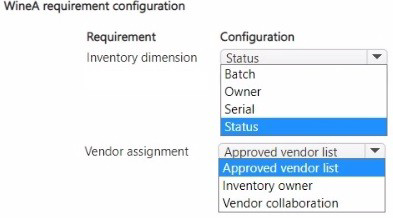
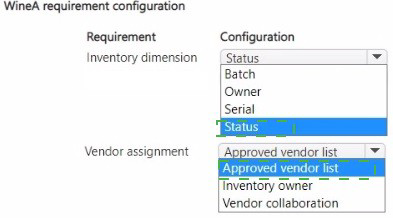
You need to configure the requirements for WineA.
What should you configure? To answer, select the appropriate options in the answer area
NOTE: Each correct selection is worth one point.
Explanation:
The question requires configuring inventory dimensions and vendor assignment for WineA based on specific tracking and sourcing needs. Wine products typically require tracking by batch for vintage purposes and may involve owner tracking for consignment scenarios. Vendor assignment must align with these dimensions to ensure proper sourcing from approved suppliers.
Correct Options:
Requirement: Inventory dimension | Configuration: Batch
Batch dimension is essential for wine products to track vintage years, production lots, and aging characteristics. This enables traceability from specific production runs and supports quality management through batch attributes like harvest date and tasting notes.
Requirement: Inventory dimension | Configuration: Owner
Owner dimension is configured when wine is held on consignment, allowing tracking of inventory ownership separate from physical location. This is important for wine distributors who may hold inventory owned by various wineries or suppliers.
Requirement: Vendor assignment | Configuration: Approved vendor list
The approved vendor list ensures WineA is only sourced from authorized suppliers who meet quality and authenticity standards. This is critical for wine products where provenance and quality certification are important to brand integrity.
Incorrect Options:
Inventory dimension: Status - Status tracks inventory availability (available, damaged, quarantined) but isn't a primary dimension for wine product tracking.
Inventory dimension: Serial - Serial numbers are typically used for high-value individual item tracking, not necessary for most wine products where batch tracking suffices.
Vendor assignment: Inventory owner - While related to the owner dimension, this isn't a direct vendor assignment configuration option.
Vendor assignment: Vendor collaboration - This enables communication but doesn't establish vendor approval or sourcing rules.
Reference:
Microsoft Learn: Inventory dimensions and Approved vendor lists
A company plans to implement Dynamics 365 for Finance and Operations mobile device
connectivity.
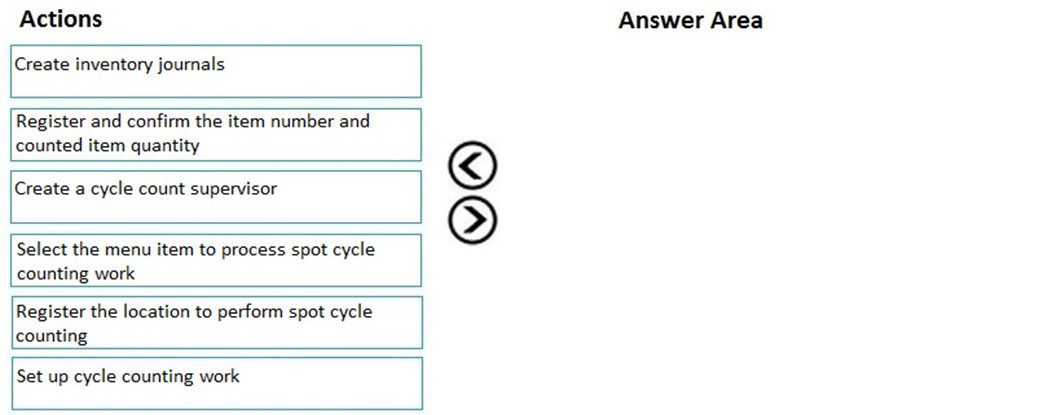
You need to perform a spot cycle count on the mobile device.
Which three actions should you perform in sequence? To answer, move the appropriate
actions from the list of actions to the answer area and arrange them in the correct order.
Explanation:
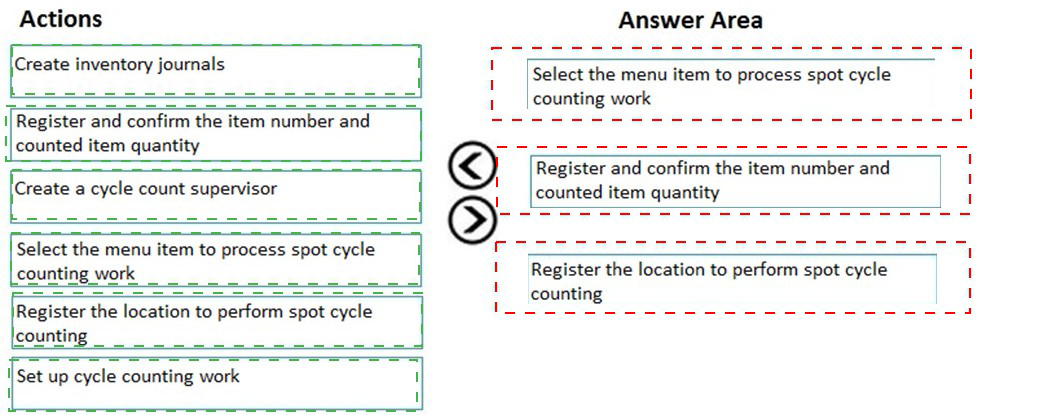
Spot cycle counting in the Dynamics 365 Warehouse Management mobile app follows a specific sequence. The user must first access the correct menu item designed for cycle counting, then scan or register the location requiring the count, and finally input and confirm the actual counted quantities for the item.
Correct Sequence:
Select the menu item to process spot cycle counting work - The user must first navigate the mobile device menu and select the specific menu item configured for spot cycle counting to initiate the process.
Register the location to perform spot cycle counting - After starting the cycle counting process, the user scans or enters the warehouse location where the spot count needs to be performed.
Register and confirm the item number and counted item quantity - At the location, the user scans the item and enters the physical count, then confirms the quantity to complete the spot cycle counting transaction.
Incorrect Actions:
Create inventory journals - This is a back-office setup activity, not a mobile device operation.
Create a cycle count supervisor - This is a user role configuration, not a step in performing the actual count.
Set up cycle counting work - This is a configuration step completed in the back office before mobile operations.
Any other sequence order - The steps must follow the logical workflow of initiating, locating, and counting.
Reference:
Microsoft Learn: Cycle counting in the warehouse mobile app
A company uses Dynamics 365 Supply Chain Management. There are two warehouses. All
inventory is purchased into Warehouse1 and transferred to Warehouse2 based on
replenishment rules.
Planned orders were generated overnight by the master planning engine and do not need
to be reviewed.
Warehouse1 orders for Warehouse2 do not show as available for picking and shipping.
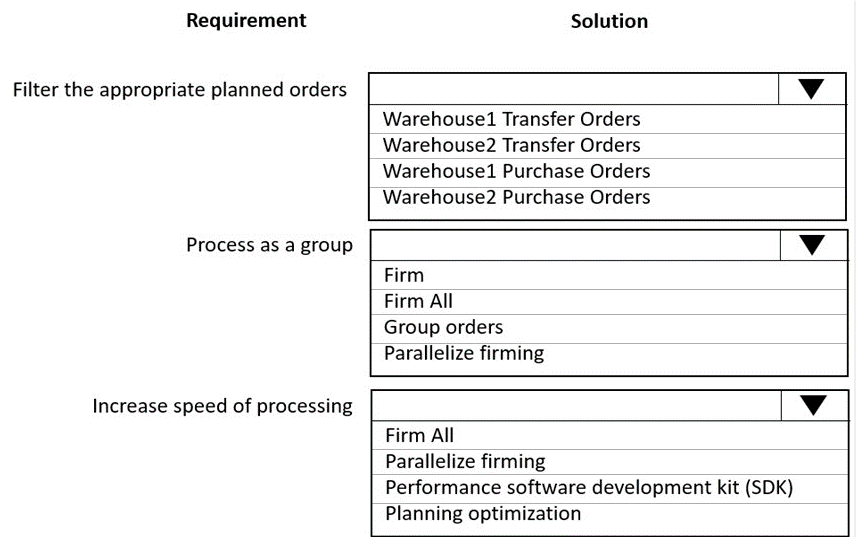
Planned orders must be available for warehouse processing as quickly as possible and processed as a group.
You need to configure the system to meet the requirements.
Which solution should you configure for each requirement? To answer, select the
appropriate options in the answer area.
NOTE: Each correct selection is worth one point.
Explanation:
The scenario involves two warehouses where inventory flows from Warehouse1 to Warehouse2 via transfer orders. Overnight planned orders need to be quickly processed and made available for warehouse operations. The requirements focus on filtering appropriate orders, processing them as a group, and increasing processing speed.
Correct Options:
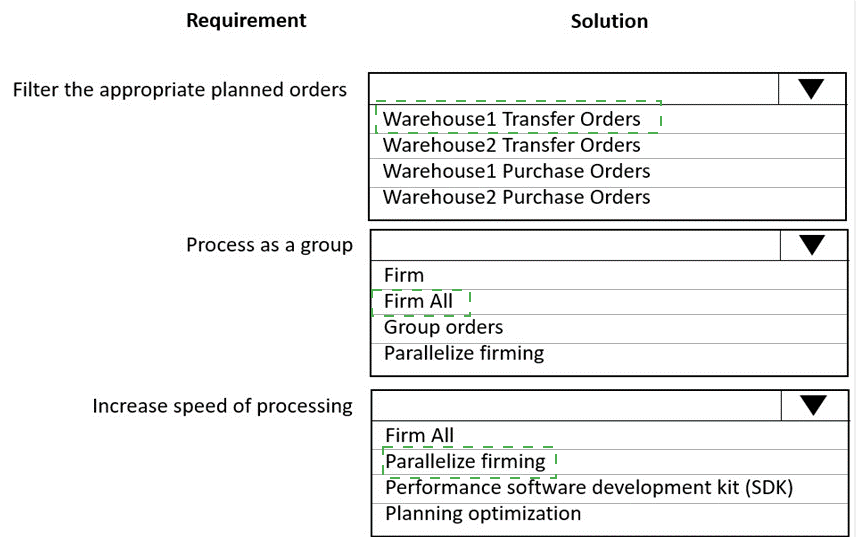
Requirement: Filter the appropriate planned orders | Solution: Warehouse2 Transfer Orders
Since inventory flows from Warehouse1 to Warehouse2 based on replenishment rules, the planned orders needing attention are transfer orders destined for Warehouse2. These orders must be released to warehouse so inventory becomes available for picking and shipping at Warehouse2.
Requirement: Process as a group | Solution: Group orders
Grouping orders allows multiple planned transfer orders to be processed together in a single action. This ensures all Warehouse2 replenishment orders are handled collectively rather than individually, maintaining consistency and efficiency in the replenishment process.
Requirement: Increase speed of processing | Solution: Parallelize firming
Parallelize firming enables multiple planned orders to be firmed simultaneously using multiple threads, significantly reducing processing time. This meets the requirement for planned orders to be available for warehouse processing as quickly as possible.
Incorrect Options:
Warehouse1 Transfer Orders -
These would move inventory out of Warehouse1, contrary to the replenishment flow into Warehouse2.
Warehouse1/2 Purchase Orders -
All purchasing is into Warehouse1; purchase orders aren't the focus for warehouse availability at Warehouse2.
Firm All -
While this firms all orders, it doesn't specifically address grouping requirements.
Performance SDK -
This is for custom development, not a standard configuration for increasing processing speed.
Planning Optimization -
This is an add-in for master planning itself, not for firming existing planned orders.
Reference:
Microsoft Learn: Firm planned orders and Parallel firming
A company is using Dynamics 365 Supply Chain Management for its asset management
operations. The company must manage periodic, preventative maintenance for two types
of conveyor belt assets.
• One type of conveyor belt asset must be maintained daily for a total of 365 total
inspections.
• The other type of conveyor belt asset must be maintained weekly for a total of 52 total
inspections.
Preventative maintenance must be consolidated under a single record for all conveyor belt
assets. You need to configure the features for the solution.
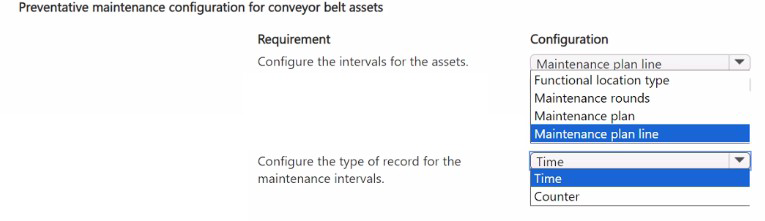
Which features should you configure? To answer, select the appropriate options in the answer area. NOTE: Each correct selection is worth one point.
Explanation:
The question requires configuring preventative maintenance for conveyor belt assets with different interval requirements (daily and weekly), consolidated under a single record. In Asset Management, maintenance plans provide the structure for scheduling recurring maintenance tasks. The configuration must accommodate both interval types while maintaining a unified record structure.
Correct Options:
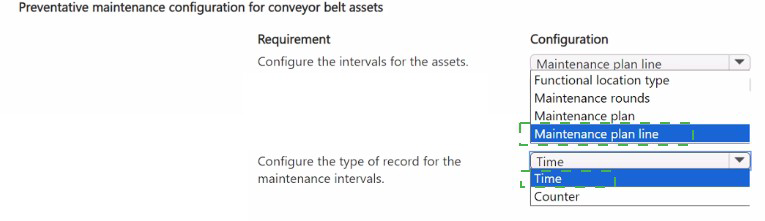
Requirement: Configure the intervals for the assets | Configuration: Maintenance rounds
Maintenance rounds allow defining multiple maintenance tasks with different intervals within a single maintenance plan. For the conveyor belts, you can create one maintenance round for daily inspections (365 times) and another round for weekly inspections (52 times), both under the same maintenance plan record.
Requirement: Configure the type of record for the maintenance intervals | Configuration: Maintenance plan
A maintenance plan is the top-level record that consolidates all maintenance requirements for the conveyor belt assets. It contains maintenance rounds, maintenance plan lines, and defines the scheduling parameters. Creating one maintenance plan for all conveyor belt assets meets the requirement for a single consolidated record.
Incorrect Options:
Maintenance plan line - While these are used within maintenance plans, they define specific tasks but don't consolidate multiple interval types under a single record.
Functional location type - This categorizes where assets are located but doesn't configure maintenance intervals.
Using separate plans for each interval - This would violate the requirement for consolidating under a single record.
Reference:
Microsoft Learn: Maintenance plans and maintenance rounds
A company uses Dynamics 365 Supply Chain Management with basic warehouse
processes. Mobile devices are not used in the two warehouses. Warehouse items that
have an A classification are counted weekly through automatic cycle count journals that are
created per warehouse.
Items that are in both warehouses appear only in one journal for counting. Counts are
inaccurate because picking is posted against items that are being counted.
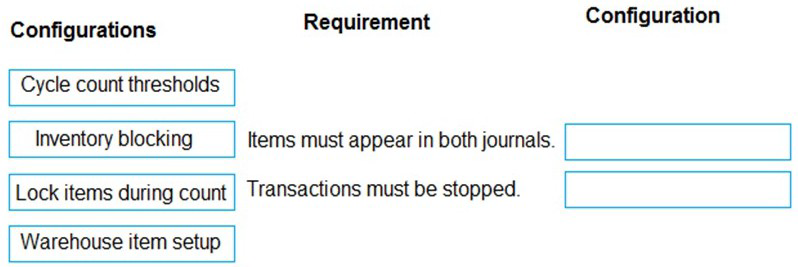
You need to resolve the cycle count issues. To answer, drag the appropriate configurations
to the correct requirements. Each configuration may be used once, more than once, or not
at all. You may need to drag the split bar between panes or scroll to view content.
NOTE: Each correct selection is worth one point.
Explanation:
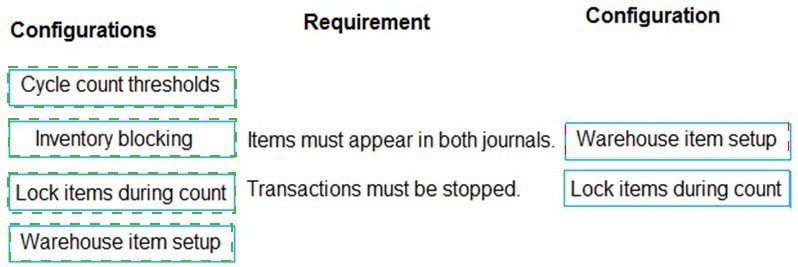
The scenario involves cycle counting issues in a basic warehouse setup without mobile devices. Items appear in only one warehouse's journal despite being in both locations, and picking transactions continue during counting causing inaccuracies. The correct configurations must ensure items appear in both journals and transactions are blocked during counting.
Correct Options:
Requirement: Items must appear in both journals | Configuration: Warehouse item setup
Warehouse item setup defines how items are managed across different warehouses. Configuring this properly ensures that items in both warehouses appear in separate cycle count journals for each warehouse location, allowing accurate counting by warehouse.
Requirement: Transactions must be stopped | Configuration: Lock items during count
Lock items during count prevents inventory transactions (such as picking) from being posted against items while cycle counting is in progress. This ensures count accuracy by freezing the inventory status until the physical count is completed and recorded.
Incorrect Options:
Cycle count thresholds - This sets triggers for when cycle counts should occur based on inventory levels but doesn't address the specific issues of journal appearance or transaction blocking.
Inventory blocking - While this can block transactions, it's typically used for quality holds or quarantines, not specifically for cycle counting scenarios.
Any configuration not listed - The remaining configurations are not relevant to the stated requirements.
Reference:
Microsoft Learn: Cycle counting in Warehouse management and Inventory blocking
| Page 2 out of 41 Pages |