Topic 3: Adventure Works Cycles
A distribution company uses Dynamics 365 Supply Chain Management.
A high-volume warehouse for the distribution company automatically releases transfer
order lines to the warehouse throughout the day.
Order line quantities are frequently changed after release to the warehouse. However, the
load lines are not always updated.
You need to configure automatic updates to the load lines.
What should you configure? To answer, select the appropriate options in the answer area.
NOTE: Each correct selection is worth one point.
Explanation:
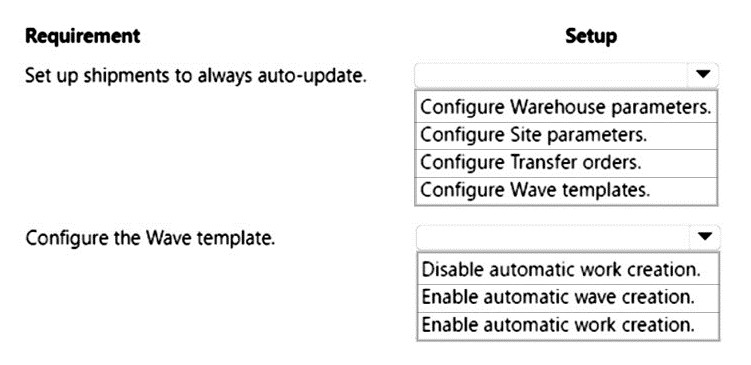
The scenario involves a high-volume warehouse where transfer order lines are automatically released to the warehouse, but load lines don't always update when order quantities change after release. In Dynamics 365, warehouse parameters and wave templates control how load lines are updated when changes occur to released order lines.
Correct Options:
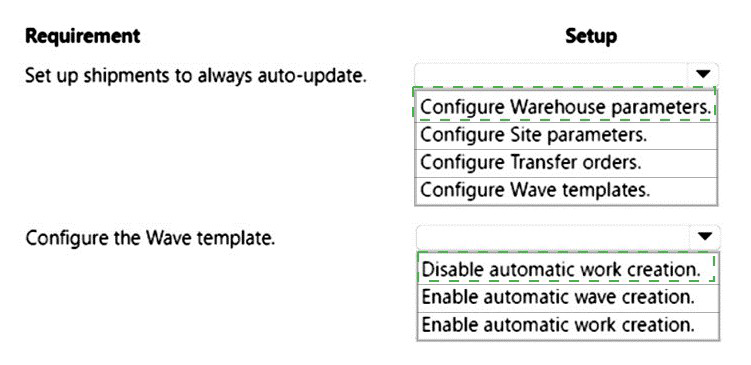
Requirement: Set up shipments to always auto-update | Configuration: Configure Warehouse parameters
Warehouse parameters contain settings that control automatic updates to shipments and loads. Within these parameters, there are options to automatically update shipment information when changes occur to source documents, ensuring load lines reflect current order quantities.
Requirement: Configure the Wave template | Configuration: Enable automatic work creation
Wave templates determine how work is created for loads. Enabling automatic work creation ensures that when load lines are updated, new warehouse work is automatically generated to reflect the changed quantities, maintaining accuracy between order lines and actual warehouse tasks.
Incorrect Options:
Configure Site parameters - Site parameters manage site-level settings but don't control automatic updates to shipments or wave processing.
Configure Transfer orders - Transfer order configuration doesn't directly impact how load lines update when quantities change after release.
Disable automatic work creation - This would prevent work from being created or updated, exacerbating the problem rather than solving it.
Enable automatic wave creation - While related, this controls when waves are created, not how load lines update in response to quantity changes.
Reference:
Microsoft Learn: Warehouse parameters and Wave templates
A company plans to make changes to change management processes for purchase orders.
Currently, the system requires an approval for any change. The company wants to
implement re-approval only when there is a change to the quantity or the unit price in a
purchase order.
You need to configure the change management process to require re-approval only on
changes to quantity and unit price.
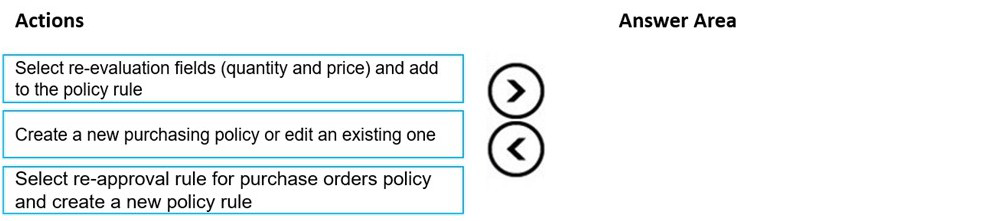
In which order should you perform the actions? To answer, move all actions from the list of
actions to the answer area and arrange them in the correct order.
Explanation:
The question requires configuring purchase order change management to require re-approval only for specific field changes (quantity and unit price). In Dynamics 365, this is achieved through purchasing policies and policy rules that define which field changes trigger re-approval. The configuration follows a logical sequence of accessing policies, creating rules, and defining the triggering fields.
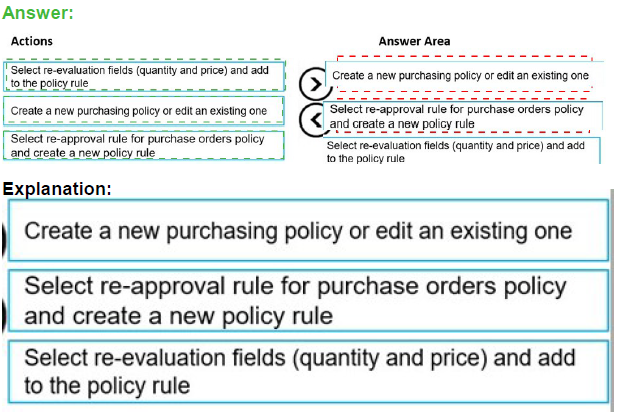
Correct Sequence:
Create a new purchasing policy or edit an existing one -
First, access the purchasing policies to either create a new policy or modify an existing one that will contain the re-approval rules for purchase orders.
Select re-approval rule for purchase orders policy and create a new policy rule -
Within the purchasing policy, select the specific rule type for purchase order re-approval and create a new policy rule that will define the conditions requiring re-approval.
Select re-evaluation fields (quantity and price) and add to the policy rule -
Finally, configure the policy rule by selecting the specific fields (quantity and unit price) that will trigger re-approval when changed, and add them to the rule.
Reference:
Microsoft Learn: Purchase order approval and change management
A company is implementing Dynamics 365 Supply Chain Management. Inventory is valued
through FIFO costing.
The company is preparing for cutover and go-live activities. The accounting manager wants
to ensure that on-hand inventory is brought into Dynamics 365 Supply Chain Management
at the correct cost.
ItemA has the following costing tiers:
• Tier 1: 20 each, $5
• Tier 2: 20 each, $10
• Tier 3: 20 each, $15
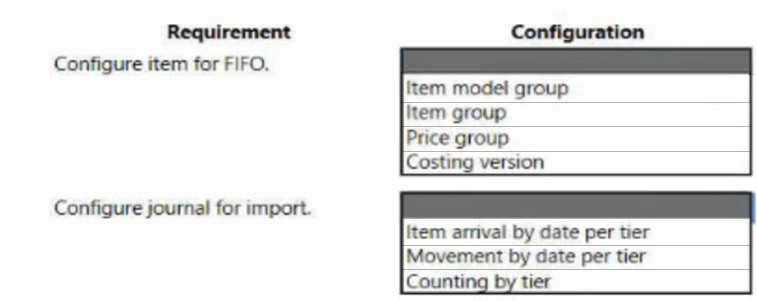
You need to configure the item and journals to meet the cutover requirement.
What should you configure? To answer, select the appropriate options in the answer area.
NOTE: Each correct selection is worth one point.
Explanation:
The cutover scenario requires importing on-hand inventory with FIFO costing using specific costing tiers (20 units at $5, $10, and $15). In Dynamics 365, item model groups determine the costing method, while specific journals allow importing inventory with tiered costing by date to establish correct FIFO layers.
Correct Options:
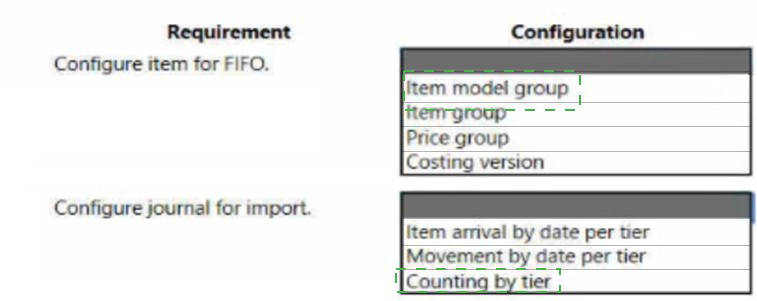
Requirement: Configure item for FIFO | Configuration: Item model group
Item model groups define inventory policies including costing method. Creating or selecting an item model group with FIFO costing ensures ItemA values inventory using the First-In-First-Out principle. The item must be assigned to this model group to enable FIFO valuation.
Requirement: Configure journal for import | Configuration: Item arrival by date per tier
Item arrival journal by date per tier allows importing inventory with specific quantities, costs, and dates. This creates distinct inventory transactions for each tier (Tier 1: 20 @ $5, Tier 2: 20 @ $10, Tier 3: 20 @ $15) with different receipt dates, establishing the FIFO layers correctly.
Incorrect Options:
Item group - This groups items for reporting and parameters but doesn't control costing method.
Price group - Used for trade agreement pricing, not inventory costing method.
Costing version - Stores costs but doesn't define the FIFO method or allow tiered receipt entry.
Movement by date per tier - Used for inventory transfers, not initial receipt of on-hand inventory.
Counting by tier - Used for cycle counting adjustments, not initial inventory setup.
Reference:
Microsoft Learn: Item model groups and FIFO costing
A company is implementing Dynamics 365 Supply Chain Management.
The company requires that historical transactional data from the current system be used to
determine future inventory needs. Transactions that fall outside of a standard deviation
must be excluded.
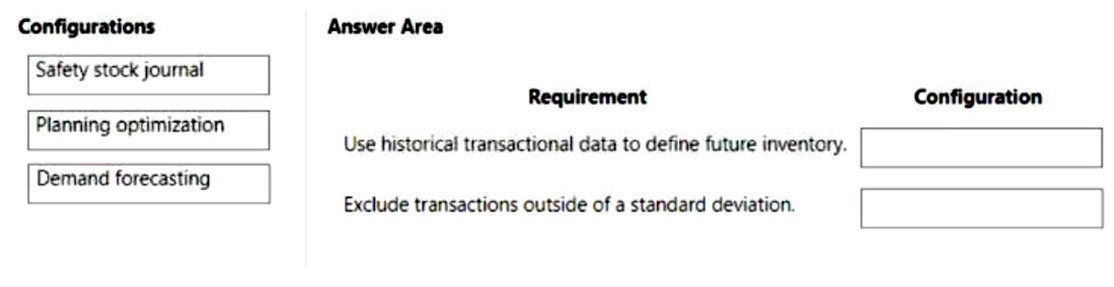
You need to configure the system to meet the requirements.
What should you configure? To answer, drag the appropriate configurations to the correct
requirements. Each configuration may be used once, more than once, or not at all. You
may need to drag the split bar between panes or scroll to view content.
NOTE: Each correct selection is worth one point.
Explanation:
The question involves using historical transactional data to forecast future inventory needs while excluding outliers beyond a standard deviation. In Dynamics 365, Demand forecasting analyzes historical data to predict future demand. This feature includes statistical methods to identify and exclude outliers, ensuring forecast accuracy by removing anomalous transactions.
Correct Options:
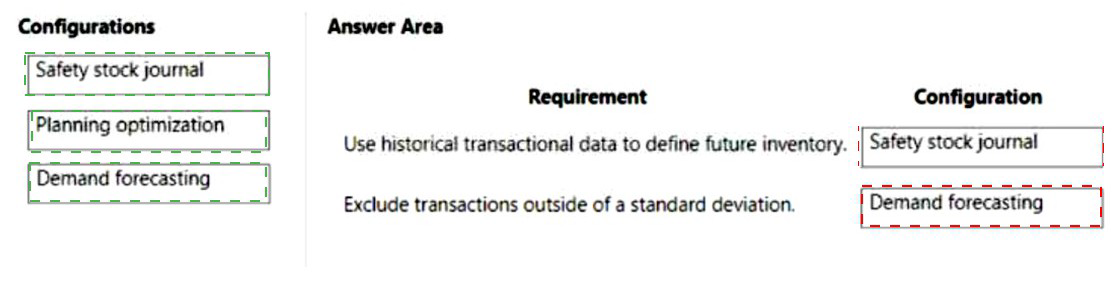
Requirement: Use historical transactional data to define future inventory | Configuration: Demand forecasting
Demand forecasting uses historical transaction data to generate predictions of future inventory requirements. The feature analyzes past consumption patterns to create statistically valid forecasts that inform procurement and inventory planning decisions.
Requirement: Exclude transactions outside of a standard deviation | Configuration: Demand forecasting
Demand forecasting includes parameters for outlier removal based on statistical methods. By configuring the forecast algorithm to exclude transactions falling outside specified standard deviation thresholds, the system automatically filters anomalous data points that would otherwise skew predictions.
Incorrect Options:
Safety stock journal -
This is used for manual adjustments to safety stock levels, not for analyzing historical data or generating forecasts.
Planning optimization -
This is the master planning engine that uses forecasts to generate planned orders, but it doesn't analyze historical data or exclude outliers itself.
Using Planning optimization for either requirement -
Planning optimization consumes forecast data but doesn't create it or perform statistical outlier analysis.
Reference:
Microsoft Learn: Demand forecasting overview
A company uses Dynamics 365 Supply Chain Management. The company plans to add
trucks to the existing truck fleet over the upcoming months.
The company requires truck drivers to complete a daily self-inspection of their trucks. The
government requires that commercial trucks are inspected annually by a certified repair
facility.
The fleet manager wants to minimize the amount of time the truck is in the shop.
• When a truck driver reports a problem during the daily inspection that requires a repair
and is within a week of the annual inspection, the company requires that both events occur
at the same time in the shop.
• The annual inspection can vary on due date for both new and existing trucks.
You must configure the requirements to minimize truck downtime.
What should you configure for each requirement? To answer, select the appropriate
options in the answer area.
NOTE: Each correct selection is worth one point.
Explanation:
The scenario requires configuring maintenance for a truck fleet with daily driver inspections and annual certified inspections. When a repair is needed within a week of the annual inspection, both should occur simultaneously. Maintenance plans can be based on asset types with time intervals, and tolerance days allow scheduling flexibility to combine work orders.
Correct Options:
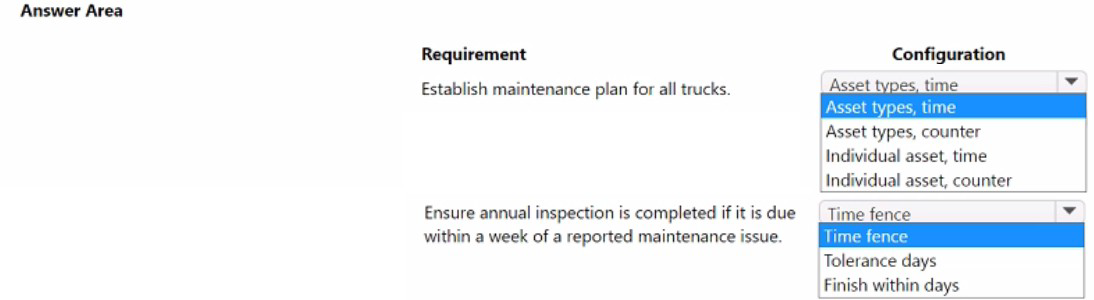
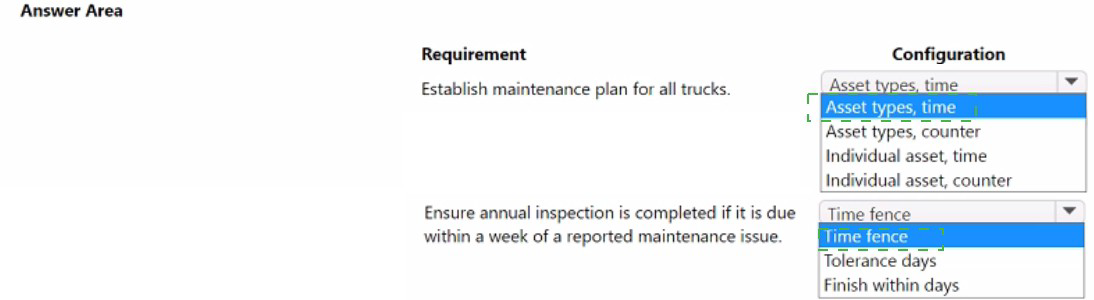
Requirement: Establish maintenance plan for all trucks | Configuration: Asset types, time
Using asset types with time-based maintenance allows a single maintenance plan to apply to all trucks regardless of individual variations. This ensures all trucks follow the same annual inspection schedule based on calendar time, accommodating new trucks added to the fleet over time.
Requirement: Ensure annual inspection is completed if it is due within a week of a reported maintenance issue | Configuration: Tolerance days
Tolerance days in maintenance plans allow scheduling flexibility around the exact due date. Setting tolerance days to at least 7 enables the system to schedule the annual inspection together with a repair work order if the inspection is due within the tolerance window, minimizing truck downtime.
Incorrect Options:
Asset types, counter - Counter-based maintenance relies on usage metrics like mileage, not appropriate for time-based annual inspections.
Individual asset, time/counter - These would require configuring separate maintenance plans for each truck, inefficient for fleet management.
Time fence - This defines planning horizons but doesn't provide scheduling flexibility around due dates.
Finish within days - This specifies completion targets but doesn't allow early scheduling of maintenance based on due date proximity.
Reference:
Microsoft Learn: Maintenance plans and tolerance days
| Page 3 out of 41 Pages |