Free Microsoft AI-900 Practice Test Questions MCQs
Stop wondering if you're ready. Our Microsoft AI-900 practice test is designed to identify your exact knowledge gaps. Validate your skills with Microsoft Azure AI Fundamentals questions that mirror the real exam's format and difficulty. Build a personalized study plan based on your free AI-900 exam questions mcqs performance, focusing your effort where it matters most.
Targeted practice like this helps candidates feel significantly more prepared for Microsoft Azure AI Fundamentals exam day.
23220+ already prepared
Updated On : 12-Oct-2026322 Questions
Microsoft Azure AI Fundamentals
4.9/5.0
Topic 5: Describe features of conversational AI workloads on Azure
For each of the following statements, select Yes If the statement is true. Otherwise, select No.
NOTE: Each correct selection is worth one point.

Explanation:
The question tests understanding of object detection capabilities in computer vision. Object detection identifies and locates objects within an image, including multiple objects of the same or different classes, and can detect each object’s location.
Correct Option:
Row 1 – Yes:
Object detection locates specific objects within an image, so it can find the location of a damaged product.
Row 2 – Yes:
It can detect multiple instances of the same object type in a single image.
Row 3 – Yes:
It can identify and locate different types of objects in one image, such as multiple categories of damaged products.
Incorrect Option:
“No” for any row would be incorrect, because all described capabilities—locating an object, detecting multiple instances, and detecting multiple types—are core functions of object detection.
Reference:
Microsoft Learn AI-900 training materials on computer vision state that object detection both classifies objects and provides bounding box coordinates for each, supporting multiple objects and multiple classes in a single image.
For each of the following statements, select Yes if the statement is true. Otherwise, select No.
NOTE; Each correct selection is worth one point.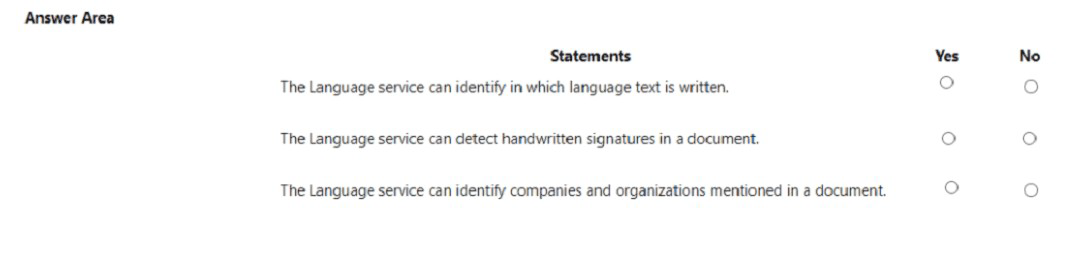
Explanation:
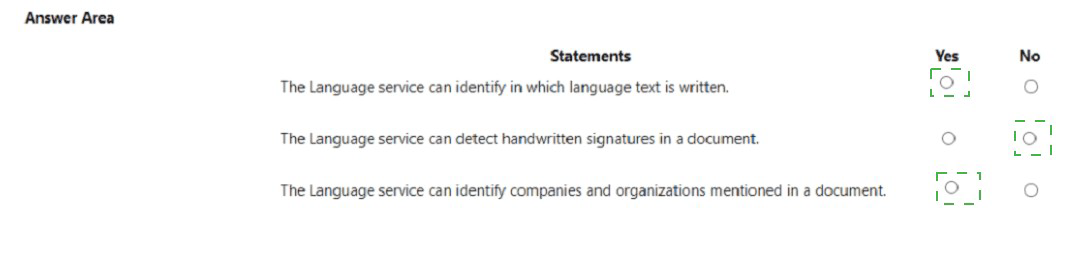
This question assesses knowledge of Azure AI Language service capabilities. The Language service supports text analytics features such as language detection, entity recognition (including organizations), but it does not process handwritten content visually.
Correct Option:
Row 1 – Yes:
Language detection is a core feature; it identifies the language of the provided text.
Row 2 – No:
Detecting handwritten signatures is a computer vision/task, not a capability of the Language service, which works only with digital text.
Row 3 – Yes:
Named entity recognition can identify companies, organizations, people, locations, etc., in a document.
Incorrect Option:
Row 1 – No:
Incorrect; language detection is a primary feature of the service.
Row 2 – Yes:
Incorrect; handwritten analysis requires OCR or Form Recognizer, not the Language service.
Row 3 – No:
Incorrect; identifying organizations is part of entity recognition in the Language service.
Reference:
Microsoft Learn documentation for Azure AI Language lists language detection and named entity recognition (including organization detection) as key features, while handwritten processing is part of Azure Form Recognizer or Vision services.
Select the answer that correctly completes the sentence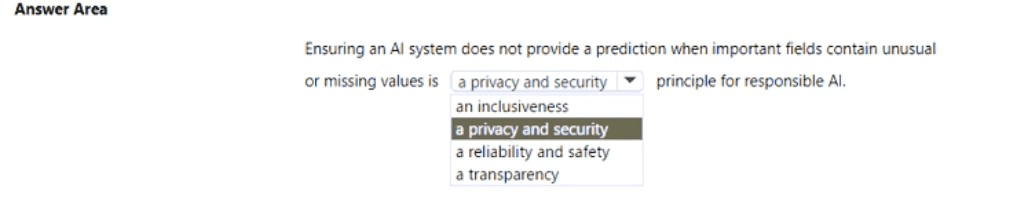
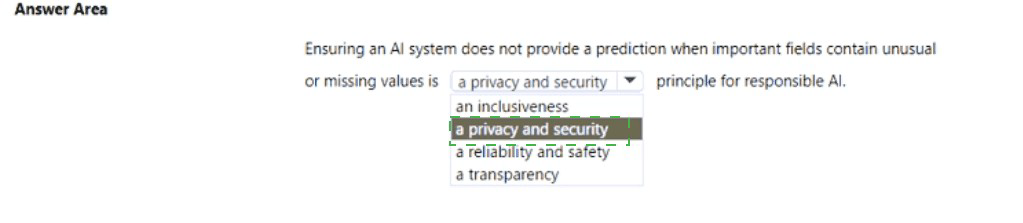
Explanation:
This question is about responsible AI principles. Preventing predictions when data is incomplete or anomalous relates to ensuring the system performs safely and reliably, avoiding harmful or erroneous outputs due to poor-quality input.
Correct Option:
Reliability and safety:
This principle focuses on operating AI systems consistently under all conditions, including handling missing or unusual data gracefully to prevent unsafe or unreliable predictions.
Incorrect Option:
Inclusiveness:
Aims to address bias and ensure AI benefits all people, not directly about handling data quality for predictions.
Privacy and security:
Protects data and systems from unauthorized access, not specifically about validating input data before making predictions.
Transparency:
Involves making AI systems understandable to users, not directly about withholding predictions due to data issues.
Reference:
Microsoft's Responsible AI principles define reliability and safety as ensuring AI systems behave as expected, even with edge cases or missing data, to avoid harm.
Select the answer that correctly completes the sentence.

Explanation:
The question asks which tool in Azure Machine Learning designer helps visually explore data distributions in feature columns. Dataset output visualization allows users to generate charts and statistics directly from a dataset module, aiding in exploratory data analysis.
Correct Option:
Dataset output visualization feature:
This feature provides a visual interface to explore the dataset, including histograms, scatter plots, and summary statistics, which helps analyze value distributions and identify patterns or anomalies in feature columns.
Incorrect Option:
Normalize Data module:
This is a transformation module that scales numerical data but does not provide visualization capabilities.
Select Columns in Dataset module:
This module is used to choose specific columns from the dataset, not to visualize data distributions.
Evaluation results visualization feature:
This is used to visualize model performance metrics after training, not for exploring raw dataset distributions.
Reference:
Microsoft Learn documentation for Azure Machine Learning designer notes that you can right‑click a dataset module and select Visualize to explore data distributions, statistics, and charts for each column.
For each of the following statements, select Yes if the statement is true. Otherwise, select
No.
NOTE; Each correct selection is worth one point.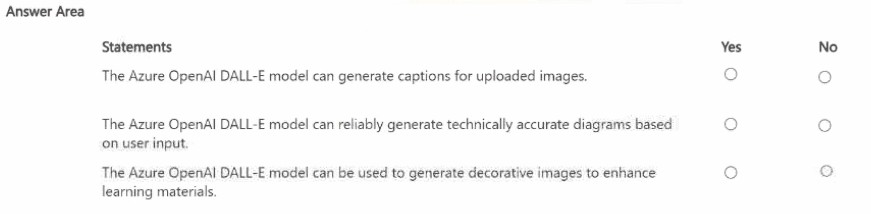
Explanation:
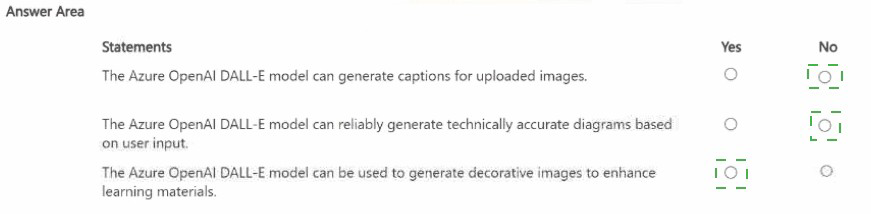
This question assesses understanding of Azure OpenAI's DALL‑E model capabilities. DALL‑E is a generative AI model that creates original images from text prompts; it does not caption existing images or guarantee technical accuracy, but is suitable for creative/illustrative content.
Correct Option:
Row 1 – No:
DALL‑E generates images from text; it does not analyze uploaded images to produce captions (this is done by Azure AI Vision's describe image feature).
Row 2 – No:
DALL‑E is not designed for reliable technical diagrams; its outputs are artistic/creative and may not be factually or technically precise.
Row 3 – Yes:
DALL‑E excels at generating decorative, stylistic, or illustrative images based on text prompts, which can enhance learning materials visually.
Incorrect Option:
Row 1 – Yes:
Incorrect; image captioning is a computer vision task, not a generative image model's function.
Row 2 – Yes:
Incorrect; DALL‑E does not guarantee accuracy for technical schematics or diagrams.
Row 3 – No:
Incorrect; generating decorative images is a core and valid use case for DALL‑E.
Reference:
Microsoft Learn: “What is Azure OpenAI Service?” describes DALL‑E as a model for generating novel images from text descriptions, ideal for creative and illustrative purposes, not for image analysis or technically precise outputs.
| Page 1 out of 33 Pages |
Microsoft Azure AI Fundamentals Practice Exam Questions
These AI-900 practice test questions with explanations help learners understand the basics of artificial intelligence on Azure. Topics include machine learning, computer vision, natural language processing, and responsible AI principles. Each explanation clearly describes the reasoning behind the correct answer, helping candidates build a solid foundation. This approach supports deeper understanding and better retention. By practicing regularly, candidates can strengthen their knowledge of AI concepts and confidently prepare for the certification exam.AI-900 Microsoft Azure AI Fundamentals Official Exam Blueprint and Weight:
1. Describe Artificial Intelligence Workloads and Considerations
Official Exam Weight: 15-20%
Subtopics: AI overview and definition, common AI workloads, machine learning workloads, computer vision workloads, natural language processing workloads, document intelligence workloads, knowledge mining workloads, generative AI workloads, identifying features of common AI workloads, prediction and forecasting, anomaly detection, object detection, image classification, semantic segmentation, text analysis, speech recognition and synthesis, translation, question answering, conversational AI, responsible AI principles overview, fairness in AI systems, reliability and safety in AI systems, privacy and security in AI systems, inclusiveness in AI systems, transparency in AI systems, accountability in AI systems, Microsoft Responsible AI Standard overview, identifying responsible AI considerations for specific AI workloads, potential harms and mitigation strategies, human oversight in AI systems.
2. Describe Fundamental Principles of Machine Learning on Azure
Official Exam Weight: 20-25%
Subtopics: Machine learning overview, supervised learning overview, regression overview, predicting numeric values, classification overview, binary classification, multiclass classification, unsupervised learning overview, clustering overview, identifying groups of similar data points, semi-supervised learning overview, deep learning overview, neural network fundamentals, layers in neural networks, input layer hidden layers output layer, activation functions overview, training a machine learning model, features and labels, training data vs validation data vs test data, loss functions overview, gradient descent overview, model evaluation metrics, regression metrics, mean absolute error, mean squared error, root mean squared error, R squared, classification metrics, accuracy, precision, recall, F1 score, AUC ROC, confusion matrix, clustering metrics, Azure Machine Learning overview, Azure Machine Learning workspace, Azure Machine Learning Studio, automated machine learning AutoML overview, AutoML supported task types, configuring AutoML experiments, AutoML model selection and evaluation, Azure Machine Learning designer overview, designer components and pipelines, building pipelines with drag and drop, Azure Machine Learning compute options, compute instances, compute clusters, inference clusters, attached compute, Azure Machine Learning datasets, data assets, Azure Machine Learning models, registering and managing models, Azure Machine Learning pipelines overview, Azure Machine Learning endpoints, real-time inference endpoints, batch inference endpoints, deploying models to endpoints, responsible machine learning features in Azure, model interpretability, fairness assessment with Fairlearn, error analysis, data drift detection.
3. Describe Features of Computer Vision Workloads on Azure
Official Exam Weight: 15-20%
Subtopics: Computer vision overview, common computer vision tasks, image classification overview, object detection overview, semantic segmentation overview, optical character recognition overview, facial detection overview, facial analysis overview, Azure AI Vision overview, Image Analysis API capabilities, image tagging, image categorization, image description generation, object detection with Image Analysis, brand detection, color scheme analysis, adult content detection, optical character recognition with Azure AI Vision, Read API overview, extracting text from images, extracting text from documents, handwritten text recognition, Azure AI Vision Studio overview, analyzing images in Vision Studio, Azure AI Custom Vision overview, Custom Vision portal, image classification projects, object detection projects, uploading and tagging images, training Custom Vision models, evaluating Custom Vision model performance, publishing and consuming Custom Vision models, exporting Custom Vision models, Azure AI Face overview, face detection capabilities, face analysis attributes, age gender emotion head pose, facial recognition overview, responsible use of Face API, limited access policy for Face API, Azure AI Video Indexer overview, video analysis capabilities, extracting insights from videos, transcript and translation, speaker identification, scene and shot detection, label detection in video, brand detection in video, Azure AI Document Intelligence overview, prebuilt document models, layout model, general document model, invoice model, receipt model, business card model, ID document model.
4. Describe Features of Natural Language Processing Workloads on Azure
Official Exam Weight: 15-20%
Subtopics: Natural language processing overview, common NLP tasks, text analysis overview, tokenization overview, frequency analysis, stemming and lemmatization overview, stop word removal, n-grams overview, vectorization overview, TF-IDF overview, named entity recognition overview, sentiment analysis overview, key phrase extraction overview, language detection overview, speech recognition overview, speech synthesis overview, translation overview, Azure AI Language overview, text analytics capabilities, language detection, sentiment analysis and opinion mining, key phrase extraction, named entity recognition, entity linking, PII detection and redaction, Azure AI Language Studio overview, question answering overview, creating a knowledge base, adding QnA pairs, publishing a knowledge base, querying a knowledge base, conversational language understanding overview, intents overview, entities overview, utterances overview, training and publishing CLU models, Azure AI Translator overview, text translation capabilities, supported languages, document translation overview, custom translation overview, Azure AI Speech overview, speech to text capabilities, real-time transcription, text to speech capabilities, neural voices, speech translation overview, speaker recognition overview, Azure Bot Service overview, bot framework overview, creating bots with Azure Bot Service, bot channels, integrating bots with QnA Maker and CLU, Power Virtual Agents overview.
5. Describe Features of Generative AI Workloads on Azure
Official Exam Weight: 15-20%
Subtopics: Generative AI overview, what is generative AI, generative AI vs traditional AI, large language models overview, how LLMs work, tokenization in LLMs, transformer architecture overview, attention mechanism overview, pre-training and fine-tuning overview, common generative AI use cases, text generation, code generation, image generation, audio generation, summarization, translation with generative AI, question answering with generative AI, Azure OpenAI Service overview, Azure OpenAI vs OpenAI API, available models in Azure OpenAI, GPT models overview, GPT-4 capabilities, GPT-35-turbo capabilities, embeddings models overview, DALL-E image generation overview, Whisper speech model overview, Azure OpenAI Studio overview, deploying models in Azure OpenAI Studio, playground for completions, playground for chat, playground for DALL-E, prompt engineering overview, what is a prompt, writing effective prompts, zero-shot prompting, few-shot prompting, system messages overview, temperature and creativity settings, Retrieval Augmented Generation overview, grounding generative AI with your own data, Azure OpenAI on your data feature, copilots overview, what is a copilot, Microsoft Copilot overview, building copilots with Azure AI Studio, responsible generative AI overview, potential harms of generative AI, identifying and measuring harms, content filtering in Azure OpenAI, content filter categories hate violence sexual self-harm, mitigating generative AI risks, Microsoft responsible generative AI guidelines.
| Domain | Title | Exam Weight |
|---|---|---|
| 1 | Describe Artificial Intelligence Workloads and Considerations | 15-20% |
| 2 | Describe Fundamental Principles of Machine Learning on Azure | 20-25% |
| 3 | Describe Features of Computer Vision Workloads on Azure | 15-20% |
| 4 | Describe Features of Natural Language Processing Workloads on Azure | 15-20% |
| 5 | Describe Features of Generative AI Workloads on Azure | 15-20% |
What You will Learn in the AI-900 Exam?
The AI-900 exam validates your understanding of core artificial intelligence concepts and how Microsoft Azure brings them to life. Topics include AI workloads, machine learning fundamentals, computer vision, natural language processing, and conversational AI. No programming background is required—only clear conceptual knowledge and practical understanding.Proven Exam Tips to Boost Your Score
Focus on understanding real-world scenarios rather than memorizing definitions. Most questions are case-based, so think from a business perspective and choose the Azure AI service that best fits the problem. Staying calm and reading questions carefully makes a big difference.
Costly Mistakes to Avoid on Exam Day
Many candidates confuse machine learning with general AI services or overlook responsible AI principles. Another common mistake is relying only on theory without practicing questions similar to the exam format.
Smart Study Strategy That Works
Begin with Microsoft Learn resources and revise concepts consistently. Reinforce learning with practical examples and diagrams. To truly test your readiness, practice with reliable exam-style questions. MSmcqs.com AI-900 practice questions are highly effective in identifying weak areas and building exam confidence.
Practice Like the Real Exam
Attempting a full-length Microsoft Azure AI Fundamentals practice test helps you understand question patterns, difficulty level, and time management. Regular practice significantly improves accuracy and reduces exam stress.
Real Success Story from a Candidate
I had no prior AI background, but the structured study approach and full-length practice tests helped me pass AI-900 on my first attempt. The questions on msmcqs.com were very close to the real exam and boosted my confidence immensely.
— Daniel Roberts, IT Support Specialist
Understanding AI fundamentals became simple with MSmcqs practice materials for Microsoft Certified: Azure AI Fundamentals. The exam-focused AI-900 practice questions clarified machine learning, computer vision, and NLP concepts effectively.
Sofia Ramirez | Mexico