Free Microsoft MB-820 Practice Test Questions MCQs
Stop wondering if you're ready. Our Microsoft MB-820 practice test is designed to identify your exact knowledge gaps. Validate your skills with Microsoft Dynamics 365 Business Central Developer questions that mirror the real exam's format and difficulty. Build a personalized study plan based on your free MB-820 exam questions mcqs performance, focusing your effort where it matters most.
Targeted practice like this helps candidates feel significantly more prepared for Microsoft Dynamics 365 Business Central Developer exam day.
21170+ already prepared
Updated On : 12-Oct-2026117 Questions
Microsoft Dynamics 365 Business Central Developer
4.9/5.0
Topic 1: Case Study Alpine Ski House
You have a column in a report.
You receive the following warning from CodeCop:
“Field ‘Home Page’ is marked for removal. Reason: Field length will be increased to 255..
AL(AL0432)"
You have the following code:
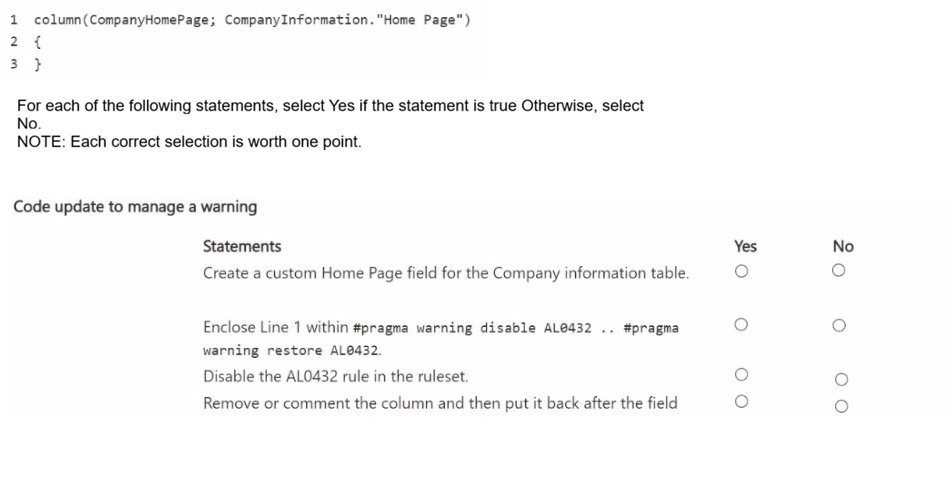
1 column(CompanyHomePage; CompanyInformation."Home Page")
2{
3 }
For each of the following statements, select Yes if the statement is true, Otherwise, select
No.
NOTE: Each correct selection is worth one point.
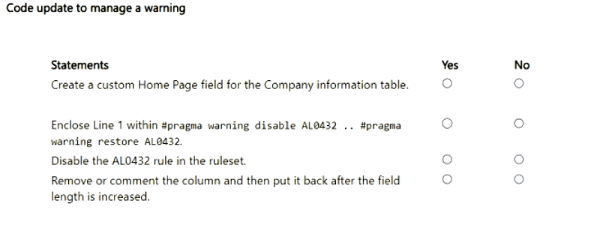
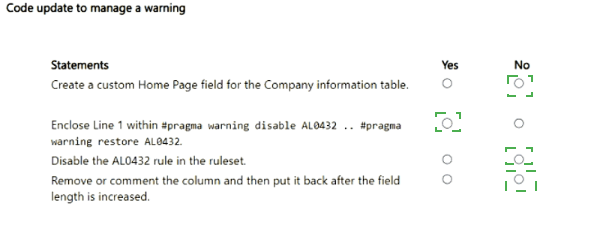
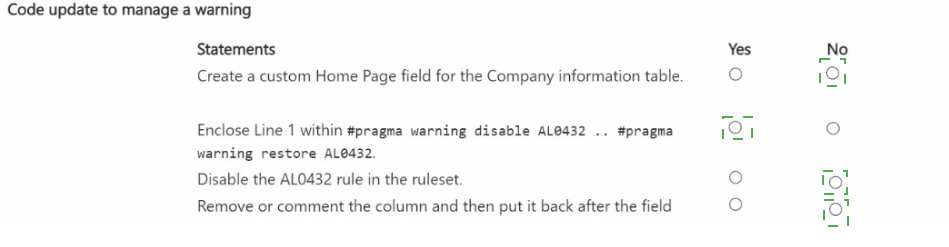
Explanation:
When Microsoft marks a field for removal, such as in an upcoming base application change where a field's length is increased or data type is changed, code analyzers throw the AL0432 warning to notify developers that the existing reference will soon be obsolete or affected.
Statement 1 (No):
You do not need to create a custom field since the base application is already updating or modifying the existing "Home Page" field length natively.
Statement 2 (Yes):
Using #pragma warning disable AL0432 and #pragma warning restore AL0432 locally around the affected line suppresses this specific compiler warning temporarily until the base transition is fully completed.
Statement 3 (No):
Disabling the rule globally in the ruleset is a poor practice because it suppresses valuable warnings across the entire project rather than handling the specific, temporary warning contextually.
Statement 4 (No):
Commenting out or removing the column entirely is unnecessary just to handle a deprecation or modification warning when pragmas or future native updates handle it.
References:
Microsoft Learn: AL0432 Warning - CodeCop Rule
Microsoft Learn: Using Pragma Directives in AL
You need to use a query data type to retrieve required data.
How should you complete the code? To answer, select the appropriate options in the
answer area.
NOTE: Each correct selection is worth one point.
A company has the following custom permission set:
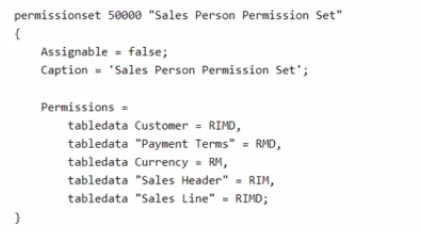
You need to make the permission set visible on the Permission Sets page.
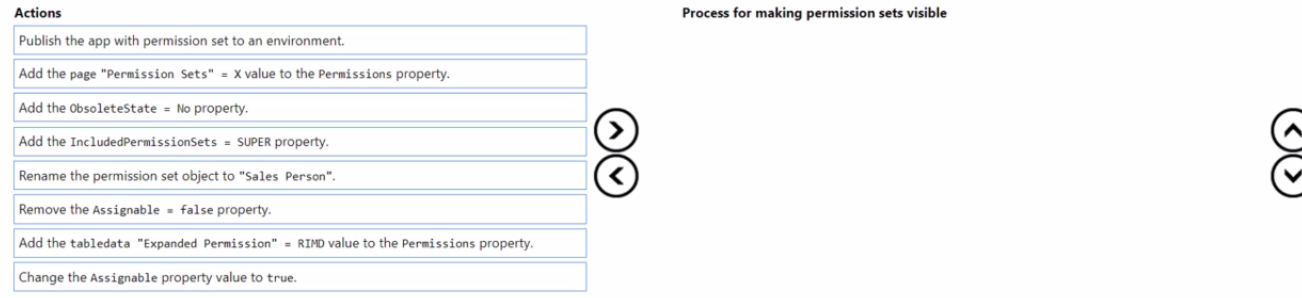
Which three actions should you perform in sequence? To answer, move the appropriate
actions from the list of actions to the answer area and arrange them in the correct order.
NOTE: More than one order of answer choices is correct. You will receive credit for any of
the correct orders you select.
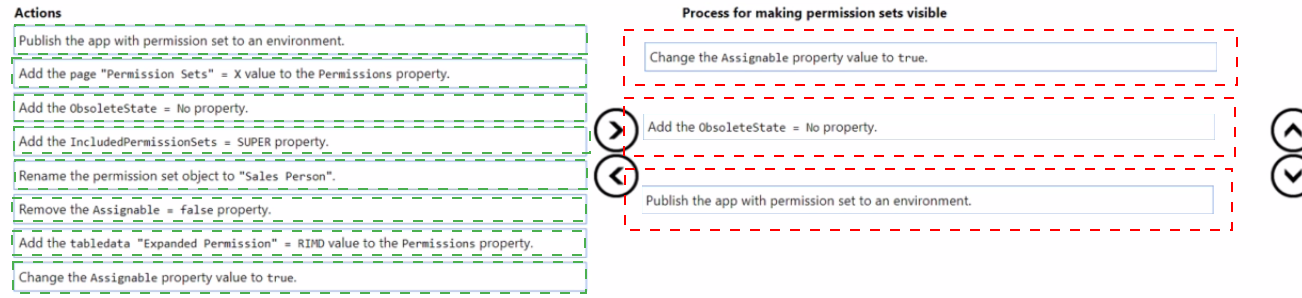
Explanation:
In Microsoft Dynamics 365 Business Central, developers can define permission sets directly in AL using the permissionset object type. These AL-defined permission sets can be published as part of an extension and assigned to users once visible in the system. By default, when a permission set is defined with the property Assignable = false;, it cannot be seen or assigned through the Business Central client. This setting is used when a permission set is only meant to be included in other sets, not directly used by users.
Let’s examine the process and rationale for making this permission set visible to users.
Step 1: Change the Assignable property value to true.
In the provided code sample, the permission set includes:
permissionset 50000 "Sales Person Permission Set"
{
Assignable = false;
Caption = 'Sales Person Permission Set';
Permissions =
tabledata Customer = RIMD,
tabledata "Payment Terms" = RMD,
tabledata Currency = RM,
tabledata "Sales Header" = RIM,
tabledata "Sales Line" = RIMD;
}
The key issue is the property Assignable = false;.
When this property is set to false, the permission set becomes hidden from the user interface, meaning it does not appear on the Permission Sets page and cannot be assigned manually to users.
To make it visible, the property must be changed to:
Assignable = true;
Setting Assignable = true indicates that the permission set should appear on the Permission Sets page in Business Central, allowing administrators to view, modify, and assign it to users or groups.
This property controls the visibility and assignability of the permission set rather than its functional permissions. Without this change, the permission set will exist in the database but remain invisible to end users.
📘 Reference:
Microsoft Learn –
Assignable Property (permissionset)
“Specifies whether the permission set can be assigned to users from the user interface. If set to false, the permission set is not shown on the Permission Sets page.”
Step 2: Publish the app with the permission set to an environment.
Once the property is modified, the next essential step is to publish the extension that includes this permission set. The publishing process compiles the AL code, generates a new application package, and installs or updates it in the target Business Central environment.
This step can be done using Visual Studio Code and AL commands such as:
Ctrl+F5 (to publish and run)
or
AL: Publish to your sandbox
Publishing is required because AL code changes (like property edits) only take effect when the extension is redeployed to the environment. The permission set definition is stored as metadata within the extension package, and updating the code alone without publishing will not modify the environment’s permission set configuration.
Once published successfully, Business Central updates its internal list of permission sets, and the “Sales Person Permission Set” object becomes active and ready to display on the Permission Sets page.
“Publishing your extension updates the environment with the extension’s objects, including permission sets.”
Step 3: Verify visibility on the Permission Sets page.
After publishing, open Business Central and navigate to:
Settings → Users → Permission Sets.
Search for “Sales Person Permission Set.” It should now be listed in the page, visible and assignable to users.
If the permission set was still hidden, that would indicate that the Assignable property remains false or that the extension wasn’t published correctly.
This final verification ensures the permission set is not only defined correctly in AL but also available for assignment within the client.
Why Other Options Are Incorrect
Remove the Assignable = false property.
❌ Removing it entirely defaults the property to false, still hiding the permission set. You must explicitly set it to true.
Add the page "Permission Sets" = X value to the Permissions property.
❌ The Permissions property defines data access (tables, reports, codeunits, etc.), not visibility on the UI.
Add the IncludedPermissionSets = SUPER property.
❌ This would only include permissions from another set (SUPER) but doesn’t affect visibility.
Add the tabledata "Expanded Permission" = RIMD value to the Permissions property.
❌ Adds an extra table permission; irrelevant to making the permission set visible.
Rename the permission set object.
❌ Renaming has no effect on visibility.
Add the ObsoleteState = No property.
❌ Used to mark objects as deprecated or obsolete, not to make them visible.
Summary:
To make a custom AL permission set visible on the Permission Sets page, follow these exact steps:
Change Assignable = true; in the permission set object.
Publish the extension to the target Business Central environment.
Verify that the permission set appears on the Permission Sets page.
A company uses Business Central.
The company has sales orders that have a different location in the header than in the
customer's card. You plan to add a check on sales order posting.
The check must meet the following requirements.
• Sales Order must have the same Location Code as the Location Code set up on the
customer's card.
• Must not be run in preview mode.
• Must be run even if the user is only shipping items and not invoicing.
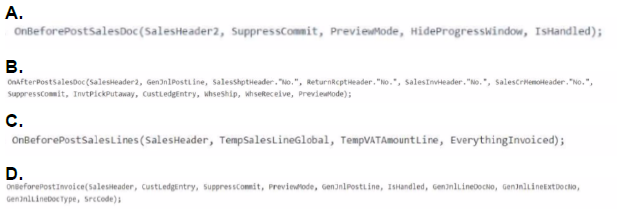
You create an event subscription for codeunit 80 "Sales-Post" You need to identify which
event to subscribe to Which event should you identify?
A. Option A
B. Option B
C. Option C
D. Option D
Explanation:
In Microsoft Dynamics 365 Business Central, when customizing the posting behavior of sales orders via event subscriptions in codeunit 80 Sales-Post, selecting the correct event is critical to ensure your logic executes under the right conditions.
The requirement is to validate that the Location Code on the Sales Order matches the Location Code on the Customer Card, and this check must:
Run before posting begins
Be skipped in preview mode
Execute even when only shipping, not invoicing
Option A is the correct event to subscribe to because it satisfies all three conditions:
Runs before posting logic: OnBeforePostSalesDoc is triggered before any posting occurs, allowing pre-validation of the SalesHeader.
Provides access to PreviewMode: This lets you conditionally bypass your logic if the user is running a preview.
Supports shipping-only scenarios: This event is triggered regardless of whether the user is posting shipment, invoice, or both.
Includes IsHandled flag: This allows you to override or inject custom logic and optionally prevent the base behavior.
Provides SalesHeader2: This is the actual sales document being posted, giving you direct access to the Location Code for validation.
❌ Why Other Options Are Incorrect:
ption B – Overloaded OnBeforePostSalesDoc with many parameters:
While technically valid, this version is overly complex and includes parameters like CustLedgerEntry, SalesHeaderNew, and others that are irrelevant to your validation. It’s harder to maintain and not necessary for a simple location check.
Option C – OnBeforePostSalesLines(SalesHeader, TempSalesLineGlobal, TempVATAmountLine, EverythingInvoiced):
This event is triggered after document-level validations, focusing on line-level posting. It’s too late to enforce header-level consistency like comparing Location Codes.
Option D – OnBeforePostSalesDoc with CustLedgerEntry and GenLinePostLine:
This variant is tied to invoicing scenarios, as CustLedgerEntry is only populated during invoice posting. It violates the requirement to run the check even when only shipping.
🧪 Implementation Notes:
Your event subscriber should look like this:
al
[EventSubscriber(ObjectType::Codeunit, Codeunit::"Sales-Post", 'OnBeforePostSalesDoc', '', true, true)]
procedure ValidateLocationCode(SalesHeader2: Record "Sales Header"; SuppressCommit: Boolean; PreviewMode: Boolean; HideProgressWindow: Boolean; var IsHandled: Boolean)
var
Customer: Record Customer;
begin
if PreviewMode then
exit;
Customer.Get(SalesHeader2."Sell-to Customer No.");
if SalesHeader2."Location Code" <> Customer."Location Code" then
Error('Sales Order Location Code must match Customer Location Code.');
end;
This ensures the check is skipped in preview mode and enforces the location match before posting.
📚 References:
Event Subscription Overview: Microsoft Learn – Subscribing to Events
Codeunit 80 – Sales-Post Events: Microsoft Learn – Codeunit "Sales-Post"
Field Access and Validation: Microsoft Learn – AL Language Reference
| Page 1 out of 12 Pages |
Microsoft Dynamics 365 Business Central Developer Practice Exam Questions
These MB-820 practice questions with explanations help candidates master development in Dynamics 365 Business Central. Topics include AL programming, extensions, integrations, and debugging. Each explanation clearly describes the reasoning behind the correct answer, helping learners understand development concepts more effectively. This approach enhances both coding skills and conceptual clarity. By practicing regularly, candidates can improve their development expertise, identify knowledge gaps, and confidently prepare for the certification exam.MB-820 - Microsoft Dynamics 365 Business Central Developer Official Exam Blueprint and Weight:
1. Describe Business Central
Official Exam Weight: 10-15%
Subtopics: Describe components and capabilities of Business Central, describe core solution and extensions approach for Business Central, describe update lifecycle for customizations of Business Central, differentiate Business Central online and Business Central on-premises features, differentiate between base app and system app, describe functionality of apps, describe process of bringing an app to AppSource.
2. Install, Develop, and Deploy for Business Central
Official Exam Weight: 10-15%
Subtopics: Describe development environment for Business Central, install and configure development environment, manage configuration files for AL extension, manage multiple AL extensions in one workspace, debug extension with Visual Studio Code, deploy extension, create or modify Business Central extension in Visual Studio Code, manage multilanguage development, maintain extensions.
3. Develop by Using AL Objects
Official Exam Weight: 35-40%
Subtopics: Develop Role Center pages, identify different page types, build and extend page objects, build and extend tables, build and extend enums, substitute report, create report layout, create document reports, design data model of report, implement multilanguage in reports, use report triggers functions and processing-only reports, develop report request page, configure different XMLport properties, configure nodes and their properties, use XMLports in AL code, create and access codeunits, use events and triggers, implement interfaces, create installation and upgrade codeunits, create and extend permission sets, override entitlements with inherent permissions, troubleshoot permission sets, link and join data items, apply filters in query objects, use queries instead of record variables, aggregate data in query objects, use query to create report.
4. Develop by Using AL
Official Exam Weight: 15-20%
Subtopics: Create profiles in AL, use and create views in AL, develop UI using user assistance model, integrate assisted setup, create teaching tips and in-app tours to onboard users, create onboarding checklist, implement data process model in Business Central, define different functional table types and characteristics, use document standards in Business Central, implement master data standards and design patterns, create custom procedures, use data types in code, manage files, manipulate data using code, describe basics of AL, use different types of expressions, use AL built-in functions and AL statements, work with variables and define them in AL code, manage errors, use access modifiers to limit access.
5. Work with Development Tools
Official Exam Weight: 10-15%
Subtopics: Test applications in Business Central, install and run Test Toolkit, develop test codeunits and procedures, monitor and analyze telemetry, configure telemetry, create custom telemetry signals.
6. Integrate Business Central with Other Applications
Official Exam Weight: 10-15%
Subtopics: Use different HTTP classes and their functions, get data from and send data to external REST service, use and read JSON, create and work with APIs, create and manage OData bound and unbound actions, use Read Scale-Out to improve performance.
| Domain | Title | Exam Weight |
|---|---|---|
| 1 | Describe Business Central | 10-15% |
| 2 | Install, Develop, and Deploy for Business Central | 10-15% |
| 3 | Develop by Using AL Objects | 35-40% |
| 4 | Develop by Using AL | 15-20% |
| 5 | Work with Development Tools | 10-15% |
| 6 | Integrate Business Central with Other Applications | 10-15% |
Results That Speak for Themselves
Development concepts for Microsoft Certified: Dynamics 365 Business Central Developer Associate (MB-820) became clearer with MSmcqs.com practice exam. The questions covered AL development, extensions, and integrations thoroughly.
Emma Johansson | Sweden