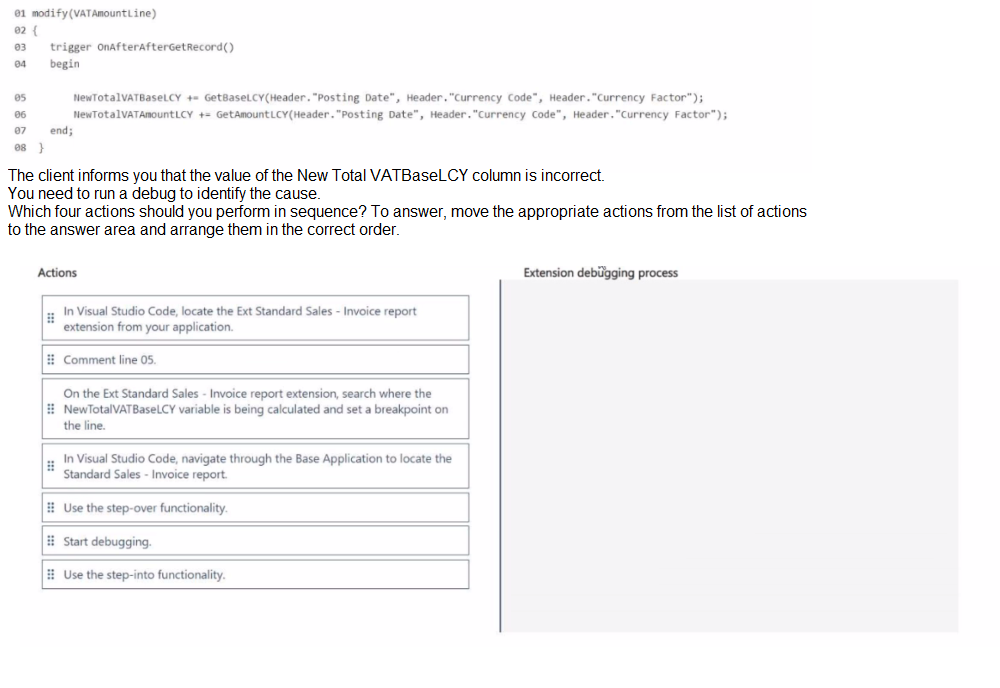
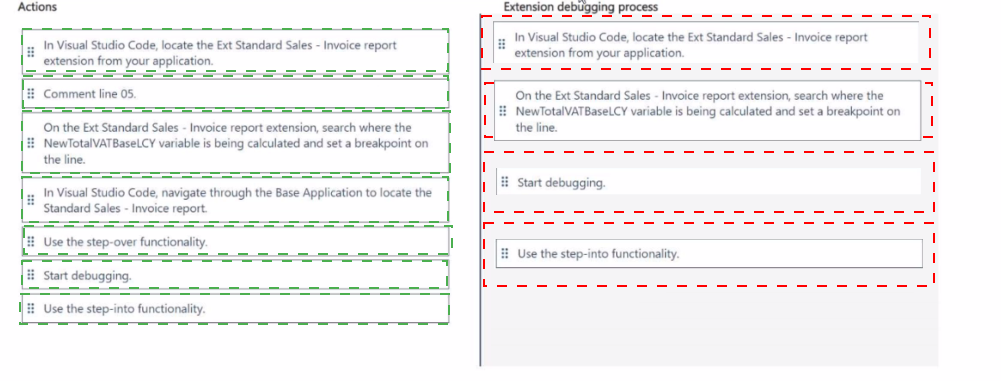
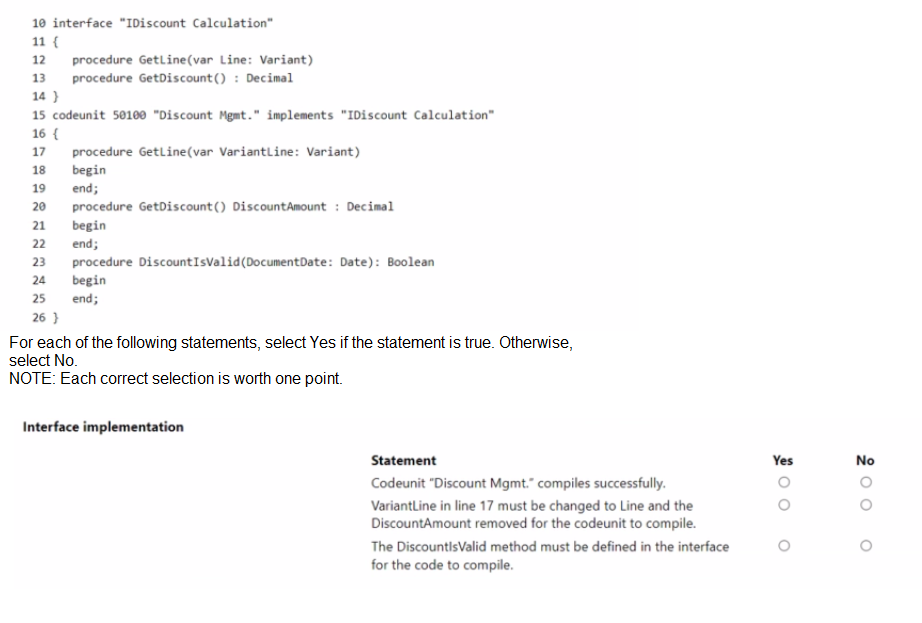
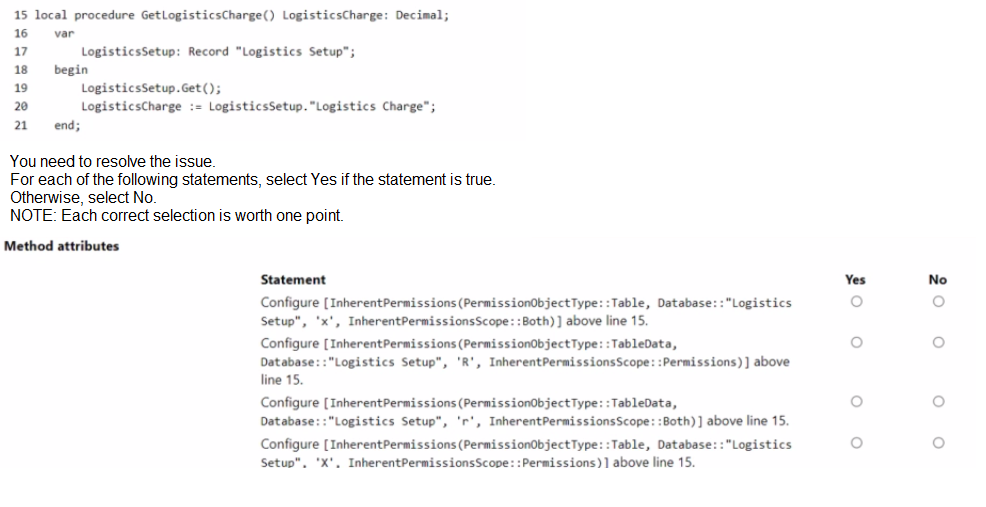
Topic 1: Case Study Alpine Ski House
You need to create the Install codeunit that is requited in the extension used for installing or
updating the Housekeeping app.
Which data type or declaration should you use? To answer, select the appropriate options
in the answer area.
NOTE; Each correct selection is worth one point.

Explanation:
An Install codeunit is a special codeunit that runs when an extension is installed or updated. It follows a specific pattern.
Data type for information: ModuleInfo
The ModuleInfo data type provides metadata about the current extension, such as its ID, name, version, and publisher. This information is crucial for an install codeunit because it allows the code to act based on the specific extension being installed or upgraded. It is passed as a parameter to the install triggers (OnInstallAppPerCompany, OnInstallAppPerDatabase).
Why not the others?
ModuleDependencyInfo is used to get information about other extensions that this one depends on, not about the current extension itself.
SessionInformation provides details about the current user session (like session ID) and is not relevant for install-time operations.
Start of the declaration of the method or procedure to perform the tasks: local procedure
The procedures that handle the installation logic (e.g., OnInstallAppPerCompany) are triggered by the platform. They should be declared as local procedure because they are internal to the codeunit and should not be callable from other parts of the application. Their execution is managed solely by the Business Central runtime during the install/upgrade process.
Why not the others?
global procedure would expose the install method publicly, which is unnecessary and violates encapsulation.
Just procedure defaults to a local scope in AL, but explicitly using local procedure is the recommended and clear practice.
Reference:
Microsoft Learn Documentation: Install Codeunits
The official documentation provides examples of Install codeunits. It shows the use of the ModuleInfo data type as a parameter for the install triggers and defines the procedures as local. For example: local procedure OnInstallAppPerCompany(); var MySetup: Record "My Setup Table"; begin ... end;
You need to improve performance when ticketAPI is used to analyze the POS data. What should you do?
A. Set the ODataReadonlyGetEnabled parameter to True in the Business Central admin center.
B. Set the AceesByPermission property to Read on the ticketAPI API page.
C. Enable read scale-out on the Business Central database.
D. Set the DataAccesslntent property to Readonly on the ticketAPI API page.
Explanation:
When you have an API page that is used primarily for data analysis and reporting (read-only operations), setting the DataAccessIntent property is the most direct and effective way to improve performance.
D. DataAccessIntent = ReadOnly:
This property tells the Business Central server that the page will only be used to read data, not modify it. This allows the server to optimize query execution by using read-only replicas of the database (if available in the environment) and bypassing certain locking mechanisms. This significantly reduces load on the primary database and improves response times for read-heavy operations like data analysis.
Let's examine why the other options are incorrect or less effective:
A. ODataReadonlyGetEnabled parameter in the admin center: This is a server-wide setting that affects all OData endpoints. While it can improve performance, it's a broad administrative change, not a targeted development solution. A developer should first optimize their API page directly using the DataAccessIntent property before relying on server-level configurations.
B. AccessByPermission property to Read: This property is for controlling user access permissions, not for performance optimization. It determines which permission sets are required to access the page, but it does not change how the data is retrieved from the database.
C. Enable read scale-out on the Business Central database: This is an infrastructure-level solution that involves configuring the SQL Server backend. While it can greatly improve read performance by offloading queries to secondary replicas, it requires administrative rights and is not a change a developer can make directly in their AL code. Furthermore, for the read scale-out to be effective for an API, the API page itself must be configured with DataAccessIntent = ReadOnly to direct traffic to the replicas.
Reference:
Microsoft Learn Documentation:
DataAccessIntent Property
The official documentation states: "Use the DataAccessIntent property to specify that you want the query to run against a read-only replica of the database... This can help reduce the load on the primary (read-write) database and improve performance of the application." This is the standard and recommended approach for optimizing report and API pages used for data analysis.
You need to access the RoomsAPI API from the canvas app.
What should you do?
A. Use the default API configuration in Business Central
B. Enable the APIs for the Business Central online environment.
C. Open the Web Services page and publish the RoomsAPI page as a web service.
D. Include in the extension a codeunit of type Install that publishes RoomsAPI.
Explanation:
To access the RoomsAPI from a Power Apps canvas app, you must expose it as a web service in Business Central. This is done by publishing the API page on the Web Services page. Once published, it becomes accessible via OData or REST endpoints, allowing external apps like Power Apps to consume it.
Publishing the API page registers it with a unique service name and URL, which can then be used in Power Platform connectors or HTTP requests. This is the standard and supported method for making custom APIs available externally.
✅ Why Option C is correct:
The Web Services page is the central interface in Business Central for exposing pages, reports, and queries as web services.
Publishing RoomsAPI here makes it discoverable and accessible to external systems.
Once published, you can retrieve the endpoint URL and use it in Power Apps via custom connectors or direct API calls.
❌ Why the other options are incorrect:
A. Use the default API configuration in Business Central
This only applies to standard APIs provided by Microsoft (e.g., customer, vendor, item APIs). Custom APIs like RoomsAPI are not automatically exposed and require manual publishing.
B. Enable the APIs for the Business Central online environment This is a prerequisite for any API access, but it does not publish individual custom APIs. It simply allows API access at the environment level.
D. Include in the extension a codeunit of type Install that publishes RoomsAPI While this is a valid automation technique, it’s not required for accessing the API from Power Apps. Manual publishing via the Web Services page is sufficient and more straightforward for testing or one-off integrations.
📚 Valid References:
Microsoft Learn –
Web Services Overview
Microsoft Learn –
Integrate Business Central with Power Platform
You need to configure telemetry for the SaaS tenant and test whether the ingested signals
are displayed.
Which three actions should you perform in sequence? To answer, move the appropriate
actions from the list of actions to the answer area and arrange them in the correct order.

Explanation:
Configuring telemetry for a SaaS (Software-as-a-Service) Business Central tenant involves a specific sequence of steps across different administrative portals.
Step 1: Create an Azure Application Insights instance by using the Azure Portal in the Partner’s subscription.
Reasoning: The foundational step is to create the destination where telemetry data will be sent. For a SaaS tenant, the partner (the developer or ISV creating the extension) is responsible for providing the Application Insights resource. This is created in the partner's Azure subscription, not the customer's, because the partner typically analyzes the telemetry for their extension's performance and usage.
Step 2: Select the environment in the Admin Center and place the connection string in the Application Insights Connection String field.
Reasoning: After the Application Insights resource exists, you must configure the Business Central environment to send data to it. This is done in the Business Central Admin Center. You select the specific SaaS environment and paste the "Connection String" from the Application Insights resource into the designated field. This action links the environment to the telemetry data sink.
Step 3: Select the Application Insights instance, select Logs, and then inspect the Traces table.
Reasoning: This is the correct method to verify that telemetry is being ingested. After performing actions in Business Central (like using the extension), you go to the Application Insights resource in the Azure portal, open the Logs query interface (not the "Events" view), and run a query against the traces table. This table contains the detailed log traces sent from Business Central, confirming the configuration is working. The "Sessions menu" and "Restart Environment" are not part of this process.
Reference:
Microsoft Learn Documentation: Enabling Application Insights for an Environment
The official documentation outlines this exact process: creating an Application Insights resource and then configuring the environment in the admin center with the connection string. It also directs users to use the Logs experience in Application Insights to query data, specifically mentioning the traces table.
You need to parse the API JSON response and retrieve each order no. in the response
body.
How should you complete the code segment? To answer select the appropriate options in
the answer area.
NOTE: Each correct selection is worth one point.

Explanation:
Parsing JSON in AL follows a specific sequence: you read the raw text into a JSON structure, then navigate through the object hierarchy to extract the values you need.
First blank: JToken.ReadFrom(Data)
The JsonToken.ReadFrom method is the initial step that parses the raw JSON text (Data) into a hierarchical JSON structure represented by a JsonToken. This token becomes the root from which you can navigate the entire JSON document.
Why not the others?
JObject.ReadFrom(Data) would fail if the root of the JSON is not an object (e.g., if it's an array). ReadFrom for a specific type is less flexible than using a generic JsonToken.
JObject.Get(Data) and JToken.Read(Data) are not valid methods.
Second blank: JToken := JObject.SelectToken('results');
After reading the data into a JsonToken, you typically convert it to a JsonObject to access its properties. The SelectToken method is used to navigate the JSON path and retrieve a specific token. The path 'results' indicates we are looking for a property named "results" in the JSON object. This line correctly assigns the value of the "results" property (which is likely the array containing the orders) to the JToken variable for further processing.
Why not the others?
JToken.SelectToken('results'); is incorrect because SelectToken is a method of JsonObject and JsonArray, not JsonToken. You must first convert the root token to a JsonObject.
JObject.SelectToken('results'); JToken); is syntactically incorrect.
Note on the subsequent code: The line JArray := JToken.AsArray(); is correct after the second blank has been properly filled, as it converts the token retrieved by SelectToken('results') into a JsonArray so it can be iterated with the foreach loop.
Reference:
Microsoft Learn Documentation: JSON Data Type
The official documentation details the methods for working with JSON. It explains that JsonToken.ReadFrom is used to parse a text string into a token, and JsonObject.SelectToken is used to get a token based on a JSON Path. The AsArray method is then used to treat a token as an array.
You need to write the code to call the subcontractor's REST API.
How should you complete the code segment? To answer, select the appropriate options in
the answer area.
NOTE: Each correct selection is worth one point.

Explanation:
This code sets up an HTTP call with Basic Authentication to a REST API.
First blank: 'Authorization'
The HTTP header for Basic Authentication is named Authorization. The value of this header will be the word Basic followed by the base64-encoded credentials.
Second blank: Base64Convert.ToBase64(Username + ':' + Password)
Basic Authentication requires the credentials to be in the format username:password and then base64 encoded. The Base64 Convert codeunit's ToBase64 method performs this encoding. Concatenating the username and password with a colon (Username + ':' + Password) before encoding is the correct format.
Third blank: httpContent.WriteFrom(Body)
This method writes the JSON string (the Body parameter) into the HttpContent object, which will be sent as the request body. httpContent := Body is invalid because you cannot assign text directly to an HttpContent object.
Fourth blank: httpClient.Post(Url, HttpContent, ResponseMessage)
The HttpClient.Post method is used to send a POST request. It takes the URL, the content (body), and an HttpResponseMessage variable to store the server's response. The other options are either invalid method names or incorrect parameters.
Reference:
Microsoft Learn Documentation: HttpClient Data Type
The documentation for the HttpClient data type shows the Post method signature which requires the URL, content, and a response message variable. It also details how to use HttpContent.WriteFrom to set the request body. The use of the Authorization header with a base64-encoded string for Basic Auth is standard HTTP protocol.
You need to handle the removal of the Description field and the Clone procedure without
breaking other extensions.
Which three actions should you perform in sequence? To answer, move the appropriate
actions from the list of actions to the answer area and arrange them in the correct order.
NOTE: More than one order of answer choices is correct. You will receive credit for any of
the correct orders you select.

Explanation:
The correct approach follows a two-phase deprecation process using the Obsolete attribute to avoid breaking dependent extensions. This gives other developers time to update their code.
Step 1: Mark as Pending (Version 2.0.0.0)
In the first version, you mark the field and procedure as ObsoleteState = Pending with a clear ObsoleteReason. This causes compile-time warnings (not errors) for any other extensions that are still using these elements. This alerts other developers that the elements will be removed in the future, giving them a chance to update their code, but it does not break their existing extensions.
Step 2: Mark as Removed (Version 2.0.0.1)
In the next version, you change the state to ObsoleteState = Removed. This now causes compile-time errors for any extensions that haven't yet removed their references to the obsolete elements. This forces the necessary update before the dependent extensions can be compiled and published. The element is still technically in the metadata but is inaccessible for new compilations.
Note:
The Clone procedure would also be set to Removed in a subsequent version (e.g., 2.0.0.2). The sequence above correctly shows the first removal action for the Description field. A full sequence would be:
v2.0.0.0: Mark both as Pending.
v2.0.0.1: Mark Description as Removed.
v2.0.0.2: Mark Clone as Removed.
Why the other actions are incorrect:
Removing the field/procedure immediately (e.g., in version 2.0.0.0): This is a breaking change. Any extension that uses the field or procedure will fail to compile and will break at runtime.
Using only the [Obsolete('xxx')] attribute: This defaults to ObsoleteState = Pending. It is the first step but is incomplete without a subsequent move to the Removed state to fully enforce the deprecation.
Setting Removed in the first version (2.0.0.0): This immediately breaks all dependent extensions, which violates the requirement to avoid breaking other extensions.
Reference:
Microsoft Learn Documentation:
Obsolete Attribute
The official documentation explains the Obsolete attribute and its states. It states that Pending "Specifies that the element will be removed in a future release. It will generate a compilation warning," while Removed "Specifies that the element was removed. It will generate a compilation error." The documented best practice is to first use Pending to warn developers and then use Removed in a later version.
You need to create the API page according to the requirements.
How should you complete the code segment? To answer, select the appropriate options in
the answer area.
NOTE: Each correct selection is worth one point.

Explanation:
Creating an API page requires specific properties to define its OData endpoint behavior and performance characteristics.
First blank: EntitySetName = 'items';
The EntitySetName property defines the name of the OData entity set for the collection of entities. This is the plural form used in the URL (e.g., /companies(...)/items). It is a required property for API pages. The standard practice is to use the plural form of the EntityName.
Second blank: DelayedInsert = true;
This property is crucial for API pages that allow inserting data. When set to true, it ensures that a new record is not inserted into the database until after all fields have been set from the incoming JSON payload. This prevents errors where required fields might be validated before all data is available. For an API, this is the standard and expected behavior.
Third blank: DataAccessIntent = ReadOnly;
This property is a key performance optimization for API pages used primarily for reading data. It tells the server that the page will not perform any data modification, allowing it to use read-only database replicas (if available) and reduce locking overhead. This significantly improves performance for data consumption scenarios. Given that InsertAllowed and ModifyAllowed are both set to false, this page is clearly intended for read-only use, making this property essential.
Why the other properties are incorrect or less suitable:
Obt&KeyFields appears to be a typo for ODataKeyFields, which is used to define the key fields for the OData entity. While SystemId is a common key for API pages, the primary requirement here is to define the entity set and the insert/read behavior.
UsageCategory = List; is a property for organizing the page in the Business Central UI (like in search), but it is not relevant for the core functionality of an API page.
Editable = false; is redundant when ModifyAllowed is already set to false.
Reference:
Microsoft Learn Documentation:
API Page Type
The official documentation details the properties specific to API pages, including the requirement for EntitySetName and the use of DelayedInsert for controlling the insert behavior. The DataAccessIntent property is documented as a performance optimization for read-heavy scenarios.
You need to log an error in telemetry when the business process defined in the custom
application developed for Contoso, Ltd fails.
How should you complete the code segment? To answer, select the appropriate options in
the answer area.
NOTE: Each correct selection is worth one point.

Explanation:
Logging telemetry in AL requires specific parameters to categorize the message correctly and adhere to data handling policies.
First blank: Verbosity::Error
The Verbosity parameter defines the severity level of the telemetry signal. Since the scenario describes a business process failure with a "critical error," the appropriate level is Error. This ensures the signal is treated as a failure in monitoring systems.
Why not others? Critical is for system-level failures, Warning is for potential issues, Normal/Verbose are for informational tracing.
Second blank: DataClassification::CustomerContent
The DataClassification parameter is mandatory and specifies how the data in the log message should be treated. The message "Process failed" and the custom dimensions contain business process information, which falls under CustomerContent.
Why not others? AccountData is for authentication data, OrganizationIdentifiableInformation is for sensitive PII, SystemMetadata is for internal system data.
Third blank: TelemetryScope::ExtensionPublisher
The TelemetryScope determines who can view the telemetry data. ExtensionPublisher means only the publisher of the extension (Contoso, Ltd.) can view this telemetry signal in their associated Azure Application Insights resource. This is the standard and correct scope for application-specific telemetry.
Why not others? All would make the data visible to the tenant administrator, which isn't necessary here.
Fourth blank: CustomDimensions
The final parameter of the LogMessage method is for passing a dictionary of custom dimensions. The variable CustomDimensions (declared as a Dictionary of [Text, Text]) should be passed here to include the "result" and "reason" details with the telemetry signal.
Why not others? Customension appears to be a typo of the correct variable name CustomDimensions.
Reference:
Microsoft Learn Documentation: LogMessage Method
The official documentation for the LogMessage method (found on the CodeUnit "Logger" data type) details all the parameters: the event name, message, verbosity, data classification, telemetry scope, and custom dimensions dictionary. It explains that ExtensionPublisher scope sends data to the publisher's Application Insights resource.
You need to implement the Issue Management module and expose the Postlssue method.
Which four actions should you perform in sequence? To answer, move the appropriate
actions from the list of actions to the answer area and arrange them in the correct order.
NOTE: Note than one order of answer choices is correct. You will receive credit for any of
the correct orders you select.

Explanation:
This implements the Facade design pattern, which is a standard practice in Business Central for creating a clean, stable public API while encapsulating the complex implementation details.
Step 1: Create Public API Codeunit (iv)
The "Issue Management" codeunit with Access = Public serves as the public facade. This is the interface that other extensions or the base application will call. Its public procedures define the official, stable API for the module.
Step 2: Create Internal Implementation Codeunit (vi)
The "Issue Management Impl." codeunit with Access = Internal contains the actual business logic. Marking it Internal encapsulates the logic, preventing other extensions from calling it directly and ensuring all calls go through the public facade. This allows you to change the implementation without breaking consumers.
Step 3: Implement the Logic in the Internal Codeunit (vii)
The PostIssue procedure in the "Issue Management Impl." codeunit is where the complex business logic for posting an issue is written.
Step 4: Expose the Logic via the Public API (ii)
The PostIssue procedure in the public "Issue Management" codeunit acts as a thin wrapper. Its only job is to call the corresponding method in the internal implementation codeunit. This provides a clean separation of concerns.
Why this order is correct:
It separates the public interface from the private implementation.
It follows the principle of least privilege by making the implementation codeunit Internal.
It provides a stable API layer that can remain constant even if the underlying implementation changes.
Why other sequences are incorrect:
Creating the implementation codeunit as Public (iii) would break encapsulation.
Calling a method named PostIssueImpl (v) from the public codeunit is a non-standard naming convention compared to the clean facade pattern.
Creating a local procedure PostIssueImpl (i) in the public codeunit does not properly separate the API from the implementation.
| Page 2 out of 12 Pages |
| MB-820 Practice Test |