Topic 2: Contoso, Ltd. Contoso, Ltd. Is a sales company in the manufacturing industry. It has subsidiaries in multiple countries/regions, each with its own localization. The subsidiaries must be data-independent from each other. Contoso. Ltd. uses an external business partner to manage the subcontracting of some manufacturing items. Contoso. Ltd. has different sectors with data security between sectors required.
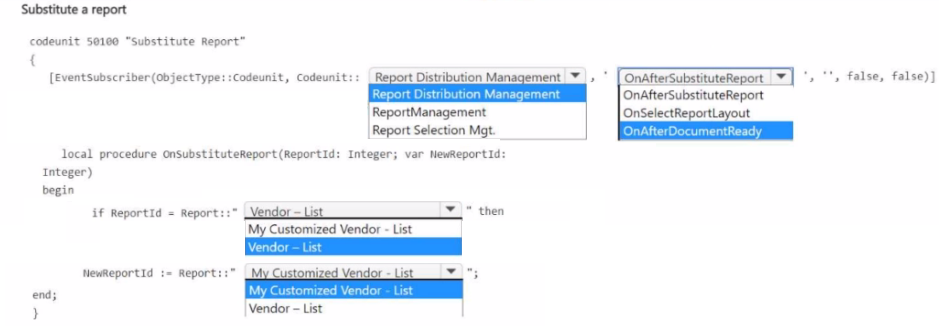
A company uses a Vendor-List report from the Base Application.
The company has new requirements that cannot be met by extending the Vendor - List
report.
You create a new report named My Customized Vendor - List.
You need to replace the Vendor - List report with My Customized Vendor - List.
How should you complete the code segment? To answer, select the appropriate options in
the answer area.
NOTE Each correct selection is worth one point.
Explanation:
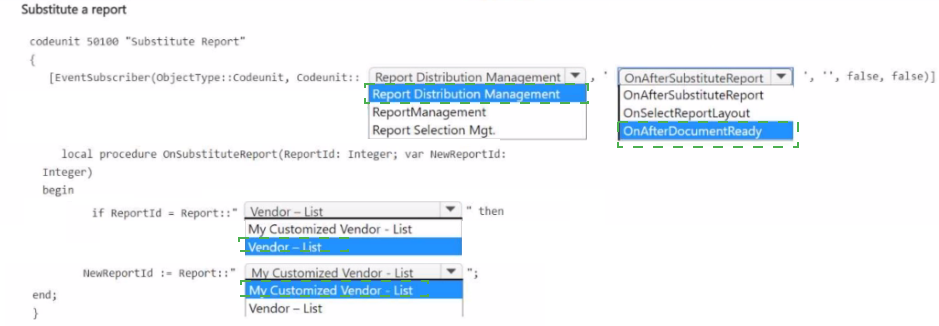
To replace a standard report with a customized version in Business Central, you subscribe to the OnAfterSubstituteReport event in Codeunit Report Distribution Management. This event allows you to change the ReportId parameter to your custom report ID. The subscriber must be placed in a codeunit with the correct event subscriber syntax.
Correct Option:
First dropdown (EventSubscriber object type): Codeunit
The event is published in a codeunit, specifically Codeunit::Report Distribution Management. Event subscribers must specify ObjectType::Codeunit when subscribing to codeunit events.
Second dropdown (EventSubscriber ID/name): Report Distribution Management
This is the exact codeunit name or ID where the OnAfterSubstituteReport event is defined. The subscriber must reference this codeunit to hook into the report substitution event.
Third dropdown (Method parameter): var NewReportId: Integer
The OnAfterSubstituteReport event includes a var NewReportId: Integer parameter. By changing this value, you redirect the report request to your custom report ID. The condition checks ReportId and assigns NewReportId to your custom report.
Fourth dropdown (Assignment): Report::"My Customized Vendor - List"
Inside the if block, you assign the NewReportId parameter to the ID of your custom report. Using Report:: with the report name is the correct syntax to reference a report object in AL.
Incorrect Options:
EventSubscriber object type: Page, Query, XmlPort –
The event originates from a codeunit, not these object types. Subscribing to codeunit events requires ObjectType::Codeunit.
EventSubscriber ID/name: ReportManagement, Report Selection Mgt. –
These are related to reporting but are not the correct codeunit that publishes the OnAfterSubstituteReport event. The correct source is Report Distribution Management.
Method parameter: ReportId: Integer – This is an input parameter, not a var parameter. Changing it has no effect outside the method. The substitution requires modifying the var NewReportId parameter.
Assignment: "Vendor - List" –
Assigning the original report ID does not achieve substitution. The goal is to replace it with the customized version, not keep the original.
Reference:
Microsoft Learn: Substituting Reports
A company uses Azure Application Insights for Business Central online in its production
environment.
A user observes that some job queues go into the failed state and require manual
intervention.
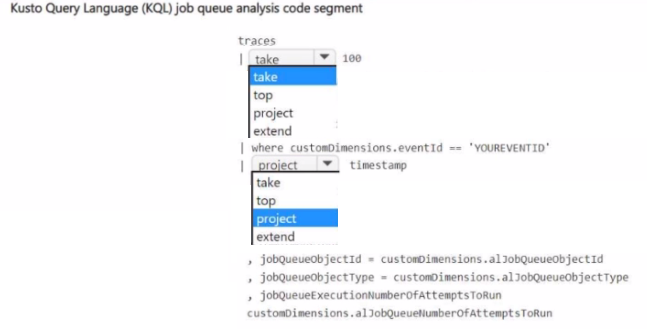
You need to analyze job queue lifecycle telemetry.
How should you complete the code segment? To answer, select the appropriate options in
the answer area.
NOTE: Each correct selection is worth one point.
Explanation:
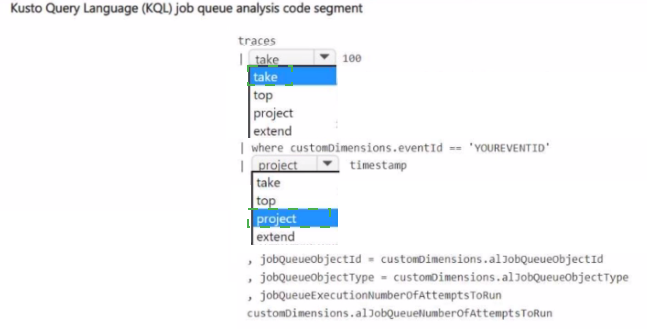
This Kusto Query Language (KQL) question tests your ability to filter and project telemetry data from Application Insights for Business Central job queue analysis. You need to filter traces for the specific job queue event ID, then project relevant timestamp and job queue custom dimensions for troubleshooting.
Correct Option:
First dropdown: where
The first blank requires filtering the traces table to only rows where customDimensions.eventId equals 'YOUREVENTID'. The where operator is used to filter records based on a condition. This isolates job queue lifecycle events from other telemetry traces.
Second dropdown: project
After filtering, you need to select specific columns to display. The project operator selects a subset of columns. Here you need timestamp, jobQueueObjectId, jobQueueObjectType, and jobQueueExecutionNumberOfAttemptsToRun from customDimensions.
Incorrect Options:
take – take returns the specified number of random rows. It is not used for filtering by condition. Using take before where could exclude relevant events. It belongs after filtering to limit sample size.
top – top returns the first N rows sorted by a specified column. It requires an order by clause and is not appropriate for simple event filtering or column selection.
extend – extend creates calculated columns or aliases. While you might extend custom dimension fields for readability, the primary operation needed here is column selection, which is project.
Reference:
Microsoft Learn: Analyzing Business Central Telemetry with KQL
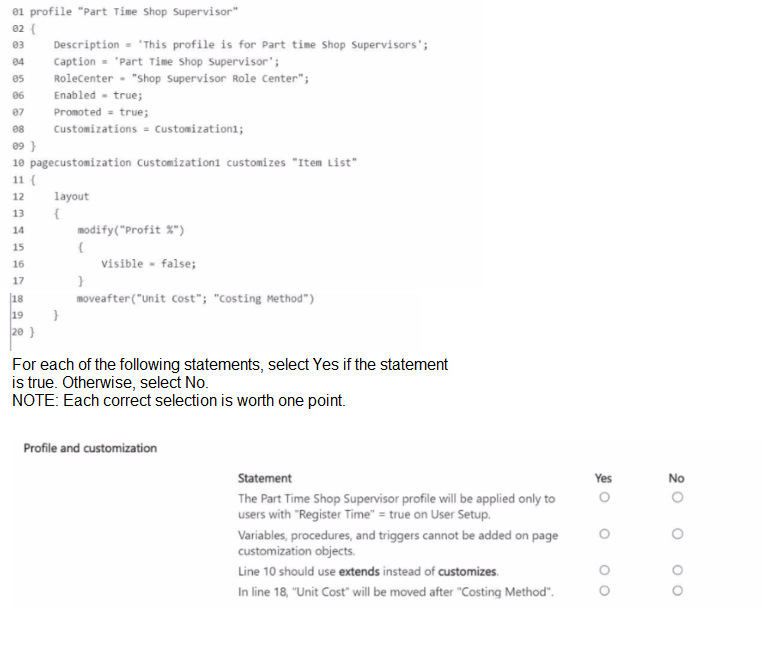
A developer creates a profile for part-time shop supervisors and adds customizations.
You plan to add new requirements to the profile.
You need to analyze the code to understand the profile and make sure there are no errors.
Explanation:
This question tests your understanding of Profile and PageCustomization objects in AL. Profiles define user roles and role centers. PageCustomization objects modify page layouts without extending the page object itself. They have specific syntax rules and limitations.
Correct Option:
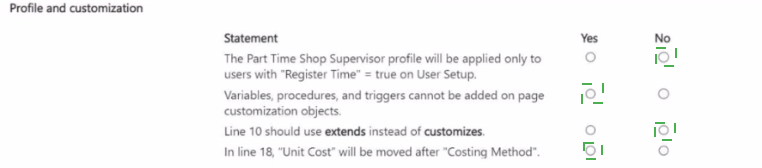
Variables, procedures, and triggers cannot be added on page customization objects. – Yes
PageCustomization objects are strictly declarative. They can only modify layout and actions of an existing page using modify, move, moveafter, movebefore, remove, and addafter/addbefore. They cannot contain AL code such as variables, procedures, triggers, or event subscribers. For code, you must use Page Extensions.
Incorrect Options:
The Part Time Shop Supervisor profile will be applied only to users with "Register Time" = true on User Setup. – No
There is no connection between profile assignment and the "Register Time" field on User Setup. Profiles are assigned to users manually by an administrator or via user groups. The "Register Time" field controls time sheet registration, not profile visibility or assignment.
Line 10 should use extends instead of customizes. – No
PageCustomization objects correctly use the customizes keyword to target an existing page. The extends keyword is used for Page Extensions, which add new controls or logic. PageCustomization is specifically for modifying layout without extending the page object itself, so customizes is correct.
In line 18, "Unit Cost" will be moved after "Costing Method". – No
The moveafter syntax is moveafter(ReferenceField; TargetField). In line 18, "Unit Cost" is the target field to move, and "Costing Method" is the reference field it should appear after. This will move "Costing Method" after "Unit Cost", not the opposite. The statement reverses the intended effect.
Reference:
Microsoft Learn: Profile Object
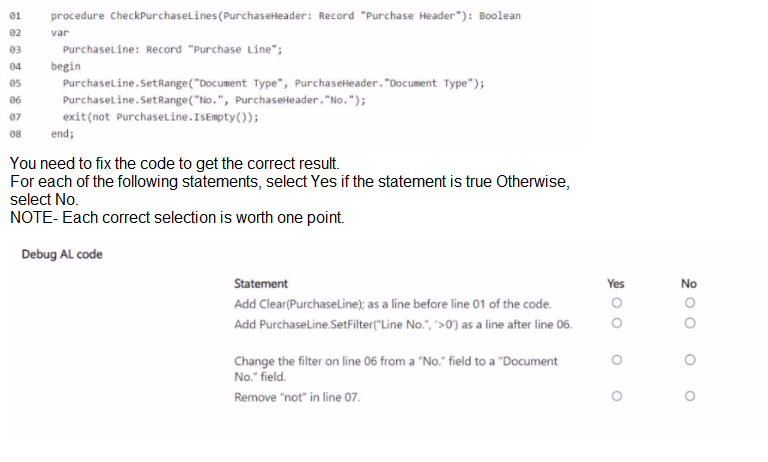
You create a procedure to check if a purchase order has lines.
The procedure returns false for purchase order PO-00001 even though it has purchase
lines.
Explanation:
The procedure returns false incorrectly because the filter is applied on the wrong field. Purchase lines are linked to the purchase header via "Document No.", not "No.". The "No." field on Purchase Line is the item or resource number, not the document number. This causes the filter to return no records, making IsEmpty() true, and not IsEmpty() false.
Correct Option:
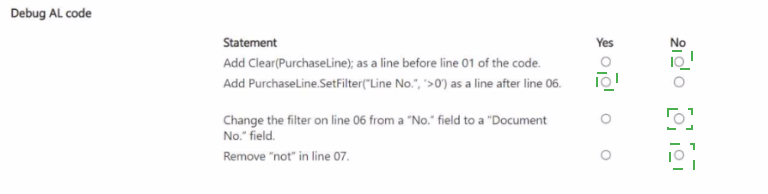
Change the filter on line 06 from a "No." field to a "Document No." field. – Yes
This is the primary fix. Purchase lines are linked to the purchase header using the "Document No." field, which stores the purchase order number (e.g., PO-00001). The "No." field stores the item number. Changing to SetRange("Document No.", PurchaseHeader."No.") correctly filters purchase lines belonging to that specific purchase order.
Remove "not" in line 07. – Yes
Currently, exit(not PurchaseLine.IsEmpty()) returns true when there are no lines and false when there are lines. Removing not changes the logic to return true when lines exist, which is the intended behavior. This fix combined with the correct field filter resolves the issue.
Incorrect Options:
Add Clear(PurchaseLine); as a line before line 01 of the procedure. – No
The PurchaseLine variable is declared locally within the procedure. It is automatically initialized when the procedure runs. Adding Clear is redundant and does not affect the filter issue. The problem is logical (wrong field), not related to variable state.
Add PurchaseLine.SetFilter("Line No.", '>0') as a line after line 06. – No
Adding a filter on "Line No." > 0 is unnecessary because purchase lines always have positive line numbers. This does not fix the core issue of filtering on the wrong document identifier field. It may also interfere with finding lines if zero-based numbering were possible.
Reference:
Microsoft Learn: Record.SetRange Method
A company is implementing Business Central.
In the per-tenant extension, TableA Header and TableA Line are document tables, and
TableB Header and TableB Line are document history tables.
The company requires that the resulting dataset of query objects contain the following
records:
• All records from TableA Header even if no matching record value exists in the linked
TableA Line
• Records from TableB Header where a match is found in the linked TableB Line field
You need to configure the linked data item to generate the required dataset.
Which SqlJoinType should you use? To answer, move the appropriate SqUoinTypes to the
correct dataset requirements. You may use each SqlJoinType once, more than once, or not
at all. You may need to move the split bar between panes or scroll to view content.


Explanation:
In Business Central query objects, SqlJoinType determines how records from linked data items are combined. For the first requirement, all records from TableA Header must be included even without matching lines—this requires a LeftOuterJoin. For the second requirement, only matched records from TableB Header with corresponding TableB Line records are needed—this requires an InnerJoin.
Correct Option:
Dataset requirement:
Include all records from TableA Header even if no matching record value exists in the linked TableA Line – LeftOuterJoin
A LeftOuterJoin returns all records from the primary (left) data item and only matching records from the secondary (right) data item. When no match exists, the secondary fields contain null values. This satisfies the requirement to include all TableA Header records regardless of whether corresponding TableA Line records exist.
Dataset requirement:
Include only matched records from TableB Header – InnerJoin
An InnerJoin returns only records where there is a match between the primary and secondary data items. Non-matching records from either side are excluded. This fulfills the requirement to include only TableB Header records that have a corresponding match in the linked TableB Line field.
Incorrect Options:
CrossJoin –
A CrossJoin returns the Cartesian product of both tables, pairing every record from the primary data item with every record from the secondary data item. This does not satisfy either requirement and would produce excessive, unrelated records.
RightOuterJoin –
A RightOuterJoin returns all records from the secondary (right) data item and only matching records from the primary (left) data item. The requirements specify including all records from the left table (TableA Header) and only matched records from the right (TableB Header), which is the opposite of RightOuterJoin.
Reference:
Microsoft Learn: Query Object Join Types
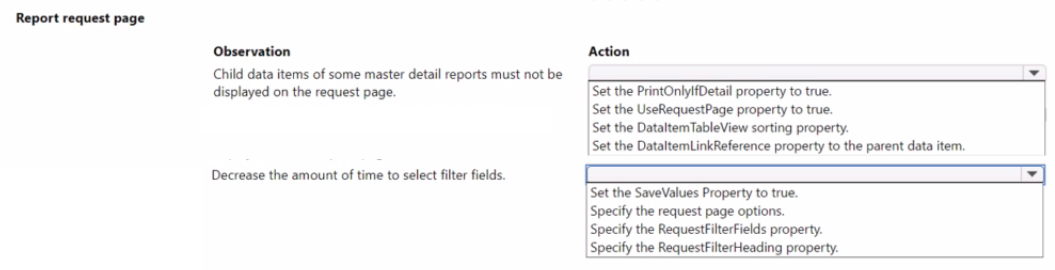
A company plans to customize its per tenant extension reports. The company has the
following requirements for the customization:
• Child data items must not be displayed on the request page for some master detail
reports.
• Selecting key filter fields takes users too much time. The customization must decrease
the amount of time to select the fields.
You need to optimize the report request page.
Which actions should you configure? To answer, select the appropriate options in the
answer area.
NOTE: Each correct selection is worth one point.
Explanation:
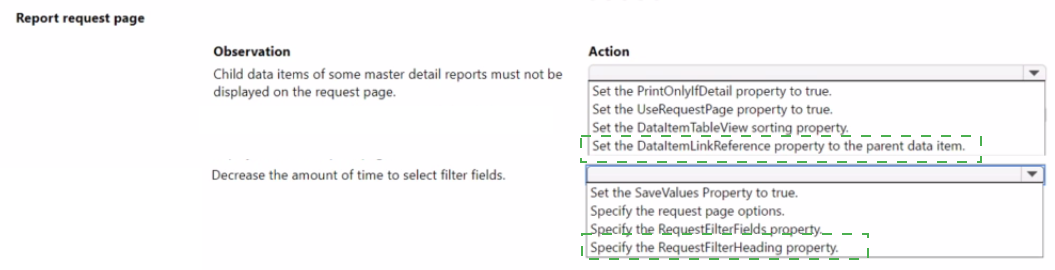
To hide child data items from the report request page, set the PrintOnlyIfDetail property to true. This prevents child data items from appearing as expandable sections on the request page. To reduce the time spent selecting filter fields, specify the RequestFilterFields property. This limits visible filters to only the most frequently used key fields, simplifying the user interface.
Correct Option:
Child data items must not be displayed on the request page for some master detail reports. – Set the PrintOnlyIfDetail property to true.
The PrintOnlyIfDetail property controls whether a child data item appears as a separate filter section on the request page. When set to true, the child data item is hidden from the request page and only prints if the parent data item contains related records. This fulfills the requirement to hide child data items.
Selecting key filter fields takes users too much time. The customization must decrease the amount of time to select the fields. – Specify the RequestFilterFields property.
The RequestFilterFields property defines which fields of a data item appear as filter fields on the request page. By limiting this list to only essential, frequently used key fields, users are not overwhelmed by unnecessary filter options. This speeds up filter selection and improves usability.
Incorrect Options:
Set the UseRequestPage property to true. –
The request page is already displayed. This property enables or disables the entire request page, but does not hide child data items or reduce filter fields. Setting it to false would remove the request page entirely, which is not the requirement.
Set the DataItemTableView sorting property. –
This property defines the default sort order and key filters for the data item when the report runs. It does not affect which fields appear on the request page or hide child data item sections.
Set the DataItemLinkReference property to the parent data item. –
This property establishes the link between a child data item and its parent. It is required for master-detail reports but does not control visibility on the request page.
Set the SaveValues Property to true. –
This property saves the last used filter values for the user. While helpful for efficiency, it does not hide child data items or reduce the number of filter fields displayed.
Specify the request page options. –
Request page options refer to option-type fields or toggles added to the request page. This does not address hiding child data item sections or filtering the visible filter fields.
Specify the RequestFilterHeading property. –
This property customizes the heading text for the filter section. It improves labeling but does not hide the section or reduce the number of filter fields.
Reference:
Microsoft Learn: PrintOnlyIfDetail Property
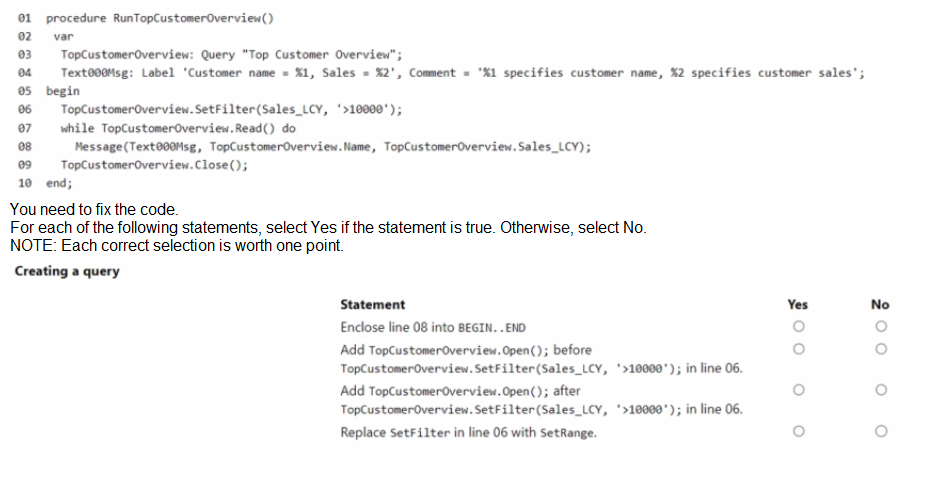
You create a query that contains a procedure to display the top customers.
The procedure breaks at runtime.
Explanation:
The code breaks because the Open method is not called before attempting to read from the query. In AL, a query object must be explicitly opened using the Open method before any filters are applied or records are read. The SetFilter method can be called either before or after Open, but Open must be called before Read.
Correct Option:
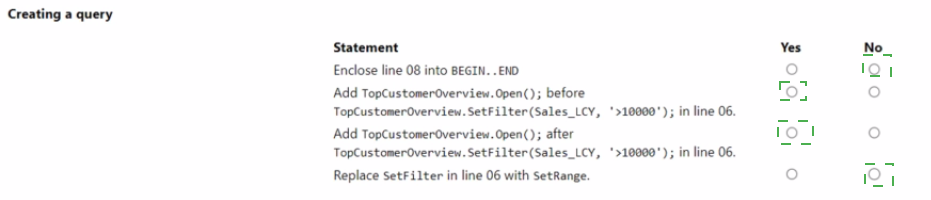
Add TopCustomerOverview.Open(); after TopCustomerOverview.SetFilter(Sales_LCY, '>10000'); in line 06. – Yes
This is the correct fix. The Open method initializes the query and must be called before Read. Placing it after SetFilter and before the while loop ensures the query is properly opened with the filter applied. Both filter and open order are acceptable as long as open precedes read.
Incorrect Options:
Enclose line 08 into BEGIN..END – No
The while statement executes a single statement (the Message call). BEGIN..END is only required when multiple statements follow the while condition. This is not the cause of the runtime error and is syntactically optional here.
Add TopCustomerOverview.Open(); before TopCustomerOverview.SetFilter(Sales_LCY, '>10000'); in line 06. – No
While adding Open is necessary, this statement alone is not complete because it does not specify both the addition and the correct placement. However, the question presents two separate options regarding Open placement. Opening before SetFilter is also valid, but the statement as worded in the answer choice is incomplete. The more critical fix is ensuring Open is called before Read, regardless of filter order.
Replace SetFilter in line 06 with SetRange. – No
SetFilter is perfectly valid for filtering numeric fields with expressions like '>10000'. SetRange is used for exact matches or contiguous ranges. Replacing it is not required and does not fix the missing Open method issue.
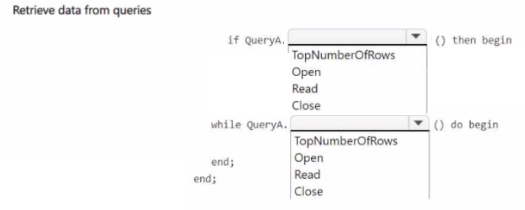
You need to use a query data type to retrieve requited data.
How should you complete the code' To answer, select the appropriate options in the
answer area.
NOTE: Each correct selection is worth one point.
Explanation:
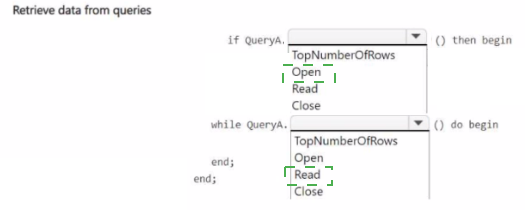
This question tests your understanding of Query object methods in AL. The Open method initializes the query and must be called before reading. Read retrieves the next row and returns true if a row exists. TopNumberOfRows is a property, not a method. Close terminates the query session. The correct sequence for query data retrieval is Open, then Read in a loop, then Close.
Correct Option:
First dropdown (after QueryA.): Open
The Open method must be called first to initialize the query and execute the SQL statement. Without opening the query, no data can be read. The if statement checks if Open was successful (returns true) before proceeding.
Second dropdown (while QueryA.): Read
The Read method retrieves the next row from the query result set and returns true as long as there are more rows. The while loop continues executing as long as Read returns true, processing each row sequentially.
Incorrect Options:
TopNumberOfRows –
This is a property of the Query object that specifies the maximum number of rows to return. It is set before opening the query using Query.TopNumberOfRows := n; It is not a method and cannot be called as shown in the code syntax.
Read (in first dropdown) –
Placing Read in the if statement would only read the first row and check if it exists. This does not initialize the query and would fail if Open was not called first. It also does not allow setting filters or top number of rows.
Close –
Close is used after all data is retrieved to release resources. Placing it in the if or while condition would close the query immediately, preventing any data from being read.
Reference:
Microsoft Learn: Query.Open Method
A company has an on-premises Business Central instance named TEST The instance
uses Windows authorization and a developer services port of 7149 Visual Studio Code is
installed on the same server.
You create a new AL project but cannot download the symbols.
The launch json file contains the following code:
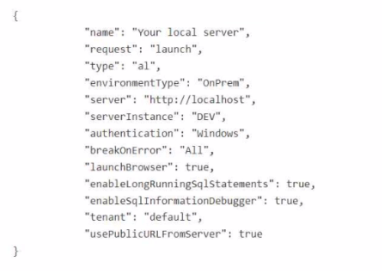
You need to download the symbols.
Which two actions should you perform? Each correct answer presents part of the solution.
NOTE: Each correct selection is worth one point.
A. Change the server Instance parameter to TEST
B. Add the port: 7149 parameter.
C. Change the name parameter to TEST.
D. Change the authentication parameter to UserPassword.
E. Check which server the instance is installed on and replace http//localhost with the correct IP address.
B. Add the port: 7149 parameter.
Explanation:
The launch.json file is misconfigured for the on-premises environment. The serverInstance parameter is empty, and the port parameter is missing. For an on-premises Business Central server with developer services enabled, the correct port is typically 7049 (not 7149, which is the client service port) or the explicitly configured developer port. The instance name must match the actual server instance (TEST).
Correct Option:
A. Change the serverInstance parameter to TEST
The serverInstance parameter in launch.json specifies the Business Central server instance name. The company's instance is named TEST, but the parameter is currently blank. Setting this to TEST allows the AL compiler to locate the correct server instance for symbol download.
B. Add the port: 7049 parameter.
For on-premises development, the port parameter must specify the Business Central Server instance's developer web service port. The default is 7049. The current configuration omits the port entirely. Adding "port": 7049 enables communication with the server for symbol download.
Incorrect Options:
C. Change the name parameter to TEST.
The name parameter in launch.json is simply a display name for the debug configuration in VS Code. It has no functional impact on server connections or symbol download. Changing it does not resolve the connection issue.
D. Change the authentication parameter to UserPassword.
The company uses Windows authentication for the on-premises instance. Changing to UserPassword would cause authentication failure unless the server is reconfigured. Windows authentication is correct for this environment.
E. Check which server the instance is installed on and replace http://localhost with the correct IP address.
Since Visual Studio Code is installed on the same server as the Business Central instance, localhost is correct. No IP address change is needed. This action is unnecessary and does not address the missing instance name and port.
Reference:
Microsoft Learn: JSON Launch File for On-Premises
| Page 3 out of 12 Pages |