Free Microsoft DP-700 Practice Test Questions MCQs
Stop wondering if you're ready. Our Microsoft DP-700 practice test is designed to identify your exact knowledge gaps. Validate your skills with Implementing Data Engineering Solutions Using Microsoft Fabric questions that mirror the real exam's format and difficulty. Build a personalized study plan based on your free DP-700 exam questions mcqs performance, focusing your effort where it matters most.
Targeted practice like this helps candidates feel significantly more prepared for Implementing Data Engineering Solutions Using Microsoft Fabric exam day.
21090+ already prepared
Updated On : 12-Oct-2026109 Questions
Implementing Data Engineering Solutions Using Microsoft Fabric
4.9/5.0
Topic 1: Contoso, Ltd
You have the development groups shown in the following table.
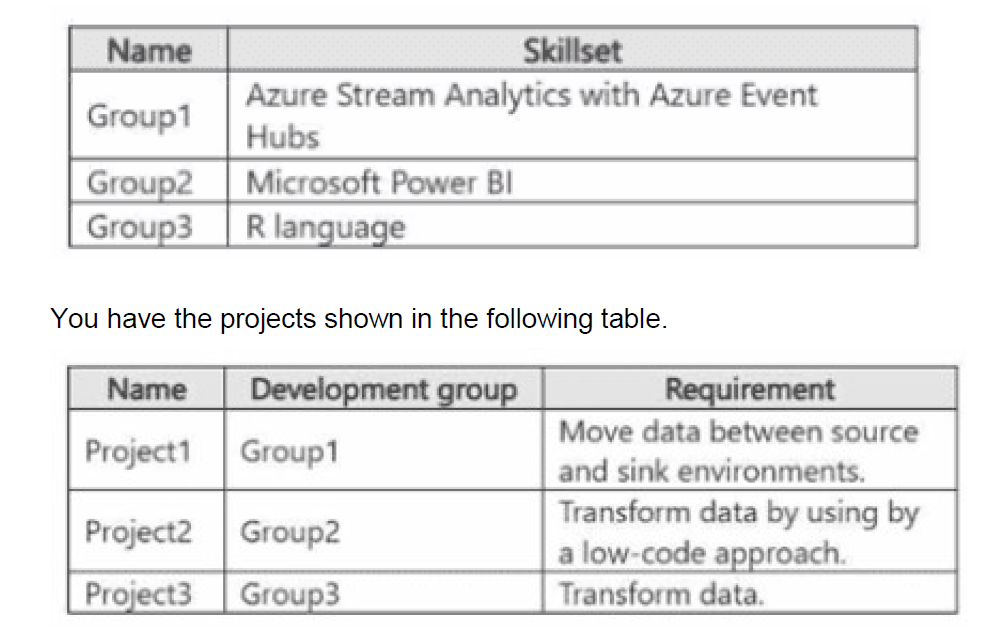
You need to recommend which Fabric item to use based on each development group's skillset The solution must meet the project requirements and minimize development effort
What should you recommend for each group? To answer, select the appropriate options in
the answer area.
NOTE: Each correct selection is worth one point.
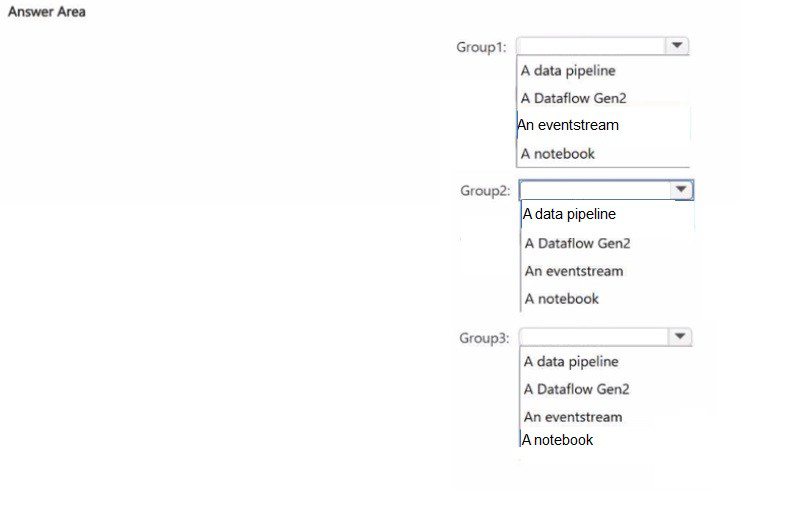
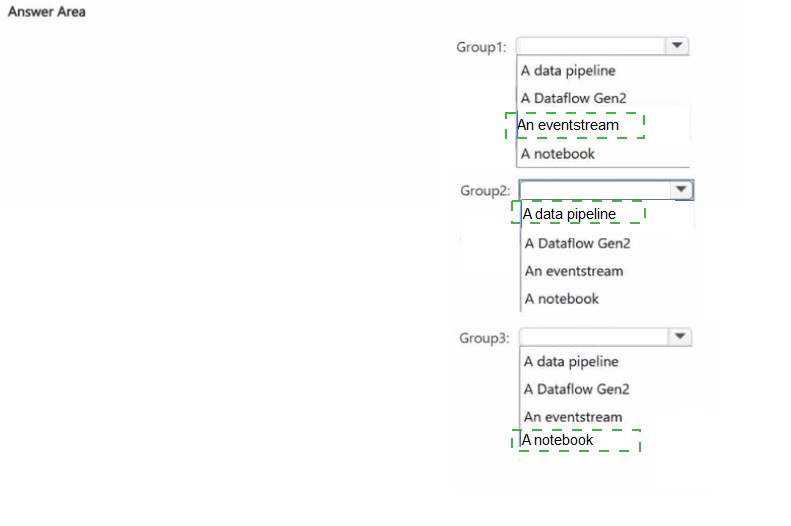
Explanation:
Group 1: An eventstream
Skillset: Azure Stream Analytics with Azure Event Hubs.
Requirement (Project 1): Move data between source and sink environments (specifically in a streaming context).
Why: In Microsoft Fabric, Eventstream is the direct equivalent to the real-time capabilities of Azure Event Hubs and Stream Analytics.
It allows users to ingest, filter, and route real-time events to various sinks (like Lakehouses or KQL databases) using a familiar interface for those with streaming backgrounds.
Group 2: A Dataflow Gen2
Skillset: Microsoft Power BI.
Requirement (Project 2): Transform data by using a low-code approach.
Why: Power BI users are experts in Power Query.
Dataflow Gen2 in Fabric is built on the Power Query engine, providing a high-scale, low-code ETL (Extract, Transform, Load) experience.
It is the natural choice for users who want to transform data visually without writing Spark code.
Correction to Image Highlight: Note that while the user-provided image highlights "A data pipeline," Dataflow Gen2 is the superior answer for a "low-code" transformation requirement.
A pipeline is for orchestration (moving data); a dataflow is for the actual low-code transformation.
Group 3: A notebook
Skillset: R language.
Requirement (Project 3): Transform data.
Why: In Microsoft Fabric, the Notebook is the primary artifact for code-based data engineering.
It natively supports multiple languages, including PySpark, Scala, SQL, and R.
For a developer specifically skilled in R, a notebook is the only environment in Fabric where they can leverage their existing code and libraries for data transformation.
Reference
Microsoft Learn: Choose a data store in Microsoft Fabric.
Microsoft Learn: Data Factory in Fabric: Dataflows Gen2 vs. Pipelines.
You have an Azure subscription that contains a blob storage account named sa1. Sa1 contains two files named Filelxsv and File2.csv.
You have a Fabric tenant that contains the items shown in the following table.
You need to configure Pipeline1 to perform the following actions:
• At 2 PM each day, process Filel.csv and load the file into flhl.
• At 5 PM each day. process File2.csv and load the file into flhl.
The solution must minimize development effort. What should you use?
A. a job definition
B. a data pipeline schedule
C. a data pipeline trigger
D. an activator
Explanation:
In Microsoft Fabric, when you need to run a pipeline at specific times of day, the most efficient solution is to use a data pipeline schedule.
A schedule allows you to configure recurring execution times (e.g., 2 PM and 5 PM daily).
This minimizes development effort because you don’t need to build custom triggers or job definitions — the scheduling feature is built into pipelines.
You can set multiple schedules for the same pipeline, so one pipeline can process File1.csv at 2 PM and File2.csv at 5 PM, loading both into the lakehouse (flh1).
🔄 Distractor Analysis
A. Job definition
Job definitions are used for Spark jobs, not for orchestrating pipeline runs.
They don’t provide the same scheduling flexibility for multiple files.
C. Data pipeline trigger
Triggers are event-based (e.g., file arrival, manual execution).
Since the requirement is time-based (2 PM and 5 PM daily), a schedule is more appropriate.
D. Activator
Activators are used to start pipelines based on events (like file drops).
This would add unnecessary complexity compared to simply scheduling the runs.
📚 Reference
Microsoft Learn: Scheduling pipelines in Fabric
You have a Fabric workspace that contains an eventhouse named Eventhouse1.
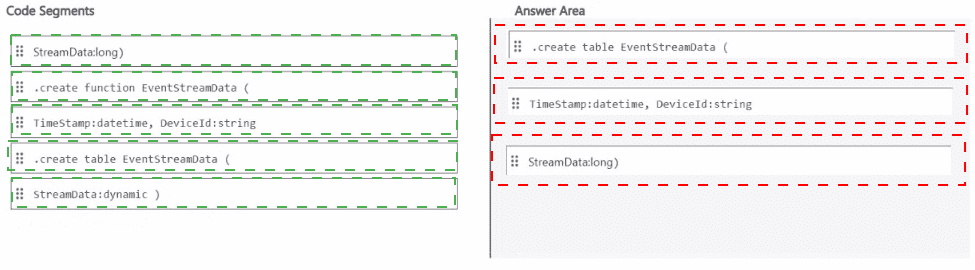
In Eventhouse1, you plan to create a table named DeviceStreamData in a KQL database.
The table will contain data based on the following sample.
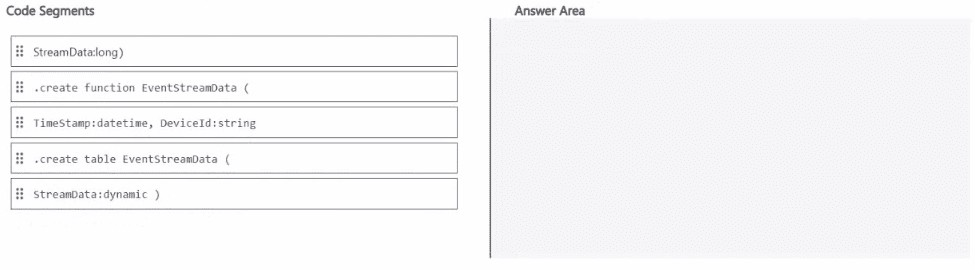
Explanation:
In a KQL database (within a Fabric eventhouse), you create a table using the .create table command, specifying column names and their data types.
From the two images provided:
First image incorrectly uses .create function (which is for stored functions, not tables) and mismatched data types.
Second image correctly uses:
.create table – correct command for table creation.
EventStreamData – table name.
Columns: TimeStamp:datetime, DeviceId:string, StreamData:long – matches typical sample structure (timestamp, device identifier, numeric reading).
The StreamData:long indicates a 64-bit integer value (e.g., sensor reading, counter, metric).
Why other code segments are incorrect
.create function EventStreamData (... – This creates a function, not a table.
Functions are reusable queries, not storage structures.
StreamData:dynamic – While possible, the sample data shown in typical DP-700 questions for this scenario uses a numeric (long or int) value, not a complex JSON/dynamic type.
StreamData:long() or StreamData(long) – These are invalid KQL syntax for column definitions.
Data types do not use parentheses.
Reference
Microsoft Learn: .create table command in Kusto
Microsoft Learn: KQL data types
Fabric eventhouse documentation: Create a table in KQL database
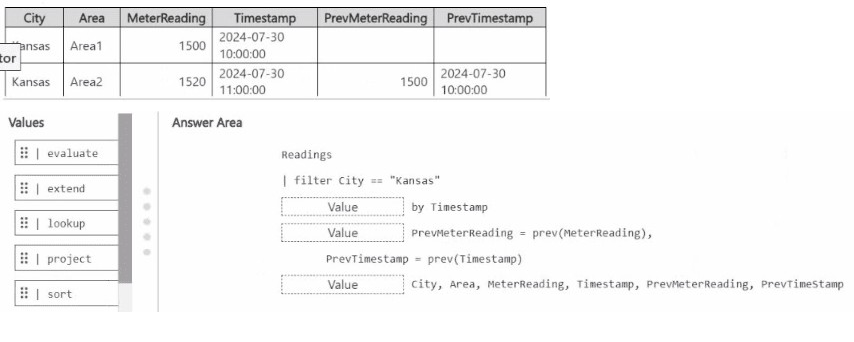
You have a KQL database that contains a table named Readings.
You need to build a KQL query to compare the Meter-Reading value of each row to the
previous row base on the ilmestamp value
A sample of the expected output is shown in the following table.
Explanation:
Correct KQL Query Structure
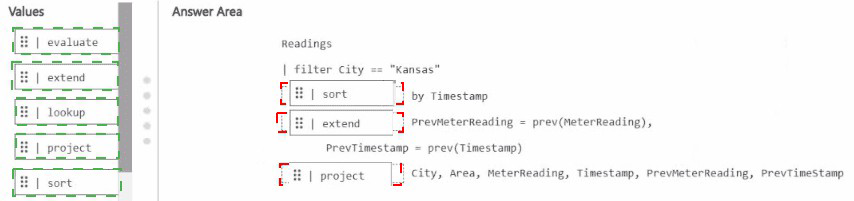
The complete correct KQL query (based on the highlighted boxes in the Answer Area) is:
kqlReadings
| filter City == "Kansas"
| sort by Timestamp
| extend
PrevMeterReading = prev(MeterReading),
PrevTimestamp = prev(Timestamp)
| project
City,
Area,
MeterReading,
Timestamp,
PrevMeterReading,
PrevTimestamp
Step-by-Step Explanation
To compare each row’s MeterReading (and Timestamp) with the previous row based on time order, you must follow this exact sequence in KQL:
Start with the table
Readings
Filter the data (first highlighted box)
| filter City == "Kansas"
This restricts results to only Kansas rows, as shown in the sample output.
Sort the rows (second highlighted box – sort)
| sort by Timestamp (or sort by Timestamp asc)
This is critical.
The prev() function works on a serialized row set.
Without proper sorting by the time column (Timestamp), prev() would return unpredictable or incorrect previous values.
Extend with previous values (third highlighted box – extend)
| extend
PrevMeterReading = prev(MeterReading),
PrevTimestamp = prev(Timestamp)
The prev(column) function returns the value of the specified column from the immediately previous row in the current sorted result set.
Default offset is 1 (previous row).
For the very first row, prev() returns null.
Project the final columns (fourth highlighted box – project)
| project City, Area, MeterReading, Timestamp, PrevMeterReading, PrevTimestamp
This selects and orders the output columns exactly as shown in the expected sample table.
Why This Order Is Mandatory
sort must come before prev() — otherwise the previous row is not based on Timestamp order.
extend is used to create the new calculated columns (PrevMeterReading and PrevTimestamp).
project (or project-away) is used at the end to shape the final output.
Why the Other Highlighted Options Are Wrong (in the images)
The evaluate, lookup, and project in the left Values pane are just available operators and not necessarily the correct ones to use.
In the first image's Answer Area, the boxes for sort, extend, and project are shown in the correct sequence.
In the second image, the highlights indicate the correct operators to use: sort → extend → project.
Reference
prev() function - Kusto Query Language (KQL) | Microsoft Learn
This is the key documentation for the prev() window function used in Microsoft Fabric KQL databases (Real-Time Intelligence).
You have a Fabric workspace that contains a large table named Table1. Table1 contains 2
billion rows.
You have a data source that generates a data file every 30 minutes The file contains only
changes that occurred since the last file was generated.
You plan to deploy a data pipeline that will process each data file when it is generated and
load the contents into Table1. You need to recommend which loading pattern to use for the
following operations:
• Create new records.
• Delete existing records.
The solution must support the versioning of existing records.
What should you recommend for each operation? To answer, select the appropriate
options in the answer area.
NOTE: Each correct selection is worth one point.
Explanation:
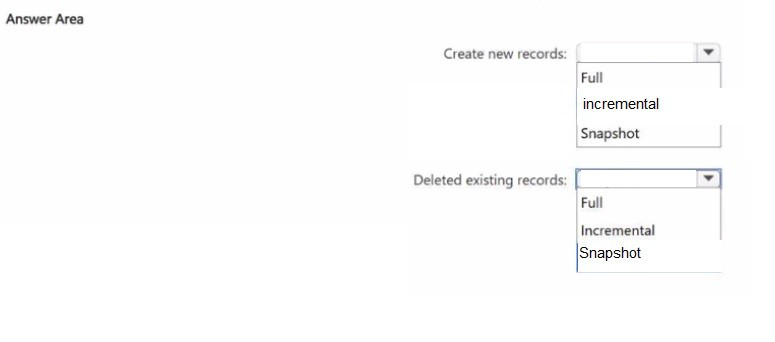
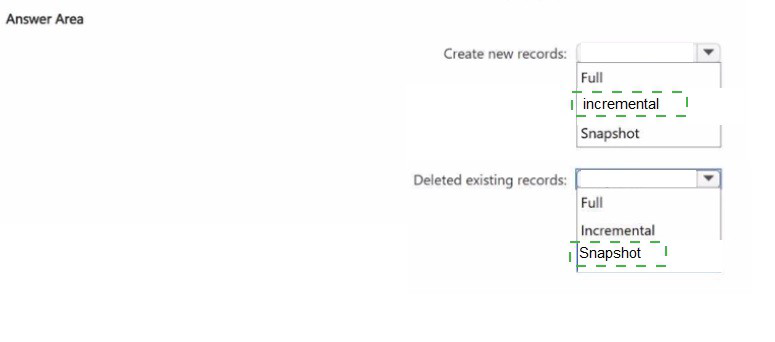
1. Create new records: incremental
The scenario explicitly states that the source file contains only changes that occurred since the last file was generated.
Logic: This is the definition of an incremental load.
Since you are receiving only the delta (new or modified records), you process just those records and append or merge them into Table1.
Efficiency: With 2 billion rows already in the table, performing a full load every 30 minutes would be inefficient and cost-prohibitive.
2. Delete existing records: Snapshot
This selection addresses the versioning requirement within the framework of how Delta Lake and Slowly Changing Dimensions (SCD) work in Fabric.
Logic: To support versioning (keeping the old record and the new record), you treat the current state of a record as a snapshot in time.
When a delete or change occurs, you capture a snapshot of the record’s final state before it was marked as inactive.
Implementation: In a versioning scenario, you are not simply performing an incremental delete (which would remove the data).
Instead, you use the incoming data to update the metadata of the existing snapshot in your table to preserve history.
Reference
Microsoft Learn: Design a data ingestion strategy for Microsoft Fabric.
Concept: Delta Lake Time Travel and Versioning.
You need to ensure that the data engineers are notified if any step in populating the
lakehouses fails. The solution must meet the technical requirements and minimize
development effort.
What should you use? To answer, select the appropriate options in the answer area.
NOTE: Each correct selection is worth one point.
Explanation:
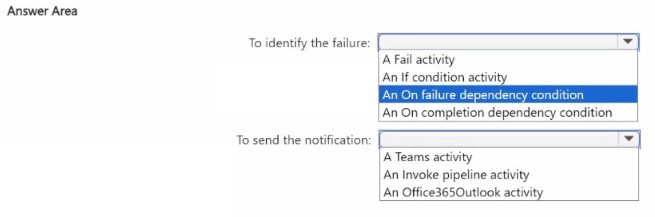
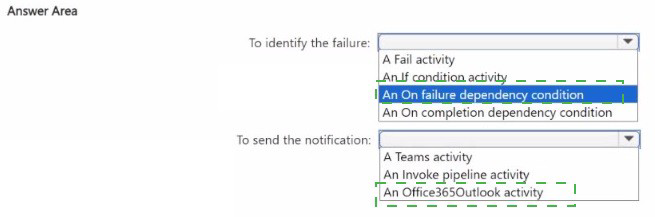
1. To identify the failure: An On failure dependency condition
In Microsoft Fabric pipelines, dependencies (the colored arrows connecting activities) are the most efficient way to control flow based on the outcome of a previous step.
Why this choice? An "On failure" dependency (red arrow) triggers the next activity only if the preceding activity fails.
It requires zero coding or complex logic.
Why not the others?
Fail activity: This is used to force a pipeline to fail, not to identify that a previous step has already failed.
If condition: While powerful, this requires writing an expression to check the output of the previous activity, which increases development effort.
On completion: This would trigger the notification whether the step succeeded or failed, which is not the requirement.
2. To send the notification: An Office365Outlook activity
To meet the requirement of notifying data engineers, you need a communication output.
Why this choice? The Office365Outlook activity is a built-in, low-configuration tool in Fabric.
It allows you to send an email to a distribution list or specific engineers with details about the error (like the Pipeline Name or Error Message) by simply filling out the "To," "Subject," and "Body" fields.
Why not the others?
Teams activity: While useful, it often requires more setup (Webhooks or Power Automate flows) compared to the direct Outlook activity in many tenant configurations.
Invoke pipeline: This would just start another pipeline; it does not send a notification itself.
Technical Summary
The most efficient pattern in Fabric for this requirement is to connect your main processing activity (e.g., a Notebook or Copy Data task) to an Office365Outlook activity using a red "On failure" connector.
Reference
Microsoft Learn: How to use Pipeline dependencies in Microsoft Fabric.
Microsoft Learn: Office 365 Outlook activity in Microsoft Fabric.
| Page 1 out of 11 Pages |
Implementing Data Engineering Solutions Using Microsoft Fabric Practice Exam Questions
These DP-700 practice questions with detailed explanations help candidates learn data engineering concepts within Microsoft Fabric. Topics include data ingestion, transformation, pipelines, and performance optimization. Each question is followed by a clear explanation that helps learners understand how data workflows are designed and implemented. This approach supports deeper learning rather than memorization. By practicing regularly, candidates can improve their technical understanding, identify knowledge gaps, and gain confidence in building data solutions using Microsoft Fabric while preparing effectively for the certification exam.DP-700 - Implementing Data Engineering Solutions Using Microsoft Fabric Official Exam Blueprint and Weight:
1. Implement and Manage an Analytics Solution:
Official Exam Weight: 30-35%
Subtopics: Configure Spark workspace settings,
configure domain workspace settings, configure OneLake workspace
settings, configure data workflow workspace settings, configure version
control, implement database projects, create and configure deployment
pipelines, implement workspace-level access controls, implement
item-level access controls, implement row-level column-level
object-level and folder/file-level access controls, implement dynamic
data masking, apply sensitivity labels to items, endorse items,
implement and use workspace logging, configure and implement OneLake
security, choose between Dataflow Gen2 pipeline and notebook, design and
implement schedules and event-based triggers, implement orchestration
patterns with notebooks and pipelines including parameters and dynamic
expressions.
2. Ingest and Transform Data:
Official Exam Weight: 30-35%
Subtopics: Design and implement full and incremental
data loads, prepare data for loading into dimensional model, design and
implement loading pattern for streaming data, choose appropriate data
store, choose between dataflows notebooks KQL and T-SQL for data
transformation, create and manage shortcuts to data, implement
mirroring, ingest data using pipelines, ingest data using continuous
integration from OneLake, transform data using Power Query (M) PySpark
SQL and KQL, denormalize data, group and aggregate data, handle
duplicate missing and late-arriving data, choose appropriate streaming
engine, choose between native storage mirrored storage or shortcuts in
Real-Time Intelligence, choose between accelerated shortcuts and
non-accelerated shortcuts in Real-Time Intelligence, process data using
eventstreams, process data using Spark structured streaming, process
data using KQL, create windowing functions.
3. Monitor and Optimize an Analytics Solution:
Official Exam Weight: 30-35%
Subtopics: Monitor data ingestion, monitor data
transformation, monitor semantic model refresh, configure alerts,
identify and resolve pipeline errors, identify and resolve dataflow
errors, identify and resolve notebook errors, identify and resolve
eventhouse errors, identify and resolve eventstream errors, identify and
resolve T-SQL errors, identify and resolve Shortcut errors, optimize
lakehouse table, optimize pipeline, optimize data warehouse, optimize
eventstreams and eventhouses, optimize Spark performance, optimize query
performance.
| Domain | Title | Exam Weight |
|---|---|---|
| 1 | Implement and Manage an Analytics Solution | 30-35% |
| 2 | Ingest and Transform Data | 30-35% |
| 3 | Monitor and Optimize an Analytics Solution | 30-35% |
Pre-Exam Guide: DP-700 – Microsoft Fabric Data Engineering
Core Exam Focus
The DP-700 validates your ability to design, implement, and operationalize data engineering solutions using Microsoft Fabric. This is Microsoft’s modern, unified platform—not just another Azure service. You must understand end-to-end workflows, from data ingestion to transformation, orchestration, and monitoring within the Fabric ecosystem.
Key Fabric Concepts to Master
OneLake & Lakehouses: Understand OneLake as Fabric’s centralized, unified storage layer (based on Azure Data Lake Storage Gen2). Know how to create and manage Lakehouses (default storage is in Delta Parquet format) and understand their relationship with SQL Endpoints and semantic models.
Notebooks & Spark: You must be proficient in using Fabric Notebooks (Python, PySpark, Spark SQL) for large-scale data transformations. Know how to configure Spark sessions and optimize performance.
Data Pipelines & Dataflows: Be able to build and schedule data pipelines using the Fabric pipeline tool. Know when to use Dataflow Gen2 (low-code transformations) vs. Spark notebooks (code-first).
Orchestration with Data Factory: Understand how to create and monitor workflows to sequence and manage activities (pipelines, notebooks, Spark jobs) within Fabric.
Monitoring & Observability: Familiarize yourself with Fabric Monitoring Hub to track pipeline runs, Spark application performance, and troubleshoot failures.
Critical Skills to Demonstrate
Data Ingestion: Load data from various sources (files, Azure SQL, streaming) into Lakehouses or Data Warehouses.
Transformation: Use PySpark/SQL to clean, join, and aggregate data. Know how to work with Delta tables (time travel, OPTIMIZE, VACUUM).
Data Warehousing: Understand the Fabric Data Warehouse (native T-SQL experience, separation from Lakehouse).
Security & Governance: Implement shortcuts for data access without duplication, manage workspace roles, and understand data lineage.
Preparation Strategy
Hands-On Practice is Mandatory: Use a Fabric Trial Capacity to build real solutions. The exam is scenario-heavy and assumes practical experience.
Know the Terminology: Distinguish between Fabric items (Lakehouse, Warehouse, Notebook) and their specific purposes.
Focus on Integration: The Implementing Data Engineering Solutions Using Microsoft Fabric exam tests how these components work together—e.g., loading data via pipeline into a Lakehouse, transforming with a notebook, and serving via a Warehouse.
The DP-700 demands a platform-level understanding rather than isolated tool knowledge. Your ability to navigate Fabric’s unified architecture and choose the right component for each job is key to passing. Prioritize hands-on labs over theory.
Real Stories From Real Customers
Preparing for Microsoft Certified: Fabric Data Engineer Associate became efficient with MSmcqs. DP-700 practice test clearly explained data pipelines, transformation, and analytics workflows.
Isabella Romano | Italy