Topic 3: Misc. Questions Set
You have a table in a Fabric lakehouse that contains the following data.
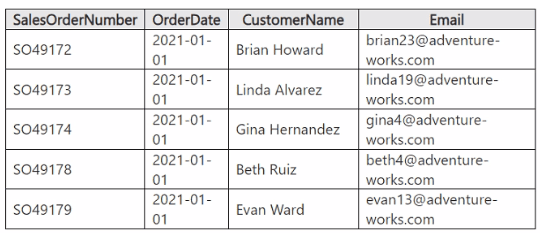
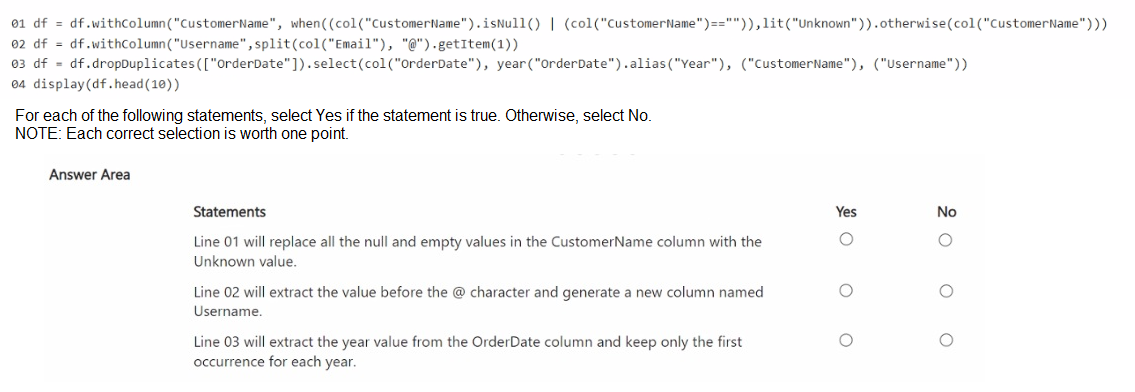
You have a notebook that contains the following code segment.
Summary
This question tests your ability to read and debug PySpark DataFrame transformation code. The code performs data cleaning and shaping, but contains a critical error in one line. The analysis involves checking each line's logic against the stated goal, paying close attention to function arguments and the overall data flow.
Correct Option Explanations
1. Line 01 will replace all the null and empty values in the CustomerName column with the Unknown value.
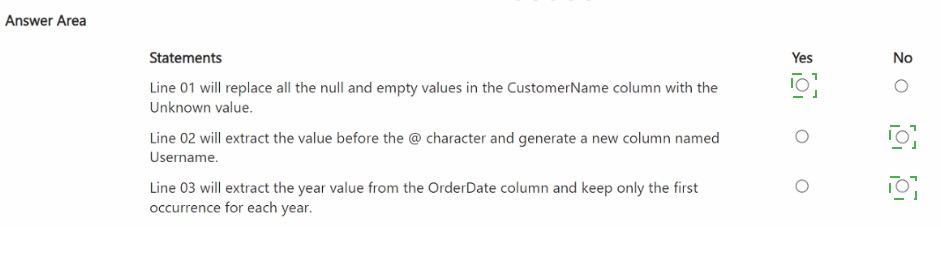
Answer: Yes
This line uses the when().otherwise() function correctly. The condition (col("CustomerName").isNull() | (col("CustomerName")=="") checks for both NULL values and empty strings. If this condition is True, the lit("Unknown") value is assigned. Otherwise, the original CustomerName value is retained via otherwise(col("CustomerName")). The logic is sound and will achieve the stated goal.
2. Line 02 will extract the value before the @ character and generate a new column named Username.
Answer: No
This line is incorrect and will fail. The split(col("Email"), "@") function correctly splits the email string into an array. However, to get the part before the "@" symbol (the username), you need to get the first element of the array, which is at index 0. The code uses .getItem(1), which gets the second element (index 1), i.e., the domain name after the "@". Furthermore, the line is missing an equal sign and the col function for the new column name. The correct syntax would be roughly df = df.withColumn("Username", split(col("Email"), "@").getItem(0)).
3. Line 03 will extract the year value from the OrderDate column and keep only the first occurrence for each year.
Answer: No
This statement is false for two reasons. First, the dropDuplicates(["OrderDate"]) operation removes duplicate rows based on the exact OrderDate value (e.g., '2021-01-01'), not the year extracted from it. If all orders are on the same date, only one row will remain. Second, and more critically, the logic is flawed. It removes duplicates based on OrderDate before selecting and aliasing the year. The goal of keeping the "first occurrence for each year" is not achieved by this code, as it operates on the full date, not the year.
Reference:
Microsoft Official Documentation: pyspark.sql.functions.split
Microsoft Official Documentation: pyspark.sql.DataFrame.dropDuplicates
You have two Fabric workspaces named Workspace1 and Workspace2.
You have a Fabric deployment pipeline named deployPipeline1 that deploys items from
Workspace1 to Workspace2. DeployPipeline1 contains all the items in Workspace1.
You recently modified the items in Workspaces1.
The workspaces currently contain the items shown in the following table.
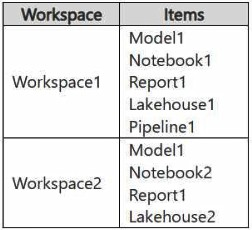
Items in Workspace1 that have the same name as items in Workspace2 are currently
paired.
You need to ensure that the items in Workspace1 overwrite the corresponding items in
Workspace2. The solution must minimize effort.
What should you do?
A. Delete all the items in Workspace2, and then run deployPipeline1.
B. Rename each item in Workspace2 to have the same name as the items in Workspace1.
C. Back up the items in Workspace2, and then run deployPipeline1.
D. Run deployPipeline1 without modifying the items in Workspace2.
Explanation:
This question tests your understanding of the default behavior when running a deployment pipeline where source and target items are already paired. The scenario states items with the same name are currently paired. The goal is to overwrite target items with the modified source versions. Deployment pipelines are designed for this incremental update workflow.
Correct Option:
D. Run deployPipeline1 without modifying the items in Workspace2. -
This is correct. When items are already paired between workspaces, running the deployment pipeline performs an update operation. The modified items from Workspace1 (Model1, Report1, Lakehouse1, Pipeline1, Notebook1) will overwrite their paired counterparts in Workspace2, satisfying the requirement. This minimizes effort as it requires a single pipeline run with no manual pre-work.
Incorrect Options:
A. Delete all the items in Workspace2, and then run deployPipeline1. -
This is incorrect and excessive. Deleting items would break the existing pairings. The deployment would then create new items, which is functionally similar but requires more manual effort and could cause downtime or loss of historical lineage/data, which is not necessary.
B. Rename each item in Workspace2 to have the same name as the items in Workspace1. -
This is incorrect and redundant. The table shows that matching items (Model1, Report1) already have the same name and are paired. Renaming items like Lakehouse2 to Lakehouse1 would be a manual, error-prone process that is completely unnecessary. The unpaired item (Notebook2) is not in the source and will not be affected by the deployment.
C. Back up the items in Workspace2, and then run deployPipeline1. -
This is incorrect. While backing up is a good precaution, it is not the action needed to meet the technical requirement of overwriting items. The deployment itself will handle the overwrite. The question asks for the step "you should do" to achieve the overwrite, not for a risk mitigation step. Backing up adds effort without changing the deployment outcome.
Reference:
Microsoft Learn documentation on "Deployment pipelines in Microsoft Fabric" explains that deploying to a target workspace with existing paired items results in those items being updated with the source version, which is the standard and intended incremental deployment behavior.
Your company has three newly created data engineering teams named Team1, Team2,
and Team3 that plan to use Fabric. The teams have the following personas:
• Team1 consists of members who currently use Microsoft Power BI. The team wants to
transform data by using by a low-code approach.
• Team2 consists of members that have a background in Python programming. The team
wants to use PySpark code to transform data.
• Team3 consists of members who currently use Azure Data Factory. The team wants to
move data between source and sink environments by using the least amount of effort.
You need to recommend tools for the teams based on their current personas.
What should you recommend for each team? To answer, select the appropriate options in
the answer area.
NOTE: Each correct selection is worth one point.
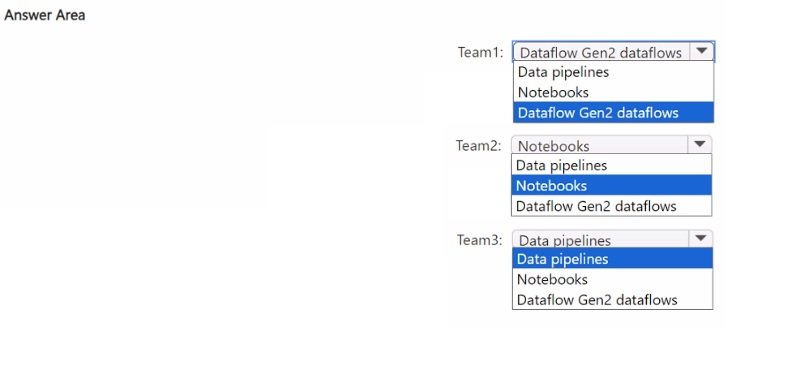
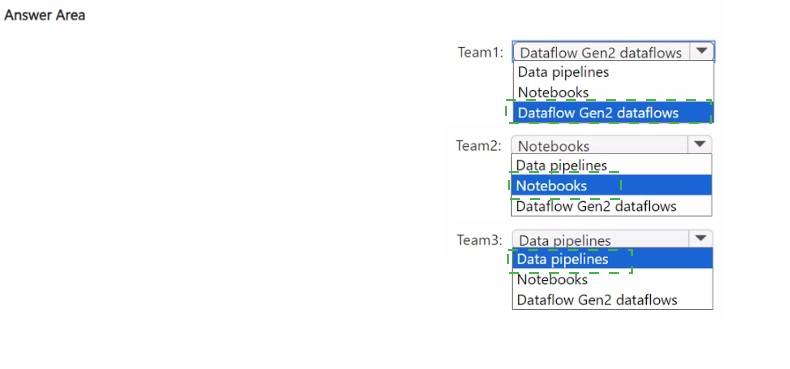
Explanation:
This question tests your ability to map specific user personas and their existing skills to the most appropriate low-code or code-first data engineering tool within Microsoft Fabric. The recommendation should align with the team's background to minimize the learning curve and leverage their existing expertise for productivity.
Correct Option:
Team1: Dataflow Gen2 -
Team 1 uses Power BI and wants a low-code approach. Dataflow Gen2 is the direct evolution of Power Query from Power BI, providing a familiar, intuitive graphical interface for data transformation. This allows them to apply their existing skills with minimal retraining.
Team2: Notebooks -
Team 2 has a Python programming background and wants to use PySpark. Notebooks in Fabric (backed by a Spark runtime) are the ideal, code-first environment for writing and executing PySpark code for complex data transformations, data science, and exploratory analysis.
Team3: Data pipelines -
Team 3 uses Azure Data Factory (ADF) and wants to move data with minimal effort. Data pipelines in Fabric are conceptually identical to ADF pipelines, sharing the same low-code authoring canvas and core concepts for orchestration and data movement. This provides a nearly seamless migration path.
Incorrect Options:
Recommending Data Pipelines for Team1 would be incorrect.
While data pipelines can include data flow activities, they are primarily for orchestration. Team1's core need is transformation using a familiar Power BI-like tool, which is Dataflow Gen2, not the broader orchestration tool.
Recommending Dataflow Gen2 for Team2 would be incorrect.
Team2's strength is writing PySpark code. Forcing them into a low-code graphical tool like Dataflow Gen2 would not leverage their coding skills and would be less efficient for complex programmatic transformations.
Recommending Notebooks for Team3 would be incorrect.
While notebooks can move data, they are not the optimal tool for simple, scheduled data copy operations. Team3's ADF background makes Data pipelines the natural fit for replicating their existing ETL/ELT patterns with the "least amount of effort."
Reference:
Microsoft Learn module "Get started with data engineering in Microsoft Fabric", which outlines the different tools and their primary user personas: Dataflow Gen2 for self-service data prep (Power Query), Notebooks for code-first development (Spark), and Data pipelines for orchestration and data movement (ADF).
HOTSPOT
You have a Fabric workspace that contains a warehouse named DW1. DW1 contains the
following tables and columns.
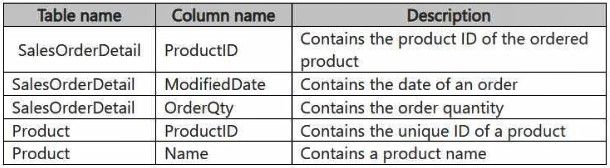
You need to create an output that presents the summarized values of all the order
quantities by year and product. The results must include a summary of the order quantities
at the year level for all the products.
How should you complete the code? To answer, select the appropriate options in the
answer area.
NOTE: Each correct selection is worth one point.
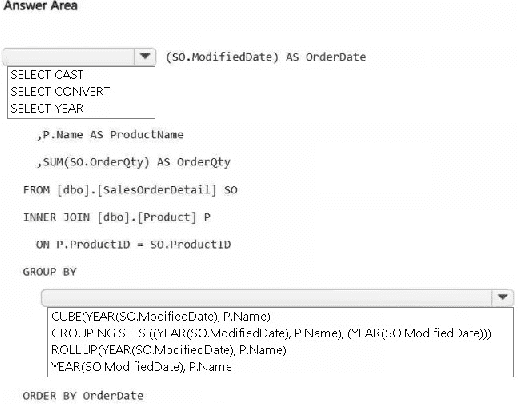
Explanation:
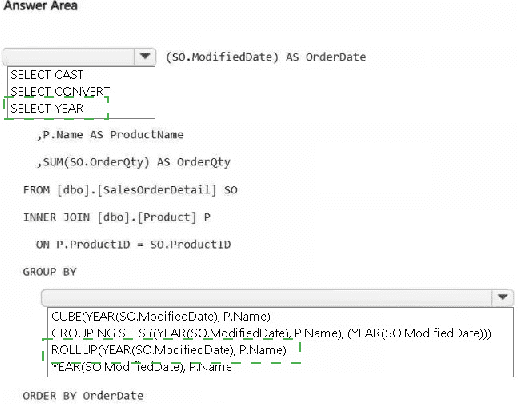
This hotspot question tests knowledge of advanced grouping in T-SQL within a Microsoft Fabric warehouse. You must aggregate total order quantities (SUM of OrderQty) grouped by year (extracted from ModifiedDate) and product name, while also generating subtotals for each year across all products. This requires an extension to GROUP BY that produces hierarchical summaries (detail rows + year-level rollups) without needing UNION or multiple queries.
Correct Option:
First dropdown (for selecting the year function): SELECT YEAR (or SELECT YEAR(SO.ModifiedDate) AS OrderDate)
YEAR() extracts the year from the datetime column ModifiedDate, enabling grouping and display at the year level. This is the correct date-part function here (as opposed to CAST or CONVERT for string formatting, which isn't needed for grouping).
Second dropdown (for the grouping operator): ROLLUP(YEAR(SO.ModifiedDate), P.Name)
GROUP BY ROLLUP (year, product) generates:
Regular groups: SUM per year + per product.
Subtotal rows: SUM per year (across all products) — exactly matching the requirement for "summary of the order quantities at the year level for all the products".
(In some cases a grand total, but the main need is the year subtotal.)
ROLLUP is hierarchical and efficient for this scenario (year → product).
Incorrect Options:
Options involving CUBE: CUBE creates all possible combinations (year only, product only, both, and grand total), producing extra unwanted subtotals by product across all years, which isn't asked for.
Options with plain GROUP BY YEAR(SO.ModifiedDate), P.Name: This gives only detail rows (per year-per product) but misses the year-level summary across all products.
Options with GROUPING SETS (unless exactly mimicking ROLLUP): While GROUPING SETS((year, product), (year)) would work, the question's dropdowns typically show ROLLUP directly as the concise and correct choice.
Wrong date functions like CAST or CONVERT in the SELECT for grouping purposes: These are for formatting, not extraction for aggregation.
Reference:
Microsoft Learn: SELECT - GROUP BY clause (Transact-SQL) – ROLLUP section
https://learn.microsoft.com/en-us/sql/t-sql/queries/select-group-by-transact-sql?view=sql-server-ver17
DP-700 Study Guide: Implement and manage an analytics solution using Microsoft Fabric (T-SQL in Fabric warehouses supports standard T-SQL extensions like ROLLUP).
Note: This question is part of a series of questions that present the same scenario. Each
question in the series contains a unique solution that might meet the stated goals. Some
question sets might have more than one correct solution, while others might not have a
correct solution.
After you answer a question in this section, you will NOT be able to return to it. As a result,
these questions will not appear in the review screen.
You have a Fabric eventstream that loads data into a table named Bike_Location in a KQL
database. The table contains the following columns:
BikepointID
Street
Neighbourhood
No_Bikes
No_Empty_Docks
Timestamp
You need to apply transformation and filter logic to prepare the data for consumption. The
solution must return data for a neighbourhood named Sands End when No_Bikes is at
least 15. The results must be ordered by No_Bikes in ascending order.
Solution: You use the following code segment:

Does this meet the goal?
A. Yes
B. no
Explanation:
The task requires filtering Bike_Location data in a Fabric KQL (Kusto Query Language) database to show only rows where Neighbourhood = 'Sands End' and No_Bikes ≥ 15, then ordering the results by No_Bikes in ascending order. The provided code attempts this but contains multiple syntax errors that prevent it from executing correctly or producing the expected output in KQL. Therefore, the solution does not meet the goal.
Correct Option:
B. No
The code fails to meet the goal because:
The WHERE clause has invalid syntax: WHERE neighbourhood = 'Sands End' WHERE no_bikes >= 15 — KQL allows only one WHERE clause; multiple WHERE keywords are not permitted.
The condition no_bikes >= 15 = 'Sands End' is malformed (mixing string comparison with numeric).
Column names are inconsistently capitalized (e.g., No_Bikes vs no_bikes, Neighbourhood vs neighbourhood), and KQL is case-sensitive for column names.
ORDER BY is written twice incorrectly (ORDER BY no_bikes appears at the end but is duplicated/misplaced).
These syntax issues make the query invalid in KQL.
Incorrect Option:
A. Yes
This is incorrect because the provided KQL code segment contains critical syntax errors and will not run successfully in a Fabric Real-Time Intelligence (KQL database / eventstream transformation). It does not correctly filter for Neighbourhood = 'Sands End' with No_Bikes ≥ 15, nor does it guarantee proper ascending order by No_Bikes. A valid KQL query would look like:
Reference:
Microsoft Learn: Kusto Query Language (KQL) syntax – WHERE operator, order by operator
https://learn.microsoft.com/en-us/azure/data explorer/kusto/query/whereoperatorhttps://learn.microsoft.com/en-us/azure/data-explorer/kusto/query/orderbyoperator
Microsoft Fabric – Real-Time Intelligence: Query data in a KQL database
https://learn.microsoft.com/en-us/fabric/real-time-intelligence/kql-database
You have a Fabric warehouse named DW1 that contains four staging tables named
ProductCategory, ProductSubcategory, Product, and SalesOrder. ProductCategory,
ProductSubcategory, and Product are used often in analytical queries.
You need to implement a star schema for DW1. The solution must minimize development
effort.
Which design approach should you use? To answer, select the appropriate options in the
answer area.
NOTE: Each correct selection is worth one point.
Explanation:
This question tests your understanding of star schema design principles in a data warehouse, focusing on dimension table structure and the goal of minimizing development effort. The tables ProductCategory, ProductSubcategory, and Product form a natural hierarchy and are frequently queried together.
Correct Option:
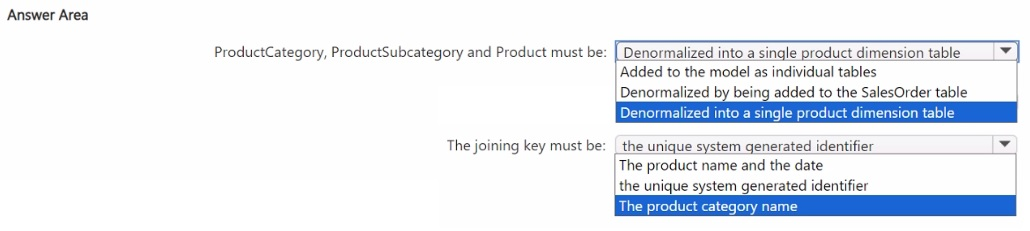
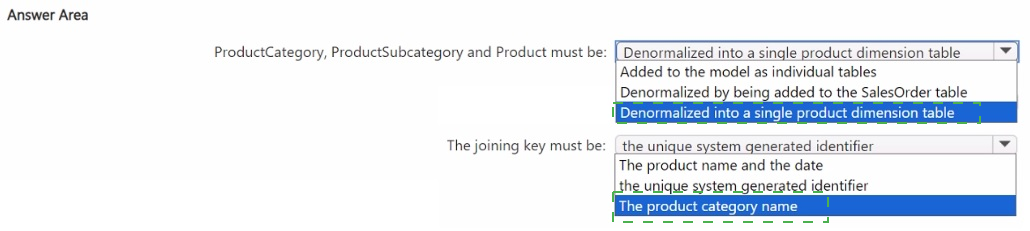
ProductCategory, ProductSubcategory and Product must be: Denormalized into a single product dimension table
The joining key must be: the unique system generated identifier
Why this is correct:
Denormalized into a single product dimension table:
This is the standard star schema approach for related hierarchical attributes (like product categories). Flattening them into one DimProduct table simplifies the model for end-users, improves query performance by reducing joins, and meets the requirement to minimize development effort for future analytical queries.
The joining key must be:
the unique system generated identifier: In a star schema, the fact table (SalesOrder) joins to the dimension table using a surrogate key (a single, unique integer ID, typically an identity column). This is the most efficient join for both storage and query performance. The "unique system generated identifier" refers to this surrogate key in the dimension table.
Incorrect Options:
For Table Structure:
Added to the model as individual tables:
This creates a snowflake schema, which normalizes the data. While valid, it increases development effort for report writers who must now write queries with multiple joins, contradicting the requirement to minimize effort.
Denormalized by being added to the SalesOrder table:
This would denormalize product attributes directly into the fact table, severely bloating it with redundant text data. This violates dimensional modeling best practices, increases storage costs, and complicates updates.
For Joining Key:
The product name and the date:
This is incorrect. Using a composite key of a text field and a date is inefficient and unreliable (names can change). The standard, high-performance join in a star schema is a single integer surrogate key.
The product category name:
This is incorrect. Using a text-based business key (like a name) as a join key is less performant than an integer and is not the standard practice for the primary join between fact and dimension tables in a star schema.
Reference:
Dimensional modeling best practices, as covered in the Microsoft Learn learning path for data warehousing, advocate for denormalized dimension tables to create a star schema for usability and performance. The join between fact and dimension tables should use a surrogate key (a system-generated integer).
| Page 3 out of 11 Pages |