Free Microsoft AZ-900 Practice Test Questions MCQs
Stop wondering if you're ready. Our Microsoft AZ-900 practice test is designed to identify your exact knowledge gaps. Validate your skills with Microsoft Azure Fundamentals questions that mirror the real exam's format and difficulty. Build a personalized study plan based on your free AZ-900 exam questions mcqs performance, focusing your effort where it matters most.
Targeted practice like this helps candidates feel significantly more prepared for Microsoft Azure Fundamentals exam day.
25010+ already prepared
Updated On : 12-Oct-2026501 Questions
Microsoft Azure Fundamentals
4.9/5.0
Topic 3: Exam Pool C (NEW)
Select the answer that correctly completes the sentence.


Summary
This question tests your understanding of how billing works for Azure Virtual Machines (VMs). VMs incur compute costs whenever they are in a "Running" state, regardless of whether the OS is active or idle. To stop these compute charges, you must explicitly de-allocate the VM, which releases the underlying hardware resources. Simply shutting down the OS from within the VM is not sufficient to stop billing.
Correct Option:
Select Stop for the virtual machine from the Azure portal.
This is the correct action. Using the "Stop" option in the Azure portal initiates a de-allocation of the VM. This process shuts down the guest OS and releases the underlying compute hardware. Once de-allocated, you are no longer charged for compute costs, you only pay for the storage (the disks) associated with the VM.
Incorrect Option:
Disconnect the virtual machine during a Remote Desktop session.
This only ends your remote session. The VM's operating system remains running, and the compute resources are fully allocated and active. Therefore, you continue to be billed at the full rate.
Put the virtual machine in sleep mode from a Remote Desktop session.
This is an action performed within the guest OS (Windows 10). From Azure's perspective, the VM is still running and consuming its allocated CPU and memory. The Azure infrastructure continues to host the VM, so compute billing continues uninterrupted.
Reference:
Microsoft Learn: Save costs by stopping and deallocating a VM
Summary:
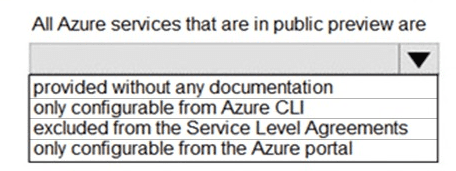
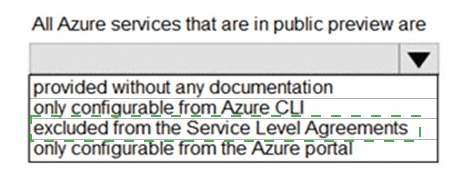
This question tests your understanding of the service lifecycle stages in Azure, specifically the "public preview" phase. Services in public preview are made available to all customers for testing and feedback before they become generally available (GA). A key characteristic of this stage is that they are not yet backed by formal financial commitments for uptime and performance.
Correct Option:
Excluded from the Service Level Agreements (SLAs):
This is the correct answer. Services in public preview are explicitly excluded from the financial-backed Service Level Agreements that generally available (GA) services have. The purpose of a preview is for customers to evaluate the service, and Microsoft does not guarantee a specific level of uptime or performance. There may be a Service Level Objective (SLO) for previews, but it is not a financially backed SLA.
Incorrect Option:
Provided without any documentation:
This is incorrect. Public preview services are almost always accompanied by documentation, tutorials, and blog posts to guide users on how to use them and provide the necessary feature information.
Only configurable from Azure CLI:
This is incorrect. While a new service might launch in preview with CLI support first, the goal is to provide multiple access methods. Most preview services are also configurable via the Azure portal, PowerShell, and REST APIs.
Only configurable from the Azure portal:
This is incorrect. Similar to the CLI option, this is too restrictive. Microsoft aims for broad accessibility, and services are typically managed through various tools, not exclusively the portal.
Reference
Microsoft Learn: Azure preview features - This documentation explains the terms and conditions for using preview features, including the lack of an SLA.
Select the answer that correctly completes the sentence.
Summary:
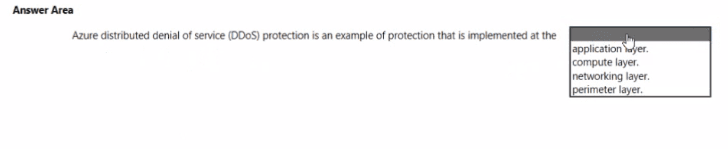
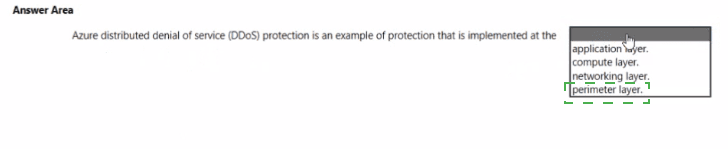
This question tests your understanding of the Azure DDoS Protection service and the security layers of the defense-in-depth model. DDoS attacks aim to overwhelm a service's network capacity, making it unavailable. Azure DDoS Protection is specifically designed to defend against these volumetric and protocol attacks by scrubbing malicious traffic before it can impact your resources, which is a fundamental function of perimeter security.
Correct Option:
Perimeter layer:
This is the correct answer. The perimeter layer focuses on using network security controls to protect from external network-based attacks. Azure DDoS Protection is a prime example of a perimeter defense. It operates at the network edge, analyzing traffic and filtering out malicious DDoS attack traffic before it can reach your virtual networks, ensuring your services remain available.
Incorrect Option:
Application layer:
Protection at this layer secures the application itself (e.g., against SQL injection or cross-site scripting). While Azure has services for this (like the Web Application Firewall in Application Gateway), the core DDoS Protection service is not an application-layer (Layer 7) firewall.
Compute layer:
This layer focuses on securing the virtual machines, endpoints, and the operating system. Examples include endpoint protection, system updates, and container security. DDoS Protection is a network-level service, not an endpoint security solution.
Networking layer:
This layer focuses on controls within the network, such as Network Security Groups (NSGs) for traffic filtering between subnets, and network segmentation. DDoS Protection operates at the boundary of the network (the perimeter), not on internal network traffic rules.
Reference:
Microsoft Learn: What is Azure DDoS Protection? - The documentation describes it as a service that "enables you to protect your Azure resources from distributed denial-of-service (DDoS) attacks," which is a core function of perimeter network security.
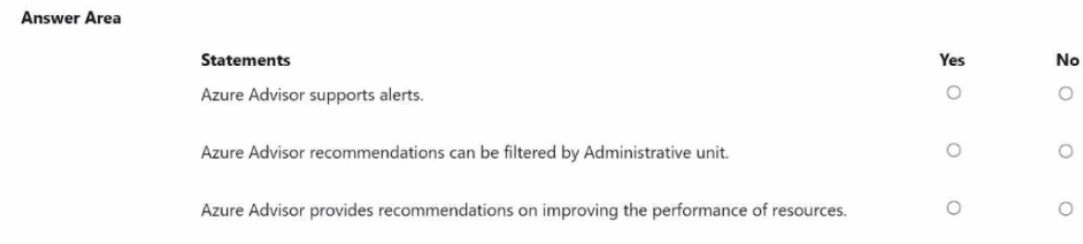
For each of the following statements, select Yes if the statement is true. Otherwise, select
No
NOTE: Each correct selection is worth one point.
Summary
This question tests your knowledge of the core features and capabilities of Azure Advisor. Advisor is a personalized tool that provides best practice recommendations, but it has specific functionalities and limitations regarding alerts, filtering, and the categories of advice it offers.
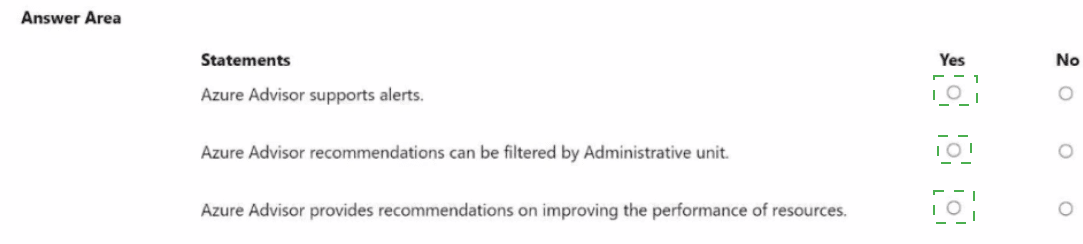
Statement 1: Azure Advisor supports alerts.
Answer: Yes
Explanation: Azure Advisor can be configured to create alerts. You can set up notifications for when new recommendations are generated. This is typically done by creating an alert rule that triggers an action group (e.g., sending an email, SMS, or triggering a Logic App) whenever the Advisor generates a recommendation. This allows for proactive management instead of manually checking the service.
Statement 2: Azure Advisor recommendations can be filtered by Administrative unit.
Answer: No
Explanation: This statement is incorrect. While Azure Advisor provides robust filtering options—such as by subscription, resource group, resource type, and recommendation category (Cost, Security, Reliability, Performance, Operational Excellence)—it does not currently support filtering by Administrative Unit. Administrative Units are an Azure Active Directory feature for delegating administrative permissions over users and groups, which is a different scope from Advisor's resource-focused recommendations.
Statement 3: Azure Advisor provides recommendations on improving the performance of resources.
Answer: Yes
Explanation: This is a core function of Azure Advisor. One of its primary recommendation categories is Performance. Advisor analyzes the configuration and usage telemetry of your resources (like virtual machines, SQL databases, and app services) to provide specific suggestions for improving their speed and responsiveness. Examples include resizing underpowered VMs or optimizing database indexes.
Reference:
Microsoft Learn: What is Azure Advisor?
Microsoft Learn: Set up alerts for Azure Advisor recommendations
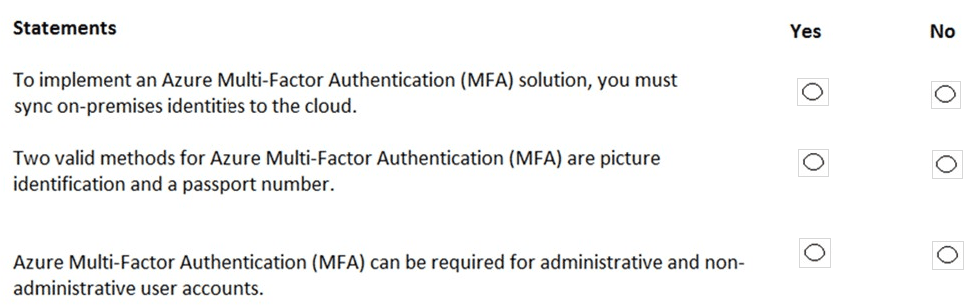
For each of the following statements, select Yes if the statement is true. Otherwise, select
No.
NOTE: Each correct selection is worth one point.
Summary
This question tests your understanding of Azure Multi-Factor Authentication's deployment requirements, supported verification methods, and scope of application. MFA is a core security feature that adds a layer of authentication beyond just a password, but it has specific prerequisites and capabilities.
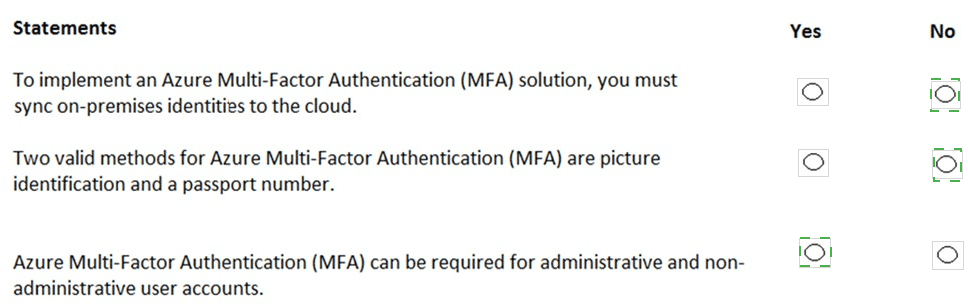
Statement 1: To implement an Azure Multi-Factor Authentication (MFA) solution, you must sync on-premises identities to the cloud.
Answer: No
Explanation: This statement is false. Azure MFA can be applied to both cloud-only identities (Azure AD users created and managed entirely in the cloud) and hybrid identities that are synced from an on-premises Active Directory using Azure AD Connect. Syncing on-premises identities is a requirement for specific scenarios, like enabling MFA for on-premises applications, but it is not a mandatory prerequisite for implementing MFA itself for cloud resources.
Statement 2: Two valid methods for Azure Multi-Factor Authentication (MFA) are picture identification and a passport number.
Answer: No
Explanation: This statement is false. Azure MFA verification methods are based on something you know (a password/PIN), something you have (a phone, a hardware key, the Microsoft Authenticator app), or something you are (biometrics like a fingerprint or face scan). Picture identification and a passport number are static forms of identification and are not supported as dynamic, verifiable methods in the Azure MFA service. Valid methods include the Microsoft Authenticator app, SMS or voice call, FIDO2 security keys, and OATH hardware tokens.
Statement 3: Azure Multi-Factor Authentication (MFA) can be required for administrative and non-administrative user accounts.
Answer: Yes
Explanation: This statement is true. A key principle of zero-trust security is that any identity can be a target. Therefore, Azure MFA can be enabled and enforced for any user account, regardless of its administrative privileges. While it is a critical best practice to require MFA for all administrative roles, policies can also be configured to require MFA for non-administrative users, specific applications, or based on risk and location signals.
Reference:
Microsoft Learn: How it works: Azure AD Multi-Factor Authentication
Microsoft Learn: Plan an Azure AD Multi-Factor Authentication deployment
Select the answer that correctly completes the sentence.
Summary:
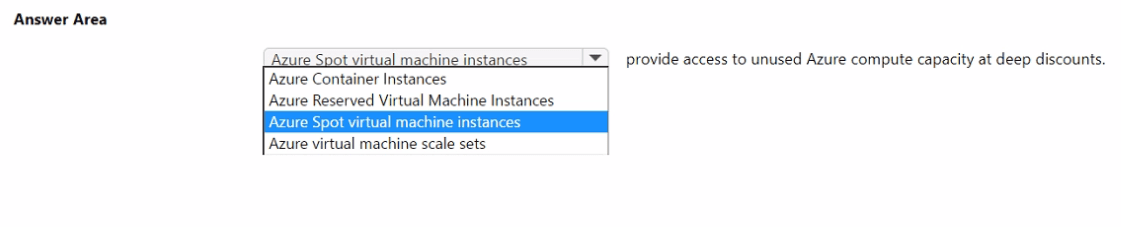
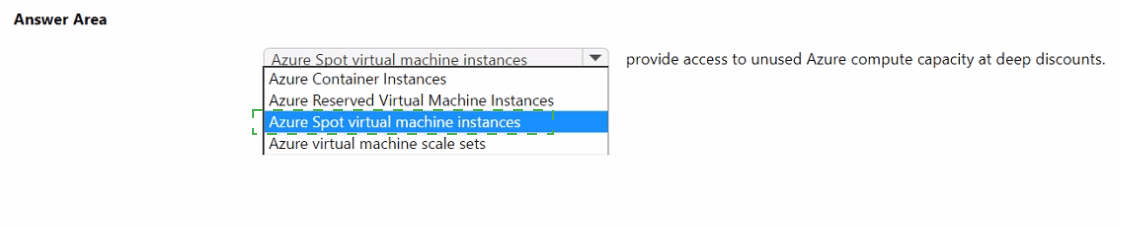
This question tests your knowledge of Azure compute pricing models, specifically the one designed for cost-saving by leveraging spare capacity. This model allows you to deploy workloads that can tolerate interruptions at a significantly reduced cost, with the trade-off that Azure can evict these resources with short notice when it needs the capacity back.
Correct Option:
Azure Spot virtual machine instances:
This is the correct answer. Azure Spot VMs provide access to unused Azure compute capacity at discounts of up to 90% compared to pay-as-you-go prices. The core characteristic is that these VMs are available on a "surplus" basis; Azure can evict them at any time if the capacity is needed for pay-as-you-go customers. This makes them ideal for fault-tolerant, interruptible workloads like batch processing, rendering, and some testing scenarios.
Incorrect Option:
Azure Container Instances (ACI):
This is a serverless container service where you pay per second for the compute resources your container group uses. While it can be cost-effective, it does not operate on a "spare capacity" model with deep discounts and potential eviction. It is a dedicated, on-demand service.
Azure Reserved Virtual Machine Instances:
This is a pricing discount model, not a VM type. You pre-pay for a one- or three-year term on a VM, which provides a significant discount over pay-as-you-go prices. However, it gives you guaranteed capacity and does not provide access to "unused" capacity at deeper discounts like Spot VMs do.
Azure virtual machine scale sets:
This is a compute resource used to deploy and manage a set of identical, auto-scaling VMs. It is an infrastructure service, not a pricing model. You can deploy Spot VMs within a scale set, but the scale set itself is not the service that provides access to the discounted capacity.
Reference:
Microsoft Learn: Azure Spot Virtual Machines - The documentation states: "Azure Spot Virtual Machines let you take advantage of our unused capacity at a significant cost savings."
For each of the following statements, select Yes if the statement is true. Otherwise, select
No.
NOTE: Each correct selection is worth one point.
Summary:
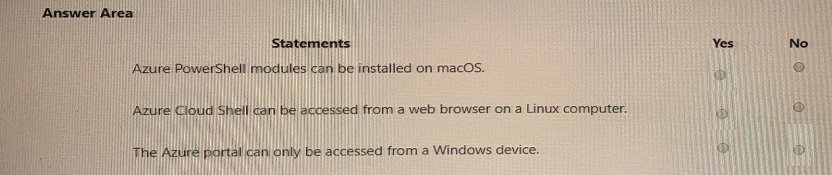
This question tests your understanding of the cross-platform compatibility of Azure's primary management interfaces. A core principle of cloud services is accessibility from various client operating systems, and Azure's tools are designed to support this.
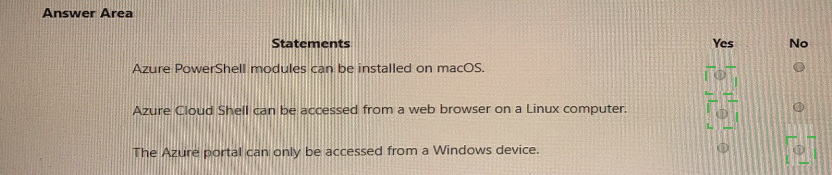
Statement 1: Azure PowerShell modules can be installed on macOS.
Answer: Yes
Explanation: This statement is true. The Az PowerShell module, which is the recommended module for interacting with Azure, is cross-platform. It is built on .NET Core and can be installed and run on PowerShell within Windows, macOS, and Linux. This allows administrators and developers using Apple computers to fully manage Azure resources using PowerShell cmdlets.
Statement 2: Azure Cloud Shell can be accessed from a web browser on a Linux computer.
Answer: Yes
Explanation: This statement is true. Azure Cloud Shell is a browser-based, authenticated shell experience accessible directly from the Azure portal. Since it runs entirely in the cloud and is served through a web browser, it has no client-side dependencies on the operating system. It can be accessed from any device with a modern web browser, including Windows, macOS, Linux, and even Chromebooks.
Statement 3: The Azure portal can only be accessed from a Windows device.
Answer: No
Explanation: This statement is false. The Azure portal is a web-based, centralized application for managing all Azure services. Like Cloud Shell, it is accessed through a standard web browser. It is explicitly designed to be platform-agnostic and can be used from any device with an internet connection and a supported browser, including Windows, macOS, Linux, and mobile operating systems.
Reference:
Microsoft Learn: Install Azure PowerShell on macOS
Microsoft Learn: Azure Cloud Shell Overview - "Accessible from anywhere... from any device."
| Page 1 out of 51 Pages |
Microsoft Azure Fundamentals Practice Exam Questions
These AZ-900 practice questions with explanations help beginners build a strong understanding of cloud concepts and Azure services. Topics include core Azure services, pricing, security, compliance, and governance. Each explanation clearly breaks down the correct answer, helping learners understand foundational concepts rather than memorize them. This learning-focused approach improves retention and clarity. By practicing these questions, candidates can strengthen their cloud knowledge, identify knowledge gaps, and confidently prepare for the certification exam.AZ-900: What You’re Preparing For
AZ-900 Microsoft Azure Fundamentals is designed for beginners who want a clear understanding of cloud concepts and Azure services. It’s less about configuring resources and more about knowing what to use, when to use it, and why it matters—including pricing and security basics.
AZ-900 Microsoft Azure Fundamentals Official Exam Blueprint and Weight
1. Describe Cloud Concepts
Official Exam Weight: 25-30%
Subtopics: Cloud computing definition and benefits, high availability, scalability, elasticity, agility, geo-distribution, disaster recovery, shared responsibility model, cloud provider vs customer responsibilities, IaaS overview and use cases, PaaS overview and use cases, SaaS overview and use cases, comparison of IaaS vs PaaS vs SaaS, public cloud definition and characteristics, private cloud definition and characteristics, hybrid cloud definition and characteristics, multi-cloud overview, Azure Arc overview, Azure VMware Solution overview, consumption-based model, CapEx vs OpEx, benefits of consumption-based model, cloud pricing models, pay-as-you-go, reserved capacity, spot pricing overview.
2. Describe Azure Architecture and Services
Official Exam Weight: 35-40%
Subtopics: Azure regions overview, region pairs, sovereign regions, Azure Government, Azure China, availability zones overview, availability zone supported regions, Azure datacenters overview, Azure resources overview, resource groups, Azure subscriptions, management groups, hierarchy of management groups and subscriptions, Azure Virtual Machines overview, VM scale sets overview, Azure Virtual Desktop overview, Azure Containers overview, Azure Container Instances, Azure Kubernetes Service overview, Azure Functions overview, serverless computing concepts, application hosting options, Azure App Service overview, Azure Virtual Networks overview, Azure subnets, VNet peering overview, Azure VPN Gateway overview, Azure ExpressRoute overview, Azure DNS overview, Azure Blob Storage overview, blob access tiers, hot cool cold archive, Azure Disk Storage overview, Azure Files overview, storage account types, storage redundancy options, Azure Migrate overview, Azure Data Box overview, AzCopy overview, Azure Storage Explorer overview, Azure Active Directory overview now Microsoft Entra ID, authentication vs authorization, Azure AD vs on-premises AD, Microsoft Entra ID features, single sign-on overview, multifactor authentication overview, passwordless authentication overview, external identities overview, Microsoft Entra B2B, Microsoft Entra B2C, Conditional Access overview, Azure RBAC overview, Zero Trust model overview, defense in depth overview, Microsoft Defender for Cloud overview, Azure Key Vault overview, Azure DDoS Protection overview, Basic vs Standard, Azure Firewall overview, Azure Monitor overview, Azure Service Health overview, Azure Advisor overview.
3. Describe Azure Management and Governance
Official Exam Weight: 30-35%
Subtopics: Cost management factors, factors affecting Azure costs, resource type, consumption, maintenance, geography, network traffic, subscription type, Azure Marketplace pricing, Pricing Calculator overview, Total Cost of Ownership Calculator overview, Azure Cost Management tool, cost alerts, budgets, cost analysis, tags for cost tracking, purpose of tags, applying and managing tags, Microsoft Azure Free Account overview, Microsoft Cost Management and Billing overview, Azure Policy overview, policy definitions, policy initiatives, policy assignments, policy compliance, resource locks overview, read-only lock, delete lock, applying resource locks, Microsoft Service Trust Portal overview, Microsoft Privacy Statement overview, Azure compliance documentation, Microsoft Purview overview, data governance with Microsoft Purview, Azure Portal overview, Azure Cloud Shell overview, Azure CLI overview, Azure PowerShell overview, Azure Arc overview managing resources outside Azure, Azure Resource Manager overview, ARM templates overview, infrastructure as code concepts, Bicep overview, Azure Advisor overview, recommendation categories cost security reliability operational excellence performance, Azure Service Health overview, service issues, planned maintenance, health advisories, resource health, Azure Monitor overview, Azure Log Analytics overview, Azure Monitor Alerts overview, Application Insights overview.
| Domain | Title | Exam Weight |
|---|---|---|
| 1 | Describe Cloud Concepts | 25-30% |
| 2 | Describe Azure Architecture and Services | 35-40% |
| 3 | Describe Azure Management and Governance | 30-35% |
Topics You Must Cover
Cloud concepts: public vs private, IaaS/PaaS/SaaS, shared responsibility
Core Azure services: compute, networking, storage, databases
Security and governance: Entra ID basics, RBAC, Zero Trust, Azure Policy
Management tools: Azure Portal, CLI/PowerShell, ARM/Bicep basics, Cloud Shell
Pricing and support: subscriptions, costs, calculators, SLAs, support plans
Smart Study Plan
Start with cloud basics, then move into “service recognition.” Learn the purpose of each service in one line (e.g., VMs for full control, App Service for web apps, Blob Storage for files, VNets for private networking). Use short daily sessions and keep a simple glossary of terms you confuse.
Common Mistakes
Mixing up IaaS vs PaaS vs SaaS
Confusing governance tools (Policy, RBAC, Blueprints concepts)
Skipping pricing/SLA questions (they show up more than people expect)
Practice That Actually Helps
AZ-900 rewards repetition and familiar phrasing. Take quick Microsoft Azure Fundamentals quizzes to lock concepts, then do a full exam to build confidence. Full-length AZ-900 practice exam can help you get used to real exam wording and improve accuracy under time pressure.
What Our Clients Say
Starting the cloud certification journey with Microsoft Certified: Azure Fundamentals was smooth thanks to MSmcqs. AZ-900 practice questions explained core Azure services and pricing concepts clearly, making it easy to build a strong foundation before exam day.
Chloe Martin | France