Topic 1: Exam Pool A
For each of the following statements, select Yes if the statement is true. Otherwise, select
No.
NOTE: Each correct selection is worth one point.
Explanation:
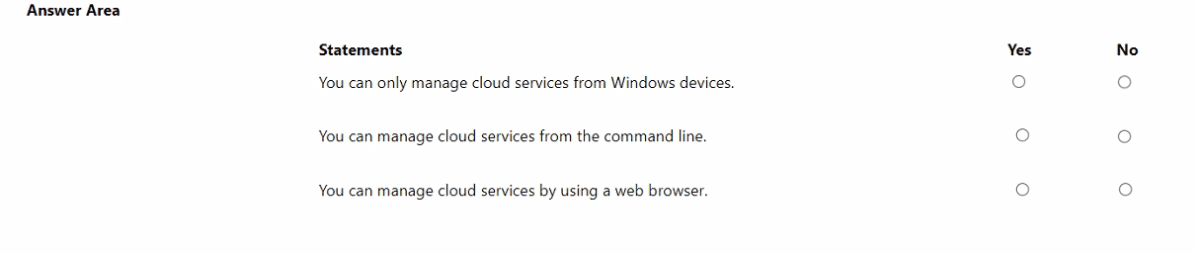
This question tests fundamental knowledge of Azure management interfaces. Azure cloud services can be managed through multiple cross-platform tools, not restricted to any specific operating system. The Azure portal (web), Azure CLI, Azure PowerShell, and REST APIs allow management from various devices and environments.
Correct Options:
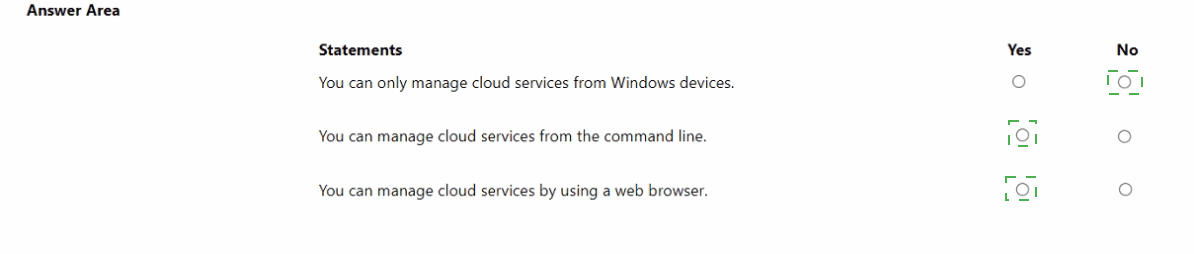
You can only manage cloud services from Windows devices.
Answer: No.
This statement is false. Azure management tools are platform-agnostic. The Azure portal is web-based, Azure CLI runs on Windows, macOS, and Linux, and Azure PowerShell Core is cross-platform. Management is possible from any device with internet access.
You can manage cloud services from the command line.
Answer: Yes.
This statement is true. Azure provides Azure CLI and Azure PowerShell for full command-line management. These tools enable scripting and automation of deployments, configuration, and management tasks for all Azure services.
You can manage cloud services by using a web browser.
Answer: Yes.
This statement is true. The primary interface is the Azure portal (portal.azure.com), a web-based console. Azure Cloud Shell (bash or PowerShell) is also browser-based, providing a command-line experience without local installation.
Incorrect Options / Why Other Answers Would Be Wrong:
Selecting "Yes" for the first statement ignores Azure’s cross-platform design. Selecting "No" for the second or third statements contradicts the existence of Azure CLI/PowerShell and the Azure portal.
Reference:
Microsoft Learn, "Azure management tools overview," lists the Azure portal (web), Azure CLI, Azure PowerShell, and Azure mobile app as core management tools, highlighting their platform independence.
Select the answer that correctly completes the sentence.


Explanation:
This question tests the definition of an Azure region. An Azure region is a fundamental geographic component of Azure's global infrastructure. It is defined by a specific set of characteristics related to its composition and connectivity, which directly impact service deployment and redundancy options.
Correct Option:
contains one or more data centers that are connected by using a low-latency network. This is the correct answer.
An Azure region is a set of one or more datacenters deployed within a latency-defined perimeter. These datacenters are interconnected via a dedicated, high-bandwidth, low-latency regional network. This design allows for high availability and replication within the region, forming the basis for services like availability zones.
Incorrect Options:
is found in each country where Microsoft has a subsidiary office. This is incorrect. Azure regions are placed based on factors like market demand, data residency laws, infrastructure availability, and geography, not solely on the presence of a Microsoft office. Many countries with Microsoft subsidiaries do not have an Azure region.
can be found in every country in Europe and the Americas only. This is incorrect. Azure regions are located globally, including in Asia, Africa, Australia, and the Middle East, not just in Europe and the Americas.
contains one or more data centers that are connected by using a high-latency network. This is incorrect. The defining characteristic of the datacenters within a single region is their interconnection via a low-latency network. High-latency connections would be typical between different regions, not within one.
Reference:
Microsoft Learn documentation, "Regions and Availability Zones in Azure": "A region is a set of datacenters deployed within a latency-defined perimeter and connected through a dedicated regional low-latency network." This is the official definition.
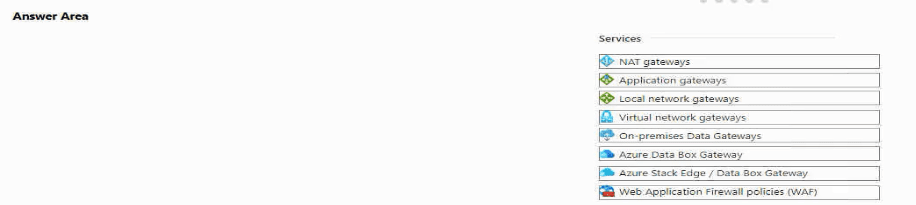
You plan to extend your company's network to Azure.
The network contains a VPN appliance that uses an IP address of 131.107.700.1.
You need to create an Azure resource that defines the VPN appliance In Azure.
Which Azure resource should you create? To answer, select the appropriate resource in
the answer area.
Explanation:
This question tests knowledge of the specific Azure networking components used in a hybrid Site-to-Site VPN connection. When connecting an on-premises network to an Azure Virtual Network via VPN, you need two primary gateway resources in Azure: one to represent your on-premises VPN device (its public IP and configuration), and another to represent the Azure-side VPN gateway.
Correct Option:
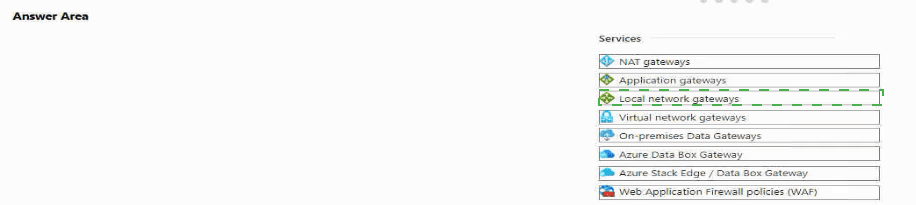
Local network gateways is the correct Azure resource to create.
A Local Network Gateway is an Azure object that represents your on-premises VPN appliance and network. When you create it, you specify:
The IP address of your on-premises VPN device (131.107.700.1 in this question, though note this is an invalid public IP; it's a typo/placeholder).
The IP address ranges (prefixes) of your on-premises network that you want to reach from Azure.
This definition is then used by the Azure Virtual Network Gateway to establish the IPSec tunnel to your location.
Incorrect Options / Why Other Services Are Not Correct:
NAT gateways:
Used for outbound Internet connectivity for Azure resources, not for defining on-premises VPN endpoints.
Application gateways:
An OSI Layer-7 load balancer and web application firewall for HTTP/S traffic, not for site-to-site VPNs.
Virtual network gateways:
This is the Azure-side VPN gateway or ExpressRoute gateway. You need this in addition to the Local Network Gateway, but this resource represents Azure's gateway, not the on-premises appliance.
On-premises Data Gateways / Azure Data Box Gateway / Azure Stack Edge:
These are for data integration, transfer, and edge computing, not for defining network VPN endpoints.
Web Application Firewall policies (WAF):
A security policy for protecting web apps, typically associated with Application Gateway or Front Door, not for VPN configuration.
Reference:
Microsoft Learn documentation, "Create a Local Network Gateway": "A local network gateway is a specific object that represents your on-premises location (the site) for routing purposes. You give the site a name by which Azure can refer to it, then specify the IP address of the on-premises VPN device... and the IP address prefixes located at the on-premises site."
For each of the following statements, select Yes if the statement is true. Otherwise, select
No.
NOTE: Each correct selection is worth one point.


Explanation:
This question tests knowledge of the Microsoft Trust Center, which is a public-facing website providing comprehensive information about Microsoft's commitments to security, privacy, compliance, and transparency across all its cloud services. It is distinct from Azure-specific management tools and is accessible to everyone.
Correct Options:
Trust Center is part of Microsoft Defender for Cloud.
Answer: No. This statement is false. Microsoft Defender for Cloud is a specific Azure service for cloud security posture management (CSPM) and workload protection. The Trust Center (www.microsoft.com/trustcenter) is a separate, public website that provides broad compliance, privacy, and security documentation for all Microsoft services (including Azure). They are different resources with different purposes.
Trust Center can only be accessed by users that have an Azure subscription.
Answer: No. This statement is false. The Trust Center is a public website intended for customers, partners, regulators, and anyone interested in Microsoft's policies. No Azure subscription or Microsoft account is required to access the information.
Trust Center provides information about the Azure compliance offerings.
Answer: Yes. This statement is true. A primary function of the Trust Center is to document Microsoft's compliance with various global, regional, and industry-specific standards (such as ISO, SOC, GDPR, HIPAA, etc.) for its cloud services, including detailed information about Azure's compliance offerings.
Incorrect Options / Why Other Answers Would Be Wrong:
Selecting "Yes" for the first two statements would be incorrect. Trust Center is not a component of Defender for Cloud, and it is not gated behind an Azure subscription. Selecting "No" for the third statement would be incorrect, as providing compliance information is a core purpose of the Trust Center.
Reference:
The official Microsoft Trust Center website and its FAQ. The site states it provides "resources, documentation, and tools about security, privacy, compliance, and transparency" for Microsoft cloud services, confirming its public nature and focus on compliance.
For each of the following statements, select Yes if the statement is true. Otherwise, select
No.
NOTE: Each correct selection is worth one point.
Explanation:
This question tests the scopes at which Azure Network Security Groups (NSGs) can be applied to filter network traffic. NSGs contain security rules that allow or deny traffic. They can be associated to specific objects in the network architecture to control traffic flow at different layers.
Correct Options:
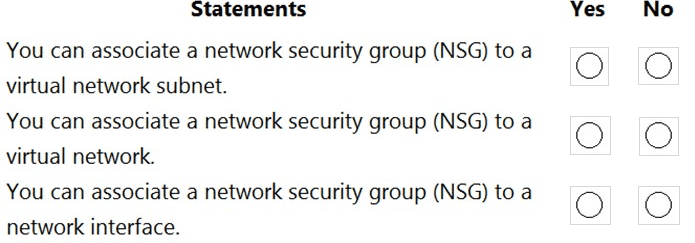
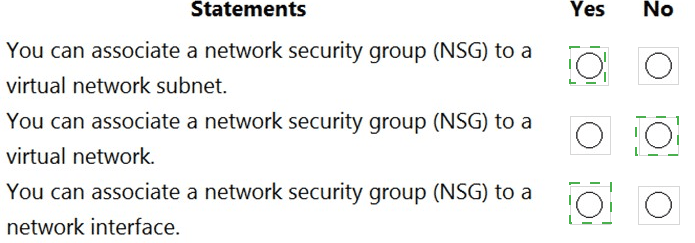
You can associate a network security group (NSG) to a virtual network subnet.
Answer: Yes. This is true. An NSG can be associated directly to a subnet. When applied at the subnet level, the rules apply to all traffic entering and leaving the subnet, affecting all network interfaces (NICs) of VMs connected to that subnet. This is a common administrative boundary.
You can associate a network security group (NSG) to a virtual network.
Answer: No. This is false. An NSG cannot be directly associated to an entire virtual network (VNet). A VNet is a logical isolation boundary, but traffic filtering with NSGs is applied at a more granular level: either at the subnet or the network interface (NIC) level. You apply NSGs to subnets within the VNet.
You can associate a network security group (NSG) to a network interface.
Answer: Yes. This is true. An NSG can be associated directly to a virtual machine's network interface (NIC). This provides the most granular level of control, applying rules specifically to the traffic for that individual NIC. A NIC can have both a subnet-level NSG and its own NIC-level NSG applied, with rules evaluated in a specific order.
Incorrect Options / Why Other Answers Would Be Wrong:
Selecting "No" for the first or third statements would be incorrect, as both subnet and NIC associations are standard, documented capabilities. Selecting "Yes" for the second statement would be incorrect, as there is no direct "VNet" association option in Azure; NSGs are applied to child resources within the VNet.
Reference:
Microsoft Learn documentation, "Network security groups". It states: "You can associate or dissociate an NSG from a network interface or subnet." It further explains the traffic evaluation process when NSGs are applied at both levels. The documentation does not list "Virtual Network" as a valid association target.
For each of the following statements, select Yes if the statement is true. Otherwise, select
No.
NOTE: Each correct selection is worth one point.
Explanation:
This question tests core features and capabilities of Azure Blueprints. Blueprints are a declarative way to orchestrate the deployment of various resource templates and artifacts (like policies, role assignments) to standardize environments at scale. They operate at the subscription level and can configure more than just resources.
Correct Options:
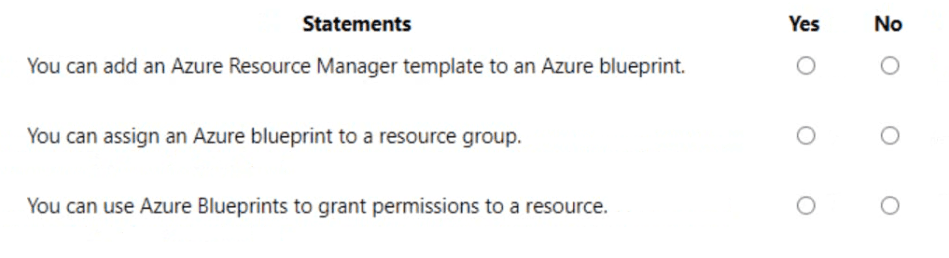
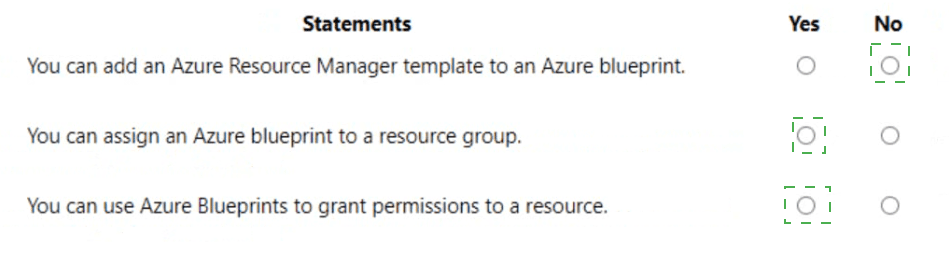
You can add an Azure Resource Manager template to an Azure blueprint.
Answer: Yes. This is true. An ARM template (or a Bicep file) is one of the primary artifacts you can add to a blueprint definition. When the blueprint is assigned, it deploys the template, creating the defined resources as part of the standardized environment setup.
You can assign an Azure blueprint to a resource group.
Answer: No. This is false. Azure Blueprints are assigned at the subscription level. During the assignment, you specify a target location for artifacts (like resource groups), meaning you can designate where within the subscription the blueprint's resources will be deployed, but the blueprint's scope of assignment is the subscription itself, not a resource group.
You can use Azure Blueprints to grant permissions to a resource.
Answer: Yes. This is true. A Role Assignment artifact is another core component of Azure Blueprints. You can include an artifact that grants a built-in or custom Azure RBAC role to a user, group, or managed identity on the subscription or on specific resource groups created by the blueprint. This is a key feature for ensuring consistent security policies during deployment.
Incorrect Options / Why Other Answers Would Be Wrong:
Selecting "No" for the first or third statements would be incorrect, as ARM templates and role assignments are standard blueprint artifacts. Selecting "Yes" for the second statement would be incorrect, as the assignment scope is the subscription, though the blueprint can create and target resource groups within it.
Reference:
Microsoft Learn documentation, "What are Azure Blueprints?". It lists the supported artifact types, which include ARM templates and Role assignments. It also states: "Blueprints are assigned to a subscription," clarifying the scope of assignment.
Select the answer that correctly completes the sentence.


Explanation:
This question tests your understanding of Azure VM billing. The key is to know that you are charged for compute resources (CPU, memory) as long as the VM is in a provisioned/allocated state. Simply shutting down the OS from inside the VM does not deallocate the underlying hardware. You must deallocate the VM using Azure management tools to stop compute billing.
Correct Option:
select Stop for the virtual machine from the Azure portal.
When you select Stop (or use Stop-AzVM in PowerShell/CLI) in the Azure portal, it initiates a deallocation of the VM. This releases the underlying hardware (CPU, memory), and you stop incurring compute charges. You are only billed for the underlying storage (OS and data disks) and any reserved public IP addresses while the VM is deallocated.
Incorrect Options:
shut down the virtual machine from a Remote Desktop session.
disconnect the virtual machine during a Remote Desktop session.
put the virtual machine in sleep mode from a Remote Desktop session.
All three of these actions are performed within the guest operating system. From Azure's infrastructure perspective, the VM remains running and allocated. The physical host, CPU, and memory are still reserved for it, and therefore compute billing continues. These actions do not save compute costs.
Reference:
Microsoft Learn documentation, "Save costs by stopping and starting VMs in Azure". It explicitly states: "To stop being charged for VMs, you must stop them from the Azure portal, using Azure PowerShell, Azure CLI, or the REST API... Simply shutting down the VM from within the OS does not stop the charges because the Azure platform still sees the VM as running."
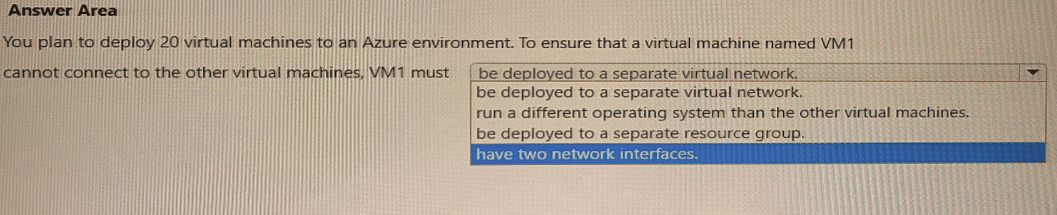
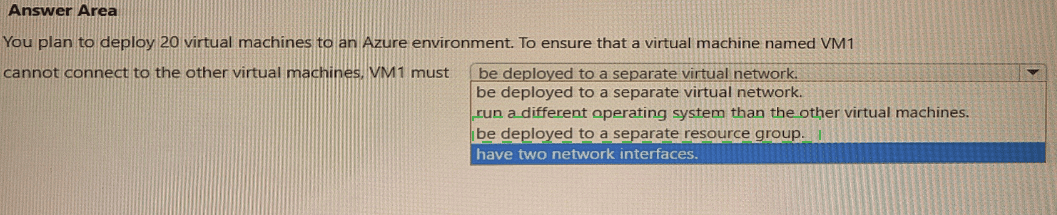
Select the answer that correctly completes the sentence.
Explanation:
This question tests network isolation strategies in Azure. The requirement is to prevent VM1 from connecting to the other 19 VMs. The key concept is that connectivity within Azure is primarily controlled by network boundaries. The most effective and direct way to isolate a VM at the network layer is to place it in a separate, non-connected network segment.
Correct Option:
be deployed to a separate virtual network.
This is the correct answer. Virtual networks (VNets) in Azure are isolated network environments. By default, VMs in one VNet cannot communicate with VMs in a different VNet. Deploying VM1 to its own VNet provides immediate network-level isolation from the other VMs (which would be in another VNet). Without VNet Peering, a VPN Gateway, or other explicit connectivity, no traffic can flow between them.
Incorrect Options:
run a different operating system than the other virtual machines.
The operating system has no bearing on network connectivity. VMs running different OSes (e.g., Windows and Linux) on the same subnet can communicate freely if network security rules allow it. This does not isolate them.
be deployed to a separate resource group.
Resource groups are management and organizational containers for billing and access control. They do not provide any network isolation. VMs in different resource groups but within the same VNet/subnet can communicate normally.
have two network interfaces.
Having multiple network interfaces (NICs) allows a VM to connect to multiple subnets, but it does not inherently prevent it from communicating with other VMs on those subnets. It could actually increase connectivity rather than isolate it.
Reference:
Microsoft Learn documentation, "Azure Virtual Network frequently asked questions (FAQ)": "Virtual networks are isolated from one another. You can create multiple virtual networks per region and per subscription. Each virtual network is isolated from other virtual networks." This confirms that separate VNets are a primary isolation boundary.
Select the answer that correctly completes the sentence.


Explanation:
This question tests the classification of Azure services into cloud service models: Infrastructure as a Service (IaaS), Platform as a Service (PaaS), and Software as a Service (SaaS). Azure Cosmos DB is a fully managed, globally distributed NoSQL database service. The key differentiator is management responsibility: with PaaS, the cloud provider manages the underlying infrastructure, runtime, and application platform, allowing developers to focus solely on data and application code.
Correct Option:
platform as a service (PaaS) is the correct answer.
Azure Cosmos DB is a prime example of PaaS. Microsoft fully manages the servers, storage, networking, virtualization, and database software. The user does not manage any infrastructure (OS, patches, scaling of VMs). The user is responsible for managing their data, configuring the database (throughput, consistency, indexing), and integrating it into their applications. This shared responsibility model is characteristic of PaaS.
Incorrect Options:
infrastructure as a service (IaaS):
IaaS provides the fundamental compute, storage, and networking resources. You rent VMs where you have full control over the OS and software, including installing and managing your own database software (like MongoDB or Cassandra on a VM). Cosmos DB is a managed service, not raw infrastructure.
content as a service:
This is not a standard cloud service model. It might describe a specific API-based content delivery pattern but is not a category for classifying core Azure services like Cosmos DB.
software as a service (SaaS):
SaaS delivers a complete, end-user application over the internet (e.g., Office 365, Outlook, Salesforce). The consumer uses the software but does not manage any underlying infrastructure or platform. Cosmos DB is a development platform component (a database), not an end-user application, so it is PaaS, not SaaS.
Reference:
Microsoft Learn documentation, "Cloud service models". It defines PaaS as: "This cloud service model is a managed hosting environment. The cloud provider manages the virtual machines and networking resources, and the cloud tenant deploys their applications into the managed hosting environment." Azure Cosmos DB is consistently categorized as a PaaS offering in Azure documentation.
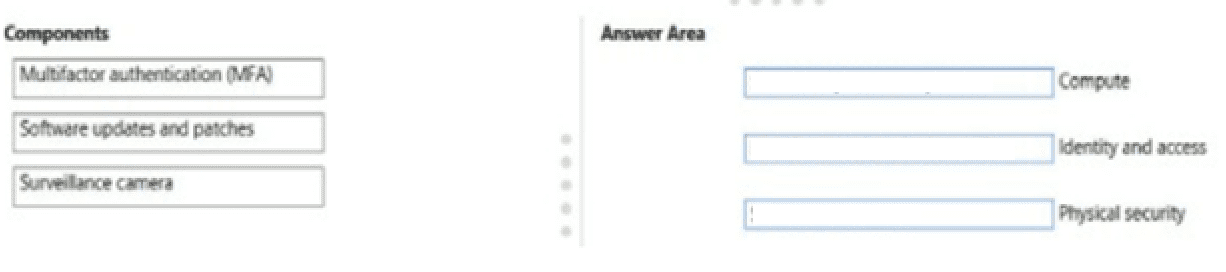
Match the security components to the appropriate defense in depth layers.
To answer, drag the appropriate service from the column on the left to its description on the
right. Each service may be used once, more than once, or not at all.
NOTE: Each correct match is worth one point
Explanation:
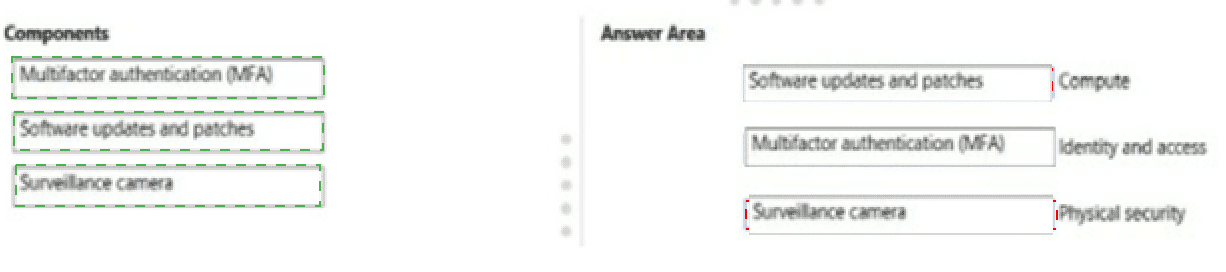
This question tests the concept of Defense in Depth—the layered security approach used in Azure and cloud computing. Each layer provides a distinct type of protection. The goal is to match the security component to the correct layer where its primary control operates.
Correct Matches:
Multifactor authentication (MFA) → Identity and access
Justification: MFA is a core identity and access management control. It adds a critical second layer of verification (beyond a password) to ensure that a user is who they claim to be before granting access to systems and data. It operates at the "Identity" layer of defense in depth.
Software updates and patches → Compute
Justification: Applying security updates and patches is a fundamental security practice for the compute layer. This involves securing the operating system and applications running on virtual machines, containers, or other compute resources. Keeping software updated mitigates vulnerabilities that could be exploited to compromise the compute environment.
Surveillance camera → Physical security
Justification: Surveillance cameras are a classic physical security control. They monitor and deter unauthorized physical access to data centers, server rooms, and other facilities housing the infrastructure. This is the outermost layer of defense, protecting the tangible hardware.
Why Other Matches Would Be Incorrect:
MFA does not belong to Physical (it's a logical control) or Compute (it's about authentication, not securing the OS/software).
Software patches do not belong to Identity (they don't manage user access) or Physical (they are digital).
Surveillance cameras do not belong to Compute or Identity; they are purely physical deterrents and monitoring tools.
Reference:
Microsoft Learn documentation, "What is defense in depth?". The article outlines the layers, including Physical, Identity, and Compute, and provides examples of controls for each. MFA is listed under "Identity," OS hardening/updates under "Compute," and physical access controls under "Physical."
| Page 2 out of 51 Pages |