Topic 1: Exam Pool A
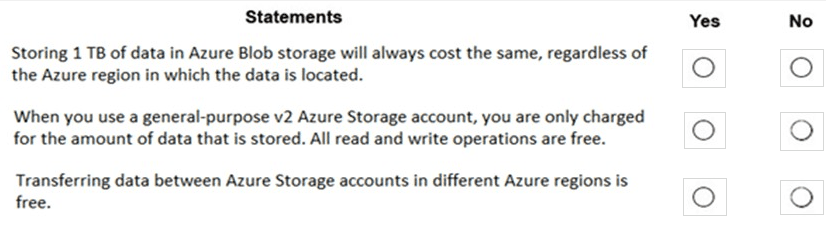
For each of the following statements, select Yes if the statement is true. Otherwise, select
No.
NOTE: Each correct selection is worth one point.
Explanation:
This question tests knowledge of Azure Storage pricing factors, specifically the impact of region, transaction costs, and data transfer fees. Azure Storage costs vary based on multiple components: storage capacity, transaction operations, data transfer, and redundancy options, and pricing differs by region.
Correct Options:
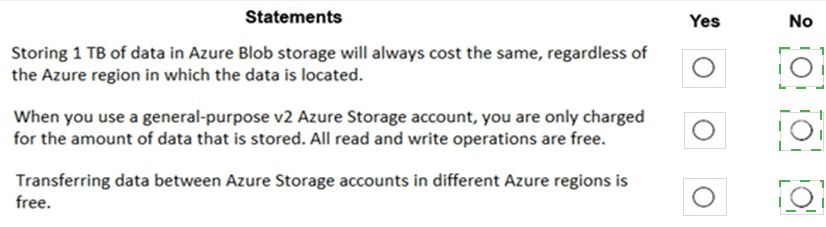
Storing 1 TB of data in Azure Blob storage will always cost the same, regardless of the Azure region in which the data is located.
Answer: No. This statement is false. Azure Storage pricing varies by region. Factors like local infrastructure costs, demand, and market conditions cause differences in per-GB storage prices across regions (e.g., storage in US East may cost less than in Brazil South). The cost for 1 TB is not globally uniform.
When you use a general-purpose v2 Azure Storage account, you are only charged for the amount of data that is stored. All read and write operations are free.
Answer: No. This statement is false. With a GPv2 account, you are charged for multiple components:
Storage capacity (per GB).
Transaction operations (read, write, list – though costs are very low per 10,000 operations).
Data transfer egress (outbound) bandwidth.
Transactions are not free; they are a separate, metered charge.
Transferring data between Azure Storage accounts in different Azure regions is free.
Answer: No. This statement is false. Data transfer out of an Azure region (egress) typically incurs charges. Transferring data from a storage account in one region to a storage account in another region involves inter-region data transfer (egress), which is billed based on the amount of data moved. Ingress (data going into Azure) is generally free, but egress between regions is not.
Incorrect Options / Why Other Answers Would Be Wrong:
Selecting "Yes" for any of these statements would be incorrect, as each one contains a fundamental misunderstanding of Azure Storage pricing components.
Reference:
Microsoft Learn documentation, "Azure Storage pricing" and "Azure bandwidth pricing details". The pricing pages clearly show that costs vary by region, list separate line items for storage capacity and transactions, and specify that data transfer between regions (egress) is charged.
Select the answer that correctly completes the sentence.|


Explanation:
This question tests the specific target storage service used by Azure File Sync. Azure File Sync is a service that centralizes file shares in Azure while keeping the flexibility, performance, and compatibility of a local Windows file server. It synchronizes files between on-premises Windows Servers and an Azure storage resource designed for file-level access.
Correct Option:
file share. This is the correct answer.
Azure File Sync specifically synchronizes on-premises Windows Server data to an Azure file share (provided by the Azure Files service). The on-premises server runs the File Sync agent, which syncs files to a "cloud endpoint," which is a representation of an Azure file share. This enables features like cloud tiering and multi-site sync.
Incorrect Options:
blob container:
Azure Blob Storage is for unstructured object data (like images, backups, logs). While you can move data to a blob container using tools like AzCopy, the Azure File Sync agent is not designed to sync to blob containers. It works exclusively with Azure file shares.
Data Lake Storage container:
Azure Data Lake Storage is an optimized service for big data analytics workloads, built on top of Blob Storage. It is not the target for the Azure File Sync agent, which is built for general-purpose file server workloads, not analytics.
queue:
Azure Queue Storage is a messaging service for asynchronous communication between application components. It is not a target for file synchronization.
Reference:
Microsoft Learn documentation, "What is Azure File Sync?". The overview states: "Azure File Sync transforms Windows Server into a quick cache of your Azure file share." It explicitly defines the cloud endpoint as an Azure file share, confirming the correct target.
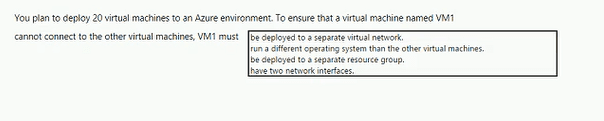
To complete the sentence, select the appropriate option in the answer area.
Explanation:
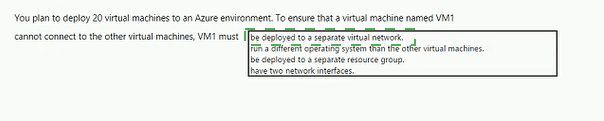
This question tests network isolation strategies in Azure. The requirement is to prevent VM1 from connecting to the other 19 VMs. The key concept is that connectivity within Azure is primarily controlled by network boundaries. The most effective and direct way to isolate a VM at the network layer is to place it in a separate, non-connected network segment.
Correct Option:
be deployed to a separate virtual network.
This is the correct answer. Virtual networks (VNets) in Azure are isolated network environments. By default, VMs in one VNet cannot communicate with VMs in a different VNet. Deploying VM1 to its own VNet provides immediate network-level isolation from the other VMs (which would be in another VNet). Without VNet Peering, a VPN Gateway, or other explicit connectivity, no traffic can flow between them.
Incorrect Options:
run a different operating system than the other virtual machines.
The operating system has no bearing on network connectivity. VMs running different OSes (e.g., Windows and Linux) on the same subnet can communicate freely if network security rules allow it. This does not isolate them.
be deployed to a separate resource group.
Resource groups are management and organizational containers for billing and access control. They do not provide any network isolation. VMs in different resource groups but within the same VNet/subnet can communicate normally.
have two network interfaces.
Having multiple network interfaces (NICs) allows a VM to connect to multiple subnets, but it does not inherently prevent it from communicating with other VMs on those subnets. It could actually increase connectivity rather than isolate it.
Reference:
Microsoft Learn documentation, "Azure Virtual Network frequently asked questions (FAQ)": "Virtual networks are isolated from one another. You can create multiple virtual networks per region and per subscription. Each virtual network is isolated from other virtual networks." This confirms that separate VNets are a primary isolation boundary.
To complete the sentence, select the appropriate option in the answer area.


Explanation:
This question tests a fundamental understanding of Azure's consumption-based (pay-as-you-go) pricing model, especially in the context of migrating a public-facing service. A key principle of Azure is that you pay for the resources you use, which includes compute, storage, and network egress. For a public website, ongoing operational costs are based on usage.
Correct Option:
pay monthly usage costs. This is the correct answer.
Azure primarily operates on a consumption-based pricing model. When you migrate a public website to Azure (e.g., using App Service, VMs, or Azure Kubernetes Service), you will incur monthly charges for the compute instances, storage, and any additional services you use. Crucially, you also pay for data egress—the amount of data transferred out from Azure to internet users viewing your website. These costs vary based on your monthly usage.
Incorrect Options:
deploy a VPN:
A VPN (Virtual Private Network) is used for creating secure, private connections between networks (like on-premises to Azure). A public website is intentionally accessible from the public internet and does not require a VPN for general user access. A VPN would be unnecessary and counterproductive for a public site.
pay to transfer all the website data to Azure:
While there may be a one-time cost associated with data ingress (uploading the initial website data into Azure), this is often free. Azure generally does not charge for inbound data transfer (ingress). The significant ongoing cost is for egress (data served to users), not the one-time migration of data into Azure.
reduce the number of connections to the website:
There is no requirement to reduce connections. In fact, a key benefit of migrating to Azure is the ability to scale the website to handle increased traffic and connections as needed. The architecture should plan for scalability, not limitation.
Reference:
Microsoft Learn documentation, "How Azure pricing works". It explains the core concepts of pay-as-you-go pricing, including separate charges for compute, storage, and networking, with data egress being a key cost factor for services accessible from the internet. The Azure pricing calculator can model these usage-based costs.
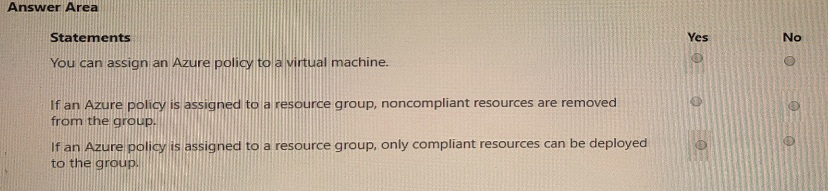
For each of the following statements, select Yes if the statement is true. Otherwise, select
No.
NOTE: Each correct select is worth one point.
Explanation:
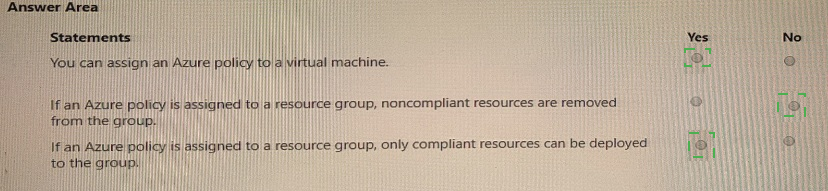
This question tests practical knowledge of Azure Policy assignment scopes and effects. Azure Policy is a governance tool that enforces organizational standards. Policies can be assigned at various scopes (management group, subscription, resource group, resource) and have different effects (like audit, deny, or modify). They do not automatically delete existing non-compliant resources.
Correct Options:
You can assign an Azure policy to a virtual machine.
Answer: Yes. This is true. While it's most common to assign policies at higher scopes (like resource groups or subscriptions), Azure Policy can be assigned directly to an individual resource, such as a specific virtual machine. This allows for very granular policy application.
If an Azure policy is assigned to a resource group, noncompliant resources are removed from the group.
Answer: No. This is false. Azure Policy effects like Audit and Deny do not delete or remove existing non-compliant resources. They either report on non-compliance (Audit) or prevent the creation of new non-compliant resources (Deny). Existing resources remain in place but are marked as non-compliant. Remediation tasks can be run to fix some resources, but this is not automatic removal.
If an Azure policy is assigned to a resource group, only compliant resources can be deployed to the group.
Answer: Yes. This is true, but with a critical condition. This statement is true only if the policy uses a "Deny" effect. A policy with a Deny effect assigned to a resource group will prevent the deployment of any new resource within that group that violates the policy rules. Therefore, successfully deployed resources will be compliant. Policies with "Audit" effects do not block deployment.
Incorrect Options / Clarifications:
For the second statement, selecting "Yes" would misunderstand the non-destructive nature of policy effects.
For the third statement, the key is understanding that "Deny" policies enforce compliance for new deployments, making the statement generally true in practice for properly configured policies.
Reference:
Microsoft Learn documentation, "Azure Policy assignment structure" and "Understand Policy effects". It confirms policies can be assigned at any scope, including individual resources. It details that "Deny" prevents non-compliant resource creation, while "Audit" creates warning records but does not delete or block existing resources.
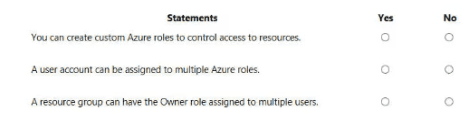
For each of the following statements, select Yes if the statement is true. Otherwise, select
No.
NOTE: Each correct selection is worth one point.
Explanation:
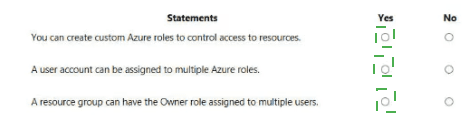
This question tests fundamental concepts of Azure Role-Based Access Control (RBAC). RBAC is the authorization system for managing access to Azure resources. It allows for fine-grained access management through built-in and custom roles, assigned to users, groups, or service principals at specific scopes.
Correct Options:
You can create custom Azure roles to control access to resources.
Answer: Yes. This is true. If the built-in roles (like Owner, Contributor, Reader) do not meet your specific needs, you can create custom RBAC roles. A custom role is defined by a JSON file specifying a precise set of allowed actions (permissions) and can be assigned just like a built-in role.
A user account can be assigned to multiple Azure roles.
Answer: Yes. This is true. A single user (or group, service principal) can have multiple role assignments. The effective permissions are the union (sum) of all permissions granted by the individual roles. For example, a user could have the "VM Contributor" role on one resource group and the "Storage Account Contributor" role on another.
A resource group can have the Owner role assigned to multiple users.
Answer: Yes. This is true. There is no limit to the number of users (or other security principals) that can be assigned the same role on the same scope. You can assign the Owner role to multiple users on a single resource group, granting all of them full control over that resource group and its contents.
Incorrect Options / Why Other Answers Would Be Wrong:
Selecting "No" for any of these statements would be incorrect. All three statements describe core, flexible capabilities of the Azure RBAC system that are essential for complex access management scenarios.
Reference:
Microsoft Learn documentation, "What is Azure Role-Based Access Control (Azure RBAC)?". It confirms: 1) "If the built-in roles don't meet the specific needs of your organization, you can create your own custom roles." 2) "A role assignment is the process of attaching a role definition to a user, group, or service principal at a particular scope." Multiple assignments are inherent. 3) The Owner role, like any other, can be assigned to multiple principals at a scope.
Select the answer that correctly completes the sentence.


Explanation:
This question tests the purpose and primary benefit of Azure Resource Manager (ARM). ARM is the underlying deployment and management service for Azure. It provides a consistent management layer that enables you to create, update, and delete resources in your Azure subscription. The key phrase is "common platform for deploying objects" and "implementing consistency."
Correct Option:
Azure Resource Manager templates provide is the correct answer.
ARM templates (in JSON or Bicep format) are declarative infrastructure-as-code files. They define the desired state of your Azure infrastructure. When you deploy a template, the Azure Resource Manager service interprets it and orchestrates the creation of all defined resources in the correct order, handling dependencies. This provides a common platform and methodology for deployment, ensuring consistency because the same template can be deployed repeatedly to create identical environments.
Incorrect Options:
Azure policies provide:
Azure Policy is for governance and compliance. It enforces organizational rules and standards (e.g., "only certain VM SKUs are allowed"). It ensures consistency in configuration and rules, but it is not the platform for deploying the infrastructure objects themselves.
Resource groups provide:
Resource groups are logical containers for managing and organizing related Azure resources for billing, access control, and lifecycle management. They do not provide a deployment platform or enforce consistency in the way ARM templates do.
Management groups provide:
Management groups are containers for managing access, policies, and compliance across multiple subscriptions. They help organize subscriptions hierarchically but are not a deployment platform for resources.
Reference:
Microsoft Learn documentation, "What is Azure Resource Manager?". It states: "Azure Resource Manager is the deployment and management service for Azure... When you send a request from any of the Azure tools, APIs, or SDKs, Resource Manager receives the request." It further explains that ARM templates provide a consistent, repeatable way to deploy solutions.
For each of the following statements, select Yes if the statement is true. Otherwise, select
No.
NOTE: Each correct selection is worth one point.
Explanation:
This question tests the encryption capabilities of various Azure networking and compute services. Encryption in transit is typically provided by higher-layer protocols (like TLS/HTTPS) or specific VPN/IPsec tunnels, not by standard network filtering or firewall services themselves.
Correct Options:
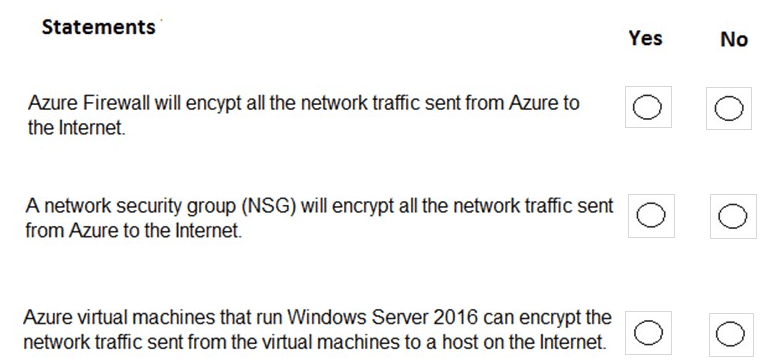
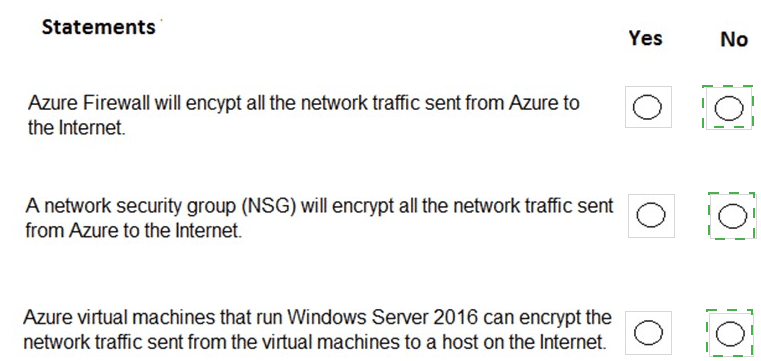
Azure Firewall will encrypt all the network traffic sent from Azure to the Internet.
Answer: No. This is false. Azure Firewall is a stateful, managed network firewall service. Its primary function is to filter and log traffic (allow/deny). It does not perform encryption. Encryption for internet-bound traffic must be implemented at the application layer (e.g., using HTTPS/TLS) or via a VPN gateway for specific tunnels.
A network security group (NSG) will encrypt all the network traffic sent from Azure to the Internet.
Answer: No. This is false. An NSG is a basic layer 3/4 packet filter that uses rules to allow or deny traffic based on IP, port, and protocol. Like a firewall, it operates on packets but does not modify them or provide encryption. Encryption is handled at other layers.
Azure virtual machines that run Windows Server 2016 can encrypt the network traffic sent from the virtual machines to a host on the Internet.
Answer: Yes. This is true. Encryption is a function of the operating system and applications running on the VM. A Windows Server 2016 VM can use protocols like TLS/SSL (for HTTPS, SMTPS, etc.) or IPsec to encrypt its outbound network traffic to an internet host. The VM itself, not the Azure network fabric, performs this encryption.
Incorrect Options / Why Other Answers Would Be Wrong:
Selecting "Yes" for the first two statements would incorrectly assign encryption capabilities to services that only filter traffic. Selecting "No" for the third statement would ignore the VM's own ability to use standard encryption protocols.
Reference:
Microsoft Learn documentation for each service confirms their roles:
Azure Firewall: "A cloud-native and intelligent network firewall security service." No mention of providing encryption.
Network Security Groups: "Filter network traffic to and from Azure resources." It is a basic access control list.
Encryption in transit is the responsibility of the application or OS, as described in security best practices for VMs.
For each of the following statements, select Yes If the statement is tine. Otherwise, select
No. NOTE: Each collect selection is worth one point.


Explanation:
Azure Active Directory (Azure AD) is Microsoft's cloud-based identity and access management service. It provides a comprehensive set of capabilities including access management for both cloud and on-premises applications, single sign-on functionality across thousands of pre-integrated applications, and device management capabilities that include registration of various platforms including iOS devices. Understanding these core features is essential for evaluating the accuracy of each statement.
Statement 1: Azure Active Directory (Azure AD) can be used to manage access to on-premises applications.
Correct Option:
Yes. Azure AD can manage access to on-premises applications through several mechanisms. The primary method is using Azure AD Application Proxy, which provides secure remote access to on-premises web applications. Additionally, Azure AD can integrate with on-premises applications via SAML or WS-Federation, and can work with existing on-premises identity infrastructure through Azure AD Connect to provide hybrid identity solutions.
Reference:
Microsoft Docs - "What is Azure Active Directory?" / "Remote access to on-premises applications through Azure AD Application Proxy"
Statement 2: Azure Active Directory (Azure AD) provides single sign-on (SSO).
Correct Option:
Yes. SSO is one of Azure AD's fundamental capabilities. It allows users to access multiple applications—including thousands of pre-integrated SaaS applications, custom cloud apps, and on-premises applications—with a single set of credentials. Azure AD supports various SSO standards including SAML 2.0, OpenID Connect, and OAuth 2.0, enabling seamless authentication across different application types.
Reference:
Microsoft Docs - "What is single sign-on in Azure Active Directory?" / "SAML-based single sign-on"
Statement 3: iOS devices can be registered in Azure Active Directory (Azure AD).
Correct Option:
Yes. Azure AD supports device registration for multiple platforms including iOS through Microsoft Intune or mobile device management (MDM) integration. Registered iOS devices can be used for conditional access policies, requiring compliant or domain-joined devices for access to corporate resources. This enables organizations to securely manage mobile access to Azure AD-integrated applications.
Reference:
Microsoft Docs - "Azure AD device registration overview" / "How to: Plan your Azure AD device deployment"
| Page 3 out of 51 Pages |