Free Microsoft PL-500 Practice Test Questions MCQs
Stop wondering if you're ready. Our Microsoft PL-500 practice test is designed to identify your exact knowledge gaps. Validate your skills with Microsoft Power Automate RPA Developer questions that mirror the real exam's format and difficulty. Build a personalized study plan based on your free PL-500 exam questions mcqs performance, focusing your effort where it matters most.
Targeted practice like this helps candidates feel significantly more prepared for Microsoft Power Automate RPA Developer exam day.
21700+ already prepared
Updated On : 12-Oct-2026170 Questions
Microsoft Power Automate RPA Developer
4.9/5.0
Topic 1, Contoso Pharmaceuticals
Background
Contoso Pharmaceuticals distributes specialty pharmaceuticals, ingredients, and raw materials throughout North America. The company has 33 offices and 12 warehouses across the US, Mexico, and Canada. As their customers' needs grow in sophistication, Contoso wants to delight customers with breakthrough products, exceptional service, and on-time delivery of materials. They want to automate time consuming and manual processes that are prone to error. Contoso wants to consolidate and automate ordering and fulfillment processes.
• The company has a fleet of 500 delivery trucks. The company has 150 drivers and uses third-party contractors to deliver goods.
• The company has 400 warehouse workers and 30 finance clerks.
• Contoso has 85 sales representatives and 50 customer service representatives. Sales representatives spend most of their time on the road visiting customers or prospects.
• The IT department consists of four system administrators and six system analysts.
Current environment
Overview
Contoso Pharmaceuticals has a custom enterprise resource management (ERP) system. It is difficult to integrate other applications and services with the system. Office staff manually key in purchase orders, customer orders, and invoices after they receive a scan or hard copy of an agreement.
Applications
• The company uses a custom supplier management system named SMSApps that runs on each user's workstation. The system is costly to run and maintain. SMSApp does not have an API.
• Sales representatives manage customer requests by using Dynamics 365 Sales.
• Contoso has Microsoft Power Platform development, user acceptance testing (UAT), and production environments.
• Administrators create one Accounts Payable (AP) mailbox for each environment to support testing.
• The use of a DLP policy and Desktop Flow development is specified as part of the automation requirements.
Business process
1. Sales representatives create quotes by using a Microsoft Word document template. The template allows representatives to include product quantity, and cost estimation details that will be needed to fulfil an order.
The representative converts quotes to a PDF file and emails the file to the customer for approval.
2. The sales representative alerts the finance team about the new order and emails the finance team a copy of the quote for processing.
3. The finance team prints the quote and manually creates a purchase order (PO) into SMSApp to request materials from a known and trusted vendor.
4. The SMSApp distributes the PO to stakeholders. The system sends a copy to a shared finance team mailbox.
5. Once a PO is fulfilled by a vendor, the system sends an email to the finance mailbox. The finance team releases an order to the warehouse.
6. Materials are shipped from the vendor to one of Contoso's warehouses. Warehouse workers enter key information from the waybill into SMSApp. The materials are unloaded and racked in the warehouse until they are shipped to customers.
7. Upon checking for new daily orders in SMSApp, they see an open order is pending that is awaiting the newly received materials
8. The Warehouse worker loads an order onto a truck for delivery and marks the order as complete in SMSApp.
9. Sales representatives provide fulfillment status and tracking information for orders.
10. A finance clerk prepares an invoice and sends the invoice to the customer by email. The clerk sends a copy of the email to the shared AP mailbox.
11. The AP team monitors the shared mailbox to confirm that the customer has paid the invoice.
Requirements
Functional requirements
• Large volume orders must be processed before other orders.
• Invoices must be cross-checked with received items against packing slip for shipments.
• The finance team must be able to analyze patterns in transactional data to conduct fraud prevention activities.
• You must automate the process of entering data about incoming orders into SMSApp.
• The solution must follow the principle of least privilege.
Purchase Order Quantity flow
• You must create an unmanaged solution to update purchase order details in SMSApp. The flow must use a manual trigger.
• Members of Accounts Payable team will be testers for the solution. They must be able to access the Purchase Order Quantity flow.
Flow for processing invoice data
• You must create a flow to monitor the AP mailbox. When an invoice arrives as an attachment in the inbox, the flow must automatically process the invoice data by using a form processing model. The flow must crosscheck the received items against the packing slip.
• You must use different Accounts Payable email addresses for development user acceptance testing (UAT),and production environments.
• You must use an environment variable to represent the Accounts Payable mailbox for the environment in use.
• You must be able to use the environment variable across multiple cloud flows, a custom connector, and a canvas app.
Technical requirements
• Users must only be allowed to connect to and access systems that are required for the employee to perform required job tasks.
• All automation flows must be either co-owned or shared between staff.
• All employees must be able to access the new environment to build personal productivity automations.
• You must distribute the workload for desktop flows to optimize productivity.
Monitor flows
• All data extracted from Invoices should be stored in a custom Dataverse entity. Only employees who are part of Finance role should be able to edit all Invoice data but must be prevented from creating or deleting one.
Issues
Invoice data
All users report that they can see and modify invoice data.
New environment
• The IT department creates a new environment. A user creates a cloud flow named FlowA in the environment that triggers a desktop flow. A user reports that the cloud flow does not trigger the desktop flow to run.
• Microsoft Dataverse is not provisioned in the new environment. You attempt to create a Desktop flow in the default environment but receive a Dataverse error message and cannot proceed.
Data entry automation flow
An administrator runs a new desktop flow in the development environment to automate data entry into SMSApp. The flow automatically reverts to a suspended state.
Order fulfillment flow
You must automate the customer communication process by using an unattended desktop flow. The flow must check the fulfillment status of each active order in SMSApp. If an order is fulfilled, the flow must send the customer an email that includes tracking information for their order.
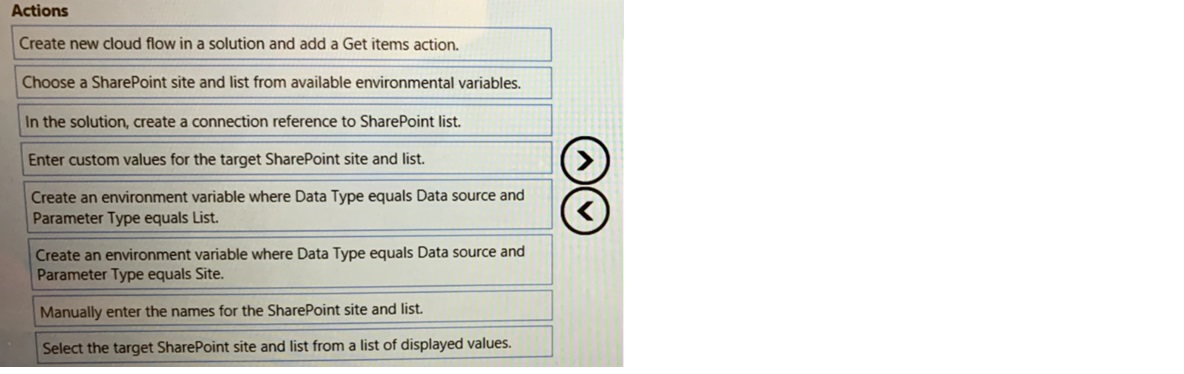
You are preparing to create a cloud flow that queries data from a SharePoint list.
You must use different SharePoint lists for the test and production environments.
You need to configure the flow to select the correct SharePoint list for the environment
where you deploy the flow.
Which five actions should you perform in sequence? To answer, move the appropriate
actions from the list of actions to the answer area and arrange them in the correct order.
Explanation:
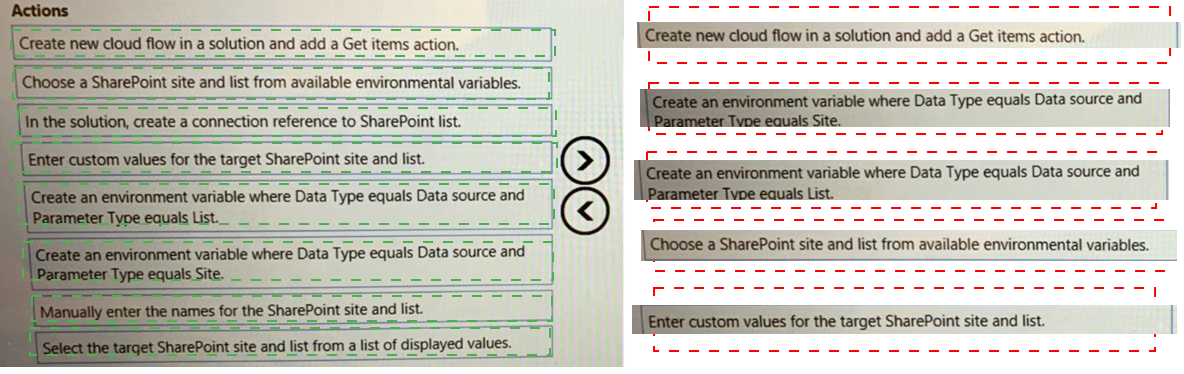
This question tests your knowledge of solution-aware cloud flows and environment variables for SharePoint data sources. The goal is to decouple the SharePoint site and list references from the flow logic, enabling runtime selection based on the deployment environment. You need to create the flow, set up the necessary environment variables for the site and list, create a connection reference, and finally bind the Get items action to these variables.
✔️ Correct Options (in sequence):
Create new cloud flow in a solution and add a Get items action.
This is the foundational first step. The flow must be created inside a solution to use solution-aware components like environment variables and connection references.
Create an environment variable where Data Type equals Data source and Parameter Type equals Site.
This stores the SharePoint site URL as a configurable value. You need this to point to different sites (e.g., test vs. production) without modifying the flow.
Create an environment variable where Data Type equals Data source and Parameter Type equals List.
This stores the specific SharePoint list name or ID. Combined with the site variable, it allows the flow to target different lists dynamically per environment.
In the solution, create a connection reference to SharePoint list.
A connection reference holds the authentication and connection details for SharePoint. This ensures the flow can connect regardless of which site or list is targeted.
Choose a SharePoint site and list from available environmental variables.
Finally, in the Get items action, you select the site and list from the environment variables you just created. This binds the action to the configurable values.
❌ Incorrect options (and why they are not part of the correct sequence):
Enter custom values for the target SharePoint site and list.
This defeats the purpose of environment variables. Hard-coding values ties the flow to a specific environment, preventing dynamic switching between test and production lists.
Manually enter the names for the SharePoint site and list.
Same as above—manual entry removes the flexibility needed for environment-specific deployment. It is not a solution-aware practice.
Select the target SharePoint site and list from a list of displayed values.
Selecting from a displayed list at design time fixes the values in the flow definition. This does not allow the flow to pick different lists when deployed to another environment.
Create an environment variable where Data Type equals Data source and Parameter Type equals List (duplicate).
You need only one List variable and one Site variable. Creating two List variables without a Site variable is incomplete and does not satisfy the requirement.
🔧 Reference:
→ Microsoft Learn - Create environment variables: Confirms that environment variables store values like SharePoint site URLs and can be reused across flows, allowing you to update values per environment without modifying flow logic .
→ Microsoft Learn - Connection references: Explains that connection references contain connection details for connectors like SharePoint, enabling flows to authenticate and connect to the correct service upon import .
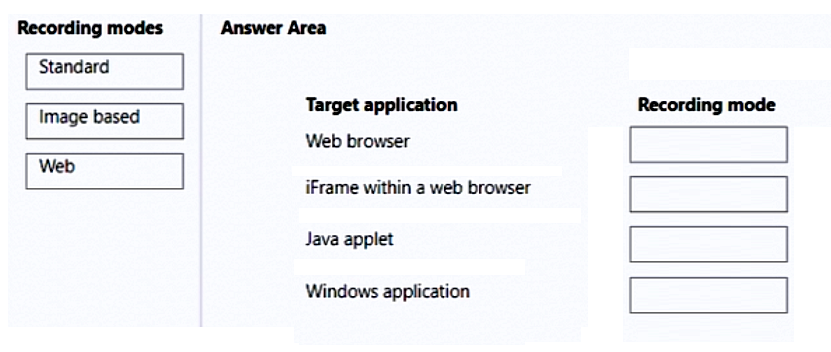
You are developing desktop flows for a company.
You need to use Recorder to record steps that you are performing in target applications.
Which recording modes will Recorder use? To answer, drag the appropriate recording
modes to the correct target applications. Each recording mode may be used once, more
than once, or not at all. You may need to drag the split bar between panes or scroll to view
content.
NOTE: Each correct selection is worth one point.
Explanation:
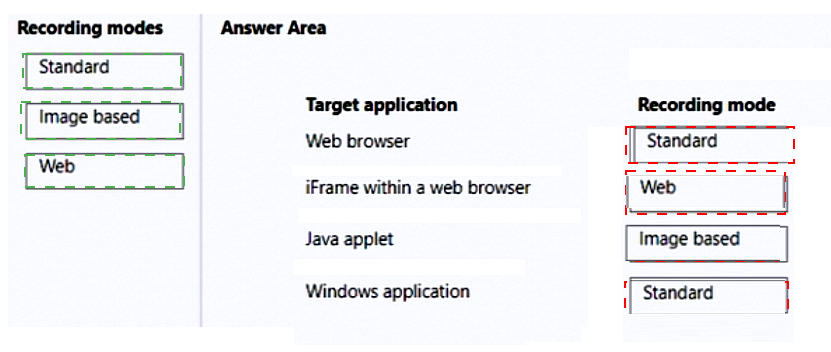
This question tests your understanding of Power Automate Desktop's recording modes and their compatibility with different target application types. Each recording mode is optimized for specific UI technologies. The Web recorder works only with web browsers, Standard recorder handles Windows and iFrame elements, and Image based recorder is used for applications that lack native UI element recognition, such as Java applets.
✔️ Correct Options:
Web browser → Web
The Web recording mode is specifically designed for web applications. It captures UI elements using HTML selectors (like ID, class, or XPath), making it the most efficient and reliable choice for standard web browsers.
iFrame within a web browser → Standard
The Standard recording mode is recommended for iFrames because they behave like embedded documents. This mode captures screen coordinates and UI hierarchies, which works well when Web mode cannot reliably identify elements within an iFrame context.
Java applet → Image based
Java applets do not expose standard UI automation properties. The Image based recording mode captures the screen image of UI elements and uses OCR/image recognition, making it the only viable choice for such non-standard applications.
Windows application → Standard
The Standard recording mode is designed for Windows desktop applications. It captures UI elements using Windows automation properties (like Name, AutomationId, or ControlType) and works reliably for most Win32, WPF, and UWP applications.
❌ Incorrect options (and why they do not match):
iFrame within a web browser → Web
The Web recorder struggles with iFrames because they are separate document contexts within a page. It often fails to identify elements inside the iFrame, making Standard mode the better and recommended choice.
Java applet → Web
Java applets are not web-based HTML applications. They run in a Java runtime environment inside the browser but do not expose HTML DOM elements, so the Web recorder cannot interact with them.
Windows application → Web
Web recording mode is exclusively for HTML-based web applications. It cannot recognize or interact with native Windows desktop UI elements, making it completely unsuitable for this target.
Java applet → Standard
Java applets do not expose native Windows or HTML automation properties. The Standard recorder cannot reliably capture their UI elements because they run in a virtual machine and do not support standard accessibility interfaces.
🔧 Reference:
→ Recording modes in Power Automate Desktop | Microsoft Learn: Confirms that Web mode is for browsers, Standard mode for Windows applications (and iFrames), and Image based mode for applications without accessible UI properties like Java applets.
You are developing a cloud flow.
You write expressions for the following JSON object. (Line numbers are included for
reference only.)
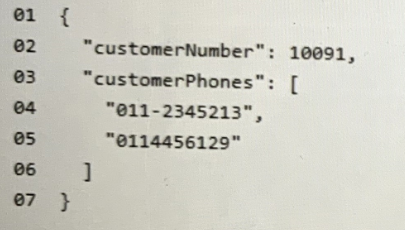
The flow parses JSON data by using the following schema;
.png)
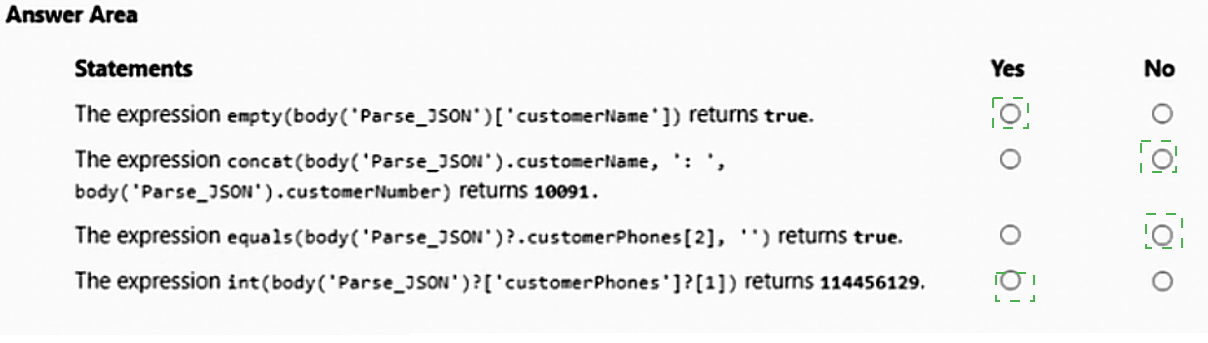
For each of the following statements, select Yes if the statement is true. Otherwise, select
No. NOTE: Each correct selection is worth one point.
.png)
Explanation:
This question tests your ability to evaluate Power Automate workflow expressions against parsed JSON payloads. It specifically examines your understanding of array indexing, data type conversion functions, object null-checking properties, and string concatenation rules within cloud flows.
✅ Correct Option:
Statement 1 (Yes) & Statement 4 (Yes):
For Statement 1, the customerName property is missing from the actual JSON payload, causing the parsed reference to evaluate as null or empty, meaning the empty() function successfully returns true. For Statement 4, the expression targets index 1 of the customerPhones array ("0114456129"), and wrapping it inside the int() function accurately casts the string digits into the integer value 114456129.
❌ Incorrect options:
Statement 2: No
This statement is false because the concat() function merges all provided arguments together. Instead of returning only the number, it combines the missing name (null), a separator, and the customer number, which evaluates to a combined string format like ': 10091' instead of just 10091.
Statement 3: No
This statement is false because the customerPhones array contains exactly two items, occupying index positions 0 and 1. Attempting to reference index 2 by using customerPhones[2] points to a non-existent third element, causing the expression evaluation to fail with an out-of-bounds error rather than returning true.
🔧 Reference:
→ Microsoft Learn: Reference guide to workflow expression functions
confirms the functional behavior of JSON array indexing, int() data conversions, evaluation rules for the empty() expression, and string assembly patterns.
| Page 1 out of 17 Pages |
Microsoft Power Automate RPA Developer Practice Exam Questions
These PL-500 practice questions with explanations help candidates learn robotic process automation using Power Automate. The questions cover desktop flows, cloud flows, process optimization, and integration with other Microsoft services. Each explanation breaks down the logic behind the correct answer, helping learners understand automation concepts more clearly. This approach enhances both theoretical knowledge and practical skills. By practicing consistently, candidates can improve their ability to design automation solutions and confidently prepare for the certification exam.People Who Trust Us
Robotic Process Automation is transforming business processes. The PL-500 exam covers desktop flows, cloud flows, and AI Builder integration. MSmcqs provided comprehensive practice test that mirrored the real exam scenarios perfectly. I passed on my first attempt and now build automation solutions that save hours of manual work.
Amanda Foster, RPA Developer | Dallas, TX