Free Microsoft MB-310 Practice Test Questions MCQs
Stop wondering if you're ready. Our Microsoft MB-310 practice test is designed to identify your exact knowledge gaps. Validate your skills with Microsoft Dynamics 365 for Finance and Operations, Financials Exam questions that mirror the real exam's format and difficulty. Build a personalized study plan based on your free MB-310 exam questions mcqs performance, focusing your effort where it matters most.
Targeted practice like this helps candidates feel significantly more prepared for Microsoft Dynamics 365 for Finance and Operations, Financials Exam exam day.
22220+ already prepared
Updated On : 12-Oct-2026222 Questions
Microsoft Dynamics 365 for Finance and Operations, Financials Exam
4.9/5.0
Topic 1: Fourth Coffee Case Study
Case study
This is a case study. Case studies are not timed separately. You can use as much exam
time as you would like to complete each case. However, there may be additional case
studies and sections on this exam. You must manage your time to ensure that you are able
to complete all questions included on this exam in the time provided.
To answer the questions included in a case study, you will need to reference information
that is provided in the case study. Case studies might contain exhibits and other resources
that provide more information about the scenario that is described in the case study. Each
question is independent of the other questions in this case study.
At the end of this case study, a review screen will appear. This screen allows you to review
your answers and to make changes before you move to the next section of the exam. After
you begin a new section, you cannot return to this section.
To start the case study
To display the first question in this case study, click the Next button. Use the buttons in the
left pane to explore the content of the case study before you answer the questions. Clicking
these buttons displays information such as business requirements, existing environment,
and problem statements. If the case study has an All Information tab, note that the
information displayed is identical to the information displayed on the subsequent tabs.
When you are ready to answer a question, click the Question button to return to the
question.
Background
Fourth Coffee is a coffee and supplies manufacturer based in Seattle. The company
recently purchased CompanyA, based in the United States, and CompanyB, based in
Canada, in order to increase production of their award-winning espresso machine and
distribution of their dark roast coffee beans, respectively.
Fourth Coffee has set up CompanyA and CompanyB in their Dynamics 365 Finance
environment to gain better visibility into the companies' profitability. CompanyA and
CompanyB will continue to operate as subsidiaries of Fourth Coffee, but all operational
companies will be consolidated under Fourth Coffee Holding Company in US dollars (USD)
for reporting purposes.
The current organizational chart is shown below:

A company implements expense management in Dynamic employee travel expenses.
The current per diem setup on the Expense management parameters page is as follow:
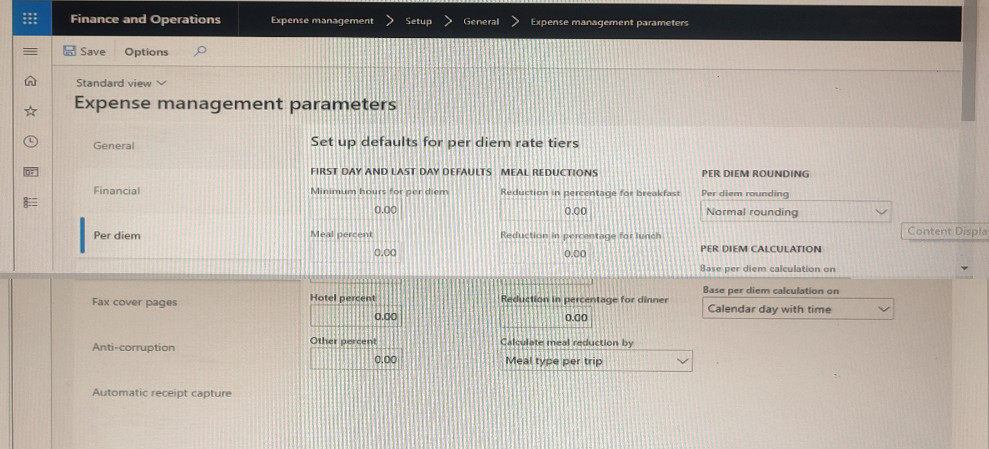
Use the drop-down menus to select the answer choice that that answers each question
based on the information presented in the graphic.


Question 1 Analysis
Explanation:
This question addresses meal reduction configurations in expense management. When employees stay at hotels offering complimentary breakfast, companies often reduce the per diem amount to avoid duplicate reimbursement. The configuration needs to specifically target breakfast reduction while maintaining proper per diem calculations for other meals.
Correct Option:
Set Reduction in percentage for breakfast to 15.
Incorrect Options:
Set Calculate meal reduction by to Meal type per day: While this setting relates to meal calculations, it doesn't specifically address the 15% breakfast reduction requirement.
Set Meal percent to 15: This field applies to general per diem calculations, not specifically to complimentary breakfast situations.
Set Reduction in percentage for lunch and Reduction in percentage for dinner to 10: These settings affect other meals, not the complimentary breakfast scenario described.
Keep Base per diem calculation on set to Calendar day with time: This setting determines how per diem is calculated (by calendar day or by time), not meal reductions.
Reference:
Microsoft Dynamics 365 documentation on Expense management parameters and meal reduction configurations.
Question 2 Analysis
Explanation:
This question addresses per diem eligibility for partial travel days. The company wants employees to receive per diem when working at least half a day on first and last travel days. In a standard 40-hour work week, half a day equals 4 hours (based on 8-hour workdays). The configuration must specify minimum hours threshold for per diem eligibility.
Correct Option:
Set Minimum hours for per diem to 4.
Incorrect Options:
Keep Base per diem calculation on set to Calendar day with time: This setting controls calculation methodology, not minimum hour requirements for partial days.
Change Per diem rounding to Always round up: This affects how per diem amounts are rounded, not eligibility thresholds.
Set Minimum hours for per diem to 4 and Other percent to 50: While the minimum hours setting is correct, adding "Other percent to 50" is unnecessary and unrelated to the half-day requirement.
Reference:
Microsoft Dynamics 365 Expense management documentation on per diem rate tiers and minimum hour configurations for partial travel days.
A company is implementing Dynamics 365 Finance.
The company must be able to record sales orders in the following currencies: USD. EUR,
and GBP.
Company A uses USD as the accounting and reporting currency Company B uses GBP as the accounting and reporting currency.
Each company is consolidated into Company CON that uses EUR as the accounting and
reporting currency.
Assets and liabilities are revalued at the current exchange rate.
You need to configure the system to meet the requirement.
Which option should you use? To answer, select the appropriate options in the answer
area.
NOTE: Each correct selection is worth one point.
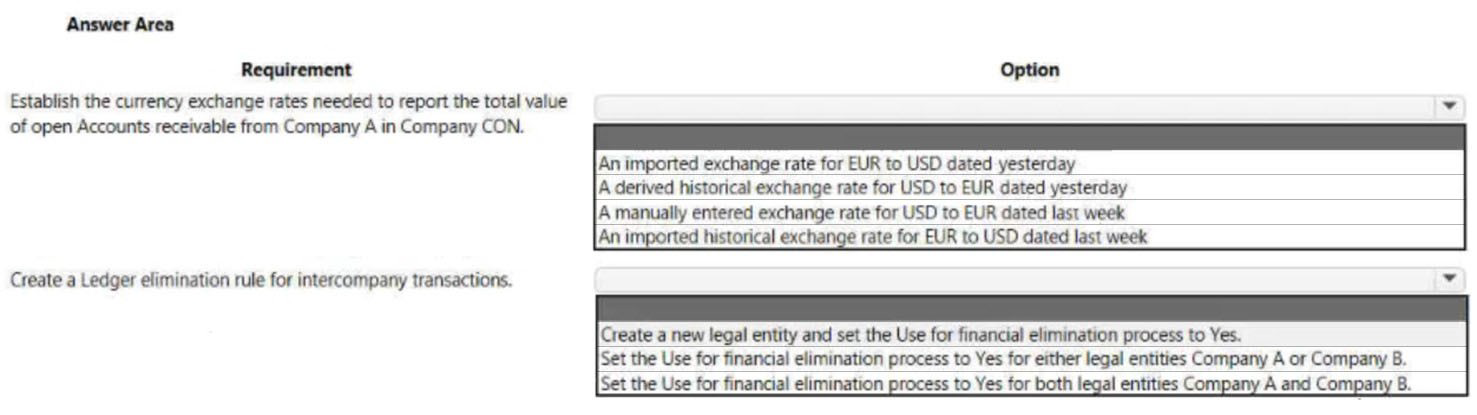
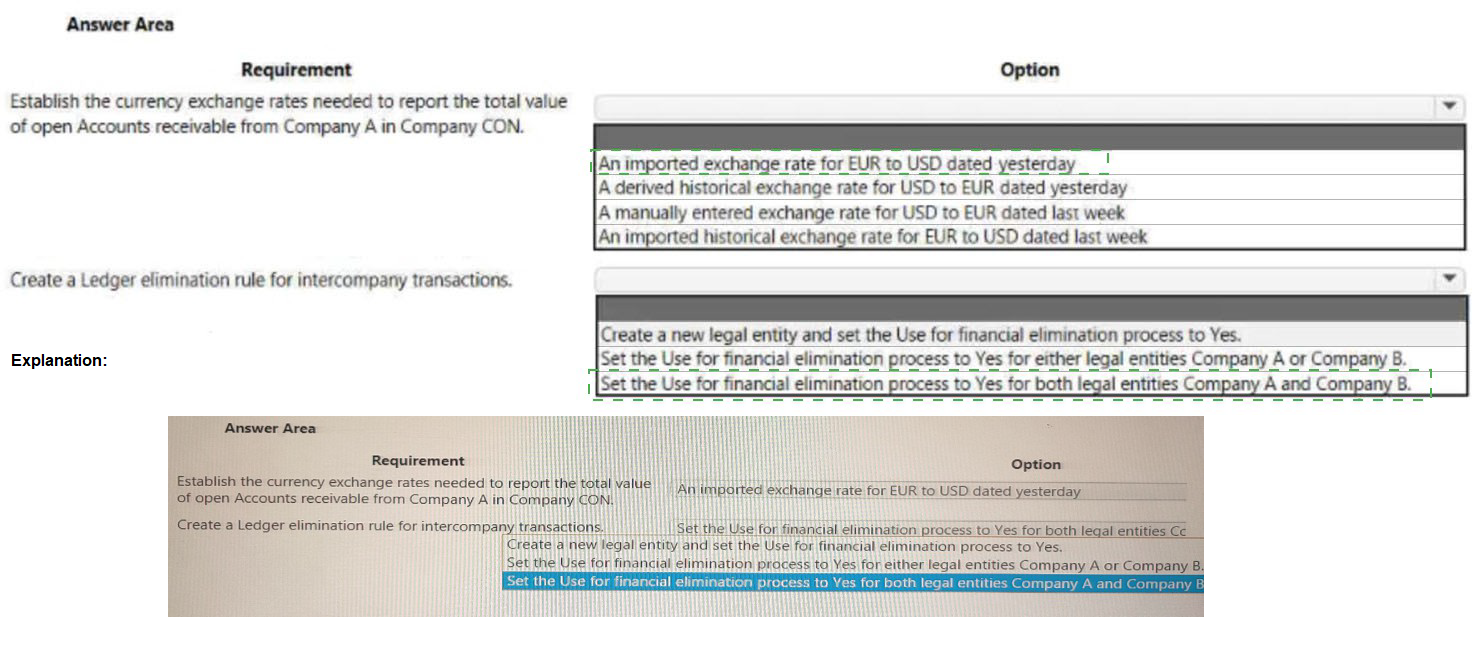
Question 1: Establish the currency exchange rates needed to report the total value of open Accounts receivable from Company A in Company CON.
Explanation:
This question addresses consolidation requirements where Company A (USD functional currency) needs to report to Company CON (EUR functional currency). For balance sheet accounts like Accounts Receivable, assets and liabilities must be revalued at the current exchange rate as of the reporting date. Therefore, the most recent exchange rate is needed for accurate consolidation.
Correct Option:
An imported exchange rate for EUR to USD dated yesterday
Incorrect Options:
A derived historical exchange rate for USD to EUR dated yesterday: Derived rates are calculated based on triangulation with a third currency. Additionally, the direction is incorrect (USD to EUR instead of EUR to USD for converting USD amounts to EUR).
A manually entered exchange rate for USD to EUR dated last week: Manual entry is possible but not optimal for automation. More importantly, the date is last week, not current, and assets/liabilities require current rates, not historical rates.
An imported historical exchange rate for EUR to USD dated last week: While the currency pair direction is correct (EUR to USD), the date is last week. For current revaluation of open receivables, the most recent rate (yesterday/current) is required, not a historical rate from last week.
Reference:
Microsoft Learn: Currency revaluation in General ledger and Consolidation account groups
Question 2: Create a Ledger elimination rule for intercompany transactions.
Explanation:
When creating elimination rules in Dynamics 365 Finance, the system needs to identify which legal entities participate in intercompany transactions that should be eliminated during consolidation. The "Use for financial elimination process" setting must be enabled for both the source and destination legal entities involved in intercompany transactions.
Correct Option:
Set the Use for financial elimination process to Yes for both legal entities Company A and Company B.
Incorrect Options:
Create a new legal entity and set the Use for financial elimination process to Yes: Creating a new legal entity is unnecessary for elimination processing. Elimination rules work with existing legal entities involved in intercompany transactions.
Set the Use for financial elimination process to Yes for either legal entities Company A or Company B: This is incorrect because elimination requires both entities in an intercompany transaction to be included. Setting only one entity would result in incomplete elimination of intercompany balances during consolidation.
Reference:
Microsoft Learn: Elimination rules and Intercompany accounting setup
A company implemented Dynamics 365 Finance less than The following business rules
must be implemented to
• Operations must be allowed to exceed budge
• Marketing must receive warnings when the)
• Sales must not exceed its budget.
• All departments must have a calculation in in place to determine what they can spend.
• Budget funds do not need to be recorded in the general ledger.
You need to configure budget controls.
Which configuration option should you use? To answer, select the appropriate options in
the answer area.
NOTE: Each correct selection is worth one points.
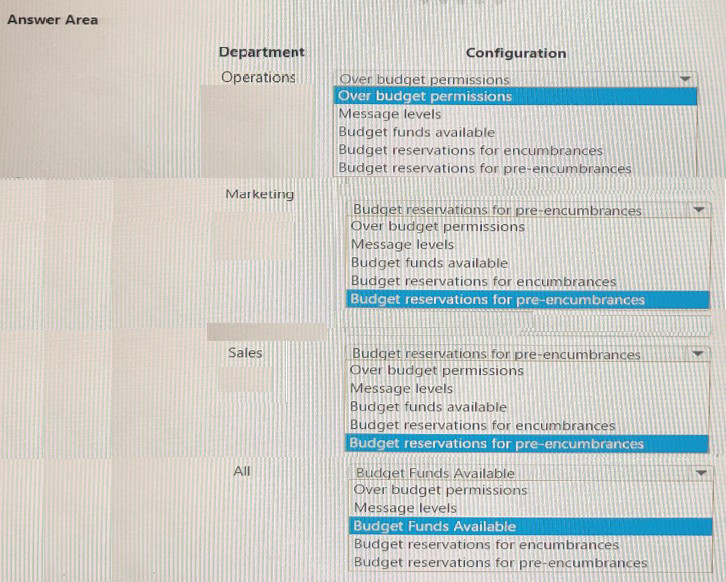
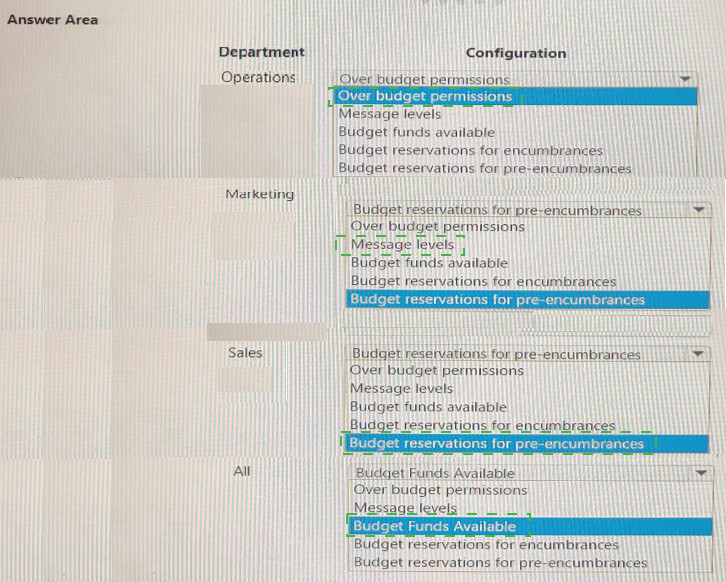
Explanation
Budget control in Dynamics 365 Finance allows organizations to manage spending by enforcing budget limits at various levels. The configuration includes setting "Over budget permissions" (how strictly budget is enforced), "Message levels" (what type of warning users receive), and "Budget funds available" (which calculation determines available budget). Each department's settings must align with their specific business rules.
Operations
Correct Option:
Over budget permissions - Set to Warn only
Explanation:
Operations must be allowed to exceed budget, which requires the most permissive setting. "Warn only" allows users to proceed with transactions that exceed available budget while receiving a warning message. This satisfies the requirement that Operations can exceed budget without being blocked.
Incorrect Options:
Message levels: This setting controls the verbosity of messages, not whether exceeding budget is permitted.
Budget funds available: This determines the calculation method for available funds, not whether overspending is allowed.
Budget reservations for encumbrances/pre-encumbrances: These settings control budget tracking for purchase orders and requisitions, not overspending permissions.
Marketing
Correct Option:
Message levels - Set to Warning
Explanation:
Marketing must receive warnings when approaching or exceeding budget. "Warning" message level ensures users are notified when budget thresholds are reached or exceeded, meeting the requirement that Marketing receives appropriate budget warnings.
Incorrect Options:
Over budget permissions: This setting would either block or allow overspending, not specifically provide warnings as required.
Budget funds available: This determines the calculation method, not the warning mechanism.
Budget reservations: These settings control encumbrance tracking, not warning messages.
Sales
Correct Option:
Over budget permissions - Set to Block
Explanation:
Sales must not exceed its budget, which requires the most restrictive setting. "Block" prevents users from posting transactions that would exceed available budget, ensuring Sales stays within allocated amounts.
Incorrect Options:
Message levels: This only controls notifications but would still allow overspending.
Budget funds available: This determines the calculation method, not enforcement.
Budget reservations: These settings control tracking, not spending limits.
All Departments
Correct Option:
Budget funds available - Set to Actual expenditures only
Explanation:
All departments need a calculation in place to determine what they can spend. Since budget funds do not need to be recorded in the general ledger, "Actual expenditures only" calculates available budget based on actual spending without requiring encumbrance or pre-encumbrance tracking in the general ledger.
Incorrect Options:
Over budget permissions: This setting controls enforcement, not the calculation method.
Message levels: This controls notifications, not fund availability calculation.
Budget reservations for encumbrances/pre-encumbrances: These would require recording budget reservations in the general ledger, which contradicts the requirement that budget funds do not need to be recorded there.
Reference
Microsoft Learn: Budget control overview and configuration
Microsoft Learn: Set up budget control
| Page 1 out of 23 Pages |
Microsoft Dynamics 365 for Finance and Operations, Financials Exam Practice Exam Questions
These MB-310 practice questions with explanations help candidates learn financial management features within Dynamics 365. Topics include general ledger, accounts payable, accounts receivable, budgeting, and financial reporting. Each question is supported by a detailed explanation that clarifies concepts and improves understanding of business processes. This approach helps learners go beyond memorization and truly understand how financial operations are managed in Dynamics 365. By practicing consistently, candidates can identify weak areas, strengthen their knowledge, and feel confident when tackling exam scenarios.MB-310 - Microsoft Dynamics 365 Finance Official Exam Blueprint and Weight:
1. Configure and Manage Finance
Official Exam Weight: 25-30%
Subtopics: Configure legal entities and ledgers, manage fiscal calendars and periods, configure chart of accounts and financial dimensions, configure currencies and exchange rates, manage accounting structures and rules, configure financial reporting and inquiries, manage workflow approvals, configure cash and bank management settings, implement financial controls and compliance requirements, configure budget control and budget planning, manage financial close processes, configure intercompany accounting and consolidations.
2. Implement and Manage Accounts Payable and Accounts Receivable
Official Exam Weight: 20-25%
Subtopics: Configure vendor and customer records, manage vendor invoices and payments, process purchase order invoices, configure payment schedules and methods, manage collections and credit limits, process customer invoices and payments, configure accounts receivable parameters, manage vendor collaborations and settlements, implement customer collections strategies, manage aging reports and inquiries, configure sales tax and withholding tax settings, process refunds and adjustments.
3. Manage Budgeting Fixed Assets and Cost Accounting
Official Exam Weight: 20-25%
Subtopics: Configure and manage budget planning processes, implement budget control policies, create and manage budget registers, configure fixed asset groups and profiles, acquire transfer depreciate and dispose of fixed assets, manage fixed asset leasing, configure depreciation methods and books, perform fixed asset transactions and reporting, configure cost accounting structures, allocate and distribute costs, manage cost objects and dimensions, analyze costs using cost accounting reports.
4. Implement and Manage Cash and Treasury Management
Official Exam Weight: 15-20%
Subtopics: Configure bank accounts and banking parameters, process bank reconciliations, manage cash flow forecasting, configure electronic payments and collections, manage liquidity and cash positions, process bank transactions and imports, implement treasury management processes, manage foreign currency transactions, configure letters of credit and bank guarantees, monitor cash management reports and analytics, automate banking operations and workflows.
5. Configure Financial Reporting and Analytics
Official Exam Weight: 10-15%
Subtopics: Configure financial reporting structures, create and customize financial reports, manage report definitions and row structures, implement Management Reporter and financial insights, configure Power BI integration, create financial dashboards and KPIs, analyze financial performance metrics, configure reporting security and access controls, manage report scheduling and distribution, troubleshoot reporting issues, optimize financial analytics and reporting performance.
| Domain | Title | Exam Weight |
|---|---|---|
| 1 | Configure and Manage Finance | 25-30% |
| 2 | Implement and Manage Accounts Payable and Accounts Receivable | 20-25% |
| 3 | Manage Budgeting Fixed Assets and Cost Accounting | 20-25% |
| 4 | Implement and Manage Cash and Treasury Management | 15-20% |
| 5 | Configure Financial Reporting and Analytics | 10-15% |
See What People Are Saying
Finance in Dynamics 365 covers general ledger, accounts payable/receivable, and budgeting. The MB-310 exam requires precision. MSmcqs practice exam broke down complex financial scenarios into digestible questions. I mastered the material and passed on my first attempt. Thank you MSmcqs!
David Peterson, Finance Consultant | New York, NY