Free Microsoft AI-103 Practice Test Questions MCQs
Stop wondering if you're ready. Our Microsoft AI-103 practice test is designed to identify your exact knowledge gaps. Validate your skills with Developing AI Apps and Agents on Azure questions that mirror the real exam's format and difficulty. Build a personalized study plan based on your free AI-103 exam questions mcqs performance, focusing your effort where it matters most.
Targeted practice like this helps candidates feel significantly more prepared for Developing AI Apps and Agents on Azure exam day.
2950+ already prepared
Updated On : 12-Oct-202695 Questions
Developing AI Apps and Agents on Azure
4.9/5.0
Topic 1: Case Study Contoso, Ltd
Overview
Contoso, Ltd is a multinational retail company that builds, deploys, and manages
generative Al and agent-based solutions by using Microsoft Foundry.
Identity Environment:
Contoso uses Microsoft Entra ID for identity management, authentication, and authorization
capabilities that enable agents to access organizational resources and services.
Contoso recently formed a new Al engineering team named Agent1Dev Team to optimize
and maintain existing Al solutions.
The team collaborates with solution architects, DevOps engineers, and security engineers
to design, implement, monitor, and secure Al applications.
Contoso also has a team named Agent1Test Team that is responsible for validating Al
solutions before the solution deployments.
Generative Environment:
Contoso has a Microsoft Foundry deployment that contains two projects named Project1
and Project2.
Project1
Project1 contains a customer support agent named Agent1 that assists customers with
product inquiries and troubleshooting requests.
Agent1 has the following configurations:
Agent1 uses a base model deployment.
A safety evaluation pipeline is NOT enabled.
Tool invocation approval workflows are NOT enabled.
Conversation memory constraints are NOT configured.
Agent1 interacts with customers by using digital support channels and answers general
questions about Contoso products.
Project1 is deployed to an Azure region located in the European Union (EU).
Agent1Dev Team will use Project1 to optimize and maintain Agent1.
Project2
Project2 contains a deployed video generation model. The marketing department at
Contoso has access to Project2 and plans to use the model to develop a video creation
solution.
Development of the solution is incomplete.
Data Environment:
Contoso stores product-related information in Azure resources that support Al applications.
The Azure environment contains an Azure Blob Storage account named storage1 that
stores product detail sheets for all the Contoso products.
The product sheets include specifications, feature descriptions, and product support
information that Agent1 can use to answer customer questions. The product sheets are
stored in the PDF format.
Problem Statement:
Contoso identifies the following issues:
Agent1 has only general knowledge of the Contoso products.
A recent chat interaction with Agent1 was analyzed for sentiment. The results of
the analysis have NOT been processed yet.
Agent1 does NOT use the detailed product information in the product sheets
stored in storage1 when responding to customer questions.
The finance department at Contoso reports that vendor invoices must be reviewed
manually to ensure that the invoices match the terms defined in the vendor
contracts. The invoices contain tables, logos, and varied layouts that make the
documents difficult to process consistently.
Requirement:
Planned Changes:
Contoso plans to implement the following changes:
Implement a solution for Project1 that analyzes the vendor invoices by evaluating
both the visual layout and the textual content of the invoices, so that the invoice
details can be verified against the vendor contract terms.
Update the base model deployment used by Agent1 and standardize the model
version to ensure continuity and consistent responses.
Enable Agent1 to retrieve and use the detailed product information from the
product sheets stored in storage1.
Implement an indexing solution for the product sheets that Agent1 can use to
answer customer questions.
Complete the development of the video creation solution.
Technical Requirements:
Contoso identifies the following technical requirements:
The model deployment used by Agent1 must support scalable, high-throughput
generative Al workloads and dynamically scale to handle variable customer
support traffic, without requiring reserved throughput capacity.
The product sheets must be processed by using an indexing pipeline that enables
semantic and vector search, so that Agent1 can retrieve the relevant product
information.
Responses generated by using the product sheet information must be relevant,
complete, and accurate.
Agent1 must be able to use the product sheets to answer natural language
questions about product details.
The model version used by Agent1 must remain consistent to ensure stable
responses.
The data processed by the model must remain within the EU.
Safety and Compliance Requirements:
Contoso identifies the following security and compliance requirements:
API keys must NOT be used to access Foundry-deployed models.
Access to the Azure resources must follow the principle of least privilege.
The developers at Contoso must authenticate to Microsoft Foundry resources by
using Microsoft Entra authentication.
Access to Project1 must be assigned to the members of Agent1Dev Team by
using a security group named SC_Agent1_Dev.
Access to Project1 must be assigned to the members of Agent1Test Team by
using a security group named SC_Agent1_Test.
Agent1 must never reveal customer information, even if a document that contains
customer data is added erroneously to the product sheet repository in storage1.
The product sheets might contain images that include embedded text. Agent1
must be protected from malicious instructions potentially hidden within the images.
Business Information:
Contoso identifies the following business requirements:
Users that interact with Agent1 must have a personalized experience in future
interactions, including the ability for Agent1 to retain conversation context and
recall relevant information from previous interactions.
Agent1 must answer questions only about the products sold by Contoso.
In Microsoft Foundry, you use the Chat playground with the GPT-35 Turbo model. You have a prompt that contains the following code.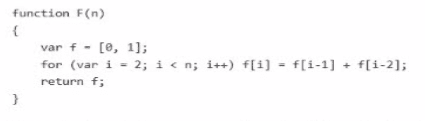
You need the model to create an explanation of the code. The solution must minimize costs. What should you do?
A. Add function F (explanation) to the prompt.
B. Change the model to GPT-4-32k.
C. Add// what does function F do? to the prompt.
D. Set the temperature parameter to 1.
Explanation:
The goal is to generate an explanation of the provided JavaScript code while keeping costs low. Costs in Azure OpenAI are primarily driven by input token count (prompt) and output token count (completion). The most efficient approach is to add a clear, concise instruction directly in the prompt, guiding the model to generate the desired explanation without unnecessary overhead.
Correct Option:
C. Add // what does function F do? to the prompt.
Adding a comment-style question directly in the prompt is the simplest and most token-efficient way to instruct the model. It uses very few input tokens, does not increase output length unnecessarily, and clearly defines the task, ensuring the model responds with a focused explanation without extra cost.
Incorrect Option:
A. Add function F (explanation) to the prompt.
This option is ambiguous and does not clearly instruct the model to generate an explanation. It may confuse the model or cause it to output irrelevant content, leading to wasted tokens and higher cost without guaranteeing a useful answer.
B. Change the model to GPT-4-32k.
GPT-4-32k is significantly more expensive per token than GPT-3.5-Turbo. Using a larger, costlier model for a simple explanation task is unnecessary and increases costs without adding value for this specific requirement.
D. Set the temperature parameter to 1.
Temperature controls randomness, not the content or cost. Setting it to 1 increases variability and may produce longer or less focused responses, potentially increasing token usage and cost, while not ensuring a relevant explanation.
Reference:
Azure OpenAI Service pricing – token-based cost model.
Microsoft Learn: Plan and manage costs for Azure OpenAI – emphasizes prompt design and model selection for cost optimization.
You have an Azure Al Search resource named Search1 that is used by multiple apps hosted in Azure. You need to secure Search1. The solution must meet the following requirements:
• Prevent access to Search1 from the internet.
• Limit the access of each app to query specific indexes.
What should you do? To answer, select the appropriate options in the answer area. NOTE:
Each correct answer is worth one point.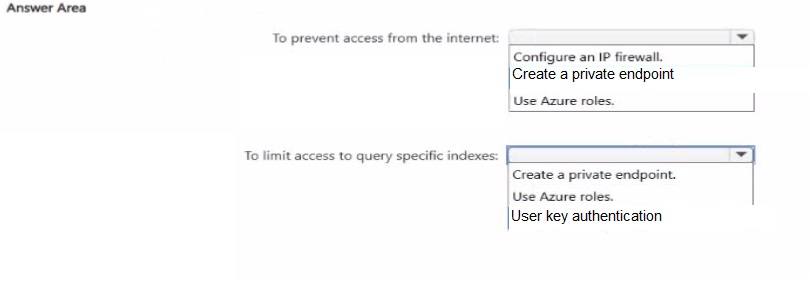
Explanation
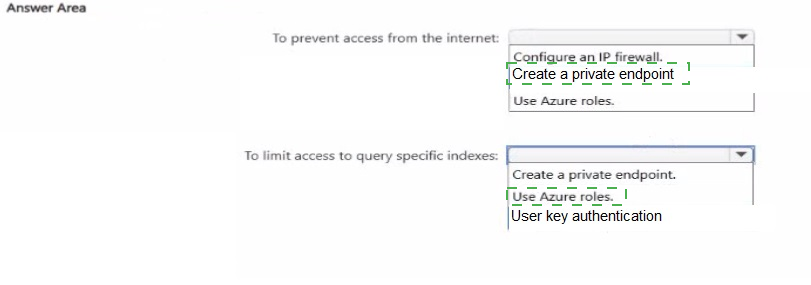
The first requirement is to prevent all public internet access to the search resource. This is achieved by integrating the service with Azure Private Link, which involves creating a private endpoint. The second requirement is to restrict each app's access to only specific indexes. This is a data-plane authorization task that is best handled by using Azure roles (RBAC), which can be scoped to individual indexes.
Correct Options
Create a private endpoint
Private endpoints allow a client on a virtual network to securely access data in a search index over a Private Link . The network traffic between the client and the search service traverses the Microsoft backbone network, eliminating exposure from the public internet . This directly meets the requirement to prevent internet access, as you can block all connections on the public endpoint .
Use Azure roles
Azure roles provide a granular way to manage access to Azure resources. The Search Index Data Reader role, for instance, grants read access to query a specific index . The portal does not directly support assigning roles at the individual index level, but it can be achieved using PowerShell or the Azure CLI by scoping the role assignment to a specific index .
Incorrect Options
To prevent access from the internet
Configure an IP firewall: IP firewall rules restrict access based on the client's IP address, but they still allow connections over the public internet. This does not meet the requirement to prevent access from the internet entirely.
Use Azure roles: Azure roles are an identity-based authorization mechanism, not a network isolation feature. They do not control network traffic or prevent public internet access.
To limit access to query specific indexes
Create a private endpoint: A private endpoint is a network-level security control, not an authorization mechanism. It does not differentiate between different apps or control which indexes a specific app can query.
User key authentication: Query API keys provide access at the service level, not at the index level . They cannot be used to restrict an app to a specific index; any key grants access to all indexes on the service.
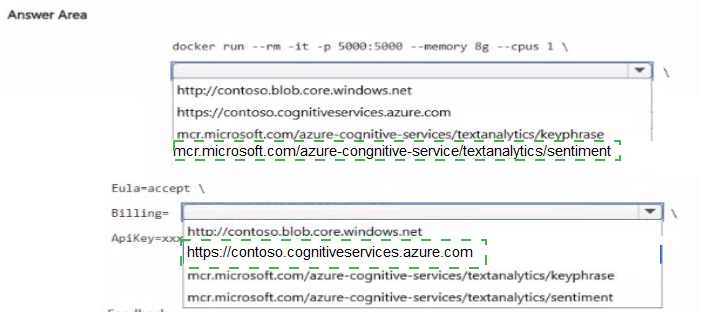
You plan to deploy a containerized version of an Azure Al Language service that will be used for sentiment analysis.
You configure https: //contoso.cognitiveservices.azure, cow as the endpoint URI for the service.
You need to run the container on an Azure virtual machine by using Docker.
How should you complete the command? To answer, select the appropriate options in the answer area.
NOTE: Each correct selection is worth one point.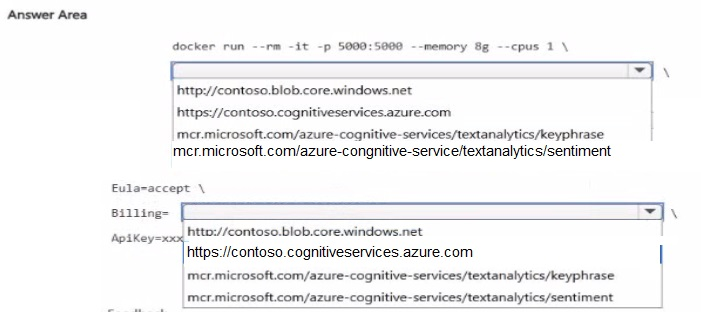
Explanation:
To run the containerized Azure AI Language service for sentiment analysis, you need to use the correct container image, specify the container's memory and CPU limits, provide the Azure endpoint URI and API key for billing, and accept the EULA. The container image for sentiment analysis must be pulled from the Microsoft Container Registry and the Eula, Billing, and ApiKey environment variables must be set correctly.
Correct Options:
First blank: mcr.microsoft.com/azure-cognitive-services/textanalytics/sentiment
This is the correct container image name for the sentiment analysis capability of Azure AI Language (formerly Text Analytics). The official container image path follows this format, and the sentiment image specifically provides the sentiment analysis feature.
Second blank: Billing=https://contoso.cognitiveservices.azure.com/
The Billing environment variable must be set to the endpoint URI of the Azure resource. The endpoint URI format is https://
Third blank: ApiKey=
The ApiKey environment variable must be set to the API key of the Azure resource. This is used for authentication and billing purposes. The variable needs to be passed in the command with the actual key value.
Incorrect Options (for context):
http://contoso.blob.core.windows.net – This is an Azure Blob Storage endpoint, not relevant to running the container.
https://contoso.cognitiveservices.azure.com – This is correct as the Billing endpoint, but note that the trailing slash may be required depending on the container version.
mcr.microsoft.com/azure-cognitive-services/textanalytics/keyphrase – This is the container image for the Key Phrase Extraction capability, not Sentiment Analysis. Using this would deploy the wrong service.
Reference:
Microsoft Learn documentation confirms that to run a containerized Azure AI Language service, you must set the Eula, Billing, and ApiKey environment variables. The Billing variable must be the resource endpoint, and the ApiKey is the service key. The container image format is mcr.microsoft.com/azure-cognitive-services/textanalytics/
You have a Python application that uses Azure OpenAt structured outputs to extract fields from unstructured receipt text and support ticket text. The application uses the following schema.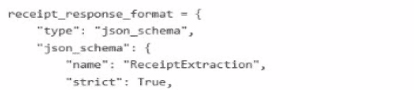
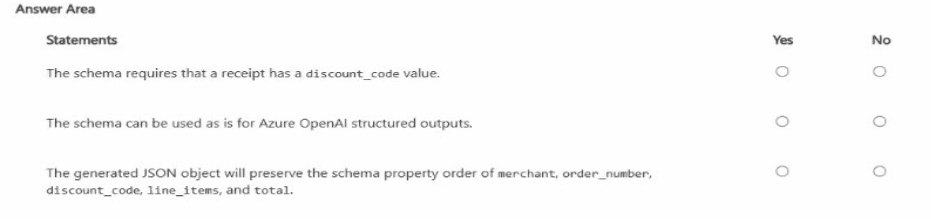
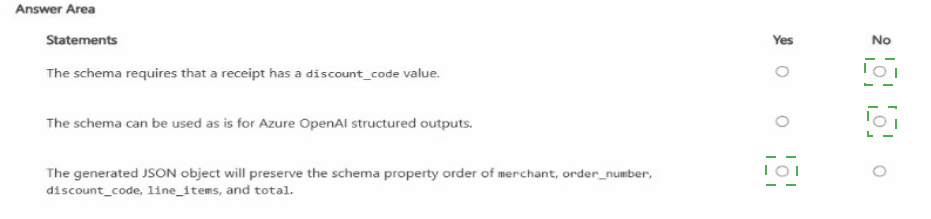
Statement 1: The schema requires that a receipt has a discount_code value.
Answer: No
Explanation:
The JSON schema shown only includes the "name" and "strict" properties. It does not define any required fields or properties for the receipt data (such as discount_code, merchant, etc.). In JSON Schema, unless a property is explicitly listed in a "required" array, it is not considered mandatory. Therefore, the schema as shown does not require a discount_code value.
Statement 2: The schema can be used as is for Azure OpenAI structured outputs.
Answer: No
Explanation:
The schema is missing critical components required by Azure OpenAI's structured outputs feature. A valid json_schema must include a "schema" property that defines the JSON schema object itself (which should include type, properties, required, etc.). Without this, the API would reject the request as incomplete. The "name" and "strict" are valid top-level properties, but the absence of the "schema" object makes it invalid.
Statement 3: The generated JSON object will preserve the schema property order of merchant, order_number, discount_code, line_items, and total.
Answer: No
Explanation:
JSON objects are inherently unordered data structures. The JSON specification explicitly states that object key ordering is not guaranteed to be preserved during serialization and deserialization. Additionally, the provided schema does not define these properties at all—it is incomplete. Even if they were defined, Azure OpenAI's structured outputs do not guarantee property order in the generated response.
Reference:
Azure OpenAI documentation for structured outputs requires that the json_schema object must include a "schema" field containing the actual JSON Schema definition with properties, required, and additionalProperties. The "strict" parameter is optional and applies only when the schema is fully defined. JSON standard defines objects as unordered collections.
| Page 1 out of 10 Pages |