Topic 2: Mixed Question Types
You have 100,000 images.
You need to build an app that will perform the following actions:
• Identify road signs in the images and extract the text on the signs.
• Analyze the text to identify well-known locations.
The solution must minimize development effort.
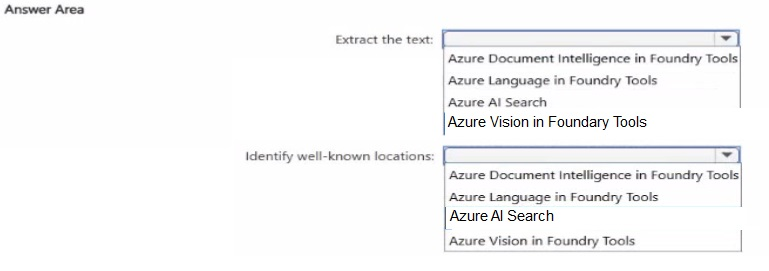
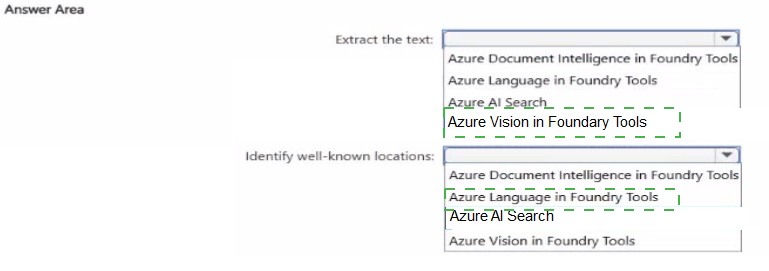
Explanation
The application requires two distinct capabilities: extracting text from images of road signs, and then analyzing that extracted text to identify well-known locations. For the first step, extracting text from an image is a core feature of Azure AI Vision, often referred to as Optical Character Recognition (OCR). For the second step, analyzing text to identify specific entities like locations is a key capability of Azure AI Language, known as Named Entity Recognition (NER). Both are pre-built services, which means you can use them with minimal custom code or development effort, perfectly aligning with the question's requirements.
Correct Options
Extract the text: Azure Vision in Foundry Tools
The Azure AI Vision service includes an OCR engine specifically designed to extract printed or handwritten text from images. The documentation explicitly mentions this service for scenarios like reading text from photographs of road signs. It provides a fast, synchronous API that is ideal for this type of "in-the-wild" image. Using its pre-built Read OCR capability meets the requirement for minimal development effort.
Identify well-known locations: Azure Language in Foundry Tools
The Azure AI Language service has a pre-built feature called Named Entity Recognition (NER) that can identify and categorize entities in unstructured text. One of its primary categories is "Location," which can be used to extract place names from the text you've scraped from the road signs. Using this feature directly on the extracted text is a straightforward, low-code solution.
Incorrect Options
Azure Document Intelligence in Foundry Tools is optimized for extracting structured data from text-heavy documents like PDFs and forms, not for performing OCR on non-document images such as road signs. Using it for this scenario would be an incorrect fit and would not minimize development effort.
Azure AI Search is a search engine service for indexing and querying data. It does not have built-in capabilities for performing OCR on images or analyzing text to identify locations, making it irrelevant for both required actions.
Reference
The core OCR feature for extracting text from images is part of the Azure AI Vision service.
The Named Entity Recognition feature for identifying locations from text is part of the Azure AI Language service.
You need to measure the public perception of your brand on social media by using natural language processing. Which Azure service should you use?
A. Azure Document Intelligence in Foundry Tools
B. Content Safety in Foundry Control Plane
C. Azure Language in Foundry Tools
D. Azure Vision in Foundry Tools
Explanation
The scenario requires measuring brand perception on social media using natural language processing (NLP). The Azure AI Language service provides pre-built NLP capabilities, including Sentiment Analysis and Opinion Mining, which are explicitly designed for this purpose . This feature can be used to analyze feedback from social media, customer reviews, and forums, returning a sentiment label (positive, neutral, negative) and confidence scores at both the document and sentence level . It is the most direct and relevant service for extracting this insight from text.
Correct Option
C. Azure Language in Foundry Tools
The Sentiment Analysis capability of Azure Language service is a pre-configured, ready-to-use feature that evaluates text and returns sentiment scores to help you understand what people think about your brand or topic . It can monitor multiple social media outlets for mentions and the associated sentiment . It works directly with the unstructured text data from social media and requires minimal development effort, aligning perfectly with the requirement.
Incorrect Options
A. Azure Document Intelligence in Foundry Tools
Document Intelligence is designed to extract data from structured forms and documents (like invoices, receipts, and contracts) . It is not built for analyzing free-form text from social media to determine sentiment or public perception.
B. Content Safety in Foundry Control Plane
Content Safety is a service for detecting harmful content such as violence, hate speech, or sexually explicit material . While it can analyze text, its purpose is to moderate content based on safety policies, not to measure customer sentiment for brand perception.
D. Azure Vision in Foundry Tools
Azure Vision is used for analyzing visual content from images and videos, such as generating captions, detecting objects, and extracting text from pictures . It does not process text or perform natural language analysis, making it unsuitable for this task.
Reference
Microsoft Learn documentation confirms that Sentiment Analysis is a core capability of the Azure Language service and is useful for detecting positive and negative sentiment in social media, customer reviews, and discussion forums .
You are building an app that will share user images. You need to configure the app to:
Categorize each image as a photograph or drawing.
Generate a caption for the image.
Minimize development effort.
Which two services should you include?
A. Image type detection in Azure Vision in Foundry Tools
B. Object detection in Azure Vision in Foundry Tools
C. Content tags in Azure Vision in Foundry Tools
D. Image classification in Azure Custom Vision
E. Image descriptions in Azure Vision in Foundry Tools
Explanation
The app requires two specific capabilities: (1) categorizing an image as a photograph or a drawing, and (2) generating a human-readable caption. Both of these are pre-built, ready-to-use features within the Azure AI Vision Image Analysis service . Using these built-in capabilities requires minimal development effort, as you simply need to call the API with the appropriate parameters .
Correct Options
A. Image type detection in Azure Vision in Foundry Tools
This feature is designed to analyze an image's content type and indicate whether it is clip art or a line drawing . It can analyze an image and rate the likelihood of it being clip art on a scale of 0 to 3, or return a boolean value indicating whether it is a line drawing . This directly meets the requirement to categorize each image as a photograph or drawing.
E. Image descriptions in Azure Vision in Foundry Tools
This service can analyze an image and generate a human-readable phrase, or caption, that describes its contents . The caption is generated using complete sentences based on the objects identified in the image . It returns a list of descriptions with confidence scores, making it easy to implement a captioning feature .
Incorrect Options
B. Object detection in Azure Vision in Foundry Tools
While this feature can identify and locate objects within an image, it does not classify the image's overall type (photograph vs. drawing) and does not generate descriptive captions. It returns bounding box coordinates, which are unrelated to the specified requirements.
C. Content tags in Azure Vision in Foundry Tools
This feature identifies and tags visual features in an image from a set of thousands of recognizable objects, living things, and actions . While it provides metadata tags, it neither categorizes the image type nor generates the natural language description required by the application.
D. Image classification in Azure Custom Vision
This requires training a custom model with your own images and labels . While it could potentially classify images, it requires significant development effort for training and does not natively generate captions, making it unsuitable for minimizing development effort.
Reference
Microsoft Learn documentation confirms that Image type detection is part of the Analyze Image 3.2 API and can indicate whether an image is clip art or a line drawing . Image descriptions are a built-in capability that generates captions describing image contents . Both features require minimal code to implement as they are pre-trained offerings of the service .
You are building an app that will use Azure AI to monitor workspaces for safety. You need to recommend a service that meets the following requirements:
Generates alerts when employees enter high-risk areas
Monitors video feeds in real time
Minimizes development effort
What should you recommend?
A. Azure Vision in Foundry Tools Image Analysis
B. Azure AI Video Indexer
C. Azure Vision in Foundry Tools Spatial Analysis
D. Object detection in Azure Custom Vision
Explanation:
The scenario requires a solution that generates alerts for employees entering high-risk areas by monitoring video feeds in real time, all while minimizing development effort. The Spatial Analysis feature of Azure AI Vision is specifically designed to analyze the movement and presence of people in video streams. It can be configured to detect events like a person crossing a line or entering a polygon zone (the "high-risk area") and generate an alert in response. This ready-to-use capability provides a direct path to meeting the requirements with minimal custom code.
Correct Option:
C. Azure Vision in Foundry Tools Spatial Analysis
This service is built for real-time video analysis on edge devices. It can be configured for specific tasks relevant to this scenario, such as PersonCrossingLine or PersonCrossingPolygon, which directly trigger events when someone enters a predefined high-risk zone. This allows you to generate alerts without requiring complex custom development.
Incorrect Option:
A. Azure Vision in Foundry Tools Image Analysis
Image Analysis is designed to extract tags, captions, and other visual features from static images, not to process real-time video feeds. It cannot track people or generate alerts based on spatial movements across multiple video frames.
B. Azure AI Video Indexer
Video Indexer provides deep insights from video and audio, including speech transcription and object detection. While it offers extensive analysis, its event detection and tracking are not specialized for the "person crossing a line" scenario in the same turn-key way Spatial Analysis is. It is a more comprehensive but less targeted solution for this specific need.
D. Object detection in Azure Custom Vision
Custom Vision is a service for building custom image classification and object detection models. While it could be trained to detect people, it does not natively perform spatial analysis to determine if a person has entered a specific area within a video frame. This would require significant custom development to build the real-time tracking and zone-based alerting logic.
Reference:
Azure AI Vision Spatial Analysis operations allow you to define a zone and trigger events when someone enters or exits it.
Spatial Analysis is designed to detect the presence and movements of people in video to generate events for other systems.
You have a Microsoft Foundry project. You need to deploy a model from the model catalog to support real-time inference. The solution must meet the following requirements: Use key-based authentication
Support real-time REST API access
Not consume the vCPU quota of the virtual machines in the Azure subscription
Which type of deployment should you use?
A. serverless API
B. self-hosted container
C. standard
D. batch
Explanation:
The scenario requires a deployment that supports key-based authentication for real-time REST API access without consuming vCPU quota from your Azure subscription. Among the available options, only serverless API deployments meet all three criteria simultaneously: they use key authentication, support real-time inference, and consume no vCPU quota from your subscription since billing is based on token usage rather than dedicated compute infrastructure.
Correct Option:
A. serverless API
Serverless API deployments are designed for real-time inference with REST API access and support key-based authentication. They are billed on a pay-as-you-go basis per token, meaning they do not consume any vCPU or VM quota from your subscription. The infrastructure hosting the model is managed by Microsoft Foundry, and you are not billed for underlying compute capacity. This makes serverless API the ideal choice for scenarios where subscription quota conservation is a priority.
Incorrect Options:
B. self-hosted container
Self-hosted containers (managed compute or standard deployment) run on dedicated infrastructure within your subscription, which consumes vCPU and VM quota. Managed compute deployments require compute quota and are billed based on compute core hours. This directly violates the requirement to not consume vCPU quota.
C. standard
Standard deployment (in Foundry resources) provisions dedicated infrastructure on your subscription and consumes vCPU quota, making it unsuitable when subscription quota conservation is required. While it supports real-time inference and key authentication, it fails the third requirement.
D. batch
Batch deployments are designed for asynchronous, long-running inference on large data sets, not real-time synchronous REST API access. They do not meet the real-time inference requirement specified in the question.
Reference:
Azure AI Foundry documentation confirms that serverless API deployments support real-time inference, key-based authentication, and consume no subscription quota. Billing is based on token usage with pay-as-you-go pricing, and there is no infrastructure charge for the model hosting.
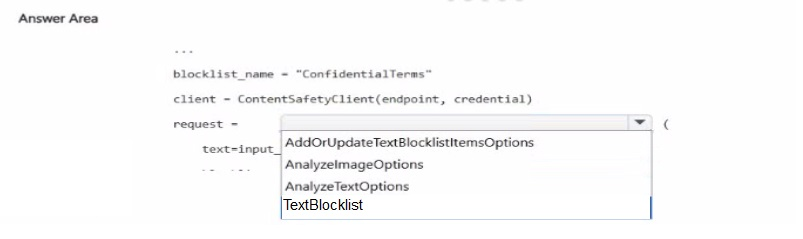
You have a configurable guardrail in a Microsoft Foundry project.
You have a Python application. A text blocklist named Conf identialTerns already contains terms that must be detected in user messages. The application stores each incoming user message in a variable named inpot_text.
You plan to moderate input_text before the text is sent to a language model.
You need to analyze input_text by using the existing blocklist.
Explanation:
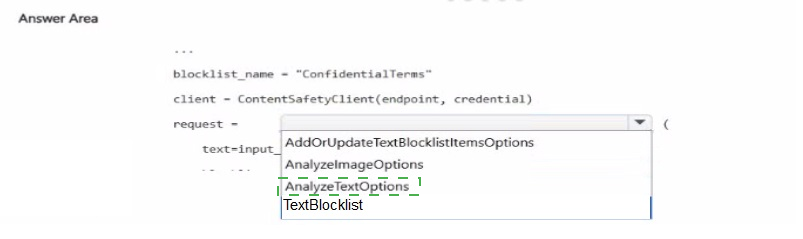
The application must evaluate incoming user messages (input_text) against a pre-existing blocklist named ConfidentialTerms. The Azure AI Content Safety SDK provides specific methods for this: AnalyzeTextOptions to configure the text analysis, and AddOrUpdateTextBlocklistItemsOptions to add items to a blocklist. The request variable must be instantiated correctly to perform the analysis.
Correct Options:
request = AnalyzeTextOptions
AnalyzeTextOptions is the correct class to construct a text analysis request. It allows you to specify the text content to analyze (text=input_text) and configure the blocklist to use. This is the primary input object for the analyze_text method.
AddOrUpdateTextBlocklistItemsOptions
This is the correct class to create a request that adds items to a blocklist. Since the blocklist ConfidentialTerms already exists and contains terms to be detected, the application would not need to add items. However, this class is used when you need to add or update items in the blocklist programmatically.
Note: Based on the scenario, the correct instantiation for analysis is AnalyzeTextOptions; AddOrUpdateTextBlocklistItemsOptions is incorrect for the analysis step but is the only other option provided that matches the pattern of constructing a request for blocklist operations.
Incorrect Options (for context):
AnalyzeImageOptions
This class is used for analyzing images (e.g., detecting violent or sexual content in images). The scenario explicitly states the input is text (input_text), making this option irrelevant.
TextBlocklist
This class represents the blocklist resource itself (e.g., fetching a blocklist by name). It is not a request object used to analyze text against the blocklist.
Reference:
Microsoft Learn documentation for Azure AI Content Safety confirms that AnalyzeTextOptions is used to configure text analysis requests, and AddOrUpdateTextBlocklistItemsOptions is used for blocklist item management. The analyze_text() method accepts AnalyzeTextOptions as its parameter.
You have an agent named Agent1 that uses Model Context Protocol (MCP) calls to retrieve external data. You need to implement guardrails to ensure that Agent1 cannot send any content tagged as Violence to the MCP server. Which intervention point should you use?
A. output
B. user input
C. tool call
D. tool response
Explanation
In the Model Context Protocol (MCP), the flow involves the LLM deciding to use a tool and generating a request that is then sent to the MCP server. This request, known as a tool call, contains the tool name and its arguments, and it is the point where the agent "speaks" to the external server. To prevent the agent from sending any content tagged as "Violence," you must intercept the request at the point where the content is being prepared to be sent to the MCP server, which is the tool call stage. This is a security control that validates the request before it leaves the application's boundaries.
Correct Option
C. tool call
The tool call is the specific message the LLM sends to request that a tool (in this case, the MCP server) be executed. It contains the arguments, which would include the user's original query or the generated content. By implementing a guardrail at this point, you can inspect the tool call's arguments, detect any content tagged as "Violence," and block the request from ever being transmitted to the MCP server, thus preventing the agent from sending harmful content.
Incorrect Options
A. output
The output intervention point occurs after the MCP server has responded. Implementing a guardrail here would only prevent the agent from displaying a harmful response to the user. However, the requirement is to prevent the agent from sending the content to the MCP server in the first place, making the output checkpoint ineffective for this scenario.
B. user input
This check would intercept the user's message before it is sent to the LLM. While it could block a user's request to use violent language, it would be ineffective if the agent itself generates the violent content as part of its reasoning to use a tool. The requirement is to prevent the agent from sending content to the MCP server, which is a specific action that happens after the agent has processed the user input.
D. tool response
The tool response is the data returned by the MCP server to the agent. A guardrail here would inspect the external data coming into the agent, not the content the agent is sending out. This would not prevent the agent from transmitting the violent content to the server in the first place.
Reference
MCP's architecture places tool calls as the client's request to the server for execution.
Guardrails frameworks are designed to validate both inputs and outputs, with tool calls being a key checkpoint for security before external execution.
You have an invoice-processing application named App1 that uses Azure Content Understanding in Foundry Tools. You are building a new Content Understanding pipeline named Pipeline1 that must meet the following requirements:
Compare an invoice to its related purchase order.
Validate the invoice against static vendor contract documents.
Return a single structured output that includes discrepancy findings.
You need to configure Pipeline1 and expose the pipeline as a single analyzer endpoint. What should you configure?
A. A single-file task in standard mode that uses confidence scores enabled for the extracted fields
B. A multi-file task in pro mode that uses the vendor contract files as reference data
C. A multi-file task in standard mode that uses the invoice and purchase order as input to the analyzer
D. A single-file task in standard mode that uses the vendor contract provided as an additional document during analysis
Explanation
Azure AI Content Understanding offers two modes: Standard and Pro. Standard mode is designed for single-file analysis—extracting structured data from one document at a time . Pro mode, however, is built for advanced, cross-file scenarios that require comparing data across multiple documents and performing multi-step reasoning . Your requirement is not just to extract data from one invoice but to compare it against a purchase order and validate it against static vendor contracts . This need for cross-document comparison and validation is a fundamental use case for the multi-file, Pro mode capability . The vendor contract files act as a reference data set or "knowledge base" against which the invoice data is validated, a key feature of Pro mode .
Correct Option
B. A multi-file task in pro mode that uses the vendor contract files as reference data
This is the correct approach. A multi-file task in Pro mode supports processing multiple files together. It allows you to feed both the invoice and the purchase order as input files, while also attaching the vendor contracts as reference data . The service can then use this structure to compare, validate, and generate a single, unified output with discrepancy findings—exactly matching the requirement to compare an invoice to a purchase order and validate it against vendor contracts.
Incorrect Options
A. A single-file task in standard mode that uses confidence scores enabled for the extracted fields
A single-file task is limited to processing one document at a time and cannot compare an invoice to a separate purchase order or validate it against vendor contract files . Confidence scores provide reliability estimates for extracted data but do not enable cross-document comparison or multi-step reasoning.
C. A multi-file task in standard mode that uses the invoice and purchase order as input to the analyzer
Standard mode is explicitly designed for single-file processing; the option to process multiple input files is a feature of Pro mode . This description is technically contradictory, as Standard mode does not support multi-file tasks.
D. A single-file task in standard mode that uses the vendor contract provided as an additional document during analysis
This approach is still limited to a single-file context and cannot compare the invoice data against the purchase order, which is a separate document. The validation against vendor contracts would not be performed correctly because the comparison logic across all three required documents (invoice, purchase order, vendor contract) would be missing.
Reference
Microsoft Learn documentation explains that Content Understanding Pro mode is for "multi‑file task mode with advanced reasoning" and can "attach reference data at analyzer creation to perform linking, validation, enrichment, and derived decisions" . A concrete Pro example is a 3‑way match: ingest a PO, an invoice, and a goods‑receipt together, join lines, validate quantities and prices against a price master (reference data), compute exceptions, and emit an approve/hold decision that goes beyond extraction to cross‑document inference and rule checking . The steps for building this in the Foundry portal are to create a hub‑based project, then a multi‑file task (Pro mode) .
You have a Microsoft Foundry resource named Al1 that hosts three deployments of the GPT 3.5 model. Each deployment is optimized for a unique workload.
You plan to deploy three apps. Each app will access AM by using the REST API and will use the deployment that was optimized for the apps intended workload.
You need to provide each app with access to All and the appropriate deployment. The solution must ensure that only the apps can access AH.
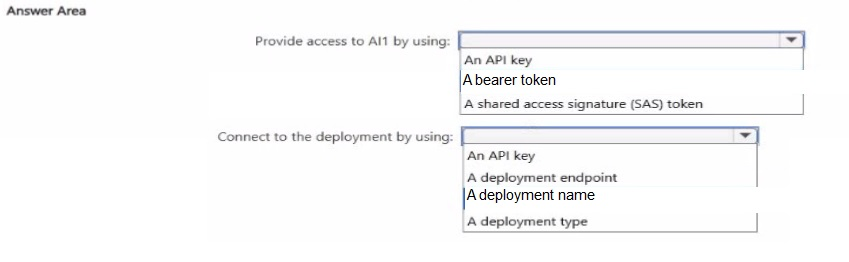
What should you use to provide access to AI1. and what should each app use to connect to its appropriate deployment? To answer, select the appropriate options in the answer area.
NOTE: Each correct selection is worth one point.
Explanation:
The scenario involves two distinct requirements: securing access to the AI resource (AI1) and connecting to a specific deployment. Azure AI Foundry has two separate "planes" for this . The control plane (resource access) requires Microsoft Entra ID authentication using a bearer token for security and auditability . The data plane (model inference) uses API keys, and the specific deployment is identified by its unique deployment name in the REST API call .
Correct Options:
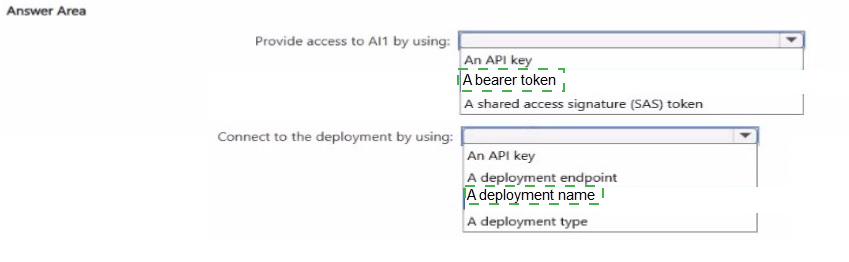
Provide access to AI1 by using: A bearer token
A bearer token obtained via Entra ID (Azure AD) is the recommended and often required method for accessing and authenticating with the Azure AI Foundry resource itself (the control plane) . This ensures only authorized apps can access AI1 and aligns with the principle of least privilege, as API keys are less secure for resource-level access .
Connect to the deployment by using: A deployment name
Each deployment within AI1 is optimized for a specific workload and is uniquely identified by its deployment name . To use the correct optimized model, the calling app must specify this name in the REST API request path (e.g., /openai/deployments/{deployment-name}/chat/completions) . This ensures the app routes its request to the correct, pre-configured model.
Incorrect Options (for context):
Provide access – An API key
API keys are used for data-plane operations like calling the model, not for accessing or managing the resource itself . Using an API key to secure resource-level access is less secure and does not provide the granular control of Entra ID-based authentication .
Provide access – A shared access signature (SAS) token
SAS tokens are used for granting delegated access to storage accounts, not for authenticating to an AI Foundry resource or its model deployments . They are not an authentication method for the AI service itself.
Connect – An API key
An API key authenticates the request to the resource but does not identify which specific deployment to use . Many deployments can share the same resource key; the correct deployment is selected via the URL path .
Connect – A deployment endpoint
The deployment endpoint is the full URL (e.g., https://
Connect – A deployment type
Deployment type (e.g., "ModelDeployment") is a classification property, not a unique identifier for a specific deployment instance . It cannot be used to route a request to a particular model optimized for a specific workload.
Reference:
Microsoft Learn documentation confirms that Bearer tokens (Microsoft Entra ID) are required for the Foundry management (control) plane , while model inference endpoints accept API keys and are identified by deployment name . The REST API requires the deployment-name in the URL path to specify which model deployment to invoke.
You have a Microsoft Foundry project that contains an agent. The agent uses Azure AI Search for Retrieval Augmented Generation (RAG). You plan to ingest and index PDF product manuals. You need to build a solution that supports semantic similarity matching. The solution must ensure that the agent retrieves relevant data when user questions use different wording than the product manuals.
A. vector search
B. semantic ranking
C. suggesters
D. analyzers
Explanation:
Vector search enables semantic similarity matching by converting text into numerical embeddings that capture meaning rather than exact keywords. When user questions use different wording than the product manuals (e.g., "freezing" vs. "frozen"), vector search can still find conceptually similar content because semantically related terms are positioned close together in the vector space. This directly addresses the requirement for the agent to retrieve relevant data despite varied phrasing.
Correct Option:
A. vector search
Vector search uses embeddings—numeric representations of content generated by machine learning models—to find semantically similar matches even without exact text matches. It enables matching based on conceptual similarity, meaning "dog" and "canine" or "freezing" and "frozen" are recognized as related despite being linguistically distinct. This is the core technology for semantic similarity matching in Azure AI Search.
Incorrect Options:
B. semantic ranking
Semantic ranking (or semantic reranker) is a premium feature that applies machine reading comprehension to rescore results after initial retrieval (L2 ranking). It improves the relevance of results but does not itself perform semantic similarity retrieval—it only reranks content already retrieved by vector or keyword search. For handling different wording, vector search is the foundational retrieval mechanism.
C. suggesters
Suggesters are used for autocomplete and type-ahead suggestions in search interfaces. They are designed to help users complete their queries as they type, not for semantic matching of user questions to document content. They do not support meaning-based retrieval and are unrelated to the requirement.
D. analyzers
Analyzers are used for text tokenization and language processing (e.g., stemming, lemmatization) during indexing and querying. While they can help with variations like "run" vs. "running", they do not enable the deep semantic understanding that vector embeddings provide. They are a lexical approach, not a semantic similarity solution.
Reference:
Microsoft Learn documentation defines vector search as an information retrieval approach that "uses numeric representations of content for semantic similarity matching" and "finds conceptually similar content even without exact text matches". Vector queries use embeddings and nearest neighbor algorithms to find semantically similar content. The official documentation further explains that vector search enables matching based on semantic similarity where "dog" and "canine" are conceptually similar but linguistically distinct.
| Page 2 out of 10 Pages |