Free Microsoft AB-620 Practice Test Questions MCQs
Stop wondering if you're ready. Our Microsoft AB-620 practice test is designed to identify your exact knowledge gaps. Validate your skills with Designing and Building Integrated AI Agent Solutions in Copilot Studio questions that mirror the real exam's format and difficulty. Build a personalized study plan based on your free AB-620 exam questions mcqs performance, focusing your effort where it matters most.
Targeted practice like this helps candidates feel significantly more prepared for Designing and Building Integrated AI Agent Solutions in Copilot Studio exam day.
2930+ already prepared
Updated On : 12-Oct-202693 Questions
Designing and Building Integrated AI Agent Solutions in Copilot Studio
4.9/5.0
Topic 1 : Fabrikam inc.
Background Current Environment:
Fabrikam Inc. is a Canada-based manufacturer with a growing service organization that supports field
technicians and internal operations teams. Fabrikam Inc. plans to launch a new internal agent solution named
Operations Concierge to reduce time spent
searching policy content, retrieving operational metrics, and executing routine transactions.
The agent will be used by three groups:
Service coordinators who triage incoming service requests
Field technicians who need guided procedures and parts availability
Operations managers who monitor KPIs and exceptions
The agent solution must work in real-world operational conditions. Users often ask questions mid-call with a customer or while
coordinating parts shipments. The agents require quick, reliable outcomes. As a result, Fabrikam Inc. requires the solution to:
Provide grounded answers with traceability when it provides guidance.
Retrieve real-time metrics when users ask for operational status,
Execute authenticated updates when users initiate a flow (such as creating a parts request).
Fabrikam Inc. also expects the solution to be maintained by multiple makers and developers across the year.
The company has experienced duplicated logic and inconsistent behavior across different agents. This project emphasizes reuse, governance, and maintainability across teams.
Business Requirements:
Fabrikam Inc. runs three Microsoft Power Platform environments for agent development and release: Dev, Test, and Prod.
The team plans to build the agent and validate it in Dev and Test, then promote to Prod by using a controlled release process that supports repeatable deployments.
Fabrikam Inc. already has two assets the team wants to reuse:
A partially completed Copilot Studio agent named Service Desk Agent, used by IT to create internal
tickets and route requests
A Microsoft Foundry agent created by a central AI team that performs specialized summarization andclassification for long-form text (for example, summarizing call transcripts into an incident narrative)
Fabrikam Inc. also has operational and knowledge data sources:
A curated policy library (internal SOPs, service warranty rules, escalation criteria, and standard
operating procedures)
A set of indexed documents and procedures in an Azure AI Search service that supports vector search for the policy library
A Microsoft Fabric workspace that includes a semantic model used by operations leadership for
reporting
Business Requirements:
Fabrikam Inc. requires Operations Concierge to meet the following business requirements:
Traceability requirement: When the agent provides policy guidance or procedural recommendations, users must be able to see where the answer came from.
Metrics requirement: When users ask about service performance (backlog, SLA risk, parts shortages, dispatch delays), the solution must return up-to-date metrics in a structured format that operations managers can use in weekly reviews.
Transaction requirement: The solution must support authenticated updates initiated during
conversations, including creating a parts request and updating a service case status.
In addition, Fabrikam Inc. wants to avoid duplicating common assets across agents:
The team must reuse the same set of escalation topics, MCP tool definitions, and a standard safety
disclaimer across three different agents.
Only the platform engineering group is allowed to edit shared assets. However, all agent authors must be able to use them.
Technical Requirements:
The Fabrikam Inc. ' s solution architecture uses a multi-agent approach so that specialist responsibilities are isolated and can evolve independently.
The Operations Concierge (primary agent) must coordinate the following specialist capabilities:
Policy and procedure Q & A: Use an enterprise knowledge source that supports indexed retrieval across the curated policy library and service procedures.
Operational metrics: Delegate metric queries to a Fabric Data Agent that reads governed business data through the Fabric semantic model.
Authenticated updates: Use tools exposed by an existing internal Model Context Protocol (MCP) server that provides transactional operations for the service organization.
Specialized processing: Delegate summarization and classification requests to an existing Microsoft Foundry agent.
Fabrikam Inc. will onboard two MCP servers as tools:
PartsOps MCP server: exposes tools for parts availability checks and parts request creation. The server requires per-user authentication because actions must be traceable to the requesting user.
WarrantyRules MCP server: exposes a read-only tool for validating warranty coverage. The server uses an API key shared by the agent team.
Fabrikam Inc. has also defined a collaboration requirement with the existing Service Desk Agent:
The primary agent must delegate IT-specific requests to the existing Service Desk Agent rather than reimplement ticket creation logic.
Finally, Fabrikam Inc. plans to support a partner integration:
For shipment tracking inquiries, Fabrikam Inc. will delegate to a partner-provided agent that is only available through a standardized agent-to-agent endpoint.
Issues and constraints
During early testing, Fabrikam Inc. found three recurring problems:
Makers are copying and modifying the same components across agents, resulting in inconsistent
disclaimers and duplicated tools.
Users can obtain a correct answer, but the response is not consistently traceable to a source when the
agent uses knowledge.
The primary agent can route some requests, but specialist capabilities are not consistently delegated (for
example, some metric questions are answered generatively instead of being routed to the Fabric Data
Agent).
You are part of the engineering team responsible for correcting the design and configuration to meet the
preceding requirements and constraints.
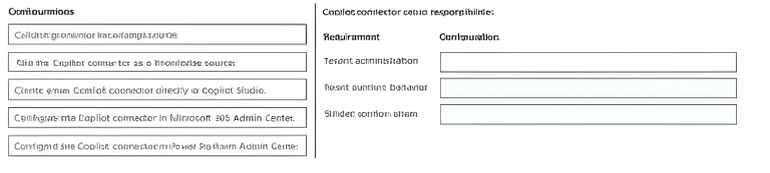
A company plans to use Copilot connectors to ground answers from a third-party system for an agent in
Copilot Studio.
To meet the business needs, responsibilities for configuring and using Copilot connectors must be separated
based on the following requirements:
For tenant administration, the connector must be available at the tenant level.
For agent runtime behavior, answers must be grounded from authorized sources.
For builder configuration, you must add the connector to the agent.
You need to determine how Copilot connector setup responsibilities are handled across the tenant, runtime,
and builder stages.
What should you configure for each requirement? To answer, move the appropriate configuration to the
correct requirement. You may use each configuration once, more than once, or not at all.
NOTE: Each correct selection is worth one point.
Explanation:
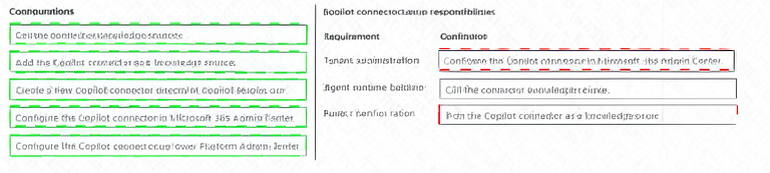
Copilot connectors enable agents in Copilot Studio to ground answers using data from third-party systems. The responsibilities for configuring and using these connectors are divided across three roles: tenant administration, agent runtime, and builder configuration.
Tenant administration → Configure the Copilot connector in Microsoft 365 Admin Center – At the tenant level, administrators must configure and enable the Copilot connector in the Microsoft 365 Admin Center. This makes the connector available across the entire tenant, ensuring it is provisioned and governed according to organizational policies.
Agent runtime behavior → Call the connector as a knowledge source – During agent runtime, the agent must be able to call the connector as a knowledge source to ground answers from authorized sources. This ensures that responses are generated based on real-time, permission-trimmed data from the third-party system.
Builder configuration → Add the Copilot connector as a knowledge source – At the builder level, the agent maker must add the Copilot connector as a knowledge source within Copilot Studio. This makes the connector available to the agent and allows it to be used for grounding answers during conversations.
❌ Why Other Configurations Are Incorrect:
Configure the Copilot connector in Power Platform Admin Center – While Power Platform Admin Center is used for environment-level settings, Copilot connectors for tenant-wide availability are configured in the Microsoft 365 Admin Center, not the Power Platform Admin Center.
Create a new Copilot connector directly in Copilot Studio – Creating a new connector is not the correct action for these requirements. The connector is configured at the tenant level and then added as a knowledge source by the builder; it is not created directly in Copilot Studio for this purpose.
Define the connector as a knowledge source – This is a duplicate of "Add the Copilot connector as a knowledge source." It is the same action and is mapped to builder configuration. It is not used for tenant administration or runtime.
📚 References:
* Microsoft Learn – Copilot connectors in Copilot Studio – Explains tenant administration, runtime behavior, and builder configuration responsibilities.
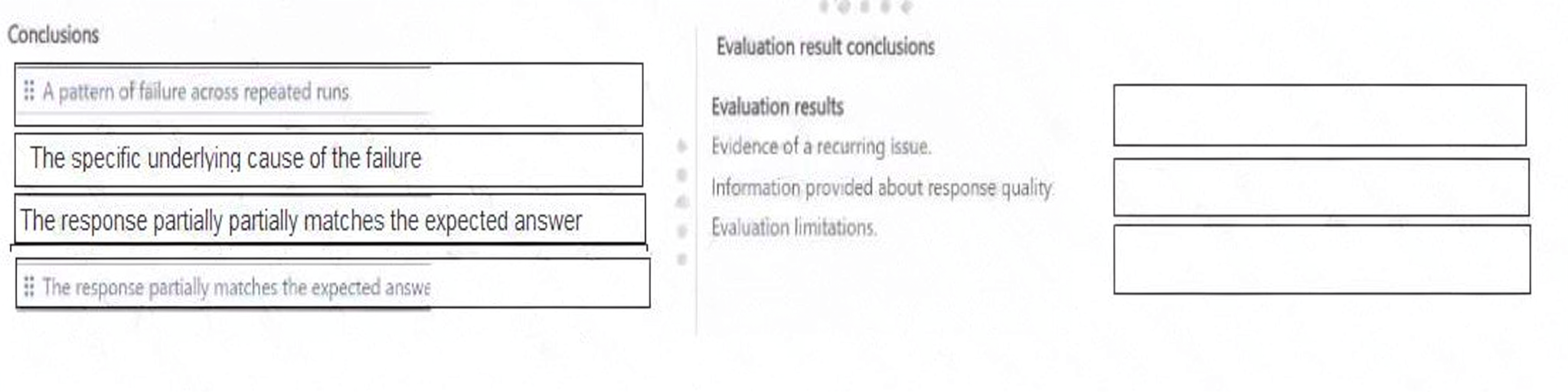
You run the same fixed test set three times in Copilot Studio.
During evaluation, you observe the following:
The same interaction fails in all three runs.
Score values range from 0.58 to 0.61.
The reasoning states that the response partially matches the expected answer.
The knowledge source that is used is internal documentation.
No tools are invoked.
Explanation:
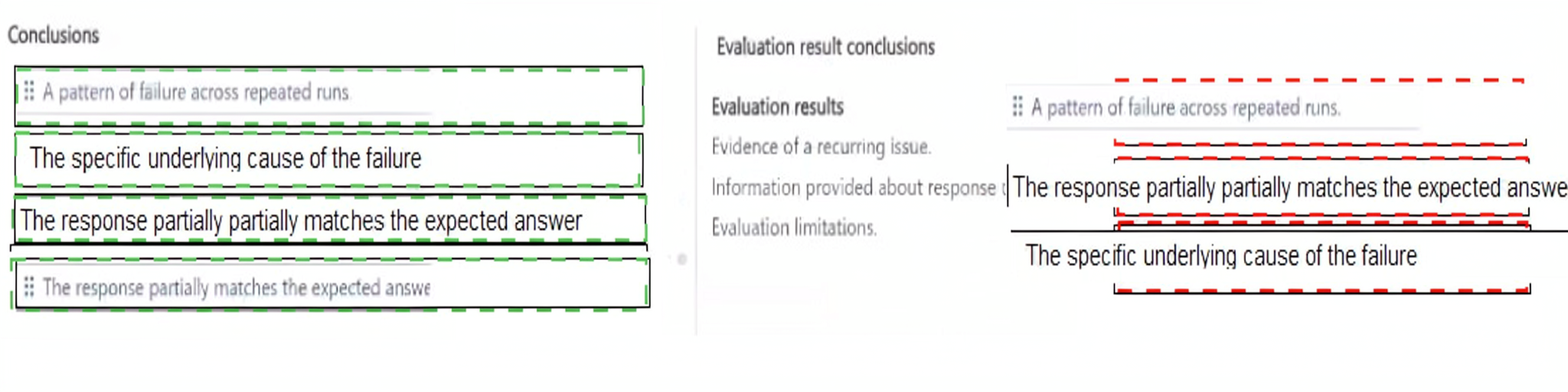
The evaluation results provide insights into the performance of the agent during repeated testing. Each observation maps to a specific conclusion.
Evidence of a recurring issue → A pattern of failure across repeated runs – The same interaction failed in all three runs, which is clear evidence of a recurring, reproducible issue rather than a random or one-time failure. This indicates a systematic problem that needs to be addressed.
Information provided about response quality → The response partially matches the expected answer – The reasoning states that the response partially matches the expected answer, and the score values (0.58 to 0.61) indicate partial correctness. This provides information about the quality of the response. It is not fully correct but is partially aligned with expectations.
Evaluation limitations → The specific underlying cause of the failure – The evaluation results do not identify the specific underlying cause of the failure. The knowledge source is internal documentation, and no tools are invoked, but the evaluation does not pinpoint why the response is only partially correct. This represents an evaluation limitation. The results indicate a problem but do not provide root-cause analysis.
❌ Why the Duplicate Conclusion Is Incorrect:
The response partially matches the expected answer (duplicate) – This conclusion is already used for the response quality observation. The evaluation results do not provide additional evidence for this conclusion, so it is not mapped to any other requirement.
📚 References:
* Microsoft Learn – Evaluate agents in Copilot Studio – Explains how to interpret evaluation results, including patterns of failure, response quality, and evaluation limitations.
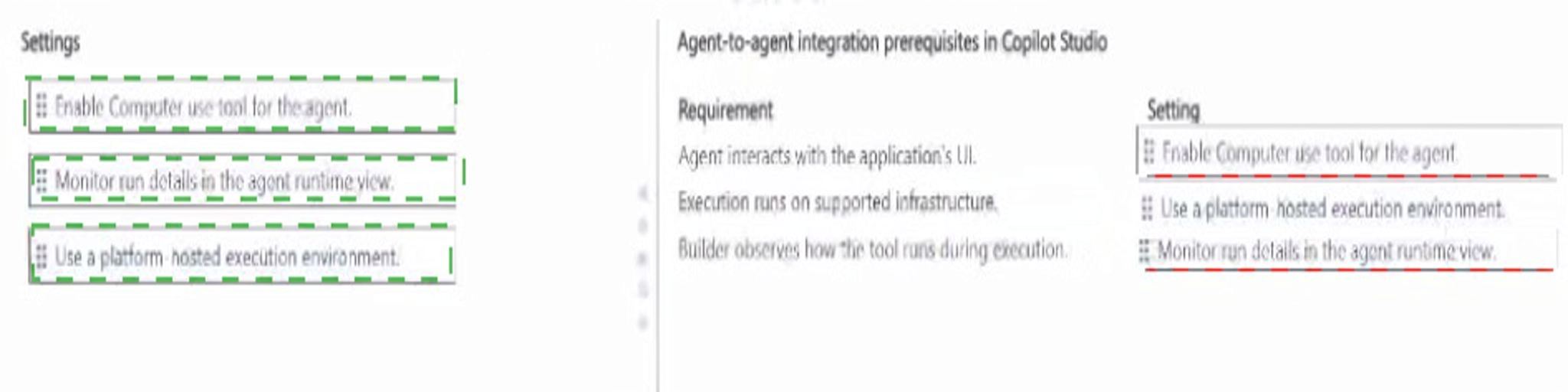
A company needs an agent in Copilot Studio to complete tasks by interacting with a legacy desktop
application that does NOT have APIs.
To meet the business needs, the solution must meet the following requirements:.
The agent must interact with the application ' s UI..
The execution must run on supported infrastructure..
The builder must be able to observe how the tool runs during execution..
You need to configure the agent based on the requirements..
Which setting should you configure for each requirement? To answer, move the appropriate settings to the
correct requirements. You may use each setting once, more than once, or not at all. You may need to move
the split bar between panes or scroll to view content..
NOTE: Each correct selection is worth one point..

Explanation:
Each requirement maps to a specific configuration setting in Copilot Studio for UI automation of legacy desktop applications.
The agent must interact with the application's UI → Enable Computer use tool for the agent – The Computer use tool in Copilot Studio enables the agent to perform UI automation, including clicking, typing, navigating menus, and interacting with desktop application interfaces. It is the supported mechanism for automating legacy applications that do not expose APIs. Enabling this tool satisfies the requirement for UI interaction.
The execution must run on supported infrastructure → Use a platform-hosted execution environment – UI automation for desktop applications must run on a platform-hosted execution environment, which provides managed and supported infrastructure for the automation. This ensures the automation executes in a secure, governed, and supported context rather than relying on the builder's local machine or an unsupported environment. This satisfies the requirement for supported infrastructure.
The builder must be able to observe how the tool runs during execution → Monitor run details in the agent runtime view – The agent runtime view provides visibility into each automation step as it executes. Builders can observe clicks, keystrokes, data entry, and navigation during conversations, enabling debugging, validation, and troubleshooting. This satisfies the requirement for observing how the tool runs during execution.
❌ Why No Other Setting Applies:
All three settings in the list are used exactly once, and each maps directly to one of the three requirements. There are no extraneous or unused settings in this scenario.
📚 References:
* Microsoft Learn – Computer use in Copilot Studio – Explains enabling the Computer use tool and using a platform-hosted execution environment.
A team is preparing to assess an agent in Copilot Studio before expanding access to additional users.
The team requires an evaluation that provides controlled, repeatable, and consistently measured test runs.
The evaluation must:
Be triggered directly by the team to control when testing occurs.
Determine success based on clearly established acceptance criteria.
Rely on a predefined set of inputs that ensures consistency across repeated runs.


Explanation:
Each requirement maps to a specific configuration for agent evaluation in Copilot Studio.
Be triggered directly by the team to control when testing occurs → Execute evaluation on demand – On-demand execution allows the team to manually trigger evaluation runs at a time of their choosing. This provides full control over when testing occurs, rather than scheduling or relying on automatic triggers. It satisfies the requirement for controlled, team-initiated evaluation.
Determine success based on clearly established acceptance criteria → Compare responses against defined expectations – To determine success objectively, the evaluation must compare the agent's responses against defined expectations, such as expected answers or golden responses. This establishes clear acceptance criteria and enables consistent scoring of pass/fail or quality levels. It satisfies the requirement for clearly established acceptance criteria.
Rely on a predefined set of inputs that ensures consistency across repeated runs → Use a predefined set of prompts – A predefined set of prompts (test set) provides a fixed, curated library of inputs that is used for every evaluation run. Because the same prompts are used each time, results are comparable across runs, ensuring consistency and repeatability. It satisfies the requirement for a predefined, consistent set of inputs.
❌ Why Other Configurations Are Incorrect:
Schedule evaluation to run automatically at set times – Scheduled execution does not give the team direct control over when testing occurs. It runs on a fixed schedule, which contradicts the requirement for team-triggered, on-demand evaluation.
Use live user conversations as the interaction source – Live user conversations are not predefined or consistent. They vary by user and context, making repeatable, comparable evaluation impossible. This violates the requirement for a predefined set of inputs.
Compare responses against undefined expectations – Undefined expectations provide no acceptance criteria and make objective success determination impossible. This is the opposite of what is required.
📚 References:
* Microsoft Learn – Evaluate agents in Copilot Studio – Explains on-demand evaluation, predefined test sets, and comparison against expected outcomes.
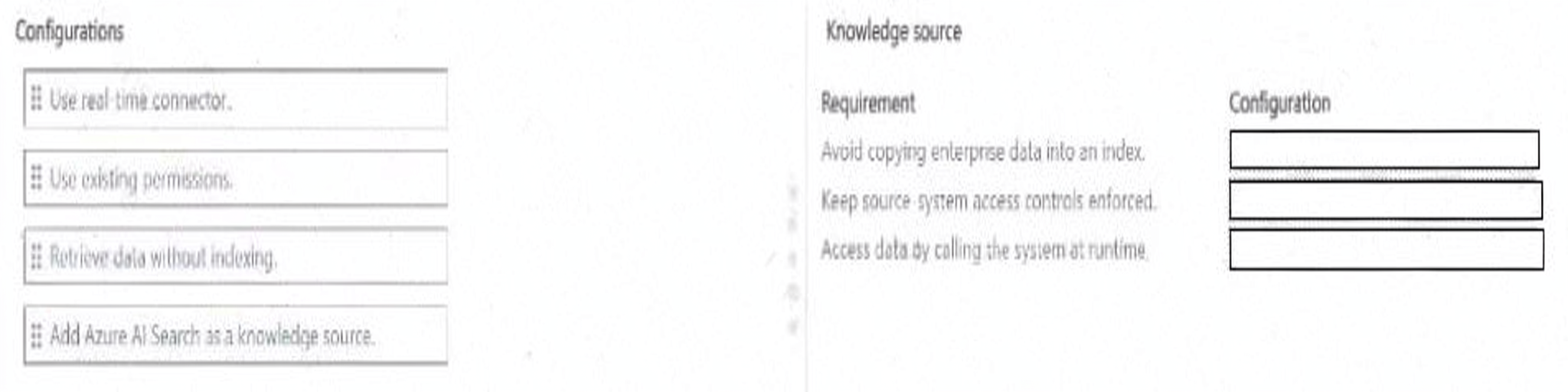
A company uses a supported Power Platform connector to provide real-time access to enterprise records for knowledge grounding in an agent in Copilot Studio.
To meet the business needs, the knowledge source must provide the following functionality:
Avoid copying enterprise data into an index.
Keep source-system access controls enforced.
Access data by calling the system at runtime.
You need to configure the connector knowledge source.
What should you configure for each requirement? To answer, move the appropriate configurations to the correct requirements. You may use each configuration once, more than once, or not at all. You may need to move the split bar between panes or scroll to view content.
Explanation:
Each requirement maps to a specific configuration of the Power Platform connector knowledge source in Copilot Studio.
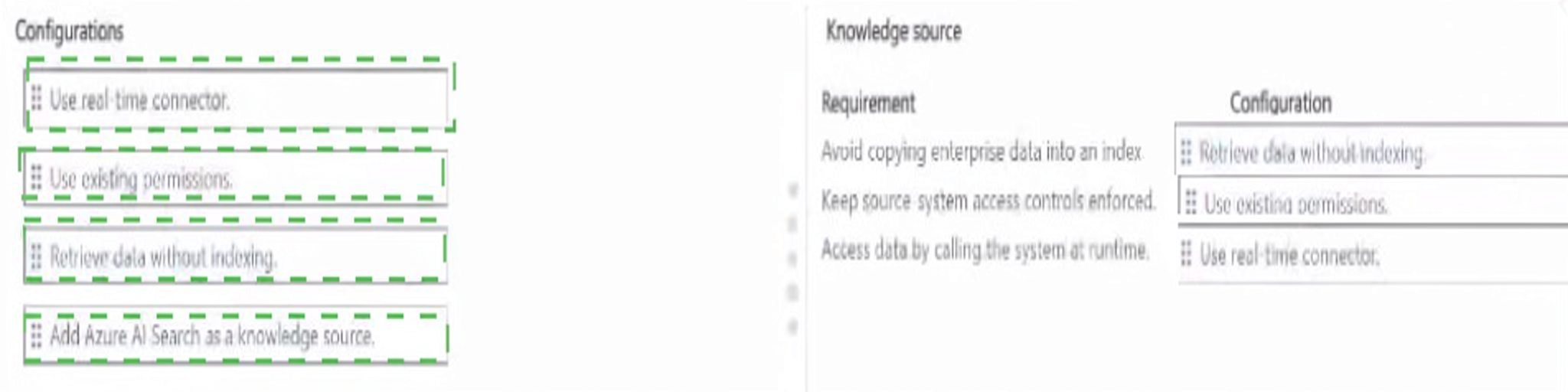
Avoid copying enterprise data into an index → Retrieve data without indexing – When you configure a real-time connector as a knowledge source, you can choose to retrieve data without indexing. This means the data is not copied into an index, such as Azure AI Search or Microsoft Graph. Instead, the agent queries the source system directly. This satisfies the requirement to avoid duplicating or copying enterprise data into an index, which is important for data freshness, storage efficiency, and compliance.
Keep source-system access controls enforced → Use existing permissions – Enabling use existing permissions ensures that the connector honors the source system's access controls, such as ACLs and role-based permissions. When the agent retrieves data, it does so in the context of the authenticated user, so users only see records they are authorized to access. This preserves the source system's security model and satisfies the requirement for enforced access controls.
Access data by calling the system at runtime → Use real-time connector – A real-time connector queries the source system at runtime rather than relying on pre-indexed content. When a user asks a question, the connector calls the system's API to fetch the latest data. This satisfies the requirement for runtime access and ensures responses reflect current, live data.
❌ Why the Other Configuration Is Incorrect:
Add Azure AI Search as a knowledge source – Azure AI Search is an indexed knowledge source. It requires copying data into an index, which violates the requirement to avoid copying enterprise data. It also does not provide runtime access to the source system in the same way a real-time connector does. This is not applicable to any of the three requirements.
📚 References:
* Microsoft Learn – Use real-time connectors as knowledge sources in Copilot Studio – Explains retrieving data without indexing, using existing permissions, and runtime access.
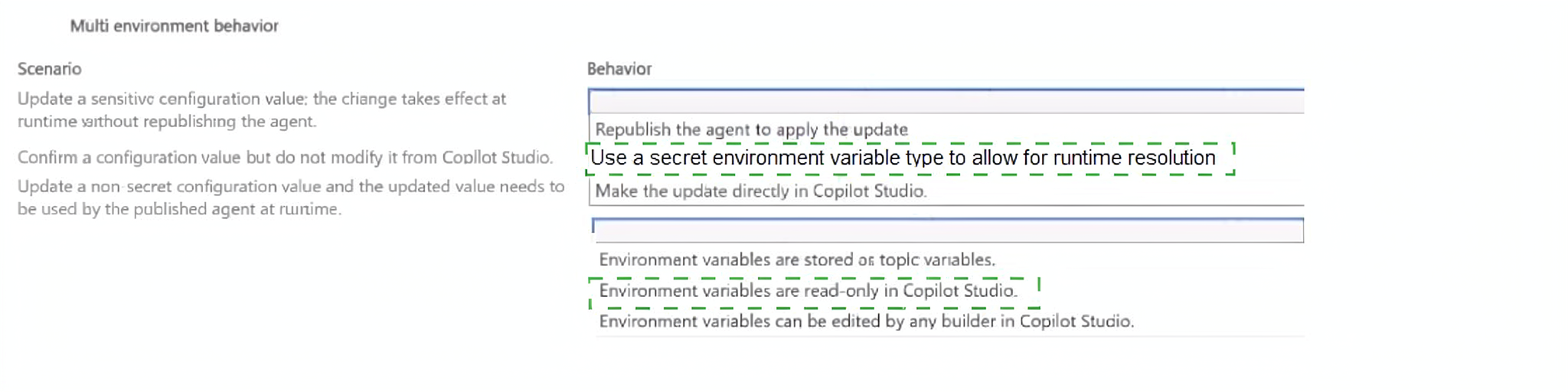
A team uses environment variables to separate configuration from an agent so that the same solution can be moved between environments.
The team requires the following scenarios to be addressed:
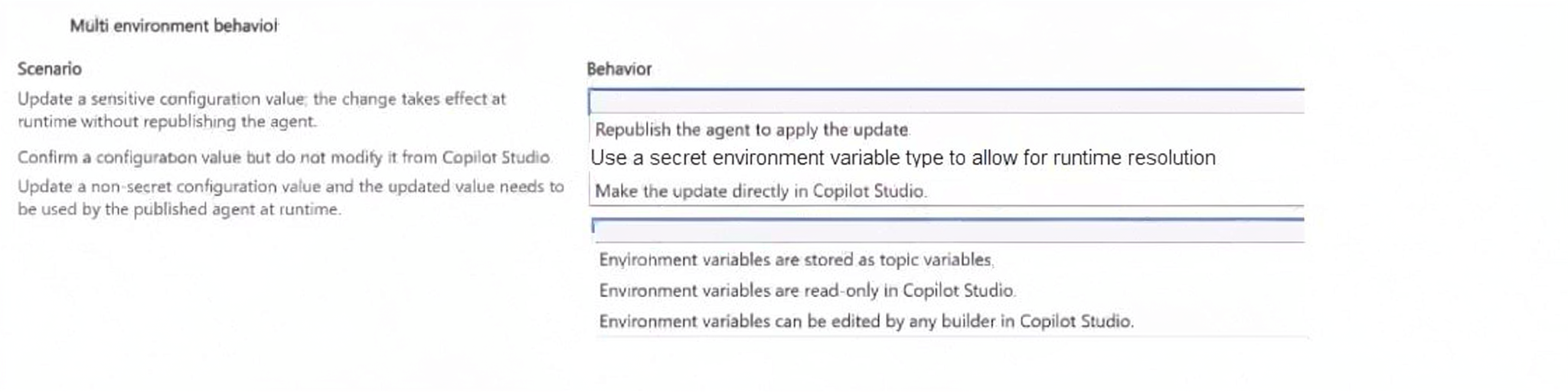
An administrator updates a sensitive configuration value and needs the change to take effect at runtime without republishing the agent.
A builder needs to confirm a configuration value but must not be able to modify it from Copilot Studio.
An administrator updates a non-secret configuration value and needs the updated value to be used by the
published agent at runtime.
Explanation:
Each scenario maps to a specific behavior of environment variables in Copilot Studio.
Update a sensitive configuration value; change takes effect at runtime without republishing → Use a secret environment variable type to allow for runtime resolution – Secret environment variables are resolved at runtime rather than being embedded in the agent definition. When an administrator updates a secret variable's value, the change is picked up immediately at runtime without requiring the agent to be republished. This is because secret values are stored securely, such as in Azure Key Vault, and retrieved dynamically during execution. This satisfies the requirement for sensitive values to take effect immediately without republishing.
Confirm a configuration value but do not modify it from Copilot Studio → Environment variables are read-only in Copilot Studio – Environment variables are exposed in Copilot Studio as read-only. Builders can view and confirm the current values for development and debugging, but they cannot modify them directly in Copilot Studio. Values are managed in the administrative experience, such as the Power Platform admin center, environment settings, or during solution import. This enforces governance and prevents unauthorized changes.
Update a non-secret configuration value; updated value must be used by the published agent at runtime → Republish the agent to apply the update – Non-secret environment variables are embedded into the agent definition at publish time. When an administrator updates a non-secret variable's value, the published agent does not automatically pick up the new value. The agent must be republished for the updated value to be used at runtime. This is a key distinction from secret variables, which resolve at runtime.
❌ Why Other Behaviors Are Incorrect:
Make the update directly in Copilot Studio – Builders cannot modify environment variable values directly in Copilot Studio. Values are managed administratively, and environment variables are read-only in the authoring experience.
Environment variables are stored as topic variables – Environment variables are separate from topic variables. They are solution-aware configuration components, not topic-scoped variables.
Environment variables can be edited by any builder in Copilot Studio – Environment variables are read-only in Copilot Studio. Allowing any builder to edit them would violate governance and ALM controls.
📚 References:
* Microsoft Learn – Environment variables in Copilot Studio – Explains secret vs. non-secret variables, read-only behavior, and republishing requirements.
| Page 1 out of 10 Pages |