Topic 2, Blue Yonder Airlines
Background - Blue Yonder Airlines is a global carrier headquartered in Los Angeles, California, operating domestic and international flights. The company serves millions of passengers annually through its website, mobile app, and call centers. To improve customer service efficiency and reduce call center volume, Blue Yonder is deploying an AI agent in Microsoft Copilot Studio. The agent will handle customer inquiries across multiple channels – web chat, mobile app, and Microsoft Teams (for internal support staff). It will answer questions, retrieve data from enterprise systems, and escalate to human agents when needed. The project is led by a cross-function team: Product manager: Defines requirements and success metrics. Lead agent author: Designs topics, intents, and generative behavior. Flow designers: Build agent flows and integrations. IT /security and compliance: Oversees identity, data protection, and Responsible AI (RAI) compliance. Current environment - Channels - Public website: Embedded web chat Mobile app: In-app chatbot - Microsoft Teams: Internal support agent access Identity and access - Customers: Anonymous access for general inquiries (e.g., flight status, baggage policy). Authentication is required for personal data access (e.g., bookings, loyalty points). Internal staff: Authenticate via Microsoft Entra ID. Data sources - Reservation and Ticketing System (internal): REST API, no prebuilt connector with custom enterprise database. Flight Status and Weather APIs (external): REST APIs with API keys. Customer Support Knowledge Base: SharePoint library with PDFs and policy documents. Loyalty Program Data: Stored in Dynamics 365 and Dataverse. Travel Advisory Content: Uses REST API with partner services. Integration mechanisms - Custom connectors must be used for internal APIs that lack prebuilt connectors. HTTP request nodes may be used for lightweight external APIs. Knowledge sources must be used for unstructured content. Agent flows must be used to encapsulate reusable logic (e.g., rebooking). Business requirements - Omnichannel support - Deploy the agent across web, mobile, and Teams with a consistent user experience. The Teams deployment must also support internal staff. Self-service capabilities - The agent must handle common inquiries such as: Flight status - Booking and rebooking - Loyalty program questions - Travel policies and baggage rules Human escalation - If the agent cannot resolve an issue or the user requests help, it must: Escalate to a human agent. Transfer the conversation transcript and relevant context. Redact any sensitive personal data before escalation. Knowledge integration - The agent must use scalable methods for knowledge integration and must not rely on manually authored Q & A topics for each document. Performance metrics - First-contact resolution: +25% Tier-1 call deflection: #20% Response time: 90% of queries answered within 30 seconds Accuracy: #95% for known FAQs - CSAT: #85% for AI-handled interactions Technical requirements - Platform constraints - No custom code is permitted; only Copilot Studio ' s built-in tools may be used. All backend logic must be implemented using agent flows. Markdown must be used for formatting (e.g., bold, bullet points); HTML is not supported. Authentication - Sign-in is required for personal data access. Anonymous access is allowed for general inquiries. User identity must be used for data access; shared or builder credentials must not be used. Compliance and security - Power Platform DLP policies must be enforced to block unauthorized data flows. Responsible AI content moderation filters must be enabled. Prompt modifications must be added to enforce tone, disclaimers, and refusal behavior. Disclaimers must be applied consistently across all generative responses. Manual edits to individual topics must be avoided. Monitoring and maintenance - All conversations and actions must be logged for auditing. Weekly reviews of transcripts and metrics must be conducted. Issues and constraints - API rate limits: External APIs (e.g., flight status) have usage limits. Agent flows must handle retries and caching to avoid exceeding quotas. Knowledge base limits: Copilot Studio has limits on the number and size of indexed documents. Large files must be split or summariz ed. Generative answer risks: Generative responses must be constrained to avoid policy violations. Prompt modifications and filters must be used to enforce tone, safety, and compliance. User input variability: Users phrase questions in diverse ways. Topics must include varied trigger phrases and fallback handling. Authentication UX: The agent must clearly explain when sign-in is required and handle transitions smoothly across channels. Problem statement - Blue Yonder Airlines must deploy a secure, scalable, and policy compliant AI agent using Microsoft Copilot Studio. The agent must deliver accurate, helpful, and safe responses across multiple channels, integrate with enterprise systems, and support both anonymous and authenticated users. It must adhere to strict data protection and Responsible AI standards while improving customer service efficiency and satisfaction.
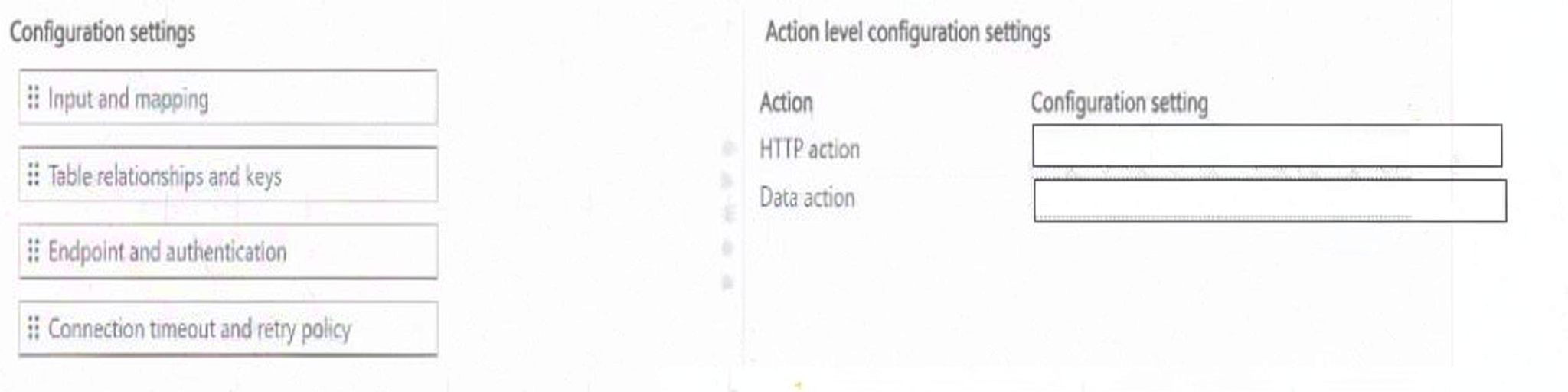
A company is configuring an agent flow that uses multiple action types to perform operations and process data.
The flow must be configured as follows:
An HTTP action must connect to an external service.
A data action must reference the correct data to process.
You need to configure the settings for each action type.
Explanation:
Each action type requires a specific configuration setting based on its function in the flow.
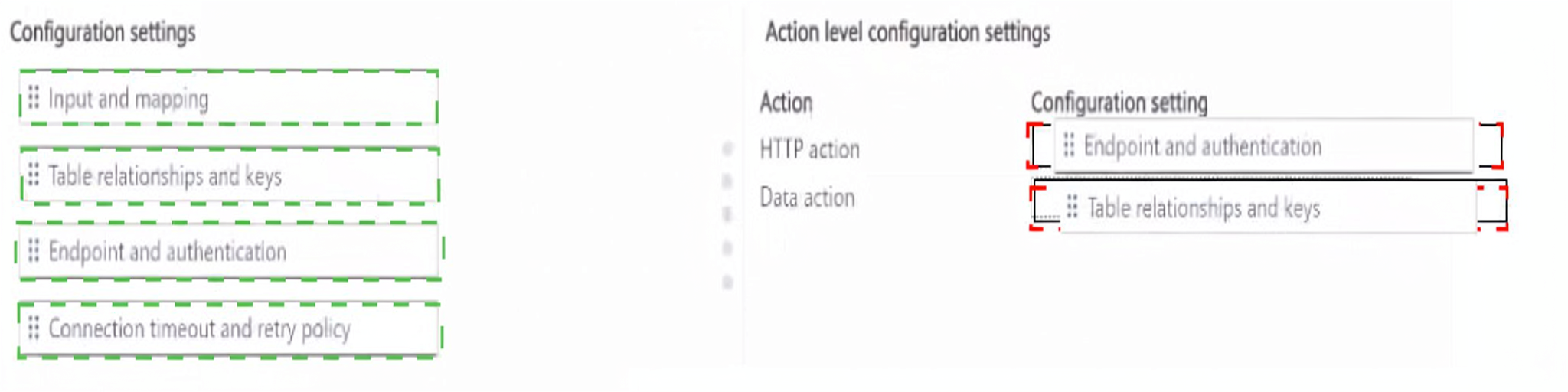
HTTP action → Endpoint and authentication – An HTTP action connects to an external service by sending requests to a specific URL. To configure this, you must define the endpoint (the URL of the external service) and the authentication method (e.g., API key, OAuth 2.0, Basic Auth) required to access it. This satisfies the requirement for the HTTP action to connect to an external service.
Data action → Table relationships and keys – A data action processes structured data, typically from Dataverse or another database. To reference the correct data, you must configure table relationships and keys. This defines which tables the action interacts with, how they relate to each other, and which key fields are used for lookups, joins, or filtering. This satisfies the requirement for the data action to reference the correct data to process.
❌ Why Other Configuration Settings Are Incorrect:
Input and mapping – This setting defines how data flows into the action from previous steps or triggers. While important, it is not the specific setting that configures the HTTP endpoint or the data table relationships.
Connection timeout and retry policy – This setting controls how long the action waits before timing out and how many times it retries on failure. It does not configure the endpoint, authentication, or table relationships.
📚 References:
* Microsoft Learn – Configure HTTP actions in Power Automate – Explains endpoint and authentication configuration.
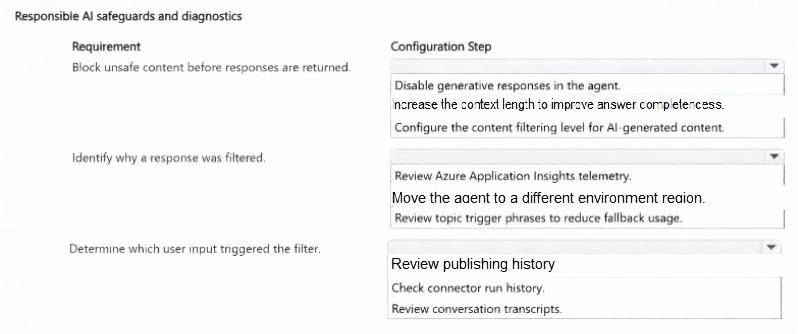
A company is deploying an agent that uses generative responses. During pilot testing, some responses are blocked by responsible AI filtering. The company has Application Insights enabled.
You need to enable the following:
Must implement safeguards to block unsafe or harmful content.
Must implement protections for user prompts and model-generated responses.
Must be able to investigate why responses are filtered.
 Explanation:
Each requirement maps to a specific Responsible AI safeguard or diagnostic step.
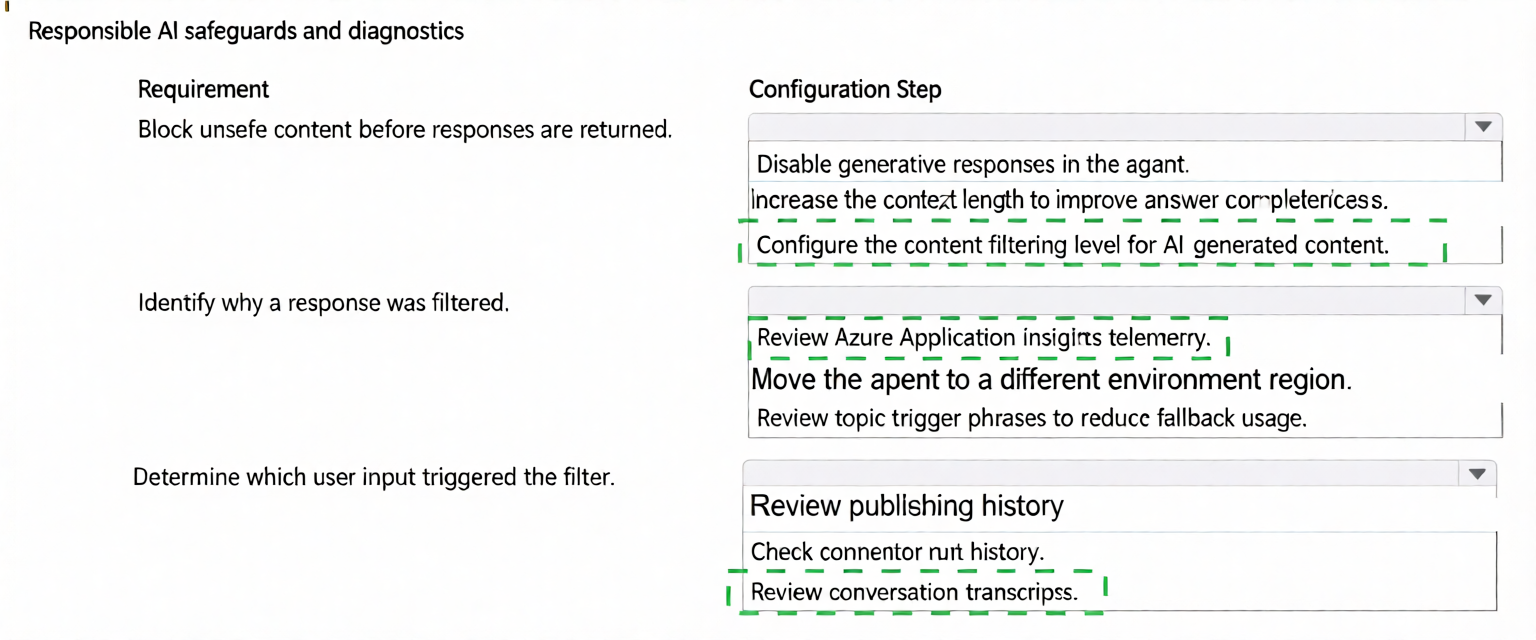
Block unsafe content before responses are returned → Configure the content filtering level for AI-generated content – Content filtering is the primary safeguard that blocks unsafe, harmful, or inappropriate content before it is returned to the user. By configuring the content filtering level (e.g., Low, Medium, High) for AI-generated content, you control the strictness of the filter and ensure that unsafe content is blocked. This satisfies the requirement to implement safeguards that block unsafe or harmful content, and it also protects user prompts and model-generated responses.
Identify why a response was filtered → Review Azure Application Insights telemetry – When a response is filtered, the event is logged in Azure Application Insights telemetry. This telemetry includes details about the filter event, such as the filter category (e.g., violence, hate, sexual, self-harm), severity level, and the reason the content was blocked. Reviewing Application Insights allows you to understand why a response was filtered. This satisfies the diagnostic requirement.
Determine which user input triggered the filter → Review conversation transcripts – Conversation transcripts capture the full exchange between the user and the agent, including the user's input and the agent's response. When a response is filtered, reviewing the transcript allows you to identify the specific user input that triggered the filter. This is essential for diagnosing problematic prompts, refining content policies, and improving the agent's handling of edge cases. This satisfies the requirement to determine which user input triggered the filter.
❌ Why Other Configuration Steps Are Incorrect:
Disable generative responses in the agent – Disabling generative responses would prevent the agent from generating any responses, which is an extreme measure that defeats the purpose of the agent. It does not implement safeguards; it eliminates functionality.
Increase the context length to improve answer completeness – Context length affects how much conversation history the model considers. It does not block unsafe content or help diagnose filter events.
Move the agent to a different environment region – Region changes affect data residency and latency, not content filtering or diagnostics.
Review topic trigger phrases to reduce fallback usage – Trigger phrases affect topic matching, not content filtering. This does not address unsafe content or filter diagnostics.
Review publishing history – Publishing history shows when the agent was published, not why content was filtered or what input triggered the filter.
Check connector run history – Connector run history shows data connector executions, not Responsible AI filter events or user inputs.
📚 References:
* Microsoft Learn – Responsible AI in Copilot Studio – Explains content filtering levels and safeguards for AI-generated content.
A company uses a primary agent in Copilot Studio to handle user intake.
For some requests, the company wants the primary agent to delegate work to another Copilot Studio agent that already exists.
To meet the business requirements, the solution must support the following capabilities for the connected agent:
Allow calls from other agents.
Allow agents to use the connected agent for collaboration.
Allow agents to invoke the connected agent during conversations.
You need to integrate the existing Copilot Studio agent with the primary agent.
Which configuration should you use for each requirement? To answer, move the appropriate configurations to
the correct requirements. You may use each configuration once, more than once, or not at all.
NOTE: Each correct selection is worth one point.


Explanation:
Each requirement maps to a specific configuration step in Copilot Studio's agent-to-agent integration.
Must allow calls from other agents → Configure connections to the connected agent – To allow calls from other agents, you must configure connections to the connected agent. This establishes the authentication and endpoint configuration that enables agent-to-agent communication. Without a valid connection, other agents cannot call the connected agent, even if it is added or published.
Must allow agents to use the connected agent for collaboration → Add the connected agent – To enable collaboration, the connected agent must be added to the primary agent's configuration. Adding the agent registers it as a callable child/connected agent, making it available for delegation and collaborative workflows. Without adding it, the primary agent has no awareness of the connected agent.
Must allow agents to invoke the connected agent during conversations → Publish the connected agent – For the connected agent to be invoked during live conversations, it must be published. An unpublished agent is not available at runtime, even if it is added and connected. Publishing makes the agent live and accessible for invocation during conversations.
❌ Why the Other Configuration Is Incorrect:
Add the connected agent as an indexed knowledge source – Knowledge sources are used for content grounding, such as retrieving documents and information, not for agent-to-agent delegation or invocation. Adding an agent as a knowledge source would not enable calls, collaboration, or invocation. This is not a valid configuration for agent-to-agent integration.
📚 References:
Microsoft Learn – Connect agents in Copilot Studio – Explains how to add connected agents, configure connections, and publish agents for agent-to-agent collaboration.
You deploy an agent in Microsoft Copilot Studio that triggers a cloud flow to update customer records in Microsoft Dataverse.
You observe the following after deploying the agent:
Several runs fail because of a temporary authentication issue.
The flow continues to trigger and generate additional failed runs.
You must:
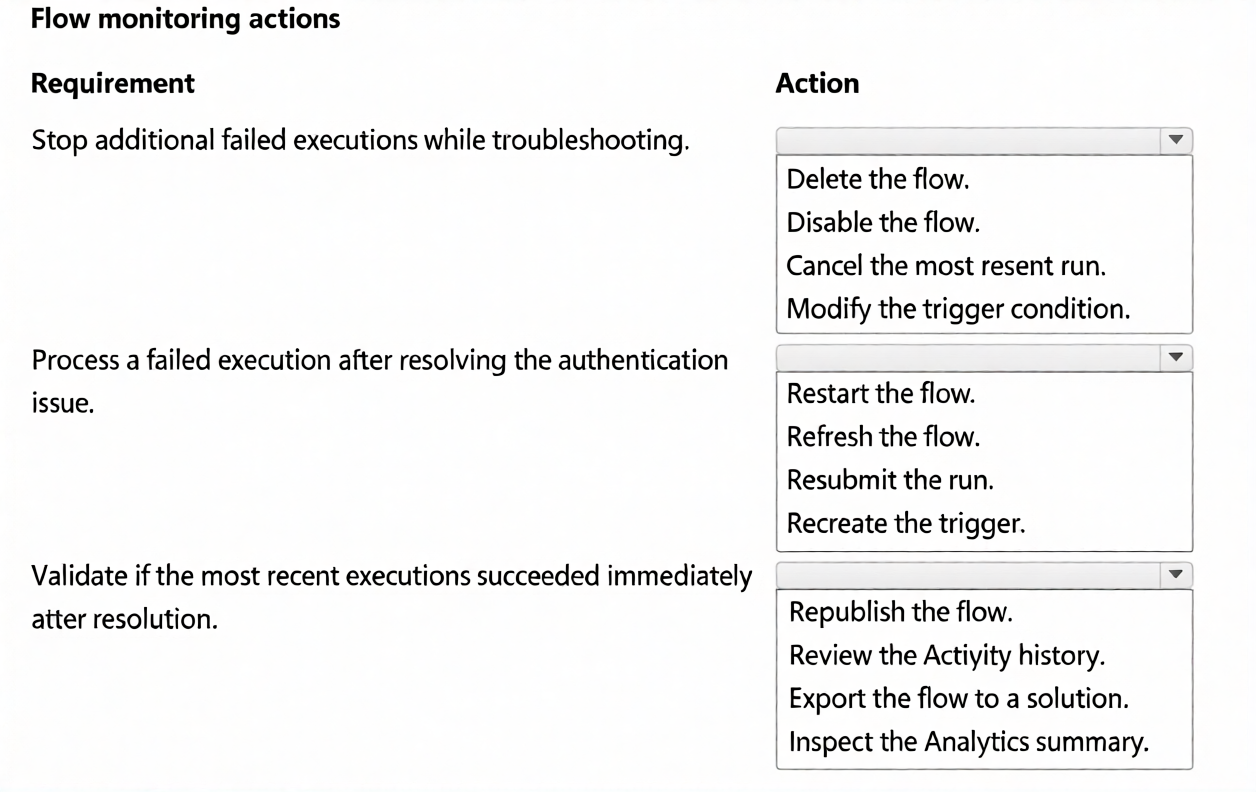
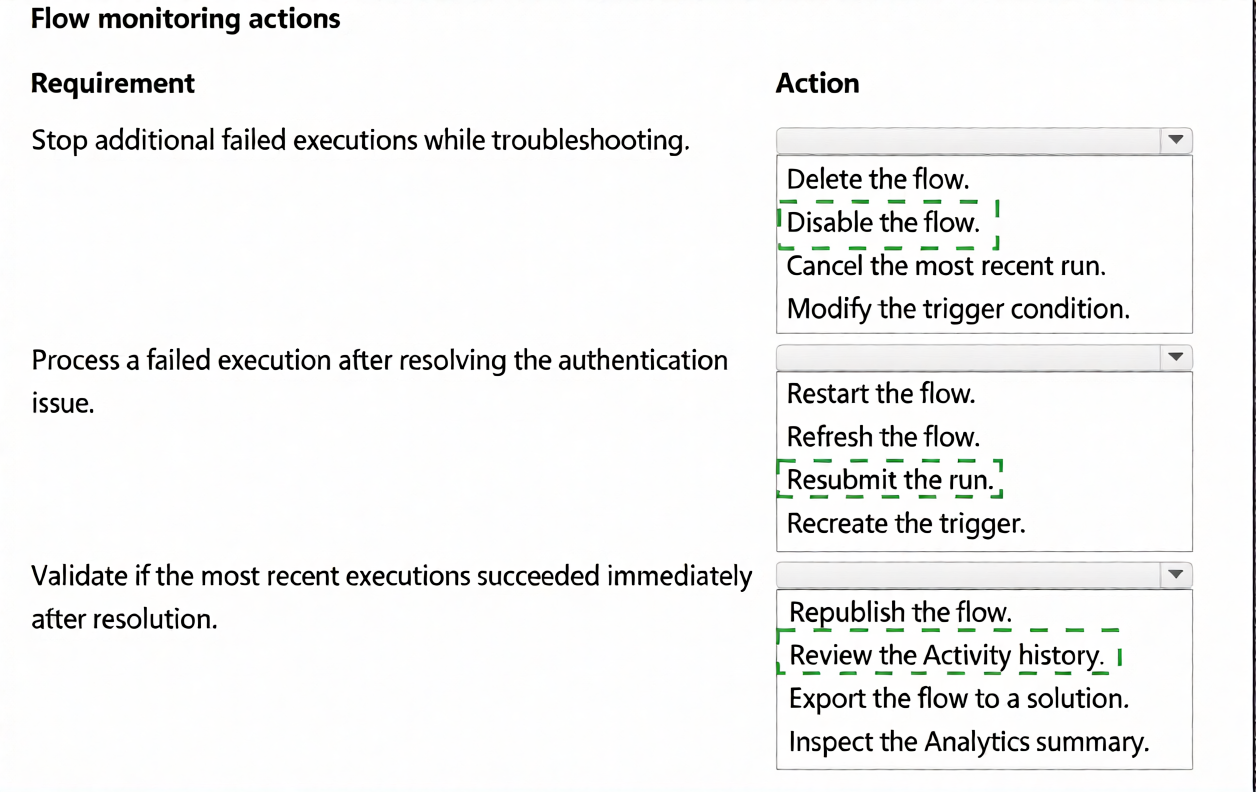
Stop additional failed executions while troubleshooting.
Process a failed execution after resolving the authentication issue.
Validate whether the most recent executions succeeded immediately after resolution.
You need to use the appropriate monitoring and management actions to restore normal flow operation and
validate successful execution.
Which action should you perform for each requirement?
Explanation:
Each requirement maps to a specific flow monitoring and management action in Power Automate.
Stop additional failed executions while troubleshooting → Disable the flow – Disabling the flow prevents it from triggering new runs. This stops the accumulation of additional failed executions while you investigate and resolve the authentication issue. Unlike deleting the flow, which is destructive and permanent, disabling is reversible and preserves the flow configuration, making it the correct action.
Process a failed execution after resolving the authentication issue → Resubmit the run – After fixing the authentication issue, you can resubmit the failed run from the flow's run history. Resubmitting re-executes the flow with the original inputs, allowing the previously failed operation to complete successfully without waiting for a new trigger event. This ensures the failed transaction is processed and no data is lost.
Validate whether the most recent executions succeeded immediately after resolution → Review the Activity history – The Activity history (run history) in Power Automate shows the status of each flow run, including successes, failures, timestamps, and execution details. Reviewing it immediately after resubmission allows you to confirm whether the most recent executions succeeded and whether the authentication issue is resolved. This is the correct action for validating recent execution outcomes.
❌ Why Other Actions Are Incorrect:
Delete the flow – Deleting removes the flow permanently, which is unnecessary and destructive. Disabling is the correct action to temporarily stop executions while preserving the flow.
Cancel the most recent run – Cancelling stops a currently running execution but does not prevent future failed runs from triggering. It also does not help reprocess the failed run after resolution.
Modify the trigger condition – Changing the trigger condition alters when the flow runs, which is not the issue. The problem is authentication failure, not trigger logic.
Restart the flow – "Restart" is not a standard action for a failed run in Power Automate. The correct action is to resubmit the run.
Refresh the flow – Refreshing the browser or flow designer does not reprocess a failed run or change execution state.
Recreate the trigger – Recreating the trigger would not fix the authentication issue and would not reprocess the failed run.
Republish the flow – Republishing saves and publishes the flow but does not reprocess failed runs or validate past executions.
Export the flow to a solution – Exporting is for ALM and deployment, not for troubleshooting or reprocessing failed runs.
Inspect the Analytics summary – Analytics provides aggregated metrics such as success rate and failure rate but does not show individual run details or recent execution outcomes. The Activity history is the correct place to validate specific recent executions.
📚 References:
* Microsoft Learn – Disable a cloud flow – Explains how to stop a flow from running.
A company is building an agent in Copilot Studio topic that must retrieve real-time status information from an
external REST API using a Send HTTP request node.
To meet the business needs, the topic must meet the following requirements:
The request must include the required authentication header.
The request must call the endpoint using the correct HTTP method.
The response must be configured with an appropriate response data type based on a schema and saved so the
topic can reuse the returned values.
You need to configure the Send HTTP request node.
Which configuration should you use for each requirement? To answer move the appropriate configuration to
the correct requirements.


Explanation:
Each requirement maps to a specific configuration in the Send HTTP request node.
The request must include the required authentication header → Add required headers to the HTTP request – Authentication headers, such as Authorization or X-API-Key, are configured in the Headers section of the HTTP request node. Adding the required headers ensures the request is authenticated and accepted by the external API.
The request must call the endpoint using the correct HTTP method → Set the method to GET in the HTTP request – The requirement states that the topic must retrieve real-time status information. The correct HTTP method for retrieval is GET. Setting the method to GET ensures the request queries the endpoint without modifying data. PATCH is used for partial updates, which is not appropriate here.
The response must be configured with an appropriate response data type based on a schema and saved so the topic can reuse the returned values → Select JSON data type and save response to a variable – The external REST API returns structured data, typically JSON. To handle this correctly, you must select the JSON response data type, which allows you to define a schema for parsing, and save the response to a topic variable. This makes the returned values available for reuse in subsequent steps of the topic, such as displaying them to the user, branching logic, or further processing.
❌ Why Other Configuration Is Incorrect:
Set the method to PATCH in the HTTP request – PATCH is used for partial updates to a resource, not for retrieving data. The requirement is to retrieve real-time status information, which requires the GET method. Using PATCH would be semantically incorrect and could cause unintended side effects or errors.
📚 References:
* Microsoft Learn – Send HTTP request node in Copilot Studio – Explains configuring headers, HTTP methods, response data types, and saving responses to variables.
A team is preparing to evaluate an agent in Copilot Studio before expanding access to additional users.
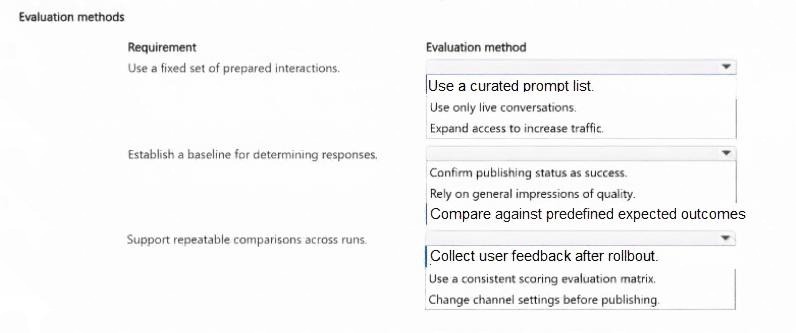
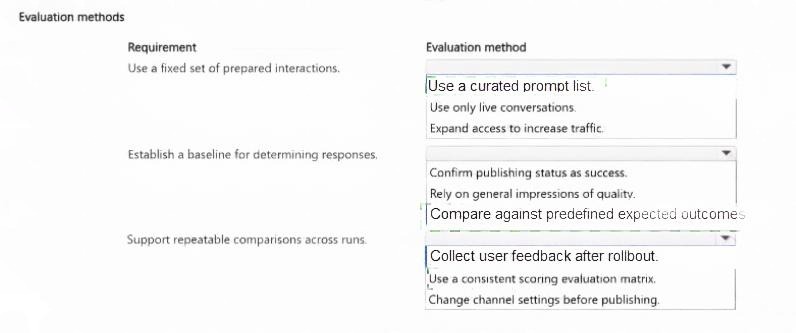
The team must choose an evaluation method that meets the following requirements:
Use a fixed set of prepared interactions..
Determine responses against a predefined baseline..
Support consistent comparison across repeated test runs..
You need to determine the evaluation method that satisfies the evaluation requirements..
Explanation:
Each requirement maps to a specific evaluation method in Copilot Studio for structured, repeatable agent evaluation.
Use a fixed set of prepared interactions → Use a curated prompt list – A curated prompt list is a predefined set of test prompts or interactions that are used consistently for evaluation. This ensures that the same inputs are tested each time, providing a fixed, standardized basis for comparison. It satisfies the requirement for a fixed set of prepared interactions.
Determine responses against a predefined baseline → Compare against predefined expected outcomes – To determine whether responses are correct, you compare the agent's generated responses against predefined expected outcomes, or golden responses. This establishes a baseline for scoring and enables objective determination of pass/fail or quality levels. It satisfies the requirement for a predefined baseline.
Support consistent comparison across repeated test runs → Use a consistent scoring evaluation matrix – A consistent scoring evaluation matrix applies the same scoring criteria and metrics to every test run. This ensures that results are comparable across runs, allowing the team to detect regressions, measure improvements, and make consistent judgments about agent performance. It satisfies the requirement for consistent comparison.
❌ Why Other Evaluation Methods Are Incorrect:
Use only live conversations – Live conversations are not fixed or repeatable. They vary by user and context, making consistent comparison difficult. This does not satisfy the requirement for a fixed set of prepared interactions.
Expand access to increase traffic – Increasing traffic is a scaling action, not an evaluation method. It does not provide a fixed test set, a predefined baseline, or consistent scoring.
Confirm publishing status as success – Publishing status indicates deployment, not evaluation quality. It does not measure response accuracy or support comparison against a baseline.
Rely on general impressions of quality – General impressions are subjective and not repeatable. They do not provide a predefined baseline or consistent scoring across runs.
Collect user feedback after rollout – User feedback is collected after deployment and reflects live usage. It is not a fixed test set, does not provide a predefined baseline for scoring, and is not consistent across runs.
Change channel settings before publishing – Channel settings affect where the agent is available, not how it is evaluated. This does not satisfy any of the three evaluation requirements.
📚 References:
* Microsoft Learn – Evaluate agents in Copilot Studio – Explains curated prompt lists, expected outcomes, and scoring matrices for consistent evaluation.
A company integrates a Model Context Protocol (MCP) service that exposes ticket-management operations.
The MCP service requires authenticated requests and exposes multiple callable operations that must be
selectively governed for agent use.
To meet the business needs, the MCP configuration must meet the following requirements:
Only the allowed capabilities must be callable during conversations.
Requests must succeed without embedding credentials in topic steps.
The agent must be configured to send requests to the correct backend.
You need to configure MCP tools for the agent.
Which setting should you configure for each requirement? To answer, move the appropriate settings to the
correct requirements. You may use each setting once, more than once, or not at all.
NOTE: Each correct selection is worth one point.


Explanation:
Each requirement maps to a specific MCP configuration setting in Copilot Studio.
Only the allowed capabilities must be callable during conversations → CreateTicket, EscalateIncident, GetTicket, UpdateSLA – This setting lists the specific capabilities (operations) that are exposed and callable by the agent. By explicitly listing only the approved operations, including CreateTicket, EscalateIncident, GetTicket, and UpdateSLA, you govern which MCP capabilities the agent can invoke. Operations not listed are not callable, ensuring selective governance of MCP tools.
Requests must succeed without embedding credentials in topic steps → API key header X-API-Key – To authenticate requests without hard-coding credentials in topic steps, you configure the API key header, such as X-API-Key, in the MCP connection settings. The credential is stored securely in the connection/authentication configuration, and the MCP call automatically includes the API key header. This allows requests to succeed without exposing credentials in topic logic.
The agent must be configured to send requests to the correct backend → Server URL – The Server URL setting specifies the endpoint of the MCP service. By configuring the correct Server URL, the agent sends requests to the right backend. This is the foundational setting for routing MCP calls to the intended service.
❌ Why No Other Setting Applies:
All three settings in the list are used exactly once, and each maps directly to one of the three requirements. There are no extraneous or unused settings in this scenario.
📚 References:
* Microsoft Learn – Connect to MCP servers in Copilot Studio – Explains how to configure the Server URL, API key header, and allowed capabilities for MCP tools.
| Page 2 out of 10 Pages |