Topic 4: Misc. Questions
Note: This question is part of a series of questions that present the same scenario. Each
question in the series contains a unique solution that might meet the stated goals. Some
question sets might have more than one correct solution, while others might not have a
correct solution.
After you answer a question in this section, you will NOT be able to return to it. As a result,
these questions will not appear in the review screen.
You have a Microsoft 365 tenant.
You have 100 IT administrators who are organized into 10 departments.
You create the access review shown in the exhibit. (Click theExhibittab.)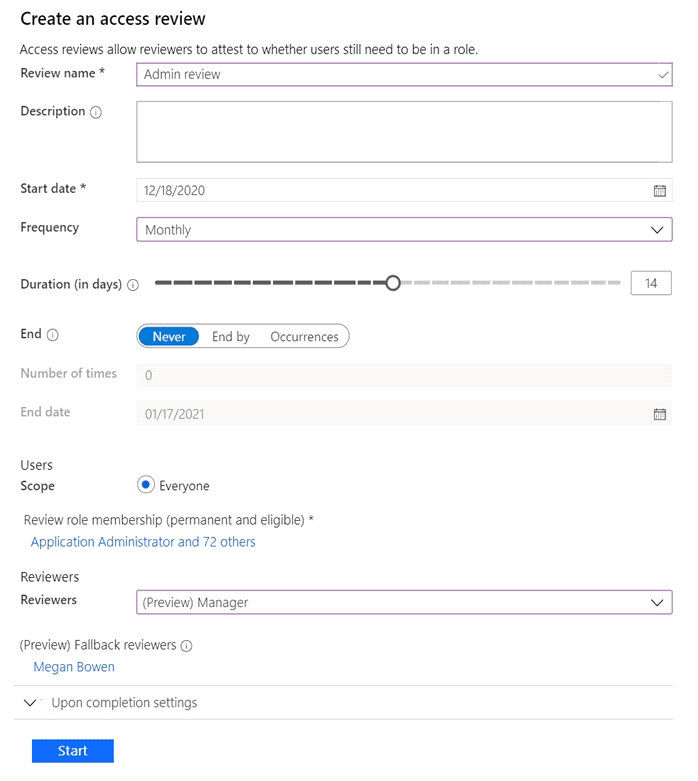
You discover that all access review requests are received by Megan Bowen.
You need to ensure that the manager of each department receives the access reviews of
their respective department.
Solution: You create a separate access review for each role.
Does this meet the goal?
A. Yes
B. NoD18912E1457D5D1DDCBD40AB3BF70D5D
Explanation:
This question tests whether creating separate access reviews per role solves the problem of distributing review tasks to department managers. The core issue is that all reviews go to one person (Megan Bowen) because the reviewer is set to "Manager", but the manager attribute is likely not populated correctly for the IT administrators, or Megan is set as everyone's manager. Creating separate reviews for each role does not change the reviewer assignment logic. Each new review would still use "Manager" as the reviewer, perpetuating the same problem.
Correct Option:
B. No.
This solution does not meet the goal. The goal is to have reviews sent to department managers. The problem is with the reviewer configuration (the "Manager" field in user profiles), not with the scope of roles being reviewed. Creating multiple reviews based on roles would still rely on the same broken "Manager" reviewer setting, so all requests would still go to Megan Bowen (or to no one if managers aren't defined), not to the respective department heads.
Incorrect Option:
A. Yes:
This is incorrect. Splitting the review by role does not address the fundamental issue of incorrect or missing manager assignments in user profiles. The reviewer logic ("Manager") remains unchanged across all new reviews.
Reference:
Microsoft Learn, "Create an access review of Microsoft Entra roles in PIM - Reviewer settings." The distribution of review tasks depends on the selected reviewer type (e.g., "Manager"). If the manager field is not correctly populated in the user objects being reviewed, the fallback reviewer receives all tasks. Changing the number of reviews or the roles targeted does not fix the manager attribute data.
You have an Azure AD tenant that contains the users shown in the following table.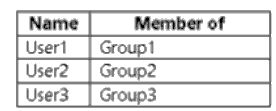
The tenant has the authentication methods shown in the following table.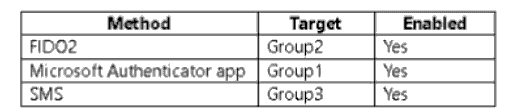
Which users will sign in to cloud apps by matching a number shown in the app with a
number shown on their phone?
A. User1 only
B. User2 only
C. User3 only
D. User1 and User2 only
E. User2 and User3 only
Explanation:
This question tests the ability to identify which passwordless authentication method is being described. The phrase "matching a number shown in the app with a number shown on their phone" is the specific user experience for number matching in the Microsoft Authenticator app passwordless sign-in flow. The user sees a number on their sign-in screen and must select the matching number in their Authenticator app notification. The table shows this method is enabled for Group1.
Correct Option:
A. User1 only.
This is correct. The described experience is the Microsoft Authenticator app passwordless (or MFA) sign-in with number matching. This method is enabled for Group1. User1 is a member of Group1 and will use this method. User2 is in Group2 (FIDO2), and User3 is in Group3 (SMS), which do not use this specific number-matching app experience.
Incorrect Options:
B. User2 only:
Incorrect. User2 is targeted for FIDO2 security key authentication. This method involves tapping a physical key or using device biometrics, not matching numbers in an app.
C. User3 only:
Incorrect. User3 is targeted for SMS authentication. This method involves receiving a code via text message and entering it, not matching numbers within an app.
D. User1 and User2 only:
Incorrect. User2 uses FIDO2, which does not involve the Authenticator app number-matching process.
E. User2 and User3 only:
Incorrect. Neither FIDO2 nor SMS authentication uses the described number-matching in the Microsoft Authenticator app.
Reference:
Microsoft Learn, "How to use the Microsoft Authenticator app - Passwordless sign-in." The documentation describes the passwordless sign-in flow where the user is prompted to "enter the number shown on the sign-in screen" into their Authenticator app.
You have a Microsoft 365 E5 subscription that contains two groups named Group1 and
Group2 and the users shown in the following table.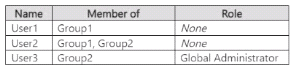
The subscription contains a Conditional Access policy that has the following settings:
• Name: Policy1
Target resources
• Include
• All cloud apps
• Access controls
• Grant
• Requite multifactor authentication
For each of the following statements, select Yes if the statement is true. Otherwise, select
No.
NOTE: Each correct selection is worth one point.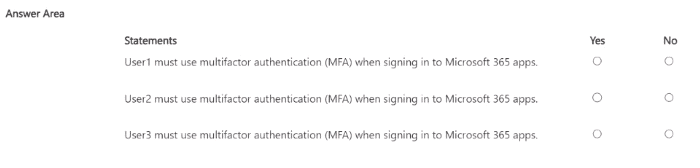
Explanation:
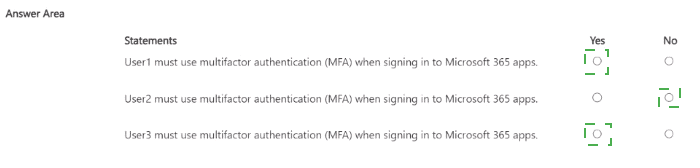
This question tests understanding of Conditional Access policy assignments. The policy (Policy1) requires MFA but has no assignments specified under "Users or workload identities." The key detail is that the exhibit shows the policy configuration is incomplete; there is no user/group assignment defined. A Conditional Access policy must have assignments to target specific users or groups. Without any assignments, the policy does not apply to anyone, even Global Administrators.
Correct Options:
Statement 1 (User1):
No. Policy1 has no user/group assignments, so it does not apply to User1.
Statement 2 (User2):
No. Policy1 has no user/group assignments, so it does not apply to User2, regardless of their group memberships.
Statement 3 (User3):
No. Policy1 has no user/group assignments. While User3 is a Global Administrator, there is no baseline policy or other rule shown that enforces MFA for admins. Therefore, MFA is not required based on the given information.
Incorrect Options:
Marking "Yes" for any statement would incorrectly assume the policy is active. The critical point is that an unassigned Conditional Access policy does not enforce any controls.
Reference:
Microsoft Learn, "Conditional Access: Conditions - What conditions are in Conditional Access." A Conditional Access policy requires configuration in the Assignments section (Users and groups, Cloud apps, Conditions). If the "Users and groups" assignment is left empty (not configured), the policy does not target any users and is effectively inactive. The policy in the exhibit has no target specified in the assignments.
You have an Azure subscription that contains a user named User1. You onboard Microsoft
Entra Permissions Management. You need to perform the following tasks:
• Identify all the accounts that are assigned the Global Administrator role permanently.
• Review the Permission Creep Index (PCI) of User1.
Which tab in Permissions Management should you use for each task? To answer, select
the appropriate options in the answer area.
NOTE: Each correct selection is worth one point.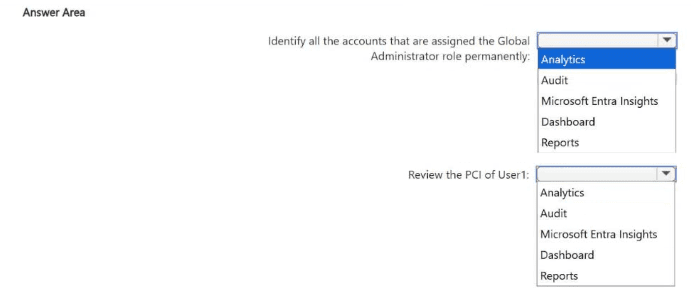
Explanation:
This question tests navigation within Microsoft Entra Permissions Management to perform specific tasks. Permissions Management has dedicated tabs for different types of analysis. The Analytics tab is the central hub for role-based identity analytics, including discovering permanent role assignments. The Reporting tab provides detailed reports, including the Permission Creep Index (PCI) for individual identities.
Correct Options:
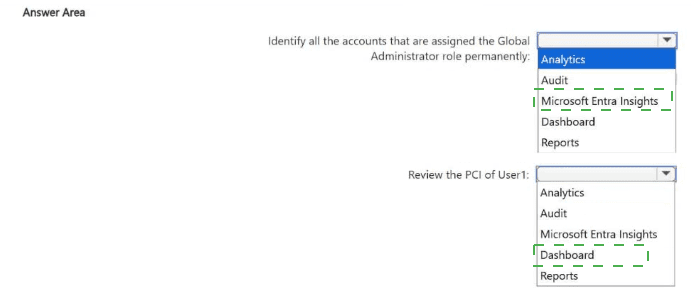
Identify all the accounts that are assigned the Global Administrator role permanently: Analytics
The Analytics tab provides data analysis dashboards that allow you to filter and view identities by their assigned roles (like Global Administrator) and by assignment type (permanent vs. eligible). You can use this to generate a list of accounts with permanent global admin assignments.
Review the Permission Creep Index (PCI) of User1: Reporting
The Reporting tab contains pre-built and customizable reports. The Permission Creep Index (PCI) report is found here. You can run this report for a specific time range and filter by identity (User1) to review their PCI score, which indicates excessive or unused permissions over time.
Incorrect Options:
Audit:
This tab shows activity logs and audit trails of actions taken within Permissions Management, not for analyzing role assignments or PCI scores.
Microsoft Entra Insights:
This is a separate service for monitoring Entra ID health and performance, not part of the Permissions Management interface for these tasks.
Dashboard:
While the dashboard may show high-level metrics, it does not provide the detailed, filterable analysis needed to list all global admins or generate a specific PCI report for a single user like the Analytics and Reporting tabs do.
Reference:
Microsoft Learn, "Navigate the Permissions Management dashboard" and "Analyze permissions using Permissions Management." The documentation outlines that the Analytics workspace is for investigating permissions, roles, and resources, while the Reports section includes the PCI report.
You have an Azure AD tenant that contains the users shown in the following table.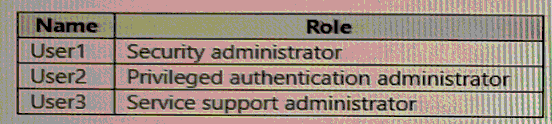
User2 reports that he can only configure multi-factor authenticating (MFA) to use the
Microsoft Authenticator app.
You need to ensure that User2 can configure alternate MFA methods.
Which configuration is required, and which user should perform the configuration? To
answer, select the appropriate options in the answer area.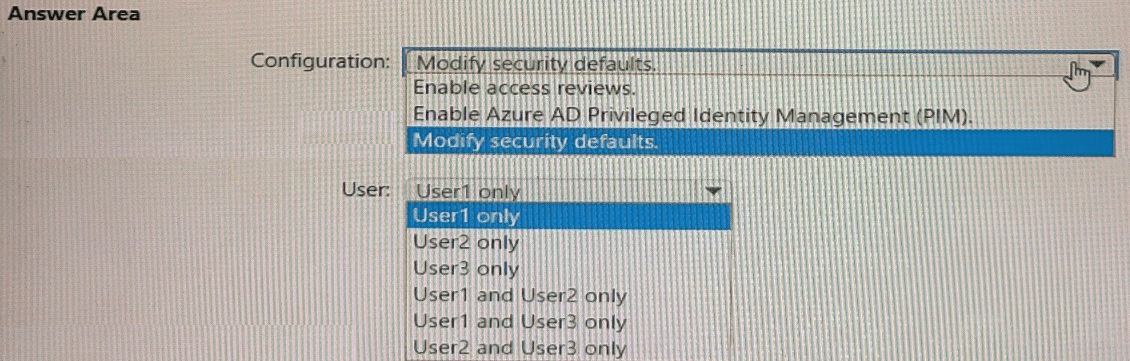
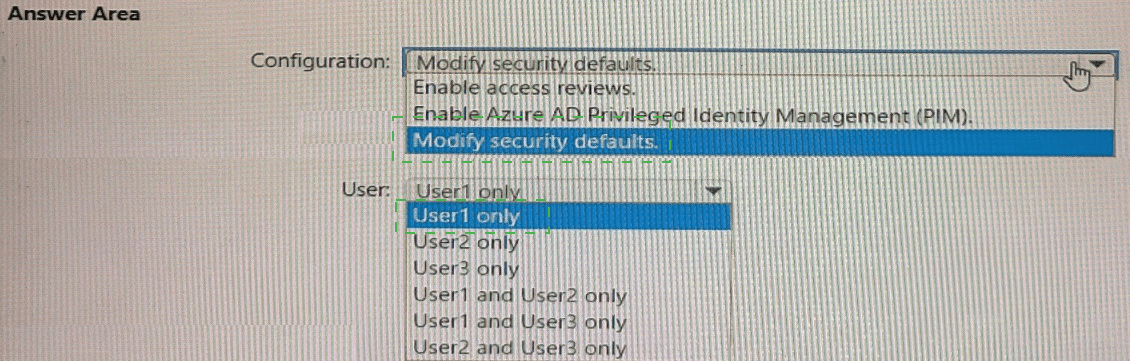
Explanation:
The scenario indicates that User2 (Privileged Authentication Administrator) can only configure MFA to use the Microsoft Authenticator app. This limitation typically occurs when Security Defaults are enabled in the tenant. Security Defaults enforce a standard set of security policies, including requiring all users to use the Microsoft Authenticator app for MFA and blocking the configuration of alternative methods. To allow User2 to configure alternate MFA methods (like SMS, phone call, or OATH tokens), Security Defaults must be disabled.
Correct Options:
Configuration required: Modify security defaults.
Security Defaults must be turned off to unlock the full MFA method configuration options in the Microsoft Entra admin center. This allows administrators to define custom authentication methods policies.
User who should perform the configuration: User1 only.
The Security Administrator role (User1) has the necessary permissions to modify tenant-wide security settings, including enabling/disabling Security Defaults and configuring authentication methods. The Privileged Authentication Administrator (User2) can manage MFA for users but cannot change the foundational Security Defaults setting that is causing the restriction. The Service Support Administrator (User3) does not have this permission.
Incorrect Options for User:
User2 only:
Incorrect. User2 cannot modify Security Defaults; they can only manage MFA within the constraints set by the tenant security baseline.
User3 only:
Incorrect. The Service Support Administrator role lacks the permissions for this security configuration.
User1 and User2 only / User1 and User3 only / User2 and User3 only:
Incorrect. Only the Security Administrator (User1) has the required permissions to disable Security Defaults.
Reference:
Microsoft Learn, "Manage authentication methods - Available authentication methods." The documentation states that when Security Defaults are enabled, "the Microsoft Authenticator app using notifications is the only method that users can use." To use other methods, you must disable Security Defaults and use Conditional Access. The Security Administrator role is required to manage Security Defaults.
You have a Microsoft 365 E5 subscription that contains three groups named Groups1,
Group2, and Group3, and the users shown in the following table.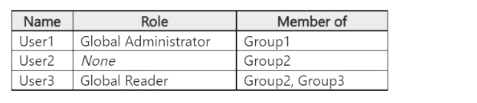
You create a Conditional Access policy named CAT that has the following settings:
• Users
° Include
Users and groups: Group1
o Exclude
Users and groups: Group2
Directory roles: Global Administrator
o Target resources
Include: All cloud apps
o Access controls
Grant: Require multifactor authentication
You create a Conditional Access policy named CA2 that has the following settings:
• Users
° Include
Users and groups: Group2
o Exclude
Users and groups: Group3
o Target resources
Include: All cloud apps
o Access controls
Grant: Block access
For each of the following statements, select Yes if the statement is true. Otherwise, select
No.
NOTE: Each correct selection is worth one point.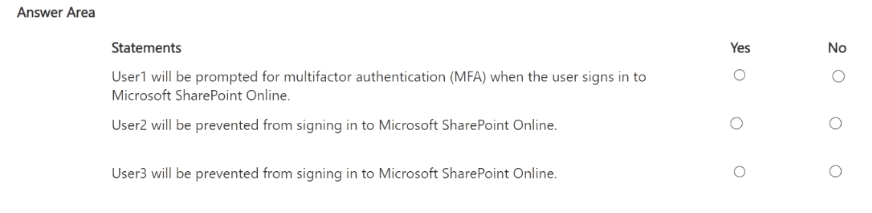
Explanation:
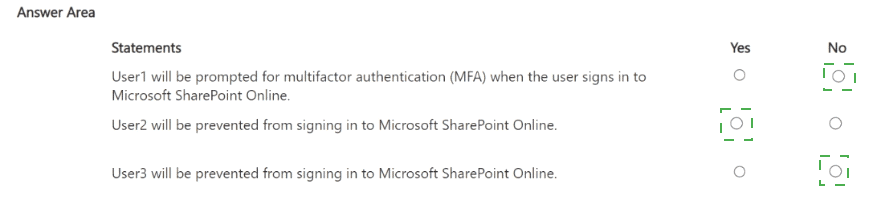
This question involves analyzing two intersecting Conditional Access policies. Key concepts are policy evaluation order (simultaneous) and that Exclude takes precedence over Include. For CA1: Group1 is included but Group2 and the Global Administrator role are excluded. For CA2: Group2 is included but Group3 is excluded. A user's final access is determined by the combined effect of all applicable policies.
Correct Options:
Statement 1 (User1):
No. User1 is in Group1 (included in CA1) and is a Global Administrator (excluded in CA1). The exclusion of the Global Administrator role takes precedence, so CA1 does not apply to User1. No other policy applies. Therefore, User1 will not be prompted for MFA by CA1.
Statement 2 (User2):
Yes. User2 is in Group2 (included in CA2) and is not in Group3 (the only exclusion in CA2). Therefore, CA2 applies and blocks access. User2 is prevented from signing in.
Statement 3 (User3):
No. User3 is in Group2 (included in CA2) but is also in Group3 (excluded in CA2). The exclusion for Group3 takes precedence, so CA2 does not apply to User3. No other policy blocks them, so they are not prevented from signing in.
Incorrect Options:
Marking "Yes" for Statement 1 would ignore the role-based exclusion.
Marking "No" for Statement 2 would ignore that User2 is included in CA2 with no applicable exclusion.
Marking "Yes" for Statement 3 would ignore the Group3 exclusion in CA2.
Reference:
Microsoft Learn, "Conditional Access: How do policies apply to users." The documentation explains that exclusions override inclusions and that policies are evaluated together. A user is granted access only if they satisfy all applied grant controls; a single blocking policy denies access.
You have a Microsoft Entra tenant that contains a group named Group1 and two users
named User1 and User2. User1 is a member of Group1.
You register an enterprise application named App1.
You enable self-service application access for App1 and configure the following settings:
Allow users to request access to this application: Yes
To which group should assigned users be added: Group1
Require approval before granting access to this application: Yes
Who is allowed to approve access to this application: User2
For each of the following statements, select Yes if the statement is true. Otherwise, select
No.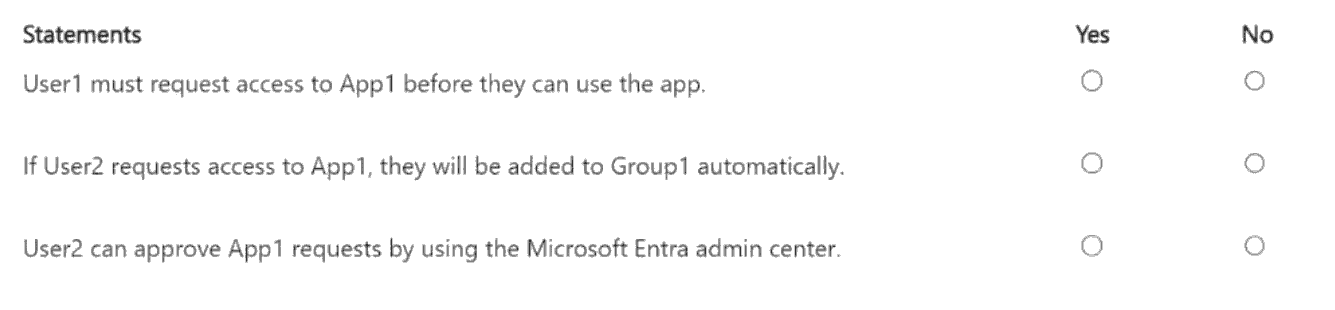
Explanation:
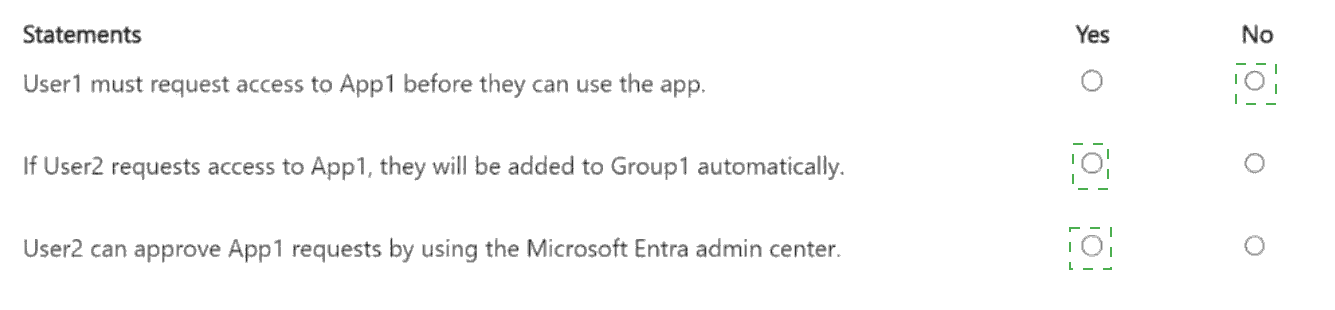
This question tests the configuration and behavior of self-service application access in Microsoft Entra ID. When enabled, users can request access to an app. Configurations include specifying an automatic assignment group, requiring approval, and designating approvers. Key points: The "Allow users to request access" setting must be on for users to see the request option. Approvers must have the proper role (Global Admin, Application Admin, etc.) to approve requests in the admin center.
Correct Options:
Statement 1 (User1 must request access):
No. User1 is already a member of Group1, which is the group designated for app assignment. Since access is granted via group membership, User1 already has access to App1 and does not need to request it.
Statement 2 (User2's request adds to Group1 automatically):
Yes. The configuration states "To which group should assigned users be added: Group1". When a user's request for App1 is approved, they are automatically added to Group1 as part of the access granting process.
Statement 3 (User2 can approve in admin center):
No. While User2 is designated as the allowed approver in the app's self-service settings, to actually approve requests in the Microsoft Entra admin center, a user must also hold an administrator role such as Global Administrator, Application Administrator, or Cloud Application Administrator. The configuration does not state that User2 has any such role, so they cannot approve requests via the admin portal.
Incorrect Options:
Marking "Yes" for Statement 1 ignores that existing group members already have access.
Marking "No" for Statement 2 misunderstands the automatic group assignment feature.
Marking "Yes" for Statement 3 overlooks the role requirement for performing approvals in the admin center.
Reference:
Microsoft Learn, "Self-service application access - Configuration." It explains that approved users are added to the specified group. For approvals, it states that "only users who are Global Administrators, Application Administrators, or Cloud Application Administrators can approve requests" from the Access Panel or admin center. Being named an approver in the app settings alone is insufficient without the required role.
You have an on-premises server named Server! that runs Windows Server.
You have a Microsoft Entra tenant that contains an app registration named App1. App1 has
Microsoft Graph application permissions.
You need to configure the environment to support App1. The solution must meet the
following requirements:
• App1 must be accessible only from the corporate network.
• The credentials for App1 must NOT be stored as plain text.
• Non-interactive scheduled tasks on Server 1 must be able to authenticate to App1.
What should you do? To answer, select the appropriate options in the answer area.
NOTE: Each correct selection is worth one point.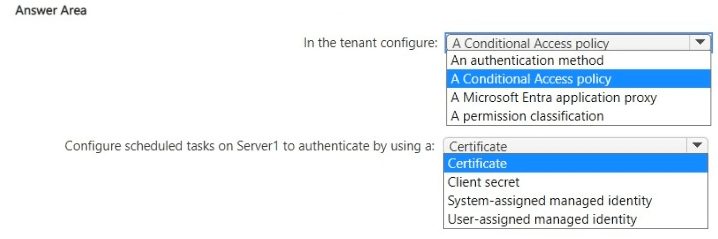
Explanation:
This is a multi-part scenario requiring secure, non-interactive authentication for an on-premises service (scheduled tasks) to a Microsoft Entra app (App1) with Graph permissions, while restricting access to the corporate network. The key requirements are: no plaintext credentials and corporate network-only access. A certificate provides strong, non-secret authentication. A Conditional Access policy with a Named Location can restrict access to specific IP ranges (the corporate network). An Application Proxy is not needed for outbound authentication from the server.
Correct Options:
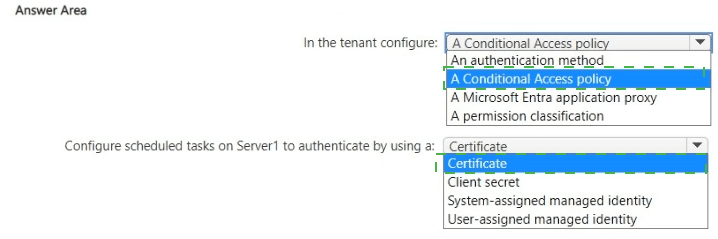
In the tenant configure: A Conditional Access policy
You need a Conditional Access policy targeting App1 (as a cloud app) with a Location condition. Configure a Named Location for your corporate IP range, then create a policy that grants access only from that trusted location. This satisfies the "accessible only from corporate network" requirement.
Configure scheduled tasks on Server1 to authenticate by using a: Certificate
This meets the requirements for non-interactive authentication and no plaintext secrets. You configure App1 to use a certificate credential. The scheduled task (e.g., a script or app) uses this certificate (installed on Server1) to authenticate silently to Microsoft Entra ID and obtain a token for App1. A client secret is plaintext and should be avoided.
Incorrect Options for Authentication Method:
Client secret:
This is a plaintext password stored in configuration files, violating the "not stored as plain text" requirement.
System-assigned managed identity / User-assigned managed identity:
Managed identities are for Azure resources (like VMs, App Services) to authenticate to Azure services. Server1 is an on-premises server, so it cannot use an Azure Managed Identity. This is a common distractor.
Incorrect Options for Tenant Configuration:
An authentication method:
This refers to user MFA methods, not application authentication.
A Microsoft Entra application proxy:
Application Proxy is for publishing on-premises web apps for secure inbound access from the internet. It is not used for an on-premises server to authenticate outbound to a cloud app.
A permission classification:
This is for labeling and managing API permissions, not for network restriction or authentication security.
Reference:
Microsoft Learn, "Certificate-based authentication in Microsoft Entra ID" and "Conditional Access: Location condition." Using certificates for daemon app authentication and using Conditional Access policies with named locations for IP-based restrictions are standard security patterns.
| Page 8 out of 41 Pages |