Topic 4: Misc. Questions
You have an Azure subscription that contains the resources shown in the following table.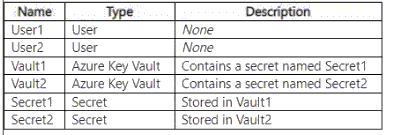
The subscription uses Privileged Identity Management (PIM).
You need to configure the following access controls by using PIM:
• Ensure that User1 can read and update Secret1.
• Ensure that User2 can read the contents of the secrets stored in Vault2.
The solution must follow the principle of least privilege.
Which authorization method should you use for each user? To answer, drag the appropriate authorization methods to the correct users. Each authorization method may be used once, more than once, or not at all. You may need to drag the split bar between panes or scroll to view content.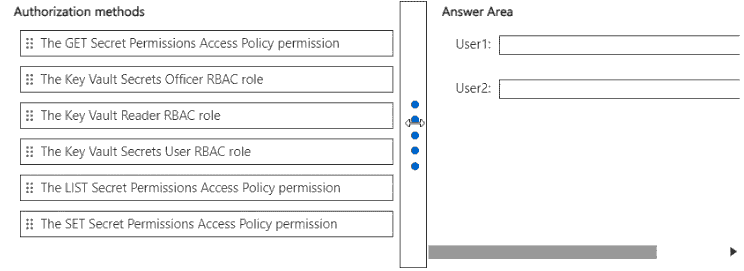
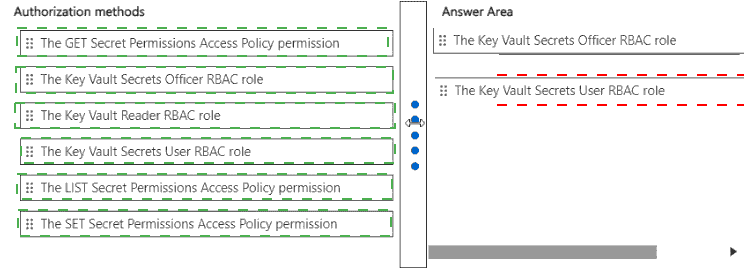
Explanation:
The scenario requires using Privileged Identity Management (PIM) to grant access to Azure Key Vault secrets while following the principle of least privilege. Azure Key Vault supports two authorization methods: Azure RBAC (role-based) and Access Policies (permissions-based). For PIM-eligible assignments, Azure RBAC roles are the recommended approach as they integrate natively with PIM. The principle of least privilege dictates granting the minimal permissions required for each user's specific task.
Correct Option (User1):
The Key Vault Secrets Officer RBAC role
User1 needs to read and update Secret1 stored in Vault1. The Key Vault Secrets Officer RBAC role grants permissions to perform all operations on secrets, including GET (read), LIST, SET (create/update), DELETE, and backup/restore. This role provides the exact permissions needed for both reading and updating secrets.
This role can be assigned via PIM at the Vault1 scope (resource group or specific vault), ensuring that User1 only has access to Vault1 and not Vault2. This follows the principle of least privilege by granting only what is necessary for managing secrets.
Incorrect Option (User1):
The GET Secret Permissions Access Policy permission
This permission only grants the ability to read (GET) a secret, not to update (SET) it. Since User1 needs both read and update capabilities, this permission alone is insufficient. Additionally, Access Policies are not the preferred method when using PIM for Azure RBAC integration.
Incorrect Option (User1):
The SET Secret Permissions Access Policy permission
This permission only grants the ability to update (SET) a secret, not to read (GET) it. Since User1 needs both read and update capabilities, this permission alone is insufficient. Both GET and SET would be required if using Access Policies, but the RBAC role is the better choice.
Incorrect Option (User1):
The Key Vault Reader RBAC role
This role grants read-only access to Key Vault properties and secrets (GET and LIST), but it does not allow updating (SET) secrets. Since User1 needs to update Secret1, this role does not meet the requirement.
Incorrect Option (User1):
The Key Vault Secrets User RBAC role
This role grants read access to secrets (GET and LIST) but does not allow creating or updating secrets (SET). Since User1 needs to update Secret1, this role does not meet the requirement.
Correct Option (User2):
The Key Vault Secrets User RBAC role
User2 needs to read the contents of the secrets stored in Vault2. The Key Vault Secrets User RBAC role grants permissions to read (GET) and list (LIST) secrets, which is exactly what is needed for reading secret contents.
This role can be assigned via PIM at the Vault2 scope, ensuring that User2 only has access to Vault2 and not Vault1. This follows the principle of least privilege by granting only the minimal permissions required for reading secrets.
Incorrect Option (User2):
The GET Secret Permissions Access Policy permission
While this permission grants the ability to read (GET) a secret, Access Policies are not the preferred method when using PIM for Azure RBAC integration. The Key Vault Secrets User RBAC role is the recommended approach as it provides the same GET access and integrates better with PIM.
Incorrect Option (User2):
The Key Vault Secrets Officer RBAC role
This role grants full permissions to manage secrets (GET, LIST, SET, DELETE, backup, restore). User2 only needs to read secrets, not manage them. Assigning this role would exceed the required permissions and violate the principle of least privilege.
Incorrect Option (User2):
The LIST Secret Permissions Access Policy permission
This permission only grants the ability to list secrets, not to read their actual contents (GET). User2 needs to read the contents of the secrets, so LIST alone is insufficient. The GET permission is also required, making this option incomplete.
Reference:
Microsoft Learn: Azure Key Vault security overview
Microsoft Learn: Azure RBAC and Key Vault
Microsoft Learn: Key Vault roles and permissions
Microsoft Learn: Assign Azure RBAC roles in PIM
Your network contains an on-premises Active Directory Domain Services (AD DS) domain
that syncs with Azure AD and contains the users shown in the following table.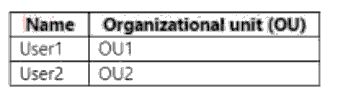
In Azure AD Connect. Domain/OU Filtering is configured as shown in the following exhibit.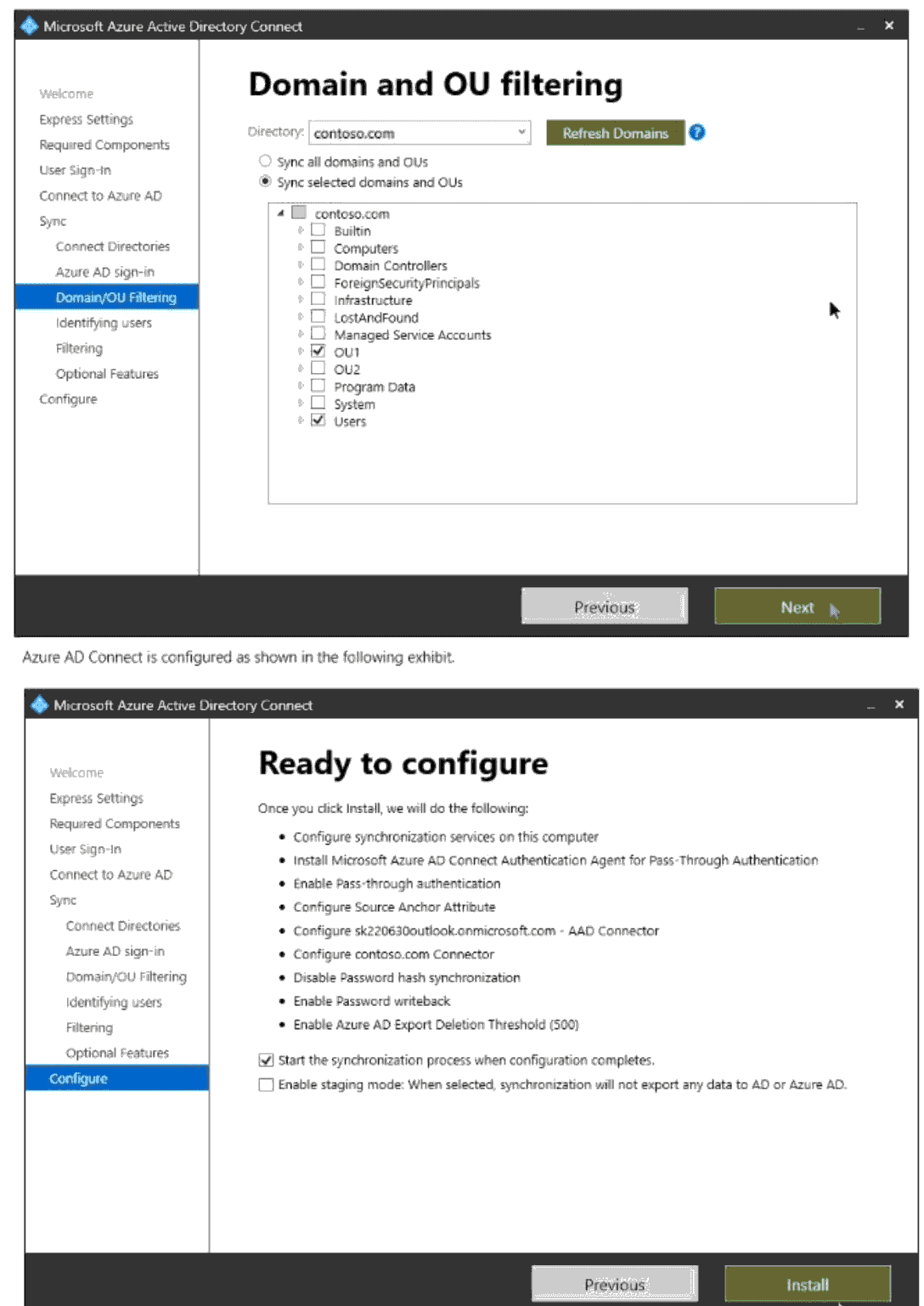
For each of the following statements, select Yes if the statement is true. Otherwise, select No.
NOTE: Each correct selection is worth one point.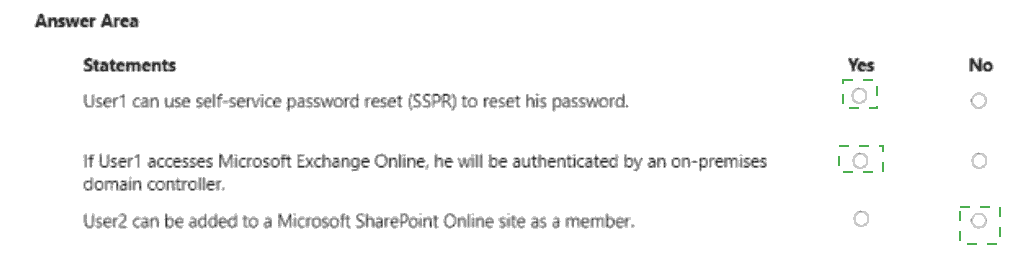
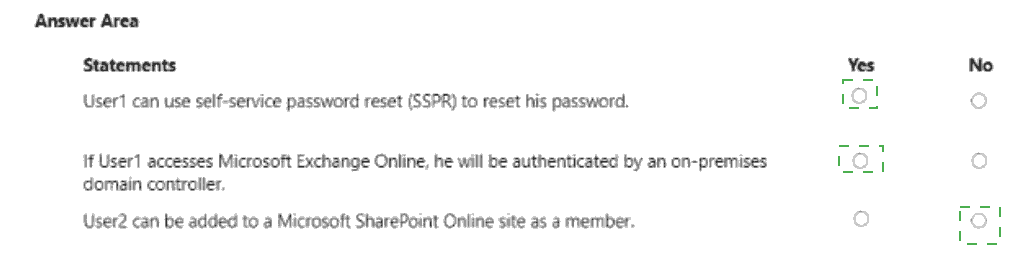 Explanation:
Azure AD Connect is configured with Domain/OU Filtering, syncing only OU1 (selected) while OU2 is not selected. Pass-through Authentication (PTA) is enabled, and Password Hash Synchronization (PHS) is disabled. Password writeback is enabled. The synchronization process is configured to start upon completion. Based on this configuration, only users in OU1 are synced to Azure AD, while users in OU2 remain on-premises only and do not exist in the cloud.
Statement 1: User1 can use self-service password reset (SSPR) to reset his password.
Yes
User1 is in OU1, which is selected for synchronization. Therefore, User1 is synced to Azure AD and has a cloud identity.
Password writeback is enabled in the Azure AD Connect configuration, which allows password changes or resets initiated in the cloud (via SSPR) to be written back to the on-premises AD DS.
Additionally, Pass-through Authentication is enabled, which is compatible with SSPR and password writeback as long as the necessary permissions are configured.
Since User1 exists in Azure AD and password writeback is enabled, User1 can successfully use SSPR to reset their password.
Statement 2: If User1 accesses Microsoft Exchange Online, he will be authenticated by an on-premises domain controller.
Yes
User1 is synced to Azure AD from OU1.
The Azure AD Connect configuration shows that Pass-through Authentication is enabled (and Password Hash Synchronization is disabled). PTA uses on-premises agents to validate user credentials directly against on-premises Active Directory domain controllers.
When User1 accesses Exchange Online, the authentication request is handled by the PTA agents, which validate the credentials against the on-premises domain controllers.
Therefore, User1 is authenticated by an on-premises domain controller.
Statement 3: User2 can be added to a Microsoft SharePoint Online site as a member.
No
User2 is in OU2, which is not selected for synchronization. Therefore, User2 is not synced to Azure AD and does not exist as a user object in the cloud.
SharePoint Online is a cloud-based service that uses Azure AD identities for authentication and authorization. Only users who exist in Azure AD can be added to SharePoint Online sites.
Since User2 is not in Azure AD, they cannot be added to any SharePoint Online site as a member.
Reference:
Microsoft Learn: Azure AD Connect sync: Configure filtering
Microsoft Learn: Pass-through Authentication - how it works
Microsoft Learn: Self-service password reset - password writeback
Microsoft Learn: Azure AD Connect: User sign-in options
You have a Microsoft Entra tenant that contains the groups shown in the following exhibit.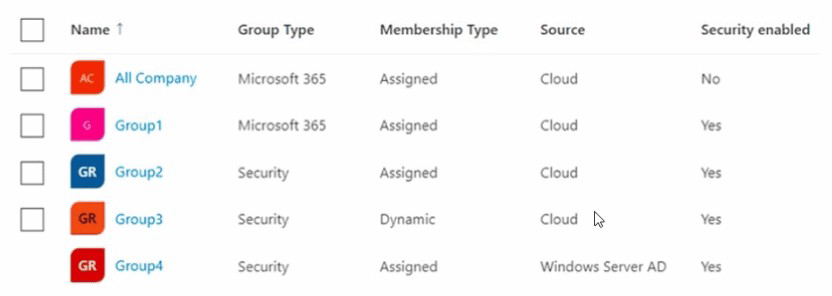
Use the drop-down menus to select the answer choice that completes each statement
based on the information presented in the graphic.
NOTE: Each correct selection is worth one point.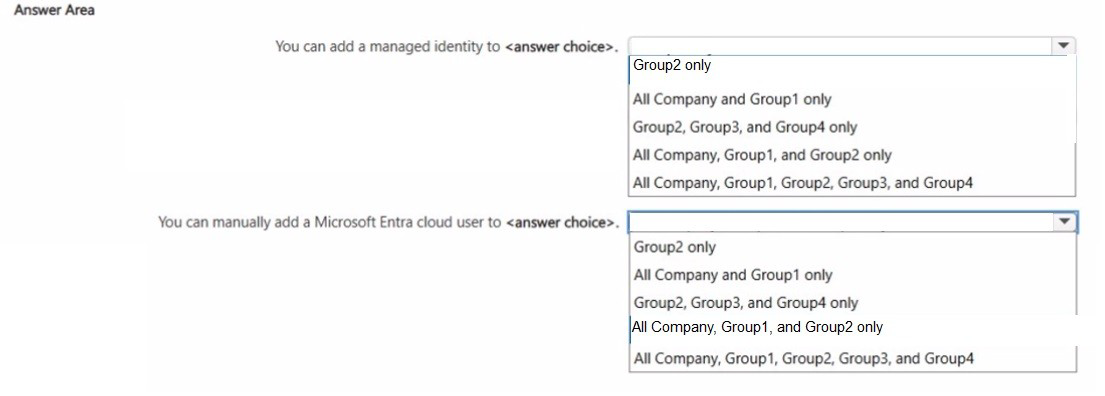
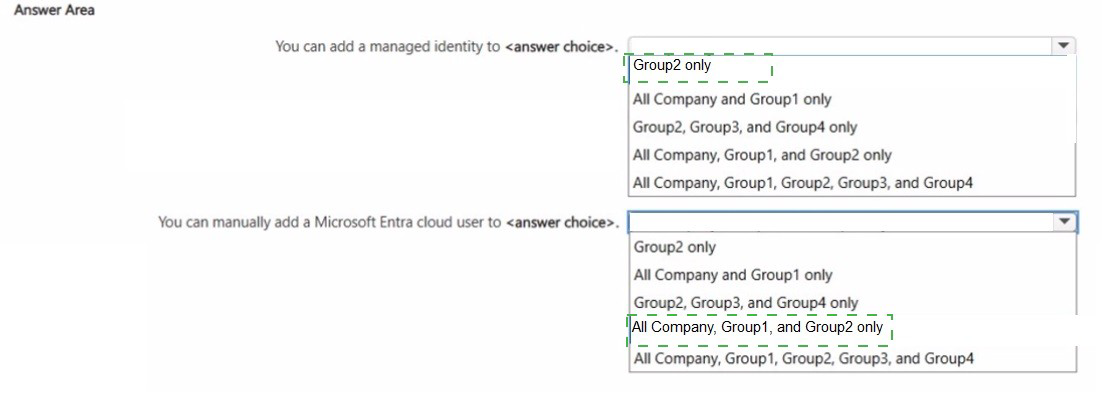
Explanation:
Managed identities can be added as members or owners of Microsoft 365 groups and security groups, but only for groups that are cloud-based. Security groups synced from on-premises (Windows Server AD) cannot have managed identities added directly. Microsoft Entra cloud users can be manually added to any cloud-based group (both Microsoft 365 and security) regardless of membership type (assigned or dynamic), but cannot be added to groups synced from on-premises.
Correct Option (You can add a managed identity to):
All Company, Group1, and Group2 only
All Company: Microsoft 365 group, Assigned, Cloud-based. Managed identities can be added to cloud-based Microsoft 365 groups.
Group1: Microsoft 365 group, Assigned, Cloud-based, Security enabled (Yes). Managed identities can be added to cloud-based Microsoft 365 groups even if security-enabled.
Group2: Security group, Assigned, Cloud-based. Managed identities can be added to cloud-based security groups.
Group3: Security group, Dynamic, Cloud-based. Managed identities cannot be added to dynamic groups because membership is rule-based and cannot be manually modified.
Group4: Security group, Assigned, Windows Server AD (synced from on-premises). Managed identities cannot be added to groups synced from on-premises; such groups are mastered on-premises and are read-only in the cloud.
Incorrect Option (You can add a managed identity to):
Group2 only
This option incorrectly excludes the Microsoft 365 groups (All Company and Group1). Managed identities can be added to both Microsoft 365 groups and security groups as long as they are cloud-based and not dynamic or synced. Therefore, this selection is incomplete.
Incorrect Option (You can add a managed identity to):
Group2, Group3, and Group4 only
This option incorrectly excludes the Microsoft 365 groups (All Company and Group1) and incorrectly includes Group3 (dynamic) and Group4 (synced). Managed identities cannot be added to dynamic groups or synced groups, so this selection is incorrect.
Incorrect Option (You can add a managed identity to):
All Company, Group1, Group2, Group3, and Group4
This option incorrectly includes Group3 (dynamic) and Group4 (synced). Managed identities cannot be added to dynamic or synced groups. Therefore, this selection is incorrect.
Correct Option (You can manually add a Microsoft Entra cloud user to):
All Company, Group1, and Group2 only
All Company: Microsoft 365 group, Assigned, Cloud-based. Microsoft Entra cloud users can be manually added to assigned Microsoft 365 groups.
Group1: Microsoft 365 group, Assigned, Cloud-based. Microsoft Entra cloud users can be manually added to assigned Microsoft 365 groups.
Group2: Security group, Assigned, Cloud-based. Microsoft Entra cloud users can be manually added to assigned cloud-based security groups.
Group3: Security group, Dynamic, Cloud-based. Microsoft Entra cloud users cannot be manually added to dynamic groups because membership is determined by dynamic rules.
Group4: Security group, Assigned, Windows Server AD (synced from on-premises). Microsoft Entra cloud users cannot be manually added to groups synced from on-premises; group membership must be managed on-premises.
Incorrect Option (You can manually add a Microsoft Entra cloud user to):
Group2 only
This option incorrectly excludes the Microsoft 365 groups (All Company and Group1). Microsoft Entra cloud users can be manually added to both Microsoft 365 groups and security groups as long as they are assigned and cloud-based. Therefore, this selection is incomplete.
Incorrect Option (You can manually add a Microsoft Entra cloud user to):
Group2, Group3, and Group4 only
This option incorrectly excludes the Microsoft 365 groups (All Company and Group1) and incorrectly includes Group3 (dynamic) and Group4 (synced). Microsoft Entra cloud users cannot be manually added to dynamic groups or synced groups. Therefore, this selection is incorrect.
Incorrect Option (You can manually add a Microsoft Entra cloud user to):
All Company, Group1, Group2, Group3, and Group4
This option incorrectly includes Group3 (dynamic) and Group4 (synced). Microsoft Entra cloud users cannot be manually added to dynamic or synced groups. Therefore, this selection is incorrect.
Reference:
Microsoft Learn: Manage groups in Microsoft Entra ID
Microsoft Learn: Add managed identity to a group
Microsoft Learn: Dynamic membership rules for groups
Microsoft Learn: Group membership and synchronization with Microsoft Entra Connect
| Page 4 out of 41 Pages |