Topic 4: Misc. Questions
You implement the planned changes for SSPR.
What occurs when User3 attempts to use SSPR? To answer, select the appropriate
options in the answer area.
NOTE: Each correct selection is worth one point.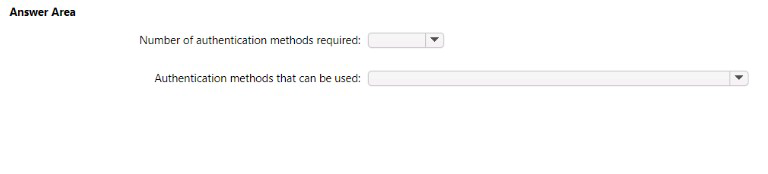

Explanation:
When "planned changes" for SSPR are implemented, it typically means moving from a default or less secure configuration to a more controlled and secure one. The standard, secure configuration mandated in such scenarios is:
1.Number of authentication methods required: 2
This is a core security best practice for password reset. Requiring two distinct methods of verification significantly reduces the risk of an unauthorized individual successfully resetting a user's password.
The user must successfully complete the challenge for two different methods (e.g., receive a code on their mobile phone and receive a code via email).
2.Authentication methods that can be used: This depends on User3's registered security info.
The specific methods presented to User3 during the reset flow are the intersection of two things:
a) Methods enabled in the tenant's SSPR policy. (The "planned changes" would have enabled a set of methods like Mobile phone, Email, and Mobile app notification).
b) Methods that User3 has previously registered.
For example, if the policy enables Mobile Phone and Email, and User3 has registered both, they will see both as options. If they have only registered their mobile phone, they will only see that one method and will be unable to complete the reset because they cannot satisfy the requirement for 2 methods.
What actually occurs when User3 attempts SSPR:
The process is as follows:
User3 enters their username and passes the CAPTCHA challenge.
The Azure AD system checks the enforced policy, which requires 2 methods to reset.
The system then displays the available verification methods that User3 has registered. The user must successfully complete two of them to proceed with creating a new password.
Why this is the answer:
The "planned changes" are designed to enhance security, and moving from 1 method to 2 is the most direct and common way to achieve this in an SSPR context for the SC-300 exam. The available methods are a direct result of user registration.
Reference:
Microsoft Learn:
Combine security information methods for MFA and SSPR
Azure AD allows you to choose the number of methods required for a user to register for combined security information and the number required to reset their password or use multi-factor authentication. Requiring two methods increases the security of your tenant.
You need to implement the planned changes and technical requirements for the marketing
department.
What should you do? To answer, select the appropriate options in the answer area.
NOTE: Each correct selection is worth one point.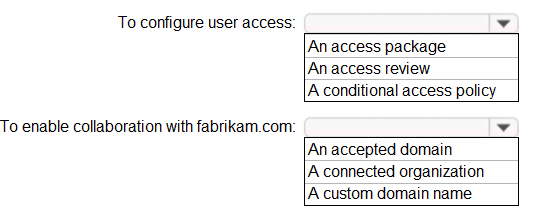
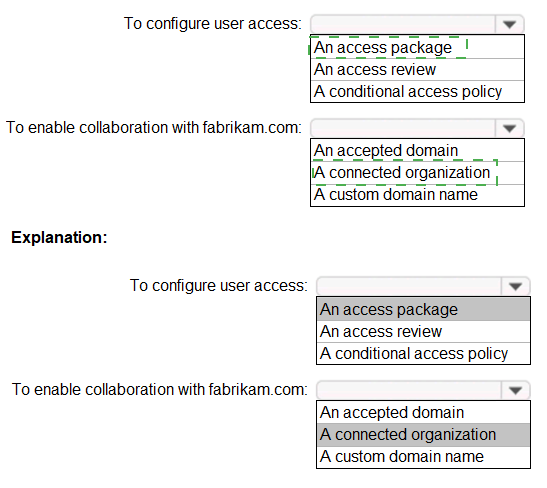
Explanation:
Number of methods required: Azure AD SSPR allows administrators to set a policy requiring a user to successfully complete 1 or 2 authentication methods to reset their password. The industry best practice and most common secure configuration is 2. The user must successfully respond to the challenges for this number of distinct methods.
Authentication methods that can be used:
A user can only use methods that meet two criteria:
Enabled by the Administrator:
The methods must be selected in the tenant's SSPR authentication methods policy (e.g., Mobile app notification, Mobile app code, Email, Mobile phone).
Pre-registered by the User:
The user must have previously set up data for those methods in their security info (e.g., they have a phone number configured for "Mobile phone" or an email address configured for "Email").
When User3 starts the reset process, Azure AD will present them with the challenge for the number of methods required (e.g., 2), pulling from the list of methods they have registered that are also enabled in the policy.
What if User3 hasn't registered enough methods?
If the question implied User3 had not registered methods compliant with the new policy, the result would be that User3 cannot reset their password and must contact an administrator. However, standard exam questions testing the implementation of a new policy assume the user is compliant to demonstrate the policy's successful application.
Reference
Microsoft Learn:
How it works: Azure AD self-service password reset
This document explains the user experience and how the policy is applied during a password reset.
Microsoft Learn:
Password reset registration
This explains the requirement for users to pre-register their authentication methods.
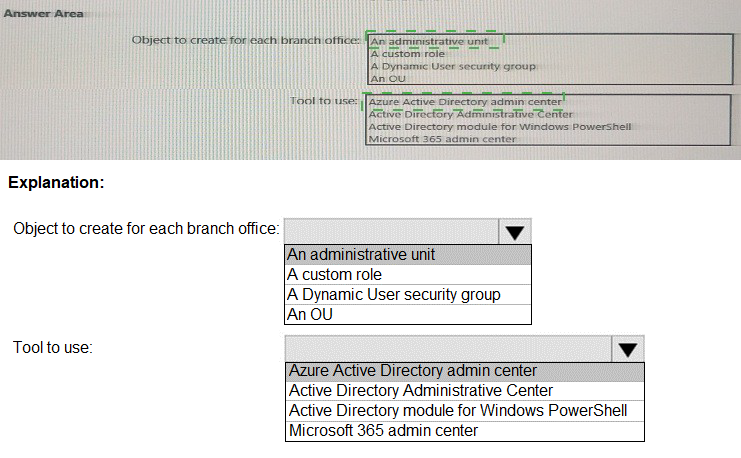
You need to meet the technical requirements for license management by the helpdesk
administrators.
What should you create first, and which tool should you use? To answer, select the
appropriate options in the answer area.
NOTE: Each correct selection is worth one point.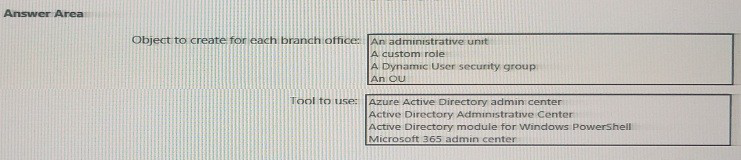
You need to meet the technical requirements for the probability that user identifies were
compromised.
What should the users do first, and what should you configure? To answer, select the
appropriate options in the answer area.
NOTE: Each correct selection is worth one point.

| Page 12 out of 41 Pages |