Topic 3: Misc. Questions
You have a Microsoft Sentinel workspace named SW1.
In SW1, you investigate an incident that is associated with the following entities:
• Host
• IP address
• User account
• Malware name
Which entity can be labeled as an indicator of compromise (loC) directly from the incident s
page?
A. malware name
B. host
C. user account
D. IP address
Explanation:
Why D is correct
When investigating an incident in Microsoft Sentinel, you can add threat indicators directly from the incident page for specific entity types only. According to Microsoft's official documentation, the following entity types can be added as indicators of compromise (IOCs):
Domain name
IP address (IPv4 and IPv6)
URL
File hash
From the list provided in the question (Host, IP address, User account, Malware name), only the IP address qualifies as a supported IOC type . This feature allows you to create detection rules using the threat indicator, enabling future alerts to be generated when the same IP address appears in your environment.
Why other options are incorrect
A. Malware name
Malware names are not valid IOC types for direct addition from the incident page. File hash is supported, but malware name alone is not a structured IOC.
B. Host
Host entities (device or computer names) are not supported as IOCs from the incident page. While host data can be used in hunting queries, it cannot be directly promoted to a threat indicator this way.
C. User account
User accounts (User Principal Name, SID) represent identities, not repeatable attack artifacts. They are not supported as IOC types for threat intelligence.
Reference
Microsoft Learn: "Add entities to threat intelligence" – "Only the following types of entities can be added as threat indicators from the incident page: Domain name, IP address (IPv4 and IPv6), URL, File (hash)"
You have a Microsoft 365 E5 subscription that contains a device named Device1. From the Microsoft Defender portal, you discover that an alert was triggered for Device1. From the Device inventory page, you isolate Device1. You need to collect a list of installed programs on Device1. What should you do?
A. Run an advanced hunting query against the DeviceTvmlnfoGathering table.
B. Initiate a live response session and run the processes command.
C. Run an advanced hunting query against the DeviceTvmSoftwarelnventory table.
D. Run an advanced hunting query against the DeviceProcessEvents table.
Explanation:
✅ Why C is correct
The DeviceTvmSoftwareInventory table is the designated location within the Microsoft Defender XDR Advanced Hunting schema for retrieving a complete inventory of installed software across onboarded devices . According to Microsoft's documentation, this table is specifically designed for querying "current security software inventory" and is populated by the Microsoft Defender Vulnerability Management component .
When you need to collect a list of installed programs for a specific device that has been isolated, using an advanced hunting query against this table is the correct method. A query can be constructed to filter for Device1 and return all software entries associated with that device ID .
❌ Why other options are incorrect
A. Run an advanced hunting query against the DeviceTvmInfoGathering table.
The DeviceTvmInfoGathering table collects vulnerability assessment data and scan status details, but it does not contain a comprehensive list of all installed software applications .
B. Initiate a live response session and run the processes command.
The processes command within a live response session only lists currently running processes on the device. It does not provide a complete inventory of installed applications that are not actively executing at that moment .
D. Run an advanced hunting query against the DeviceProcessEvents table.
The DeviceProcessEvents table captures process creation and execution events in real-time. While it logs activity, it does not maintain a static record of all software installed on the device .
📌 References
Microsoft Learn: DeviceTvmSoftwareInventory table reference
Microsoft Q&A: Confirmation of prerequisites and usage for DeviceTvm* tables
SC-200 Exam Sample: Verification of correct answer for this scenario
Your network contains an on-premises Active Directory Domain Services (AD DS) domain
that syncs with Azure AD.
You have a Microsoft 365 E5 subscription that uses Microsoft Defender 365.
You need to identify all the interactive authentication attempts by the users in the finance
department of your company.
How should you complete the KQL query? To answer, select the appropriate options in the
answer area.
NOTE: Each correct selection is worth one point.
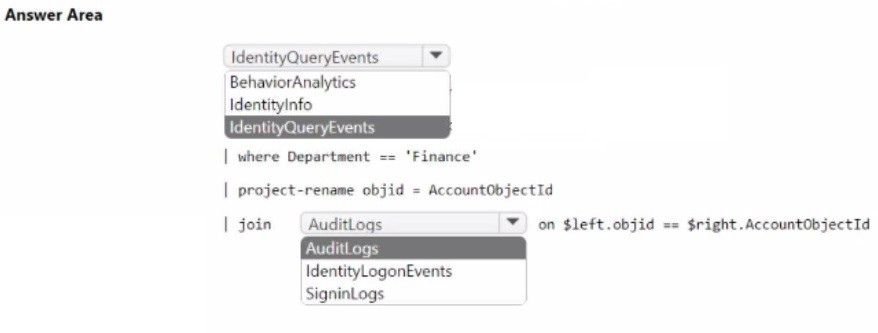
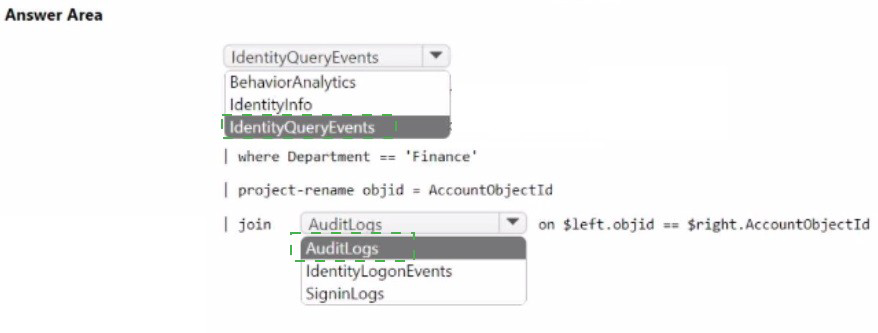
Technical Analysis:
This query leverages the User and Entity Behavior Analytics (UEBA) data in Microsoft Sentinel to bridge the gap between organizational identity and technical log events.
IdentityInfo (The Metadata Source):
Raw logs like SigninLogs generally do not contain HR-related metadata such as Department or Job Title.
The IdentityInfo table is enriched via UEBA, syncing these attributes from AD DS and Entra ID. Filtering this table first is the most performant way to isolate the "Finance" user group before processing heavy sign-in data.
join kind=inner (The Correlation):
An inner join is used to return rows only where a user in the "Finance" department has a corresponding record in the sign-in logs.
SigninLogs is the correct table for tracking interactive authentications. While tables like IdentityDirectoryEvents track changes to the directory itself, SigninLogs captures the actual authentication flow.
Join Keys:
The join is performed by matching the user's account identifier (usually AccountName or AccountUPN from the identity side) with the UserPrincipalName found in the sign-in records.
References
Microsoft Learn:
IdentityInfo table reference
You have an Azure subscription that contains 50 virtual machines.
You plan to deploy Microsoft [Defender for Cloud.
You need to enable agentless scanning for 40 virtual machines. The solution must create
disk snapshots of the virtual machines and perform out-of-band analysis of the snapshots.
What should you do? To answer, select the appropriate options in the answer area.
NOTE: Each correct selection is worth one point.
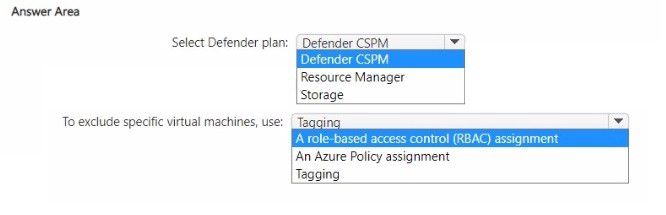
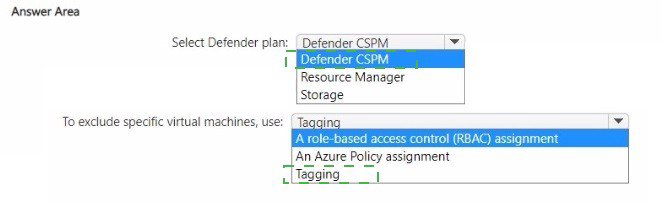
Technical Analysis:
This configuration utilizes the modern Agentless Scanning feature of Microsoft Defender for Cloud, which provides visibility into installed software and vulnerabilities without impacting VM performance.
Defender for Servers (Setting):
Agentless scanning is a capability provided specifically under the Defender for Servers plan. To use it, you must navigate to the Environment Settings of your subscription, select the Defender for Servers plan, and ensure the "Agentless scanning for VMs" component is toggled to On.
Exclusions (Method):
In Microsoft Defender for Cloud, agentless scanning is enabled at the subscription level by default for all supported VMs once the feature is turned on.
Because the requirement specifies enabling it for only 40 out of 50 virtual machines, the most efficient administrative path is to enable the feature for the subscription and then use the Exclusion tag or configuration to opt-out the 10 specific virtual machines that should not be scanned.
References
Microsoft Learn: Agentless scanning for VMs with Microsoft Defender for Cloud
Microsoft Learn: Configure agentless scanning for your subscriptions
You have a Microsoft Sentinel workspace that contains the following Advanced Security
Information Model (ASIM) parsers:
• _Im_ProcessCreate
• InProceessCreate
You create a new source-specific parser named vimProcessCreate.
You need to modify the parsers to meet the following requirements:
• Call all the ProcessCreate parsers.
• Standardize fields to the Process schema.
Which parser should you modify to meet each requirement? To answer, drag the
appropriate parsers to the correct requirements. tach parser may be used once, more than
once, or not at all You may need to drag the split bar between panes or scroll to view
content.
NOTE Each correct selection is worth one point.


Technical Analysis
The Advanced Security Information Model (ASIM) uses a hierarchical structure to normalize data from disparate sources into a unified schema.
imProcessCreate (The Union Parser):
Requirement: "Call all the ProcessCreate parsers."
Reasoning: In ASIM, the parser starting with im (Information Model) is the agnostic/union parser. Its sole purpose is to act as a wrapper that performs a union across all available source-specific parsers. To include your new source, you must modify this union parser to call vimProcessCreate.
vimProcessCreate (The Source-Specific Parser):
Requirement: "Standardize fields to the Process schema."
Reasoning: This is the filtering/source-specific parser. Its job is to take raw, vendor-specific logs and use KQL (often with the project-rename or extend operators) to map those native fields into the standardized ASIM Process schema fields.
Why Other Options Are Incorrect
_Im_ProcessCreate: This is typically the built-in, read-only system parser provided by Microsoft. While it functions similarly to the union parser, best practices dictate modifying the custom or deployment-specific union parser (imProcessCreate) to include new sources.
InProceessCreate: This appears to be a typo or a misnamed custom parser that does not follow the standard ASIM naming convention (which uses im for union and vim for source-specific).
References
Microsoft Learn:
Microsoft Sentinel ASIM parsers
You have an Azure subscription that contains a Log Analytics workspace named
Workspace1.
You configure Azure activity logs and Microsoft Entra ID logs to be forwarded to
Workspace1.
You need to query Workspace1 to identify all the requests that failed due to insufficient
authorization.
How should you complete the KQL query? To answer, select the appropriate options in the
answer area.
NOTE: Each correct selection is worth one point.
Explanation:
This query utilizes the union operator to correlate data from two distinct log sources and applies filters specific to authorization errors.
union ActivityLog, SigninLogs:
ActivityLog: Contains records of operations performed on Azure resources (Control Plane), such as creating or deleting a VM.
SigninLogs: Contains Microsoft Entra ID (formerly Azure AD) sign-in activity.
The union operator: This combines the rows from both tables into a single result set, allowing you to search for failures across both resource management and identity authentication in one go.
where ResultType in ("403", "50125"):
403 (Forbidden): This is the standard HTTP status code for "Authorized, but Forbidden." It indicates that the server understands the request but refuses to authorize it (insufficient permissions).
50125:This is a specific Microsoft Entra error code indicating that a sign-in was interrupted (often requiring password reset or additional interaction) or that the user does not have the required role to access a specific application.
Note: While 401 represents "Unauthorized" (unauthenticated), 403 specifically represents "Insufficient Authorization" for an authenticated user.
References
Microsoft Learn:
Azure Activity log event schema
You have a Microsoft 365 E5 subscription that contains a database server named DB1. DB1 is onboarded to Microsoft Defender XDR. You need to ensure that DB1 appears on the attack surface map. What should you configure?
A. a critical asset rule
B. an asset rule
C. a honeytoken entity tag
D. a sensitive entity tag
Explanation:
✅ Why A is correct
A critical asset rule is a configuration that classifies specific assets as "critical" within Defender XDR . Microsoft Defender XDR uses a four-level criticality scale, from "Very High / Tier0" to "Low / Tier3" . Once an asset is identified as critical (using criteria like device name, domain, vulnerability status, or signed-in users), the Enterprise Exposure Graph and attack surface map automatically display it with a crown icon and include it in attack path analysis .
This ensures DB1 appears on the map as a high-priority resource, helping security teams proactively identify and mitigate potential attack paths targeting your database server .
❌ Why other options are incorrect
B. an asset rule
This is not a documented configuration in Microsoft Defender XDR for asset classification. Critical asset rules are the specific mechanism .
C. a honeytoken entity tag
A honeytoken tag (available in Defender for Identity) is designed to trap malicious actors by marking normally inactive accounts or devices that should never authenticate. Any activity triggers an alert, but this does not place an asset on the attack surface map—it creates decoys, not critical asset visualisation .
D. a sensitive entity tag
The "sensitive" tag (in Defender for Identity) is for marking high-value assets like domain controllers or Exchange servers, but this classification does not place assets on the attack surface map. The attack surface map specifically relies on critical asset rules defined in Exposure Management .
📌 References
Microsoft Security Exposure Management: Critical asset protection initiatives require defining custom classifications based on organizational needs
Microsoft Learn: Attack surface map visualises exposure graph data, and critical assets are identified manually through device inventory or custom queries
You have an Azure subscription that contains 100 Linux virtual machines.
You need to configure Microsoft Sentinel to collect event logs from the virtual machines.
Which three actions should you perform in sequence? To answer, move the appropriate
actions from the list of actions to the answer area and arrange them in the correct order.


Explanation:
This workflow utilizes the Azure Monitor Agent (AMA), which is the modern standard for data collection in Azure, replacing the legacy Log Analytics agent.
Step 1: Create a Data Collection Rule (DCR): The DCR is the central "brain" that defines what data should be collected and where it should be sent. In Microsoft Sentinel, you initiate this through the Content hub or Data connectors page specifically for Syslog or Common Event Format (CEF) via AMA.
Step 2: Add resources to the DCR: To manage 100 VMs at once, you define the "scope" within the DCR. By adding the VMs as resources, Azure automatically handles the installation or configuration of the Azure Monitor Agent on those specific machines.
Step 3: Configure the Syslog data source: Within the same DCR, you must specify the facilities (e.g., auth, cron, mail, local0) and log levels (e.g., Alert, Critical, Notice) you wish to ingest. This final step tells the agent exactly which Linux system logs to forward to your Sentinel workspace.
References
Microsoft Learn:
Collect Syslog and CEF logs with the Azure Monitor Agent
You have an Azure subscription that uses Microsoft Sentinel and contains 100 Linux virtual machines. You need to monitor the virtual machines by using Microsoft Sentinel. The solution must meet the fallowing requirements: • Minimize administrative effort • Minimize the parsing required to read log data What should you configure?
A. REST API integration
B. a SysJog connector
C. a Log Analytics Data Collector API
D. a Common Event Format (CEF) connector
Explanation:
✅ Why B is correct
The Syslog protocol is the native logging standard for Linux operating systems. By using the Syslog via AMA (Azure Monitor Agent) connector, you can collect events directly from your 100 Linux virtual machines with minimal administrative effort .
Microsoft Sentinel's Syslog connector requires no custom parsing at the time of collection because the data is ingested directly into the Syslog table in a semi-structured format. You can then use KQL queries (including query-time parsing) to analyze the data, which satisfies the requirement to minimize the parsing required to read log data . The connector also supports automatic agent installation through Data Collection Rules (DCRs), reducing the manual workload for 100 VMs .
❌ Why other options are incorrect
A. REST API integration
Requires custom development for each VM or application. High administrative effort compared to using the native Syslog connector.
C. Log Analytics Data Collector API
Requires building custom HTTP requests from each Linux VM to send data. Does not scale well for 100 VMs and requires significant code development.
D. Common Event Format (CEF) connector
CEF is an extension of Syslog typically used for security appliances (firewalls, IDS/IPS), not standard Linux OS logs. Using CEF for basic Linux monitoring would require converting standard logs to CEF format, adding unnecessary complexity.
📌 References
Microsoft Learn:"Ingest syslog and CEF messages to Microsoft Sentinel with the Azure Monitor Agent" – Standard syslog collection for Linux machines
Microsoft Learn: "Collect data from Linux-based sources using Syslog" – Native Linux logging protocol
You need to assign role-based access control (RBAQ roles to Group1 and Group2 to meet
The Microsoft Defender for Cloud requirements and the business requirements Which role
should you assign to each group? To answer, select the appropriate options in the answer
area NOTE Each correct selection is worth one point.
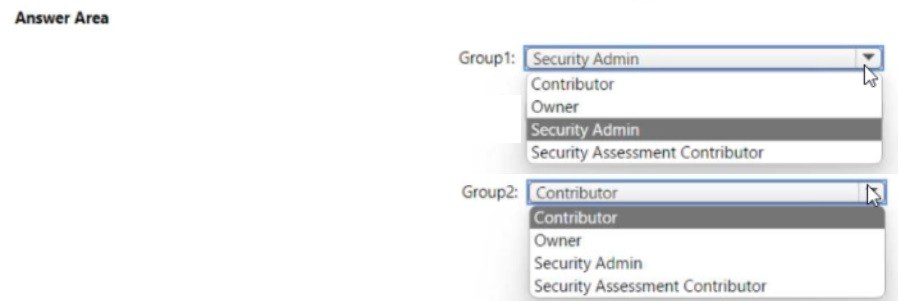
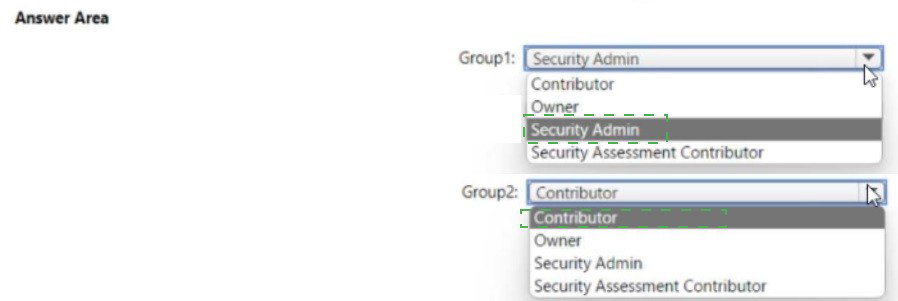
Technical Analysis:
The selection is based on the principle of least privilege and the standard hierarchy of security roles in Azure:
Group1 (Security Reader): * Requirement: This group typically needs to view security states, alerts, and recommendations without the ability to modify policies or dismiss alerts.
Reasoning: The Security Reader role provides read-only access to Defender for Cloud. It allows users to view the secure score, policies, and alerts, which is sufficient for auditors or view-only security analysts.
Group2 (Security Admin): * Requirement: This group needs to manage security policies, dismiss alerts, and configure security components.
Reasoning: The Security Admin role is the standard "manager" role for security operations. It allows users to view and update security policies, dismiss alerts, and manage the security state. However, it does not grant permissions to access the data itself (like seeing the contents of a storage account) or perform resource-level actions like resetting passwords.
Why Other Options Are Incorrect
Owner/Contributor: These roles provide excessive permissions. An Owner can manage access for others, and a Contributor can delete resources, which violates the least privilege requirement for security-specific tasks.
Microsoft Sentinel Contributor: This is a service-specific role. While it allows management of Sentinel, it is not the primary role for managing the broader Defender for Cloud posture and recommendations across the Azure subscription.
References
Microsoft Learn:
Roles and permissions in Microsoft Defender for Cloud
| Page 7 out of 37 Pages |