Topic 3: Misc. Questions

You have a Microsoft 365 subscription. The subscription contains 500 Windows 11 devices that are onboarded to Microsoft Defender for Endpoint.
You need to perform the following actions in Microsoft Defender XDR:
• For your company's finance department, populate random endpoints with fake cached credentials.
• Ensure That an incident is created in Microsoft Defender XDR if an attacker attempts to use the fake cached credentials.
The solution must ensure that the fake cached credentials are planted only on endpoints of the finance department.
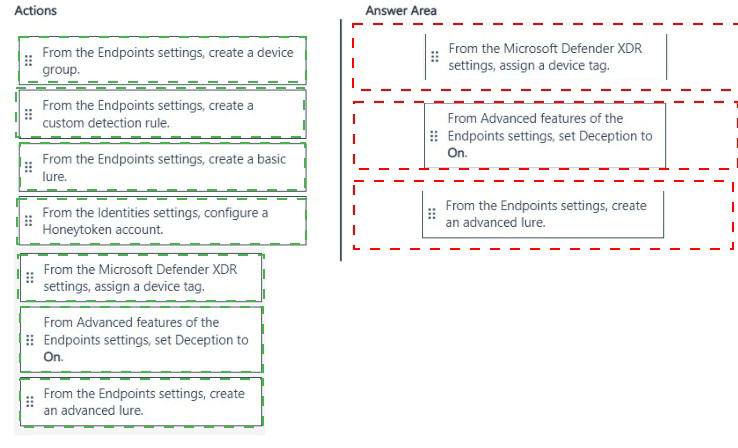
Which three actions should you perform in sequence? To answer, move the appropriate actions from the list of actions to the answer area and arrange them in the correct order.
NOTE: More than one order of answer choices is correct. You will receive credit for any of the correct orders you select.


Explanation:

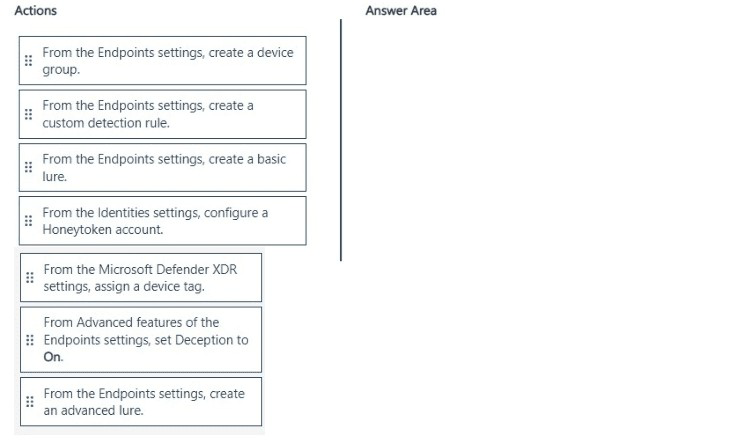
✅ Why this sequence is correct
The requirement is to plant fake cached credentials (an advanced lure) only on finance department endpoints and generate an incident if an attacker attempts to use them.

Step 1: Assign a device tag
Before you can limit the scope of the deception rule, you must identify which devices should receive the lures. You do this by assigning a specific device tag (e.g., "Finance") to the finance department's endpoints.

Step 2: Create an advanced lure
Next, you create an advanced lure. According to Microsoft documentation, "Advanced lures use custom detection rules to produce high-fidelity alerts when attackers interact with the lures." This is the specific type of lure that will plant fake cached credentials and listen for interactions from attackers.

Step 3: Set Deception to On (Advanced features)
Finally, you enable deception in the Defender for Endpoint settings. You navigate to Settings > Endpoints > Advanced features and set the Deception toggle to On. This enables Defender for Endpoint to push the lures to the tagged devices and to generate incidents when the fake credentials are used.

❌ Why other actions are incorrect

Create a device group
Deception rules only support scoping to "all devices" or "devices with specific tags". Device groups are not supported for limiting deception scope.

Create a custom detection rule
While advanced lures rely on custom detection logic, the rule is created automatically by the "advanced lure" wizard. You do not create a separate custom detection rule manually.

Create a basic lure
Basic lures do not plant fake cached credentials — they only create simple decoys. The requirement specifically states "fake cached credentials," which requires an advanced lure.

Configure a Honeytoken account (Identities settings)
This is a Microsoft Defender for Identity feature for planting fake user accounts in AD DS, not for planting fake cached credentials on endpoints.

📌 References
Microsoft Learn: "To scope a deception rule to specific devices, first assign a device tag to those devices"
Microsoft Learn: "Advanced lures can plant fake network shares and fake cached credentials"
Microsoft Learn: "Lures are planted only after you turn on Deception in the Advanced features section"

You have an Azure subscription that contains a Microsoft Sentinel workspace named WS1. You create a hunting query that detects a new attack vector. The attack vector maps to a tactic listed in the MITRE ATT&CK database. You need to ensure that an incident is created in WS1 when the new attack vector is detected. What should you configure?

A. a Fusion rule

B. a query bookmark

C. a scheduled query rule

D. a hunting livestream session

C.   a scheduled query rule

Explanation:

Why C is correct
A scheduled query rule is the standard method in Microsoft Sentinel to automate threat detection and incident creation from custom KQL queries .

Here is the specific workflow for your scenario:
You have already written a custom hunting query that successfully detects a new attack vector and maps to a MITRE ATT&CK tactic.
To convert this manual hunting query into an automated detection, you create a Scheduled query rule.
In the Analytics rule wizard, you paste your KQL query into the Rule query field .
Next, you map your rule to the relevant MITRE ATT&CK tactics in the Tactics and techniques field.
Finally, you enable Incident creation. This ensures that every time the rule's query returns results, Microsoft Sentinel automatically generates an incident for your SOC to investigate.

Why the other options are incorrect

A. a hunting livestream session
Livestream sessions are for interactive, real-time threat hunting . They do not create incidents automatically and require an analyst to be actively monitoring the session.

B. a query bookmark
A bookmark is used to save interesting log entries for later use or to share with other analysts. It does not generate alerts or create incidents .

D. a Fusion rule
Fusion rules are built-in, machine-learning-based correlation rules that are enabled by default. They are not user-programmable. You cannot create a new Fusion rule using your own custom KQL query .

📌 References

Microsoft Learn: Create custom analytics rules to detect threats (Explains the scheduled query rule wizard)

Microsoft Learn: Enable analytics rules in Microsoft Sentinel (Details scheduled query rules and MITRE mapping)

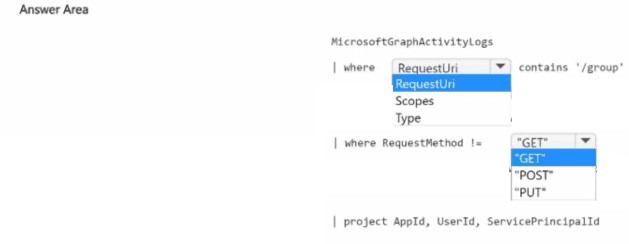
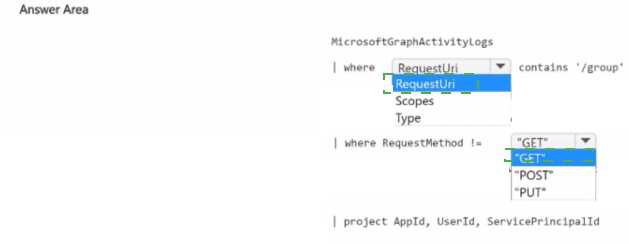
You have a Microsoft 365 subscription
You need to identify all the security principals that submitted requests to change or delete groups. How should you complete the KQL query? To answer, select the appropriate options in the answer area.
NOTE: Each correct selection is worth one point.


Explanation:

Technical Analysis
This query targets the administrative logs that track directory-level changes within Microsoft Entra ID.

AuditLogs (The Data Source):
The AuditLogs table stores activity related to your tenant's configuration and object management. While SigninLogs tracks authentication and SecurityEvent tracks local OS activity, AuditLogs is the primary destination for lifecycle events (Create, Update, Delete) of groups, users, and applications.

OperationName (The Filter):

Update group: This operation is logged whenever a group's properties (like name, description, or membership type) are changed.

Delete group:This operation is logged when a group is removed from the tenant.

The in operator allows you to search for multiple specific operation strings simultaneously, making the query efficient and readable.

Key Log Fields for Investigation
Once you run this query, the following columns will provide the "who" and "what":

InitiatedBy: Contains the identity (UserPrincipalName or Service Principal ID) of the security principal that submitted the request.

TargetResources: Provides details about the specific group that was changed or deleted.

Result: Confirms if the operation was successful or failed.

References

Microsoft Learn: Audit logs in Microsoft Entra ID

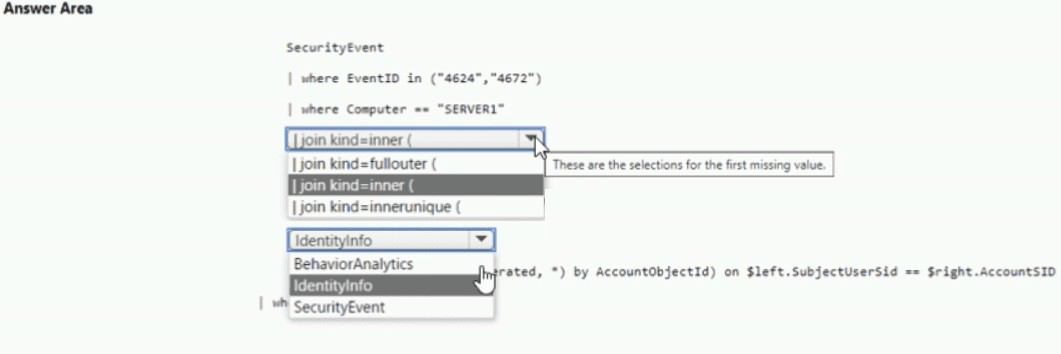
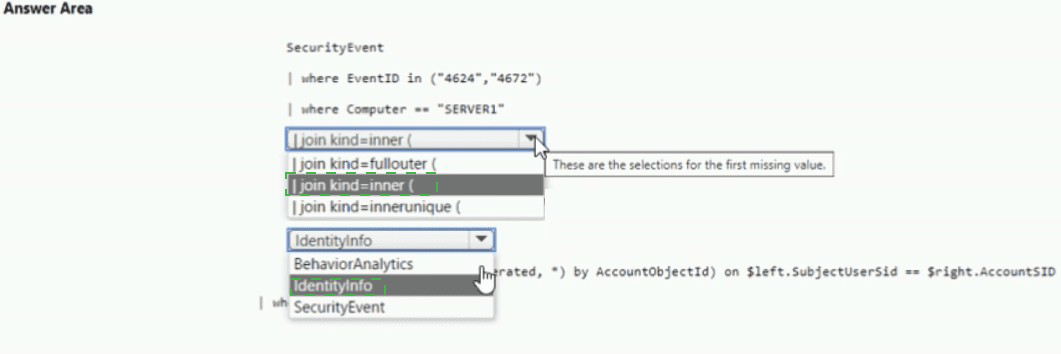
You have a Microsoft Sentinel workspace that has User and Entity Behavior Analytics (UEBA) enabled.
You need to identify all the log entries that relate to security-sensitive user actions performed on a server named Server1. The solution must meet the following requirements:
• Only include security-sensitive actions by users that are NOT members of the IT department.
• Minimize the number of false positives.
How should you complete the query? To answer, select the appropriate options in the answer area. NOTE: Each correct selection is worth one point.


Explanation:


>Technical Analysis
This query leverages the high-fidelity data provided by the User and Entity Behavior Analytics (UEBA) engine in Microsoft Sentinel. BehaviorAnalytics (Table):
The BehaviorAnalytics table is the core output of the UEBA engine. It is superior to raw SecurityEvent or AuditLogs for this task because it identifies "anomalous" or "sensitive" actions that have already been enriched and scored.

ActivityType == "SecuritySensitiveAction" (Precision):
By filtering specifically for SecuritySensitiveAction, you target events that Microsoft Sentinel has already categorized as high-risk (such as group membership changes, permission overrides, or security configuration modifications). This directly addresses the requirement to minimize false positives by ignoring routine system logs.

UserDepartment != "IT" (Metadata Filter):
One of the key advantages of UEBA is that it enriches log entries with user metadata from Microsoft Entra ID. The BehaviorAnalytics table contains a UserDepartment column, allowing you to filter out IT personnel without needing a complex join to the IdentityInfo table, which significantly simplifies the query.


References

Microsoft Learn: BehaviorAnalytics table reference

You have a Microsoft 365 E5 subscription that uses Microsoft Defender XDR and contains two users named User1 and User2.
You need to ensure that the users can perform searches by using the Microsoft Purview portal. The solution must meet the following requirements:
• Ensure that User1 can search the Microsoft Purview Audit service logs and review the Microsoft Purview Audit service configuration.
• Ensure that User2 can search Microsoft Exchange Online mailboxes. • Follow the principle of least privilege.
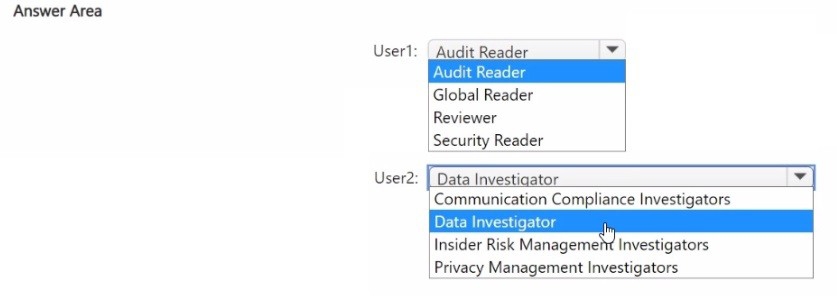
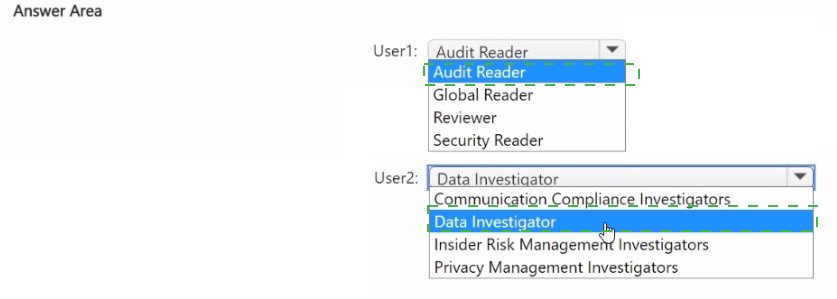
To which Microsoft Purview role group should you add each user? To answer, select the appropriate options in the answer area.
NOTE: Each correct selection is worth one point.


Explanation:

Permissions in Microsoft Purview are managed through role groups that grant access to specific compliance and auditing tools.

User1 (Audit Search & Configuration):

Requirement: Search audit logs and review audit configuration.

Reasoning: While the "Audit Reader" role allows searching logs, reviewing and managing th/eAudit service configuration (such as turning auditing on/off or managing log retention policies) requires elevated permissions. The Organization Management role group includes the "Audit Logs" and "Organization Configuration" roles, making it the least privileged group that covers both requirements.

User2 (Search Exchange Online Mailboxes):
Requirement: Search Microsoft Exchange Online mailboxes.

Reasoning: The eDiscovery Manager role group is specifically designed for users who need to perform content searches across different locations, including Exchange mailboxes, SharePoint sites, and OneDrive for Business. It provides the "Reviewer" and "Search and Purge" capabilities necessary for discovery without granting broad administrative control over the entire Purview organization.

Key Role Group Differences

Audit Manager: Primarily focused on viewing and managing audit logs but may not have the full organizational configuration rights required for User1's specific "review configuration" task.

Compliance Administrator: A high-level role that has broad access to all compliance features; usually exceeds the "least privilege" requirement for a user who only needs to perform mailbox searches.

References

Microsoft Learn: Permissions in the Microsoft Purview compliance portal
Microsoft Learn: Assign eDiscovery permissions in Microsoft Purview

You have a Microsoft 365 E5 subscription. You have 1,000 Windows devices that have a third-party antivirus product installed and Microsoft Defender Antivirus in passive mode. All Windows devices are on boarded to Microsoft Defender for Endpoint. You need to ensure that the devices are protected from malicious artifacts that were undetected by the third-party antivirus product. Solution: You enable Live Response. Does this meet the goal?

A. Yes

B. No

B.    No

Explanation:

✅ Why No (Live Response does not meet the goal)
Live Response is a remote shell capability that allows incident responders to manually perform forensics and remediation—it is a manual interactive tool, not an automated protection mechanism. The question requires automatic protection from undetected malicious artifacts, which demands a preventive technology.

📌 What you should enable instead: EDR in block mode
EDR in block mode is specifically designed for this exact scenario—when Microsoft Defender Antivirus runs in passive mode and a third-party antivirus is the primary solution. Microsoft documentation states: "EDR in block mode provides an added layer of protection when Microsoft Defender Antivirus is not the primary antivirus product and is running in passive mode. It helps protect against malicious artifacts that were undetected by the third-party antivirus."

❌ Why other options discussed in reviews are incorrect
Live ResponseManual interactive shell, requires human intervention, does not provide automatic protection

Controlled folder accessOnly prevents unauthorized changes to protected folders (anti-ransomware), not general malware

Attack surface reduction (ASR) rulesCan help reduce overall risks but is not the feature specifically designed to fill the "passive mode protection gap"

📌 References

Microsoft Learn: "EDR in block mode provides protection against malicious artifacts that were undetected by the third-party antivirus"

Microsoft Learn: "Live response is a manual investigation tool, not an automatic protection feature"

You have an Azure subscription that uses Microsoft Defender for Cloud. You have an Amazon Web Services (AWS) account that contains an Amazon Elastic Compute Cloud (EC2) instance named EC2-1. You need to onboard EC2-1 to Defender for Cloud. What should you install on EC2-1?

A. the Log Analytics agent

B. the Azure Connected Machine agent

C. the unified Microsoft Defender for Endpoint solution package

D. Microsoft Monitoring Agent

B.   the Azure Connected Machine agent

Explanation:

Why B is correct
To onboard an AWS EC2 instance to Microsoft Defender for Cloud, you must install the Azure Connected Machine agent. Microsoft Defender for Cloud uses Azure Arc as the bridge to extend Azure security services to multicloud environments . The official Microsoft documentation states: "Defender for Cloud uses Azure Arc to deploy the Connected Machine agent to your AWS instances" . This agent projects the EC2 instance into Azure Resource Manager, making it visible as an Azure Arc-enabled server . Once onboarded, Defender for Servers can protect the instance by deploying endpoint detection and response (EDR) capabilities and vulnerability assessment .

Why other options are incorrect

A. Log Analytics agent
This legacy agent is being phased out. Defender for Cloud uses the Azure Monitor Agent (AMA) via Azure Arc, not the standalone Log Analytics agent.

C. unified Microsoft Defender for Endpoint solution package
This is deployed automatically by Defender for Cloud after the instance is Arc-enabled. It is not the prerequisite for onboarding.

D. Microsoft Monitoring Agent
This is an older agent (predecessor to Log Analytics agent) and is not used for onboarding AWS instances to Defender for Cloud.

References

Microsoft Learn: "Defender for Cloud uses Azure Arc to deploy the Connected Machine agent to your AWS instances"

Microsoft Learn: "Azure Arc is a prerequisite for Defender for Cloud protection on non-Azure resources"

You have a Microsoft 365 E5 subscription that contains a device named Device 1. Device 1 is enrolled in Microsoft Defender for End point. Device1 reports an incident that includes a file named File1 exe as evidence. You initiate the Collect Investigation Package action and download the ZIP file. You need to identify the first and last time File1.exe was executed. What should you review in the investigation package?

A. Processes

B. Scheduled tasks

C. Autoruns

D. Security event log

E. Prefetch files

E.   Prefetch files

Explanation:

Why E is correct
The Prefetch folder in the investigation package is the correct location to find when File1.exe was first executed. Windows creates a prefetch file the first time an application is run, and this file contains the timestamp of that initial execution.

The investigation package includes a dedicated Prefetch files folder that contains these forensic artifacts. According to Microsoft's forensic analysis guidance, "Prefetch files provide information on when applications were first and last executed, which assists in establishing file execution timelines during investigations".

❌ Why other options are incorrect

A. ProcessesShows currently running processes, not historical execution timestamps.

B. Scheduled tasksContains task definitions but does not record execution times of arbitrary executables.

C. AutorunsShows programs configured to start automatically at boot, not historical execution timestamps.

D. Security event logCan log process creation (Event ID 4688) but may not be reliable due to volume, and Prefetch is the definitive forensic source for first-run timing.

📌 References

Microsoft Learn: "Investigation package contents for Windows devices" – Prefetch files contain first and last execution timestamps

Exam SC-200 discussions:Confirmed that Prefetch files are the correct answer for determining when an executable was first executed

You have an Azure subscription that uses Microsoft Defender for Cloud. You have an Amazon Web Services (AWS) subscription. The subscription contains multiple virtual machines that run Windows Server. You need to enable Microsoft Defender for Servers on the virtual machines. Which two actions should you perform? Each correct answer presents part of the solution. NOTE: Each correct answer is worth one point.

A. From Defender for Cloud, enable agentless scanning.

B. Install the Azure Virtual Machine Agent (VM Agent) on each virtual machine.

C. Onboard the virtual machines to Microsoft Defender for Endpoint.

D. From Defender for Cloud, configure auto-provisioning.

E. From Defender for Cloud, configure the AWS connector.

C.   Onboard the virtual machines to Microsoft Defender for Endpoint.
E.   From Defender for Cloud, configure the AWS connector.

Explanation:

E. From Defender for Cloud, configure the AWS connector.
This is the prerequisite. Before Microsoft Defender for Cloud can protect any resource in your AWS subscription, you must first establish a connection (the "native cloud connector") between your AWS environment and Azure . The setup process involves deploying a CloudFormation template in AWS, which creates the necessary IAM roles and permissions for Defender for Cloud to access your EC2 instances .

C. Onboard the virtual machines to Microsoft Defender for Endpoint.
To enable Defender for Servers on AWS EC2 instances, the machines must be onboarded to Microsoft Defender for Endpoint. While the connection process automatically onboards machines as Azure Arc-enabled VMs , you specifically need to ensure the integration with Defender for Endpoint is active. When you enable the Servers plan for the AWS connector, you are consenting to integrate with Defender for Endpoint and access its vulnerability and alert data .

❌ Why the other options are incorrect

A. From Defender for Cloud, enable agentless scanning.
Incorrect. Agentless scanning is a feature of Defender for Cloud Plan 2 used for vulnerability assessment without an installed agent. It is not a required step to initially enable the Defender for Servers plan .

B. Install the Azure Virtual Machine Agent (VM Agent) on each virtual machine.
Incorrect. When you use the native AWS connector, the connection process automatically onboards the AWS EC2 instances as Azure Arc-enabled servers, which handles the necessary agent infrastructure (the Azure Connected Machine agent). You do not need to manually install the standard Azure VM Agent .

D. From Defender for Cloud, configure auto-provisioning.
Incorrect. Auto-provisioning refers to the automatic installation of the Log Analytics agent or Azure Monitor agent onto Azure virtual machines. It is not the mechanism for enabling Defender for Servers on AWS EC2 instances .

📌 References

Microsoft Learn:Connect your AWS accounts (Step-by-step guide for the native connector)

Microsoft Learn: Deploy Defender for Servers in Microsoft Defender for Cloud (Explains the integration with Defender for Endpoint and Azure Arc)

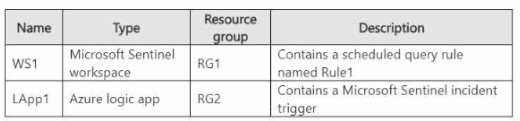
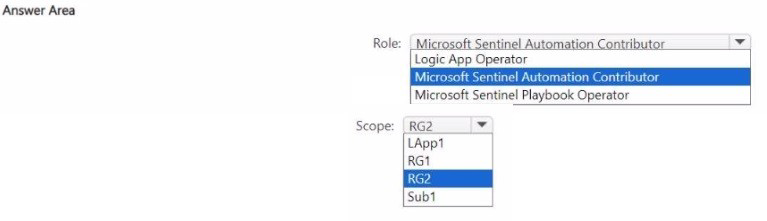
You have an Azure subscription named Sub1 that contains the resources shown in the following table.

You plan to configure Rule1 to trigger Lapp1 when an incident is generated.
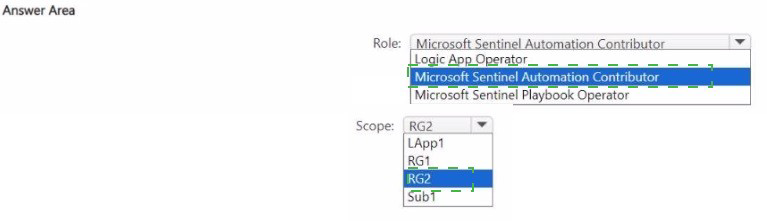
You need to recommend the role-based access control (RBAC) role that you should assign to WS1, and the scope at which should you assign the role. The solution must follow the principle of least privilege.
What should you recommend? To answer, select the appropriate options in the answer area.
NOTE: Each correct selection is worth one point.


Explanation:

Technical Analysis
This configuration ensures that Microsoft Sentinel has the necessary permissions to interact with automation resources while adhering to the principle of least privilege.

Microsoft Sentinel Automation Contributor (Role):

This is a specialized, "built-in" role designed specifically for this scenario. It grants Microsoft Sentinel the permissions required to run playbooks and automate responses to incidents.

Unlike the standard "Logic App Contributor" role, which allows full management (editing/deleting) of logic apps, the Automation Contributor role is scoped to the execution and management within the context of Sentinel.

RG2 (Scope):
According to the table provided in the exhibit, Lapp1 (the Logic App) is located in resource group RG2.

Assigning the role at the RG2 level ensures that Sentinel can trigger any playbook within that specific group without having unnecessary permissions across the entire subscription (Sub1) or other unrelated resource groups (RG1).

Key Workflow

When an incident is generated in WS1 that matches the criteria of Rule1, Sentinel uses this RBAC assignment to "reach into" RG2 and signal Lapp1 to begin its workflow (e.g., sending a Slack message, isolating a host, or blocking a user).

References
Microsoft Learn: Authenticate Sentinel to Microsoft Defender XDR to run playbooks
Microsoft Learn: Microsoft Sentinel RBAC roles

Page 4 out of 37 Pages