Topic 2: Relecloud
Case study
This is a case study. Case studies are not timed separately. You can use as much
exam time as you would like to complete each case. However, there may be additional
case studies and sections on this exam. You must manage your time to ensure that you
are able to complete all questions included on this exam in the time provided.
To answer the questions included in a case study, you will need to reference information
that is provided in the case study. Case studies might contain exhibits and other resources
that provide more information about the scenario that is described in the case study. Each
question is independent of the other questions in this case study.
At the end of this case study, a review screen will appear. This screen allows you to review
your answers and to make changes before you move to the next section of the exam. After
you begin a new section, you cannot return to this section.
To start the case study
To display the first question in this case study, click the Next button. Use the buttons in the
left pane to explore the content of the case study before you answer the questions. Clicking
these buttons displays information such as business requirements, existing environment,
and problem statements. If the case study has an All Information tab, note that the
information displayed is identical to the information displayed on the subsequent tabs.
When you are ready to answer a question, click the Question button to return to the
question.
Background
Relecloud provides regional air service in North America. The company uses a variety of
systems, apps, and services to manage the business. You are hired to design a new
solution to manage passenger information, reservations, and maintenance.
Current environment
The company uses Microsoft Office 365.
The company has a custom app for managing and tracking passenger luggage.
The app uses Microsoft Dataverse.
For flights longer than four hours, passengers receive a meal. Customers can
select a meal when they make a reservation and can save the meal choices as a
customer preference.
The company offers two types of meals: standard and vegetarian. Meal types can
be temporarily unavailable. The airline is considering offering other meal types,
such as gluten-free and low-sodium options.
The company uses paper-based reservation checklists to help ensure that all the
steps for a reservation are complete.
The company uses vendors to service aircraft
Environment
Ensure that employees can sign in to all Microsoft apps by using one set of
credentials per employee.
Minimize the use of third-party products and custom development.
Reduce customer support call volumes by having the system automatically resolve
common issues.
The security rule for agents must contain the privileges in the default Customer
Service Representative security role.
Log issues as cases. The case form must show variable sections based on the
case type. Include a custom entity named Seats and grant agents access to the
entity.
Application use layout should be role specific.
Agents
You must standardize the format used by agents to enter customer phone
numbers.
Agents need a solution to replace paper reservation checklists.
Agents need dashboards to show a current count of all reservations on the entity.
Agents need a way to track reservation issues.
Agents need a visual indicator in the interface to determine the reservation step to
provide a seamless customer experience.
Agents need different versions of cancellation policies to send customers. One
version must be controllable within the system.
Agents need to view which pieces of luggage match to each passenger, and then
need to add the total on the passenger record.
IT
IT staff needs a mobile solution to see IT cases at the top of the menu since this is
their primary focus.
IT staff needs a system that is easy to navigate to active cases.
IT specialists want to design Power BI reports. They need to understand the
underlying table relationships of the system.
IT specialists need a solution that is visual rather than text-based so they can
quickly complete their tasks.
Management
Management requires paginated reports for stakeholders.
Management wants to provide frequent flyers with better service when the flyers
call.
Managers need to see all customer dashboards at the top of their menu on their
mobile device.
Maintenance
Maintenance supervisors must not have access to Dynamics 365 Customer
Service. The supervisors must be able to communicate with the contracts team
about contracts.
Aircraft maintenance vendors must have only view and upload privileges to their invoices and receipts.
Contracts with maintenance companies must be stored in Dynamics 365 Customer Service.
A company uses Power Pages for article submissions. The article properties are stored in a
table in Microsoft Dataverse and the content of the article is stored in a related Microsoft
SharePoint library. The company invites different experts outside its organization to review
an article before publishing it. The reviewers are granted access to the articles in Microsoft
Dataverse. The company has the following requirements:
• Provide a app to canvas the reviewers that exposes both the article properties and
content in read-only mode.
• Once the review is completed, the reviewer saves the review data, and the article and the
review no longer appear in the app.
You need to recommend the components to be used for each requirement.
Which options should you use?
NOTE: Each correct selection is worth one point.
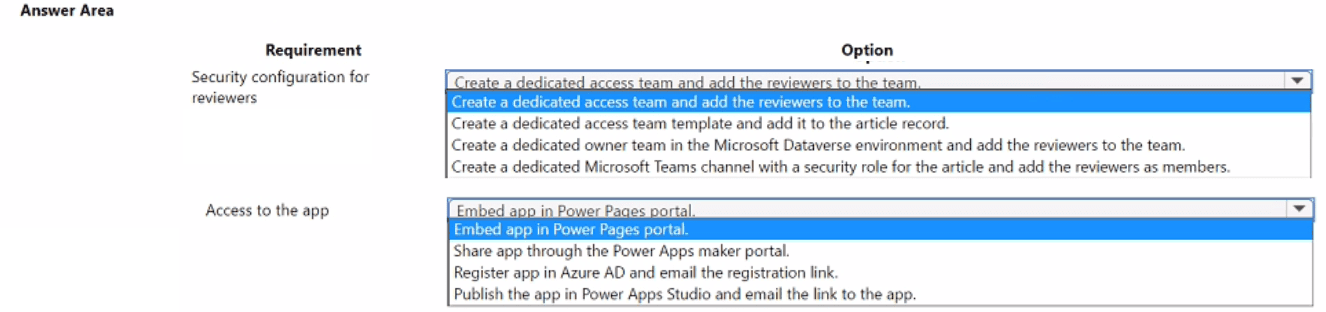
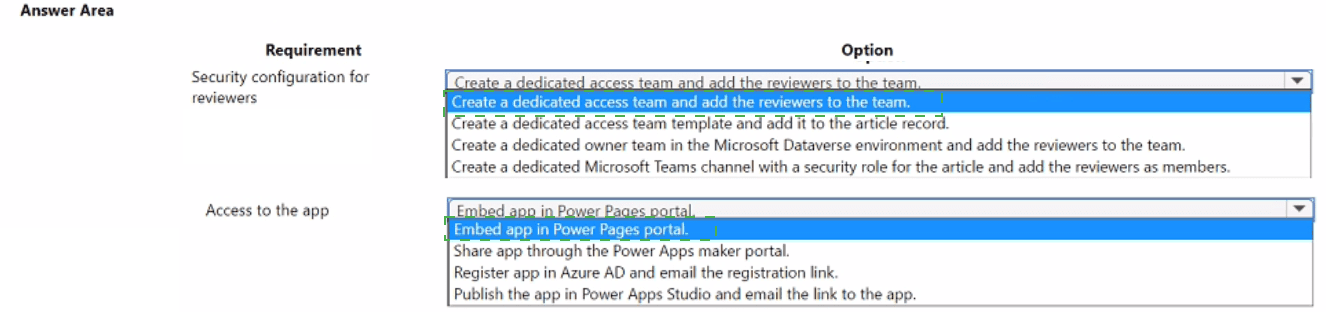
Explanation:
The scenario requires granting external reviewers access to a canvas app that displays read-only article data from Dataverse and SharePoint. Reviewers must lose access automatically after completing their review. The security configuration must handle external users efficiently, and app access must be provided without complex setup. The recommended options focus on access teams for temporary permissions and Power Pages portal for external app delivery.
Correct Options:
Security configuration for reviewers → Create a dedicated access team and add the reviewers to the team
Access teams in Dataverse provide temporary, record-level access without requiring a Dataverse license for each member when using Power Pages. Reviewers can be added to an access team associated with specific article records, granting read-only permissions. When the review is completed, removing the reviewer from the team revokes access automatically.
Access to the app → Embed app in Power Pages portal
Power Pages is designed for external user access without individual Dataverse licenses. Embedding the canvas app in a Power Pages portal allows external reviewers to authenticate and access the app securely. The portal can manage external identities and provide the read-only interface for article properties and SharePoint content.
Incorrect Options:
Create a dedicated access template and add it to the article record – Access templates define team properties but do not grant access themselves; they must be used with access teams.
Create a dedicated owner team in Dataverse and add reviewers – Owner teams own records and require licenses for members, making them unsuitable for external reviewers.
Create a dedicated Microsoft Teams channel with a security role – Teams channels are for internal collaboration, not for managing Dataverse record access for external users.
Share app through Power Apps maker portal – The maker portal is for developers, not for distributing apps to external reviewers.
Register app in Azure AD and email registration link – This adds unnecessary complexity and does not address external user access management.
Publish app in Power Apps Studio and email link – Direct app sharing requires authenticated users with appropriate licenses and does not handle external reviewer scenarios well.
Reference:
Microsoft documentation on access teams in Dataverse for record-level permissions and Power Pages for external user access to embedded canvas apps.
You are a Microsoft Power Platform architect gathering solution requirements for a
customer. Management uses three different systems to locate asset inventory and contract
details.
Management must view inventory with the ability to select assets and view additional
details. Sales representatives have issues locating assets based on specific features in a
timely manner when working with customers.
You need to prioritize the requirements.
Which priority should you use? To answer, select the appropriate options in the answer
area.
NOTE: Each correct selection is worth one point.
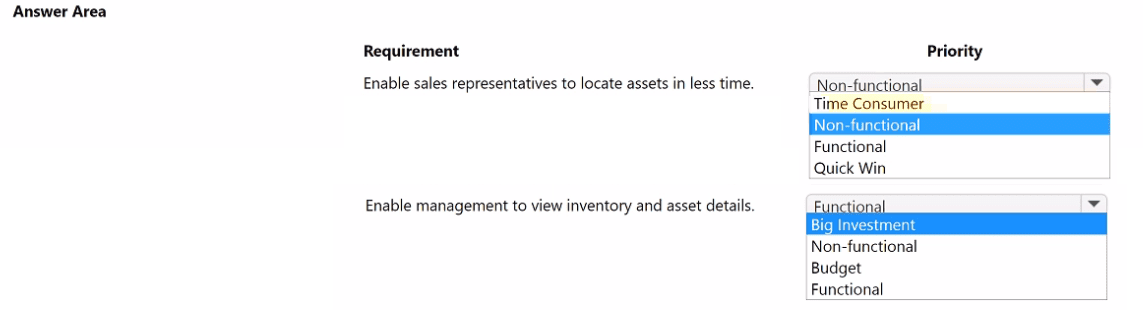
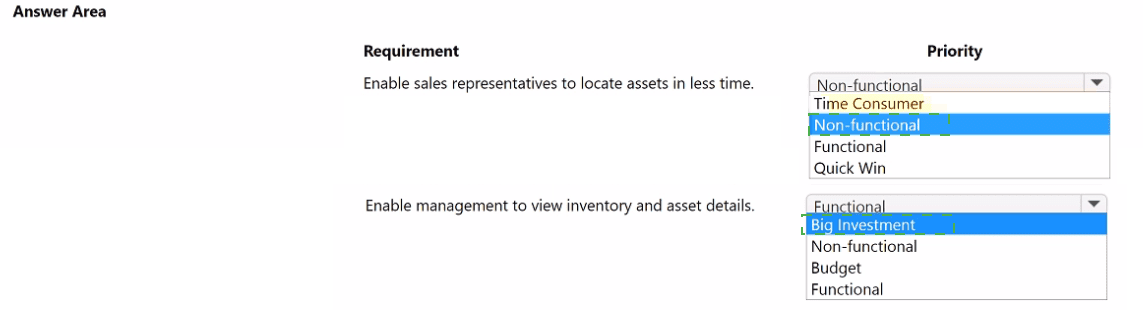
Explanation:
The question requires prioritizing two distinct requirements based on their business impact and implementation effort. The first involves enabling sales reps to find assets faster—a time-saving goal that delivers immediate value with relatively low complexity (a quick win). The second gives management consolidated visibility into inventory and contracts, which may involve significant integration work across three systems (a big investment).
Correct Options:
Enable sales representatives to locate assets in less time → Quick Win
This requirement addresses a direct pain point for customer-facing staff. Improving search speed for asset features can be achieved with targeted enhancements like improved views, filters, or a canvas app. The effort is moderate, and the benefit is immediate, classifying it as a Quick Win in prioritization frameworks.
Enable management to view inventory and asset details → Big Investment
Consolidating data from three different systems into a unified management view requires significant integration work, data modeling, and potentially custom development. The complexity and resource commitment make this a Big Investment, even though the business value is high.
Incorrect Options:
Non-functional – Both requirements describe functional capabilities (what the system does), not non-functional attributes like performance or security.
Time Consumer – Not a standard prioritization category; "Quick Win" is the correct term for low-effort, high-impact items.
Budget – Not a prioritization category; refers to financial constraints rather than requirement type or value.
Functional – While both requirements are functional, this option alone does not convey prioritization; the question asks for priority, not just classification.
Reference:
Microsoft solution architect prioritization frameworks, including Quick Wins and Big Investments from impact-effort matrices.
A client plans to implement Microsoft Power Platform solutions.
The client identifies the following requirements for handling opportunities:
• Users must follow the same set of steps each time they process opportunities
• For opportunities with values greater than $20,000, a follow-up date and second contact
field must appear on the form.
• An error message must display if a follow-up date is not within seven days of the
opportunity creation date.
You need to recommend tools to meet the client requirements.
What should you recommend? To answer, drag the appropriate tools to the correct
requirement. Each tool may be used once, more than once, or not at all. You may need to
drag the split bar between panes or scroll to view content.
NOTE: Each correct selection is worth one point.


Explanation:
The client has three distinct requirements for opportunity handling: guided process steps, conditional field visibility, and validation with error messaging. Each maps to a specific Power Platform tool based on functionality and complexity. Business process flows provide step-by-step guidance, business rules handle simple form logic, and workflows (or modern alternatives) manage validation and messaging.
Correct Option Matching:
Users must follow the same set of steps each time they process opportunities → Business process flow
Business process flows provide a guided experience that ensures users consistently follow defined stages and steps when working with opportunities. They can be configured to show specific stages, required fields, and conditional branches, making them ideal for standardizing opportunity processing across the organization.
For opportunities with values greater than $20,000, a follow-up date and second contact field must appear → Business Rule
Business rules apply simple conditional logic to forms without requiring code. They can show or hide fields based on field values, such as revealing follow-up date and second contact when opportunity value exceeds $20,000. Business rules execute on the form client-side, providing immediate visual feedback.
Error message if follow-up date not within seven days of creation date → Workflows
Workflows (or modern Power Automate flows) can validate data against business rules and trigger actions like displaying error messages. A real-time workflow can check the follow-up date against the creation date and prevent save with a custom error message if the condition is not met.
Incorrect Tool:
Business process flow for validation – While business process flows guide steps, they do not perform complex date validation or display custom error messages on save attempts.
Business rule for process steps – Business rules cannot enforce sequential step completion or guide users through stages.
Workflow for conditional visibility – Workflows run in the background and cannot dynamically show/hide fields on a form in real-time.
Reference:
Microsoft documentation on business process flows for guided experiences, business rules for form logic, and workflows for backend validation and automation.
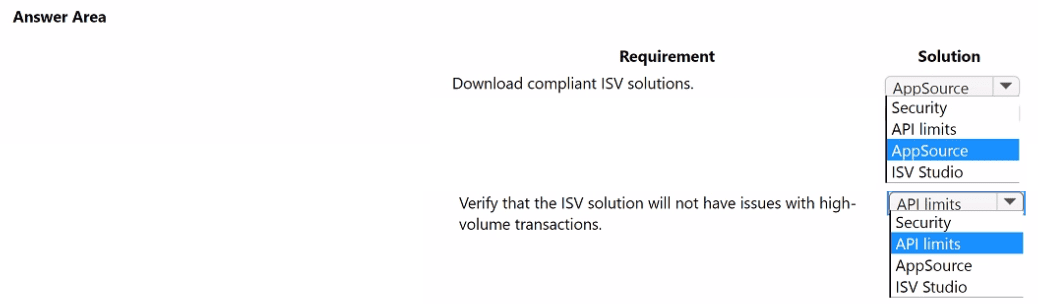
You design a Microsoft Power Platform app for a company. The company has the following
requirements:
• need to use an off-the-shelf product by an ISV that provides functionality to enable
customers to deposit funds into their account
• ability to handle a high number of customers depositing funds into their account during
lunchtime hours
You need to recommend a solution that meets the requirements. Which components
should you recommend?
To answer, select the appropriate options in the answer area.
Explanation:
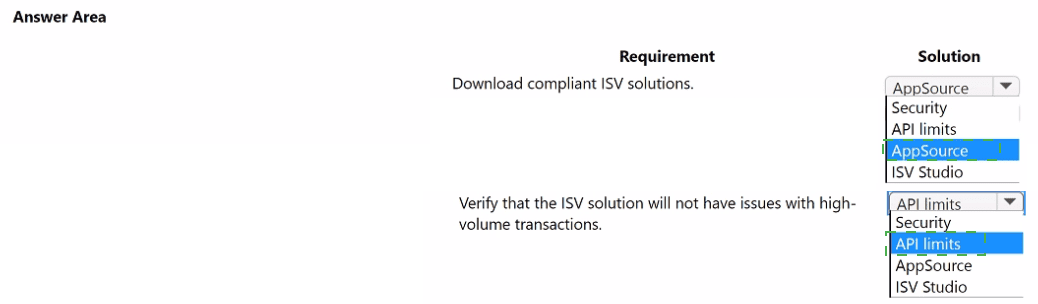
The company requires an off-the-shelf ISV solution for customer fund deposits that can handle high transaction volumes during peak hours. The first requirement involves finding a compliant, trusted ISV solution. The second requires verifying that the solution can scale to meet transaction demands. AppSource is the official marketplace for discovering and downloading compliant ISV solutions, while API limits evaluation ensures the solution can handle high-volume transactions without performance issues.
Correct Options:
Download compliant ISV solutions → AppSource
AppSource is Microsoft's official marketplace for business applications, including ISV solutions built on Power Platform and Dynamics 365. It provides a curated catalog where companies can discover, trial, and download compliant, vetted solutions that meet security and publishing standards.
Verify that the ISV solution will not have issues with high-volume transactions → API limits
API limits refer to the service protection limits in Dataverse that govern how many requests an application can make within a time window. For high-volume scenarios like lunchtime deposits, it is critical to verify that the ISV solution's API consumption patterns stay within these limits or that the solution is designed to handle throttling gracefully.
Incorrect Options:
Security – While security is important, it does not directly address the requirement to verify high-volume transaction handling.
ISV Studio – ISV Studio is a tool for ISVs to monitor and analyze their app usage across tenants, not for customers to download solutions or evaluate API capacity.
Reference:
Microsoft documentation on AppSource for discovering ISV solutions and Dataverse API limits for capacity planning in high-volume scenarios.
A food distribution terminal uses Microsoft Dynamics 365 Field Service and Microsoft
Dynamics 365 Supply Chain Management to manage inventory and fulfill customer orders.
Customers place custom orders through a Power Pages customer portal. Customers can
enter different receiving times and dates on fresh produce order lines.
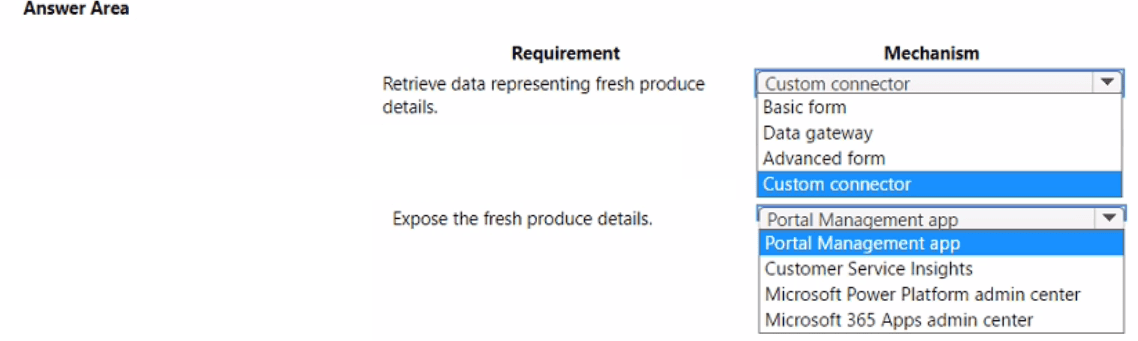
The terminal needs to expose fresh produce order details from Dynamics 365 to its
customers in the portal. Customers can control how much detail they see in the portal.
You need to design a solution that meets the requirements.
Which mechanism should you use for each requirement?
To answer, select the appropriate options in the answer area.
NOTE: Each correct selection is worth one point.
Explanation:
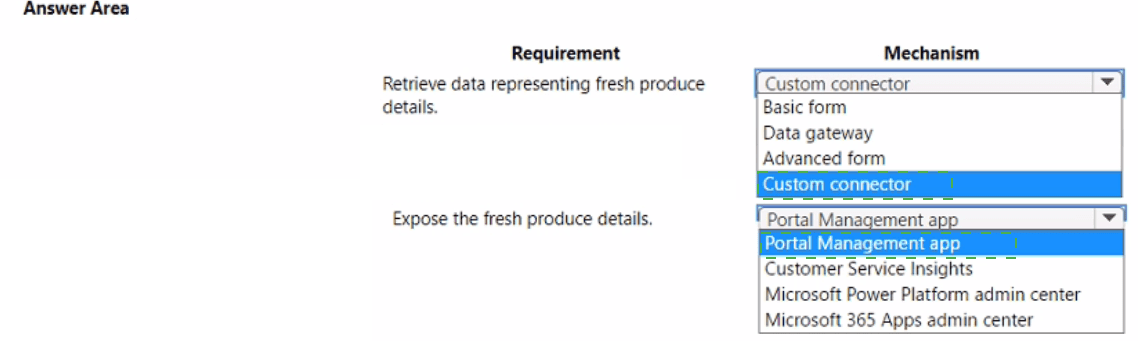
The scenario requires retrieving fresh produce order details from Dynamics 365 (Field Service and Supply Chain Management) and exposing them in a Power Pages portal with customer-controlled visibility. The retrieval mechanism must access data from Dynamics 365, and the exposure mechanism must provide configurable views within the portal. Custom connectors enable integration with Dynamics 365 data, while the Portal Management app allows portal configuration and content management.
Correct Options:
Retrieve data representing fresh produce details → Custom connector
A custom connector can be built to connect Power Pages to Dynamics 365 data sources (Field Service and Supply Chain Management). It enables secure API-based retrieval of fresh produce order details, which can then be displayed in the portal. This provides flexibility to access specific data entities needed for customer orders.
Expose the fresh produce details → Portal Management app
The Portal Management app is a model-driven app used to configure Power Pages portals. It allows administrators to manage content, create lists and forms, and control what data is displayed to different user roles. Using this app, customers can be given options to customize how much detail they see based on permissions or personalization settings.
Incorrect Options:
Basic form / Advanced form – These are components within portals for displaying forms, not mechanisms for retrieving data from external systems.
Data gateway – Used for on-premises data connectivity, not for retrieving data from cloud-based Dynamics 365 applications.
Customer Service Insights – An analytics tool for customer service, not relevant for portal data exposure.
Microsoft Power Platform admin center – Used for environment administration, not for portal content configuration.
Microsoft 365 Apps admin center – Manages Microsoft 365 apps, not Power Pages portal configuration.
Reference:
Microsoft documentation on custom connectors for Dynamics 365 integration and Portal Management app for Power Pages configuration.
You are working with a customer to plan a go-live deployment to their production
environment. The solution includes several apps and environment variables. The superuser
team manages the production environment that is secured by using a specific environment
Azure AD security group.
The following issues have been identified:
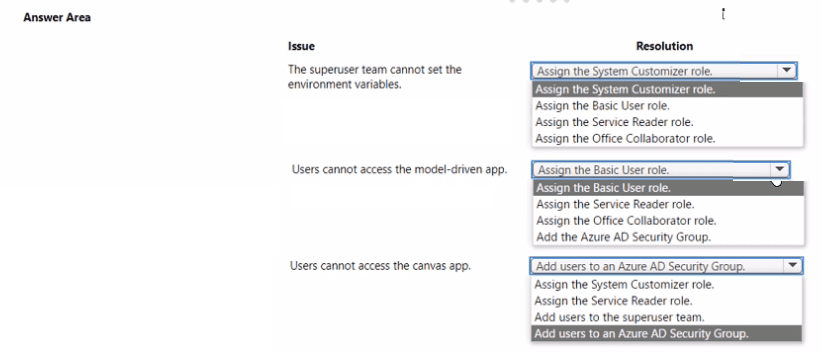
• The super user team cannot access make.powerapps.com to open and set the
environment variables.
• Users are added to the environment Azure AD security group and are not able to access
the model-driven app.
• Users are added to the environment Azure AD security group and are not able to access
the canvas app.
You need to resolve the issues.
What should you do? To answer, select the appropriate options in the answer area. NOTE:
Each correct selection is worth one point.
Explanation:
The production environment is secured by an Azure AD security group, meaning only members of that group can access the environment and its resources. The superuser team needs elevated permissions to manage environment variables in make.powerapps.com. Users in the group cannot access the model-driven or canvas apps, which typically indicates missing security roles or app-specific permissions. The resolutions involve assigning appropriate roles and ensuring proper app sharing.
Correct Options:
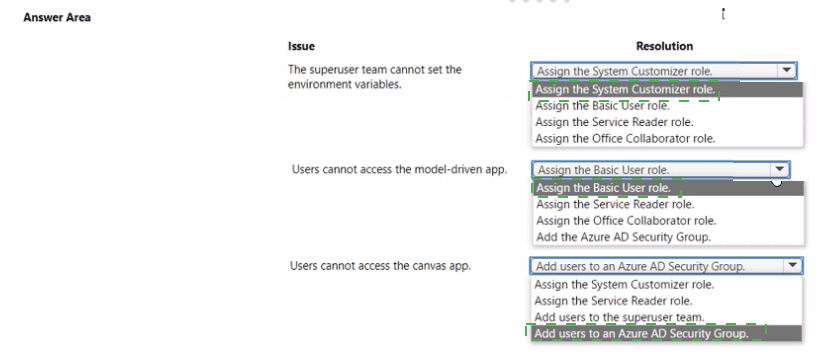
Superuser team cannot set environment variables → Assign the System Customizer role
Environment variables are solution components that require create, read, and write permissions on the Environment Variable Definition and Environment Variable Value tables. The System Customizer role includes these privileges, enabling superusers to open make.powerapps.com and update environment variables as needed.
Users cannot access model-driven app → Assign the Basic User role
Access to model-driven apps requires the Basic User role, which grants read access to tables and permission to run apps. Even if users are in the environment Azure AD security group, they must also have this role assigned to launch and use model-driven apps.
Users cannot access canvas app → Add users to an Azure AD Security Group
Canvas apps are shared with Azure AD security groups, not individual users, when group-based sharing is configured. If users are already in the environment security group but still cannot access the canvas app, they must be added to the specific Azure AD security group that the app is shared with.
Incorrect Options:
Service Reader role – Provides read-only access to Customer Service tables, not general app access or environment variable management.
Office Collaborator role – Used for integration with Office apps, not for app access or environment configuration.
Add users to superuser team – The superuser team already manages the environment; adding users to this team does not grant app access or environment variable permissions without appropriate roles.
Reference:
Microsoft documentation on environment security groups, security roles for app access, and sharing canvas apps with Azure AD security groups.
A nationwide retailer is streamlining its warehouse operations by using a custom Microsoft Power Platform solution. The retailer plans to migrate its existing data to Microsoft
Dataverse.
The retailer provides the following data solution requirements:
• Dispatchers are responsible for the storage, handling, and transportation of goods to and
from the warehouses.
• Dispatchers will own order records and any associated order lines after an order ships.
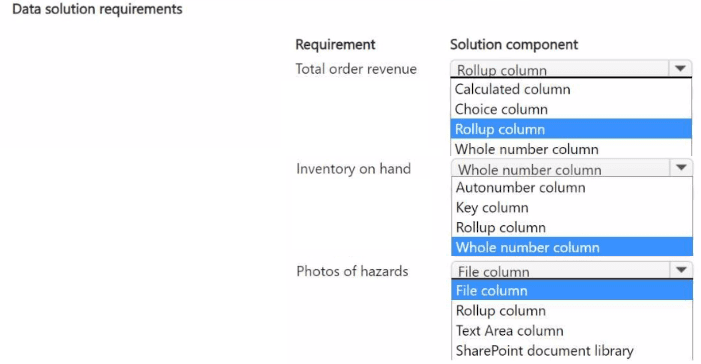
• The floor manager requires a consolidated view of the total order revenue for each order.
• The remaining inventory on hand must be available on each order line for the shipped
product.
• All staff must take photos if they observe a hazard in a warehouse. These photos must be
added to a folder and shared with regional managers.
You need to design the data solution.
Which data solution component should you use for each requirement? To answer, select
the appropriate options in the answer area.
NOTE: Each correct selection is worth one point.
Explanation:
The retailer requires specific Dataverse components to address operational needs: a consolidated view of order revenue, real-time inventory availability, and photo capture for hazards. Each requirement maps to a distinct Dataverse feature that provides the necessary functionality with minimal custom development.
Correct Options:
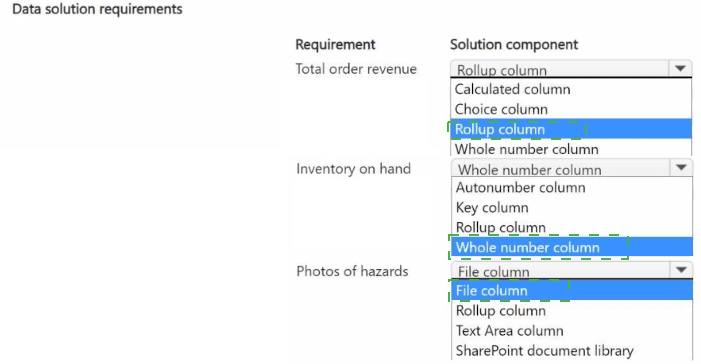
Total order revenue → Rollup column
A rollup column calculates an aggregate value (such as sum) from related records. For total order revenue, a rollup column on the order table can sum the revenue values from all associated order line records, providing the floor manager with an automatically updated consolidated view.
Inventory on hand → Rollup column
Remaining inventory on hand for each product can be calculated as a rollup column on the product table, summing quantities from inventory transactions or subtracting shipped quantities from received quantities. This ensures order lines always display current availability.
Photos of hazards → SharePoint document library
For photos that need to be organized in folders and shared with regional managers, SharePoint document libraries provide superior folder management, permission control, and sharing capabilities compared to Dataverse file columns. The integration between Dataverse and SharePoint enables seamless attachment storage.
Incorrect Options:
Calculated column – Performs row-level calculations but cannot aggregate data from related records, making it unsuitable for total order revenue.
Choice column – Used for dropdown selections, not for numerical aggregations or file storage.
Whole number column – Simple integer storage without calculation capability.
Autonumber column – Generates sequential numbers, not for calculations or file storage.
Key column – Used for alternate keys, not for data values.
File column – While capable of storing files, it lacks the folder organization and granular sharing features of SharePoint for regional manager distribution.
Text Area column – For multi-line text, not for files or calculations.
Reference:
Microsoft documentation on rollup columns for aggregated calculations, Dataverse-SharePoint integration for document management.
| Page 3 out of 20 Pages |