Topic 1: First Up Consulting
Case study
This is a case study. Case studies are not timed separately. You can use as much exam time as you would like to complete each case. However, there may be additional case studies and sections on this exam. You must manage your time to ensure that you are able to complete all questions included on this exam in the time provided.
To answer the questions included in a case study, you will need to reference information that is provided in the case study. Case studies might contain exhibits and other resources that provide more information about the scenario that is described in the case study. Each question is independent of the other questions in this case study. At the end of this case study, a review screen will appear. This screen allows you to review your answers and to make changes before you move to the next section of the exam. After you begin a new section, you cannot return to this section.
To start the case study
To display the first question in this case study, click the Next button. Use the buttons in the left pane to explore the content of the case study before you answer the questions. Clicking these buttons displays information such as business requirements, existing environment, and problem statements. If the case study has an All Information tab, note that the information displayed is identical to the information displayed on the subsequent tabs. When you are ready to answer a question, click the Question button to return to the question.
Background
First Up Consulting recruits information technology (IT) workers for temporary or
permanent positions at client companies. The company operates offices in multiple countries/regions.
First Up has both full-time and part-time employees. The company has a team or worker support agents that respond to inquiries from current and prospective workers. Some of the worker support agents are multilingual.
The company does not have a standardized tool used for reporting purposes. The organization engages you to implement a new Power Platform solution. Workers are managed by a dedicated team that includes one primary recruiter and a contract assistant. Many client companies live in areas that do not allow for mobile data connections.
Current environment:
Existing systems and processes
First Up uses an on-premises system to manage current and historical patient data including medications and medical visits. The company plans to reference historical data in the existing system. The records held in these systems will not be migrated to the new solution except for medication information.
Employee authentication with the existing system is provided by an on-premises
Active Directory instance that is linked to Azure Active Directory. An appointment record is created for each visit with a worker. The record includes
worker contact information, preferred language, the date and time of the
appointment, and other relevant data. This information is reviewed by the worker’s primary recruiter.
First Up has no current capabilities for forecasting future worker needs based on the data held.
Client company visits
Before First Up signs a contract to place workers at a client company, a member of the audit team visits the company and interviews company management. Audit members use different types of devices including Android and iOS devices. First Up has no plans to require the use of a single type of device. Audit team members currently record information about workers on paper forms. Team members enter information from paper forms into the
system when they return to the office.
First Up audits client companies at least once each year but may schedule additional visits based on feedback from workers that they place at a client company.
Requirements
General
There is no standardized communication tool across the company, and this causes communication issues between different teams. First up employees must be able to contact each other by using a secure system to ask and answer questions about medical cases. Workers must be able to communicate in near real-time with worker support agents
.
Client company visits
Audit team records must be locked after they have been reviewed by a First Up
manager. No further edits to the record can be carried out. This must be
implemented using standard available system functionality. Audit teams must be able to enter records of their visits to the companies where they have or may place workers. Audit teams must be able to update any necessary records with the latest information. The solution must support tracking of security clearance information for a worker including the date, status, and certifying agency.
When a worker makes an appointment, the appointments must appear in the
timeline for the worker’s contact record.
Job history information
The solution must provide a worker appointment booking system that can access worker historical job placement data. The solution must allow employees to associate a primary recruiter with each worker. The solution must also allow multiple secondary recruiters to be associated with each worker.
Every worker assessment performed must be validated and countersigned by the primary recruiter for a worker.
Job posting data from previous work engagements must be accessible by the
Power Platform solution to ensure that new job postings are accurate.
First Up staff members must be able to view and update worker records. They
must be able to see current and historical job placement data on the same form in the new solution.
Worker access
The solution must support workers that speak different languages. The solution
must provide automatic translation capabilities.
The solution must support near real-time communications between workers and
recruiters.
Workers must be able to view their records online. Workers must be able to enter
any additional information that is required by or may be helpful to recruiters.
The solution must provide workers a way to search for general information about
available positions.
Workers must be able to request copies of their records by using a chatbot.
Workers must be able to provide information to a recruiter as needed.
Data platform
Audit teams must have the ability to view worker information on their mobile
devices.
Audit teams must be able to record data during visits to locations where workers
are placed.
The solution must support the ability for a corporate governance auditing team to
periodically audit the organization’s records, policies, and procedures.
Reporting and analytics
The reporting and analytics team must be able to create reports that include data
from all facilities and all workers.
Management reports must present an overview of the entire organization. Other
reports may be limited to specific offices.
You must create dashboards that show the status across all groups of workers.
The dashboards must be embedded into the Power Platform apps. Updates to
data must be displayed in near real time.
Security
Authentication for all user types must be managed by a single platform. IT teams
must use PowerShell to apply security permissions for users.
Worker records must only be viewed by the recruiting office that the worker visits.
Worker still records must be archived after ten years and are then removed from the main system. Worker information must not be deleted from the system while
skill and job placement history records for the worker exist in the system.
User security roles must be customized to ensure that users are able to interact
only with the specific data in which they need access.
Workers must be able to sign into a portal by using their own email address.
Workers must be required to use a secure method of authentication to be able to
view their data.
Alerts regarding the number of recruited and placed at client companies must be
updated as background processes.
Issues
The organization reports the following issues:
Recruiters report that they cannot see historical job placement data for workers.
API usage reports show that the number of API calls made exceeds limits. This
causes delays saving data.
Users cannot view Power BI reports within the Power Platform apps.
Some security clearance information for workers not visible from within the Power
Platform solution.
Audit teams report that they cannot view or edit worker data when the device on
which they access the solution does not have network connectivity.
The testing ream reports that one of the canvas apps is not working as expected.
An error message displays as specific pages load.
A company plans to implement a model-driven app. The company has the following
requirements:
• Short Message Service (SMS) data must be visible on the model-driven app timeline.
• Store location data must be referenced from a SQL server database.
• Customer data must be audited and only edited by specific users.
You need to recommend the table type for each requirement.
Which table types should you recommend? To answer, drag the appropriate solutions to
the correct requirements. Each solution may be used once, more than once, or not at all.
You may need to drag the split bar between panes or scroll to view content.
NOTE: Each correct selection is worth one point.


Explanation:
The question requires matching table types in Dataverse to specific business requirements. Different table types provide distinct capabilities for data visibility, integration, and security. SMS data needs timeline integration, store location data requires external SQL connectivity, and customer data needs audit and restricted editing. Proper table type selection ensures each requirement is met appropriately.
Correct Option Matching:
SMS data → Activity – user or team owned
Activity tables are specifically designed to appear on timeline controls in model-driven apps. SMS data, as a communication record, fits the activity pattern perfectly. User or team ownership enables appropriate assignment and visibility of SMS communications while maintaining timeline functionality for chronological display.
Store location data → Virtual – organization owned
Virtual tables connect to external data sources like SQL Server without physically storing data in Dataverse. Organization ownership is appropriate for store locations as they are reference data not owned by individual users. This enables real-time access to SQL data while maintaining Dataverse integration capabilities.
Customer data → Custom – organization owned
Custom tables provide flexibility for business-specific data structures. Organization ownership with field-level security enables granular edit restrictions while maintaining comprehensive auditing capabilities. This configuration allows specific users to edit while others view, and all changes are tracked through Dataverse auditing features.
Incorrect Options:
Custom – user or team owned would be incorrect for customer data if organization-wide visibility is needed with restricted editing, as user/team ownership might unnecessarily limit record visibility.
Activity tables for store location would be incorrect because activity tables are designed for communications and appointments, not for referencing external SQL data.
Reference:
Microsoft Dataverse table types documentation covering activity tables, virtual tables, and custom tables with ownership options.
An automobile parts manufacturer wants to replace an existing system with a Microsoft
Power Platform solution. The company has been experiencing undesired data changes in
their current system. The cause of the changes is due to the relationships that are set up
between tables in the database that the system uses.
The new solution must meet the following requirements:
• Track vehicle manufacturers and models.
• Display a list of all models that a manufacturer produces.
• Ensure that each vehicle model can be associated to only one manufacturer.
• Delete all associated models when a user deletes a manufacturer.
• Automatically populate information from the manufacturer when creating a new model
from the model list on the manufacturer page.
You need to recommend table relationships to meet the business requirements.
Which relationship settings should you recommend? To answer, select the appropriate
options in the answer area.
NOTE: Each correct selection is worth one point.
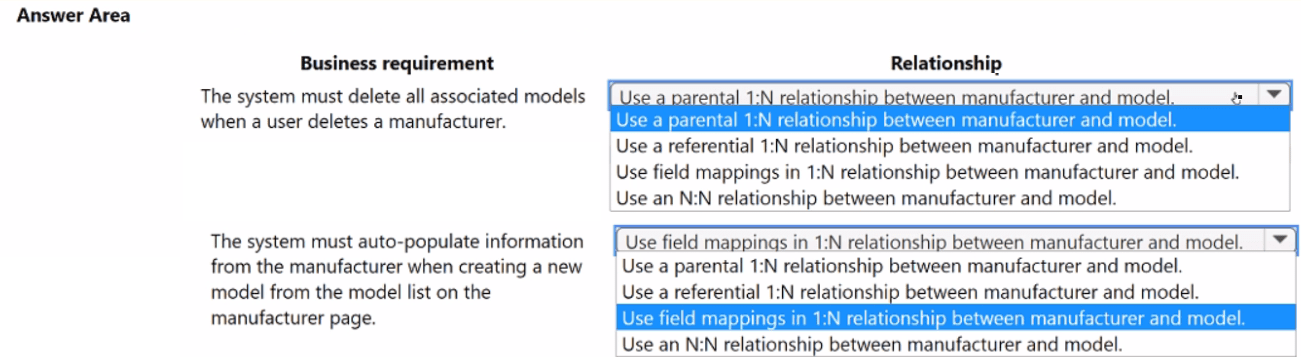
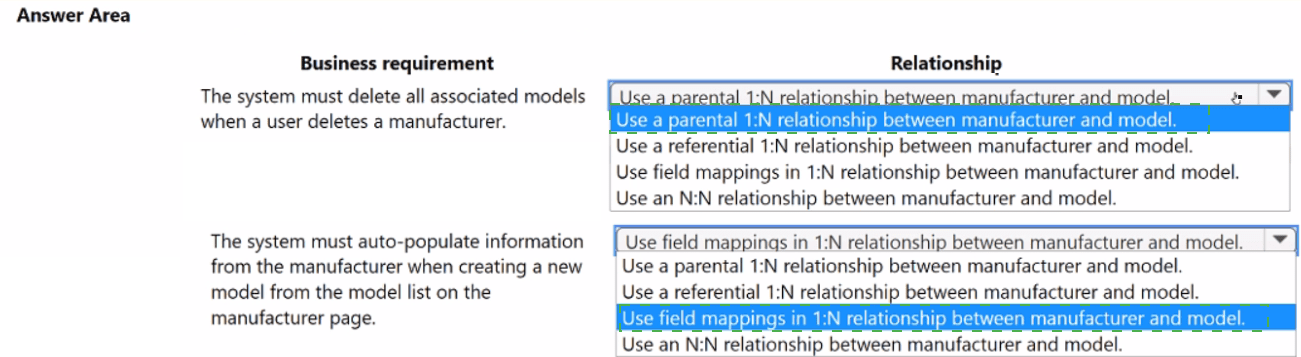
Explanation:
The business requirements specify a one-to-many relationship where each model belongs to exactly one manufacturer. Additionally, when a manufacturer is deleted, all related models must be removed (cascade delete), and when creating a new model from a manufacturer’s view, manufacturer fields should auto-populate. These requirements point to a parental 1:N relationship with field mappings, which enforces cascade behavior and enables automatic data inheritance.
Correct Options:
Relationship type: Use a parental 1:N relationship between manufacturer and model
A parental 1:N relationship ensures that each model is associated with exactly one manufacturer, meeting the cardinality requirement. It also enables cascading behaviors, such as deleting all related models when the parent manufacturer is deleted, fulfilling the data integrity requirement.
Auto-populate behavior: Use field mappings in 1:N relationship between manufacturer and model
Field mappings in a 1:N relationship allow values from the parent manufacturer record to be automatically copied into new child model records when created from the manufacturer’s sub-grid. This satisfies the requirement to auto-populate manufacturer information without manual entry.
Incorrect Options:
Use a referential 1:N relationship between manufacturer and model –
Referential relationships do not support cascading deletes. Deleting a manufacturer would leave orphaned model records or block deletion, failing the requirement to remove all associated models.
Use an N:N relationship between manufacturer and model –
This would allow a model to belong to multiple manufacturers, violating the requirement that each model can be associated with only one manufacturer.
Reference:
Microsoft Dataverse table relationship documentation covering parental vs. referential relationships and field mapping configuration for 1:N relationships.
You are working with a credit union that has implemented a Microsoft Power Platform
solution for its member banking team.
The credit union must add additional data sources to support the solution.
You need to identify the data sources to support additional requirements, including:
• Access real-time financial data from an on premises SQL database by using a member
greeting canvas app.
• Manually ingest member data once weekly from an enrichment CSV file.
Which data source connections should you use? To answer, select the appropriate options
in the answer area. NOTE: Each correct selection is worth one point.
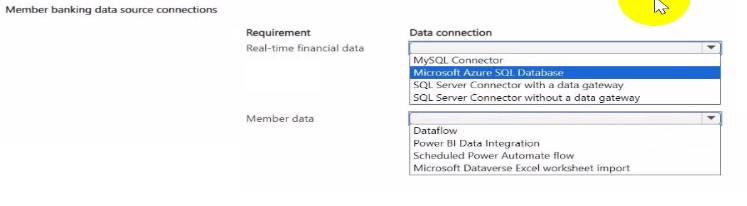
Explanation:
The credit union requires two distinct data integration approaches: real-time access to on-premises SQL data for a canvas app, and weekly manual ingestion of member enrichment data from a CSV file. The first requires connectivity to on-premises data with security and performance suitable for real-time use. The second involves periodic data loading into Dataverse for use in Power Platform solutions. The correct selections address each requirement appropriately.
Correct Option Matching:
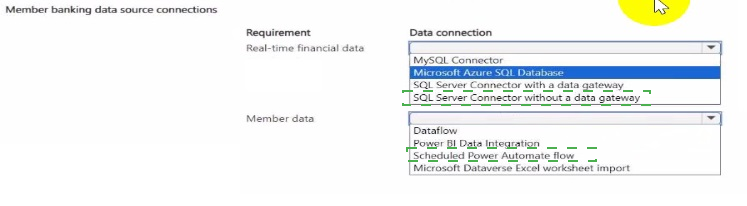
Real-time financial data → SQL Server Connector with a data gateway
The SQL Server connector alone cannot directly access on-premises databases from the cloud. A data gateway provides secure, encrypted connectivity between on-premises SQL Server and cloud services like Power Apps. This enables the member greeting canvas app to query financial data in real-time without exposing the internal network.
Member data → Microsoft Dataverse
Dataverse is the appropriate destination for manually ingested member data because it provides structured storage, security, and integration with Power Platform components. Once the CSV data is imported into Dataverse, it becomes available for use in apps, flows, and reports alongside other member information.
Incorrect Options:
MySQL Connector –
Not applicable as the requirement specifies SQL Server, not MySQL. Even if used, it would not solve the on-premises connectivity challenge without a gateway.
Microsoft Azure SQL Database –
This is a cloud database, not on-premises, so it does not meet the requirement for accessing an on-premises SQL database.
SQL Server Connector without a data gateway –
Cannot connect to on-premises SQL Server from cloud services; the gateway is mandatory for on-premises data access.
Dataflow –
While dataflows can ingest CSV data, they are designed for data transformation and loading into Dataverse or data lakes. The requirement specifies manual weekly ingestion, which is simpler and more directly achieved by importing into Dataverse.
Power BI Data Integration –
Used for Power BI datasets, not for making data available to canvas apps and other Power Platform components.
Scheduled Power Automate flow –
Could automate CSV import, but the requirement explicitly states "manually ingest," so scheduled automation is not appropriate.
Microsoft Excel worksheet import –
Excel import is a one-time or ad-hoc capability in Power Apps or Dataverse, but for weekly manual ingestion, Dataverse itself is the destination, not the import method.
Reference:
Microsoft documentation on on-premises data gateway for Power Platform and Dataverse data import options for CSV files.
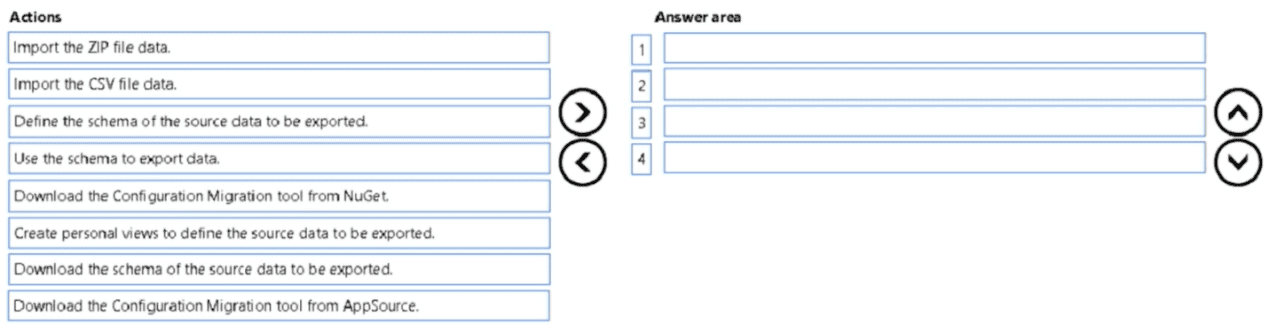
You are a Microsoft Power Platform architect.
You need to design a process to transport configuration and test data from one
environment to a separate environment
Which four actions should you recommend be performed in sequence? To answer, move
the appropriate actions from the list of actions to the answer area and arrange them in the
correct order.
Explanation:
The Configuration Migration tool is the standard utility for moving configuration and test data between Power Platform environments. The process involves retrieving the tool, defining the data to export (usually via personal views), exporting the data as a schema and data file (ZIP), and finally importing that file into the target environment. The correct sequence ensures all necessary steps are completed in logical order.
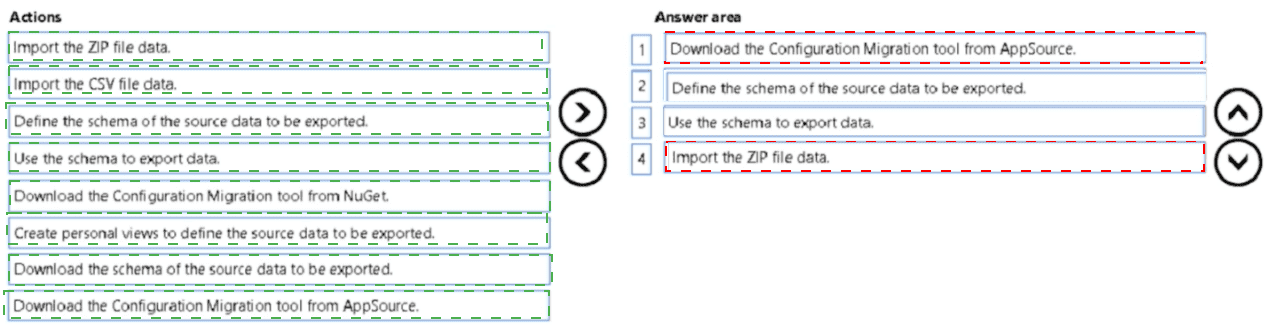
Correct Sequence:
1. Download the Configuration Migration tool from NuGet
The Configuration Migration tool is available as a NuGet package. The first step is to download and install it on a machine with access to the source environment.
2. Create personal views to define the source data to be exported
Personal views in the source environment specify exactly which records (e.g., configuration and test data) should be exported. This step ensures the export captures the correct data set.
3. Use the schema to export data
After defining views, the tool uses the schema to export the selected data into a ZIP file containing both the schema definition and the actual data records.
4. Import the ZIP file data
Finally, the generated ZIP file is imported into the target environment using the Configuration Migration tool, populating it with the configuration and test data.
Incorrect Actions:
Import the CSV file data – The Configuration Migration tool uses ZIP files, not CSV, for transport.
Define the schema of the source data to be exported – Schema is derived from views and tables, not manually defined.
Download the schema of the source data to be exported – Schema is included in the export ZIP, not downloaded separately.
Download the Configuration Migration tool from AppSource – The tool is available from NuGet, not AppSource.
Reference:
Microsoft documentation on using the Configuration Migration tool to move configuration and test data between Dataverse environments.
A medium-size company is evaluating Microsoft Power Platform functionality to enhance its
business processes. The company currently uses a mix of spreadsheet tools and an
outdated CRM system.
The company requires the following business solutions:
• bidirectional data sync between the outdated system and a new custom app
• improved efficiency of data transfers
• comprehensive real-time sales data displays
You need to configure the solution components for each requirement
Which components should you configure? To answer, move the appropriate solution
components to the correct requirements. You may use each solution component once,
more than once, or not at all. You may need to move the split bar between panes or scroll
to view content.
NOTE: Each correct selection is worth one point.


Explanation:
The company needs three distinct capabilities: bidirectional sync, improved data transfer efficiency, and real-time sales dashboards. Each maps to a specific Power Platform component. Power Automate handles integration workflows, dataflows optimize data preparation and movement, and Power BI delivers interactive real-time visualizations. Correct matching ensures each requirement is addressed by the most suitable tool.
Correct Option Matching:
Bidirectional data sync between outdated system and new custom app → Power Automate
Power Automate can connect to both the outdated system (via connectors or HTTP) and Dataverse/the custom app, enabling bidirectional synchronization. Flows can be triggered by changes in either system to update the other, ensuring data consistency without custom code.
Improved efficiency of data transfers → Power Platform dataflows
Dataflows provide reusable data preparation and transformation logic, loading data into Dataverse or data lakes efficiently. They optimize transfer processes by handling large volumes, scheduling incremental loads, and reducing manual intervention, directly improving data transfer efficiency.
Comprehensive real-time sales data displays → Power BI
Power BI connects to Dataverse and other data sources to create interactive dashboards with real-time or near-real-time visualizations. It provides comprehensive sales data displays that update as underlying data changes, meeting the requirement for real-time insights.
Incorrect Component:
Power Apps – While Power Apps is used to build the custom app, it does not itself provide bidirectional sync, data transfer efficiency, or real-time displays. It is the interface, not the integration or analytics layer.
Reference:
Microsoft Power Platform documentation on Power Automate for integration, dataflows for data preparation, and Power BI for real-time analytics.
| Page 2 out of 20 Pages |