Topic 5, Mix Questions
You are developing automation solutions for a company.
You plan to use Process advisor to gain a better understanding of business processes.
You need to select the process types to use to meet the company's requirements.
Which process types should you use? To answer, drag the appropriate process types to
the correct requirements. Each process type may be used once, more than once, or not at
all. You may need to drag the split bar between panes or scroll to view content.
NOTE: Each correct selection is worth one point.


Explanation:
This question tests understanding of the two process types available in Process Advisor within Power Automate: Task mining and Process mining. Each serves a distinct analytical purpose — one focuses on observing individual user actions at the task level, while the other analyzes end-to-end process flows using event log data to identify inefficiencies.
✔️ Correct Options:
Identify and eliminate unnecessary process tasks → Task mining
Task mining records and analyzes how users perform repetitive tasks on their desktops by capturing user interactions and screen activity. It reveals redundant, unnecessary, or inconsistent steps within a task workflow. This makes it the right choice for identifying and eliminating unnecessary process tasks at the individual action level before any automation is built.
Reduce total process time → Process mining
Process mining analyzes structured event log data from business systems to map out how processes actually flow end-to-end across an organization. It identifies bottlenecks, delays, and deviations that extend total process duration. By visualizing the full process lifecycle, it enables teams to pinpoint exactly where time is being lost and optimize accordingly.
Automate tasks that will accelerate processes and reduce human error → Task mining
Task mining captures the exact sequence of user actions performed during repetitive desktop tasks and generates automation recommendations from those recordings. These insights directly feed into Power Automate desktop flow creation, allowing organizations to automate error-prone manual steps, accelerate task execution, and significantly reduce the risk of human error in routine operations.
❌ Incorrect Options:
Process mining (for identifying and eliminating unnecessary tasks)
Process mining works at the process level using event logs from backend systems, not at the individual task or user-action level. It cannot capture or analyze the granular desktop interactions needed to identify and eliminate unnecessary steps within a specific user task.
Process mining (for automating tasks to reduce human error)
Process mining is an analytical tool focused on process visualization and bottleneck identification, not on capturing user interactions for automation. It does not generate desktop automation recommendations or record task-level steps, making it unsuitable for directly driving task automation to reduce human error.
Task mining (for reducing total process time)
Task mining focuses on individual user desktop interactions and specific repetitive tasks. It does not have access to system-wide event logs or the ability to analyze end-to-end process flows across multiple systems. Reducing total process time at the organizational level requires the broader process-level visibility that only process mining provides.
🔧 Reference:
→ Microsoft Learn – Overview of process mining and task mining in Power Automate — Confirms the distinction between task mining and process mining, their use cases, and how each is applied within Process Advisor.
→ Task Mining | Microsoft Learn – Power Automate
— Confirms that task mining records user interactions to identify inefficiencies, eliminate unnecessary steps, and generate automation recommendations.
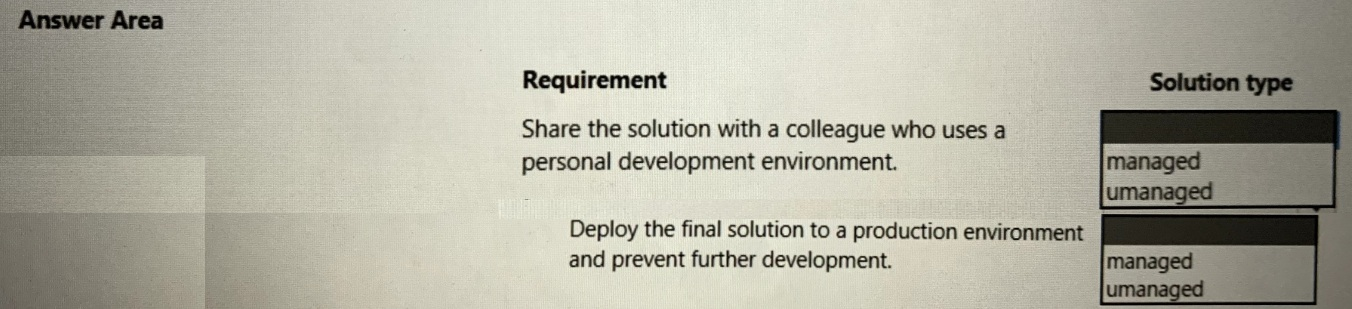
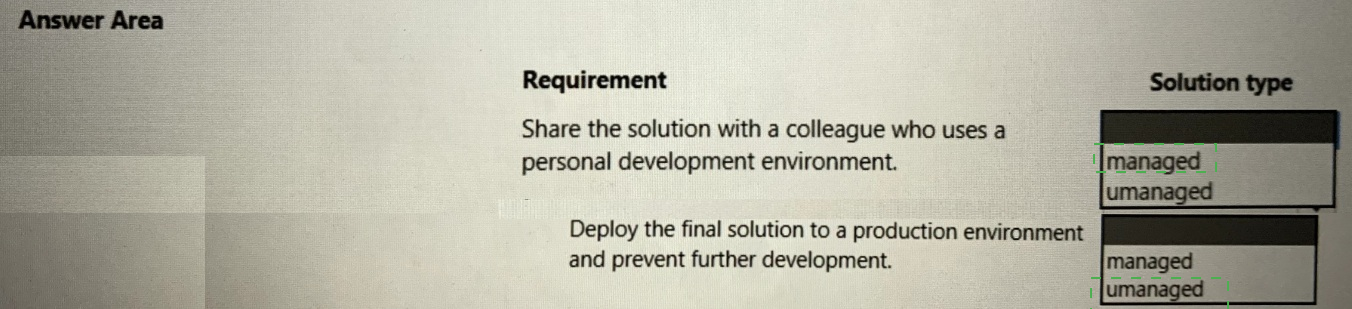
You develop automation solutions for a company.
You need to package the solutions.
What should you use? To answer, select the appropriate options in the answer area.
NOTE: Each correct selection is worth one point.
Explanation:
This question tests the difference between managed and unmanaged solutions in the Power Platform when packaging and distributing automation solutions.
✅ Correct Option:
Unmanaged
Use an unmanaged solution when sharing with a colleague working in a personal development environment. Unmanaged solutions allow full editing and customization of components in the target environment.
✅ Correct Option:
Managed
Use a managed solution when deploying the final version to production. Managed solutions prevent direct modification of components, ensuring stability and blocking further development in the production environment.
❌ Incorrect options:
Managed (for sharing with colleague)
Managed solutions are locked and not suitable for collaborative development.
Unmanaged (for production deployment)
Unmanaged solutions remain editable, which does not meet the requirement to prevent further development in production.
🔧 Reference:
→ Microsoft Learn: Solution concepts - Managed and unmanaged solutions
Explains the use of unmanaged solutions for development/sharing and managed solutions for production deployment
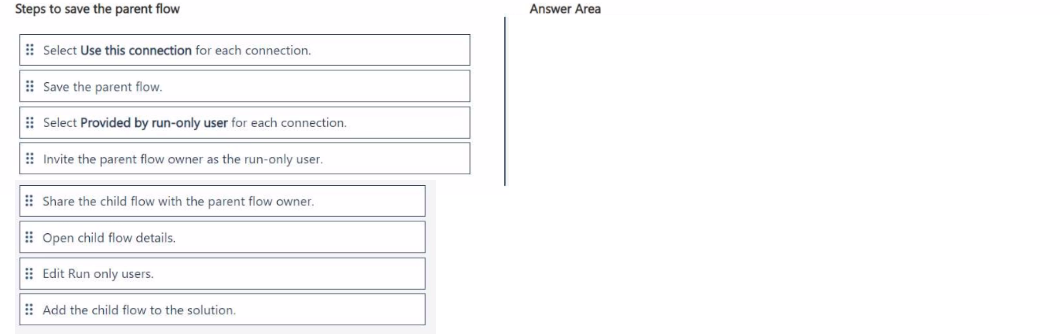
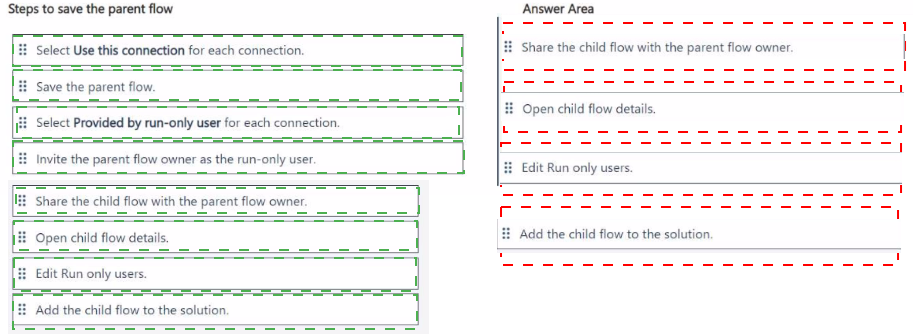
You are working on an automation solution that uses multiple approval stages.
You observe that each approval stage has the same logic. You build a dedicated child flow
that handles a single approval step.
When you try to save the parent flow, it displays the following error: 'Action
Run_a_Child_Flow' has defined a child flow that contains 'run-only user' connections.
Update the child flow for action Run_a_Child_Flow' to not use 'run-only user' connections."
You need to fix the solution to be able to save the parent flow.
Which four actions should you perform in sequence? To answer, move the appropriate
actions from the list of actions to the answer area and arrange them in the correct order.
Steps to save the parent flow.
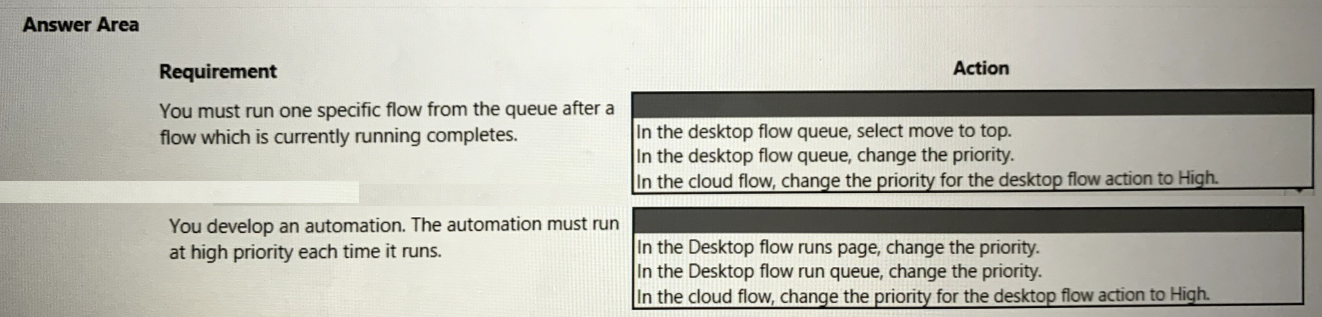
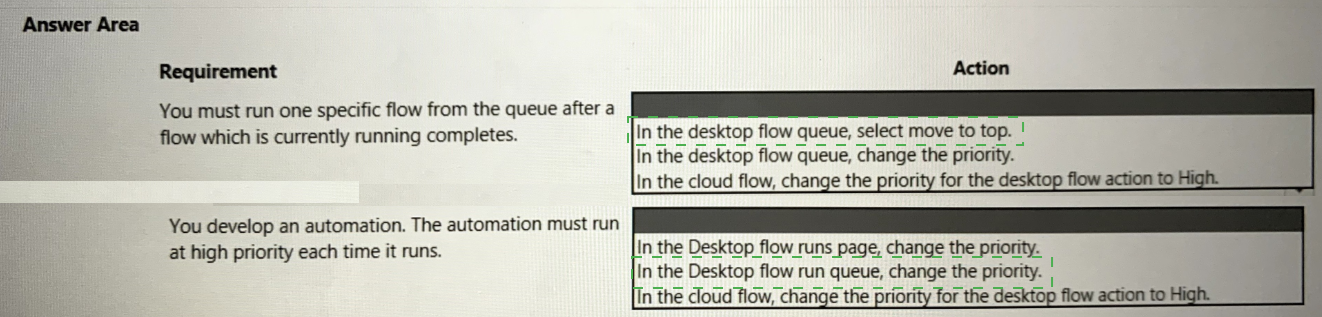
A company develops an automation solution.
You need to manage the flows. To answer, select the appropriate options in the answer
area.
NOTE: Each correct selection is worth one point.
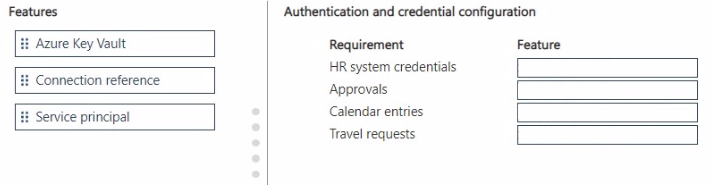
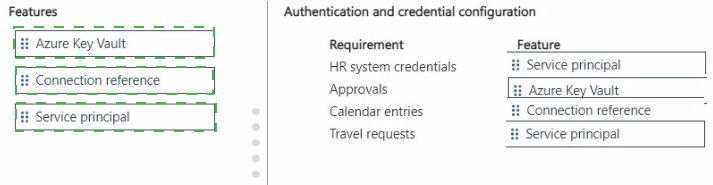
You are building an approval process for business travel.
The approval process must meet the following requirements:
• The solution must be deployed to the production environment. The human resources
(HR) system uses a different login and password for test and production.
• The process must assign an approval task by using the system account.
• After the approval process is approved, it must create an entry in the on-premises HR
system and create an entry in the requestor manager's calendar.
• The approval process must be triggered whenever an employee places a new travel
request on a Microsoft SharePoint list.
You need to recommend the approach to configure authentication and credentials.
Which features should you recommend? To answer, move the appropriate features to the
correct requirements. You may use each feature once, more than once, or not at all. You
may need to move the split bar between panes or scroll to view content
NOTE: Each correct selection is worth one point.
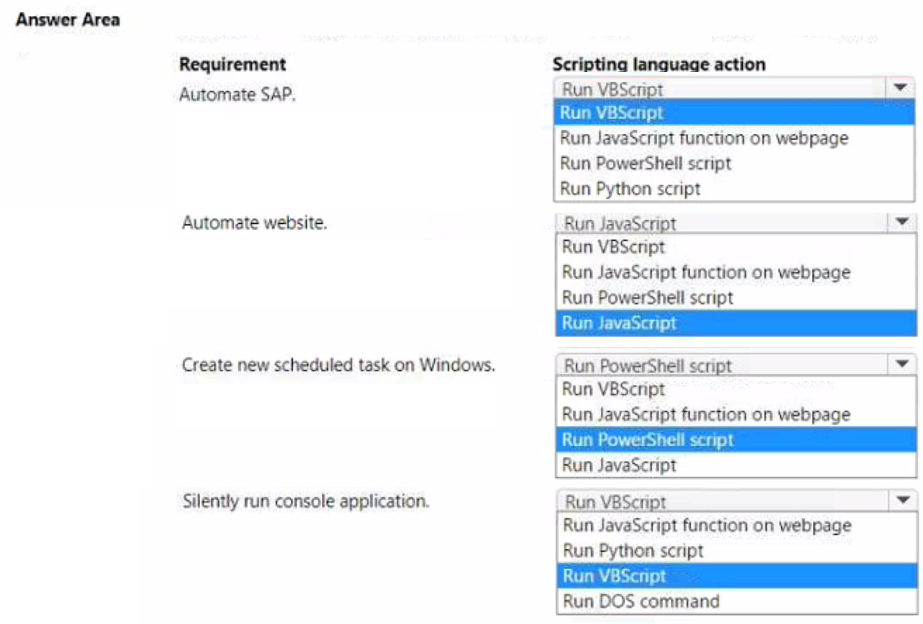
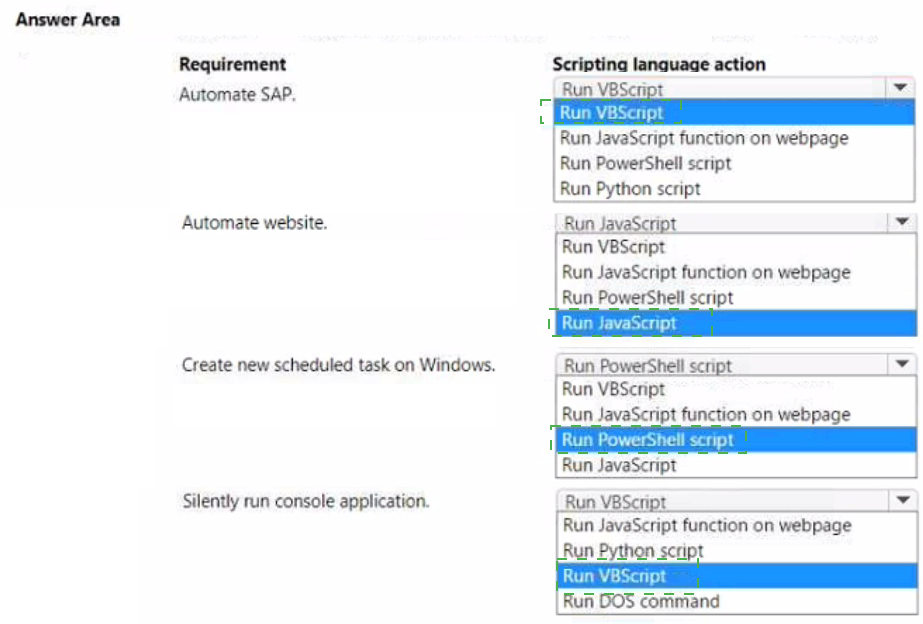
You are developing automation for an application.
You plan to use the application on legacy desktop applications and browser applications.
You need to select the appropriate scripting language based on the requirements.
Which scripting language action should you use? To answer, select the appropriate options
in the answer area.
NOTE Each correct selection is worth one point.
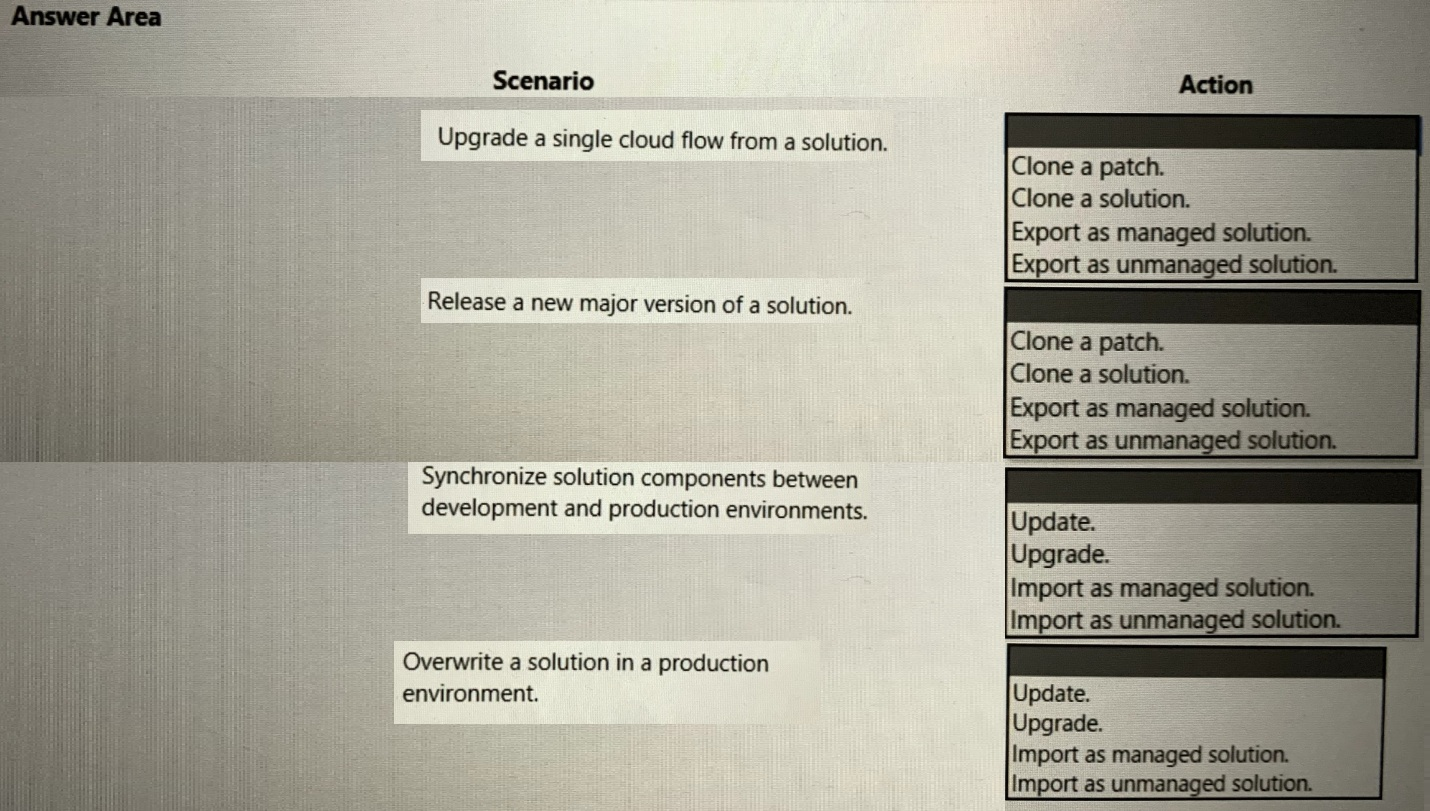
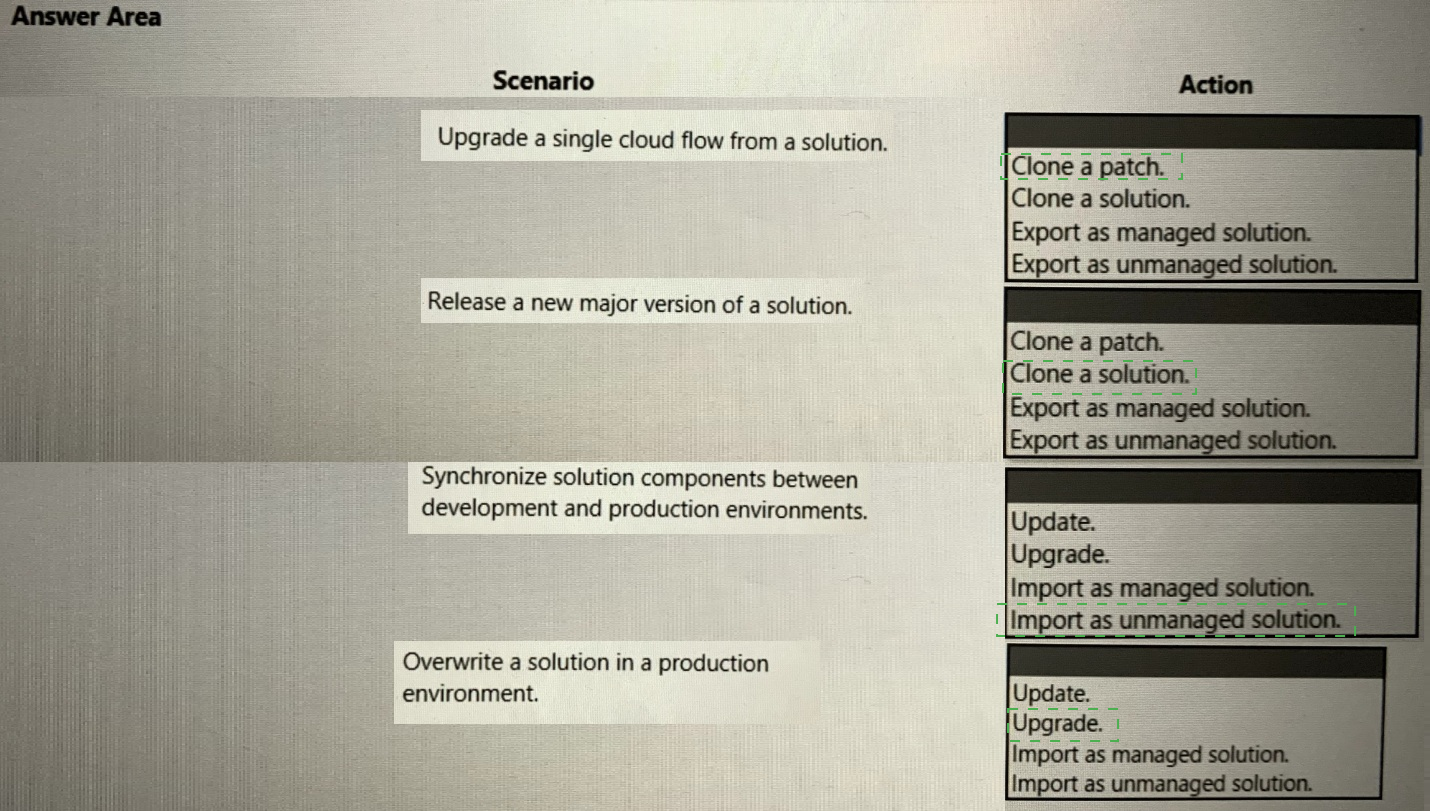
You are developing a new release for an automation solution.
You need to use the right feature.
Which feature should you use? To answer, select the appropriate options in the answer
area.
NOTE: Each correct selection is worth one point.
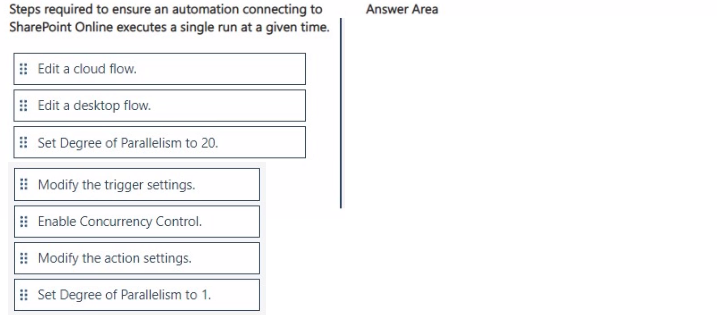
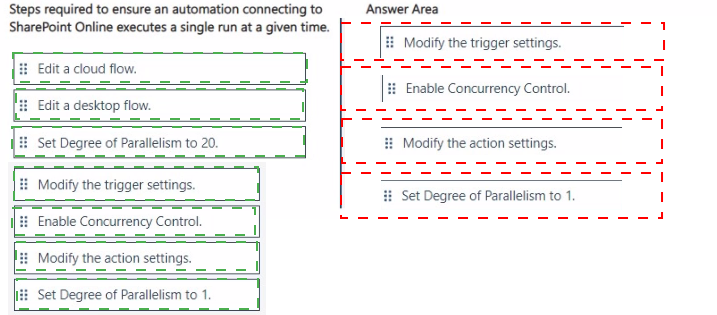
You create an automated flow to update a Microsoft SharePoint Online list based on an
update that occurs in Microsoft Dataverse. The flow runs approximately 20 times per day.
Users report that the workflow does not complete successfully.
You need to update the flow to ensure that the automation runs once only.
Which four actions should you perform in sequence? To answer, move the appropriate
actions from the list of actions to the answer area and arrange them in the correct order.
A company plans to implement Al models to perform business processes.
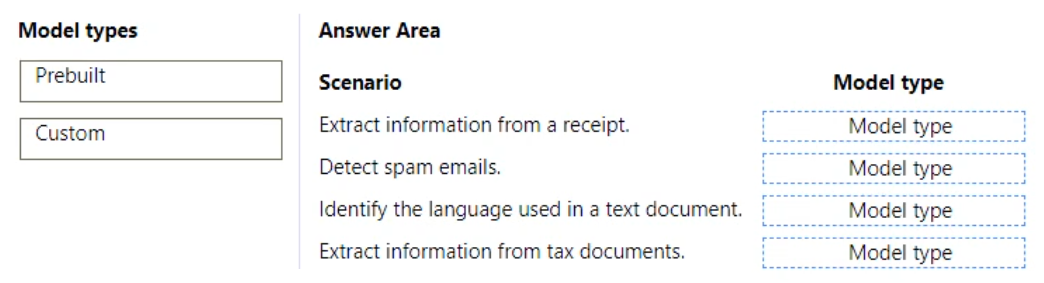
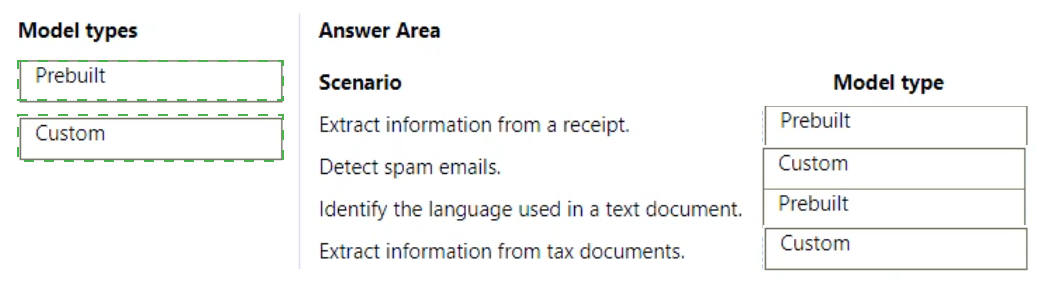
You need to determine whether to use prebuilt or custom Al models.
Which type of model should you use for each scenario? To answer, drag the appropriate
model types to the correct scenarios. Each model may be used once, more than once, or
not at all. You may need to drag the split bar between panes or scroll to view content.
NOTE: Each correct selection is worth one point.
| Page 5 out of 17 Pages |