Topic 5: Misc, Questions

You are Microsoft Teams administrator for your company.
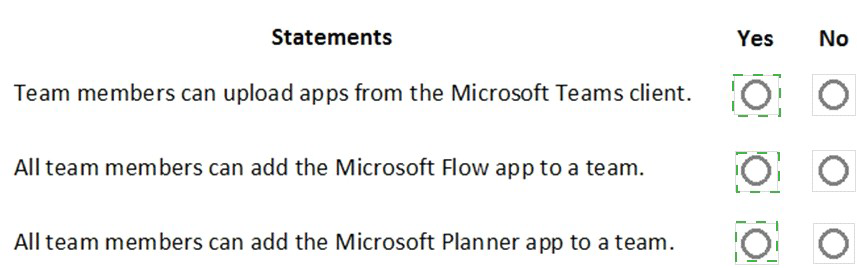
You have the Org-wide app settings shown in the App Settings exhibit. (Click the App Settings tab.)
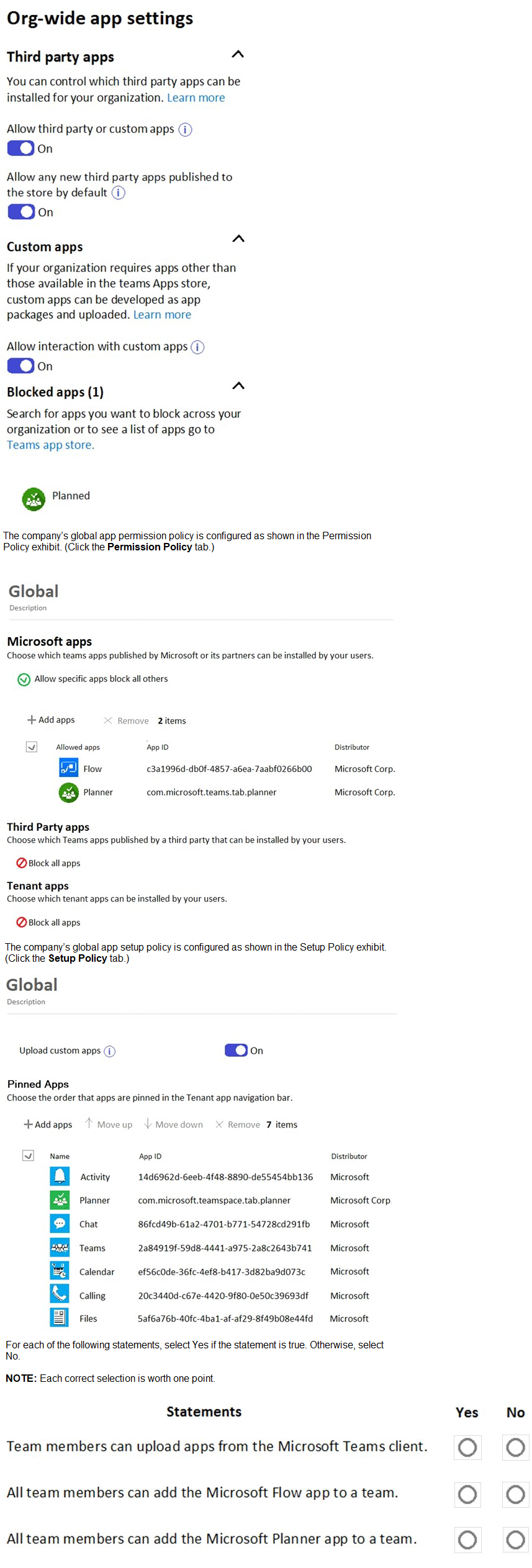

Your company has a Microsoft 365 tenant that uses Microsoft Skype for Business Online.
All users connect to Skype for Business Online by using computers that run Windows 10.
You plan to upgrade all the users from Skype for Business Online to Microsoft Teams.
You need to ensure that the Microsoft Teams client is installed automatically on all the computers.
What should you do from the Teams admin center?

A. From the Messaging policies settings, modify the Global (Org-wide default) messaging policy.

B. From Org-wide settings, configure the Teams upgrade settings.

C. From Teams apps, add an App setup policy.

B.   From Org-wide settings, configure the Teams upgrade settings.

Your company uses Microsoft Teams and a Microsoft calling plan.
The company has a main office in Chicago.
The company opens a new office in Toronto that has 500 users.
You need to ensure that the correct address is available to emergency responders.
What should you do?

A. Create a calling policy and assign the policy to each user.

B. Create a configuration profile and assign the profile to the device of each user.

C. Add an emergency address, and then modify the outbound calling setting for each user.

D. Add an emergency address, and then modify the location for each phone number.

D.   Add an emergency address, and then modify the location for each phone number.

Explanation: According to the Microsoft documentation1, you need to add an emergency address for each location where your users make and receive phone calls. An emergency address is a civic address—the physical or street address of a place of business for your organization. It is used to route emergency calls to the appropriate dispatch authorities and to assist in locating the emergency caller.
After you add an emergency address, you need to assign a phone number to it. You can assign either a user number or a service number. A user number is assigned to a specific user in your organization who makes and receives phone calls. A service number is used for services such as Audio Conferencing (for dial-in numbers), auto attendants, or call queues.
To assign a phone number to an emergency address, you need to modify the location for each phone number. You can do this by using the Microsoft Teams admin center or PowerShell. For example, to modify the location for a user number by using PowerShell, you can use the Set-CsOnlineVoiceUser cmdlet with the -LocationID parameter2.

You have a Microsoft 365 E5 subscription that uses Microsoft Teams.
You need to identify which percentage of meetings include video.
What should you use?

A. the Teams usage report

B. the Teams device usage report

C. Productivity Score Meetings insights

D. the Teams user activity report

D.   the Teams user activity report

Your company uses Teams.
You plan to deploy Teams to a branch office that has limited bandwidth.
Which Two features can he used when the Teams client has a bandwidth restriction of 150 kilobit/s up and 150 kilobit/s down? Each correct answer presents a complete solution.
NOTE: Each correct selection is worth one point.

A. one-to-one seen sharing

B. one-to-one video

C. video during meetings

D. screen sharing during meetings

E. audio during meetings

C.   video during meetings
D.   screen sharing during meetings

Your company has a Microsoft 365 subscription.
You need to ensure that only the members of the company's IT group can create private channels.
Which three actions should you perform? Each correct answer presents part of the solution.
NOTE: Each correct selection is worth one point.

A. Modify the global teams policy

B. Assign the members of the IT group to the policy.

C. Create a custom teams policy

D. Run the Sec-TeamsChannel cmdlet.

E. Modify the global messaging policy.

F. Create a custom messaging policy

A.   Modify the global teams policy
B.   Assign the members of the IT group to the policy.
C.   Create a custom teams policy

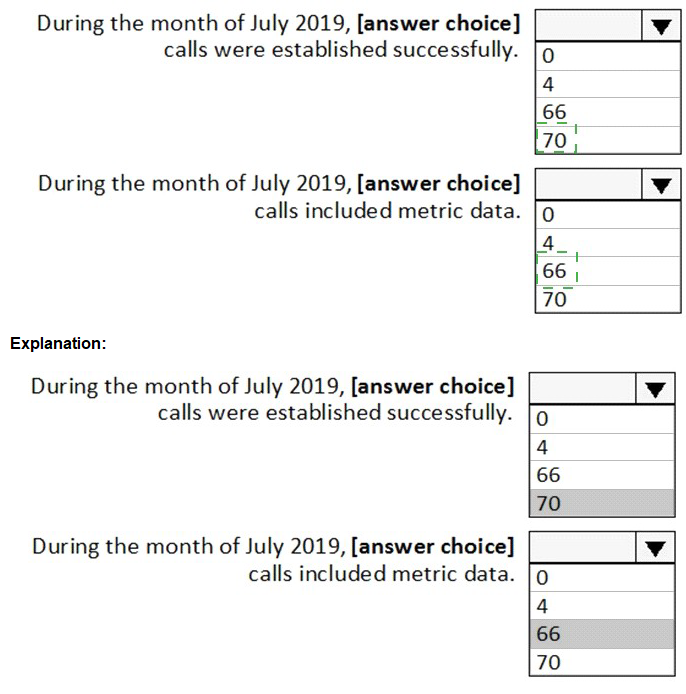
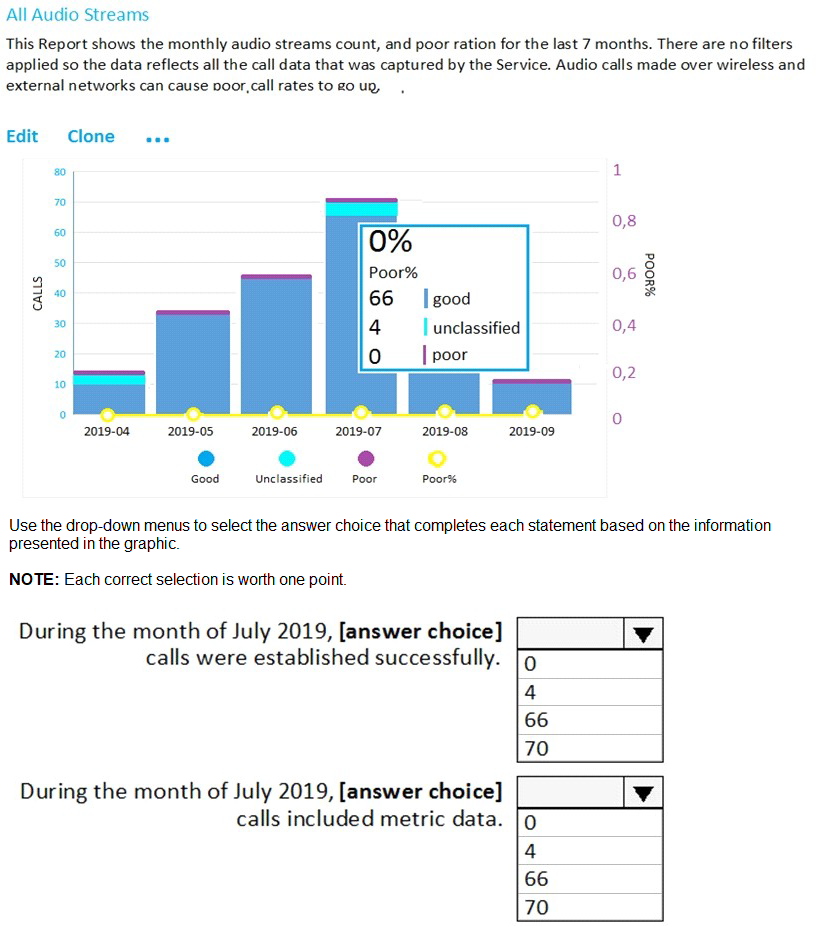
You open the Microsoft Call Quality Dashboard as shown in the following exhibit.

You plan to implement Microsoft Teams for 300 users.
For the first stage of the deployment, you will enable the following features:
• Audio
• Video
• Screen sharing

Users will be prevented from using the following features:
• File sharing
• PSTN calling
• Conference audio
• Conference video
• Conference screen sharing

You need to calculate how much network bandwidth is required for the first-stage deployment. What should you use?

A. Network Assessment Tool

B. Advisor for Teams

C. Bandwidth Utilization Analyzer

D. Network Planner

D.   Network Planner

Explanation: According to the Microsoft documentation1, you can use Network Planner in the Microsoft Teams admin center to calculate how much network bandwidth is required for your Teams deployment. Network Planner helps you determine and organize network requirements for connecting your organization to Teams. You can use Network Planner to:
Input your organization’s information, such as the number of users, sites, and expected call and meeting scenarios.
Get a report that tells you if your network can support Teams.
Get a report that tells you what network hardware you need to support Teams.
To use Network Planner, you need to follow these steps1:
In the left navigation of the Microsoft Teams admin center, go to Org-wide settings > Network planner.
Under Overview, click Download the Network Planner Excel template.
Open the template and enter information about your organization’s sites, users, and expected call and meeting scenarios.
Save the template and then upload it in Network Planner.
Under Calculated results, view the reports that show you the estimated network requirements for Teams.

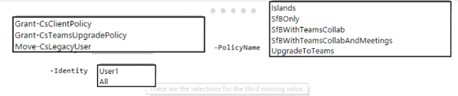
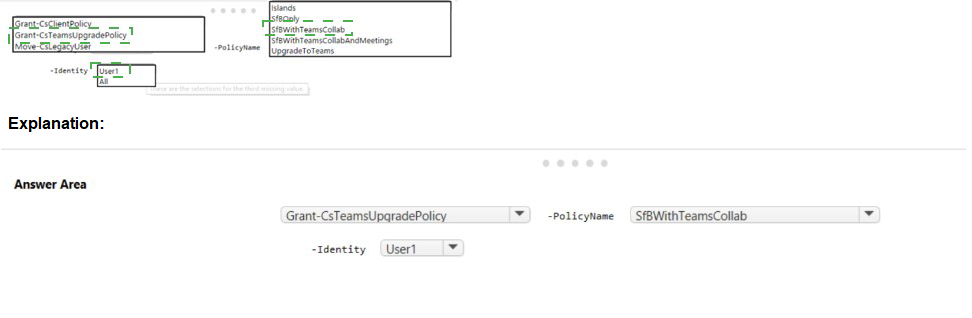
Your company plans to upgrade to Microsoft Teams from Microsoft Skype for Business Online. The org-wide coexistence mode for Microsoft Teams is set to Teams Only.
The company has a user named User1.
You need to implement a migration solution that meets the following requirements:
• User 1 must be able to chat and create meetings by using Skype for Business only.
• User 1 must be able to read and post messages by using Microsoft Teams channels.
How should you complete the PowerShell command? To answer, select the appropriate options in the answer area.
NOTE: Each correct selection is worth one point.

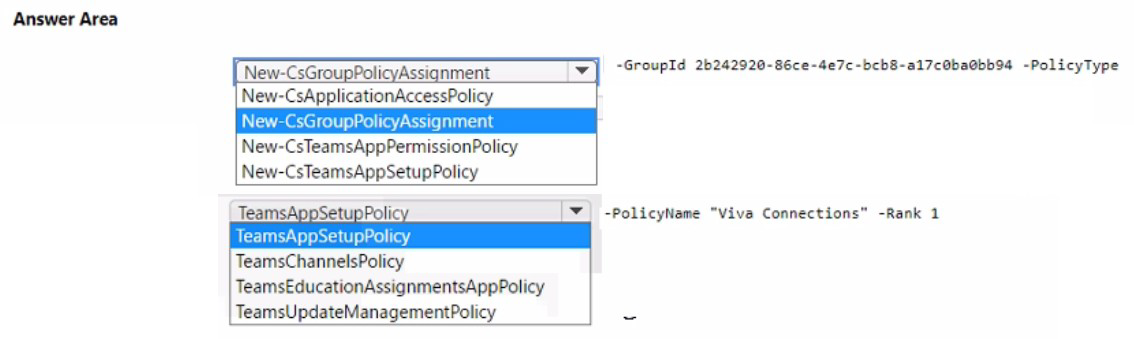
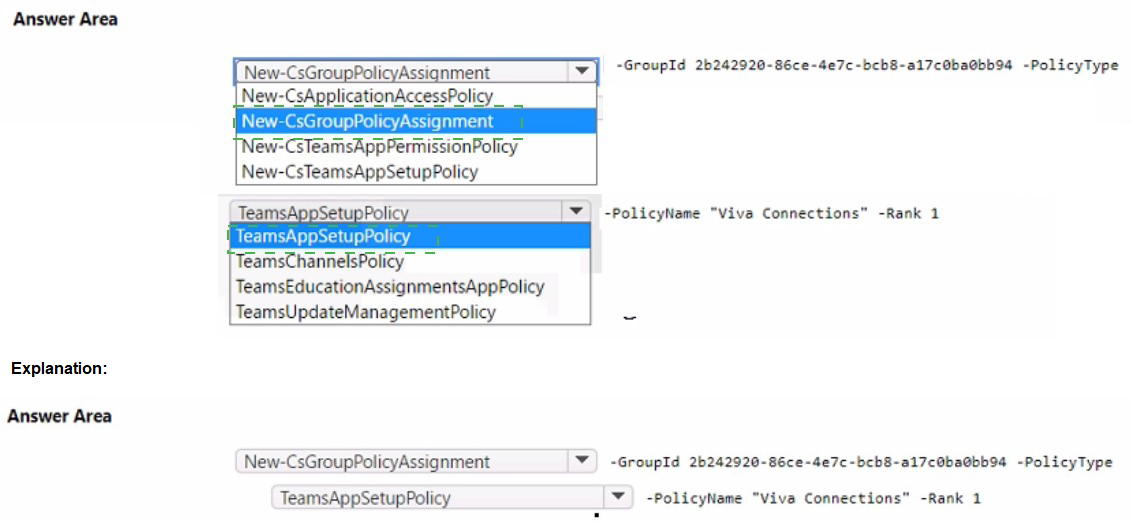
You need to install the Microsoft Viva Connections application in Microsoft Teams for a specific group.
How should you complete the PowerShell cmdlets? To answer, select the appropriate options in the answer area.
NOTE: Each correct selection is worth one point.

Page 12 out of 34 Pages