Topic 4: Mix Question
You have a Microsoft Entra tenant named contoso.com.
You manage devices by using Microsoft Intune. Automatic Intune enrollment is disabled.
Users report that they must enter the mobile device management (MDM) server address during device enrollment.
To reduce user interaction during device enrollment, you plan to create the following CNAME DNS hostname records:
EnterpriseEnrollment.contoso.com
EnterpriseRegistration.contoso.com
You need to configure a fully qualified domain name (FQDN) for each CNAME record to redirect enrollment requests to the Intune servers.
How should you configure each FQDN? To answer, select the appropriate options in the answer area.
NOTE: Each correct selection is worth one point.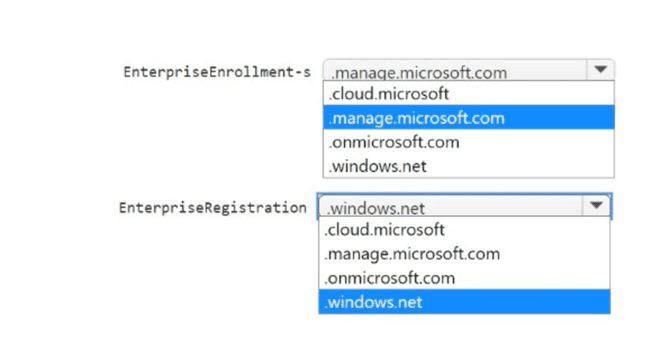
Explanation:
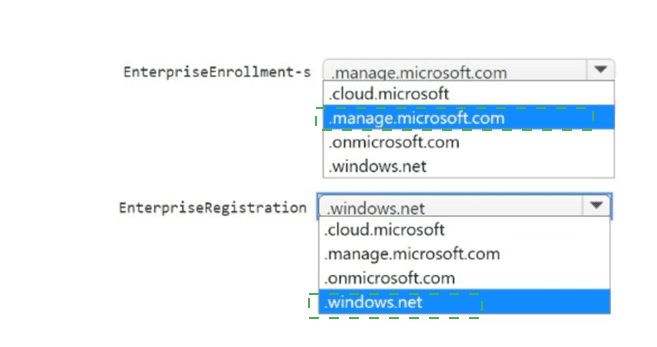
For automatic Intune enrollment, you configure CNAME records to redirect enrollment requests to Microsoft Intune servers. The EnterpriseEnrollment CNAME should point to manage.microsoft.com. The EnterpriseRegistration CNAME should point to enterpriseregistration.windows.net. These DNS records eliminate the need for users to manually enter the MDM server address.
Correct Option:
EnterpriseEnrollment.contoso.com FQDN: manage.microsoft.com
The CNAME record for EnterpriseEnrollment must point to manage.microsoft.com. This redirects mobile device management (MDM) enrollment requests from users (e.g., when connecting "Access work or school") to the correct Intune enrollment endpoint. This is the standard DNS configuration for Intune automatic enrollment.
EnterpriseRegistration.contoso.com FQDN: enterpriseregistration.windows.net
The CNAME record for EnterpriseRegistration must point to enterpriseregistration.windows.net. This redirects Windows device registration requests (for Azure AD join/registration) to the correct Microsoft endpoint. This is required for modern authentication and device identity management.
Incorrect Option (other FQDNs in the answer area):
.cloud.microsoft – Generic Microsoft cloud domain, not used for Intune enrollment CNAME targets.
.onmicrosoft.com – Default tenant domain name (contoso.onmicrosoft.com), not an Intune enrollment endpoint.
.windows.net – Too generic; the specific subdomain enterpriseregistration.windows.net is required for registration, not the root domain.
EnterpriseEnrollment → .windows.net – Incorrect; EnterpriseEnrollment points to manage.microsoft.com, not windows.net.
EnterpriseRegistration → manage.microsoft.com – Incorrect; EnterpriseRegistration points to enterpriseregistration.windows.net, not manage.microsoft.com.
Reference:
Microsoft Learn: Configure DNS CNAME for Intune enrollment – EnterpriseEnrollment to manage.microsoft.com; EnterpriseRegistration to enterpriseregistration.windows.net. No external links provided.
You have a Hyper-V host that contains the virtual machines shown in the following table.
On which virtual machines can you install Windows 11?
A. VM1 only
B. VM3only
C. VM1 and VM2 only
D. VM2 and VM3 only
E. VM1, VM2, and VM3
Explanation:
Windows 11 requires a Generation 2 virtual machine, at least 2 virtual processors, and 4 GB of RAM. VM1 is Generation 1 (not supported). VM2 has only 1 virtual processor (not supported). VM3 meets all requirements: Generation 2, 2 virtual processors, 4 GB RAM. Only VM3 can run Windows 11.
Correct Option:
B. VM3 only
Windows 11 system requirements for Hyper-V virtual machines: Generation 2 VM, 2 or more virtual processors, 4 GB RAM minimum.
VM1: Generation 1 → fails.
VM2: 1 virtual processor → fails.
VM3: Generation 2, 2 virtual processors, 4 GB RAM → meets all requirements.
Therefore, only VM3 can have Windows 11 installed.
Incorrect Option:
A. VM1 only –
Incorrect; Generation 1 VMs do not support Windows 11.
C. VM1 and VM2 only –
Incorrect; neither meets requirements.
D. VM2 and VM3 only –
Incorrect; VM2 has insufficient virtual processors.
E. VM1, VM2, and VM3 –
Incorrect; VM1 and VM2 fail requirements.
Reference:
Microsoft Learn: Windows 11 system requirements for Hyper-V – Generation 2, 2+ vCPUs, 4+ GB RAM. No external links provided.
You have a Microsoft 365 E5 subscription that contains 100 Windows 10 devices enrolled in Microsoft Intune.
You need to create Endpoint security policies to meet the following requirements:
Hide the Firewall & network protection area in the Windows Security app.
Disable the provisioning of Windows Hello for Business on the devices.
Which two policy types should you use? To answer, select the policies in the answer area.
NOTE: Each correct selection is worth one point.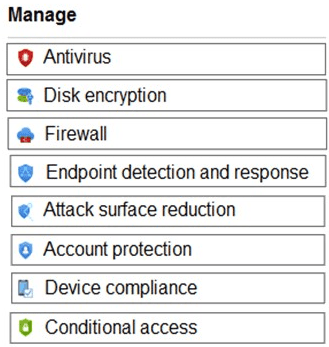
Explanation:
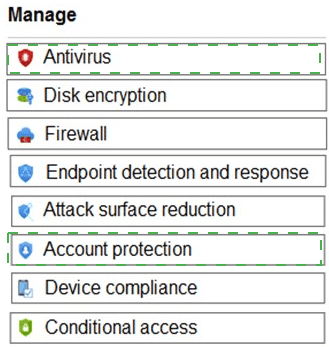
Hiding the Firewall & network protection area in Windows Security is configured via an Attack surface reduction policy (specifically under Windows Security experience settings). Disabling Windows Hello for Business provisioning is configured via an Account protection policy (specifically under Windows Hello for Business settings).
Correct Option:
Hide Firewall & network protection area: Attack surface reduction
Within an Attack surface reduction policy in Endpoint security, under "Windows Security experience," there is a setting called "Hide Firewall & network protection area." Enabling this setting removes that section from the Windows Security app, preventing users from viewing or modifying firewall settings.
Disable provisioning of Windows Hello for Business: Account protection
Within an Account protection policy in Endpoint security, under "Windows Hello for Business," you can configure "Use Windows Hello for Business" to Disabled or "Configure Windows Hello for Business" to Not configured or disabled. This prevents the device from provisioning Windows Hello (PIN, biometric) for users.
Incorrect Option (other policy types):
Antivirus – Manages Microsoft Defender Antivirus settings (real-time protection, cloud-delivered protection). Does not hide firewall sections or disable Windows Hello.
Disk encryption – Configures BitLocker settings. Unrelated to firewall visibility or Windows Hello.
Firewall – Configures Windows Defender Firewall rules (inbound/outbound). Does not hide the firewall area from Windows Security app.
Endpoint detection and response (EDR) – Onboards devices to Defender for Endpoint and configures sensor settings. Not used for firewall UI or Windows Hello.
Device compliance – Evaluates device health against compliance policies, does not configure Windows Security UI or Windows Hello.
Conditional access – Not an Endpoint security policy type; it is an Entra ID feature.
Reference:
Microsoft Learn: Endpoint security policies in Intune – Attack surface reduction (Windows Security experience) and Account protection (Windows Hello for Business). No external links provided.
You have 200 computers that run Windows 10. The computers are joined to Microsoft Azure Active Directory (Azure AD) and enrolled in Microsoft Intune.
You need to configure an Intune device configuration profile to meet the following requirements:
Prevent Microsoft Office applications from launching child processes.
Block users from transferring files over FTP.
Which two settings should you configure in Endpoint protection? To answer, select the appropriate settings in the answer area.
NOTE: Each correct selection is worth one point.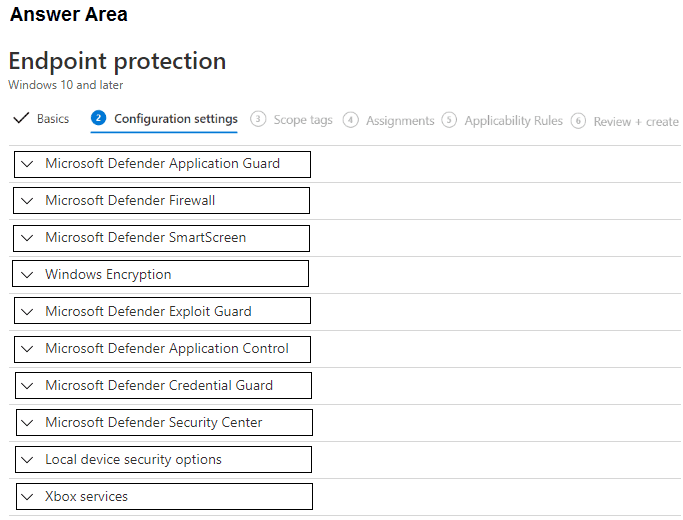
Explanation:
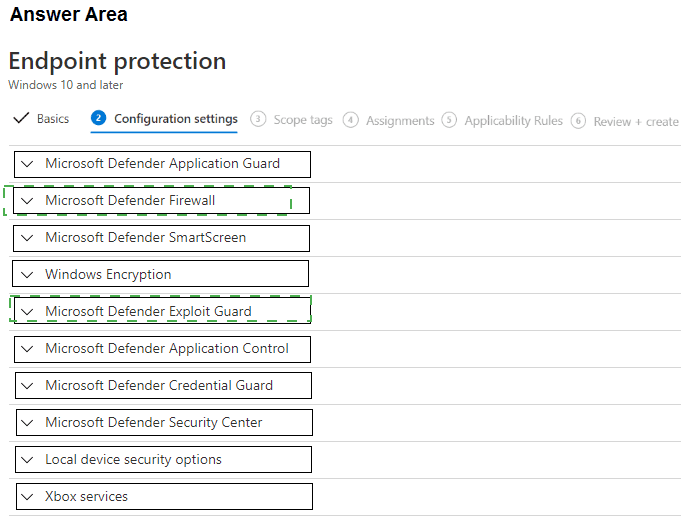
Preventing Office applications from launching child processes is an Attack Surface Reduction (ASR) rule found under Microsoft Defender Exploit Guard > Attack Surface Reduction. Blocking file transfers over FTP is a network firewall rule configured under Microsoft Defender Firewall (create outbound rule to block FTP port 21). Both settings are in the Endpoint protection profile.
Correct Option:
Prevent Microsoft Office applications from launching child processes: Microsoft Defender Exploit Guard
Under Microsoft Defender Exploit Guard, select "Attack Surface Reduction Rules." Find the rule "Block Office applications from launching child processes" and set it to Block. This ASR rule prevents Office apps (Word, Excel, PowerPoint) from spawning potentially malicious child processes (e.g., PowerShell, cmd).
Block users from transferring files over FTP: Microsoft Defender Firewall
Under Microsoft Defender Firewall, configure outbound rules to block FTP traffic. Create a new firewall rule with action "Block," protocol TCP, remote port 21 (FTP control port) and optionally port 20 (FTP data). This prevents users from initiating FTP file transfers from the device.
Incorrect Option (other settings in the answer area):
Microsoft Defender Application Guard – Isolates untrusted browsing in a containerized environment, not related to Office child processes or FTP blocking.
Microsoft Defender SmartScreen – Protects against phishing and malicious websites, not Office child processes or FTP.
Windows Encryption – Configures BitLocker encryption, unrelated.
Microsoft Defender Application Control – Restricts which applications can run (WDAC), not specific to Office child processes.
Microsoft Defender Credential Guard – Protects domain credentials from theft, unrelated.
Microsoft Defender Security Center – Configures Windows Security app settings (notifications, icons), not ASR rules or firewall.
Local device security options – Configures local security policies (UAC, audit, etc.), not ASR or FTP blocking.
Xbox services – Configures Xbox Game Bar and related services, irrelevant.
Reference:
Microsoft Learn: ASR rules – Block Office applications from launching child processes. Intune Endpoint protection – Configure firewall rules to block FTP. No external links provided.
You have a Microsoft 365 subscription that uses Microsoft Intune and contains the users
shown in the following table.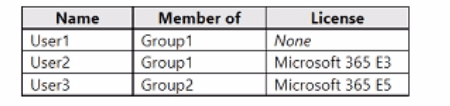
Group2 has been assigned in the Enrollment Status Page.
You have the devices shown in the following table.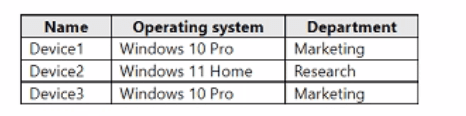
You capture and upload the hardware IDs of the devices in the marketing department.
You configure Windows Autopilot.
For each of the following statements, select Yes if the statement is true. Otherwise select
No.
NOTE: Each correct selection is worth one point

Explanation:
Autopilot requires a valid Microsoft 365 license (E3, E5, Business Premium) for the user completing enrollment. User1 has no license → cannot complete Autopilot. User2 has E3 license → can complete Autopilot. Group2 (containing User3) is assigned to Enrollment Status Page (ESP) → User3 can view device setup information during enrollment.
Correct Option (per statement):
Statement 1: User1 can complete the Autopilot process on Device1. → No
User1 has no Microsoft 365 license assigned (None). Windows Autopilot requires the user performing enrollment to have an active license that includes Intune (e.g., Microsoft 365 E3, E5, Business Premium). Without a license, User1 cannot complete the Autopilot process.
Statement 2: User2 can complete the Autopilot process on Device1. → Yes
User2 has a Microsoft 365 E3 license, which includes Intune enrollment rights. Device1 is a Windows 10 Pro device (marketing department), and hardware IDs for marketing devices have been uploaded to Autopilot. User2 can successfully complete the Autopilot process on Device1.
Statement 3: User3 can view device setup information during the enrollment phase of Device1. → Yes
Group2 (of which User3 is a member) has been assigned in the Enrollment Status Page (ESP). ESP displays device setup progress (app installation, policy configuration) during the enrollment phase. Users in Group2 can view this information. Therefore, User3 can view device setup information during enrollment.
Reference:
Microsoft Learn: Windows Autopilot licensing requirements – User needs Intune license (E3/E5/Business Premium). Enrollment Status Page (ESP) assigned to groups. No external links provided.
Your network contains an Active Directory domain.
You install the Microsoft Deployment Toolkit (MDT) on a server.
You have a custom image of Windows 11.
You need to deploy the image to 100 devices by using MDT.
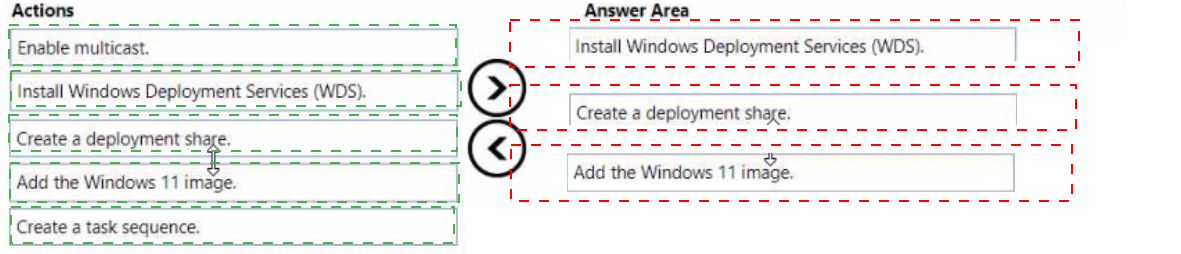
Which three actions should you perform in sequence? To answer, move answer area and arrange them in the correct order.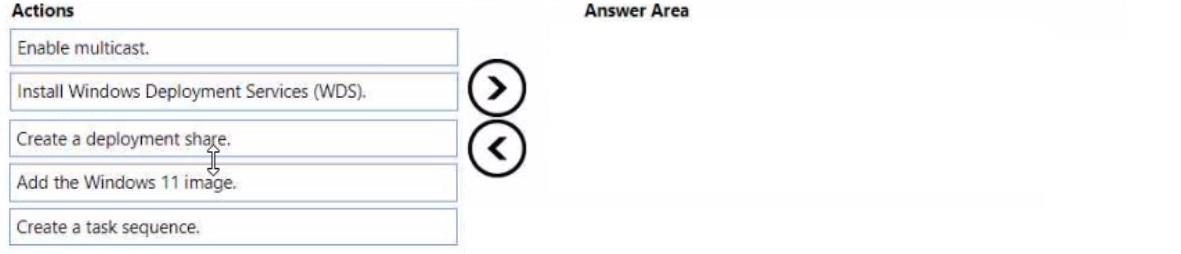
 < br>
< br>
Explanation:
To deploy a custom Windows 11 image using MDT to 100 devices, you must first create a deployment share, then add the custom Windows 11 image to that share, and finally create a task sequence that defines the deployment steps. These three actions are the core prerequisites before booting target devices for deployment.
Correct Option (in correct sequence):
1. Create a deployment share
In the MDT Deployment Workbench, right-click "Deployment Shares" and select "New Deployment Share." Specify a local or network path (e.g., D:\MDTShare). This creates the folder structure (Boot, Captures, Control, etc.) and configuration files needed to host operating systems, applications, drivers, and task sequences.
2. Add the Windows 11 image
Under the deployment share, right-click "Operating Systems" > "Import Operating System." Select "Custom image file" and browse to your custom Windows 11 WIM file. This imports the image into the deployment share, making it available for use in task sequences.
3. Create a task sequence
Right-click "Task Sequences" > "New Task Sequence." Choose "Standard Client Task Sequence," name it, select the imported Windows 11 image, and configure product key, admin password, and other settings. The task sequence defines the steps to deploy the image (partition disk, apply OS, inject drivers, install apps).
Incorrect Option (actions not used):
Enable multicast –
Multicast is optional for network optimization when deploying to multiple devices simultaneously. It is not a required action before creating a deployment share, adding an image, or creating a task sequence.
Install Windows Deployment Services (WDS) –
WDS is not required for MDT deployments. MDT can deploy via USB media, ISO, or network boot using its own LiteTouch boot images. WDS integration is optional for PXE boot, but not a prerequisite for MDT deployment preparation.
Reference:
Microsoft Learn: MDT deployment process – Create deployment share → Import operating system → Create task sequence. No external links provided.
| Page 9 out of 35 Pages |