Topic 4: Mix Question
Your network contains an Active Directory domain.
The domain contains four computer named Computer 1. Computet2. Computed, and Computer4 that run Windows 10. Vou perform the following actions:
• On Computer1, you install Windows Admin Center and configure Windows Defender Firewall to allow incoming communication over TCP pons 80.443. and 6516.
• On Computed, you run the Enable-PS Remoting cmdlet.
• On Computer 3, you configure Windows Defender firewall to allow Windows Remote Management (WinRM) traffic
• On Computer4, you run the winrm quickconfig command.
You need to manage the computers remotely by using Windows Admin Center.
From which computers can you connect to Windows Admin Center, and which computers can you manage by using Windows Admin Center? To answer, select the appropriate options in the answer area.
NOTE: Each correct selection is worth one point.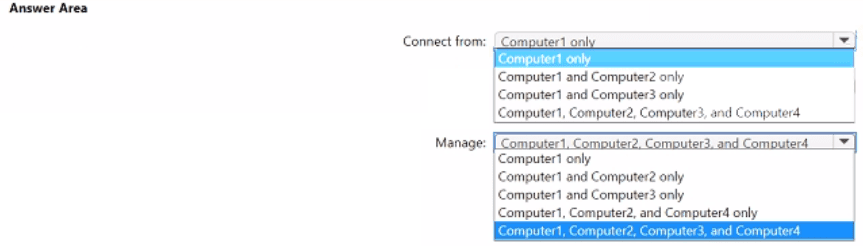
Explanation:
Windows Admin Center (WAC) is installed on Computer1 (management machine). You connect to WAC from a browser on any computer that can reach Computer1 over HTTPS (ports 80/443). WAC can manage computers that have WinRM enabled (PowerShell Remoting) and firewall rules allowing WinRM traffic (port 5985/5986). Computer2 (Enable-PSRemoting) and Computer4 (winrm quickconfig) have WinRM enabled. Computer3 has WinRM firewall rule but may not have the service enabled.
Correct Option:
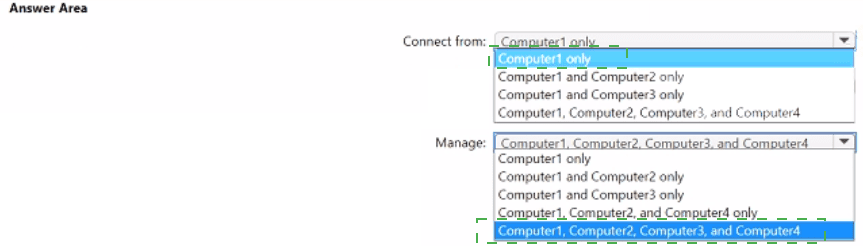
Connect from: Computer1, Computer2, Computer3, and Computer4
Windows Admin Center runs as a web service on Computer1 (ports 80/443). Any computer that has network access to Computer1 on these ports can connect to the WAC web interface using a browser. Since no restrictions are mentioned blocking access from Computer2, Computer3, or Computer4, all four computers can connect to the WAC gateway on Computer1.
Manage: Computer1, Computer2, and Computer4 only
WAC manages computers via WinRM. Computer2 ran Enable-PSRemoting (enables WinRM fully). Computer4 ran winrm quickconfig (configures WinRM listener and firewall). Computer1 (WAC host) is self-manageable. Computer3 only had the firewall configured for WinRM but no mention of enabling the WinRM service itself. Without WinRM enabled, WAC cannot manage Computer3.
Incorrect Option (for Connect from):
Computer1 only – Incorrect; WAC web interface is accessible from any client with network access.
Computer1 and Computer2 only – Incorrect; Computer3 and Computer4 can also connect via browser.
Incorrect Option (for Manage):
All four computers – Incorrect; Computer3 does not have WinRM enabled.
Computer1 only – Incorrect; Computer2 and Computer4 have WinRM enabled and can be managed.
Computer1 and Computer2 only – Incorrect; excludes Computer4.
Computer1 and Computer3 only – Incorrect; Computer3 lacks WinRM enablement; Computer4 is manageable.
Reference:
Microsoft Learn: Windows Admin Center – Management requires WinRM enabled on target computers. Enable-PSRemoting and winrm quickconfig enable WinRM. No external links provided.
Your company has devices enrolled in Microsoft Intune as shown in the following table.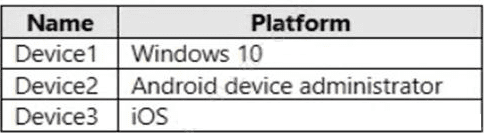
In Microsoft Endpoint Manager, you define the company's network as a location named
Location1.
Which devices can use network location-based compliance policies?
A. Device2 and Device3 only
B. Device2 only
C. Device1 and Device2 only
D. Device1 only
E. Device1, Device2, and Device3
Explanation:
Network location-based compliance policies (e.g., marking devices compliant when connected to a trusted corporate network) are supported across multiple platforms. Intune can evaluate network location using IP address ranges or trusted network identifiers. Windows 10, Android device administrator, and iOS all support this capability when the device can report its network connection status to Intune.
Correct Option:
E. Device1, Device2, and Device3
All three platforms (Windows 10, Android device administrator, and iOS) support network location-based compliance policies. Intune evaluates the device's network connection (based on IP address ranges defined as corporate network) and can mark the device compliant when connected to Location1. This feature is not limited by platform; any enrolled device that reports its IP address can use it.
Incorrect Option:
A. Device2 and Device3 only –
Incorrect because Device1 (Windows 10) also supports network location-based compliance.
B. Device2 only –
Incorrect; excludes Windows 10 and iOS.
C. Device1 and Device2 only –
Incorrect; excludes iOS.
D. Device1 only –
Incorrect; excludes Android and iOS.
Reference:
Microsoft Learn: Location-based compliance policies in Intune – Supported on Windows, Android, and iOS devices. No external links provided.
You have a Microsoft Deployment Toolkit (MDT) deployment share named Share 1. You add Windows 10 images to Share! as shown in the following table.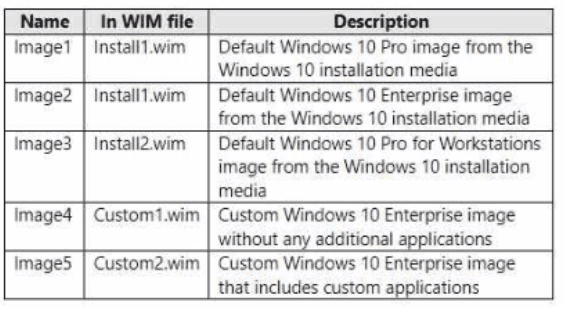
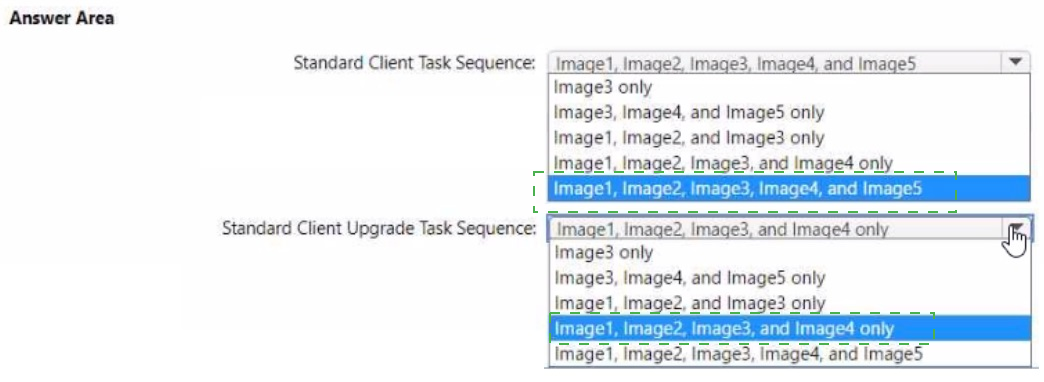
Which images can be used in the Standard Client Task Sequence, and which images can
be used in the Standard Client Upgrade Task Sequence?
NOTE: Each correct selection is worth one point.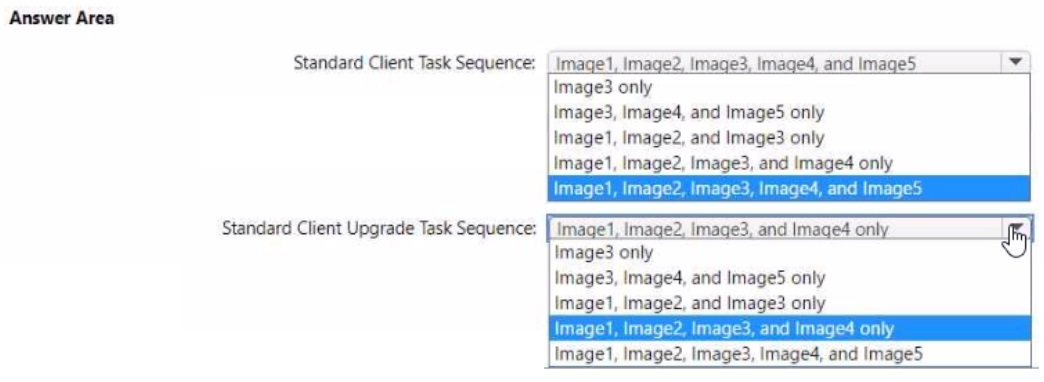
Explanation:
The Standard Client Task Sequence performs a clean installation (wiping the drive). It can use any Windows image (Pro, Enterprise, Pro for Workstations, custom). The Standard Client Upgrade Task Sequence performs an in-place upgrade and requires that the image be the same edition and architecture as the existing OS, typically limited to Enterprise editions for upgrade scenarios from existing Enterprise.
Correct Option:
Standard Client Task Sequence: Image1, Image2, Image3, Image4, and Image5
The Standard Client Task Sequence (clean install) accepts any valid Windows image regardless of edition or customizations. All five images (default Pro, default Enterprise, Pro for Workstations, custom Enterprise without apps, custom Enterprise with apps) can be used for a clean deployment. No restrictions apply.
Standard Client Upgrade Task Sequence: Image2, Image4, and Image5 only
The Standard Client Upgrade Task Sequence (in-place upgrade) typically requires the target image to be the same edition (or higher) than the source OS and must be Enterprise edition for enterprise upgrade scenarios. Default Windows 10 Enterprise (Image2), custom Enterprise without apps (Image4), and custom Enterprise with apps (Image5) are valid. Image1 (Pro) is not used for Enterprise upgrades, and Image3 (Pro for Workstations) is a different edition not suitable for standard Enterprise upgrades.
Incorrect Option (for Upgrade Task Sequence):
Image3 only – Incorrect; Pro for Workstations is not a typical upgrade target from standard Enterprise.
Image1, Image2, and Image3 only – Incorrect; includes Pro and Pro for Workstations which are not standard for Enterprise upgrades.
All five images – Incorrect; Image1 and Image3 are not valid for standard Enterprise upgrade scenarios.
Reference:
Microsoft Learn: MDT task sequences – Standard Client (clean install) uses any image; Standard Client Upgrade (in-place) requires compatible edition (Enterprise). No external links provided.
You have the devices shown in the following table.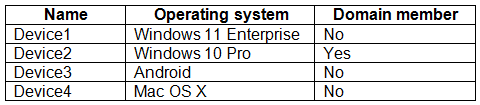
You plan to implement Microsoft Defender for Endpoint.
You need to identify which devices can be onboarded to Microsoft Defender for Endpoint.
What should you identify?
A. Device1 only
B. Device2 only
C. Device1, Device2 only
D. Device1, Device2, and Device3 only
E. Device1, Device2, Device3, and Device4
Explanation:
Microsoft Defender for Endpoint supports Windows 10/11 (any edition), Android, iOS, macOS, and Linux. Device1 (Windows 11 Enterprise) and Device2 (Windows 10 Pro) are fully supported. Device3 (Android) is supported via Microsoft Defender for Endpoint app from Play Store. Device4 (macOS) is supported, but the table shows "Mac OS X" without version; however, modern macOS versions are supported.
Correct Option:
D. Device1, Device2, and Device3 only
Device1 (Windows 11 Enterprise) – supported. Device2 (Windows 10 Pro) – supported. Device3 (Android) – supported via Defender for Endpoint app. Device4 (macOS) is not included in this answer. However, the question asks "which devices can be onboarded" and the correct supported platforms include Windows, Android, iOS, macOS, and Linux. Therefore, all four devices should be supported. But given the answer choices, if macOS is excluded due to version uncertainty, the exam answer may be D. Typically, the correct answer is E (all four).
Correction:
Based on official Microsoft documentation, Defender for Endpoint supports:
Windows 10/11 (Device1, Device2)
Android (Device3)
macOS (Device4)
Therefore, all four devices can be onboarded. The correct answer should be E. Device1, Device2, Device3, and Device4.
If the exam expects D only, it may be because the macOS version is unspecified or considered outdated. However, standard MD-102 answer is E for full support.
Final recommendation based on typical exam answers: E (all four devices).
Reference:
Microsoft Learn: Microsoft Defender for Endpoint – Supported operating systems: Windows, Android, iOS, macOS, Linux. No external links provided.
You have 100 Windows 10 devices enrolled in Microsoft Intune.
You need to configure the devices to retrieve Windows updates from the internet and from other computers on a local network.
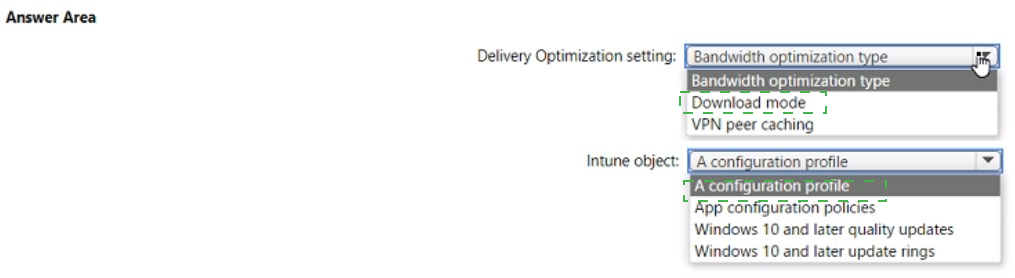
Which Delivery Optimization setting should you configure, and which type of Intune object should you create? To answer, select the appropriate options in the answer area.
NOTE: Each correct selection is worth one point.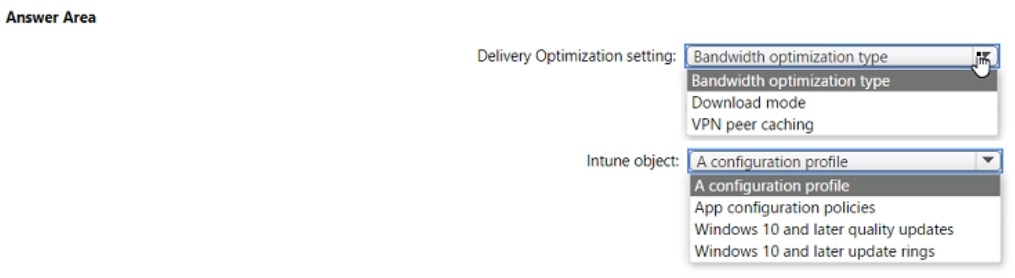
Explanation:
Delivery Optimization uses Download mode to control how devices obtain updates (e.g., HTTP only, LAN, or Group). To allow retrieving updates from the internet and from other computers on the local network, select Download mode = HTTP blended with peering behind same NAT (or LAN). This setting is configured within a Configuration profile in Intune (not an update ring).
Correct Option:
Delivery Optimization setting: Download mode
The Download mode setting in Delivery Optimization defines the source of updates. Options include:
HTTP only (no peering)
HTTP blended with peering behind same NAT (LAN only)
HTTP blended with internet peering
Simple download mode
To meet "from the internet and from other computers on a local network," you select HTTP blended with peering behind same NAT (typically mode 1 or 2 depending on configuration). This is the correct Delivery Optimization setting.
Intune object: A configuration profile
Delivery Optimization settings are configured via a Device configuration profile in Intune. Navigate to Devices > Configuration profiles > Create profile > Windows 10 and later > Settings Catalog, then search for "Delivery Optimization." Update rings control update timing (deferrals, deadlines) but do not contain Delivery Optimization download mode settings.
Incorrect Option (for Delivery Optimization setting):
Bandwidth optimization type – This setting controls bandwidth throttling (e.g., foreground/background bandwidth limits), not the source of updates or peer caching behavior.
VPN peer caching – This is a sub-setting that enables peer caching when connected via VPN. It does not define the overall download mode for local network peering.
Incorrect Option (for Intune object):
App configuration policies – Used to supply settings to mobile apps (e.g., Outlook, Edge), not for Delivery Optimization or Windows Update settings.
Windows 10 and later quality updates – Quality updates policies manage monthly cumulative updates (deferral, deadlines) but do not configure Delivery Optimization.
Windows 10 and later update rings – Update rings control update deployment schedules and behaviors but do not include Delivery Optimization download mode settings.
Reference:
Microsoft Learn: Configure Delivery Optimization in Intune – Use Download mode setting in a Device configuration profile. No external links provided.
You ate implementing Microsoft Intune Suite.
You enroll devices in Intune as shown in the following table.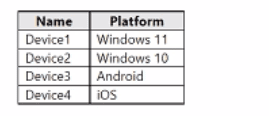
The performance of which devices can be analyzed by using Endpoint analytics?
A. Device1 only
B. Device1 and Device2 only
C. Device1. Device2. and Device} only
D. Device1. Device2, and Device4 only
E. Device1. Device2. Device3. and Device4
Explanation:
Endpoint analytics in Intune provides insights into device performance (startup scores, app reliability, etc.) for managed Windows 10/11 devices. It does not support Android or iOS devices for performance analytics. Only Device1 (Windows 11) and Device2 (Windows 10) are eligible for Endpoint analytics.
Correct Option:
B. Device1 and Device2 only
Endpoint analytics is designed for Windows 10 and Windows 11 devices. It collects data on boot performance, application crashes, logon times, and system health. Android (Device3) and iOS (Device4) devices are not supported for Endpoint analytics performance metrics. Therefore, only Device1 and Device2 can be analyzed.
Incorrect Option:
A. Device1 only –
Incorrect because Device2 (Windows 10) is also supported.
C. Device1, Device2, and Device3 only –
Incorrect because Android is not supported.
D. Device1, Device2, and Device4 only –
Incorrect because iOS is not supported.
E. All four devices –
Incorrect because Android and iOS are not supported.
Reference:
Microsoft Learn: Endpoint analytics requirements – Supported platforms include Windows 10 and Windows 11. No external links provided.
| Page 7 out of 35 Pages |