Topic 4: Mix Question

You need to assign the same deployment profile to all the computers that are configured by using Windows Autopilot.

Which two actions should you perform? Each correct answer presents part of the solution.

NOTE: Each correct selection is worth one point.

A. Create an Azure AD group that has dynamic membership rules and uses the ZTDID tag.

B. Create an Azure AD group that has dynamic membership rules and uses the operatingSystem tag.

C. Assign a Windows Autopilot deployment profile to a group.

D. Join the computers to Azure AD.

E. Create a Group Policy object (GPO) that is linked to a domain.

F. Join the computers to an on-premises Active Directory domain.

A.   Create an Azure AD group that has dynamic membership rules and uses the ZTDID tag.
C.   Assign a Windows Autopilot deployment profile to a group.

Explanation:
To assign the same Windows Autopilot deployment profile to multiple computers, you first create an Azure AD dynamic group that automatically includes all Autopilot devices (using the ZTDID tag), then assign the Autopilot deployment profile to that group. The profile assignment is done via Intune, targeting the group.

Correct Option:

A. Create an Azure AD group that has dynamic membership rules and uses the ZTDID tag
The ZTDID (Zero Touch Deployment ID) is a unique identifier automatically assigned to each device imported into Windows Autopilot. A dynamic membership rule using (device.devicePhysicalIds -any (_ -eq "[ZTDID]")) or simply targeting all Autopilot devices can include all computers configured by Autopilot. This ensures the group automatically captures all Autopilot devices without manual updates.

C. Assign a Windows Autopilot deployment profile to a group
In the Microsoft Intune admin center, under Devices > Windows > Windows Autopilot > Deployment profiles, you assign a profile to an Azure AD group. By assigning the same profile to the dynamic group created in option A, all Autopilot devices receive that deployment profile. This is the mechanism that applies the profile during OOBE.

Incorrect Option:

B. Create an Azure AD group that uses the operatingSystem tag –
The operatingSystem tag is not reliable for identifying Autopilot devices, as multiple devices share the same OS. ZTDID uniquely identifies each Autopilot device and is the correct attribute for dynamic Autopilot groups.

D. Join the computers to Azure AD –
Autopilot devices are joined to Azure AD during OOBE as part of the deployment process. This is an outcome, not an action you perform to assign a deployment profile.

E. Create a Group Policy object (GPO) that is linked to a domain –
GPOs are for on-premises Active Directory management, not for Windows Autopilot profile assignment. Autopilot uses Intune, not Group Policy.

F. Join the computers to an on-premises Active Directory domain –
Autopilot supports hybrid Azure AD join, but the question asks about assigning the same deployment profile to all Autopilot-configured computers. Domain join is not required for profile assignment.

Reference:
Microsoft Learn: Windows Autopilot – Use dynamic groups with ZTDID to assign deployment profiles. Assign profiles to Azure AD groups in Intune. No external links provided.

Your company has a Remote Desktop Gateway (RD Gateway).

You have a server named Server1 that is accessible by using Remote Desktop Services (RDS) through the RD Gateway.

You need to configure a Remote Desktop connection to connect through the gateway.

Which setting should you configure?

A. Connect from anywhere

B. Server authentication

C. Connection settings

D. Local devices and resources

A.   Connect from anywhere

Explanation:
The Remote Desktop Connection client provides a Connect from anywhere setting (formerly called "Bypass RD Gateway server for local addresses") that configures the connection to use an RD Gateway. You specify the gateway server name and whether to use the gateway for all connections or only for connections to remote networks.

Correct Option:

A. Connect from anywhere
In Remote Desktop Connection, under Advanced > Settings, the "Connect from anywhere" option allows you to configure RD Gateway settings. You can enable the gateway, specify the RD Gateway server address (e.g., rdgateway.contoso.com), and choose when to use the gateway (for all connections or only for connections to addresses not on the local subnet). This is the correct setting to route the connection through the RD Gateway.

Incorrect Option:

B. Server authentication –
Server authentication settings control how the client verifies the identity of the remote computer (always connect, warn, or do not connect). It does not configure gateway usage.

C. Connection settings –
Connection settings include display, local resources, and experience settings. The RD Gateway configuration is specifically under Advanced > Settings, not under the general "Connection settings" category.

D. Local devices and resources –
This setting controls redirection of local drives, printers, clipboard, and other resources into the remote session. It does not configure RD Gateway.

Reference:
Microsoft Learn: Configure RD Gateway for Remote Desktop Connections – Use the "Connect from anywhere" setting in RDC client. No external links provided.

You have a hybrid Azure AD tenant.

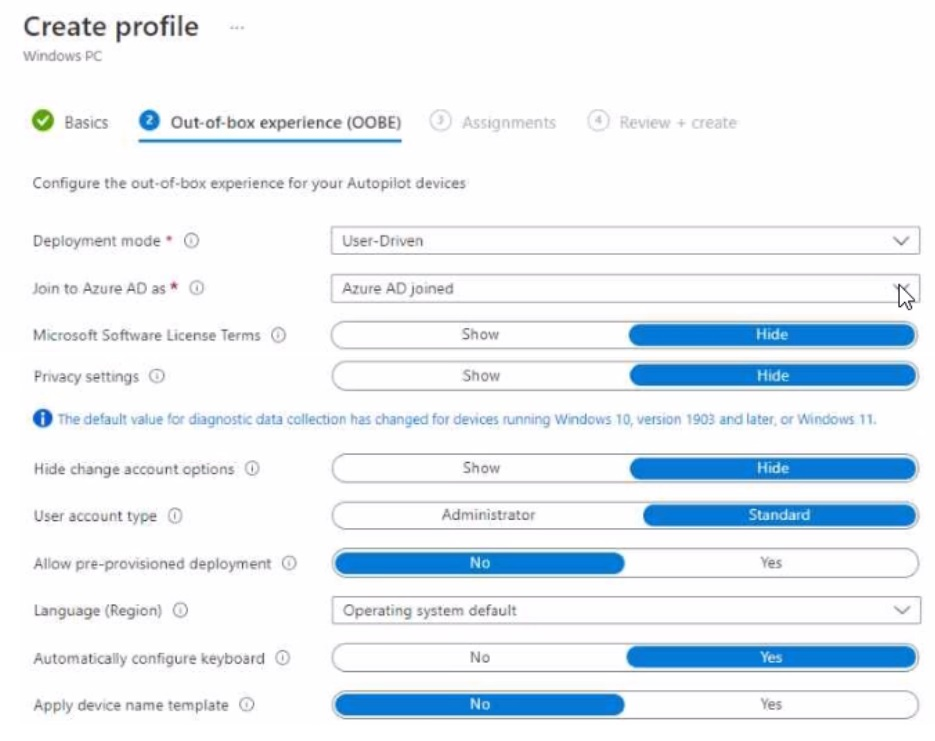
You configure a Windows Autopilot deployment profile as shown in the following exhibit.


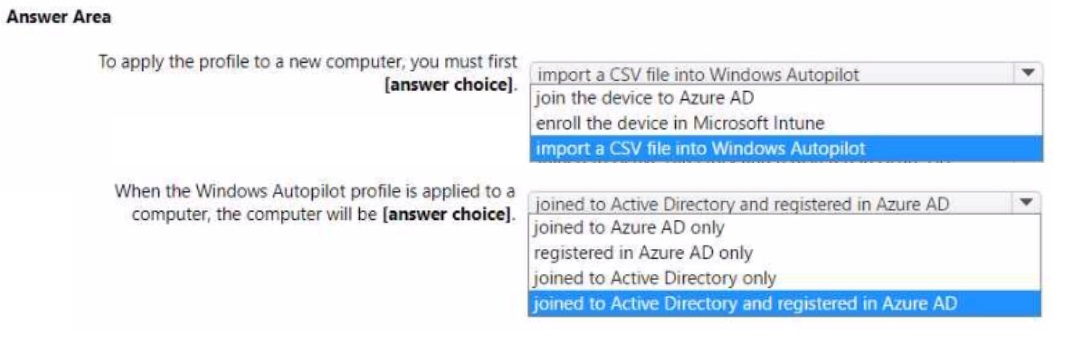
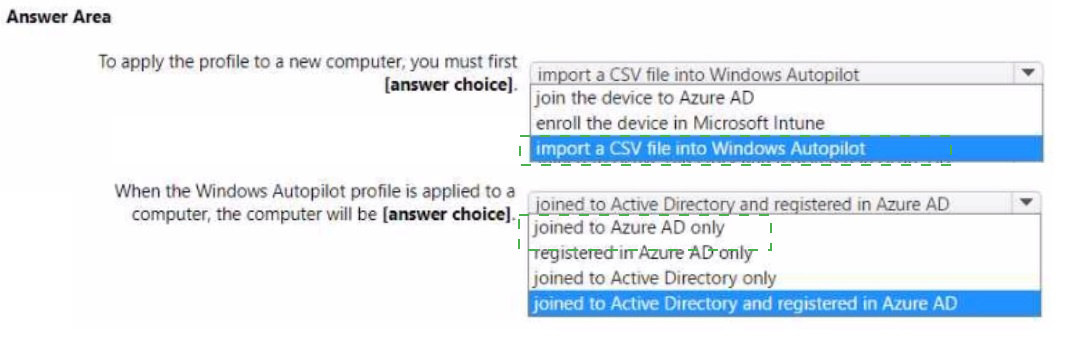
Use the drop-down menus to select the answer choice that completes each statement based on the information presented in the graphic.

NOTE: Each correct selection is worth one point.


Explanation:
The exhibit shows Deployment mode as "User-Driven" and Join to Azure AD as "Azure AD joined" (not Hybrid Azure AD joined). However, the question states "You have a hybrid Azure AD tenant." For a new computer to receive this profile, it must first be imported into Autopilot via CSV. With this profile, the computer will be joined to Azure AD only (not hybrid joined).

Correct Option:

To apply the profile to a new computer, you must first: import a CSV file into Windows Autopilot
Before a Windows Autopilot profile can be applied to a computer, the device must be registered in the Windows Autopilot service. This is done by importing a CSV file containing device identifiers (hardware hash, serial number, etc.) into the Intune admin center under Devices > Windows > Windows Autopilot > Devices > Import.

When the Windows Autopilot profile is applied to a computer, the computer will be: joined to Azure AD only
The exhibit clearly shows "Join to Azure AD as: Azure AD joined" (not "Hybrid Azure AD joined"). With this setting, during OOBE the device will join directly to Azure AD only, not to on-premises Active Directory. Even though the tenant is hybrid, this specific profile does not perform hybrid join.

Incorrect Option (for first statement):

join the device to Azure AD – This happens during OOBE as a result of the Autopilot profile, not as a prerequisite to apply the profile.

enroll the device in Microsoft Intune – Enrollment occurs automatically during Autopilot; it is not a prerequisite step before profile application.

Incorrect Option (for second statement):

joined to Active Directory and registered in Azure AD – This describes hybrid Azure AD join, but the profile is configured for "Azure AD joined" only.

registered in Azure AD only – Registration (formerly Workplace Join) is different from Azure AD join; this profile performs full Azure AD join.

joined to Active Directory only – Incorrect; the profile explicitly joins to Azure AD, not on-premises AD.

Reference:
Microsoft Learn: Windows Autopilot – Import devices via CSV before profile assignment. Autopilot profiles with "Azure AD joined" perform Entra ID join only. No external links provided.

You have a Microsoft 365 tenant.

You have devices enrolled in Microsoft Intune.

You assign a conditional access policy named Policy1 to a group named Group1. Policy!

restricts devices marked as noncompliant from accessing Microsoft OneDrive for Business.

You need to identify which noncompliant devices attempt to access OneDrive for Business.

What should you do?

A. From the Microsoft Entra admin center, review the Conditional Access Insights and Reporting workbook.

B. From the Microsoft Intune admin center, review Device compliance report.

C. From the Microsoft Intune admin center, review the Noncompliant devices report.

D. From the Microsoft Intune admin center, review the Setting compliance report.

C.   From the Microsoft Intune admin center, review the Noncompliant devices report.

Explanation:
To identify which noncompliant devices attempt to access OneDrive for Business after being blocked by a Conditional Access policy, you need to review the Noncompliant devices report in Intune. This report shows devices marked as noncompliant, including compliance status and details. However, the sign-in attempts themselves are best reviewed via Conditional Access Insights. The Noncompliant devices report identifies which devices are noncompliant.

Correct Option:

C. From the Microsoft Intune admin center, review the Noncompliant devices report
The Noncompliant devices report (under Devices > Monitor > Noncompliant devices) lists all devices that are not compliant with Intune compliance policies. Since Policy1 restricts noncompliant devices from accessing OneDrive, reviewing this report shows which devices are noncompliant and would be blocked. You can then cross-reference sign-in logs for actual attempts.

Incorrect Option:

A. From the Microsoft Entra admin center, review the Conditional Access Insights and Reporting workbook –
This workbook provides sign-in data, including Conditional Access policy evaluation results. While it shows which devices were blocked by Policy1, the question asks for "which noncompliant devices attempt to access" – the Noncompliant devices report is the direct answer for identifying noncompliant devices.

B. From the Microsoft Intune admin center, review Device compliance report –
The Device compliance report provides a summary of compliance status across devices but is less focused on the noncompliant list specifically.

D. From the Microsoft Intune admin center, review the Setting compliance report –
This report shows compliance status per setting (e.g., BitLocker, antivirus), not a list of noncompliant devices attempting access to OneDrive.

Reference:
Microsoft Learn: Monitor device compliance in Intune – Use Noncompliant devices report to identify devices that fail compliance policies. No external links provided.

You have a Microsoft 365 subscription that contains 500 computers that run Windows 11.

The computers are Azure AD joined and are enrolled in Microsoft Intune.

You plan to manage Microsoft Defender Antivirus on the computers.

You need to prevent users from disabling Microsoft Defender Antivirus,

What should you do?

A. From the Microsoft Intune admin center, create a security baseline.

B. From the Microsoft 365 Defender portal, enable tamper protection.

C. From the Microsoft Intune admin center, create an account protection policy.

D. From the Microsoft Intune admin center, create an endpoint detection and response (EDR) policy.

B.   From the Microsoft 365 Defender portal, enable tamper protection.

Explanation:
Tamper Protection in Microsoft Defender Antivirus prevents users (and malicious software) from disabling antivirus settings, including real-time protection and cloud-delivered protection. This feature is enabled from the Microsoft 365 Defender portal (security.microsoft.com) under Settings > Endpoints > Advanced features. It is the primary mechanism to prevent users from disabling Defender Antivirus.

Correct Option:

B. From the Microsoft 365 Defender portal, enable tamper protection
Tamper protection is a global setting that locks Microsoft Defender Antivirus configurations, preventing unauthorized changes via Registry, PowerShell, or Group Policy. Once enabled, users cannot disable Defender Antivirus features. This is the recommended Microsoft solution for protecting Defender settings from user tampering.

Incorrect Option:

A. From the Microsoft Intune admin center, create a security baseline –
Security baselines apply recommended configurations but do not specifically prevent users from disabling Defender Antivirus. Tamper protection is not configured through Intune security baselines (it is set in Defender portal).

C. From the Microsoft Intune admin center, create an account protection policy –
Account protection policies configure Windows Hello, Credential Guard, and other identity-related settings. They do not prevent disabling of Defender Antivirus.

D. From the Microsoft Intune admin center, create an endpoint detection and response (EDR) policy –
EDR policies onboard devices to Defender for Endpoint and configure sensor settings. They do not prevent users from disabling antivirus components.

Reference:
Microsoft Learn: Tamper protection in Microsoft Defender for Endpoint – Enable from Microsoft 365 Defender portal to prevent disabling of antivirus features. No external links provided.

You have a Microsoft 365 E5 subscription that contains two devices named Device1 and Device2.

You manage the devices by using Microsoft Intune.

You need to use Device query to meet the following requirements:

• Identify the Windows build on a device.

• Validate whether a folder exists on the C drive of a device.

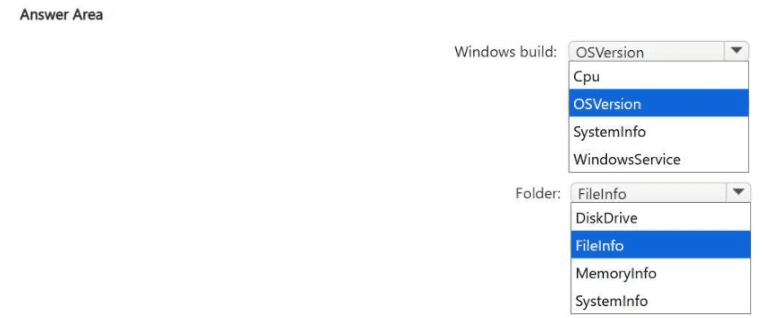
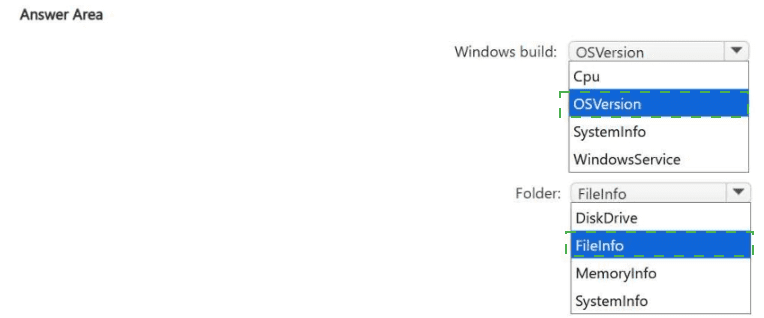
Which table should you target for each requirement? To answer, select theappropriateoptions in the answer area.

NOTE: Each correct selection is worth one point.


Explanation:
Device query in Intune uses Kusto Query Language (KQL) to query device properties. To identify the Windows build, you query the OSVersion property which contains the full OS build number. To validate whether a folder exists on the C drive, you query the FileInfo table which contains file and folder presence information.

Correct Option:

Windows build: OSVersion
The OSVersion property (found in device inventory tables) stores the Windows build number (e.g., 10.0.22621.1 for Windows 11 22H2). You would use a query like DeviceInfo | project OSVersion or target the OSVersion field. Cpu and SystemInfo do not provide the Windows build number.

Folder exists on C drive: FileInfo
The FileInfo table contains information about files and folders on the device. You can query for a specific folder path (e.g., FileInfo | where FolderPath == "C:\\TestFolder") to validate its existence. DiskDrive provides storage device hardware info, not folder presence.

Incorrect Option (for Windows build):

Cpu – Contains processor information (name, cores, speed), not Windows build version.

SystemInfo – Contains general system details (manufacturer, model, BIOS version), but OSVersion is the specific field for Windows build.

WindowsService – Contains information about Windows services (name, status, startup type), not OS build.

Incorrect Option (for folder existence):

DiskDrive – Provides information about physical disk drives (model, size, type), not files or folders.

MemoryInfo – Contains RAM capacity and usage information, unrelated to folder existence.

SystemInfo – Does not contain file or folder presence data.

Reference:
Microsoft Learn: Intune Device query – Use OSVersion for Windows build and FileInfo for file/folder presence checks. No external links provided.

You have the Windows 10 devices shown in the following table
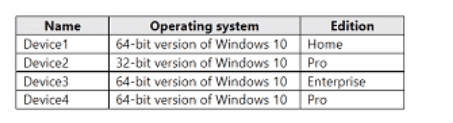


You plan to upgrade the devices to Windows 11 Enterprise.

On which devices can you perform a direct in-place upgrade to Windows 11 Enterprise?

A. Device3 only

B. Device 3 and Device 4 only

C. Device2. Device3. and Devtce4 only

D. Device1. Device3, and Devtce4 only

E. Device1, Device2. Device3. and Devke4 only

A.   Device3 only

Explanation:
An in-place upgrade from Windows 10 to Windows 11 requires 64-bit architecture and a supported edition (Pro, Enterprise, or Education). Windows 10 Home cannot be directly upgraded to Enterprise. Windows 10 32-bit cannot be upgraded to 64-bit Windows 11. Only Device3 (64-bit, Enterprise) meets both requirements for a direct in-place upgrade to Windows 11 Enterprise.

Correct Option:

A. Device3 only
Device3 runs 64-bit Windows 10 Enterprise. In-place upgrade to Windows 11 Enterprise is supported because architecture matches (64-bit) and the edition upgrade path allows Enterprise to Enterprise. No edition downgrade or architecture conversion is needed. Device4 (64-bit Pro) could upgrade to Windows 11 Pro, but the requirement is Windows 11 Enterprise, which would require an additional edition upgrade (Pro to Enterprise) either before or after, making it not a direct in-place upgrade.

Incorrect Option:

B. Device3 and Device4 only –
Device4 (64-bit Pro) cannot directly in-place upgrade to Windows 11 Enterprise because Enterprise is a higher edition. While possible with an edition upgrade, the question asks for a direct in-place upgrade to Windows 11 Enterprise specifically, not Pro.

C. Device2, Device3, and Device4 only –
Device2 runs 32-bit Windows 10 Pro. Windows 11 requires 64-bit architecture. A 32-bit OS cannot be directly upgraded to a 64-bit OS; this requires a clean installation.

D. Device1, Device3, and Device4 only –
Device1 runs Windows 10 Home 64-bit. Home cannot be directly upgraded to Enterprise; it would need to go to Pro first, then Enterprise, or require a clean install.

E. All four devices –
Incorrect because Device1 (Home edition) and Device2 (32-bit) do not support direct in-place upgrade to Windows 11 Enterprise.

Reference:
Microsoft Learn: Windows 11 system requirements and upgrade paths – 64-bit required; Home edition cannot directly upgrade to Enterprise; 32-bit cannot upgrade to 64-bit. No external links provided.

Your company has a computer named Computer1 that runs Windows 10.

Computed was used by a user who left the company.

You plan to repurpose Computer1 and assign the computer to a new user.

You need to redeploy Computer1 by using Windows Autopilot.

Which three actions should you perform in sequence? To answer, move the appropriate actions from the list of actions to the answer area and arrange them in the correct order.




Explanation:
To redeploy a computer using Windows Autopilot, you must first capture its hardware hash, generate a CSV file with that information, and upload the CSV to Intune. The computer is then reset to OOBE state, where Autopilot will take over. The correct sequence is: generate CSV, upload via Intune, then reset the computer.

Correct Option (in correct sequence):

1. Generate a CSV file that contains the computer information
On Computer1, run a Windows PowerShell script (Get-WindowsAutopilotInfo.ps1) to export the device's hardware hash. Use the command Get-WindowsAutopilotInfo.ps1 -OutputFile Computer1.csv to generate a CSV file containing the device's serial number, hardware hash, and other identifiers required for Autopilot registration.

2. Upload the file by using Microsoft Intune
In the Microsoft Intune admin center, navigate to Devices > Windows > Windows Autopilot > Devices, and import the CSV file. This registers Computer1 in the Windows Autopilot service, associating it with any assigned deployment profile.

3. Reset the computer
After the device is imported and an Autopilot profile is assigned, reset Computer1 (via Settings > Update & Security > Recovery > Reset this PC, or using a fresh start from Intune). Upon reboot, the device will enter OOBE and automatically apply the Autopilot configuration for the new user.

Incorrect Option (actions not used):

Generate a JSON file that contains the computer information – Autopilot device registration requires a CSV file, not JSON. The PowerShell script outputs CSV format specifically.

Upload the file by running azcopy.exe – Azcopy is used for copying blobs or files to Azure Storage accounts, not for uploading Autopilot device information to Intune. The Intune admin center is the correct upload method.

Reference:
Microsoft Learn: Windows Autopilot – Register devices by exporting hardware hash to CSV and importing via Intune. No external links provided.

You have 200 computers that run Windows 10. The computers are joined to Microsoft Entra and enrolled in Microsoft Intune. You need to enable self-service password reset on the sign-in screen. Which settings should you configure from the Microsoft Intune admin center?

A. Conditional access

B. Device compliance

C. Device configuration

D. Device enrollment

C.   Device configuration

Explanation:
Enabling self-service password reset (SSPR) on the Windows sign-in screen requires configuring the Device configuration profile in Intune. Specifically, you create an Administrative Templates profile (or Settings Catalog) and enable the policy "Enable password reset link on the sign-in screen" under Windows components > Authentication. Conditional access controls access, not sign-in screen behavior.

Correct Option:

C. Device configuration
Device configuration profiles in Intune allow you to manage Windows settings via Administrative Templates or Settings Catalog. The policy "Enable password reset link on the sign-in screen" (found under Computer Configuration > Administrative Templates > System > Logon) adds a "Reset password" link to the sign-in screen. This enables users to perform SSPR directly from the login interface without needing to access a web browser.

Incorrect Option:

A. Conditional access –
Conditional access policies control access to cloud resources based on conditions (user, location, device compliance). They do not modify the local Windows sign-in screen or add SSPR functionality to it.

B. Device compliance –
Compliance policies evaluate device health (OS version, encryption, etc.) and determine compliance status. They are used with Conditional Access but do not configure sign-in screen options or SSPR links.

D. Device enrollment –
Device enrollment settings control how devices are enrolled into Intune (e.g., enrollment restrictions, automatic enrollment). They do not configure local Windows sign-in screen behavior.

Reference:
Microsoft Learn: Configure SSPR on Windows sign-in screen via Intune Device configuration profile (Administrative Templates). No external links provided.

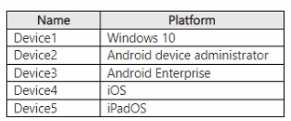
You have a Microsoft 365 tenant that uses Microsoft Intune to manage the devices shown in the following table.


You need to deploy a compliance solution that meets the following requirements:

• Marks the devices as Not Compliant if they do not meet compliance policies

• Remotely locks noncompliant devices

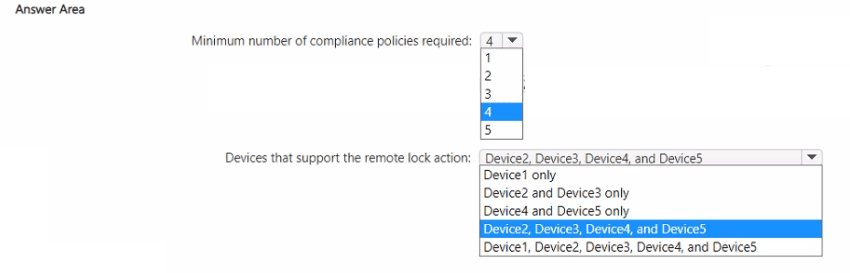
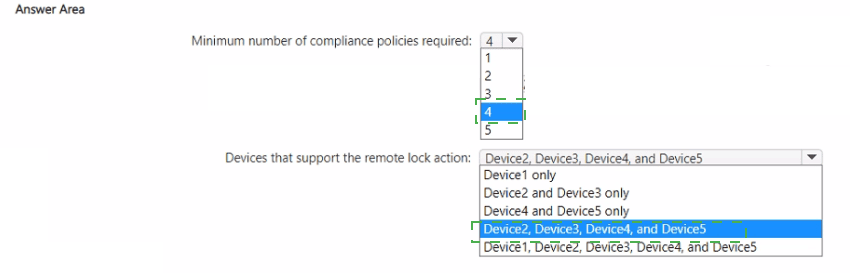
What is the minimum number of compliance policies required, and which devices support the remote lock action? To answer, select the appropriate options in the answer area.

NOTE: Each correct selection is worth one point.


Explanation:
Compliance policies can be assigned across platforms, but each platform requires its own policy because compliance settings are platform-specific. Remote lock action is supported on Android device administrator, Android Enterprise, iOS, and iPadOS. Windows 10 does not support the remote lock action from Intune (only wipe, retire, or sync).

Correct Option:

Minimum number of compliance policies required: 4
You need one compliance policy per unique platform because settings differ (e.g., iOS requires different compliance checks than Android). The five devices span four distinct platforms: Windows 10, Android device administrator, Android Enterprise, iOS/iPadOS (iOS and iPadOS share the same compliance policy type). Therefore, 4 compliance policies are required (one for each platform type).

Devices that support the remote lock action: Device2, Device3, Device4, and Device5
Remote lock is supported on Android device administrator (Device2), Android Enterprise (Device3), iOS (Device4), and iPadOS (Device5). Windows 10 (Device1) does not support the remote lock action from Intune; you can perform a wipe, retire, or sync, but not remote lock. Therefore, Device2, Device3, Device4, and Device5 support remote lock.

Incorrect Option (for minimum number):
1, 2, 3, or 5 – 1 is insufficient because platforms differ; 2 or 3 would miss some platform-specific settings; 5 is unnecessary because iOS and iPadOS share a policy type.

Incorrect Option (for remote lock support):

Device1 only – Incorrect; Windows does not support remote lock.

Device2 and Device3 only – Incorrect; excludes iOS and iPadOS.

Device4 and Device5 only – Incorrect; excludes Android devices.

All five devices – Incorrect; Device1 (Windows) does not support remote lock.

Reference:
Microsoft Learn: Intune compliance policies – Platform-specific policies required. Remote lock action supported on Android, iOS, iPadOS, not Windows. No external links provided.

Page 6 out of 35 Pages