Topic 4: Mix Question

You have a computer named Computer! that runs Windows 11.

A user named User1 plans to use Remote Desktop to connect to Computer1.

You need to ensure that the device of User1 is authenticated before the Remote Desktop connection is established and the sign in page appears.

What should you do on Computer1?

A. Turn on Reputation-based protection.

B. Enable Network Level Authentication (NLA).

C. Turn on Network Discovery.

D. Configure the Remote Desktop Configuration service.

B.   Enable Network Level Authentication (NLA).

Explanation:
Network Level Authentication (NLA) requires the connecting user to authenticate before a full Remote Desktop session is established. When NLA is enabled on Computer1, User1's device must provide valid credentials before the remote desktop sign-in page appears, meeting the requirement for pre-connection authentication.

Correct Option:

B. Enable Network Level Authentication (NLA)
NLA uses CredSSP to require user authentication before the Remote Desktop connection is fully established. On Computer1, you enable NLA by going to System Properties > Remote Desktop and selecting "Allow connections only from computers running Remote Desktop with Network Level Authentication." This ensures authentication occurs before the logon screen appears.

Incorrect Option:

A. Turn on Reputation-based protection –
This refers to Windows Defender SmartScreen or Microsoft Defender reputation-based protection against malicious apps/websites. It has no relation to Remote Desktop authentication or pre-connection validation.

C. Turn on Network Discovery –
Network Discovery allows a device to find other devices on the network and be found. It does not affect Remote Desktop authentication flow or require pre-connection authentication.

D. Configure the Remote Desktop Configuration service –
This service manages Remote Desktop server configuration but does not have a specific setting to enforce authentication before the connection is established. NLA is the correct feature to configure.

Reference:
Microsoft Learn: Network Level Authentication (NLA) for Remote Desktop – Requires authentication before establishing a full RDP session. No external links provided.

Your network contains an on-premises Active Directory domain. The domain contains two computers named Computer1 and Computer? that run Windows 10.

You install Windows Admin Center on Computer1.

You need to manage Computer2 from Computer1 by using Windows Admin Center.

What should you do on Computed?

A. Update the TrustedHosts list

B. Run the Enable-PSRemoting cmdlet

C. Allow Windows Remote Management (WinRM) through the Microsoft Defender firewall.

D. Add an inbound Microsoft Defender Firewall rule.

A.   Update the TrustedHosts list

Explanation:
Windows Admin Center uses PowerShell remoting over WinRM to manage remote computers. For workgroup computers or computers in different domains, the TrustedHosts list must be updated on the managing computer (Computer1) to include Computer2. This allows authentication and connection without being in the same Active Directory domain.

Correct Option:

A. Update the TrustedHosts list
On Computer1 (running Windows Admin Center), you need to add Computer2 to the WinRM TrustedHosts list using the command Set-Item WSMan:\localhost\Client\TrustedHosts -Value "Computer2". This is required when computers are not domain-joined or when using different credentials, as Windows Admin Center relies on WinRM for remote management.

Incorrect Option:

B. Run the Enable-PSRemoting cmdlet –
This enables PowerShell remoting on the local computer (Computer2). While this may be necessary, the specific requirement for Windows Admin Center to manage from Computer1 often requires TrustedHosts configuration on Computer1, especially across different trust boundaries.

C. Allow Windows Remote Management (WinRM) through the Microsoft Defender firewall –
WinRM is typically enabled by default on Windows 10, but the firewall rule may already be present. Even if needed, the TrustedHosts update is the specific action required on Computer1 for cross-computer management.

D. Add an inbound Microsoft Defender Firewall rule –
This is too generic. The specific WinRM firewall rule is typically already present, or you would enable WinRM which creates the rule. TrustedHosts is the missing piece for Windows Admin Center connections.

Reference:
Microsoft Learn: Windows Admin Center – Manage computers in workgroups or different domains using TrustedHosts. No external links provided.

You have groups that use the Dynamic Device membership type as shown in the following table.



You are deploying Microsoft 365 apps.

You have devices enrolled in Microsoft Intune as shown in the following table.



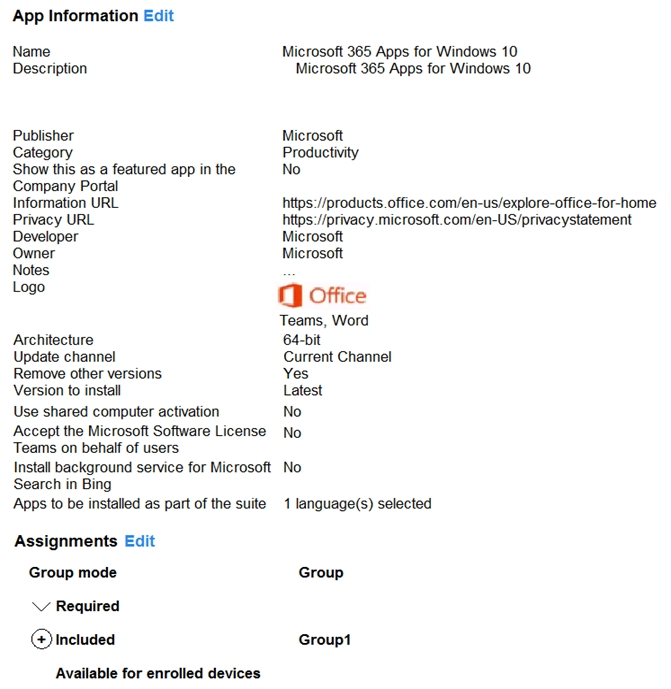
In the Microsoft Endpoint Manager admin center, you create a Microsoft 365 Apps app as shown in the exhibit. (Click the Exhibit tab.)
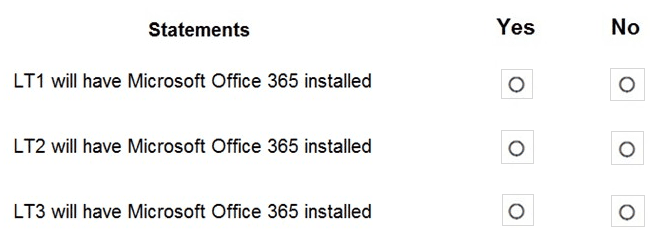
For each of the following statements, select Yes if the statement is true. Otherwise, select No.

NOTE: Each correct selection is worth one point.


Explanation:
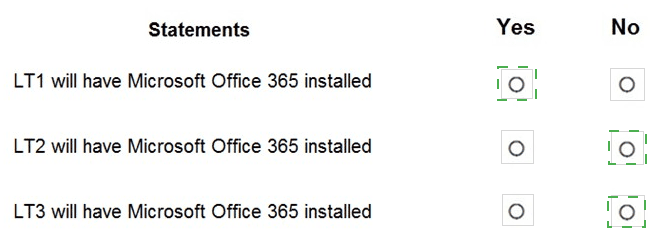
The Microsoft 365 Apps deployment is assigned as Required to a group. The exhibit shows the assignment is configured with "Group mode: Required" but does not specify which group is selected. Assuming the assignment is to Group1 (Company-owned devices) or All devices, the following analysis applies. LT1 is Company-owned Windows, LT2 is Personal Windows, LT3 is macOS.

Correct Option (per statement):

Statement 1: LT1 will have Microsoft Office 365 installed → Yes
LT1 is a Windows 10 Enterprise device with Company ownership. The Microsoft 365 Apps app is for Windows 10 (as shown in the exhibit title "Microsoft 365 Apps for Windows 10"). If the assignment includes Group1 (Company-owned devices) or directly targets LT1's group, Office will install on LT1 as a Required app.

Statement 2: LT2 will have Microsoft Office 365 installed → No
LT2 is a Personal Windows device. The exhibit shows the app is assigned as "Required" but does not specify exclusion of personal devices. However, many MD-102 scenarios assume the assignment is to Group1 (Company-owned) or that personal devices are excluded. If the assignment is specifically to Group1, LT2 (Personal) will not receive the required installation.

Statement 3: LT3 will have Microsoft Office 365 installed → No
LT3 runs macOS Big Sur. The Microsoft 365 Apps app created in the exhibit is specifically for Windows 10 ("Microsoft 365 Apps for Windows 10"). This app package cannot be installed on macOS. Mac devices require separate Microsoft 365 Apps deployment via a different app type (macOS line-of-business or store app). Therefore, LT3 will not receive this installation.

Reference:
Microsoft Learn: Deploy Microsoft 365 Apps with Intune – Windows-only deployment. Dynamic device groups based on ownership. No external links provided.

You have a Microsoft 365 E5 subscription. All devices are enrolled in Microsoft Intune.

You have a device group named Group1 that contains five Windows 11 devices.

You need to ensure that the devices in Group1 automatically receive new Windows 11 builds before the builds are released to the public.

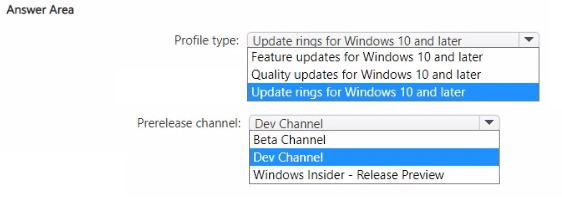
What should you configure in Intune? To answer, select the appropriate options in the answer area.

NOTE: Each correct selection is worth one point.
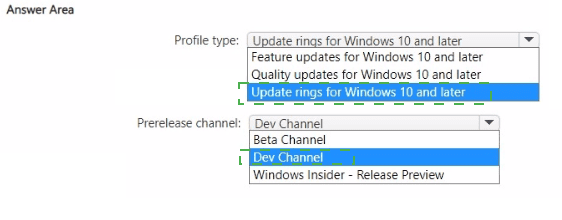


Explanation:
To receive new Windows 11 builds before public release, you need to configure a Windows Insider preview channel. This is done within an Update ring for Windows 10 and later policy, where you set the Prerelease channel to either Dev Channel, Beta Channel, or Release Preview. For most MD-102 scenarios, Beta Channel is the recommended choice for pre-release builds.

Correct Option:

Profile type: Update rings for Windows 10 and later
Update rings control how and when Windows updates are delivered, including Insider Preview settings. Feature updates and Quality updates policies do not include prerelease channel options. Only Update rings allow you to select a prerelease channel (Dev, Beta, or Release Preview) for early build deployment.

Prerelease channel: Beta Channel
The Beta Channel provides pre-release Windows builds that are more reliable than Dev Channel but still ahead of public release. Beta builds are validated by Microsoft and suitable for early testing in production-like environments. Dev Channel builds are less stable. Release Preview channel provides builds very close to public release, not significantly ahead.

Incorrect Option (for Profile type):

Feature updates for Windows 10 and later – Feature updates policies are used to defer or delay feature updates, not to deploy pre-release Insider builds. This policy type does not have prerelease channel settings.

Quality updates for Windows 10 and later – Quality updates policies manage monthly cumulative updates (security and non-security). They do not include options for Insider preview builds.

Incorrect Option (for Prerelease channel - alternative selections):

Dev Channel – While this would provide very early builds, it is not the typical recommendation for most scenarios due to lower stability. Beta Channel is the more common answer for MD-102.

Windows Insider - Release Preview – This channel provides builds that are very close to public release, meaning devices receive builds only shortly before general availability, not significantly "before the builds are released to the public" as required.

Reference:
Microsoft Learn: Intune Update rings for Windows – Configure prerelease channel for Windows Insider builds. No external links provided.

Your network contains an Active Directory domain named contoso.com. The domain contains two computers named Computer! and Computer2 that run Windows 10. On Computer1, you need to run the Invoke-Command cmdlet to execute several PowerShell commands on Computed. What should you do first?

A. On Computed, run the Enable-PSRemoting cmdlet.

B. On Computed, add Computer! to the Remote Management Users group.

C. From Active Directory, configure the Trusted for Delegation setting for the computer account of Computed.

D. On Computer1, run the HcK-PSSession cmdlet.

A.   On Computed, run the Enable-PSRemoting cmdlet.

Explanation:
The Invoke-Command cmdlet uses PowerShell Remoting (WinRM) to execute commands on remote computers. Before Computer1 can remotely execute commands on Computer2, PowerShell Remoting must be enabled on Computer2. The Enable-PSRemoting cmdlet starts the WinRM service, sets the startup type to automatic, and creates necessary firewall rules.

Correct Option:

A. On Computer2, run the Enable-PSRemoting cmdlet
Enable-PSRemoting enables PowerShell Remoting on the local computer (Computer2). This cmdlet configures WinRM, starts the service, and adds firewall rules to allow remote connections. Without this, Computer1 cannot use Invoke-Command to connect to Computer2. This is the prerequisite step for PowerShell Remoting on the target machine.

Incorrect Option:

B. On Computer2, add Computer1 to the Remote Management Users group –
The Remote Management Users group grants access to WMI and WinRM, but PowerShell Remoting must still be enabled first. Additionally, this group is not required for default authentication scenarios.

C. From Active Directory, configure the Trusted for Delegation setting for the computer account of Computer2 –
Trusted for Delegation is used for Kerberos delegation scenarios (e.g., double-hop authentication). It is not required for basic Invoke-Command execution.

D. On Computer1, run the New-PSSession cmdlet –
New-PSSession creates a persistent session to a remote computer but requires PowerShell Remoting to already be enabled on the target (Computer2). Running this on Computer1 first would fail if Computer2 is not configured.

Reference:
Microsoft Learn: Enable-PSRemoting – Enables PowerShell Remoting on the target computer for remote command execution. No external links provided.

You have a Microsoft Entra tenant named contoso.com that contains a group named Contoso Help Desk.

You need to ensure that Contoso Help Desk is added to the local Administrators group whenever a Windows device is joined to contoso.com.

What should you do?

A. Configure the Enterprise State Roaming settings.

B. Assign the Microsoft Entra Joined Device Local Administrator role to Contoso Help Desk.

C. Enable Microsoft Entra Local Administrator Password Solution (LAPS) for contoso.com.

D. Assign the Cloud Device Administrator role to Contoso Help Desk.

B.   Assign the Microsoft Entra Joined Device Local Administrator role to Contoso Help Desk.

Explanation:
When a Windows device is joined to Microsoft Entra ID, you can automatically add groups to the local Administrators group using the Microsoft Entra Joined Device Local Administrator role. Assigning this role to Contoso Help Desk ensures that members of that group are added to the local Administrators group on all Entra joined devices.

Correct Option:

B. Assign the Microsoft Entra Joined Device Local Administrator role to Contoso Help Desk
This built-in role in Microsoft Entra ID is specifically designed to grant local administrator privileges to users or groups on all Microsoft Entra joined devices. When a device joins Entra ID, members of this role are automatically added to the device's local Administrators group. No additional configuration on individual devices is required.

Incorrect Option:

A. Configure the Enterprise State Roaming settings –
Enterprise State Roaming synchronizes user settings (browser favorites, passwords, etc.) across devices. It has no effect on local group membership or administrator privileges.

C. Enable Microsoft Entra Local Administrator Password Solution (LAPS) for contoso.com –
Entra LAPS manages local administrator account passwords (rotation, storage, retrieval). It does not add groups to the local Administrators group.

D. Assign the Cloud Device Administrator role to Contoso Help Desk –
The Cloud Device Administrator role manages devices in Entra ID (enable/disable, delete devices) but does not grant local administrator privileges on the devices themselves.

Reference:
Microsoft Learn: Manage local administrators on Microsoft Entra joined devices – Microsoft Entra Joined Device Local Administrator role. No external links provided.

You have a Windows 10 device named Computer1 enrolled in Microsoft Intune.

You need to configure Computer1 as a public workstation that will run a single customerfacing, full-screen application.

Which configuration profile type template should you use in Microsoft Intune admin center?

A. Shared multi-user device

B. Device restrictions

C. Kiosk

D. Endpoint protection

C.   Kiosk

Explanation:
A public workstation running a single full-screen application is a kiosk mode configuration. Intune provides a dedicated "Kiosk" profile template under Device configuration profiles for Windows 10/11. This template allows you to configure single-app or multi-app kiosk mode, including specifying the application to run in full-screen locked-down mode.

Correct Option:

C. Kiosk
The Kiosk profile template in Intune is specifically designed to lock down a Windows device to run one or more apps in full-screen mode. You can select "Single app, full-screen kiosk," specify the application (e.g., a customer-facing app), and configure user logon type (Auto logon or local user). This meets the requirement for a public workstation.

Incorrect Option:

A. Shared multi-user device –
This template configures Windows 10/11 devices for shared use with Azure AD guest users or using the Shared PC mode. It does not lock the device to a single full-screen application like kiosk mode does.

B. Device restrictions –
Device restrictions control general device features (camera, Bluetooth, app store, etc.) but do not configure kiosk mode or restrict the device to a single full-screen application.

D. Endpoint protection –
Endpoint protection profiles manage Microsoft Defender settings, firewall, BitLocker, and other security features. They are unrelated to configuring a device as a public workstation or kiosk.

Reference:
Microsoft Learn: Configure kiosk mode in Intune – Use the Kiosk profile template for Windows 10/11 devices. No external links provided.

Your company uses Microsoft Intune.

More than 500 Android and iOS devices are enrolled in the Intune tenant.

You plan to deploy new Intune policies. Different policies will apply depending on the version of Android or iOS installed on the device.

You need to ensure that the policies can target the devices based on their version of Android or iOS.

What should you configure first?

A. groups that have dynamic membership rules in Azure AD

B. Device categories in Intune

C. Corporate device identifiers in Intune

D. Device settings in Azure AD

A.   groups that have dynamic membership rules in Azure AD

Explanation:
To target Intune policies based on the operating system version (Android or iOS), you need to create dynamic groups in Azure AD that automatically include devices matching specific OS version criteria. These groups can then be used as assignment targets for Intune policies, ensuring different policies apply based on the version installed.

Correct Option:

A. groups that have dynamic membership rules in Azure AD
Dynamic device groups in Azure AD use membership rules based on device properties, including deviceOSType and deviceOSVersion. For example, you can create a rule like (device.deviceOSType -eq "iOS") and (device.deviceOSVersion -startsWith "15") to target iOS 15 devices. Once created, these groups can be assigned to Intune policies for granular targeting based on OS version.

Incorrect Option:

B. Device categories in Intune –
Device categories are static labels assigned by users during enrollment or manually by administrators. They do not automatically update based on OS version changes and are not dynamic. They cannot target devices based on version without manual intervention.

C. Corporate device identifiers in Intune –
Corporate device identifiers (serial numbers, IMEI) are used to mark devices as corporate-owned. They do not contain OS version information and cannot be used to target policies based on Android or iOS version.

D. Device settings in Azure AD –
Azure AD device settings control global device configuration (e.g., number of devices per user, device join settings). They do not provide a method for targeting policies based on OS version.

Reference:
Microsoft Learn: Dynamic membership rules for devices in Azure AD – Use deviceOSType and deviceOSVersion properties to create groups based on OS version. No external links provided.

You use Microsoft Defender for Endpoint to protect computers that run Windows 10.

You need to assess the differences between the configuration of Microsoft Defender for Endpoint and the Microsoft-recommended configuration baseline.

Which tool should you use?

A. Microsoft Defender for Endpoint Power 81 app

B. Microsoft Secure Score

C. Endpoint Analytics

D. Microsoft 365 Defender portal

B.   Microsoft Secure Score

Explanation:
Microsoft Secure Score (within the Microsoft 365 Defender portal) provides a security posture assessment that compares your configuration against Microsoft-recommended baselines. It shows how your Defender for Endpoint settings align with best practices, identifies gaps, and suggests improvements. Endpoint Analytics focuses on device performance and user experience, not security baseline comparisons.

Correct Option:

B. Microsoft Secure Score
Microsoft Secure Score is a measurement of an organization's security posture, including Defender for Endpoint configurations. It evaluates your current settings against Microsoft-recommended security baselines, assigns a score, and provides actionable recommendations to improve alignment. The Secure Score is accessible from the Microsoft 365 Defender portal and is the correct tool for assessing configuration differences.

Incorrect Option:

A. Microsoft Defender for Endpoint Power BI app –
This app provides customizable reporting and visualization of Defender for Endpoint data (alerts, detections, etc.), but it does not compare configurations against Microsoft-recommended baselines.

C. Endpoint Analytics –
Endpoint Analytics measures device performance, startup times, application reliability, and user experience. It does not assess security configuration alignment with baselines for Defender for Endpoint.

D. Microsoft 365 Defender portal –
The portal is the interface where Secure Score resides, but the portal itself is not the specific tool for baseline comparison. Within the portal, you would use Secure Score. The question asks for the tool, not the portal.

Reference:
Microsoft Learn: Microsoft Secure Score – Assess security configuration against Microsoft recommended baselines for Defender for Endpoint. No external links provided.

You have a Microsoft 365 E5 subscription. The subscription contains devices that are Microsoft Entra joined and enrolled in Microsoft Intune.

You create a user named User1.

You need to ensure that User1 can rotate Bitlocker recovery keys by using Intune.

Solution: From the Microsoft Intune admin center, you assign the Endpoint Security Manager role to User1.

Does this meet the goal?

A. Yes

B. No

A.   Yes

Explanation:
The Endpoint Security Manager role in Intune includes permissions to manage endpoint security configurations, including BitLocker. This role allows a user to perform tasks such as rotating BitLocker recovery keys, viewing compliance status, and managing security policies. Therefore, assigning this role to User1 meets the requirement.

Correct Option:

A. Yes
The Endpoint Security Manager role in Microsoft Intune grants permissions to manage security policies, including disk encryption and BitLocker. Users with this role can view BitLocker recovery keys and initiate key rotation from the Intune admin center (under Devices > device > BitLocker key rotation). This directly meets the requirement for User1.

Incorrect Option:

B. No –
This would be incorrect because the Endpoint Security Manager role does include BitLocker key rotation capabilities. The answer is Yes.

Reference:
Microsoft Learn: Intune built-in roles – Endpoint Security Manager permissions include BitLocker management and key rotation. No external links provided.

Page 5 out of 35 Pages