Topic 3: Contoso Ltd, Case 2


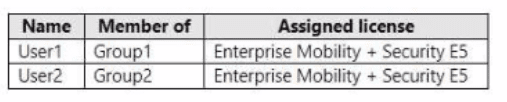
You have an Azure Active Directory Premium Plan 2 subscription that contains the users shown in the following table.


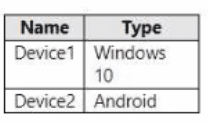
You purchase the devices shown in the following table.


You configure automatic mobile device management (MDM) and mobile application management (MAM) enrollment by using the following settings:

• MDM user scope: Group1

• MAM user scope: Group2

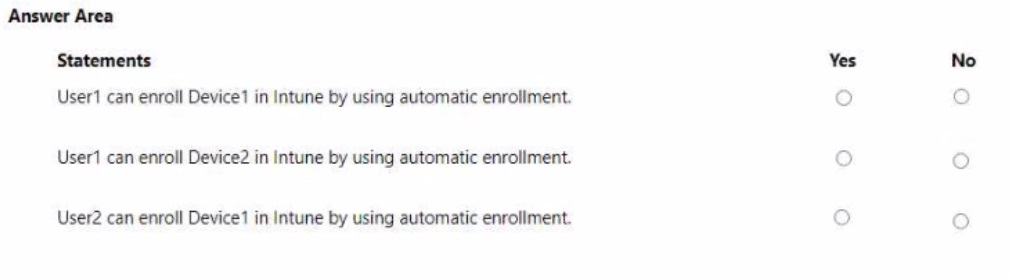
For each of the following statements, select Yes if the statement is true. Otherwise, select No. NOTE: Each correct selection is worth one point.


Explanation:
Automatic MDM enrollment in Intune works only for users in the configured MDM user scope (Group1). Windows devices enrolled via automatic MDM use the "Join to Azure AD + automatic enrollment" method. Android devices do not support automatic MDM enrollment via this scope; they require manual enrollment via Company Portal or Google Zero Touch.

Correct Option (per statement):

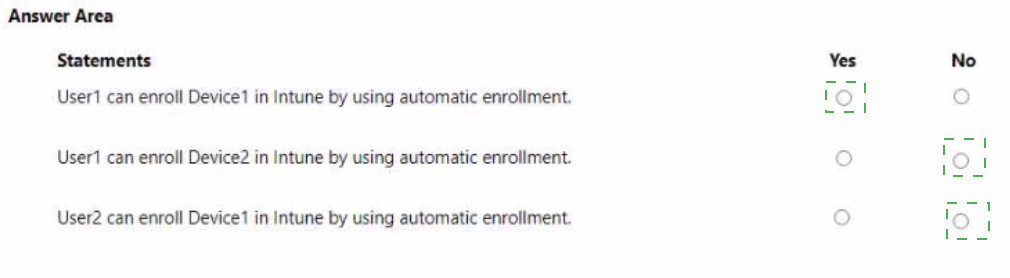
Statement 1: User1 can enroll Device1 in Intune by using automatic enrollment. → Yes
User1 is a member of Group1, which is configured as the MDM user scope. Device1 runs Windows 10, which supports automatic MDM enrollment when the user signs into Azure AD with credentials (e.g., during OOBE or Settings > Accounts > Access work or school). This meets the goal.

Statement 2: User1 can enroll Device2 in Intune by using automatic enrollment. → No
User1 is in Group1 (MDM scope), but automatic MDM enrollment is only supported for Windows devices (and some iOS/macOS via Apple Configurator). Android devices do not support this automatic enrollment method. Device2 (Android) requires manual enrollment via the Company Portal app or other Android enrollment methods.

Statement 3: User2 can enroll Device1 in Intune by using automatic enrollment. → No
User2 is a member of Group2, which is configured as the MAM user scope, not the MDM user scope. Automatic MDM enrollment only applies to users in Group1. User2 is not in Group1, so automatic MDM enrollment for Device1 (Windows) will not trigger. User2 would need to enroll manually.

Reference:
Microsoft Learn: Configure automatic MDM enrollment – Only Windows, iOS, and macOS support automatic enrollment; Android does not. MDM user scope determines which users automatically enroll Windows devices. No external links provided.

You have an Azure AD tenant named contoso.com.

You plan to purchase 25 computers that run Windows 11. You plan to deliver the computers directly to users.

You need to ensure that during the out-of-box experience (OBE), users are prompted to sign in, and then the computers are configured to use Microsoft Intune.

Which two components should you configure? Each correct answer presents part of the solution.

NOTE: Each correct selection is worth one point.

A. a provisioning package

B. automatic enrollment

C. an unattend.xml answer file

D. a Windows Autopilot deployment profile for self-deploying mode

E. a Windows Autopilot deployment profile for user-driven mode

B.   automatic enrollment
E.   a Windows Autopilot deployment profile for user-driven mode

Explanation:
The scenario describes delivering new Windows 11 computers directly to users. During OOBE, users should sign in, and then devices should automatically enroll in Intune. This requires Windows Autopilot user-driven mode (prompts user to sign in) and automatic enrollment configured in Entra ID (to enroll the device into Intune after sign-in).

Correct Option:

B. automatic enrollment
Automatic MDM enrollment must be configured in Microsoft Entra ID (under Mobility > Microsoft Intune). This setting ensures that after a user signs in with their Entra ID credentials during OOBE, the device automatically enrolls in Microsoft Intune. Without this, Autopilot cannot enroll the device.

E. a Windows Autopilot deployment profile for user-driven mode
User-driven mode requires the user to sign in during OOBE, which matches the requirement. The profile is assigned to the devices (via device group or hash upload). During OOBE, the device downloads the Autopilot profile, presents the Entra ID sign-in page, and after authentication, continues with enrollment and configuration.

Incorrect Option:

A. a provisioning package –
Provisioning packages (.ppkg) are for offline or runtime configuration, not for OOBE automation with user sign-in. They do not integrate with Autopilot or automatic enrollment in this scenario.

C. an unattend.xml answer file –
Unattend.xml is used for traditional Windows imaging (Sysprep) and does not support modern Autopilot deployment with user-driven OOBE and Intune enrollment.

D. a Windows Autopilot deployment profile for self-deploying mode –
Self-deploying mode does not prompt the user to sign in during OOBE; it uses a device identity. The requirement explicitly states "users are prompted to sign in," so user-driven mode is required, not self-deploying mode.

Reference:
Microsoft Learn: Windows Autopilot user-driven mode requires automatic MDM enrollment in Entra ID. No external links provided.

You use the Microsoft Deployment Toolkit (MDT) to manage Windows 11 deployments.

From Deployment Workbench, you modify the WinPE settings and add PowerShell support.

You need to generate a new set of WinPE boot image files that contain the updated settings.

What should you do?

A. From the Deployment Shares node, update the deployment share.

B. From the Advanced Configuration node, create new media.

C. From the Packages node, import a new operating system package

D. From the Operating Systems node, import a new operating system.

A.   From the Deployment Shares node, update the deployment share.

Explanation:
In MDT, WinPE boot images are generated from the deployment share settings. After modifying WinPE settings (such as adding PowerShell support), you must update the deployment share to regenerate the boot images (LiteTouchPE_x86.iso, LiteTouchPE_x64.iso, and corresponding WIM files) with the new configurations included.

Correct Option:

A. From the Deployment Shares node, update the deployment share
Right-clicking the deployment share and selecting "Update Deployment Share" regenerates the WinPE boot images based on the current deployment share properties (including WinPE settings, components, drivers, and PowerShell support). This process creates new .iso and .wim files that contain the updated WinPE environment. This is the correct step after any WinPE configuration change.

Incorrect Option:

B. From the Advanced Configuration node, create new media –
Creating new media generates offline media for deployment without a network connection. This is not the correct method for regenerating WinPE boot images after changing WinPE settings.

C. From the Packages node, import a new operating system package –
The Packages node is used to import OS features or updates (e.g., .cab files). This does not regenerate WinPE boot images.

D. From the Operating Systems node, import a new operating system –
Importing an operating system adds OS installation files (e.g., Windows 11 .wim). This does not update or regenerate WinPE boot images.

Reference:
Microsoft Learn: MDT – Update Deployment Share to regenerate WinPE boot images after changing WinPE settings. No external links provided.

You have a Microsoft 365 E5 subscription. The subscription contains 25 computers that run Windows 11 and are enrolled in Microsoft Intune. You need to onboard the devices to Microsoft Defender for Endpoint. What should you create in the Microsoft Intune admin center?

A. an attack surface reduction (ASR) policy

B. a security baseline

C. an endpoint detection and response (EDR) policy

D. an account protection policy

E. an antivirus policy

C.   an endpoint detection and response (EDR) policy

Explanation:
Onboarding devices to Microsoft Defender for Endpoint from Intune requires an Endpoint Detection and Response (EDR) policy. This policy configures the onboarding settings (workspace key, sensor deployment) that allow Windows 11 devices to connect and report to the Defender for Endpoint service, enabling advanced threat detection and response capabilities.

Correct Option:

C. an endpoint detection and response (EDR) policy
In the Microsoft Intune admin center, under Endpoint Security > Endpoint Detection and Response, you create an EDR policy to onboard devices. This policy applies onboarding configuration packages (for devices running Windows 10/11) to Intune-managed devices, enabling them to communicate with Defender for Endpoint and send telemetry data. This is the required method for onboarding.

Incorrect Option:

A. an attack surface reduction (ASR) policy –
ASR policies reduce vulnerabilities (e.g., blocking Office macros), but they do not onboard devices to Defender for Endpoint. ASR is configured after onboarding, not as the onboarding method itself.

B. a security baseline –
Security baselines apply recommended security configurations (e.g., BitLocker, Defender settings) to devices, but they do not perform onboarding to Defender for Endpoint. Onboarding must be done separately via an EDR policy.

D. an account protection policy –
Account protection policies configure Windows Hello, Credential Guard, and other identity-related settings. They are unrelated to onboarding devices to Defender for Endpoint.

E. an antivirus policy –
Antivirus policies manage Microsoft Defender Antivirus settings (e.g., real-time protection, cloud-delivered protection). While related to Defender, these policies do not onboard devices to Defender for Endpoint.

Reference:
Microsoft Learn: Onboard devices to Microsoft Defender for Endpoint using Intune – Create an Endpoint Detection and Response (EDR) policy. No external links provided.

You have a Microsoft 365 E5 subscription that contains a user named User1 and uses Microsoft Intune Suite.

You use Microsoft Intune to manage devices.

You have a device named Device1 that is enrolled in Intune.

You need to ensure that User1 can use Remote Help from the Intune admin center for Device1.

Which three actions should you perform? Each correct answer presents part of the solution.

NOTE: Each correct selection is worth one point.

A. Deploy the Remote Help app to Device1.

B. Assign the Help Desk Operator role to User1.

C. Assign the Intune Administrator role to User1.

D. Assign a Microsoft 365 E5 license to User1.

E. Rerun device onboarding on Device1.

F. Assign the Remote Help add-on license to User1.

A.   Deploy the Remote Help app to Device1.
B.   Assign the Help Desk Operator role to User1.
F.   Assign the Remote Help add-on license to User1.

Explanation:
Remote Help in Intune requires three components: the Remote Help app installed on the device, a user role with Remote Help permissions, and the appropriate license. The Help Desk Operator role includes Remote Help permissions. The Remote Help add-on license (included in Intune Suite) must be assigned to the helper (User1), not the device user.

Correct Option:

A. Deploy the Remote Help app to Device1
The Remote Help app must be installed on the target device (Device1) for the helper to connect. This app is deployed via Intune as a required or available app installation. Without the app on Device1, Remote Help cannot establish a connection.

B. Assign the Help Desk Operator role to User1
The built-in Help Desk Operator role in Intune includes the necessary permissions to initiate Remote Help sessions. This role allows User1 to access the Remote Help feature from the Intune admin center and connect to devices.

F. Assign the Remote Help add-on license to User1
Remote Help requires an additional license (Remote Help add-on or Intune Suite license). This license must be assigned to the helper (User1), not to the device user. A standard Microsoft 365 E5 license alone does not include Remote Help.

Incorrect Option:

C. Assign the Intune Administrator role to User1 –
The Intune Administrator role has broader permissions but is not required. The Help Desk Operator role is sufficient and is a more appropriate choice for Remote Help. Assigning Intune Administrator would work but is not one of the three required actions (the question asks for three actions, and Help Desk Operator is the documented minimum).

D. Assign a Microsoft 365 E5 license to User1 –
User1 already has a Microsoft 365 E5 subscription per the scenario. However, this license alone does not include Remote Help. The Remote Help add-on or Intune Suite license is specifically required, making this action incorrect.

E. Rerun device onboarding on Device1 –
Device onboarding refers to Defender for Endpoint onboarding, which is unrelated to Remote Help. Rerunning onboarding does not enable Remote Help functionality on Device1.

Reference:
Microsoft Learn: Remote Help prerequisites – Requires Remote Help app deployment, Help Desk Operator role (or custom role with Remote Help permission), and Remote Help add-on license (Intune Suite). No external links provided.

You have a Microsoft 365 subscription that includes Microsoft Intune.

You plan to use Windows Autopilot to deploy Windows 11 devices.

You need to meet the following requirements during Autopilot provisioning:

• Display the app and profile configuration progress.

• Block users from using the devices until all apps and profiles are installed

What should you configure?

A. an app configuration policy

B. an app protection policy

C. an enrollment device platform restriction

D. an enrollment status page

D.   an enrollment status page

Explanation:
During Windows Autopilot provisioning, the Enrollment Status Page (ESP) controls the user experience while apps and policies are being installed. It can be configured to show detailed progress and block device access until all required apps and profiles have successfully completed installation, meeting both requirements.

Correct Option:

D. an enrollment status page
The Enrollment Status Page (ESP) is configured in Intune under Devices > Enrollment > Enrollment Status Page. When enabled, it displays the installation progress of required apps and policies during Autopilot. By setting "Block device use until all apps and profiles are installed" to Yes, users cannot access the desktop until provisioning completes, satisfying both requirements.

Incorrect Option:

A. an app configuration policy –
App configuration policies supply settings to mobile apps (e.g., email server addresses), not to control Autopilot provisioning progress or block device usage during setup.

B. an app protection policy –
App protection policies (MAM) protect corporate data within apps on managed or unmanaged devices. They do not control Autopilot device provisioning or display configuration progress.

C. an enrollment device platform restriction –
Platform restrictions block specific device platforms (e.g., Android, iOS) or personally owned devices from enrolling in Intune. They do not affect the Autopilot user experience or app installation progress display.

Reference:
Microsoft Learn: Enrollment Status Page (ESP) for Windows Autopilot – Configure app and profile progress display and block device use until installation completes. No external links provided.

You have a Microsoft 365 subscription that uses Microsoft Defender for Endpoint.

You plan to onboard the following types of devices to Defender for Endpoint:

• macOS

• Linux Server

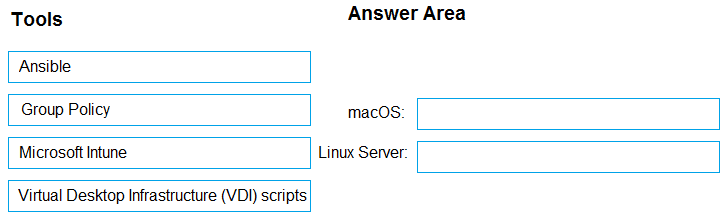
What should you use to onboard each device? To answer, drag the appropriate tools to the correct device types. Each tool may be used once, more than once, or not at all. You may need to drag the split bar between panes or scroll to view content.

NOTE: Each correct selection is worth one point.


Explanation:
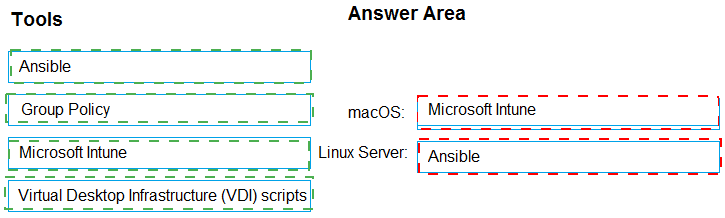
Onboarding macOS and Linux servers to Defender for Endpoint typically uses configuration management or scripting tools. For macOS, Microsoft Intune is the recommended method when devices are enrolled. For Linux servers, Ansible (or other scripting tools) is commonly used, as Linux servers are often managed via configuration management rather than Intune.

Correct Option:

macOS: Microsoft Intune
For macOS devices enrolled in Intune, you can create a Defender for Endpoint onboarding profile under Endpoint Security > Endpoint Detection and Response. Intune pushes the onboarding configuration to managed macOS devices. This is the preferred method for corporate-owned or user-enrolled macOS devices.

Linux Server: Ansible
Linux servers are typically onboarded to Defender for Endpoint using configuration management tools like Ansible, Puppet, or shell scripts. Ansible playbooks can deploy the Defender for Endpoint installation package and apply the onboarding configuration. Microsoft provides Linux onboarding scripts that can be integrated into Ansible workflows.

Incorrect Option (for macOS):

Group Policy – Group Policy is for Windows devices only and does not apply to macOS.

Virtual Desktop Infrastructure (VDI) scripts – VDI scripts are specific to virtual desktop environments (e.g., non-persistent VDI), not standard macOS or Linux server onboarding.

Incorrect Option (for Linux Server):

Microsoft Intune – While Intune can manage some Linux configurations, onboarding Linux servers to Defender for Endpoint via Intune is not the primary or recommended method. Ansible or local scripts are preferred.

Group Policy – Group Policy does not work on Linux.

Virtual Desktop Infrastructure (VDI) scripts – VDI scripts are specific to optimizing Defender for Endpoint in VDI environments (e.g., Citrix, AVD), not for standard Linux server onboarding.

Reference:
Microsoft Learn: Onboard macOS devices to Defender for Endpoint via Intune. Onboard Linux servers using Ansible or other configuration management tools. No external links provided.

You have two computers named Computer1 and Computed that run Windows 10.

Computed has Remote Desktop enabled.

From Computer1, you connect to Computer2 by using Remote Desktop Connection.

You need to ensure that you can access the local drives on Computer1 from within the Remote Desktop session.

What should you do?

A. From Computer 2, configure the Remote Desktop settings.

B. From Windows Defender Firewall on Computer 1, allow Remote Desktop.

C. From Windows Defender Firewall on Computer 2, allow File and Printer Sharing.

D. From Computer1, configure the Remote Desktop Connection settings.

D.   From Computer1, configure the Remote Desktop Connection settings.

Explanation:
Accessing local drives from Computer1 within a Remote Desktop session to Computer2 requires enabling drive redirection on the client side (Computer1). This setting is configured in the Remote Desktop Connection client before initiating the session, not on the remote computer (Computer2) or via firewall rules.

Correct Option:

D. From Computer1, configure the Remote Desktop Connection settings
On Computer1, open Remote Desktop Connection, go to Show Options > Local Resources tab. Under "Local devices and resources," select "Drives" to redirect local drives into the remote session. This allows Computer1's drives (C:, D:, etc.) to appear inside the Remote Desktop session on Computer2. No configuration is needed on Computer2 for drive redirection beyond having Remote Desktop enabled.

Incorrect Option:

A. From Computer2, configure the Remote Desktop settings –
The Remote Desktop settings on Computer2 control who can connect and authentication methods, not drive redirection. Drive redirection is a client-side setting on Computer1, not a host-side setting on Computer2.

B. From Windows Defender Firewall on Computer1, allow Remote Desktop –
Computer1 is the client initiating the connection, not the host. Allowing Remote Desktop in the firewall on Computer1 is irrelevant for outbound connections. The firewall rule applies to inbound connections.

C. From Windows Defender Firewall on Computer2, allow File and Printer Sharing –
File and Printer Sharing is unrelated to Remote Desktop drive redirection. Drive redirection uses the Remote Desktop Protocol channel, not SMB/File Sharing. No firewall change is required on Computer2 beyond the default Remote Desktop rule.

Reference:
Microsoft Learn: Remote Desktop – Redirect local drives to a remote session. Configured in Remote Desktop Connection client under Local Resources. No external links provided.

You have a Microsoft 365 E5 subscription that contains 100 iOS devices enrolled in Microsoft Intune.

You need to ensure that notifications of iOS updates are deferred for 30 days after the updates are released.

What should you create?

A. a device configuration profile based on the Device features template

B. a device configuration profile based on the Device restrictions template

C. an update policy for iOS/iPadOS

D. an iOS app provisioning profile

C.   an update policy for iOS/iPadOS

Explanation:
Deferring iOS software update notifications is managed through an update policy for iOS/iPadOS in Intune. This policy allows you to configure the delay period (in days) for when users see update notifications after Apple releases an update. The setting "Delay visibility of software updates" can be set to 30 days.

Correct Option:

C. an update policy for iOS/iPadOS
In Intune, under Devices > Manage updates > Update policies for iOS/iPadOS, you create a policy that controls software update behavior. The setting "Delay visibility of software updates" allows you to defer update notifications for 0 to 90 days. Setting this to 30 days meets the requirement exactly. This policy applies to supervised iOS devices.

Incorrect Option:

A. a device configuration profile based on the Device features template –
Device features templates configure AirPrint, notification settings, and lock screen messages. They do not control iOS update deferral or notification timing.

B. a device configuration profile based on the Device restrictions template –
Device restrictions control device capabilities (camera, app store, Bluetooth), but iOS update deferral is not configured here. Update settings are separate from restrictions profiles.

D. an iOS app provisioning profile –
App provisioning profiles are used to deploy and trust internal/LOB apps on iOS devices. They have no relation to operating system update deferral.

Reference:
Microsoft Learn: Manage software updates for iOS/iPadOS devices in Intune – Use update policies to delay visibility of software updates. No external links provided.

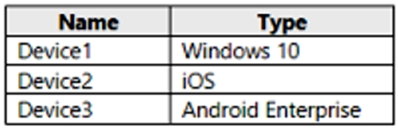
You have a Microsoft 365 subscription that contains the devices shown in the following table.


You need to ensure that only devices running trusted firmware or operating system builds can access network resources.

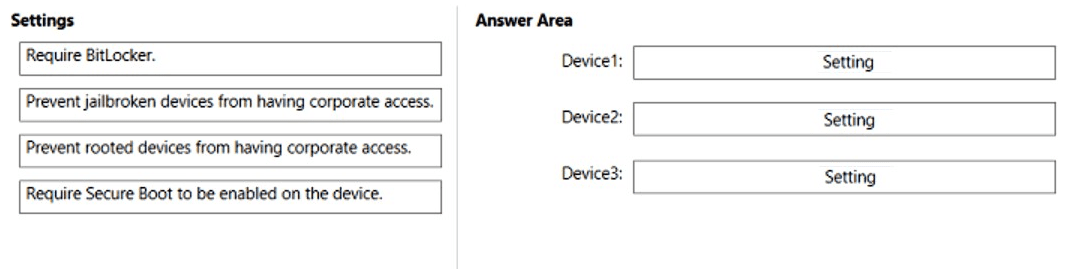
Which compliance policy setting should you configure for each device? To answer, drag the appropriate settings to the correct devices. Each setting may be used once, more than once, or not at all. You may need to drag the split bar between panes or scroll to view content.

NOTE: Each correct selection is worth one point.
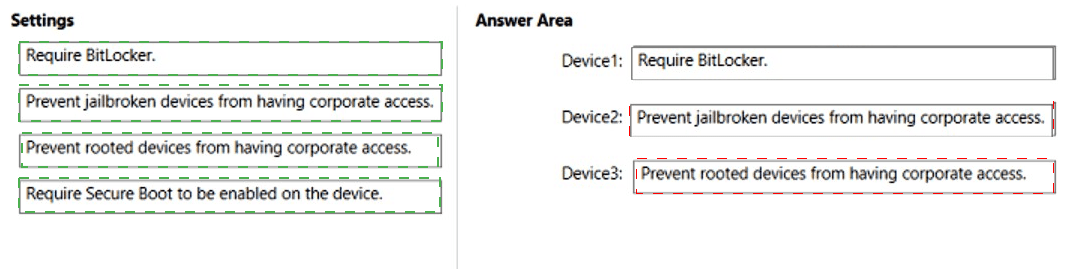


Explanation:
The requirement is to ensure devices run trusted firmware or OS builds. For Windows, Require BitLocker and Require Secure Boot enforce trusted boot integrity. For iOS, Prevent jailbroken devices blocks compromised OS builds. For Android Enterprise, Prevent rooted devices blocks unauthorized OS modifications.

Correct Option:

Device1 (Windows 10): Require Secure Boot to be enabled on the device
Secure Boot ensures that only trusted firmware and bootloaders load during startup. This directly verifies trusted firmware integrity on Windows devices. While BitLocker also provides protection, Secure Boot is specifically about trusted firmware/OS builds. BitLocker focuses on data encryption, not boot integrity.

Device2 (iOS): Prevent jailbroken devices from having corporate access
Jailbreaking bypasses Apple's security controls and allows unsigned code to run, compromising the trusted OS build. The compliance policy setting "Jailbroken devices" (marked as not compliant) blocks access from such devices, ensuring only devices with trusted iOS builds can connect.

Device3 (Android Enterprise): Prevent rooted devices from having corporate access
Rooting gives users administrative access and bypasses Android security features, altering the trusted OS build. The compliance policy setting "Rooted devices" (marked as not compliant) blocks access from rooted Android devices, ensuring only devices with factory OS builds can connect.

Incorrect Option (for Device1):
Require BitLocker – While BitLocker provides encryption for data at rest, it does not verify that the device is running trusted firmware or OS builds. It is a data protection feature, not a boot integrity check. Secure Boot is the correct setting for this requirement.

Prevent jailbroken/rooted devices – These settings do not apply to Windows devices; they are specific to iOS and Android respectively.

Incorrect Option (for Device2):

Require BitLocker / Require Secure Boot – These are Windows-specific settings and do not exist in compliance policies for iOS.

Prevent rooted devices – Rooted applies to Android, not iOS. iOS uses the term "jailbroken."

Incorrect Option (for Device3):

Require BitLocker / Require Secure Boot – These are Windows-specific settings and do not apply to Android Enterprise.

Prevent jailbroken devices – Jailbroken applies to iOS, not Android. Android uses the term "rooted."

Reference:
Microsoft Learn: Intune compliance policies – Secure Boot for Windows, Jailbroken for iOS, Rooted for Android. No external links provided.

Page 3 out of 35 Pages