A company plans to implement Dynamics 365 Finance and Dynamics 365 Supply Chain
Management.
You need to recommend tools to meet the company's reporting requirements.
What should you recommend? To answer, drag the appropriate tools to the correct requirements. Each tool may be used once, more than once, or not at all. You may need to drag the split bar between panes or scroll to view content.
NOTE: Each correct selection is worth one point.

Supporting Explanations
Reporting and Connectivity Tools
Mobile Workspaces:
These are specifically designed to enable users to perform business tasks on mobile devices. A key feature is their ability to support offline data entry and viewing, which syncs once connectivity is restored, making them ideal for intermittent network environments.
SSRS Reports:
In Dynamics 365 Finance and Supply Chain Management, SSRS is the primary engine used for high-volume, formatted business documents. It natively supports integration with the system's batch framework, allowing reports to be generated and distributed on a recurring schedule.
Enterprise Asset Management
In the context of the asset management requirement found in your images:
Track purchase price and acquisition costs: Use Dynamics 365 Finance. This is handled by the Fixed Assets module to manage the financial lifecycle and depreciation of large machinery.
Track maintenance, spare parts, and labor through the lifecycle:
Use Dynamics 365 Supply Chain Management. The Asset Management module in SCM is designed for operational maintenance, work orders, and tracking the physical health of assets.
ERP Modernization Issues
Isolated departments:
Use Dynamics 365 Reporting. This allows for cross-departmental data visibility through aggregated views while keeping underlying data secure.
Outdated/Slow system (no updates):
Use Dynamics 365 cloud deployment. Cloud deployments are managed by Microsoft and receive automatic "One Version" updates to ensure the system is always current.
A company implements Dynamics 365 Supply Chain Management. The company uses Microsoft SharePoint Online for document management. For each of the following statements, select Yes if the statement is true. Otherwise, select No. NOTE: Each correct selection is worth one point.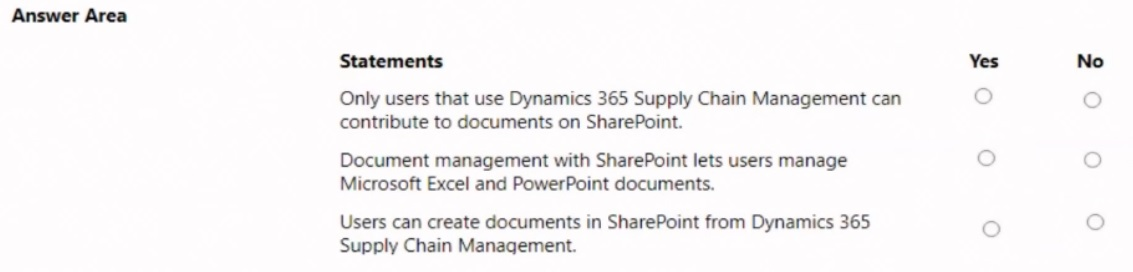
Explanation:
This question tests the integration capabilities between Dynamics 365 Supply Chain Management (SCM) and SharePoint Online for document management, focusing on access, file types, and creation.
Correct Option Explanations:
Statement 2:
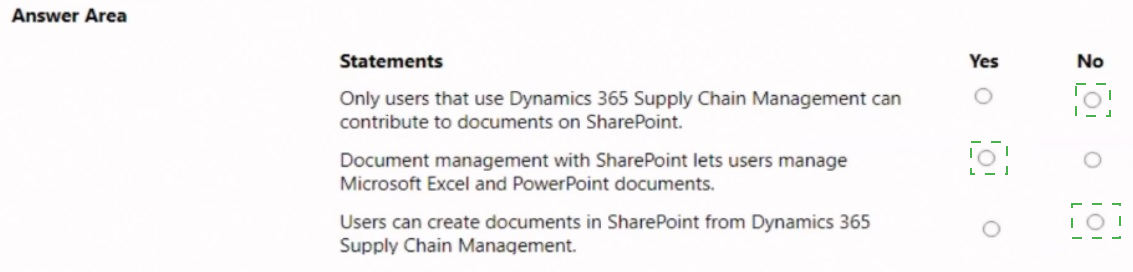
Yes. Manage Excel and PowerPoint documents. When SharePoint is configured as the document storage provider, the Document management framework in SCM can handle various file types, including Microsoft Office files like Excel workbooks and PowerPoint presentations, which can be attached to records.
Statement 3:
Yes. Create documents in SharePoint from SCM. Users can create new Office documents (like Word, Excel) directly from the Attach button in SCM. The system opens the appropriate Office Online application (e.g., Excel Online) to create the document, which is then saved directly to the linked SharePoint location.
Incorrect Option Explanation:
Statement 1:
No. Only SCM users can contribute? This is false. SharePoint permissions are separate. While SCM users can attach and access documents, any user with appropriate SharePoint permissions (e.g., a vendor, a partner, or an employee without an SCM license) can view, edit, or contribute to documents stored in the SharePoint library directly through SharePoint. Access is not restricted solely to SCM users.
Reference:
Microsoft Learn - "Document management overview" and "Configure document management." The documentation explains that the integration supports multiple file types (Office files, images, PDFs) and that users can create and edit documents directly from finance and operations apps, storing them in SharePoint. It also notes that SharePoint manages its own security independently.
A company implements Dynamics 365 Finance.
You need to recommend features that the company can use for integrated reporting scenarios.
Which feature should you recommend? To answer, drag the appropriate features to the correct scenarios. Each feature may be used once, more than once, or not at all. You may need to drag the split bar between panes or scroll to view content.
NOTE: Each correct selection is worth one point.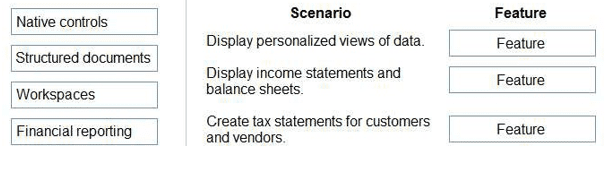
Explanation:
This question requires matching the correct reporting or display feature in Dynamics 365 Finance to its described scenario. It distinguishes between interactive analytical views, formal financial statements, and regulatory tax documents.
Why These Pairings Are Correct:
Scenario:
Display personalized views of data.
Feature:
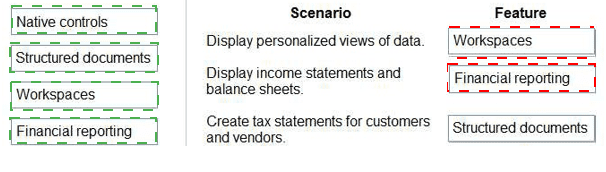
Workspaces. Workspaces are role-based home pages that contain tiles, links, and embedded Power BI reports. Users can personalize these workspaces to display the data and KPIs most relevant to them, providing personalized, interactive views.
Scenario:
Display income statements and balance sheets.
Feature:
Financial reporting. Financial reporting (formerly Management Reporter) is the dedicated tool for designing, generating, and distributing formal financial statements like the Income Statement (P&L) and Balance Sheet. It pulls data directly from the general ledger with account/dimension precision.
Scenario:
Create tax statements for customers and vendors.
Feature:
Structured documents. This refers to tools like Business documents (SSRS reports) and Electronic reporting (ER). Tax statements (like 1099s for vendors or tax invoices for customers) are structured documents with specific legal formats. They are typically generated using SSRS report layouts or configured using the Electronic reporting tool for electronic submissions.
Reference:
Microsoft Learn - "Introduction to analytics and reporting in finance and operations."
Workspaces are described as personalized, role-based entry points with visual analytics.
Financial reporting is highlighted as the tool for traditional financial statements.
Structured documents (like SSRS reports) are used for operational documents and regulatory filings, including tax forms.
A company plans to implement Dynamics 365 Project Operations.
Instructions: For each of the following statements, select Yes if the statement is true.
Otherwise, select No. NOTE: Each correct selection is worth one point.
Hot Area: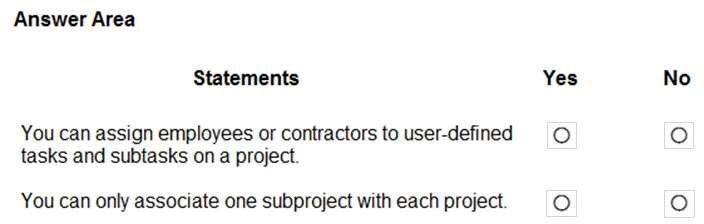
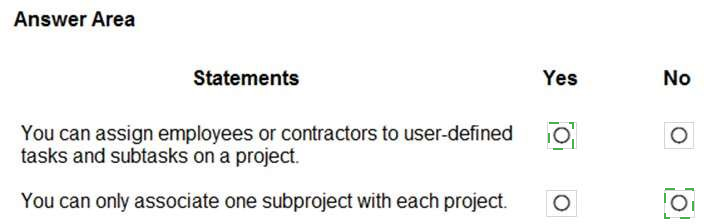
Explanation:
This question tests two specific project management capabilities in Dynamics 365 Project Operations: resource assignment flexibility and the structure of project hierarchies.
Correct Option Explanation:
Statement 1:
Yes. Assign employees/contractors to tasks/subtasks. This is a core project planning feature. In the Project planning (WBS - Work Breakdown Structure), you can create user-defined tasks and subtasks. You can then assign resources (both internal employees and external contractors/vendors) to those specific tasks for scheduling and cost tracking.
Incorrect Option Explanation:
Statement 2:
No. You can associate multiple subprojects. This statement is false. A project can have a multi-level hierarchical structure. You can create a parent project and then associate multiple child projects (subprojects) under it. This allows for complex program management where a master project contains several related subprojects.
Reference:
Microsoft Learn - "Project planning and tracking" and "Project hierarchies" in Dynamics 365 Project Operations documentation. The documentation confirms the ability to assign resources to tasks and the support for project hierarchies with parent-child relationships.
A company plans to implement Dynamics 365 Human Resources.
Instructions: For each of the following statements, select Yes if the statement is true.
Otherwise, select No.
NOTE: Each correct selection is worth one point.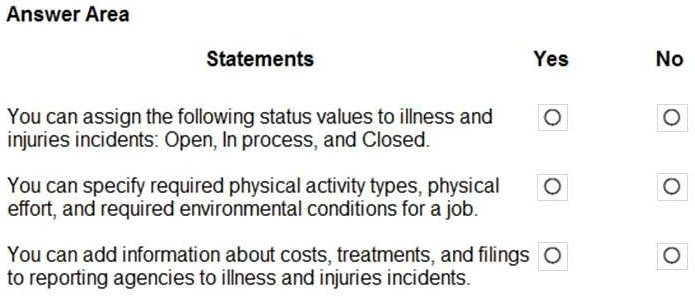
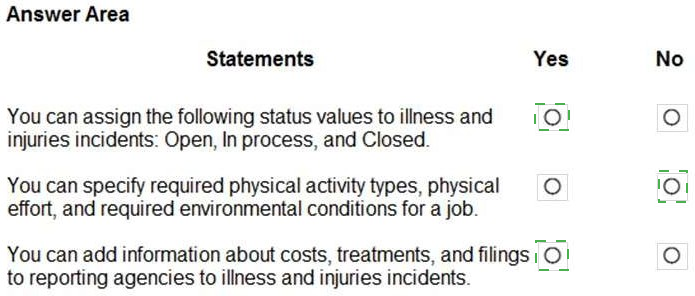
Explanation:
This question tests knowledge of specific functionalities within the Health and safety and Compensation management areas of Dynamics 365 Human Resources. It covers incident management, job analysis, and incident cost tracking.
Why All Statements Are True:
Statement 1:
Incident status values. In the Health and safety module, illness and injury case records have a lifecycle that can be tracked using standard status values like Open, In process, and Closed, similar to case management in other systems.
Statement 2:
Job requirements (physical activity, environment). This is part of the Job analysis functionality within Compensation management. When defining a job, you can detail the job requirements, which include physical demands (activity types, effort levels) and environmental working conditions. This is used for compliance, job postings, and compensation planning.
Statement 3:
Cost, treatment, and filing info for incidents. The Health and safety module allows you to track comprehensive details for an incident. This includes associated costs (medical, lost time), treatments administered, and records of filings made to external reporting agencies (like OSHA), supporting regulatory compliance and incident analysis.
Reference:
Microsoft Learn documentation for Health and safety management and Compensation and benefits management in Dynamics 365 Human Resources. These modules are designed to handle occupational health incidents and detailed job analysis, including the features described.
A company uses Dynamics 36S Finance.
For each of the following statements, select Yes if the statement is true. Otherwise, select No.
NOTE: Each correct selection is worth one point.

Explanation:
This question covers three distinct areas in Dynamics 365 Finance: the chart of accounts structure, project time/expense capabilities, and budget data management.
Correct Option Explanations:
Statement 1:
Yes. Account segments. This is true. Account segments refer to the structure of the main account number itself. In D365 Finance, you can define an account number format that includes segments (e.g., Division-Segment-Account). These segments can represent financial dimensions that are part of the main account structure (called a segmented entry control), allowing for a rich chart of accounts.
Statement 3:
Yes. Budget entries from Excel. This is a standard data management feature. Using the Data management workspace, you can import data from an Excel/CSV file. Budget register entries have a corresponding data entity, so you can create a data project, map your Excel file to the budget entity, and import budget amounts directly.
Incorrect Option Explanation:
Statement 2:
No. Project Operations is NOT required for timesheets/expenses against a project. This is false. The Project management and accounting (PMA) module is a core part of Dynamics 365 Finance. It allows employees to enter timesheets and expenses directly against projects. Dynamics 365 Project Operations is a separate, more advanced application for project-centric businesses that includes this functionality, but it is not a prerequisite; the capability exists natively within Finance.
Reference:
Statement 1: Microsoft Learn - "Plan your chart of accounts" discusses segmented entry controls and account structures.
Statement 2: Microsoft Learn - "Project management and accounting overview" shows that time and expense entry is a core feature of the PMA module in Finance.
Statement 3: Microsoft Learn - "Data management overview" and "Budget register entry entity" confirm you can import budget data via data entities.
A company wants to understand the self-service capabilities of Dynamics 365 Human Resources. Instructions: For each of the following statements, select Yes if the statement is true. Otherwise, select No.
NOTE: Each correct selection is worth one point.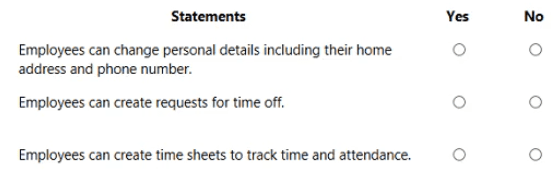
Explanation:
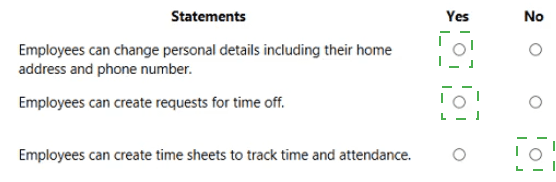
This question assesses the core self-service capabilities available to employees (not managers or HR admins) through the Employee self-service workspace in Dynamics 365 Human Resources.
Why All Statements Are True:
Personal details:
The Employee self-service workspace allows employees to view and update their personal information, such as home address, phone numbers, and emergency contacts, ensuring their records are current.
Time off requests:
A primary function of self-service is Leave and absence management. Employees can submit new requests for vacation, sick leave, or other approved absence types through the workspace.
Time sheets:
The workspace provides access to time entry functionality. Employees can create and submit time sheets to record their work hours for payroll, project tracking, or attendance purposes, depending on the company's configuration.
Reference:
Microsoft Learn - "Employee self-service overview" in Dynamics 365 Human Resources. The documentation lists these exact capabilities: employees can maintain personal information, request time off, and register time (via timesheets or clock in/out).
A company plans to manage inventory in Dynamics 365 Supply Chain Management.
You need to configure the system for tracking inventory.
Select the answer that correctly completes the sentence.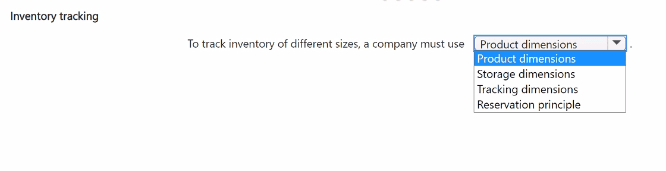
Explanation:
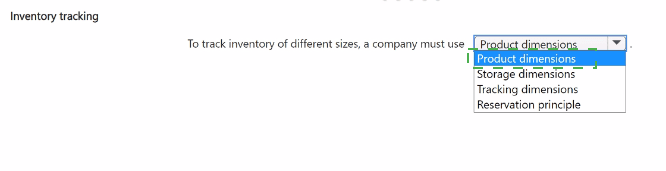
This question asks for the correct dimension type to use for tracking inventory based on different sizes. This refers to inherent characteristics of the product that define its variants (like Size, Color, Style), which are used to differentiate one stock-keeping unit (SKU) from another within the same product family.
Correct Option:
Product dimensions.
This is the precise answer. Product dimensions are attributes that define the variants of a product. The standard product dimensions are Size, Color, Style, and Configuration. To track inventory for "different sizes," you must enable and use the Size product dimension. This allows you to have separate inventory records for, e.g., Shirt-Small, Shirt-Medium, and Shirt-Large.
Why the Other Options Are Incorrect:
Storage dimensions:
These define where inventory is physically stored (Site, Warehouse, Location, Pallet). They are about location, not product characteristics like size.
Tracking dimensions:
These are used to track individual items or batches (Batch number, Serial number) for traceability, not for defining product variants like size.
Reservation principle:
This is a policy that determines how inventory is reserved (e.g., FIFO, FEFO) or whether it can be reserved at all. It is not a dimension for tracking product variants.
Reference:
Microsoft Learn - "Product dimensions." The documentation explains that product dimensions (Size, Color, Style, Configuration) are used to create product variants and track inventory for each distinct variant.
A company plans to implement Dynamics 365 Project Operations.
Instructions: For each of the following statements, select Yes if the statement is true.
Otherwise, select No.
NOTE: Each correct selection is worth one point.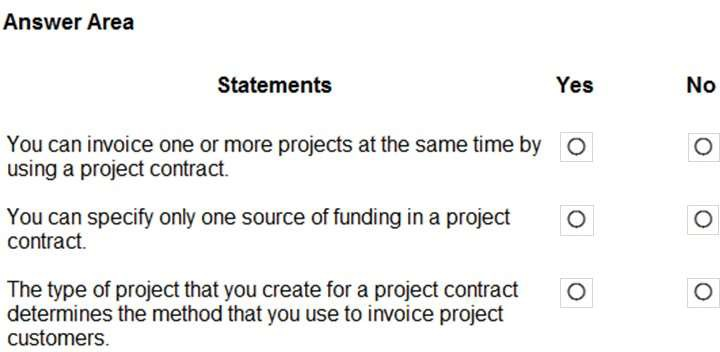
Explanation:
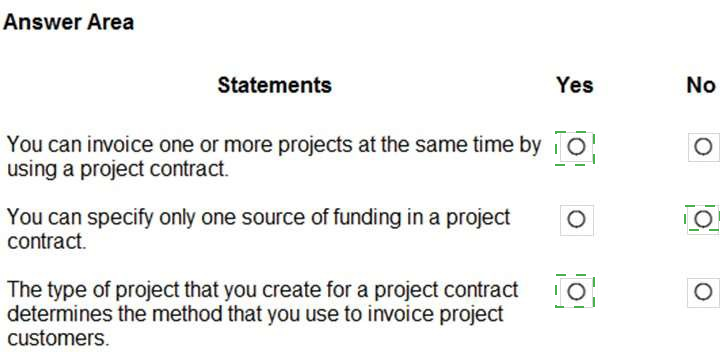
This question tests specific functionalities related to project contracts and invoicing in Dynamics 365 Project Operations. It covers billing consolidation, funding sources, and the impact of project type.
Correct Option Explanations:
Statement 1:
Yes. Invoice multiple projects under one contract. A project contract (or sales agreement) can be linked to multiple projects. When you run the invoicing process, you can select and bill for time, expenses, and fees from all those related projects in a single invoice, consolidating billing for the customer.
Statement 3:
Yes. Project type determines invoicing method. This is fundamental. The Project type (e.g., Time and material, Fixed price) dictates the billing rules and invoicing method. For example, Time and material projects invoice based on submitted time/expenses, while Fixed price projects invoice based on milestone completion or a billing schedule.
Incorrect Option Explanation:
Statement 2:
No. You can specify multiple funding sources. This is false. A project contract (especially for complex projects) can have multiple funding sources (or funding limits). This allows you to split the contract value or invoice amounts across different internal budgets, departments, or even different customer accounts, providing flexibility in financial tracking and billing.
Reference:
Microsoft Learn - "Project contracts and funding" and "Project types in Dynamics 365 Project Operations."
The documentation explains that project contracts can fund multiple projects and that you can set up multiple funding sources within a contract.
It details how the project type (Time and material, Fixed price) controls the invoicing methodology.
| Page 3 out of 15 Pages |