Free Microsoft MB-500 Practice Test Questions MCQs
Stop wondering if you're ready. Our Microsoft MB-500 practice test is designed to identify your exact knowledge gaps. Validate your skills with Microsoft Dynamics 365: Finance and Operations Apps questions that mirror the real exam's format and difficulty. Build a personalized study plan based on your free MB-500 exam questions mcqs performance, focusing your effort where it matters most.
Targeted practice like this helps candidates feel significantly more prepared for Microsoft Dynamics 365: Finance and Operations Apps exam day.
2610+ already prepared
Updated On : 12-Oct-202661 Questions
Microsoft Dynamics 365: Finance and Operations Apps
4.9/5.0
Topic 5: Misc Questions
You are a Dynamics 365 Finance developer.
A long-running process times out in the system.
You need to implement the asynchronous framework to resolve this issue.
Which class runAsync method should you use for each use case? To answer, drag the
appropriate classes to the correct use cases. Each class may be used once, more than
once, or not at all. You may need to drag the split bar between panes or scroll to view
content.
NOTE: Each correct selection is worth one point.


Use case 1: The process is run outside the client.
Answer: Global
Explanation:
The Global class provides the runAsync method which is used to execute long-running processes on the server side, outside the client. When you need to ensure that a process continues running even if the user closes their browser or navigates away, Global.runAsync is the appropriate choice as it executes the operation asynchronously on the server tier.
Use case 2: Display a message when the process is completed without a page refresh.
Answer: FormRun
Explanation:
The FormRun class provides the runAsync method that maintains a connection to the client form. When the asynchronous process completes, it can display messages or update the form interface without requiring a full page refresh. This is achieved through callbacks that can interact with the form's UI elements directly.
Use case 3: The page must be refreshed for the message to be displayed.
Answer: Global
Explanation:
When using Global.runAsync, the process runs completely on the server without maintaining a persistent client connection. Since there is no callback mechanism to update the UI directly, any completion messages would require the user to refresh the page to see the updated status or results of the asynchronous operation.
Reference:
Microsoft Learn: Asynchronous operations in X++
Microsoft Learn: Global.runAsync method
Microsoft Learn: FormRun.runAsync method
You need to map the Dynamics 365 Finance components into the standard models.
Which component belongs to which model? To answer, drag the appropriate models to the
correct components. Each model may be used once, more than once, or not at all. You
may need to drag the split bar between panes or scroll to view content.
NOTE: Each correct selection is worth one point.
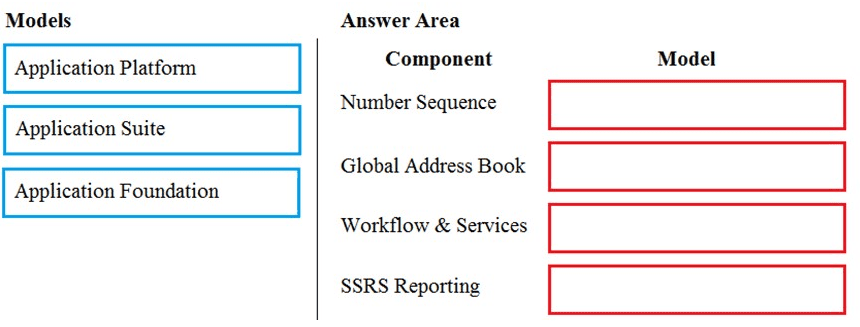
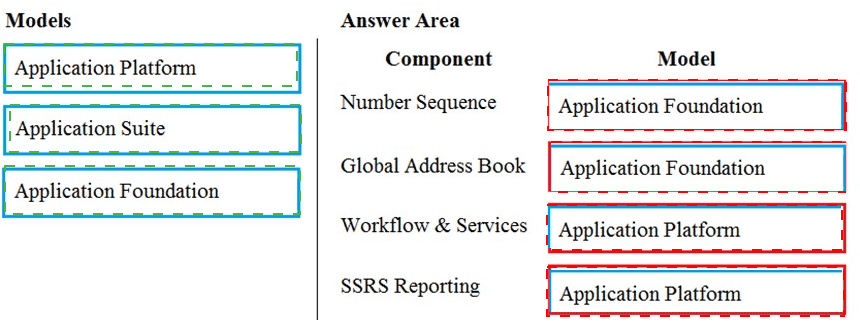
Component: Number Sequence
Model: Application Foundation
Explanation:
Number sequences are fundamental framework components that provide unique identifiers for records across the application. They reside in the Application Foundation model because they are a core system capability used by multiple modules throughout the application suite.
Component: Global Address Book
Model: Application Foundation
Explanation:
The Global Address Book (GAB) is a foundational data management component that stores party information (customers, vendors, contacts, etc.) and is shared across all modules. It is located in the Application Foundation model as it provides the base party framework that other models depend upon.
Component: Workflow & Services
Model: Application Platform
Explanation:
The workflow system and service framework are part of the core application infrastructure. They belong to the Application Platform model, which contains the system-level frameworks, runtime components, and development tools that enable business logic execution and integrations.
Component: SSRS Reporting
Model: Application Platform
Explanation:
SQL Server Reporting Services (SSRS) integration and the reporting framework are platform-level capabilities. They are part of the Application Platform model, which provides the underlying infrastructure for generating and rendering reports across all application modules.
Reference:
Microsoft Learn: Application models in Dynamics 365 Finance and Operations
Microsoft Learn: Model split and layering architecture
You are a Dynamics 365 Finance developer. You have the following Extended Data Types
(EDTs):

You plan to modify the EDT properties by using an extension.
You need to determine which operations can be performed.
Which operation is possible?
A. Create an extension for AccountBase and decrease the field size.
B. Create an extension for AccountId and increase the field size.
C. Create a derived EDT for AccountId and decrease the field size.
D. Create an extension for AccountBase and increase the field size.
Explanation:
In Dynamics 365 Finance and Operations, when extending Extended Data Types (EDTs) using extensions, there are specific limitations. You cannot decrease the field size of an EDT or its extension because this could break existing functionality where data might exceed the new limit. However, you can increase the field size of a derived EDT through an extension. This maintains backward compatibility while allowing more flexibility.
Correct Option:
B. Create an extension for AccountId and increase the field size.
This is the correct operation. AccountId is a derived EDT (from AccountBase), and you can create an extension for it to increase the field size. Increasing the field size through an extension is allowed because it does not break existing data or functionality—it only expands capacity. This is a common customization requirement when business needs demand longer identifier values.
Incorrect Option:
A. Create an extension for AccountBase and decrease the field size.
This operation is not possible. You cannot decrease the field size of an EDT through an extension. Reducing field size could cause data loss or truncation errors if existing records contain values longer than the new limit. Microsoft enforces this restriction to maintain data integrity and backward compatibility.
C. Create a derived EDT for AccountId and decrease the field size.
This operation is not possible. While you can create derived EDTs, decreasing the field size of a derived EDT is not allowed for the same data integrity reasons. Once an EDT exists in the system with a certain field size, you cannot create a version with a smaller size, whether through derivation or extension.
D. Create an extension for AccountBase and increase the field size.
This operation is not possible for the root EDT. AccountBase is the root EDT, and increasing its field size would affect all derived EDTs (like AccountId) that inherit from it. While increasing field size is generally allowed, doing so at the root level impacts too many dependent elements and could have widespread consequences. Customizations should typically target the specific derived EDT that needs the change.
Reference:
Microsoft Learn: Extend Extended Data Types (EDTs)
Microsoft Learn: EDT extensibility limitations
You are developing a Power Bl report.
The report must show the number of past due invoices in near real time.
You need to embed the report in the Analytics tab of a Vendor Payments workspace.
What should you use? To answer, select the appropriate options in the answer area.
NOTE: Each correct selection is worth one point.
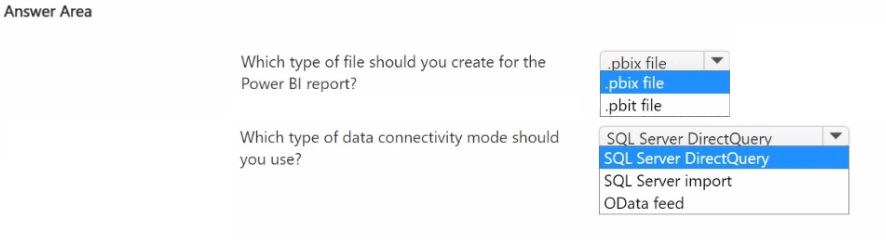
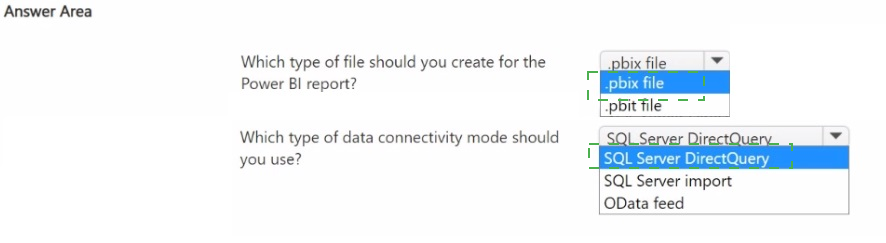
Scenario Analysis:
The requirement is to show the number of past due invoices in near real time within a Vendor Payments workspace. Near real-time data requires a direct connection to the data source rather than importing data. Additionally, to embed a Power BI report in a Dynamics 365 Finance workspace, you need a template file that defines the report structure without containing the actual data.
Question 1: Which type of file should you create for the Power BI report?
Answer: .pbit file (Power BI Template file)
Explanation:
A .pbit file (Power BI Template) contains the report structure, layout, and queries but does not include the actual data. This is the required file format when embedding Power BI reports in Dynamics 365 Finance and Operations workspaces. The template connects to the data source at runtime, ensuring that users see current data based on their access permissions.
Incorrect Options:
pbix file / .pbix file: These contain both the report structure and the actual data. If you import data into a .pbix file, it becomes static and cannot show near real-time information. Additionally, .pbix files with imported data are not suitable for embedded analytics in Finance and Operations.
Question 2: Which type of data connectivity mode should you use?
Answer: OData feed
Explanation:
OData is the recommended data connectivity option for near real-time reporting in Dynamics 365 Finance and Operations. OData endpoints expose entity data that can be queried directly by Power BI. This provides live access to the current state of past due invoices without requiring data import, satisfying the near real-time requirement.
Incorrect Options:
SQL Server DirectQuery: While DirectQuery provides real-time access, it is typically used for SQL Server data sources. For Finance and Operations, the preferred and supported method for live data access is through OData endpoints, especially for embedded analytics in workspaces.
SQL Server import: Import mode loads data into the Power BI model, creating a snapshot that becomes stale over time. This does not meet the near real-time requirement because the data would only refresh on a scheduled basis, not continuously.
Reference:
Microsoft Learn: Embed Power BI in workspaces
Microsoft Learn: OData endpoints in Finance and Operations
Microsoft Learn: Power BI integration with Finance and Operations
Note: This question is part of a series of questions that present the same scenario.
Each question in the series contains a unique solution that might meet the stated
goals. Some question sets might have more than one correct solution, while others
might not have a correct solution.
After you answer a question in this section, you will NOT be able to return to it. As a
result, these questions will not appear in the review screen.
You must extend the class SalesLineType and add a new method that returns the day of
week for the system’s current date as an integer value.
You need to create a class that extends SalesLineType and adds the new method.
Solution: You create the following code:
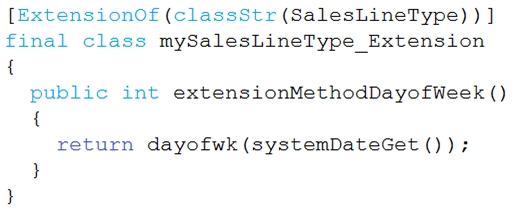
Does the solution meet the goal?
A. Yes
B. No
Explanation:
The goal is to extend the SalesLineType class and add a new method that returns the day of the week as an integer. The provided code shows an extension class with the correct ExtensionOf attribute. However, the method extensionMethodDayOfWeek() is syntactically correct but it does not follow the standard naming convention for extension methods, nor does it properly implement the requirement.
Correct Option:
B. No
This is correct because while the class structure is right, the method name is incorrect. In X++ extension classes, new methods must be decorated with an attribute or follow a specific naming convention to be accessible. The method should be named with the class name prefix pattern like SalesLineTypeExtension.DayOfWeek(). Additionally, the method should be static or properly implemented to be called from the extended class context. The given method returns the day of week but cannot be called as SalesLineType.extensionMethodDayOfWeek() from outside.
Incorrect Option:
A. Yes
This option is incorrect. Selecting "Yes" would imply that the code meets all requirements. However, the method is not properly exposed as an extension method. In extension classes, new methods are typically defined as static methods that accept an instance of the extended class as the first parameter. The current implementation is missing this pattern and also has an unconventional method name that does not follow standard extension naming conventions.
Reference:
Microsoft Learn: Extension class method naming
Microsoft Learn: Adding methods through extensions
You are a Dynamics 365 Finance developer. You have two tables as shown in the following
exhibit:

You need to configure Table1 to ensure that records cannot be deleted from Table1 if
Table2 contains related records.
Which value should you use for the OnDelete property?
A. None
B. Cascade
C. Cascade + Restricted
D. Restricted
Explanation:
The exhibit shows a 1:n (one-to-many) relationship where Table1 is the primary table (one side) and Table2 is the related table (many side). The requirement is to prevent deletion of records from Table1 if any related records exist in Table2. This is a referential integrity constraint that must be configured through the OnDelete property of the relation on Table1.
Correct Option:
D. Restricted
This is the correct value. When you set the OnDelete property to Restricted, the system prevents the deletion of a parent record (Table1) if any child records (Table2) exist. This enforces referential integrity exactly as required - users cannot delete a record from Table1 when Table2 has related records, and an error message will be displayed.
Incorrect Option:
A. None
This value provides no referential integrity enforcement. With None selected, users could delete records from Table1 even if related records exist in Table2, leaving orphaned records. This does not meet the requirement to prevent deletion when related records exist.
B. Cascade
This value automatically deletes all related records in Table2 when a record in Table1 is deleted. While this maintains referential integrity by removing child records, it does not prevent deletion - it actually enables deletion by cascading it. This contradicts the requirement to prevent deletion.
C. Cascade + Restricted
This is not a valid option for the OnDelete property. The available values are None, Cascade, Restricted, and Cascade+Delete. Cascade+Delete is a different option that combines cascading behavior with deletion actions, but Cascade + Restricted is not a standard value in the property dropdown.
Reference:
Microsoft Learn: Table relation properties (OnDelete)
Microsoft Learn: Referential integrity in tables
| Page 1 out of 7 Pages |
Microsoft Dynamics 365: Finance and Operations Apps Practice Exam Questions
These MB-500 practice questions with explanations are designed to help developers master customization and development in Dynamics 365 Finance and Operations. The questions focus on X++, integrations, extensions, security, and performance optimization. Each explanation clearly describes the reasoning behind the answer, helping candidates understand development concepts more effectively. This approach enhances practical knowledge and prepares learners for real-world development tasks. By practicing these questions, candidates can improve coding skills, reinforce technical concepts, and confidently approach the certification exam.MB-500 - Microsoft Dynamics 365: Finance and Operations Apps Developer Official Exam Blueprint and Weight:
1. Plan Architecture and Solution Design
Official Exam Weight: 10-15%
Subtopics: Identify solution requirements, evaluate extensibility options, design application architecture, plan integrations with external systems, identify data migration requirements, recommend development approaches, design security and compliance solutions, evaluate performance and scalability requirements, select appropriate development tools and frameworks, plan application lifecycle management (ALM), identify reporting and analytics requirements, design deployment strategies for Dynamics 365 Finance and Operations applications.
2. Develop Finance and Operations Solutions
Official Exam Weight: 35-40%
Subtopics: Create and customize tables fields and relationships, develop forms and user interfaces, create classes and methods using X++, implement business logic and validations, create and manage enums and extended data types (EDTs), implement event handlers and delegates, customize workflows and business processes, create batch jobs and scheduled tasks, develop services and APIs, implement data entities, create custom reports and inquiries, manage labels and localization, optimize code performance and maintainability.
3. Integrate Finance and Operations Apps with Other Systems and Services
Official Exam Weight: 15-20%
Subtopics: Create and consume REST and SOAP services, implement custom services, configure OData endpoints, integrate with Microsoft Power Platform, develop custom connectors, implement business events, configure dual-write integrations, integrate with Azure services, use Data Management Framework (DMF), implement asynchronous integrations, secure integrations using authentication and authorization methods, troubleshoot integration issues, monitor integration performance and reliability.
4. Test and Maintain Finance and Operations Apps
Official Exam Weight: 20-25%
Subtopics: Create and execute unit tests, implement automated testing strategies, use Task Recorder for testing, debug X++ code and application components, analyze performance issues, troubleshoot application errors, validate customizations and extensions, monitor application health and diagnostics, implement code quality best practices, manage application updates and releases, perform regression testing, document technical solutions and maintenance procedures.
5. Implement Reporting and Data Management Solutions
Official Exam Weight: 10-15%
Subtopics: Create SQL Server Reporting Services (SSRS) reports, develop report data providers and controllers, configure report security, implement electronic reporting (ER), create and manage data entities, perform data import and export operations, configure Data Management Framework (DMF), manage data migrations, optimize report performance, implement business intelligence and analytics solutions, troubleshoot reporting and data management issues, maintain data integrity and governance.
| Domain | Title | Exam Weight |
|---|---|---|
| 1 | Plan Architecture and Solution Design | 10-15% |
| 2 | Develop Finance and Operations Solutions | 35-40% |
| 3 | Integrate Finance and Operations Apps with Other Systems and Services | 15-20% |
| 4 | Test and Maintain Finance and Operations Apps | 20-25% |
| 5 | Implement Reporting and Data Management Solutions | 10-15% |
See What People Are Saying
Development in Finance and Operations requires X++ knowledge and deep platform understanding. The MB-500 exam tests both. MSmcqs.com provided practice questions that covered extensions, data entities, and integrations perfectly. I felt prepared for every coding scenario and passed with confidence.
Ryan Mitchell, Dynamics 365 Developer | Toronto, Canada