Topic 5: Trey Research

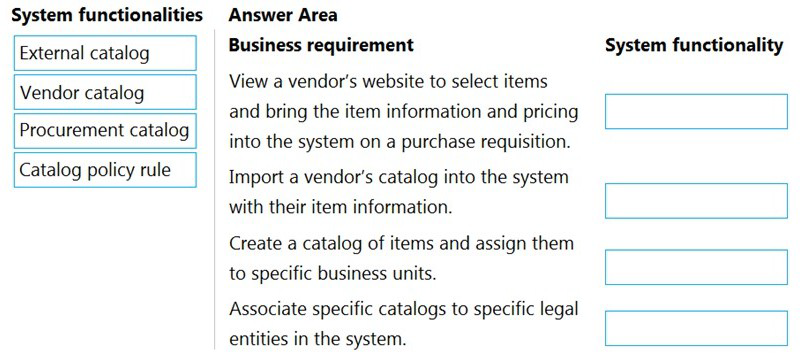
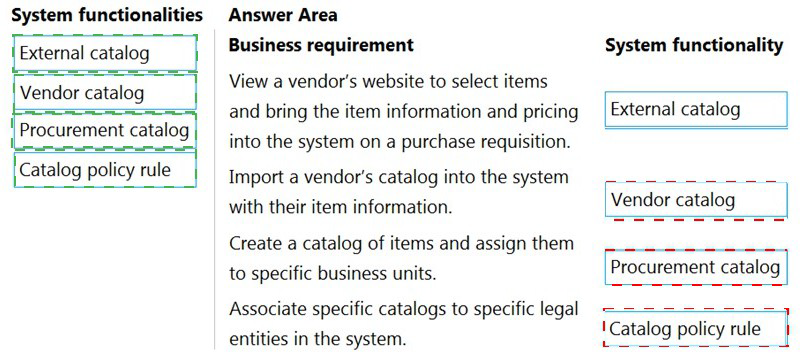
A company uses procurement in Dynamics 365 Supply Chain Management.

You need to select the correct system functionalities to meet the company's requirements.
Which system functionalities should you select? To answer, drag the appropriate system
functionalities to the correct business requirements. Each system functionality may be used
once, more than once, or not at all. You may need to drag the split bar between panes or
scroll to view content.
NOTE: Each correct selection is worth one point.
A buyer reviews the orders generated by Planning Optimization. The buyer observes that
the output for some orders appears incorrect.
The buyer reviews the history and planning logs.
Which two types of information are in the history and planning logs? Each correct answer
presents part of the solution.
Select all answers that apply.

A.

list of planned orders created

B.

start time a job was run and the status

C.

additional information and warnings

D.

end time a job stopped and the status

E.

list of planned orders with firm history

B.   

start time a job was run and the status


C.   

additional information and warnings


Explanation:
https://docs.microsoft.com/en-us/learn/modules/work-costing-sheet-dyn365-supply-chainmgmt/
https://docs.microsoft.com/en-us/learn/modules/planning-optimization/

A company manufactures and sells surround-sound audio systems. A third-party company
manufactures the stereo receivers as part of the Bill of materials (BOM) for complete sound
systems.
You need to automatically create a purchase order for the stereo receiver from the
production order for a sound system.
Which three actions should you perform? Each correct answer presents part of the
solution.

NOTE: Each correct selection is worth one point.

A.

Assign the Vendor account to the service item BOM line.

B.

Set service item BOM line type to Vendor.

C.

Set the service item BOM line type to Pegged supply

D.

Link the service items to the vendor on the costing sheet.

E.

Attach the service item to the parent item as a BOM line.

A.   

Assign the Vendor account to the service item BOM line.


B.   

Set service item BOM line type to Vendor.


E.   

Attach the service item to the parent item as a BOM line.


A manufacturing company uses Planning Optimization. Manned production orders are
created, modified, and approved by the
planner but are not yet firmed.
What is the effect on the planned production orders when you enable the Planning
Optimization feature?

A.

Modifications are ignored when Planning Optimization is run again.

B.

Modifications are included when Planning Optimization is run again.

C.

Approved orders are automatically firmed.

D.

Approved orders are set to unprocessed.

E.

Approved orders are set to completed.

B.   

Modifications are included when Planning Optimization is run again.


Explanation:
https://docs.microsoft.com/en-us/dynamics365/supply-chain/master-planning/planningoptimization/
purchase-trade-agreement

A manufacturing company uses standard costs for raw materials.
The company opens a new manufacturing location that will have different standard costs
for the raw materials. The differences in costs must be reflected on the finished goods.
You need to configure the site setup for the different costs.
Which two configurations can be set up?
Select all answers that apply.

A.

Costing version Recording tab

B.

Item default order setting

C.

Define site on BOM lines

D.

Pending cost lines

E.

Active cost lines

C.   

Define site on BOM lines


E.   

Active cost lines


A company is implementing the Warehouse management module in Dynamics 365 Supply
Chain Management.
The company will receive an item in three units of measure (UOM): each, case, and pallet
. The item must be counted from a mobile device in each UOM or case UOM only by the
warehouse worker.

You must configure the item.
What should you configure?

A.

Create a reservation hierarchy and define the rules.

B.

Set the default inventory unit of measure to each and the default purchase and sell unit
to case.

C.

Create one unit sequence group and enable counting per unit of measure.

D.

Set the default inventory unit of measure to each and assign the default item set up to
case.

E.

Create separate unit sequence groups, one for case counting and one for each
counting.

C.   

Create one unit sequence group and enable counting per unit of measure.


Set up a unit sequence group and unit of measure conversions in Warehouse
management.
The unit sequence group defines the sequence of units that can be used in warehouse
operations. The sequence determines the order of units in which warehouse work is
generated and it is applied when work is created for quantities on a purchase order line or
transfer order line. The unit sequence group should include units of measure that range
from the smallest to the largest unit and can be used for the product in warehouse
operations.
Reference: https://learn.microsoft.com/en-us/dynamicsax-2012/appuser-itpro/set-up-a-unitsequence-
group-and-unit-of-measure-conversions-in-warehouse-management

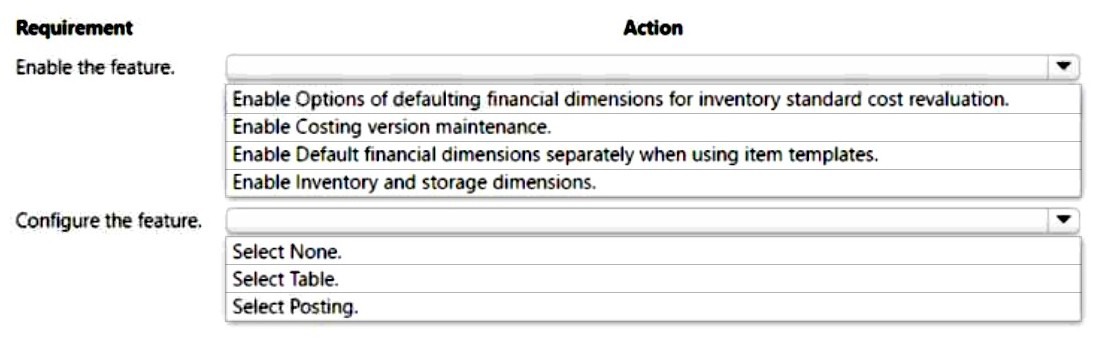
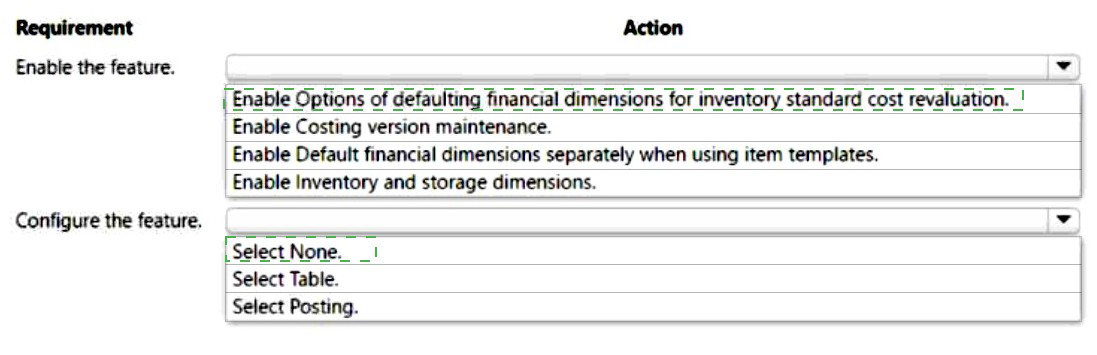
A company uses Dynamics 365 Supply Chain Management. The company uses a Business Unit financial dimension. The dimension is required on items and posted on
transactions.
The company wants to update item costs but exclude the required financial dimension. The
change must include a warning to users before the update. The costing method should be
calculated based on the expected, calculated cost to produce an item.
You must configure the system to meet the requirements.
Which actions should you perform? To answer, select the appropriate options in the
answer area.
NOTE: Each correct selection is worth one point.
You are a functional consultant for a company named Contoso Entertainment System USA
(USMF).

You need to post a new trade agreement that will contain the following prices:
Surface Pro 128GB: 750 US dollars for orders of 50 units or less
Surface Pro 128GB: 720 US dollars for orders from 50 units to 100 units
The agreement must be valid for the 2020 calendar year only.
To complete this task, sign in to Dynamics 365 portal.


Go to Navigation pane > Modules > Sales and marketing > Prices and discounts >
Trade agreement journals.
Click New.
In the Name field, click the drop-down button to open the lookup.
In the list, select S_Price (Sales Price Adjustment).
On Action Pane, click Lines.
In the Account code, select ‘All’ (for All customers)
In the Item code field, select 'Table'. This will allow you to select a specific item.
In the Item relation field, click the drop-down button to open the lookup.
Select the Surface Pro 128GB.
In the From field, enter a minimum quantity (1).
In the To field, enter a maximum quantity (50).
In the Amount in currency field, enter a price (750) and select US Dollars in the
Currency field.
Configure another price bracket with a minimum of 51 units, a maximum of 100
units and a price of 720 US Dollars.
Under the Details section, in the From date field, enter a date from which this
agreement will be valid (January 1st 2020).
In the To date field, enter a date to which this agreement will be valid (December
31st 2020).
Click Save.
Click Validate.
Click Validate selected lines.
Click OK.
Click Post.
Click OK.

A company uses Dynamics 365 Supply Chain Management for wave processing.
The system must automatically create a wave when a sales order is released to the warehouse.
You need to configure the system to meet this requirement.
Which configuration should you enable?

A. Automate wave release

B. Assign to open waves

C. Process wave automatically threshold

D. Automate wave creation

A.   Automate wave release

A company uses Dynamics 365 Supply Chain Management.
Orders are reserved against open purchase orders that have not yet been received. As a
result, there are
issues prioritizing deliveries, which is causing backorders on both sales orders and transfer
orders.
Negative inventory is not currently allowed.
Product reservations must be performed against physical stock only.
You need to update the configuration for product reservations.
What should you do?

A.

Clear the Reserve Items Automatically check box for transfers.

B.

Clear the Reserve Ordered Items check box.

C.

Select the Auto batch reservations check box.

D.

Select the Physical negative inventory check box.

B.   

Clear the Reserve Ordered Items check box.


Reference:
https://docs.microsoft.com/en-us/dynamics365/supply-chain/inventory/reserve-inventoryquantities

Page 15 out of 41 Pages